
Conditional test execution in JUnit 5 and JUnit 6 means enabling or disabling a test at runtime with annotations from the org.junit.jupiter.api.condition package, based on the operating system, the Java version, a system property, an environment variable or a method of our own. A test whose condition is not met is reported as skipped, with a reason, and the build stays green.
The annotations fit tests that only make sense in some environments, for example a test of POSIX file permissions that cannot pass on Windows, or an upload test that needs cloud credentials only the CI server has. The following example shows four conditions on the tests of a backup service, each with its result on a Linux laptop running Java 25.
@EnabledOnOs({OS.LINUX, OS.MAC})                                     // runs on Linux
@EnabledOnJre(versions = 26)                                          // skipped on Java 25
@EnabledIfSystemProperty(named = "backup.target", matches = "s3://.+")   // skipped, property not set
@EnabledIfEnvironmentVariable(named = "CI", matches = "true")          // skipped on a laptop
Notice that each annotation names one condition, and JUnit evaluates it before the test starts, so a skipped test never runs its @BeforeEach methods. We cover the built-in conditions one group at a time, write custom conditions with @EnabledIf and ExecutionCondition, combine annotations, and compare them with @Disabled and assumptions.
1. How JUnit Evaluates Conditions
Every conditional annotation is backed by an ExecutionCondition extension. Before JUnit runs a test class or a test method, it asks all registered conditions, and the test is disabled as soon as one of them returns a disabled result. Each annotation comes in an @Enabled… and a @Disabled… variant, and every variant has a disabledReason attribute for our own text.
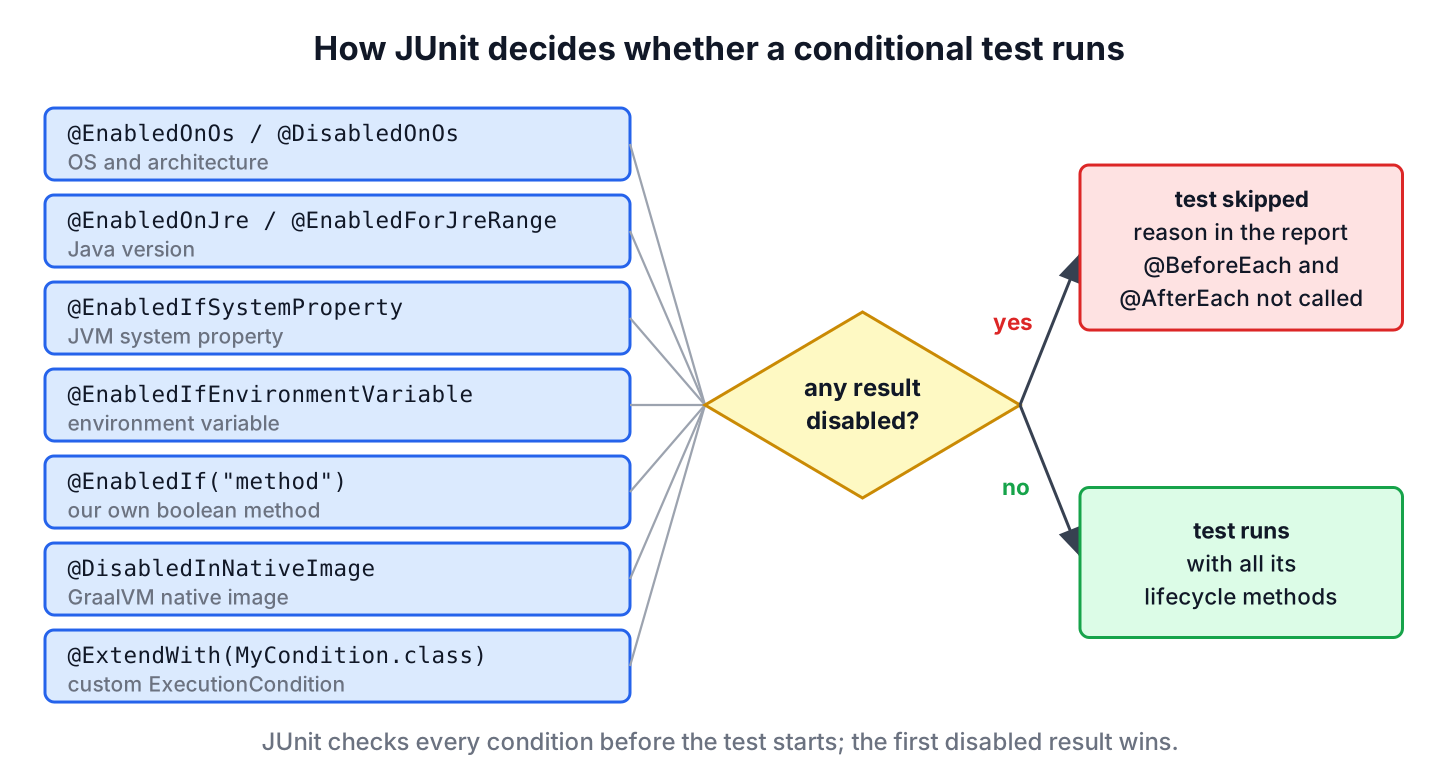
- On a method, a disabled result skips that method and its @BeforeEach and @AfterEach methods. The class still runs its @BeforeAll and @AfterAll methods.
- On a class, a disabled result skips every test in the class and in its @Nested classes.
- The annotations are not @Inherited, so a subclass of an annotated test class has to declare them again.
- Each annotation can be used once per element, except the system property and environment variable annotations, which are repeatable. Different annotations can be combined freely.
The examples use JUnit 6.1.3 on Java 25, and the junit-conditional-test-execution project contains all of them. The annotations exist in JUnit 5 as well, with two differences in JUnit 6 that section 3 explains. The JUnit tutorial covers the setup of a new project.
2. Operating System and Architecture Conditions
The annotations @EnabledOnOs and @DisabledOnOs take one or more values of the OS enum, such as LINUX, MAC, WINDOWS, AIX, SOLARIS, FREEBSD, OPENBSD or OTHER. JUnit compares them with the os.name system property. The backup service sets POSIX file permissions, which Windows does not support, so that test runs on Linux and macOS only.
@Test
@EnabledOnOs({OS.LINUX, OS.MAC})
void archiveIsReadableOnlyByOwner() throws IOException {
  Path archive = service.createPrivateArchive(backupDir, "orders");
  assertEquals("rw-------", PosixFilePermissions.toString(Files.getPosixFilePermissions(archive)));
}

@Test
@EnabledOnOs(OS.WINDOWS)
void archiveNameIsCaseInsensitive() throws IOException {
  service.createArchive(backupDir, "orders");
  assertTrue(Files.exists(backupDir.resolve("ORDERS.TAR")));
}
The architectures attribute checks the os.arch system property, such as amd64, x86_64 or aarch64. Combined with an OS value, both must match, which helps for native libraries that exist only for one platform.
@Test
@EnabledOnOs(value = OS.LINUX, architectures = "aarch64")
void runsOnlyOnArmLinux() {
  assertEquals("aarch64", System.getProperty("os.arch"));
}
On an x86 Linux machine, the Surefire XML report shows the reasons JUnit generates for both skipped tests.
  <testcase name="archiveNameIsCaseInsensitive" classname="com.howtodoinjava.junit.backup.OsConditionsTest" time="0.0">
    <skipped message="Disabled on operating system: Linux"/>
  <testcase name="runsOnlyOnArmLinux" classname="com.howtodoinjava.junit.backup.OsConditionsTest" time="0.0">
    <skipped message="Disabled on operating system: Linux (amd64)"/>
3. Java Version Conditions
The annotations @EnabledOnJre and @DisabledOnJre match one or more exact Java versions, and @EnabledForJreRange and @DisabledForJreRange match a range. Both accept constants of the JRE enum or plain version numbers.
@Test
@EnabledOnJre(JRE.JAVA_25)
void onlyOnJava25() {
  assertEquals(25, Runtime.version().feature());
}

@Test
@EnabledOnJre(versions = 26)
void onlyOnJava26() {
  assertEquals(26, Runtime.version().feature());
}

@Test
@EnabledForJreRange(min = JRE.JAVA_21)
void virtualThreadsAvailable() throws InterruptedException {
  Thread thread = Thread.ofVirtual().start(() -> { });
  thread.join();
  assertTrue(thread.isVirtual());
}

@Test
@EnabledForJreRange(minVersion = 25, maxVersion = 27)
void fromJava25To27() {
  assertTrue(Runtime.version().feature() >= 25);
}
A range includes both ends, and a missing end stays open. A typical use is a test of an API that does not exist on older Java versions. Stream gatherers became final in Java 24, so the next test is disabled up to Java 23.
@Test
@DisabledForJreRange(max = JRE.JAVA_23, disabledReason = "Stream gatherers are final since Java 24")
void groupsFilesIntoBatches() {
  List<List<String>> batches = Stream.of("a.txt", "b.txt", "c.txt").gather(Gatherers.windowFixed(2)).toList();
  assertEquals(List.of(List.of("a.txt", "b.txt"), List.of("c.txt")), batches);
}
Two details changed in JUnit 6. The ranges start at JAVA_17 by default, because JUnit 6 itself needs Java 17, and the constants JAVA_8 to JAVA_16 are deprecated. JUnit 6.1 also deprecated JRE.OTHER. The enum in 6.1.3 goes up to JAVA_28, and for any newer release we use the numeric versions, minVersion and maxVersion attributes, which work for every version without a JUnit upgrade. On Java 25, the Java 26 test is skipped with this reason.
  <testcase name="onlyOnJava26" classname="com.howtodoinjava.junit.backup.JreConditionsTest" time="0.0">
    <skipped message="Disabled on JRE version: 25.0.4.1"/>
4. System Property Conditions
The annotations @EnabledIfSystemProperty and @DisabledIfSystemProperty read a JVM system property by its named attribute and match its value against the regular expression in matches. The whole value must match. Say the nightly build passes -Dbackup.target=s3://nightly-backups, and a laptop passes nothing.
@Test
@EnabledIfSystemProperty(named = "backup.target", matches = "s3://.+")
void uploadsToS3() {
  assertTrue(service.target().startsWith("s3://"));
}

@Test
@DisabledIfSystemProperty(named = "backup.target", matches = "s3://.+")
void writesToLocalDisk() {
  assertEquals("local", service.target());
}
A missing property never matches, so an @Enabled… annotation skips the test and a @Disabled… annotation lets it run. On a laptop, uploadsToS3() is skipped. With the property set, the two tests swap, and the reason shows the value and the pattern.
<skipped message="System property [backup.target] does not exist"/>mvn test -Dtest=PropertyAndEnvConditionsTest -Dbackup.target=s3://nightly-backups <skipped message="System property [backup.target] with value [s3://nightly-backups] matches regular expression [s3://.+]"/>Both annotations are repeatable, and all repeated conditions must be met. The next test runs only on a 64-bit JVM with UTF-8 as the default charset.
@Test
@EnabledIfSystemProperty(named = "os.arch", matches = ".*64.*")
@EnabledIfSystemProperty(named = "file.encoding", matches = "UTF-8")
void runsOn64BitWithUtf8() {
  assertTrue(System.getProperty("os.arch").contains("64"));
}
Maven Surefire passes -D options from the command line to the forked test JVM, so the property reaches the test. For values that every run needs, we set them in the systemPropertyVariables section of the Surefire configuration.
5. Environment Variable Conditions
The annotations @EnabledIfEnvironmentVariable and @DisabledIfEnvironmentVariable work the same way for environment variables of the process. GitHub Actions, GitLab CI and most other CI servers set CI=true, which makes it the usual switch between CI and local runs.
@Test
@EnabledIfEnvironmentVariable(named = "CI", matches = "true")
void runsNightlyBackupOnCi() {
  assertEquals("true", System.getenv("CI"));
}

@Test
@DisabledIfEnvironmentVariable(named = "CI", matches = "true", disabledReason = "Needs a local NAS share")
void copiesToNasShare() {
  assertTrue(System.getenv("CI") == null || !System.getenv("CI").equals("true"));
}
On a laptop, the first test is skipped because CI is not set. With CI=true mvn test, the first test runs and the second is skipped. JUnit appends our disabledReason to the generated text after an arrow.
<skipped message="Environment variable [CI] does not exist"/>
<skipped message="Environment variable [CI] with value [true] matches regular expression [true] ==> Needs a local NAS share"/>6. Custom Conditions With @EnabledIf and @DisabledIf
When no built-in annotation fits, @EnabledIf and @DisabledIf call a method that returns a boolean. The method takes no parameters or one ExtensionContext. A backup test that needs a running backup server checks the port first.
@Test
@EnabledIf("backupServerReachable")
void sendsArchiveToBackupServer() {
  assertTrue(backupServerReachable());
}

boolean backupServerReachable() {
  try (Socket socket = new Socket()) {
    socket.connect(new InetSocketAddress("localhost", 9000), 200);
    return true;
  } catch (IOException e) {
    return false;
  }
}
A method in another class is referenced by its fully qualified class name, a # and the method name. In the backup app, the feature flags are defined in their own class, and an incremental backup test runs only when its flag is on.
@Test
@EnabledIf("com.howtodoinjava.junit.backup.FeatureFlags#incrementalBackupEnabled")
void createsIncrementalBackup() {
  assertTrue(FeatureFlags.incrementalBackupEnabled());
}
The condition method must be static in three cases.
- The method is in another class, as in the feature-flag example.
- The annotation is on the test class, because JUnit evaluates it before an instance exists.
- The annotation is on a @ParameterizedTest or another @TestTemplate method.
In all other cases, an instance method works, as backupServerReachable() shows. Without a disabledReason, the report repeats the annotation, and with one, it shows our text.
@Test
@DisabledIf(value = "isNightlyTest", disabledReason = "Runs only in the nightly build")
void nightlyFullBackup() {
  assertTrue(true);
}

boolean isNightlyTest(ExtensionContext context) {
  return context.getDisplayName().startsWith("nightly") && System.getenv("NIGHTLY") == null;
}
<skipped message="@EnabledIf("backupServerReachable") evaluated to false"/>
<skipped message="Runs only in the nightly build"/>7. Native Image Conditions
Projects that run their tests inside a GraalVM native image, for example with the GraalVM Native Build Tools plugin for Maven or Gradle, can use @DisabledInNativeImage and @EnabledInNativeImage. A test that relies on reflection without reflection metadata fails in a native image, so we keep it on the JVM only.
@Test
@DisabledInNativeImage
void readsVersionWithReflection() throws ReflectiveOperationException {
  Object version = Runtime.class.getMethod("version").invoke(null);
  assertTrue(version.toString().startsWith("25"));
}
On a normal JVM, @DisabledInNativeImage lets the test run and @EnabledInNativeImage skips it, so the test above runs in every regular Maven build.
8. Writing an ExecutionCondition Extension
For a condition we reuse across many classes, we implement ExecutionCondition and register it with @ExtendWith. The method returns ConditionEvaluationResult.enabled() or ConditionEvaluationResult.disabled() with a reason.
public class BackupServerAvailable implements ExecutionCondition {

  @Override
  public ConditionEvaluationResult evaluateExecutionCondition(ExtensionContext context) {
    String host = context.getConfigurationParameter("backup.server.host").orElse("localhost");
    try (Socket socket = new Socket()) {
      socket.connect(new InetSocketAddress(host, 9000), 200);
      return ConditionEvaluationResult.enabled("Backup server " + host + ":9000 is reachable");
    } catch (IOException e) {
      return ConditionEvaluationResult.disabled("Backup server " + host + ":9000 is not reachable");
    }
  }
}
@ExtendWith(BackupServerAvailable.class)
class RemoteBackupTest {
@Test
void uploadsArchive() {
assertTrue(true);
}
} <skipped message="Backup server localhost:9000 is not reachable"/>The extension reads the host from a configuration parameter, so a CI job can point it to another machine with -Dbackup.server.host=backup.internal or a line in junit-platform.properties.
9. Composed Annotations
When the same combination appears on many tests, we put it into our own annotation. JUnit finds conditions that are meta-present, so @LinuxOnlyTest replaces @Test plus @EnabledOnOs(OS.LINUX).
@Target(ElementType.METHOD)
@Retention(RetentionPolicy.RUNTIME)
@Test
@EnabledOnOs(OS.LINUX)
public @interface LinuxOnlyTest {
}
@LinuxOnlyTest
void usesTmpDirectory() {
assertTrue(Files.isDirectory(Path.of("/tmp")));
}10. Conditions vs @Disabled vs Assumptions
All three tools end with a skipped test, but they decide at different times and for different reasons.
| Tool | Decided | Runs @BeforeEach | Use for |
|---|---|---|---|
| @Disabled(“reason”) | always | no | a known bug or an unfinished feature |
| Conditional annotations | before the test, from the environment | no | OS, Java version, properties, variables, flags |
| Assumptions (assumeTrue()) | inside the test | yes | a value that is known only after setup |
We prefer an annotation when the condition can be checked before the test, because it stays visible on the method signature and costs no setup time. When the condition needs the test’s own setup, such as a connection opened in @BeforeEach, the JUnit assumptions are the right tool. To run all disabled tests once, for example to check whether a bug is fixed, the configuration parameter junit.jupiter.conditions.deactivate switches conditions off by class name pattern.
11. Conditional Test Execution FAQs
Most questions come from a test that runs on one laptop and is skipped on the CI server.
11.1. What Happens if the System Property or Environment Variable Is Not Set?
The pattern cannot match a missing value. An @EnabledIf… annotation therefore skips the test with the reason does not exist, and a @DisabledIf… annotation lets the test run, as the reports in section 4 show.
11.2. Can We Combine Two Conditional Annotations on One Test?
Yes. Different annotations combine, and the test runs only when all of them allow it. The same annotation can be declared only once, except the system property and environment variable annotations, which are repeatable.
11.3. Does @EnabledIf Need a Static Method?
Only for a method in another class, for an annotation on the class, or on a parameterized or other template method. In all other cases, an instance method in the test class works.
11.4. Do Conditional Annotations Work With @ParameterizedTest?
Yes. The condition gives the same result for every invocation, so all invocations run or all are skipped. To skip single arguments, use an assumption inside the test.
12. Conclusion
The annotations in org.junit.jupiter.api.condition enable or disable a test from the environment before it starts. JUnit 6 offers the same set as JUnit 5, with ranges starting at Java 17 and numeric versions for Java releases newer than the JRE enum.
For the OS, the architecture, the Java version, system properties and environment variables, the built-in annotations write a clear reason into the report. Our own logic goes into @EnabledIf or an ExecutionCondition extension, and a composed annotation keeps repeated combinations short. A missing property or variable skips an @Enabled… test and runs a @Disabled… test.
13. References
- JUnit User Guide 6.1.3, Conditional Test Execution
- org.junit.jupiter.api.condition Javadoc (JUnit 6.1.3)
- ExecutionCondition Javadoc (JUnit 6.1.3)
- JUnit 6.0.0 Release Notes
- JUnit 6.1.3 Release Notes
Happy Learning !!
