
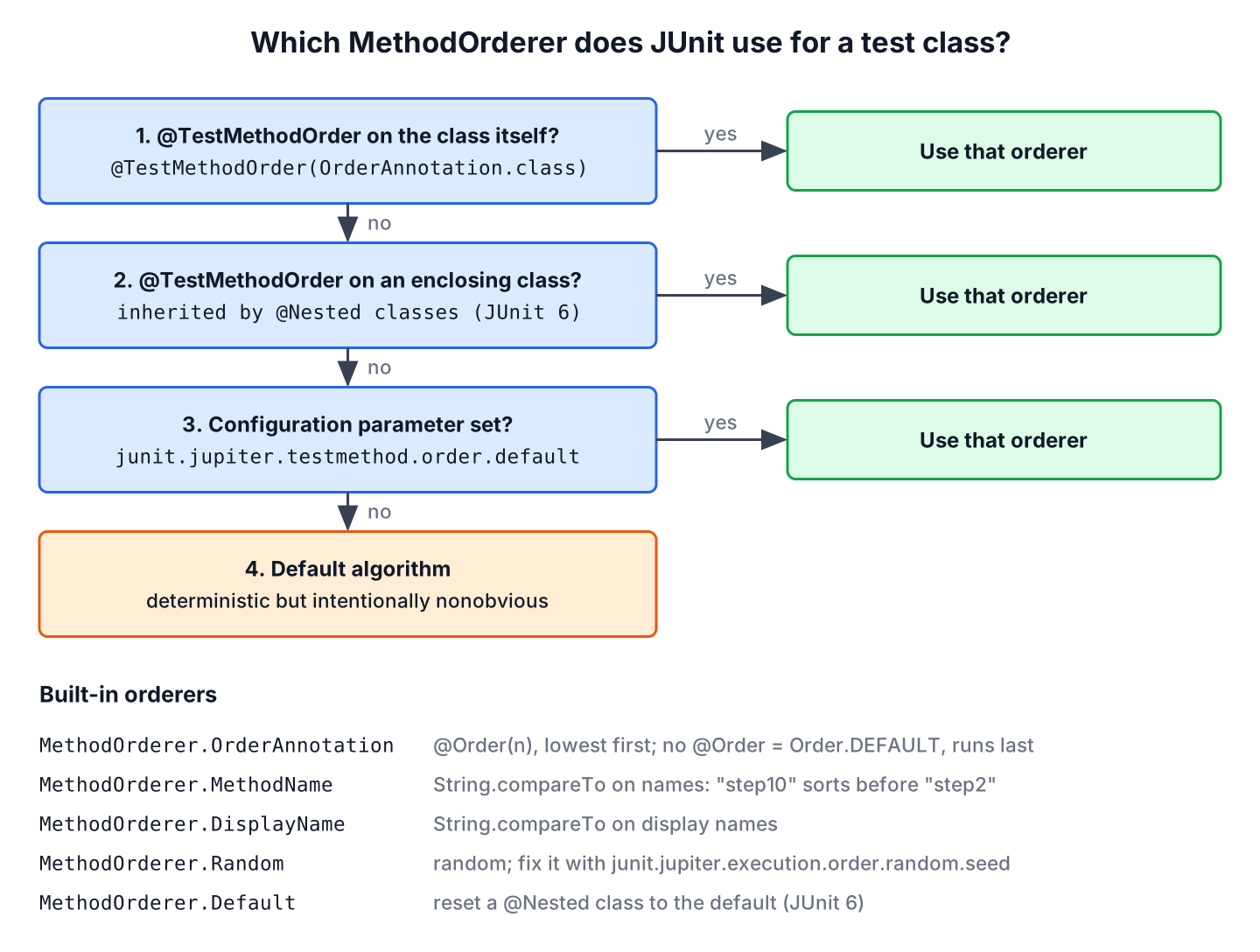
By default, JUnit runs the test methods of a class in an order that is deterministic but intentionally nonobvious, and the annotation @TestMethodOrder with a MethodOrderer such as OrderAnnotation sets the order ourselves. The same run always gives the same order, but the order follows neither the source code nor the alphabet.
We control the test execution order when tests build on each other on purpose, for example an integration test that registers a book, lends it and returns it, or when we want the quick checks of a class to fail first. Unit tests stay independent and do not need any order.
The following example runs three steps of a library loan in a fixed order with @Order.
@TestInstance(TestInstance.Lifecycle.PER_CLASS)
@TestMethodOrder(MethodOrderer.OrderAnnotation.class)
class LoanWorkflowTest {

    @Test
    @Order(1)
    void registersBook() {          // runs 1st
    }

    @Test
    @Order(2)
    void lendsBook() {              // runs 2nd
    }

    @Test
    @Order(3)
    void returnsBook() {            // runs 3rd
    }

    @Test
    void checksUnknownBook() {      // no @Order, runs last
    }
}
LoanWorkflowTest > registersBook()
LoanWorkflowTest > lendsBook()
LoanWorkflowTest > returnsBook()
LoanWorkflowTest > checksUnknownBook()Notice that the method without @Order runs after all numbered methods. Each test prints its display name from a @BeforeEach method, so every output block lists the tests in the order they ran.
We look at the default order first. After that, we cover the four built-in method orderers, a custom orderer and the ordering of test classes and @Nested classes. The last sections set a project-wide default and explain how ordering and parallel execution go together.
1. The Default Order of Test Methods
Without @TestMethodOrder, JUnit Jupiter sorts the methods with an internal algorithm that the JUnit User Guide calls deterministic but intentionally nonobvious. Deterministic means that every run on every machine executes the methods in the same order, so a build is repeatable. Nonobvious means that the order is neither the declaration order nor the alphabetical order, so nobody starts to depend on it by accident.
The class DefaultOrderTest declares four empty tests in the order registersBook, lendsBook, returnsBook and checksUnknownBook. JUnit 6.1.3 runs them in a different order, and the order stays the same in every run.
DefaultOrderTest > checksUnknownBook()
DefaultOrderTest > returnsBook()
DefaultOrderTest > registersBook()
DefaultOrderTest > lendsBook()
A test that passes only after another test has run is a hidden dependency, and it breaks as soon as the order changes. We keep unit tests independent with a fresh setup in @BeforeEach, and we use an explicit order only for tests that model a sequence on purpose.
We run the examples on Java 25, JUnit 6.1.3 and Maven Surefire 3.6.0. The ordering API is the same in JUnit 5.8 and later, except for the JUnit 6 changes to @Nested classes in section 6. More JUnit topics are collected in the JUnit tutorial.
2. Ordering Test Methods With @Order
The orderer MethodOrderer.OrderAnnotation sorts the methods by the int value of @Order, lowest first. The numbers do not have to be consecutive, so values such as 10, 20 and 30 leave room for a new step later.
A method without @Order gets the value Order.DEFAULT, which is Integer.MAX_VALUE / 2. It therefore runs after all methods with normal numbers, but before a method with a value above Order.DEFAULT. Methods with the same value run next to each other in an undefined order.
The loan workflow in the intro needs one more piece. JUnit creates a new instance of the test class for every test method by default, so a book registered in the first test would be gone in the second. The annotation @TestInstance(Lifecycle.PER_CLASS) keeps one instance, and with it the Library object, for all methods of the class. The JUnit test lifecycle article explains both instance modes.
private final Library library = new Library();

@Test
@Order(1)
void registersBook() {
    library.register("Dune");
    assertEquals(Library.Status.AVAILABLE, library.statusOf("Dune"));
}

@Test
@Order(2)
void lendsBook() {
    library.lend("Dune");
    assertEquals(Library.Status.LENT, library.statusOf("Dune"));
}
If registersBook() fails, lendsBook() fails too, because the book does not exist. JUnit has no built-in way to skip the remaining steps after a failure, so the report shows one real failure and the follow-up failures it caused.
3. Alphabetical Order With MethodName and DisplayName
Two orderers sort alphabetically. MethodOrderer.MethodName compares the method names, and the parameter lists when two methods have the same name. MethodOrderer.DisplayName compares the display names. Both use String.compareTo(), which compares character codes, not natural numbers.
@TestMethodOrder(MethodOrderer.MethodName.class)
class MethodNameOrderTest {

    @Test
    void step2LendsBook() {
    }

    @Test
    void step10ClosesAccount() {
    }

    @Test
    void step1RegistersBook() {
    }

    @Test
    void Step3ReturnsBook() {
    }
}
MethodNameOrderTest > Step3ReturnsBook()
MethodNameOrderTest > step10ClosesAccount()
MethodNameOrderTest > step1RegistersBook()
MethodNameOrderTest > step2LendsBook()We can see two traps in the output. The upper-case S sorts before every lower-case letter, so Step3ReturnsBook() runs first. And step10 runs before step1R, because the character 0 has a lower code than R. Zero-padded numbers such as step01 and step10 avoid the second trap.
Sorting by display name lets us write the order into readable names. The prefixes A, B and C decide the order, and the method names do not affect the order.
@TestMethodOrder(MethodOrderer.DisplayName.class)
class DisplayNameOrderTest {

    @Test
    @DisplayName("C - a member returns the book")
    void returnsBook() {
    }

    @Test
    @DisplayName("A - a librarian registers a book")
    void registersBook() {
    }

    @Test
    @DisplayName("B - a member borrows the book")
    void lendsBook() {
    }
}
DisplayNameOrderTest > A - a librarian registers a book
DisplayNameOrderTest > B - a member borrows the book
DisplayNameOrderTest > C - a member returns the bookJUnit 5 also had MethodOrderer.Alphanumeric, deprecated since JUnit 5.7. JUnit 6.0 removed it, and MethodName is the replacement with the same behavior.
4. Random Order and a Fixed Seed
The orderer MethodOrderer.Random shuffles the methods. We use it to find hidden dependencies between tests, because a test that only passes after another one fails as soon as the order changes. By default, the seed is the value of System.nanoTime() taken once when the orderer class is initialized, so every JVM run gets a new order.
@TestMethodOrder(MethodOrderer.Random.class)
class RandomOrderTest {

    @Test
    void searchesByAuthor() {
    }

    @Test
    void searchesByTitle() {
    }

    @Test
    void searchesByYear() {
    }

    @Test
    void searchesByGenre() {
    }
}
A random failure is only useful if we can repeat it. The configuration parameter junit.jupiter.execution.order.random.seed fixes the seed, either in src/test/resources/junit-platform.properties or as a system property on the command line.
junit.jupiter.execution.order.random.seed=42mvn test -Dtest=RandomOrderTest # seed 42 from the file
mvn test -Dtest=RandomOrderTest -Djunit.jupiter.execution.order.random.seed=7$ mvn test -Dtest=RandomOrderTest
RandomOrderTest > searchesByAuthor()
RandomOrderTest > searchesByGenre()
RandomOrderTest > searchesByYear()
RandomOrderTest > searchesByTitle()
$ mvn test -Dtest=RandomOrderTest -Djunit.jupiter.execution.order.random.seed=7
RandomOrderTest > searchesByYear()
RandomOrderTest > searchesByGenre()
RandomOrderTest > searchesByAuthor()
RandomOrderTest > searchesByTitle()The seed 42 gives the same order in every run, and the seed 7 gives another fixed order. The system property takes precedence over the properties file. When we run without a fixed seed, JUnit logs the generated seed at the CONFIG level of java.util.logging, so we can copy it from the log of a failed CI run and replay that order.
5. Writing a Custom MethodOrderer
A custom orderer implements the interface MethodOrderer and sorts the list from MethodOrdererContext.getMethodDescriptors() in place. Each MethodDescriptor gives access to the method, its display name and its annotations.
For example, a catalog import test class has fast parsing checks and slow tests that download files. SlowLastOrderer runs every method with the JUnit tag slow at the end, so a broken parser fails within milliseconds.
public class SlowLastOrderer implements MethodOrderer {

    @Override
    public void orderMethods(MethodOrdererContext context) {
        context.getMethodDescriptors().sort(
                Comparator.comparing(SlowLastOrderer::isSlow)
                        .thenComparing(MethodDescriptor::getDisplayName));
    }

    private static boolean isSlow(MethodDescriptor descriptor) {
        return descriptor.findRepeatableAnnotations(Tag.class).stream()
                .anyMatch(tag -> tag.value().equals("slow"));
    }
}
@TestMethodOrder(SlowLastOrderer.class)
class CatalogImportTest {
@Test
@Tag("slow")
void importsFullCatalog() {
}
@Test
void parsesIsbn() {
}
@Test
@Tag("slow")
void downloadsCoverImages() {
}
@Test
void rejectsEmptyTitle() {
}
}CatalogImportTest > parsesIsbn()
CatalogImportTest > rejectsEmptyTitle()
CatalogImportTest > downloadsCoverImages()
CatalogImportTest > importsFullCatalog()The comparator puts false before true, so the two fast tests come first, and the display name orders the methods inside each group. A custom orderer needs a no-argument constructor, because JUnit creates it by reflection.
6. Ordering Test Classes and @Nested Classes
The annotation @TestClassOrder with a ClassOrderer orders the @Nested classes of a test class. The built-in class orderers mirror the method orderers.
- ClassOrderer.ClassName sorts by the fully qualified class name.
- ClassOrderer.DisplayName sorts by the display name.
- ClassOrderer.OrderAnnotation sorts by @Order on the classes.
- ClassOrderer.Random shuffles the classes, with the same seed parameter as the method orderer.
- ClassOrderer.Default (since JUnit 6.0) resets a @Nested class to the default order.
A member account test checks the sign-up first, the borrowing rules second and the reports last. The outer class orders the nested classes with @Order and the methods with OrderAnnotation.
@TestClassOrder(ClassOrderer.OrderAnnotation.class)
@TestMethodOrder(MethodOrderer.OrderAnnotation.class)
class MemberAccountTest {

    @Nested
    @Order(1)
    class SignUp {

        @Test
        @Order(2)
        void sendsWelcomeMail() {
        }

        @Test
        @Order(1)
        void createsAccount() {
        }
    }

    @Nested
    @Order(2)
    class Borrowing {
        // borrowsFirstBook() with @Order(1), hitsLoanLimit() with @Order(2)
    }

    @Nested
    @Order(3)
    @TestMethodOrder(MethodOrderer.Default.class)
    class Reports {

        @Test
        void listsOverdueBooks() {
        }

        @Test
        void listsActiveLoans() {
        }
    }
}
MemberAccountTest > SignUp > createsAccount()
MemberAccountTest > SignUp > sendsWelcomeMail()
MemberAccountTest > Borrowing > borrowsFirstBook()
MemberAccountTest > Borrowing > hitsLoanLimit()
MemberAccountTest > Reports > listsActiveLoans()
MemberAccountTest > Reports > listsOverdueBooks()We can see that SignUp runs createsAccount() first, although it has no @TestMethodOrder of its own. Since JUnit 6.0, a @TestMethodOrder on a class is inherited by its @Nested classes, the same way @TestClassOrder already was. In JUnit 5, the nested class would use the default order. Reports opts out with MethodOrderer.Default. JUnit 6.0 also orders @Nested classes without @TestClassOrder deterministically, as it does with methods.
Top-level test classes have no enclosing class, so @TestClassOrder cannot order them. For them, we set the configuration parameter junit.jupiter.testclass.order.default, as the next section shows. That order applies to all classes that the build tool passes to JUnit in one run.
7. Setting a Default Order for the Whole Project
Two configuration parameters set the default orderers of a project. They take the fully qualified class name of the orderer, with a $ before the name of a nested class such as MethodOrderer$OrderAnnotation.
| Parameter | Applies to | Example value |
|---|---|---|
| junit.jupiter.testmethod.order.default | methods of every class without its own or an inherited @TestMethodOrder | org.junit.jupiter.api.MethodOrderer$MethodName |
| junit.jupiter.testclass.order.default | top-level classes and @Nested classes without @TestClassOrder | org.junit.jupiter.api.ClassOrderer$ClassName |
| junit.jupiter.execution.order.random.seed | MethodOrderer.Random and ClassOrderer.Random | 42 |
Our example project sorts the test classes by name and fixes the random seed in junit-platform.properties.
junit.jupiter.execution.order.random.seed=42
junit.jupiter.testclass.order.default=org.junit.jupiter.api.ClassOrderer$ClassName
A system property on the Maven command line works as well, because Surefire passes it to the test JVM. With the method default set to MethodName, the class DefaultOrderTest from section 1 runs alphabetically. The single quotes keep the shell from reading the $.
mvn test -Dtest=DefaultOrderTest '-Djunit.jupiter.testmethod.order.default=org.junit.jupiter.api.MethodOrderer$MethodName'DefaultOrderTest > checksUnknownBook()
DefaultOrderTest > lendsBook()
DefaultOrderTest > registersBook()
DefaultOrderTest > returnsBook()8. Ordered Tests and Parallel Execution
A MethodOrderer also tells JUnit how the ordered methods may run when parallel execution is on. The method getDefaultExecutionMode() of the built-in orderers returns SAME_THREAD, so the methods of an ordered class run one after another on one thread, even with junit.jupiter.execution.parallel.mode.default=concurrent. Other classes can still run in parallel with it.
A custom orderer whose order does not matter for correctness, for example one that only puts fast tests first, can override getDefaultExecutionMode() and return Optional.empty() to let JUnit decide. An explicit @Execution annotation on the class always wins over the orderer.
9. Test Execution Order FAQs
Questions about test order often start with a test that passes alone and fails in the full run.
9.1. Does JUnit Run Tests in the Order They Are Written?
No. Neither JUnit 4 nor JUnit 5 nor JUnit 6 uses the declaration order, because the Java reflection API does not guarantee it. Without an orderer, JUnit Jupiter uses its deterministic default algorithm.
9.2. What Happens to Test Methods Without @Order?
With OrderAnnotation, they get Order.DEFAULT (Integer.MAX_VALUE / 2) and run after all methods with a lower value, in the default order among themselves. Without OrderAnnotation, JUnit ignores @Order on methods completely.
9.3. What Is the JUnit 5 Equivalent of @FixMethodOrder?
JUnit 4 used @FixMethodOrder(MethodSorters.NAME_ASCENDING). In JUnit 5 and 6, we write @TestMethodOrder(MethodOrderer.MethodName.class). The JUnit 5 vs JUnit 4 comparison shows how the other JUnit 4 annotations map to JUnit 5 and 6.
9.4. Can a Failing Step Skip the Remaining Ordered Tests?
Not with a built-in feature. The remaining tests run and most of them fail with follow-up errors. If the steps belong together, we put them in one test method, or we abort the later tests with an assumption that checks a flag the earlier test sets.
10. Conclusion
JUnit runs test methods in a fixed but nonobvious default order. With @TestMethodOrder, we choose OrderAnnotation for an explicit sequence, MethodName or DisplayName for alphabetical order, Random with a fixed seed to find hidden dependencies, or a custom MethodOrderer. Methods without @Order run after the numbered ones.
For classes, @TestClassOrder orders @Nested classes and junit.jupiter.testclass.order.default orders all classes of a run. JUnit 6 lets nested classes inherit the method orderer and adds MethodOrderer.Default and ClassOrderer.Default to opt out. Most tests still do not need any order, and the ones that do should say so in their code.
11. References
- JUnit User Guide 6.1.3, Test Execution Order
- MethodOrderer Javadoc (JUnit 6.1.3)
- ClassOrderer Javadoc (JUnit 6.1.3)
- Order Javadoc (JUnit 6.1.3)
- JUnit 6.0.0 Release Notes
Happy Learning !!
