
The JUnit 5 test lifecycle, which JUnit 6 keeps unchanged, is the fixed order in which JUnit creates test class instances and calls the @BeforeAll, @BeforeEach, @AfterEach and @AfterAll methods and the extension callbacks around every test. Knowing that order tells us where to put setup and cleanup code, why a field changed in one test is fresh in the next, and when an extension such as MockitoExtension has done its work.
The following example is a test class for a parcel shipping calculator with a constructor, all four lifecycle methods and two tests.
ShippingCostTest() {
  System.out.println("  constructor");
}

@BeforeAll
static void beforeAll() {
  System.out.println("@BeforeAll");
}

@BeforeEach
void beforeEach() {
  calculator = new ShippingCostCalculator();
  System.out.println("  @BeforeEach");
}

@AfterEach
void afterEach() {
  System.out.println("  @AfterEach");
}

@AfterAll
static void afterAll() {
  System.out.println("@AfterAll");
}
@BeforeAll
constructor
@BeforeEach
@Test costOfSmallParcel
@AfterEach
constructor
@BeforeEach
@Test rejectsZeroWeight
@AfterEach
@AfterAllNotice that the constructor runs twice, once per test, while @BeforeAll and @AfterAll run once for the class. The examples use Java 25 and JUnit 6.1.3, where the lifecycle is the same as in JUnit 5.
In the following sections, we cover the phases, the test instance per test and how @TestInstance changes it, the exact position of extension callbacks, and the lifecycle of nested, disabled and failing tests. Each lifecycle annotation also has its own detailed guide, linked in the first section.
1. Phases of the JUnit 5 Test Lifecycle
Every test class goes through class-level setup, a repeated per-test cycle, and class-level cleanup. The per-test cycle has its own setup, the test method and its own cleanup, so a class with three tests runs the per-test part three times.
| Phase | Annotation | How often JUnit calls it | Deep dive |
|---|---|---|---|
| Class setup | @BeforeAll | Once per class, before the first test | @BeforeAll and @AfterAll |
| Test setup | @BeforeEach | Before every test method | @BeforeEach |
| Test | @Test, @RepeatedTest, @ParameterizedTest, @TestFactory | Once per test, repetition or invocation | – |
| Test cleanup | @AfterEach | After every test method, also after a failure | @AfterEach |
| Class cleanup | @AfterAll | Once per class, after the last test | Same as @BeforeAll |
The All methods are static by default, and the Each methods must not be static, for the reason shown in section 2. JUnit 4 used @BeforeClass, @Before, @After and @AfterClass for the same four phases.
Resources kept in fields can skip the cleanup methods. JUnit closes fields annotated with @AutoClose as part of the same lifecycle, instance fields after @AfterEach and static fields after @AfterAll.
2. A New Test Instance for Every Test
By default, JUnit creates a new instance of the test class before each test method. JUnit calls this mode the per-method lifecycle (Lifecycle.PER_METHOD). Instance fields therefore belong to one test only, which isolates the tests from each other without any cleanup code.
The complete ShippingCostTest from the junit-test-lifecycle project has two tests that share a calculator field. The calculator charges a base fee of 4.00 plus 1.50 per started kilogram.
@Test
void costOfSmallParcel() {
  System.out.println("    @Test costOfSmallParcel");
  assertEquals(new BigDecimal("7.00"), calculator.cost(1.2));           // 4.00 + 2 x 1.50
}

@Test
void rejectsZeroWeight() {
  System.out.println("    @Test rejectsZeroWeight");
  assertThrows(IllegalArgumentException.class, () -> calculator.cost(0));
}
The output in the intro shows the full sequence for one test, namely constructor, @BeforeEach, test and @AfterEach, repeated for the second test with a new object. Because every test gets a new instance, @BeforeAll must be static under the default lifecycle. JUnit calls it before any instance exists.
The order of the test methods themselves is deterministic but intentionally not obvious. When the order matters, we set it with @TestMethodOrder instead of relying on method names.
3. Changing the Instance Lifecycle With @TestInstance
The annotation @TestInstance(Lifecycle.PER_CLASS) makes JUnit create one instance for all tests of the class. The constructor runs once, before @BeforeAll, so the class-level methods can be instance methods.
@TestInstance(TestInstance.Lifecycle.PER_CLASS)
class PerClassShippingTest {

  PerClassShippingTest() {
    System.out.println("constructor");
  }

  @BeforeAll
  void beforeAll() {
    System.out.println("@BeforeAll (non-static)");
  }
}
constructor
@BeforeAll (non-static)
@BeforeEach
@Test costOfSmallParcel
@AfterEach
@BeforeEach
@Test costOfHeavyParcel
@AfterEach
@AfterAll (non-static)The shared instance also means that fields keep their values from one test to the next. When and how to use this mode, including the project-wide default, is covered in non-static @BeforeAll and @AfterAll.
4. Where Extension Callbacks Run
Extensions such as MockitoExtension or SpringExtension hook into the same lifecycle through callback interfaces in the org.junit.jupiter.api.extension package. The LifecycleLogger extension implements eight of them and prints one line per callback.
public class LifecycleLogger implements BeforeAllCallback, TestInstancePostProcessor, BeforeEachCallback,
    BeforeTestExecutionCallback, AfterTestExecutionCallback, AfterEachCallback, TestInstancePreDestroyCallback,
    AfterAllCallback {

  @Override
  public void beforeEach(ExtensionContext context) {
    System.out.println("[ext]   BeforeEachCallback");
  }

  @Override
  public void beforeTestExecution(ExtensionContext context) {
    System.out.println("[ext]   BeforeTestExecutionCallback");
  }
}
We register the extension with @ExtendWith(LifecycleLogger.class) on a test class that also prints from its constructor and its four lifecycle methods.
[ext] BeforeAllCallback
@BeforeAll
    constructor
[ext]   TestInstancePostProcessor
[ext]   BeforeEachCallback
    @BeforeEach
[ext]   BeforeTestExecutionCallback
      @Test costOfHeavyParcel
[ext]   AfterTestExecutionCallback
    @AfterEach
[ext]   AfterEachCallback
[ext]   TestInstancePreDestroyCallback
@AfterAll
[ext] AfterAllCallback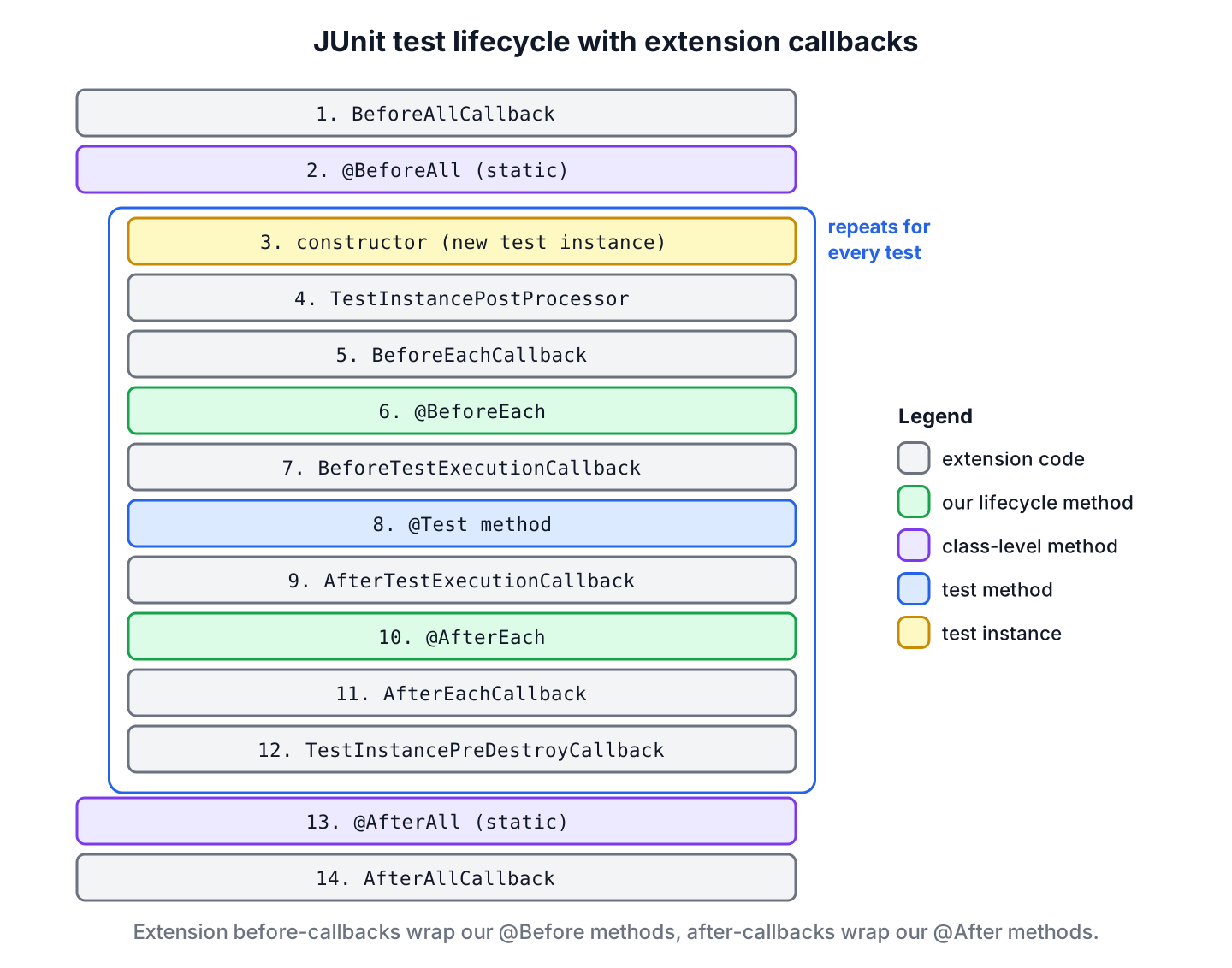
We can see that the before-callbacks of an extension run before our @Before methods, and the after-callbacks run after our @After methods. Two callbacks sit closest to the test method. BeforeTestExecutionCallback runs after @BeforeEach and AfterTestExecutionCallback runs before @AfterEach, so an extension that measures the test time uses this pair and excludes the setup time.
The exception handlers also have a fixed place in the full order of user code and extensions. A TestExecutionExceptionHandler gets exceptions from the test method, and a LifecycleMethodExecutionExceptionHandler gets exceptions from the four lifecycle methods. When several extensions are registered, the first one wraps the others, so its before-callbacks run first and its after-callbacks run last.
5. Lifecycle of @Nested Test Classes
A @Nested class runs inside an instance of its outer class. For each test in the nested class, JUnit runs the @BeforeEach methods of the outer class first and its @AfterEach methods last, so the nested setup can use what the outer setup created.
@BeforeEach
void createCalculator() {
  calculator = new ShippingCostCalculator();
  System.out.println("outer @BeforeEach");
}

@Nested
class ExpressParcels {

  BigDecimal surcharge;

  @BeforeEach
  void addSurcharge() {
    surcharge = new BigDecimal("5.00");               // calculator is already set
    System.out.println("  inner @BeforeEach");
  }

  @Test
  void expressCost() {
    System.out.println("    @Test expressCost");
    assertEquals(new BigDecimal("12.00"), calculator.cost(2).add(surcharge));
  }
}
outer @BeforeEach
inner @BeforeEach
@Test expressCost
inner @AfterEach
outer @AfterEachSuperclass lifecycle methods follow the same wrapping rule. A superclass @BeforeEach runs before the subclass one, and a superclass @AfterEach runs after it.
6. Disabled Tests and the Lifecycle
A test marked with @Disabled does not run, and JUnit skips its @BeforeEach and @AfterEach methods too. JUnit still creates the test instance in that case, so a constructor with side effects runs even for a class whose only test is disabled.
DisabledTestInstanceTest() {
  System.out.println("constructor of DisabledTestInstanceTest");
}

@BeforeEach
void beforeEach() {
  System.out.println("@BeforeEach of DisabledTestInstanceTest");
}

@Disabled("International rates are not ready")
@Test
void internationalCost() {
  System.out.println("@Test internationalCost");
}
constructor of DisabledTestInstanceTest
[WARNING] Tests run: 1, Failures: 0, Errors: 0, Skipped: 1, Time elapsed: 0.044 s -- in com.howtodoinjava.junit.lifecycle.DisabledTestInstanceTestSo we keep constructors free of expensive work and put setup into lifecycle methods, which JUnit calls only for tests that run.
7. What Happens When a Lifecycle Step Fails
An exception in one phase affects the phases that follow it in a predictable way. JUnit always runs the matching cleanup methods after a failed setup, so cleanup code must handle fields that were never assigned.
| Step that throws | Effect on the tests | Cleanup that still runs |
|---|---|---|
| @BeforeAll | No test of the class runs, and Surefire reports initializationError | @AfterAll |
| @BeforeEach | The current test fails, the test method does not run | @AfterEach of that test |
| Test method | The test fails | @AfterEach, and later @AfterAll |
| @AfterEach | The current test fails, even if the test method passed | @AfterAll at the end of the class |
| @AfterAll | Test results stay, Surefire adds a class error executionError | Extension AfterAllCallback methods |
An assumption that fails in a lifecycle method aborts instead of failing, so the affected tests are reported as skipped. The @BeforeEach, @AfterEach and @BeforeAll guides linked in section 1 show the Surefire output for each failing row.
8. JUnit Test Lifecycle FAQs
The answers describe JUnit 6.1.3, and they apply unchanged to JUnit 5 unless an answer says otherwise.
8.1. Does JUnit Create a New Instance for Each Test Method?
Yes, by default. JUnit uses the per-method lifecycle, so each @Test, each repetition of a @RepeatedTest and each invocation of a @ParameterizedTest gets a new instance of the test class. @TestInstance(Lifecycle.PER_CLASS) changes that to one instance per class.
8.2. Which Runs First, the Constructor or @BeforeEach?
The constructor. JUnit creates the test instance, lets extensions post-process it through TestInstancePostProcessor, runs the BeforeEachCallback methods of extensions such as MockitoExtension, and calls @BeforeEach after that. With the default lifecycle, the constructor runs after @BeforeAll, and with PER_CLASS it runs before.
8.3. In Which Order Do Several Methods With the Same Annotation Run?
JUnit does not guarantee an order for several @BeforeEach methods, or any other lifecycle annotation, declared in the same class. The order is deterministic but intentionally non-obvious. The JUnit team recommends one method per annotation per class when the steps depend on each other.
8.4. Is the Lifecycle Different in JUnit 6?
No. JUnit 6 keeps the Jupiter lifecycle annotations, @TestInstance and the extension callbacks of JUnit 5 in the same org.junit.jupiter.api package. The differences are elsewhere, such as the Java 17 baseline, which lets @Nested classes declare static @BeforeAll methods. The JUnit 5 vs JUnit 6 comparison lists the changes.
9. Conclusion
JUnit runs @BeforeAll once at the start and @AfterAll once at the end. For every test in between, it creates a new instance and calls @BeforeEach, the test and @AfterEach. Extension callbacks wrap these steps, with BeforeTestExecutionCallback and AfterTestExecutionCallback closest to the test method.
@TestInstance(PER_CLASS) switches to one instance per class. Outer and superclass setup always runs first and their cleanup last, and cleanup still runs after a failed setup. The JUnit tutorial collects the guides for each annotation.
10. References
- Relative Execution Order of User Code and Extensions (JUnit User Guide)
- Test Instance Lifecycle (JUnit User Guide)
- @TestInstance Javadoc (JUnit 6.1.3)
- org.junit.jupiter.api.extension package (JUnit 6.1.3)
Happy Learning !!

Thanks Guy! May I signal a small probably error: on testOnProd() the good call is Assumptions.assumeFalse(“DEV”.equals(System.getProperty(“ENV”))) and not assumeTrue().
Thanks for the feedback.