
To write non-static @BeforeAll and @AfterAll methods in JUnit, we annotate the test class with @TestInstance(TestInstance.Lifecycle.PER_CLASS), so JUnit creates one test instance for all tests of the class and calls both methods on that instance. The methods can read and write instance fields, which helps when the shared setup needs injected values, a non-static @MethodSource factory, or Kotlin code without a companion object.
The following example loads a book catalog once in a non-static @BeforeAll method and keeps it in an instance field.
@TestInstance(TestInstance.Lifecycle.PER_CLASS)
class BookCatalogTest {

  static int instances = 0;

  BookCatalog catalog;
  int lookups = 0;

  BookCatalogTest() {
    instances++;
    System.out.println("constructor: test instance #" + instances);
  }

  @BeforeAll
  void loadCatalog(@TempDir Path dir) throws IOException {
    Path file = dir.resolve("books.csv");
    Files.write(file, List.of("Dune,Frank Herbert", "Emma,Jane Austen", "Persuasion,Jane Austen"));
    catalog = BookCatalog.load(file);
    System.out.println("@BeforeAll loadCatalog(): " + catalog.size() + " books");
  }

  @AfterAll
  void printStats() {
    System.out.println("@AfterAll printStats(): " + lookups + " lookups on test instance #" + instances);
  }
}
constructor: test instance #1
@BeforeAll loadCatalog(): 3 books
@AfterAll printStats(): 2 lookups on test instance #1Notice that the constructor ran once and that lookups reached 2, because the two tests of the class (shown in section 2) ran on the same object. The code targets JUnit 6.1.3 on Java 25, and JUnit 5 behaves the same for everything in this post.
We first recap why the methods are static by default and walk through the example. After that, we set per_class for a whole project, look at the cases where the mode helps, and cover the shared-state and parallel-execution traps.
1. The Default Lifecycle and What PER_CLASS Changes
By default, JUnit uses the per-method test instance lifecycle (Lifecycle.PER_METHOD) and creates a new instance of the test class for every test method. JUnit calls @BeforeAll before the first instance exists, so the method has to be static, and a non-static one is a discovery error. The @BeforeAll and @AfterAll guide shows that error and the static version in full.
The @TestInstance annotation switches a class to Lifecycle.PER_CLASS. JUnit creates the instance first, calls the non-static @BeforeAll method on it, runs all tests on it, and calls the non-static @AfterAll method on it at the end.
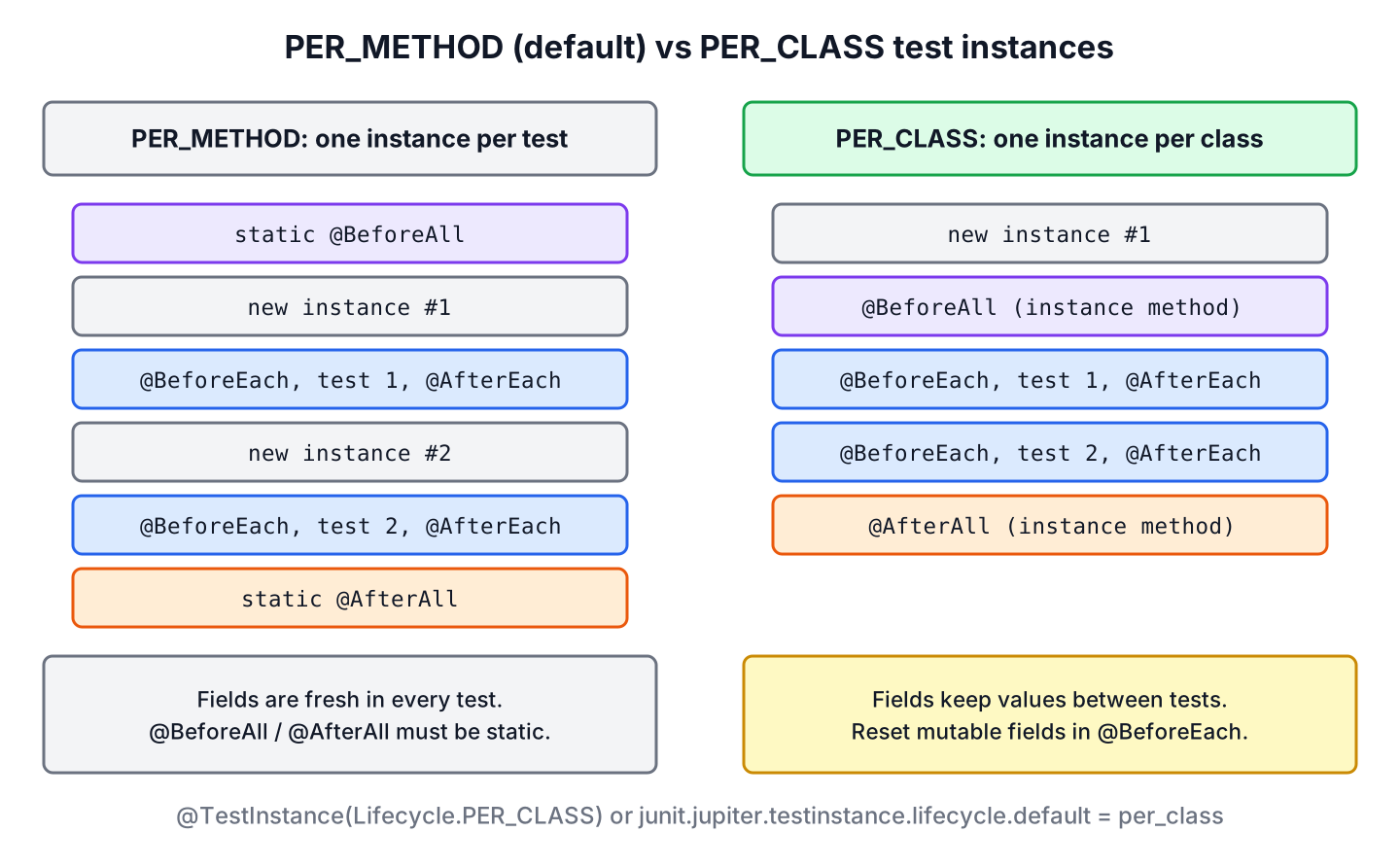
The full order of constructor, lifecycle methods and extension callbacks in both modes is in the JUnit test lifecycle overview.
2. Non-Static @BeforeAll and @AfterAll Example
Say a library app has a BookCatalog class that loads books from a CSV file and finds titles by author. Parsing the file once for the whole test class is enough, because the tests only read the catalog. We keep the full project in the junit-non-static-beforeall-afterall folder on GitHub.
The test class keeps the catalog and a lookup counter in instance fields, and a static counter tracks how many test instances JUnit creates. The @BeforeAll method also receives a temporary directory through a @TempDir parameter.
@TestInstance(TestInstance.Lifecycle.PER_CLASS)
class BookCatalogTest {
static int instances = 0;
BookCatalog catalog;
int lookups = 0;
BookCatalogTest() {
instances++;
System.out.println("constructor: test instance #" + instances);
}
@BeforeAll
void loadCatalog(@TempDir Path dir) throws IOException {
Path file = dir.resolve("books.csv");
Files.write(file, List.of("Dune,Frank Herbert", "Emma,Jane Austen", "Persuasion,Jane Austen"));
catalog = BookCatalog.load(file);
System.out.println("@BeforeAll loadCatalog(): " + catalog.size() + " books");
}
@Test
void findsAustenBooks() {
lookups++;
assertEquals(List.of("Emma", "Persuasion"), catalog.titlesBy("Jane Austen"));
}
@Test
void findsHerbertBook() {
lookups++;
assertEquals(List.of("Dune"), catalog.titlesBy("Frank Herbert"));
}
@AfterAll
void printStats() {
System.out.println("@AfterAll printStats(): " + lookups + " lookups on test instance #" + instances);
}
}[INFO] Running com.howtodoinjava.junit.perclass.BookCatalogTest
constructor: test instance #1
@BeforeAll loadCatalog(): 3 books
@AfterAll printStats(): 2 lookups on test instance #1
[INFO] Tests run: 2, Failures: 0, Errors: 0, Skipped: 0, Time elapsed: 0.073 s -- in com.howtodoinjava.junit.perclass.BookCatalogTestWith the default lifecycle, the same class would print two constructor lines, and printStats() could not even exist as an instance method. Here lookups counts across tests, which shows the main difference. Under PER_CLASS, every instance field is shared by all tests of the class.
3. Making per_class the Default for a Project
When most test classes of a project need non-static class-level methods, for example in a Kotlin code base, we set the default lifecycle once instead of annotating every class. JUnit reads the configuration parameter junit.jupiter.testinstance.lifecycle.default from a junit-platform.properties file at the root of the test classpath, which in a Maven project is src/test/resources.
junit.jupiter.testinstance.lifecycle.default = per_classThe class DefaultPerClassDemo has no @TestInstance annotation, and its non-static @BeforeAll and @AfterAll methods run because of the file. In the example project, the file sits in a separate folder that the Maven profile per-class adds, so the other classes keep the default lifecycle.
@BeforeAll
void openLibrary() {
  System.out.println("@BeforeAll openLibrary() without @TestInstance");
}
[INFO] Running com.howtodoinjava.junit.perclass.demo.DefaultPerClassDemo
@BeforeAll openLibrary() without @TestInstance
@Test borrowsBook
@AfterAll closeLibrary() without @TestInstanceThe same parameter also works as a JVM system property, such as -Djunit.jupiter.testinstance.lifecycle.default=per_class, but the properties file is the recommended place for the default, because it is checked into version control and the IDE and the build tool both read it from the classpath. A system property set only in the Maven build gives different results when we run the same test from the IDE.
4. Where Non-Static Lifecycle Methods Help
A static @BeforeAll method covers most setups, so we switch to PER_CLASS only when an instance method makes the test simpler. Three cases come up most often.
4.1. A Non-Static @MethodSource Factory
A parameterized test with @MethodSource needs a static factory method by default. With PER_CLASS, the factory can be an instance method, so it can read data that the non-static @BeforeAll method loaded into a field.
@BeforeAll
void loadCatalog(@TempDir Path dir) throws IOException {
  Path file = dir.resolve("books.csv");
  Files.write(file, List.of("Emma,Jane Austen", "Persuasion,Jane Austen", "Dune,Frank Herbert"));
  catalog = BookCatalog.load(file);
}

Stream<String> austenTitles() {                       // non-static factory method
  return catalog.titlesBy("Jane Austen").stream();
}

@ParameterizedTest
@MethodSource("austenTitles")
void titleIsNotBlank(String title) {
  System.out.println("@ParameterizedTest with " + title);
  assertTrue(!title.isBlank());
}
@ParameterizedTest with Emma
@ParameterizedTest with PersuasionJUnit calls austenTitles() after loadCatalog(), so the factory sees the loaded catalog and produces one invocation per title.
4.2. Lifecycle Methods in a @Nested Class
A @Nested test class is an inner class, and Java allowed static methods in inner classes only from Java 16. On older Java versions, PER_CLASS on the nested class was the only way to give it a @BeforeAll method. JUnit 6 needs Java 17, so a static method works there too, and PER_CLASS remains useful when the nested setup should use instance fields.
@Nested
@TestInstance(TestInstance.Lifecycle.PER_CLASS)
class Reservations {

  List<String> queue;

  @BeforeAll
  void loadQueue() {                            // non-static in a @Nested class
    queue = List.of("alex", "maria");
    System.out.println("  @BeforeAll Reservations.loadQueue()");
  }

  @Test
  void firstInQueue() {
    assertEquals("alex", queue.getFirst());
  }
}
4.3. Kotlin Test Classes
Kotlin has no static methods, so a static @BeforeAll method in Kotlin needs a companion object with the @JvmStatic annotation. With PER_CLASS, the lifecycle methods and @MethodSource factories are plain member functions, which is why many Kotlin projects set per_class as the project default from section 3.
5. Shared State and Parallel Execution
The shared instance is the cost of PER_CLASS. A field that one test changes keeps that value in the next test, so the result can depend on the test order. We reset every mutable field in @BeforeEach, and keep only read-only data, such as the loaded catalog, from @BeforeAll.
List<String> borrowed;

@BeforeEach
void resetBorrowed() {
  borrowed = new ArrayList<>();                 // fresh list, the instance is shared
}

@Test
void borrowsOneBook() {
  borrowed.add("Emma");
  assertEquals(1, borrowed.size());
}
Parallel execution needs more care. JUnit runs the tests of a PER_CLASS class in one thread unless the class or method is annotated with @Execution(CONCURRENT). With that annotation and parallel execution enabled, all tests run on the same instance at the same time, so PER_CLASS does not isolate concurrent tests from each other. It shares one object between all threads, the same way a static field would.
@TestInstance(TestInstance.Lifecycle.PER_CLASS)
@Execution(ExecutionMode.CONCURRENT)
class SharedInstanceParallelDemo {

  final Queue<String> checkouts = new ConcurrentLinkedQueue<>();     // not ArrayList

  @Test
  void checksOutEmma() {
    checkouts.add("Emma");
    System.out.println("Emma on " + Thread.currentThread().getName() + ", instance " + this.hashCode());
  }
}
Dune on ForkJoinPool-1-worker-2, instance 1596174513
Emma on ForkJoinPool-1-worker-1, instance 1596174513
@AfterAll: 2 checkouts in one shared instanceTwo worker threads used the same instance, so the field must be a thread-safe type such as ConcurrentLinkedQueue. With an ArrayList, two threads that call add() at the same time can lose an element or throw an ArrayIndexOutOfBoundsException. Parallel execution is off by default, and the demo turns it on with the configuration parameter junit.jupiter.execution.parallel.enabled=true, passed as a -D option on the Maven command line.
6. Static @BeforeAll or PER_CLASS
Both styles run the class-level setup once, and they differ in where the shared data lives. The comparison helps us pick one per class.
| Question | Static @BeforeAll (default) | Non-static with PER_CLASS |
|---|---|---|
| Test instances per class | One per test method | One for all tests |
| Where shared setup data lives | Static fields | Instance fields |
| Instance fields between tests | Fresh in every test | Keep their values, reset them in @BeforeEach |
| @MethodSource factory | Static method | Instance method allowed |
| Kotlin | companion object with @JvmStatic | Plain member functions |
| Concurrent tests in the class | Separate instances, shared static fields | One shared instance for all threads |
We keep the default for most classes, because fresh fields per test rule out a whole group of order-dependent bugs. PER_CLASS is the better choice when the instance methods remove real code, as in the Kotlin and @MethodSource cases.
7. Non-Static @BeforeAll FAQs
A few follow-up questions come up after switching a class to the per-class lifecycle.
7.1. Is @TestInstance Inherited by Subclasses?
Yes. An explicit @TestInstance mode is inherited within a test class hierarchy, so a base class annotated with PER_CLASS makes every subclass use one instance per class. The annotation also works as a meta-annotation on a custom composed annotation.
7.2. Does PER_CLASS Make Tests Faster?
Only slightly. JUnit saves one constructor call per test, which costs almost nothing for a normal test class. The time we save comes from the setup in @BeforeAll, and a static @BeforeAll method saves the same time.
7.3. When Does JUnit Close @AutoClose Fields With PER_CLASS?
After all tests of the class. Under PER_CLASS, JUnit closes @AutoClose instance fields after the @AfterAll methods and after the static @AutoClose fields, instead of after each test.
7.4. Can One Class Mix Static and Non-Static @BeforeAll Methods?
Yes, under PER_CLASS JUnit accepts both, because a static method can always be called without an instance. Under the default lifecycle, only static methods are allowed. We still keep one @BeforeAll method per class, since JUnit does not guarantee the order of several.
8. Conclusion
@TestInstance(Lifecycle.PER_CLASS) makes JUnit create one test instance per class, so @BeforeAll and @AfterAll can be instance methods that use instance fields. The junit.jupiter.testinstance.lifecycle.default parameter in junit-platform.properties sets the mode for a whole project.
The mode helps with non-static @MethodSource factories, nested classes and Kotlin, and it costs us fresh fields per test. We reset mutable fields in @BeforeEach and use thread-safe types when tests run concurrently. The JUnit tutorial links the other lifecycle guides.
9. References
- @TestInstance Javadoc (JUnit 6.1.3)
- Test Instance Lifecycle (JUnit User Guide)
- @BeforeAll Javadoc (JUnit 6.1.3)
Happy Learning !!
