
The JUnit 5 @TempDir annotation gives a test a new, empty temporary directory and deletes it with all its content when the test or the test class is finished. We annotate a field or a parameter of type java.nio.file.Path or java.io.File, and JUnit creates the directory and injects it.
We use the annotation in every test where the code under test reads or writes files, for example a report export, a file upload service or a log cleaner. Each test works in its own directory, so tests cannot see each other’s files, and nothing is left in the project folder.
The following example writes a CSV export into a temporary directory and checks the file content.
@Test
void writesCsvFile(@TempDir Path tempDir) throws IOException {
    List<Invoice> invoices = List.of(
            new Invoice("1001", "Alex", new BigDecimal("120.50")),
            new Invoice("1002", "Brian", new BigDecimal("75.00")));

    Path csv = exporter.exportCsv(invoices, tempDir);

    System.out.println("Exported to " + csv);
    assertEquals(List.of("number,customer,amount", "1001,Alex,120.50", "1002,Brian,75.00"),
            Files.readAllLines(csv));
}
Exported to /tmp/junit-16426643104967055916/invoices.csvNotice the directory name. JUnit creates it in the system temporary directory with the prefix junit-, and after the test the file is gone.
$ ls /tmp/junit-16426643104967055916/invoices.csv
ls: cannot access '/tmp/junit-16426643104967055916/invoices.csv': No such file or directory
Next, we look at the places where @TempDir can be declared and how long each directory lives, how to share one directory between tests, and the cleanup modes. The last sections cover a custom directory factory, the deletion strategy that JUnit 6.1 added, and the migration from the JUnit 4 TemporaryFolder rule.
1. How the Temporary Directory Is Created and Deleted
The annotation @TempDir belongs to a built-in extension of JUnit Jupiter that is registered by default, so it needs no @ExtendWith. Before a test needs the directory, the extension calls Files.createTempDirectory(“junit-“), which creates it under the path in the system property java.io.tmpdir. That is /tmp on Linux, a folder under /var/folders on macOS and %TEMP% on Windows.
When the scope of the directory ends, JUnit deletes the files and subdirectories recursively and finally the directory itself. If a file cannot be deleted, for example because a stream is still open on Windows, the test fails. The examples use Java 25, JUnit 6.1.3 and Maven Surefire 3.6.0, and except for section 6, everything works the same on JUnit 5.10 or later. All other JUnit topics of this series start from the JUnit tutorial.
The annotated element must follow three rules, or JUnit fails the test with an ExtensionConfigurationException or a ParameterResolutionException.
- The type is Path or File.
- A field is not final.
- A File is used only with a factory that creates the directory on the default file system.
2. Where to Declare @TempDir
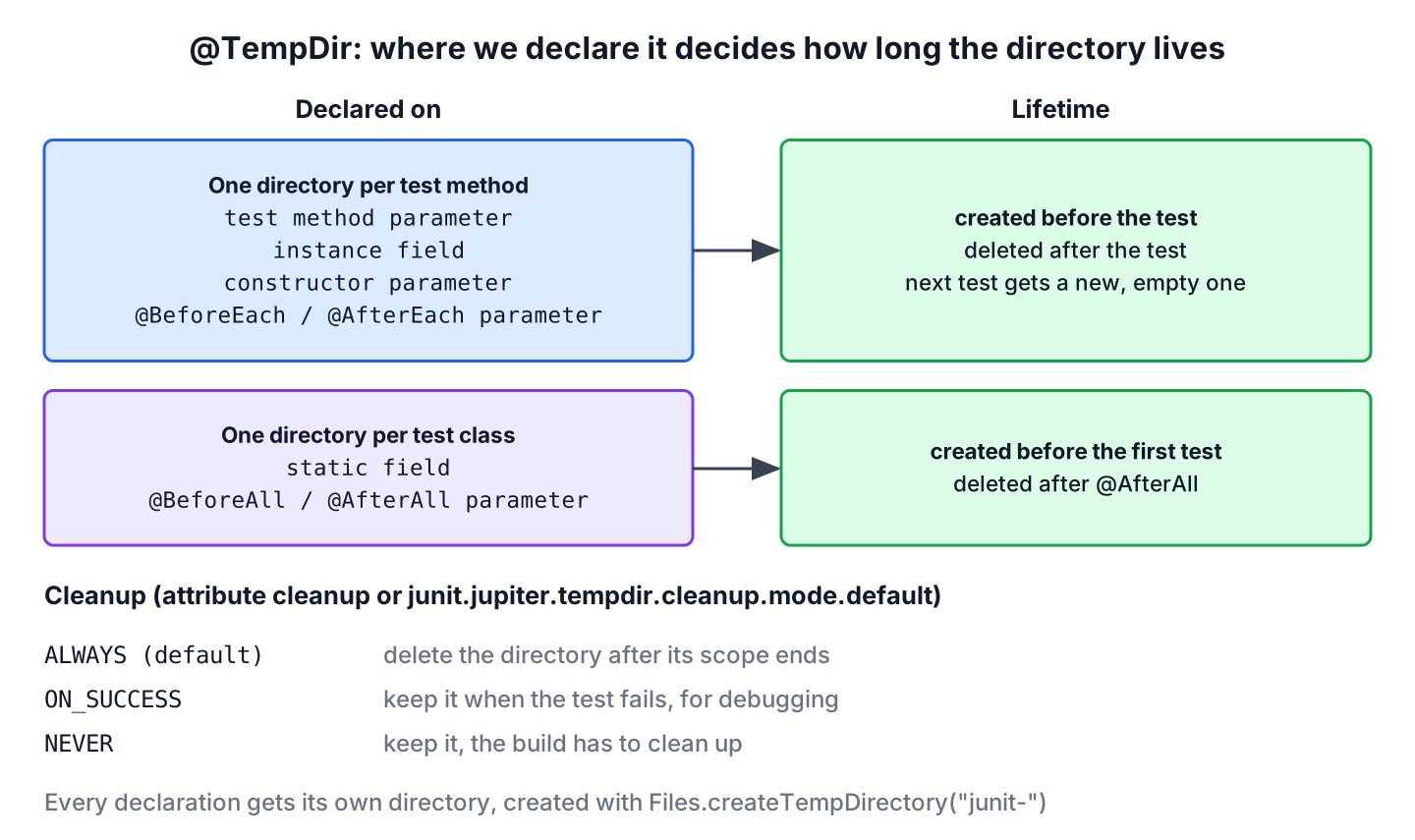
We can put @TempDir on a test method parameter, a field, a constructor parameter or a parameter of a lifecycle method. The place decides the scope, and every declaration gets its own directory.
2.1. Test Method Parameter
A parameter fits a single test that needs files, as in the intro example. The directory exists only for that one test method. Two annotated parameters in one method give two separate directories.
2.2. Instance Field and Static Field
A field fits a test class where several tests need a directory. An instance field gets a new directory for every test method, because JUnit creates a new test instance per test by default. A static field gets one directory for the whole class, so files written by one test are visible to the next.
@TempDir
static Path sharedDir;

@TempDir
Path perTestDir;

@TempDir
File legacyDir;
@Test
@Order(1)
void firstTest() throws IOException {
System.out.println("firstTest shared=" + sharedDir.getFileName() + " perTest=" + perTestDir.getFileName());
Files.writeString(sharedDir.resolve("catalog.txt"), "written by firstTest");
Files.writeString(perTestDir.resolve("draft.txt"), "written by firstTest");
assertTrue(legacyDir.isDirectory());
}
@Test
@Order(2)
void secondTest() {
System.out.println("secondTest shared=" + sharedDir.getFileName() + " perTest=" + perTestDir.getFileName());
assertTrue(Files.exists(sharedDir.resolve("catalog.txt"))); // same directory as firstTest
assertFalse(Files.exists(perTestDir.resolve("draft.txt"))); // new, empty directory
assertNotEquals(perTestDir, legacyDir.toPath()); // every declaration is separate
}firstTest shared=junit-7976660792064298829 perTest=junit-16812607361851560228
secondTest shared=junit-7976660792064298829 perTest=junit-15117081204102976467We can see that the shared directory has the same name in both tests, whereas the instance field points to a new directory in each test. The second test depends on the first one, so the class fixes the order with @TestMethodOrder, as explained in JUnit test execution order. With @TestInstance(Lifecycle.PER_CLASS), an instance field also keeps its directory for the whole class.
A shared directory couples the tests of a class, so we use a static field only for read-only data that is expensive to create, such as a generated catalog or an unpacked archive. A @BeforeAll method with a @TempDir parameter does the same and can fill the directory in the same place, as shown in JUnit @BeforeAll and @AfterAll.
2.3. Constructor Parameter
JUnit also injects a temporary directory into a constructor parameter, which lets us keep the field final. Older tutorials say that constructor parameters are not supported, but current JUnit 5 versions and JUnit 6 handle them, and the directory is new for every test in the default lifecycle.
private final Path archiveDir;
private final ArchiveCleaner cleaner = new ArchiveCleaner();

ConstructorInjectionTest(@TempDir Path archiveDir) {
    this.archiveDir = archiveDir;
}

@BeforeEach
void createFiles() throws IOException {
    Files.createFile(archiveDir.resolve("upload-1.tmp"));
    Files.createFile(archiveDir.resolve("upload-2.tmp"));
    Files.createFile(archiveDir.resolve("report.pdf"));
}

@Test
void deletesOnlyTmpFiles() throws IOException {
    List<String> deleted = cleaner.deleteTempFiles(archiveDir);

    assertEquals(List.of("upload-1.tmp", "upload-2.tmp"), deleted);
    assertEquals(List.of(archiveDir.resolve("report.pdf")), Files.list(archiveDir).toList());
}
The test is a realistic case for a temporary directory. A cleaner job deletes leftover upload files, and the test checks that it keeps the report. With a real folder, a crashed test run would leave files behind and break the next run.
3. Cleanup Modes
The attribute cleanup takes a value of the enum CleanupMode and decides whether JUnit deletes the directory.
| Mode | Behavior |
|---|---|
| DEFAULT | Uses the configured default, which is ALWAYS unless changed |
| ALWAYS | Deletes the directory after its scope, whether the test passed or failed |
| ON_SUCCESS | Deletes the directory only if the test passed, so a failed test leaves its files for debugging |
| NEVER | Never deletes the directory |
ON_SUCCESS is the most useful mode in practice. When an export test fails, we want to open the file and see what the code wrote. In the following test, the assertion expects two lines but the file has only the header.
@Test
void keepsFilesOfFailedTest(@TempDir(cleanup = CleanupMode.ON_SUCCESS) Path tempDir) throws IOException {
    Path export = Files.writeString(tempDir.resolve("export.csv"), "number,customer,amount");
    System.out.println("Export file: " + export);
    assertEquals(2, Files.readAllLines(export).size());
}
Export file: /tmp/junit-14940589794061668858/export.csv
org.opentest4j.AssertionFailedError: expected: <2> but was: <1>
$ cat /tmp/junit-14940589794061668858/export.csv
number,customer,amountThe file is still there after the failed run. With NEVER, JUnit keeps the directory even after a passing test, so a long test suite fills the temporary folder. To change the default for the whole project, we set junit.jupiter.tempdir.cleanup.mode.default in junit-platform.properties, for example to on_success. The value ignores case, and since JUnit 6.0 an invalid value fails the test run instead of falling back to the default.
4. A Custom TempDirFactory
By default, every directory comes from TempDirFactory.Standard, which calls Files.createTempDirectory(“junit-“). A custom TempDirFactory (since JUnit 5.10) changes where and how the directory is created. A factory needs a no-argument constructor, and JUnit calls createTempDirectory() and close() once per factory instance.
For example, a test suite with dozens of file tests leaves directories named junit-123… when a cleanup fails. A factory that puts the test method name into the directory name tells us which test created which directory.
public class TestNameTempDirFactory implements TempDirFactory {

    @Override
    public Path createTempDirectory(AnnotatedElementContext elementContext, ExtensionContext extensionContext)
            throws IOException {
        String testName = extensionContext.getRequiredTestMethod().getName();
        return Files.createTempDirectory(testName + "-");
    }
}
@Test
void namesDirectoryAfterTest(@TempDir(factory = TestNameTempDirFactory.class) Path tempDir) {
System.out.println("Factory directory: " + tempDir.getFileName());
assertTrue(tempDir.getFileName().toString().startsWith("namesDirectoryAfterTest-"));
}Factory directory: namesDirectoryAfterTest-2373497567458973163The method getRequiredTestMethod() throws for a static field, because no test method exists at that point, so this factory fits parameters and instance fields. A factory can also create the directory in an in-memory file system such as Jimfs, which makes file tests faster and independent of the disk. Such a directory works only with a Path, not with a File. The configuration parameter junit.jupiter.tempdir.factory.default sets a factory for every @TempDir that does not name its own.
5. Combining @TempDir With Other Annotations
Repeating the same attributes on many tests adds repeated code to every test. @TempDir can be used as a meta-annotation, so a team can declare an annotation such as @KeepOnFailureTempDir with @TempDir(cleanup = CleanupMode.ON_SUCCESS) once. The new annotation needs the targets ANNOTATION_TYPE, FIELD and PARAMETER and runtime retention.
Temporary directories also work with parameterized tests and repeated tests. Every invocation is a separate test, so a @TempDir parameter is new and empty in each invocation.
6. Deletion Strategies in JUnit 6.1
JUnit 6.1 added the attribute deletionStrategy with the interface TempDirDeletionStrategy. It decides how JUnit deletes the directory and what happens when a file cannot be deleted.
- TempDirDeletionStrategy.Standard is the default. It deletes recursively, retries after resetting file permissions, and fails the test when a path still cannot be deleted.
- TempDirDeletionStrategy.IgnoreFailures does the same, but logs a warning instead of failing the test.
@Test
void ignoresDeletionFailures(
        @TempDir(deletionStrategy = TempDirDeletionStrategy.IgnoreFailures.class) Path tempDir) {
    assertTrue(tempDir.toFile().isDirectory());
}
IgnoreFailures helps on Windows build agents, where a virus scanner or an indexer may hold a file open for a moment after the test. The configuration parameter junit.jupiter.tempdir.deletion.strategy.default sets it for the whole project. The API is experimental in JUnit 6.1, so it may change in a later release.
7. Migrating From the JUnit 4 TemporaryFolder Rule
JUnit 4 offered temporary folders through the rule TemporaryFolder, declared as a public field with @Rule. JUnit 5 and 6 have no rules, and @TempDir replaces it. The methods map as follows.
| JUnit 4 TemporaryFolder | JUnit 5 and 6 @TempDir |
|---|---|
| @Rule public TemporaryFolder folder = new TemporaryFolder(); | @TempDir Path tempDir; |
| @ClassRule static field | @TempDir static field |
| folder.newFile(“a.txt”) | Files.createFile(tempDir.resolve(“a.txt”)) |
| folder.newFolder(“sub”) | Files.createDirectory(tempDir.resolve(“sub”)) |
| folder.getRoot() | tempDir, or tempDir.toFile() for a File |
The JUnit 5 vs JUnit 4 comparison covers the other rules and their replacements.
8. JUnit TempDir FAQs
These questions are about the location, failed tests, sharing and the parameter type.
8.1. Where Does JUnit Create the Temporary Directory?
In the directory of the system property java.io.tmpdir, with a name that starts with junit- and ends with a random number. A custom TempDirFactory can choose another location.
8.2. Is the Directory Deleted When the Test Fails?
Yes, with the default mode ALWAYS. With cleanup = CleanupMode.ON_SUCCESS, JUnit keeps the directory of a failed test, as shown in section 3.
8.3. Can Two @TempDir Parameters Point to the Same Directory?
No. Since JUnit 5.8, every declaration gets its own directory. JUnit 5 had a configuration parameter junit.jupiter.tempdir.scope=per_context to share one directory, which was deprecated and was removed in JUnit 6.0.
8.4. Should We Use Path or File?
We use Path, because the java.nio.file.Files methods work with it and it also works with custom file systems. File is supported for older code that expects it.
9. Conclusion
The @TempDir annotation gives a test a fresh directory and removes it afterwards. A test method parameter, an instance field or a constructor parameter gives one directory per test, and a static field or a @BeforeAll parameter shares one directory across the class. Every declaration gets its own directory.
The attribute cleanup with ON_SUCCESS keeps the files of failed tests for debugging, a TempDirFactory changes where the directory is created, and JUnit 6.1 adds deletion strategies for file systems where a file stays locked for a moment after the test. For JUnit 4 code, @TempDir replaces the TemporaryFolder rule.
10. References
- JUnit User Guide 6.1.3, The TempDirectory Extension
- TempDir Javadoc (JUnit 6.1.3)
- TempDirFactory Javadoc (JUnit 6.1.3)
- JUnit 6.1.3 Release Notes
- Files.createTempDirectory() (Java 25)
Happy Learning !!
