
A JUnit HTML report is a web page that lists every test of a build with its result, time and failure message, and in Maven we create it with the Maven Surefire Report plugin, which reads the XML files Surefire writes and renders them as target/reports/surefire.html. JUnit itself writes only XML, so the HTML always comes from a build tool or a converter.
We open the HTML report when a build on a CI server fails and the console log is too long to read, and we publish it next to the build so that testers and reviewers can see which tests ran, which ones were skipped and why a test failed.
The following example adds the Surefire Report plugin 3.6.0 to a Maven project with JUnit 6.1.3 tests.
<reporting>
  <plugins>
    <plugin>
      <groupId>org.apache.maven.plugins</groupId>
      <artifactId>maven-surefire-report-plugin</artifactId>
      <version>3.6.0</version>                <!-- same version as Surefire -->
    </plugin>
  </plugins>
</reporting>
mvn surefire-report:report # runs the tests, writes target/reports/surefire.htmlNotice that the plugin sits in the reporting section, and one command both runs the tests and writes the page. We look at what the report contains, how failures and skipped tests appear, the difference between surefire-report:report and mvn site, and the options that change the page. The last sections cover the HTML report of Gradle and the HTML converter for the new Open Test Reporting format of JUnit.
1. Where the HTML Report Comes From
Every Maven test run writes one XML file per test class into target/surefire-reports. The XML is meant for tools, and the JUnit XML reports article explains its format. The Surefire Report plugin parses these TEST-*.xml files and turns them into one HTML page with a summary, a package list and the details of each test.
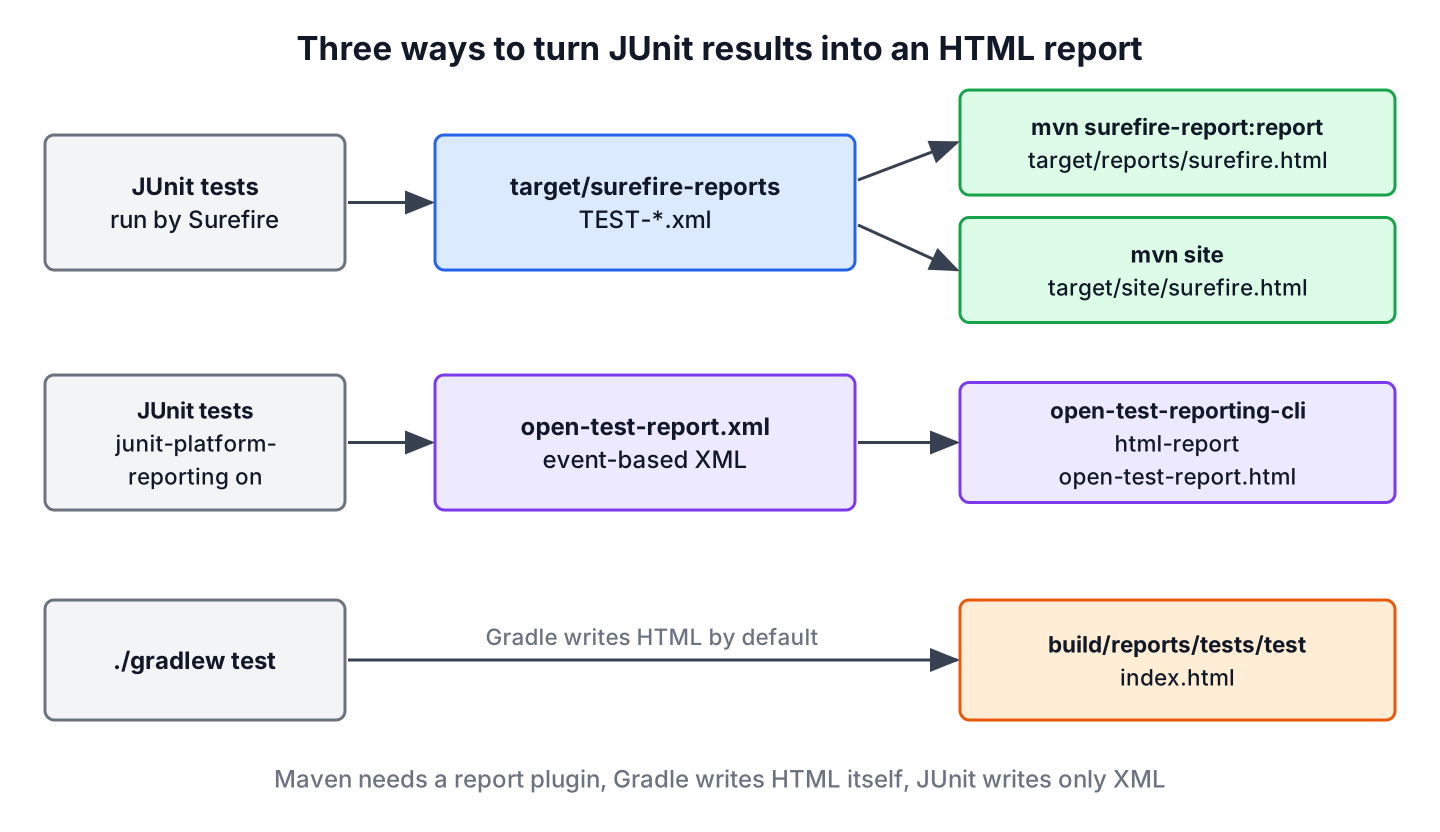
The three routes differ in what we have to install. Maven needs the report plugin, Gradle writes an HTML report on every test run, and the Open Test Reporting XML of JUnit needs a separate command-line tool.
2. Creating the Report With surefire-report:report
The example project tests an OrderTotals class that calculates subtotals, tax and refunds for an online shop. The test class OrderTotalsTest has four passing tests and one test disabled with @Disabled, because gift cards are not supported yet.
@Test
@DisplayName("Refund is proportional to returned items")
void partialRefund() {
  assertEquals(new BigDecimal("10.00"), totals.refund(new BigDecimal("30.00"), 1, 3));
}

@Test
@Disabled("Gift cards are not supported yet")
void giftCardPayment() {
}
The goal surefire-report:report runs the test phase in a forked lifecycle before it renders the page, so we do not need a separate mvn test.
[INFO] >>> surefire-report:3.6.0:report (default-cli) > [surefire]test @ junit-html-report >>>
[INFO] Running com.howtodoinjava.junit.orders.OrderTotalsTest
[WARNING] Tests run: 5, Failures: 0, Errors: 0, Skipped: 1, Time elapsed: 0.268 s -- in com.howtodoinjava.junit.orders.OrderTotalsTest
[INFO] <<< surefire-report:3.6.0:report (default-cli) < [surefire]test @ junit-html-report <<<
[INFO] --- surefire-report:3.6.0:report (default-cli) @ junit-html-report ---
[INFO] Rendering content with org.apache.maven.skins:maven-fluido-skin:jar:2.0.0-M9 skin
[WARNING] Unable to locate Test Source XRef to link to -- DISABLED
[INFO] BUILD SUCCESS
The report lands in target/reports, together with the CSS, JavaScript and images of the Maven Fluido skin. We open surefire.html in a browser, and the page needs the other files of the folder, so we copy or archive the whole folder.
target/reports/surefire.html
target/reports/js
target/reports/img
The XRef warning means that the report cannot link a failure to the test source code, which we fix in section 4.
3. Reading the JUnit HTML Report
The page has four parts. The summary counts tests, errors, failures and skipped tests for the whole build, the package list repeats the counts per package and class, the test case list shows each method with its time, and the failure details show the message and stack trace of each problem. The text content of the report from the run above looks like this.
Tests | Errors | Failures | Skipped | Success Rate | Time |
5 | 0 | 0 | 1 | 80.0% | 0.268 s |
Package | Tests | Errors | Failures | Skipped | Success Rate | Time |
com.howtodoinjava.junit.orders | 5 | 0 | 0 | 1 | 80.0% | 0.268 s |
| giftCardPayment + - [ Detail ]
- | Gift cards are not supported yet | - |
| subtotalAddsPrices | 0.064 s |
| tooManyReturns | 0.028 s |
Notice that the success rate counts the skipped test against the build, so 4 passed tests out of 5 give 80.0%. The @Disabled reason appears next to the test, which is a good reason to always write one. The report shows method names, not the @DisplayName texts, because the default Surefire XML stores method names.
3.1. Failures in the Report
A failing test is where the HTML report earns its place. The class RefundRulesDemoTest in the example project fails on purpose and is excluded from the normal build, so we include it with -Dtest.
mvn surefire-report:report -Dtest='OrderTotalsTest,RefundRulesDemoTest'[ERROR] Tests run: 7, Failures: 1, Errors: 0, Skipped: 1
[INFO] <<< surefire-report:3.6.0:report (default-cli) < [surefire]test @ junit-html-report <<<
[INFO] --- surefire-report:3.6.0:report (default-cli) @ junit-html-report ---
[INFO] BUILD SUCCESSThe report goal still writes the page and ends with BUILD SUCCESS when a test fails. That is what we want for a report, but a CI job that runs only surefire-report:report never turns red. So we run mvn verify to decide whether the build passes, and the report goal as a separate step. The failed test shows up with its message and the first lines of the stack trace.
7 | 0 | 1 | 1 | 71.4% | 0.485 s |
com.howtodoinjava.junit.demo | 2 | 0 | 1 | 0 | 50.0% | 0.100 s |
| refundIncludesShipping + - [ Detail ]
- | expected: <39.99> but was: <35.00> | - |
- | com.howtodoinjava.junit.demo.RefundRulesDemoTest:15
4. Adding Source Links and Changing the Report
The plugin works without configuration, and a few parameters change the page. Each one is a configuration element in the pom.xml and also a user property for a single run, such as -DshowSuccess=false.
| Parameter | Default | Effect |
|---|---|---|
| showSuccess | true | With false, the test case list shows only failed, errored and skipped tests |
| outputName | surefire | File name of the page without .html |
| linkXRef | true | Links failures to the test source pages written by the JXR plugin |
| aggregate | false | In a multi-module build, collects the results of all modules into one report |
| reportsDirectories | target/surefire-reports | Folders with the XML files to read |
| skipSurefireReport | false | Skips the report, for example in a fast local profile |
On a large suite, the full list of passing tests buries the problems. With -DshowSuccess=false, the test case section of the same run keeps only the failed and the skipped test.
RefundRulesDemoTest
| refundIncludesShipping + - [ Detail ]
OrderTotalsTest
| giftCardPayment + - [ Detail ]
The source links need the Maven JXR plugin, which renders the test sources as HTML pages. We add its test-jxr report next to the Surefire Report plugin.
<plugin>
  <groupId>org.apache.maven.plugins</groupId>
  <artifactId>maven-jxr-plugin</artifactId>
  <version>3.6.0</version>
  <reportSets>
    <reportSet>
      <reports>
        <report>test-jxr</report>
      </reports>
    </reportSet>
  </reportSets>
</plugin>
The JXR pages are part of the project site, so the links work when we build the report with mvn site, as the next section shows.
5. Comparing the report and report-only Goals With mvn site
The plugin has three goals, and the Maven site adds a fourth way to get the page. They differ in whether they run the tests and where they write the file.
| Command | Runs the tests? | Output |
|---|---|---|
| mvn surefire-report:report | Yes, forks the test phase | target/reports/surefire.html |
| mvn test surefire-report:report-only | No, reads the existing XML | target/reports/surefire.html |
| mvn verify surefire-report:failsafe-report-only | No, reads Failsafe XML | target/reports/failsafe.html |
| mvn site | Yes, through the report goal | target/site/surefire.html plus the project site |
The goal report-only fits a CI pipeline where an earlier step already ran the tests, because it does not run them a second time. The mvn site command needs the Maven Site plugin 3.22.0 and the Project Info Reports plugin 3.9.0, which we pin in the pom.xml.
<plugin>
  <groupId>org.apache.maven.plugins</groupId>
  <artifactId>maven-site-plugin</artifactId>
  <version>3.22.0</version>
</plugin>
<plugin>
<groupId>org.apache.maven.plugins</groupId>
<artifactId>maven-project-info-reports-plugin</artifactId>
<version>3.9.0</version>
<reportSets>
<reportSet>
<reports>
<report>index</report>
</reports>
</reportSet>
</reportSets>
</plugin>[INFO] Rendering 5 report documents
[INFO] Generating "About" report --- maven-project-info-reports-plugin:3.9.0:index
[INFO] Generating "Surefire" report --- maven-surefire-report-plugin:3.6.0:report
[INFO] Generating "Test Source Xref" report --- maven-jxr-plugin:3.6.0:test-jxr
[INFO] Generating "Project Information" report --- maven-site-plugin:3.22.0:project-info
[INFO] Generating "Generated Reports" report --- maven-site-plugin:3.22.0:project-reports
[INFO] BUILD SUCCESSThe XRef warning is gone, and target/site/surefire.html links each test class to its source page in target/site/xref-test. The index report set keeps the site small, because the Project Info Reports plugin would otherwise add pages for dependencies, licenses and team members.
6. HTML Test Report in Gradle
Gradle writes an HTML report on every run of the test task, without any plugin or configuration. The report sits in build/reports/tests/test/index.html, with one folder per test class next to it, and Gradle prints its path when a test fails.
build/reports/tests/test:
com.howtodoinjava.junit.loyalty.LoyaltyPointsTest
css
index.html
js
The Gradle report shows the display names of parameterized invocations, such as [1] “45”, “false”, “4”, and the standard output of each test. The JUnit Gradle dependency article sets up the build that produced this report.
7. HTML From JUnit’s Open Test Reporting XML
Since JUnit 5.9, the junit-platform-reporting artifact can write a second XML format, Open Test Reporting, which also records the Java version, the host and the time of each event. JUnit 6.1.3 writes it to open-test-report.xml when the configuration parameter junit.platform.reporting.open.xml.enabled is true. The XML reports article from section 1 shows the setup.
The Open Test Reporting project ships a command-line tool whose html-report command turns one or more of these XML files into a single HTML file. We download open-test-reporting-cli-0.2.7-standalone.jar from Maven Central and run it on the XML file of a test run.
java -jar open-test-reporting-cli-0.2.7-standalone.jar html-report \
     --output target/open-test-report.html \
     target/open-test-reports/open-test-report.xml
Wrote HTML report to file:///home/dev/app/junit-xml-reports/target/open-test-report.htmlThe result is one self-contained file of about 260 KB that shows the display names, such as “Mistyped digit fails the Luhn check”, and the status of every test. We can attach the single file to a pull request or a CI job. The tool is still at version 0.2.x, so we treat it as an addition to the Surefire report, not as a replacement.
8. JUnit HTML Report FAQs
Most questions about the HTML report come from an empty page or from a file that is not where an older tutorial said it would be.
8.1. Can JUnit Generate an HTML Report by Itself?
No. JUnit writes test results as XML through its reporting listeners, and the build tool or a converter creates the HTML. Maven uses the Surefire Report plugin, Gradle has a built-in report, and the Open Test Reporting CLI converts JUnit’s own XML.
8.2. Where Is the Surefire HTML Report Saved?
The surefire-report:report goal writes target/reports/surefire.html. The mvn site command writes target/site/surefire.html as part of the project site. Tutorials that show target/site/surefire.html for the report goal describe old plugin versions.
8.3. Why Is My Surefire Report Empty?
The plugin found no TEST-*.xml files. That happens with report-only when the tests did not run before, after a mvn clean, or when Surefire found no tests because of the naming patterns or a JUnit version mix-up, as described in JUnit Maven dependency.
8.4. Does the HTML Report Include Failsafe Integration Tests?
Not in surefire.html. The goal failsafe-report-only renders failsafe.html from the XML files in target/failsafe-reports.
8.5. Can the Report Show @DisplayName Texts?
Yes, through the XML. Surefire’s statelessTestsetReporter option writes display names into the XML files, and the HTML report shows what the XML contains. The JUnit XML reports article shows that configuration.
9. Conclusion
JUnit writes XML, and the HTML report comes from the build. In Maven, the Surefire Report plugin 3.6.0 turns the Surefire XML into target/reports/surefire.html with one command, or into target/site/surefire.html as part of mvn site, where the JXR plugin adds links to the test sources.
The report goal does not fail the build on a failing test, so the pass or fail decision stays with mvn verify. Gradle users get an HTML report on every test run, and the Open Test Reporting CLI produces a single-file report from JUnit’s newer XML format. More testing topics are collected in the JUnit tutorial.
10. References
- Maven Surefire Report Plugin 3.6.0
- surefire-report:report goal
- Maven JXR Plugin
- Maven Site Plugin
- JUnit 6.1.3 User Guide – JUnit Platform Reporting
- Open Test Reporting on GitHub
- Gradle 9.8.1 User Manual – Testing in Java
Happy Learning !!
