
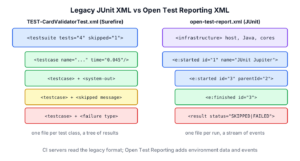
A JUnit XML report is a machine-readable file with the result of every test of a run, and JUnit 6 builds produce two formats of it, namely the classic JUnit XML that Maven Surefire and Gradle write per test class, and the newer Open Test Reporting XML that JUnit itself writes per run. CI servers such as Jenkins and GitLab read the XML to show test trends, failures and flaky tests.
We care about the XML whenever a pipeline must show test results, when a quality tool imports them, or when we write a script that reacts to failed tests. People read the JUnit HTML report, while machines read the XML.
The following example is the XML that Maven Surefire 3.6.0 writes for a test class with JUnit 6.1.3, with one disabled test and one test that prints a line.
<testsuite xmlns:xsi="http://www.w3.org/2001/XMLSchema-instance" xsi:noNamespaceSchemaLocation="https://maven.apache.org/surefire/maven-surefire-plugin/xsd/surefire-test-report.xsd" version="3.0.2" name="com.howtodoinjava.junit.payments.CardValidatorTest" time="0.148" tests="4" errors="0" skipped="1" failures="0" flakes="0">
  <testcase name="Valid test card number passes the Luhn check" classname="com.howtodoinjava.junit.payments.CardValidatorTest" time="0.045"/>
  <testcase name="maskKeepsLastFourDigits" classname="com.howtodoinjava.junit.payments.CardValidatorTest" time="0.027">
    <system-out><![CDATA[Masked card: **** 1111
]]></system-out>
  </testcase>
  <testcase name="rejectsExpiredNetworkPrefix" classname="com.howtodoinjava.junit.payments.CardValidatorTest" time="0.0">
    <skipped message="Waiting for the new card network rules"/>
  </testcase>
Notice that the testsuite element holds the counts, and each testcase holds its own outcome as a child element. Next, we compare the two formats, read both files from a real run with a failure, and configure them in Maven and Gradle. The last part shows how CI servers pick up the files.
1. Two XML Formats for JUnit Results
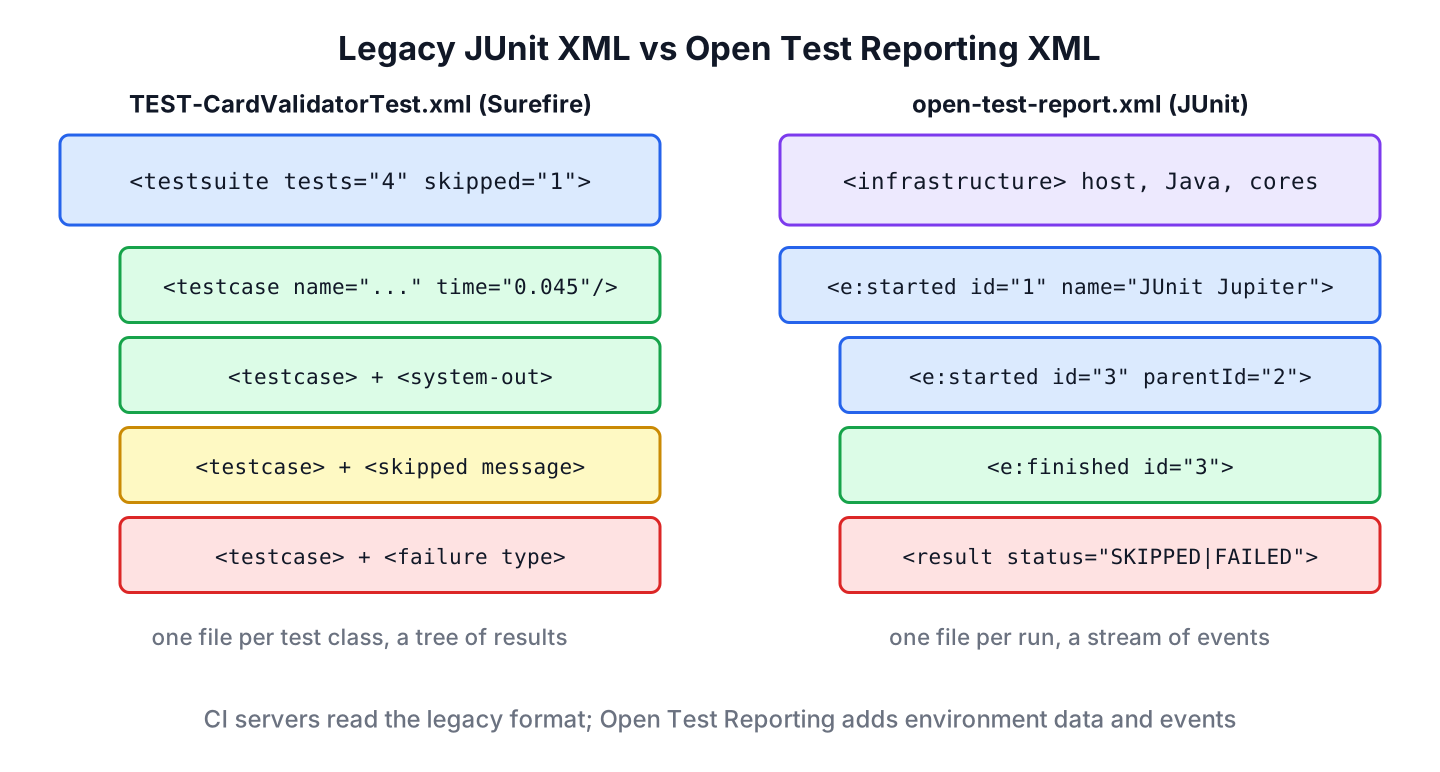
The classic format comes from the Ant JUnit task. There is no official specification for it, but every CI server understands it, and both Maven and Gradle write it by default. Open Test Reporting is a newer format from the JUnit team. It records each test as a stream of events and adds data about the environment.
| Legacy JUnit XML | Open Test Reporting XML | |
|---|---|---|
| Written by | Maven Surefire / Failsafe, Gradle, Console Launcher | JUnit’s junit-platform-reporting listener |
| Enabled | By default | Only with junit.platform.reporting.open.xml.enabled=true |
| Files | One TEST-<class>.xml per test class | One open-test-report.xml per run |
| Structure | testsuite with testcase children | e:started and e:finished events with ids |
| Extra data | System properties, captured output | Host, user, CPU cores, Java version, heap size, optional Git info |
| Read by | Jenkins, GitLab, GitHub Actions plugins, SonarQube and most CI tools | Open Test Reporting CLI and tools that support the format |
For a CI dashboard, the legacy format is the safe choice today, because every server reads it. The Open Test Reporting file is useful when we want the environment data or one file for the whole run, and it does not replace the legacy files.
2. The Legacy XML Report in Maven
The example project tests a CardValidator class that checks credit card numbers with the Luhn algorithm and masks them for receipts. After mvn test, Surefire writes two files per test class in target/surefire-reports, a plain text summary and the XML report.
target/surefire-reports/TEST-com.howtodoinjava.junit.payments.CardValidatorTest.xml
target/surefire-reports/com.howtodoinjava.junit.payments.CardValidatorTest.txt
Each element of the XML has a fixed meaning, which the Surefire XML schema describes. CI servers read only a few of these elements and attributes.
| Element or attribute | Meaning |
|---|---|
| testsuite tests, failures, errors, skipped | Counts for the class; failures are failed assertions, errors are unexpected exceptions |
| testsuite/properties | All system properties of the test JVM, 60 entries in our run, such as java.version and os.name |
| testcase name, classname, time | One test method (or one invocation of a parameterized test) and its duration in seconds |
| skipped with message | A disabled test or a failed assumption, with the reason |
| failure with message and type | A failed assertion, with the exception class and the stack trace as text |
| system-out, system-err | Output the test printed while it ran |
The properties list holds the whole JVM environment. A pipeline that publishes the XML outside the company should keep that in mind, because it can contain paths and user names.
    <property name="os.name" value="Linux"/>
    <property name="java.version" value="25.0.4.1"/>
2.1. A Failed Test in the XML
The class CardMaskingDemoTest expects a wrong masked number, so the pom.xml leaves it out of the default test run. We run it alone with mvn test -Dtest=CardMaskingDemoTest, and Surefire writes a failure element with the assertion message and the stack trace.
@Test
void maskShowsLastFourDigits() {
  assertEquals("**** 1112", new CardValidator().mask("4111 1111 1111 1111"));
}
<testsuite xmlns:xsi="http://www.w3.org/2001/XMLSchema-instance" xsi:noNamespaceSchemaLocation="https://maven.apache.org/surefire/maven-surefire-plugin/xsd/surefire-test-report.xsd" version="3.0.2" name="com.howtodoinjava.junit.demo.CardMaskingDemoTest" time="0.209" tests="1" errors="0" skipped="0" failures="1" flakes="0">
<testcase name="maskShowsLastFourDigits" classname="com.howtodoinjava.junit.demo.CardMaskingDemoTest" time="0.14">
<failure message="expected: <**** 1112> but was: <**** 1111>" type="org.opentest4j.AssertionFailedError"><![CDATA[org.opentest4j.AssertionFailedError: expected: <**** 1112> but was: <**** 1111>
at org.junit.jupiter.api.Assertions.assertEquals(Assertions.java:1199)
at com.howtodoinjava.junit.demo.CardMaskingDemoTest.maskShowsLastFourDigits(CardMaskingDemoTest.java:13)
]]></failure>
</testcase>CI servers show the message attribute in the test list and the CDATA text in the detail view. The type attribute separates assertion failures (AssertionFailedError) from real errors, which Surefire writes as an error element instead.
2.2. Display Names in the Surefire XML
By default, Surefire writes the method name into the name attribute and ignores @DisplayName. A test report of the order module shows plain method names.
<testcase name="subtotalAddsPrices" classname="com.howtodoinjava.junit.orders.OrderTotalsTest" time="0.033"/>Since Surefire 3.0.0-M4, the statelessTestsetReporter configuration switches the XML to the display names. Our example sets only the option for method names, so the class names stay fully qualified, which keeps the links in CI servers working.
<statelessTestsetReporter implementation="org.apache.maven.plugin.surefire.extensions.junit5.JUnit5Xml30StatelessReporter">
  <usePhrasedTestCaseMethodName>true</usePhrasedTestCaseMethodName>
</statelessTestsetReporter>
With this element in the Surefire configuration, the test with a display name shows the sentence, as in the XML at the top of this article. Methods without @DisplayName keep their names.
3. The Legacy XML Report in Gradle
Gradle writes the same format to build/test-results/test, one file per class, without any configuration. Gradle uses the display names by default and keeps the parentheses of method names, so the same test class looks slightly different.
<testsuite name="com.howtodoinjava.junit.payments.CardValidatorTest" tests="4" skipped="1" failures="0" errors="0" timestamp="2026-10-11T15:17:58.474Z" hostname="vm" time="0.16">
  <testcase name="Valid test card number passes the Luhn check" classname="com.howtodoinjava.junit.payments.CardValidatorTest" time="0.047"/>
  <testcase name="maskKeepsLastFourDigits()" classname="com.howtodoinjava.junit.payments.CardValidatorTest" time="0.028"/>
  <testcase name="rejectsExpiredNetworkPrefix()" classname="com.howtodoinjava.junit.payments.CardValidatorTest" time="0.001">
    <skipped/>
Notice that Gradle adds timestamp and hostname to the testsuite element and writes the skipped element without the reason. Parameterized tests get one testcase per invocation with names such as [1] “45”, “false”, “4”, as the JUnit Gradle dependency build shows.
4. Open Test Reporting XML From JUnit
The second format comes from JUnit, not from the build tool. The listener OpenTestReportGeneratingListener in junit-platform-reporting writes it when the configuration parameter junit.platform.reporting.open.xml.enabled is true. The parameter is false by default, so adding the dependency alone writes nothing.
In Maven, we add the dependency without a version, because the junit-bom sets it, and we pass the parameters through Surefire’s configurationParameters property.
<dependency>
  <groupId>org.junit.platform</groupId>
  <artifactId>junit-platform-reporting</artifactId>
  <scope>test</scope>
</dependency>
<properties>
<configurationParameters>
junit.platform.reporting.open.xml.enabled = true
junit.platform.reporting.output.dir = target/open-test-reports
</configurationParameters>
</properties>The run writes one file for all test classes. It starts with the environment and continues with events that refer to each other by id and parentId.
  <infrastructure>
    <operatingSystem>Linux</operatingSystem>
    <cpuCores>2</cpuCores>
    <java:javaVersion>25.0.4.1</java:javaVersion>
    <java:fileEncoding>UTF-8</java:fileEncoding>
  </infrastructure>
  <e:started id="6" name="Mistyped digit fails the Luhn check" parentId="2" time="2026-10-11T15:00:09.623280353Z">
    <metadata>
      <junit:uniqueId>[engine:junit-jupiter]/[class:com.howtodoinjava.junit.payments.CardValidatorTest]/[method:mistypedNumber()]</junit:uniqueId>
      <junit:legacyReportingName>mistypedNumber()</junit:legacyReportingName>
      <junit:type>TEST</junit:type>
    </metadata>
  </e:started>
  <e:finished id="6" time="2026-10-11T15:00:09.629218695Z">
    <result status="SUCCESSFUL"/>
  </e:finished>
Each test has a started and a finished event, and the result sits in the finished event. The uniqueId is the same id that JUnit uses to select a test, and the display name is the name attribute. A disabled test ends with SKIPPED and its reason, and a failed test carries the exception.
<result status="FAILED">
<java:throwable assertionError="true" type="org.opentest4j.AssertionFailedError"><