
Gradle 9 is the current major version of the Gradle build tool, and it needs Java 17 or newer to run. It also removes the old APIs that Gradle 8 marked as deprecated, so a build script that still calls one of them stops compiling. Gradle 9.0.0 came out in July 2025, and the latest release is Gradle 9.8.0 from September 2026.
We upgrade to Gradle 9 when we want to build Java 25 projects, because Gradle 8 does not support Java 25. The upgrade also lets us turn on the configuration cache, which makes repeat builds faster.
For most projects, the upgrade is one command, ./gradlew wrapper –gradle-version 9.8.0, plus a few fixes in the build script. After a summary of the changes, we build a small Java 25 project with Gradle 9 and fix the errors that show up most often after the upgrade.
1. Gradle 9 Changes at a Glance
All breaking changes came in Gradle 9.0. The minor releases 9.1 to 9.8 added features and support for new Java versions, and they did not break builds again.
| Change | Since | What it means for our build | Details |
|---|---|---|---|
| Java 17 needed to run Gradle | 9.0.0 | The JDK that starts Gradle must be 17 or newer. Our code can still target older Java. | Section 2.1 |
| Kotlin 2 and Groovy 4 | 9.0.0 | Build scripts compile with newer compilers. A few old script patterns break. | Section 2.2 |
| Configuration cache preferred | 9.0.0 | Gradle suggests turning it on. It is still off by default. | Section 2.3 |
| Deprecated Gradle 8 APIs removed | 9.0.0 | exec {}, jcenter() and -b are gone. | Section 2.4 |
| Reproducible archives | 9.0.0 | JAR and ZIP files are the same on every build. | Section 2.5 |
| Java 25, 26 and 27 support | 9.1.0, 9.4.0, 9.8.0 | Gradle can run on the new JDK and use it as a toolchain. | Section 3 |
2. Changes in Gradle 9.0 That Affect Every Build
The Gradle 9.0.0 release notes and the Gradle 9 upgrade guide list more changes, but most of them matter only to plugin authors.
2.1. Java 17 or Newer to Run Gradle
Gradle runs our build in a background Java process called the Gradle Daemon. In Gradle 9, this process needs Java 17 or newer. If JAVA_HOME points to Java 11, the build stops before it runs any task.
* What went wrong:
Gradle requires JVM 17 or later to run. Your build is currently configured to use JVM 11.
The Java 17 rule is only for running Gradle, not for our code. With Java toolchains, we tell Gradle which JDK compiles and tests our app, so the app can still target Java 8 or Java 11.
2.2. Kotlin 2 and Groovy 4 in Build Scripts
Gradle compiles build.gradle.kts files with its own copy of Kotlin and build.gradle files with its own copy of Groovy. Gradle 9.8.0 ships Kotlin 2.4.10 and Groovy 4.0.33, and ./gradlew –version prints both.
Most build scripts compile without changes. One pattern that breaks in Kotlin scripts is the label this@Build_gradle, which some old scripts use to refer to the script itself. We replace it with project.
2.3. Configuration Cache Is the Preferred Mode
Before running any task, Gradle reads all build scripts and works out which tasks to run. The configuration cache saves that result, so the next build with the same tasks skips this step. In Gradle 9 the cache is still off by default, and Gradle prints “Consider enabling configuration cache to speed up this build” after a build that could use it.
We turn it on with one line in gradle.properties. When we run the same command a second time, Gradle prints “Configuration cache entry reused.” and our example build finishes in about 3 seconds.
org.gradle.configuration-cache=true2.4. Removed Gradle 8 APIs
Gradle 8 printed a warning with “This is scheduled to be removed in Gradle 9.0” for each of these APIs, and Gradle 9 deleted them. A Kotlin DSL script that still calls one of them fails to compile with “Unresolved reference”. Four of these removals affect application builds most often.
- The exec {} and javaexec {} calls on Project are removed. We use providers.exec {} or an injected ExecOperations instead.
- The jcenter() repository shortcut is removed. We use mavenCentral().
- The -b (–build-file) and -c (–settings-file) command-line options are removed.
- Gradle no longer puts the JUnit Platform launcher on the test classpath for us. We declare junit-platform-launcher as a testRuntimeOnly dependency.
The buildDir property still works in Gradle 9.8.0, but it is deprecated. We switch to layout.buildDirectory so the build is ready for Gradle 10.
2.5. Reproducible JAR and ZIP Files
In Gradle 9, archive tasks such as Jar and Zip sort the entries and give every file the date 1980-02-01, so two builds of the same commit produce identical JAR files. If our app needs the real file dates inside an archive, we set isPreserveFileTimestamps = true on that task.
3. What Gradle 9.1 to 9.8 Added
Each new Java version needs a matching Gradle release, as the Gradle compatibility matrix shows. So for most teams, Java support is the main reason to take the minor releases, and the table lists the ones that matter most for application builds.
| Release | Date | Main additions |
|---|---|---|
| 9.1.0 | Sep 2025 | Java 25 support, –task-graph option that prints the task tree without running it |
| 9.3.0 | Jan 2026 | New HTML test report that groups nested and parameterized tests |
| 9.4.0 | Mar 2026 | Java 26 support |
| 9.6.0 | Jun 2026 | –non-interactive option for CI builds |
| 9.8.0 | Sep 2026 | Java 27 support |
The Gradle 9.8.0 release notes list everything in the latest release.
4. Gradle 9 With Java 25 in a Kotlin DSL Build
Gradle 8.14 supports Java up to 24, so a Java 25 project needs Gradle 9.1.0 or newer.
The following example is a small Java 25 app that counts fruits in a basket, with six JUnit 6.1.3 tests in FruitBasketTest. It uses the Gradle 9.8.0 wrapper and a Kotlin DSL build script. The complete project is in the Core-Java repository on GitHub.
The build script sets Java 25 with a toolchain and adds JUnit 6 through the JUnit BOM. Notice the junit-platform-launcher line, which Gradle 9 needs, as we saw in section 2.4. The JUnit dependencies are explained in JUnit 6 Gradle Dependency.
plugins {
    application
}

dependencies {
    testImplementation(platform("org.junit:junit-bom:6.1.3"))
    testImplementation("org.junit.jupiter:junit-jupiter")
    testRuntimeOnly("org.junit.platform:junit-platform-launcher")   // required in Gradle 9
}

java {
    toolchain {
        languageVersion = JavaLanguageVersion.of(25)                // compile and test with JDK 25
    }
}

application {
    mainClass = "com.howtodoinjava.gradle9.FruitApp"
}

tasks.test {
    useJUnitPlatform()
}
We run the build through the wrapper script. The first line shows that the configuration cache is on but has no saved entry yet, and the last line shows that Gradle saved one.
Calculating task graph as no cached configuration is available for tasks: clean build

> Task :test

FruitBasketTest > totalSumsAllFruits() PASSED
FruitBasketTest > rejectsBadInput(String, int) > [1] "apple", "0" PASSED
FruitBasketTest > rejectsBadInput(String, int) > [2] "apple", "-1" PASSED
FruitBasketTest > rejectsBadInput(String, int) > [3] " ", "3" PASSED
FruitBasketTest > missingFruitHasZeroCount() PASSED
FruitBasketTest > addsCountsOfTheSameFruit() PASSED

BUILD SUCCESSFUL in 12s
8 actionable tasks: 7 executed, 1 up-to-date
Configuration cache entry stored.
The ./gradlew run command prints “Java = 25” after the counts. The Gradle tutorial explains tasks and the wrapper, and running JUnit tests with Gradle shows more test options.
5. How to Upgrade to Gradle 9
We upgrade in two hops. First we move to Gradle 8.14.5, the last 8.x release, and fix every deprecation warning there. On Gradle 8.14 each problem is a warning with a link to the fix, whereas on Gradle 9 the same call is a build error.
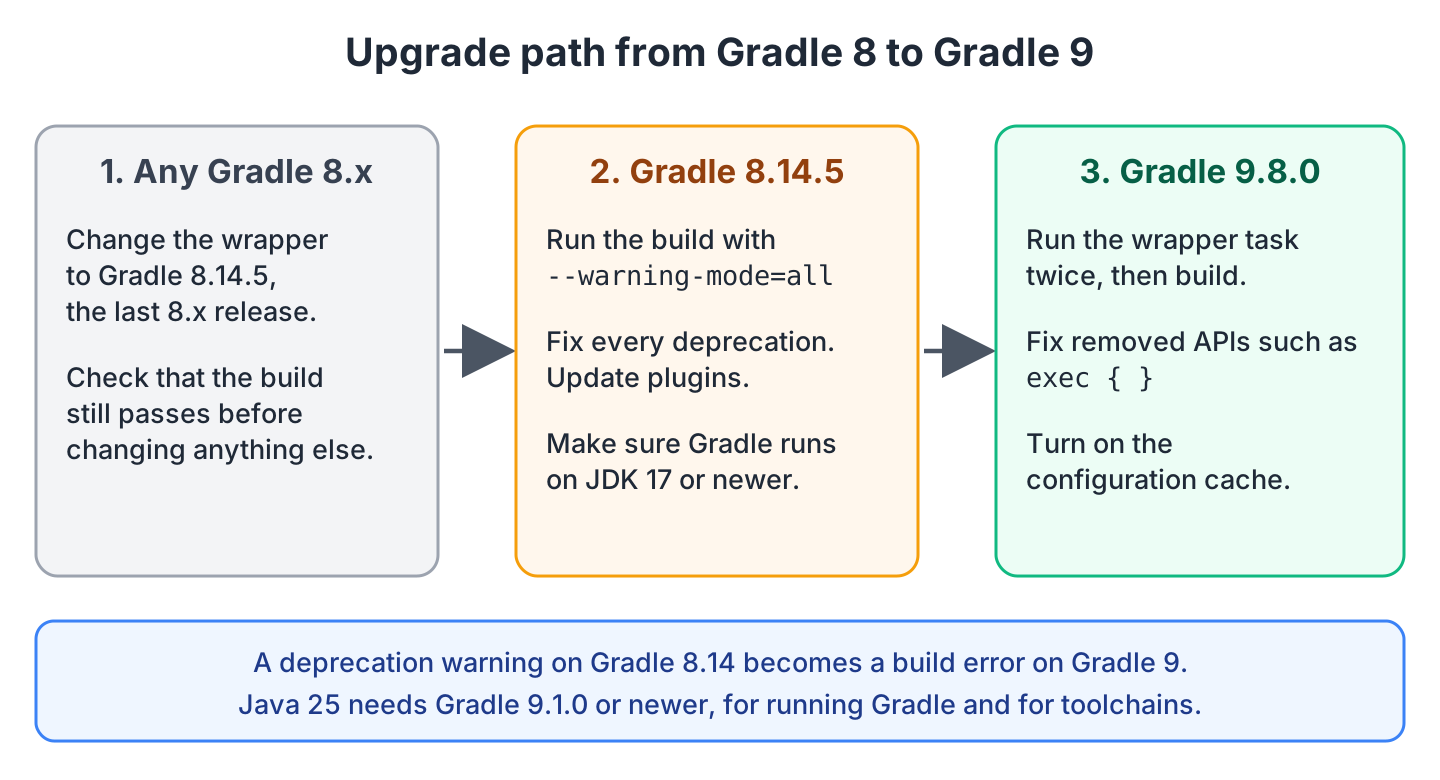
Every step uses the Gradle wrapper, which is the gradlew scripts plus the gradle/wrapper folder in our project. The wrapper downloads the Gradle version written in gradle-wrapper.properties, so one changed line upgrades the build for the whole team and for CI.
- Run ./gradlew wrapper –gradle-version 8.14.5 and check that the build passes.
- Run ./gradlew build –warning-mode=all and fix every deprecation it prints. Update third-party plugins to their latest versions.
- Make sure JAVA_HOME and the CI image use JDK 17 or newer.
- Run ./gradlew wrapper –gradle-version 9.8.0, and run ./gradlew wrapper a second time so the gradlew scripts and the wrapper JAR are updated too.
- Run ./gradlew build on Gradle 9 and fix what is left, with help from section 6.
- Commit the gradle/wrapper folder and both gradlew scripts.
In our example project, step 2 found a printGitHash task that called exec {} to read the current Git commit.
> Task :printGitHash
Using method exec(Action) has been deprecated. This is scheduled to be removed in Gradle 9.0. Use ExecOperations.exec(Action) or ProviderFactory.exec(Action) instead.

BUILD SUCCESSFUL in 15s
6. Common Gradle 9 Migration Errors and Fixes
Most Gradle 9 migration errors come from a removed API in a build script. To see one, we kept the exec {} call from section 5, changed the wrapper to 9.8.0 and ran the build.
* Where:
Build file '.../gradle-9/build.gradle.kts' line: 37

* What went wrong:
Script compilation errors:

  Line 37:         exec {
                   ^ Unresolved reference 'exec'.

  Line 38:             commandLine("git", "rev-parse", "--short", "HEAD")
                       ^ Unresolved reference 'commandLine'.

4 errors
The fix is to run the command through providers.exec {} from the ProviderFactory. The call returns a provider, which is a value that Gradle computes only when a task asks for it. So Gradle runs Git only when printGitHash reads the value, and the build also works with the configuration cache.
val gitHash = providers.exec {
    commandLine("git", "rev-parse", "--short", "HEAD")
    isIgnoreExitValue = true                                     // no failure outside a Git repo
}.standardOutput.asText.map { it.trim().ifEmpty { "unknown" } }

tasks.register("printGitHash") {
    val hash = gitHash
    doLast {
        println("Git commit: " + hash.get())                     // Git commit: unknown (no repo)
    }
}
The other common errors have a one-line fix each, and we met all of them while upgrading the example project.
| Error message | Cause | Fix |
|---|---|---|
| Gradle requires JVM 17 or later to run. | JAVA_HOME points to an old JDK. | Point JAVA_HOME to JDK 17 or newer. |
| Failed to load JUnit Platform. Please ensure that all JUnit Platform dependencies are available … including the JUnit Platform launcher. | Gradle 9 no longer adds the launcher. | Add testRuntimeOnly(“org.junit.platform:junit-platform-launcher”). |
| Unresolved reference ‘exec’. | Project.exec() is removed. | Use providers.exec {} or ExecOperations. |
| Unresolved reference ‘jcenter’. | jcenter() is removed. | Use mavenCentral(). |
| Unknown command-line option ‘-b’. | The -b and -c options are removed. | Run Gradle in the project folder, or pass the folder with -p. |
Old plugin versions cause most other errors, so we update plugins such as the Spring Boot Gradle plugin to their latest releases. Projects written in Kotlin also need the Kotlin Gradle Plugin 2.0.0 or newer.
7. Conclusion
Gradle 9 needs Java 17 or newer to run, and it is the only Gradle line that builds Java 25, 26 and 27 projects. All breaking changes came in 9.0, so we first fix the deprecation warnings on Gradle 8.14.5, then change the wrapper to 9.8.0 and turn on the configuration cache. Teams that still build with Maven can read about converting a Maven project to Gradle and compare it with what changed in Maven 4.
8. References
- Gradle 9.0.0 Release Notes
- Gradle 9.8.0 Release Notes
- Upgrading to Gradle 9.0.0
- Gradle Compatibility Matrix
- Configuration Cache
- Toolchains for JVM Projects
Happy Learning !!
