
A JUnit 5 test suite is a class annotated with @Suite that selects tests from several classes or packages and runs them together as one group. Selector annotations such as @SelectClasses and @SelectPackages decide where the suite looks for tests, and filter annotations such as @IncludeTags or @ExcludePackages narrow the result.
We use suites to run a named subset of the tests on purpose, for example the checkout tests before a release, a two-minute smoke test after a deployment, or a nightly regression run without the slow tests. The regular mvn test run stays as it is.
The following example groups the order and payment tests of a shop into one suite and runs it with Maven.
@Suite
@SuiteDisplayName("Checkout tests")
@SelectClasses({OrderServiceTest.class, PaymentServiceTest.class})
public class CheckoutSuite {
}
mvn test -Dtest=CheckoutSuite[INFO] Running com.howtodoinjava.junit.suites.CheckoutSuite
[INFO] Running com.howtodoinjava.junit.suites.orders.OrderServiceTest
[INFO] Tests run: 2, Failures: 0, Errors: 0, Skipped: 0, Time elapsed: 0.099 s -- in com.howtodoinjava.junit.suites.orders.OrderServiceTest
[INFO] Running com.howtodoinjava.junit.suites.payments.PaymentServiceTest
[INFO] Tests run: 2, Failures: 0, Errors: 0, Skipped: 0, Time elapsed: 0.011 s -- in com.howtodoinjava.junit.suites.payments.PaymentServiceTest
[INFO] Tests run: 0, Failures: 0, Errors: 0, Skipped: 0, Time elapsed: 0.158 s -- in com.howtodoinjava.junit.suites.CheckoutSuite
[INFO] Tests run: 4, Failures: 0, Errors: 0, Skipped: 0Notice that the suite class has no code. The annotations are the whole definition, and the 4 tests are reported under their own classes, nested inside the suite.
We start with how a suite picks its tests and the one dependency it needs. After that, we build suites by class, package, class name pattern, tag and single method, add setup code with @BeforeSuite, and run suites with Maven and Gradle without running every test twice.
1. How a @Suite Class Picks Its Tests
A suite works in two steps. First, the selectors collect candidate tests from classes, packages, methods or classpath resources. After that, the filters remove candidates by package, class name, tag or engine. A suite without any selector finds nothing, so a filter annotation on its own never works.
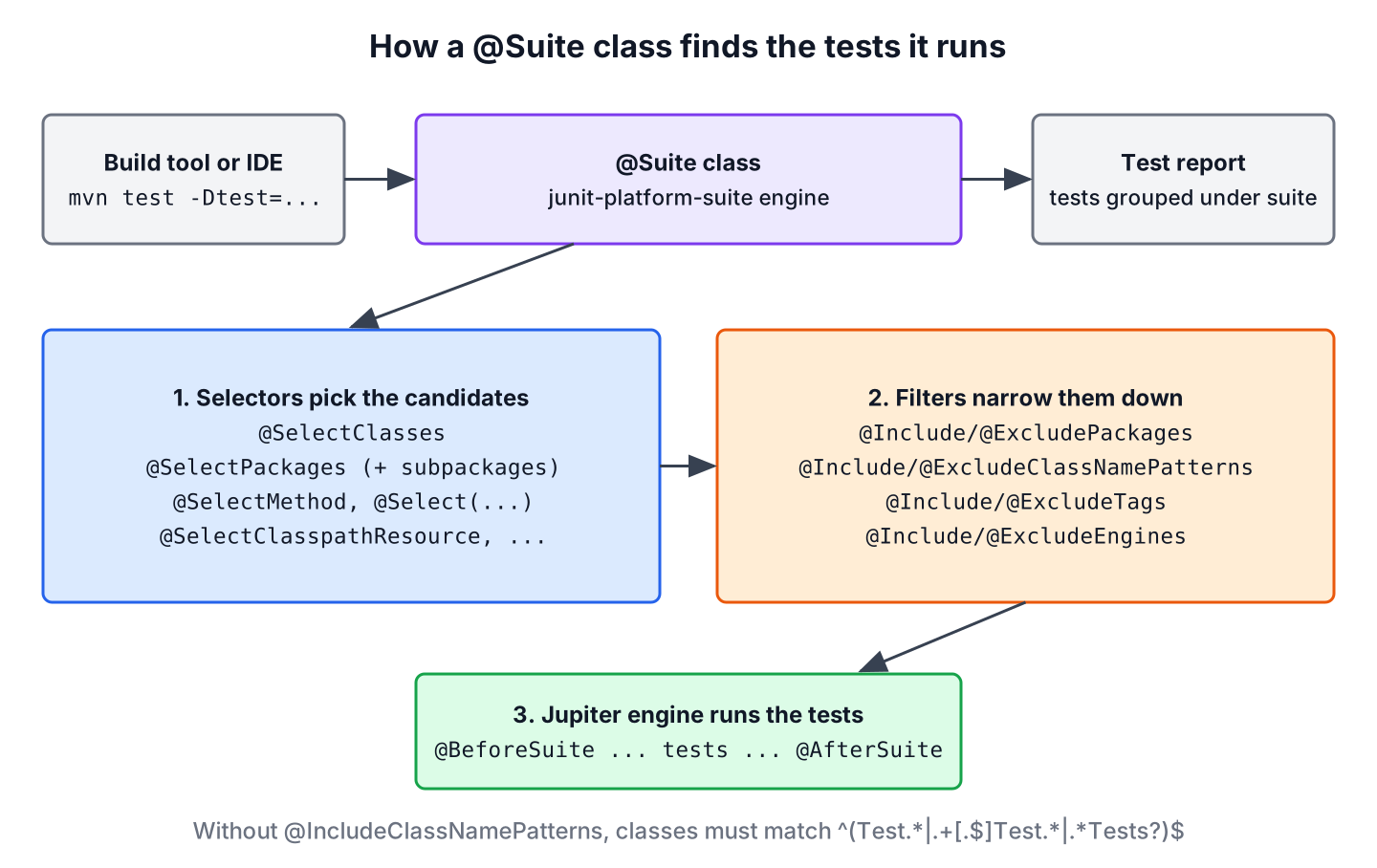
All annotations are in the package org.junit.platform.suite.api. These are the ones we use in practice.
| Annotation | Kind | What it does |
|---|---|---|
| @Suite | marker | Marks the class as a suite for the suite engine |
| @SelectClasses | selector | Selects test classes, by class literal or by name |
| @SelectPackages | selector | Selects all test classes in packages and their subpackages |
| @SelectMethod, @Select | selector | Selects one method, or any target by a prefixed selector such as method: or class: |
| @IncludePackages, @ExcludePackages | filter | Keeps or removes tests by package |
| @IncludeClassNamePatterns, @ExcludeClassNamePatterns | filter | Keeps or removes test classes by a regex on the fully qualified name |
| @IncludeTags, @ExcludeTags | filter | Keeps or removes tests by tag or tag expression |
| @SuiteDisplayName | report | Sets the name of the suite in IDE and Gradle reports |
| @BeforeSuite, @AfterSuite | lifecycle | Runs static methods once before and after all tests of the suite |
| @ConfigurationParameter | config | Passes a JUnit configuration parameter to the tests of this suite |
2. Adding the Suite Engine to the Build
Suites need the JUnit Platform Suite Engine. The artifact junit-platform-suite brings both the annotations and the engine, and the JUnit BOM sets its version. The examples use Java 25, JUnit 6.1.3 and Maven Surefire 3.6.0. The same code runs on JUnit 5.11 or later, because JUnit 6 kept the suite annotations and removed only @UseTechnicalNames and the old JUnitPlatform runner. The JUnit Maven dependency article covers the rest of the setup, and the JUnit tutorial lists the other topics of this series.
<dependencyManagement>
  <dependencies>
    <dependency>
      <groupId>org.junit</groupId>
      <artifactId>junit-bom</artifactId>
      <version>6.1.3</version>
      <type>pom</type>
      <scope>import</scope>
    </dependency>
  </dependencies>
</dependencyManagement>

<dependencies>
  <dependency>
    <groupId>org.junit.jupiter</groupId>
    <artifactId>junit-jupiter</artifactId>
    <scope>test</scope>
  </dependency>
  <dependency>
    <groupId>org.junit.platform</groupId>
    <artifactId>junit-platform-suite</artifactId>
    <scope>test</scope>
  </dependency>
</dependencies>
Older tutorials run suites with @RunWith(JUnitPlatform.class) from the junit-platform-runner module. That runner used JUnit 4 to start the JUnit Platform, it was deprecated in JUnit 5.8 when @Suite arrived, and JUnit 6.0 removed the module. A project on JUnit 6 must use @Suite.
3. Selecting Test Classes With @SelectClasses
The annotation @SelectClasses lists the test classes of the suite. This is the clearest form when a feature spans a few classes in different packages, such as the order and payment tests of a checkout.
@SelectClasses({OrderServiceTest.class, PaymentServiceTest.class})A class literal follows the Java visibility rules. JUnit test classes are often package-private, so a suite in another package does not compile until the test classes are public. In our project, CheckoutSuite is in com.howtodoinjava.junit.suites and the tests in subpackages, so we made OrderServiceTest and PaymentServiceTest public. If we want to keep a test class package-private, the attribute names (since JUnit 5.10) takes the fully qualified class name as a string.
A suite can also select other suites. ReleaseSuite runs CheckoutSuite and PaymentsSuite one after the other, and the report shows each suite as its own node.
@Suite
@SelectClasses({CheckoutSuite.class, PaymentsSuite.class})
public class ReleaseSuite {
}
The nested suites do not remove duplicates. PaymentServiceTest is part of both suites, so mvn test -Dtest=ReleaseSuite runs it twice and reports 7 tests for 5 test methods.
4. Selecting Packages With @SelectPackages
The annotation @SelectPackages selects every test class in a package and in all its subpackages. Package selection fits a project that is organized by feature, because a new test class in the package joins the suite without any change to the suite.
@Suite
@SelectPackages("com.howtodoinjava.junit.suites.payments")
public class PaymentsSuite {
}
[INFO] Running com.howtodoinjava.junit.suites.PaymentsSuite
[INFO] Running com.howtodoinjava.junit.suites.payments.PaymentServiceTest
[INFO] Tests run: 2, Failures: 0, Errors: 0, Skipped: 0, Time elapsed: 0.096 s -- in com.howtodoinjava.junit.suites.payments.PaymentServiceTest
[INFO] Running com.howtodoinjava.junit.suites.payments.refunds.RefundPolicyTest
[INFO] Tests run: 1, Failures: 0, Errors: 0, Skipped: 0, Time elapsed: 0.013 s -- in com.howtodoinjava.junit.suites.payments.refunds.RefundPolicyTest
[INFO] Tests run: 3, Failures: 0, Errors: 0, Skipped: 0We can see that RefundPolicyTest from the subpackage payments.refunds is part of the run. To leave a subpackage out, we add @ExcludePackages, and PaymentsWithoutRefundsSuite runs only the 2 tests of PaymentServiceTest. The opposite filter, @IncludePackages, keeps only the named subpackages of a wider selection.
@Suite
@SelectPackages("com.howtodoinjava.junit.suites.payments")
@ExcludePackages("com.howtodoinjava.junit.suites.payments.refunds")
public class PaymentsWithoutRefundsSuite {
}
5. Filtering by Class Name With @IncludeClassNamePatterns
A package selection does not take every class in the package. When a suite has no @IncludeClassNamePatterns, JUnit applies the standard pattern ^(Test.*|.+[.$]Test.*|.*Tests?)$, so only classes whose simple name starts with Test or ends with Test or Tests are included. A class such as ShippingLabelChecks is left out without any message.
The annotation @IncludeClassNamePatterns replaces the standard pattern with our own regular expressions. The patterns match the fully qualified class name, and a class is included when it matches at least one of them.
@Suite
@SelectPackages("com.howtodoinjava.junit.suites.shipping")
@IncludeClassNamePatterns({".*Tests", ".*Checks"})
public class ShippingSuite {
}
[INFO] Running com.howtodoinjava.junit.suites.ShippingSuite
[INFO] Running com.howtodoinjava.junit.suites.shipping.ShippingLabelChecks
[INFO] Tests run: 1, Failures: 0, Errors: 0, Skipped: 0, Time elapsed: 0.131 s -- in com.howtodoinjava.junit.suites.shipping.ShippingLabelChecks
[INFO] Running com.howtodoinjava.junit.suites.shipping.ShippingCostTests
[INFO] Tests run: 1, Failures: 0, Errors: 0, Skipped: 0, Time elapsed: 0.087 s -- in com.howtodoinjava.junit.suites.shipping.ShippingCostTests
[INFO] Tests run: 2, Failures: 0, Errors: 0, Skipped: 0The annotation @ExcludeClassNamePatterns works the other way round. A class is removed when its name matches any of the patterns, and the standard include pattern still applies to the rest.
6. Filtering by Tags
Tags select tests across the package structure. A team tags quick unit tests with fast and long-running ones with slow, and a suite picks them by tag. The annotations @IncludeTags and @ExcludeTags take tag names or tag expressions, which the JUnit @Tag article explains with Maven and Gradle filters.
@Suite
@SelectPackages("com.howtodoinjava.junit.suites")
@IncludeTags("fast")
public class FastSuite {
}
FastSuite runs 2 tests, the tagged class OrderTotalsTest and the tagged method rejectsShortCardNumber(). Notice that it selects the package of the suite classes themselves. The suite classes do not match the standard class name pattern, so a suite never selects itself or another suite by accident.
Filters combine with AND. RegressionSuite selects the whole project, removes the slow tests and every class with Shipping in its name, and runs the 5 order and payment tests.
@Suite
@SelectPackages("com.howtodoinjava.junit.suites")
@ExcludeTags("slow")
@ExcludeClassNamePatterns(".*Shipping.*")
public class RegressionSuite {
}
7. Single Methods, Setup Code and Configuration
A smoke test after a deployment needs only a handful of methods from different classes. The annotation @SelectMethod (since JUnit 5.10) selects one method by class#method, and it is repeatable. The generic @Select annotation (since JUnit 5.11) does the same with a prefix, such as @Select(“method:com.example.OrderTest#placesOrder”).
The same suite starts a payment gateway stub before the tests and stops it afterwards. Methods annotated with @BeforeSuite and @AfterSuite must be static, must return void and must not be private. The annotation @ConfigurationParameter passes a configuration parameter to the tests of this suite only, here a default timeout of 5 seconds per test.
@Suite
@SelectMethod("com.howtodoinjava.junit.suites.orders.OrderServiceTest#placesOrder")
@SelectMethod("com.howtodoinjava.junit.suites.payments.PaymentServiceTest#chargesValidCard")
@ConfigurationParameter(key = "junit.jupiter.execution.timeout.default", value = "5s")
public class SmokeSuite {

    @BeforeSuite
    static void startStubs() {
        System.out.println("Starting payment gateway stub");
    }

    @AfterSuite
    static void stopStubs() {
        System.out.println("Stopping payment gateway stub");
    }
}
[INFO] Running com.howtodoinjava.junit.suites.SmokeSuite
Starting payment gateway stub
[INFO] Running com.howtodoinjava.junit.suites.orders.OrderServiceTest
[INFO] Tests run: 1, Failures: 0, Errors: 0, Skipped: 0, Time elapsed: 0.364 s -- in com.howtodoinjava.junit.suites.orders.OrderServiceTest
[INFO] Running com.howtodoinjava.junit.suites.payments.PaymentServiceTest
[INFO] Tests run: 1, Failures: 0, Errors: 0, Skipped: 0, Time elapsed: 0.071 s -- in com.howtodoinjava.junit.suites.payments.PaymentServiceTest
Stopping payment gateway stubThe setup method runs once for the whole suite, not once per test class, which makes it the right place for an expensive stub or an embedded database. For setup per test class, we use @BeforeAll and @AfterAll inside the test class.
8. Running Suites With Maven and Gradle
For the build tool, a suite is a test class like any other, and the suite engine runs next to the Jupiter engine. Maven and Gradle pick test classes in different ways, so each one needs its own small configuration to run every test once.
8.1. Maven Surefire
Surefire’s default includes are **/Test*.java, **/*Test.java, **/*Tests.java and **/*TestCase.java. A class named CheckoutSuite matches none of them, so a plain mvn test runs the 7 tests of the regular test classes and no suite. Naming suites *Suite and tests *Test keeps every test from running twice.
To run one suite, we pass its name with -Dtest, which replaces the includes for that run. To run all suites in a CI job, we add a profile that includes only the suite classes.
mvn test                          # 7 tests, no suites
mvn test -Dtest=CheckoutSuite     # 4 tests
mvn test -Psuites                 # all suites, 27 test runs
<profile>
<id>suites</id>
<build>
<plugins>
<plugin>
<groupId>org.apache.maven.plugins</groupId>
<artifactId>maven-surefire-plugin</artifactId>
<configuration>
<includes>
<include>**/*Suite.java</include>
</includes>
</configuration>
</plugin>
</plugins>
</build>
</profile>The suites profile reports 27 test runs for 8 test methods, because several suites select the same tests. A suite is a view on the tests, not a partition of them.
8.2. Gradle
Gradle does not filter test classes by name. It passes every class to the JUnit Platform, so the suite engine runs every @Suite class during ./gradlew test as well, and the tests inside the suites run again. We exclude the suite engine from the test task and register a separate task that includes only the suite engine.
tasks.named('test', Test) {
    useJUnitPlatform {
        excludeEngines 'junit-platform-suite'
    }
}

tasks.register('suiteTest', Test) {
    testClassesDirs = sourceSets.test.output.classesDirs
    classpath = sourceSets.test.runtimeClasspath
    useJUnitPlatform {
        includeEngines 'junit-platform-suite'
    }
}
Checkout tests > OrderServiceTest > rejectsEmptyOrder() PASSED
Checkout tests > OrderServiceTest > placesOrder() PASSED
Checkout tests > PaymentServiceTest > rejectsShortCardNumber() PASSED
Checkout tests > PaymentServiceTest > chargesValidCard() PASSED
BUILD SUCCESSFUL in 16sGradle shows the @SuiteDisplayName value, Checkout tests, whereas Surefire prints the class name. The JUnit Gradle dependency article explains the rest of the Gradle setup.
8.3. A Suite That Finds No Tests
By default, a suite fails when its selectors and filters leave no test, because failIfNoTests of @Suite is true. A typo in a package name or a too strict pattern shows up as an error instead of a green build that tested nothing. EmptySuite has no selector at all.
@Suite
public class EmptySuite {
}
[ERROR] Tests run: 1, Failures: 0, Errors: 1, Skipped: 0, Time elapsed: 0.013 s <<< FAILURE! -- in com.howtodoinjava.junit.suites.EmptySuite
org.junit.platform.suite.engine.NoTestsDiscoveredException: Suite [com.howtodoinjava.junit.suites.EmptySuite] did not discover any testsWhen an empty suite is expected, for example a suite for a tag that no test uses yet, we write @Suite(failIfNoTests = false).
9. Migrating JUnit 4 Suites
JUnit 4 built suites with runners. On the JUnit Platform, a JUnit 4 suite still runs through the Vintage engine, but new suites use the annotations of junit-platform-suite. The mapping is one to one for the common cases.
| JUnit 4 | JUnit 5 and 6 |
|---|---|
| @RunWith(Suite.class) | @Suite |
| @Suite.SuiteClasses({A.class, B.class}) | @SelectClasses({A.class, B.class}) |
| @RunWith(Categories.class) with @IncludeCategory | @IncludeTags with @Tag on the tests |
| @ExcludeCategory | @ExcludeTags |
| @RunWith(JUnitPlatform.class) (JUnit 5 only, removed in JUnit 6.0) | @Suite |
The JUnit 5 vs JUnit 4 comparison covers the other annotation changes and how both versions run in one project.
10. JUnit Test Suite FAQs
Most questions about suites come from builds that run too many or too few tests.
10.1. Why Does mvn test Not Run My Suite?
Because the suite class name does not match Surefire’s default includes. A class named *Suite runs only with -Dtest=MySuite or with an include pattern such as **/*Suite.java, as in section 8.1.
10.2. Why Do My Tests Run Twice?
Because the Jupiter engine runs them as regular tests and the suite engine runs them again inside the suite. With Maven, it happens when a suite name matches the includes, for example AllTests. With Gradle, it happens in every project with suites until we exclude the suite engine from the test task.
10.3. What Is the Difference Between a Test Class and a Test Suite?
A test class contains test methods. A suite contains no tests, it only selects tests from test classes and runs them as a group, possibly with its own configuration and setup code.
10.4. Can a Suite Run Its Tests in Parallel?
Yes. Parallel execution is a Jupiter setting, so we add two @ConfigurationParameter annotations to the suite, junit.jupiter.execution.parallel.enabled=true and junit.jupiter.execution.parallel.mode.default=concurrent. The tests of that suite run on several worker threads, while the regular runs stay sequential.
11. Conclusion
A JUnit test suite is a class with @Suite and a few annotations. Selectors such as @SelectClasses, @SelectPackages and @SelectMethod collect the tests, and filters for packages, class names and tags narrow them down. Without @IncludeClassNamePatterns, only classes that follow the standard test naming pattern are selected.
The build decides when suites run. Naming suites *Suite keeps them out of the regular Surefire run, -Dtest or a profile runs them on purpose, and Gradle needs the suite engine excluded from the test task. On JUnit 6, @Suite is the only way, because the old JUnitPlatform runner is gone.
12. References
- JUnit User Guide 6.1.3, JUnit Platform Suite Engine
- Package org.junit.platform.suite.api (JUnit 6.1.3 Javadoc)
- JUnit 6.0.0 Release Notes
- Maven Surefire, Inclusions and Exclusions of Tests
- Gradle Testing in Java Projects
Happy Learning !!

Hello,
Thanks for your great sharing!
Q1: If I have multiple test suites class(ex: one for regression Test, another for Smoke test), how would I go about executing specific one from a script ?
Q2 In Jenkins Job, how to configure certain(different) suites to run different cases?
Thanks!
Can you tell what maven modules and which version you are using for this examples?
Please refer to link.