
AssertJ is a Java library for test assertions where we pass the actual value to assertThat() and chain checks that read like a sentence, such as hasSize(3) or containsExactly(“apple”, “banana”). When a check fails, AssertJ prints the actual value and the part that differs from what we expected, so we can see the problem without a debugger.
We use AssertJ in place of the assertEquals() and assertTrue() calls in JUnit tests, for anything from a single String to a list of records, an Optional or a thrown exception. AssertJ works with JUnit 6, JUnit 4 and TestNG, and Spring Boot adds it to every project through spring-boot-starter-test.
The following example is a quick reference of the most common AssertJ assertions. Each line passes, except the last one, which shows the failure message.
List<String> fruits = List.of("apple", "banana", "cherry");
Map<String, Integer> ages = Map.of("Lokesh", 37, "Alex", 29);

assertThat("apple").startsWith("app").hasSize(5);                             // passes

assertThat(0.1 + 0.2).isCloseTo(0.3, within(0.0001));                         // passes

assertThat(fruits).hasSize(3).containsExactly("apple", "banana", "cherry");   // passes

assertThat(ages).containsEntry("Lokesh", 37).doesNotContainKey("John");       // passes

assertThatThrownBy(() -> Integer.parseInt("abc"))
    .isInstanceOf(NumberFormatException.class)
    .hasMessageContaining("abc");                                             // passes

assertThat(fruits).contains("kiwi");                                          // AssertionError
Expecting ListN:
["apple", "banana", "cherry"]
to contain:
["kiwi"]
but could not find the following element(s):
["kiwi"]Notice that every assertion starts with assertThat(), and the type of the actual value decides which methods we can chain, so the IDE completion shows only the checks that make sense. The name ListN in the message is the JDK class that List.of() returns.
Next, we add AssertJ to a JUnit 6 project and compare it with the JUnit assertions. After that, we go through each common type, soft assertions, custom assertions and Spring Boot tests, and finish with an AssertJ cheat sheet table.
1. Adding AssertJ to a JUnit 6 Project
We add assertj-core with the test scope next to JUnit 6. AssertJ runs inside any test framework, because a failed assertion is an AssertionError that the framework reports as a test failure. For checks such as isEqualTo() or containsExactly(), AssertJ throws the opentest4j subclass AssertionFailedError, so the IDE can show a diff of the expected and actual values.
The following example is a recipe app with a Recipe record, a RecipeBook service and a REST controller. The project uses AssertJ 3.27.7, JUnit 6.1.3, Java 25 and Spring Boot 4.1.1. The complete Maven project with 36 tests is in the assertj-tutorial folder on GitHub.
<dependency>
  <groupId>org.junit.jupiter</groupId>
  <artifactId>junit-jupiter</artifactId>
  <version>6.1.3</version>
  <scope>test</scope>
</dependency>
<dependency>
  <groupId>org.assertj</groupId>
  <artifactId>assertj-core</artifactId>
  <version>3.27.7</version>
  <scope>test</scope>
</dependency>
For Gradle, the same dependency is testImplementation(“org.assertj:assertj-core:3.27.7”). AssertJ 4.0.0-M1 on Maven Central is a milestone build, so we stay on the stable 3.27.x line.
All assertions are static methods of the Assertions class. AssertJ offers three ways to call them, and all three give the same assertions.
- import static org.assertj.core.api.Assertions.*; gives us assertThat(), assertThatThrownBy(), within(), tuple() and the rest. Most projects use this static import.
- BDDAssertions.then(actual) is the same API with a given/when/then name, for teams that write BDD-style tests.
- A test class that implements the WithAssertions interface can call assertThat() without any static import.
The Recipe record rejects a blank name and a cooking time of zero or less, which gives us exceptions to test in section 8.
public record Recipe(String name, int minutes, List<String> tags, LocalDate added) {

  public Recipe {
    if (name == null || name.isBlank()) {
      throw new IllegalArgumentException("Recipe name must not be blank");
    }
    if (minutes <= 0) {
      throw new IllegalArgumentException("Cooking time must be positive: " + minutes);
    }
    tags = List.copyOf(tags);
  }
}
2. AssertJ vs JUnit Assertions
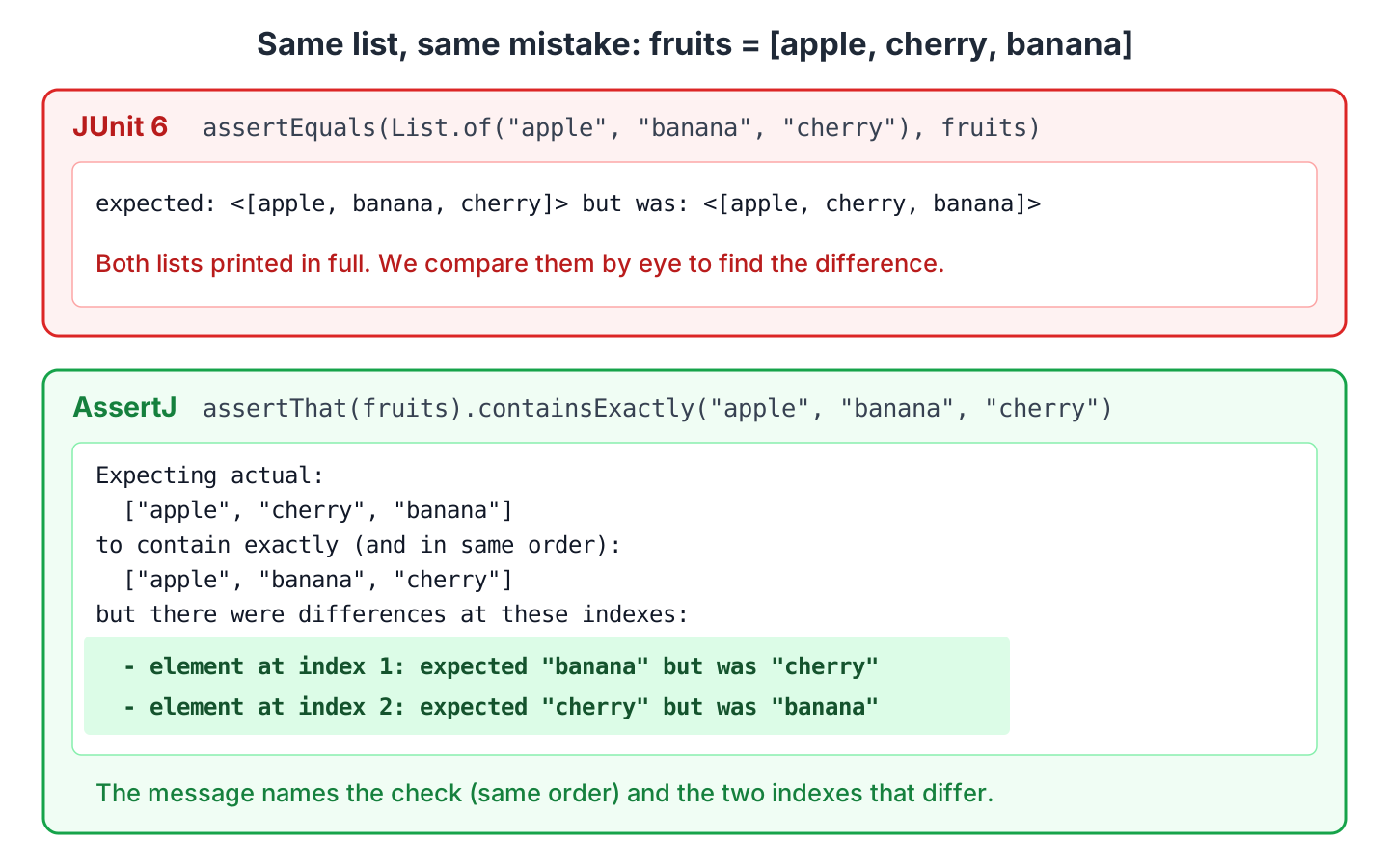
The JUnit assertions such as assertEquals(expected, actual) report expected X but was Y, which works for numbers and short strings. For a list in the wrong order, JUnit prints both lists in full, and we compare them by eye. The assertTrue() method knows only that a boolean was false.
AssertJ has a dedicated method for each check, so the failure message can name the problem. We run the checks on the list List.of(“apple”, “cherry”, “banana”), which has the right elements in the wrong order.
assertEquals(List.of("apple", "banana", "cherry"), fruits);          // JUnit
assertThat(fruits).containsExactly("apple", "banana", "cherry");     // AssertJ

assertTrue(fruits.contains("kiwi"));                                 // JUnit
----- assertEquals -----
expected: <[apple, banana, cherry]> but was: <[apple, cherry, banana]>
----- containsExactly -----
Expecting actual:
["apple", "cherry", "banana"]
to contain exactly (and in same order):
["apple", "banana", "cherry"]
but there were differences at these indexes:
- element at index 1: expected "banana" but was "cherry"
- element at index 2: expected "cherry" but was "banana"
----- assertTrue -----
expected: <true> but was: <false>We can see that AssertJ points to the two indexes that differ, whereas assertTrue() gives no detail at all. The AssertJ contains(“kiwi”) check in the intro names the missing element instead.
The second difference is readability. JUnit takes the expected value first, and swapped arguments produce a misleading message. AssertJ always starts with the actual value, and the table maps the everyday JUnit assertions to their AssertJ form.
| Check | JUnit 6 | AssertJ |
|---|---|---|
| Equality | assertEquals(15, minutes) | assertThat(minutes).isEqualTo(15) |
| Condition | assertTrue(name.startsWith(“Pan”)) | assertThat(name).startsWith(“Pan”) |
| Not null | assertNotNull(recipe) | assertThat(recipe).isNotNull() |
| Floating point | assertEquals(0.3, total, 0.0001) | assertThat(total).isCloseTo(0.3, within(0.0001)) |
| List with order | assertIterableEquals(expected, fruits) | assertThat(fruits).containsExactly(“apple”, “banana”) |
| Exception | assertThrows(IllegalStateException.class, () -> …) | assertThatThrownBy(() -> …).isInstanceOf(IllegalStateException.class) |
| Group of checks | assertAll(() -> …, () -> …) | SoftAssertions.assertSoftly(softly -> …) |
| Failure message | assertTrue(ok, “Lasagna is too slow”) | assertThat(minutes).as(“Lasagna cooking time”).isLessThan(30) |
The trade-off is one more library and a large API. JUnit 6 alone is enough for simple equality checks, and assertThrows() covers exceptions. AssertJ is the better choice as soon as we assert on collections, objects without equals() or exception messages.
3. String Assertions
String checks are where AssertJ replaces the most assertTrue() calls. Each of these methods would otherwise be a String method inside assertTrue(), and a failure would say only expected: <true> but was: <false>.
String name = "Pancakes";

assertThat(name).isEqualTo("Pancakes");                               // passes
assertThat(name).isEqualToIgnoringCase("PANCAKES");                   // passes
assertThat(name).startsWith("Pan").endsWith("cakes");                 // passes
assertThat(name).contains("cake").doesNotContain("waffle");           // passes
assertThat(name).containsIgnoringCase("CAKE");                        // passes
assertThat(name).hasSize(8).isNotBlank();                             // passes
assertThat(name).matches("[A-Z][a-z]+");                              // passes, whole string
assertThat("15").containsOnlyDigits();                                // passes
assertThat("Pan  cakes").isEqualToIgnoringWhitespace("Pancakes");     // passes
assertThat("Pan  cakes").isEqualToNormalizingWhitespace("Pan cakes"); // passes

String missing = null;
assertThat(missing).isNullOrEmpty();                                  // passes
The matches() method checks the whole string against a regular expression, like String.matches(). To check for a part of the string, use containsPattern(). A null actual value does not throw a NullPointerException, because AssertJ reports it as a normal assertion failure such as Expecting actual not to be null.
4. Number Assertions With isCloseTo() and Offsets
For integers, AssertJ adds range methods, so we don’t need two assertions for a lower and an upper bound. The isBetween() method includes both ends, and isStrictlyBetween() excludes them.
int minutes = 15;

assertThat(minutes).isEqualTo(15);                               // passes
assertThat(minutes).isPositive().isOdd();                        // passes
assertThat(minutes).isGreaterThan(10).isLessThanOrEqualTo(20);   // passes
assertThat(minutes).isBetween(10, 20);                           // passes, both ends included
assertThat(minutes).isStrictlyBetween(14, 16);                   // passes, both ends excluded
assertThat(minutes).isCloseTo(16, within(1));                    // passes
Never compare double or float results with isEqualTo(), because floating point arithmetic adds rounding errors. For example, 0.1 + 0.2 is 0.30000000000000004, so isEqualTo(0.3) fails with expected: 0.3 but was: 0.30000000000000004. We use isCloseTo() with an offset instead.
double total = 0.1 + 0.2;                                        // 0.30000000000000004

assertThat(total).isCloseTo(0.3, within(0.0001));                // passes
assertThat(total).isCloseTo(0.3, offset(0.0001));                // passes, same as within()
assertThat(total).isCloseTo(0.3, byLessThan(0.0001));            // passes
assertThat(1.0).isCloseTo(1.1, within(0.1));                     // passes, bound included
assertThat(1.0).isCloseTo(1.1, byLessThan(0.1));                 // AssertionError, bound excluded
assertThat(103.0).isCloseTo(100.0, withinPercentage(5));         // passes
assertThat(new BigDecimal("2.50")).isEqualByComparingTo("2.5");  // passes
assertThat(new BigDecimal("2.50")).isNotEqualTo(new BigDecimal("2.5")); // passes, scale differs
The offset factories differ only at the boundary, which matters when the difference equals the offset.
| Factory | Meaning | isCloseTo(1.1, …) on 1.0 with 0.1 |
|---|---|---|
| within(0.1) | Difference <= 0.1 | passes |
| offset(0.1) | Same as within() | passes |
| byLessThan(0.1) | Difference < 0.1 | fails |
| withinPercentage(5) | Difference <= 5% of the expected value | not applicable |
For BigDecimal, isEqualTo() calls BigDecimal.equals(), which also compares the scale, so 2.50 and 2.5 are not equal. Use isEqualByComparingTo() when only the numeric value matters, as with money amounts read from a database.
5. Collection Assertions
AssertJ saves the most code in collection assertions. Without it, we stream a list into names, sort it and compare it with an expected list, whereas one AssertJ chain checks the size, the elements and their order.
5.1. Choosing Between contains, containsExactly and containsExactlyInAnyOrder
Developers often mix up the contains family, because the methods differ in two rules. One rule is whether every element of the list must be listed, and the other is whether the order matters. Picking the strictest method that fits the test catches more bugs.
List<String> fruits = List.of("apple", "banana", "cherry");

assertThat(fruits).hasSize(3).isNotEmpty();                                 // passes
assertThat(fruits).contains("cherry", "apple");                             // passes, subset, any order
assertThat(fruits).containsExactly("apple", "banana", "cherry");            // passes, all, same order
assertThat(fruits).containsExactlyInAnyOrder("cherry", "apple", "banana");  // passes, all, any order
assertThat(fruits).containsOnly("banana", "apple", "cherry", "apple");      // passes, duplicates ignored
assertThat(fruits).containsSequence("banana", "cherry");                    // passes
assertThat(fruits).doesNotContain("kiwi").doesNotHaveDuplicates();          // passes
assertThat(fruits).startsWith("apple").endsWith("cherry");                  // passes
assertThat(fruits).allMatch(f -> f.length() >= 5);                          // passes
assertThat(fruits).anySatisfy(f -> assertThat(f).startsWith("b"));          // passes

assertThat(fruits).containsExactlyInAnyOrder("apple", "banana");            // AssertionError
Expecting actual:
["apple", "banana", "cherry"]
to contain exactly in any order:
["apple", "banana"]
but the following elements were unexpected:
["cherry"]The diagram turns the two rules into questions and adds a third one about duplicates.
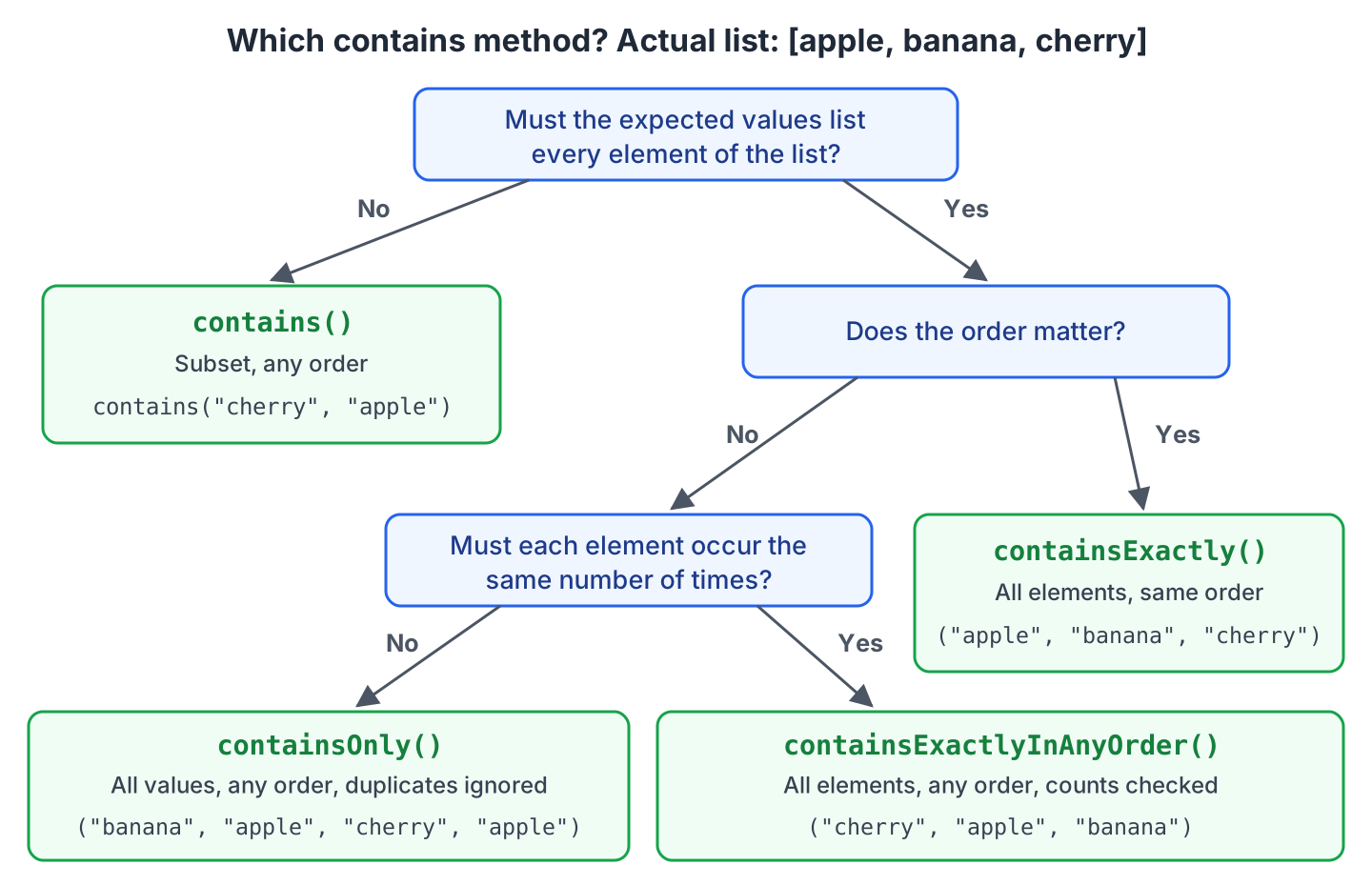
The containsOnly() method accepts duplicates in either list, whereas containsExactlyInAnyOrder() also checks how many times each element occurs. For a list that comes from a HashSet or a database query without ORDER BY, use containsExactlyInAnyOrder(), because the order is not defined.
5.2. Extracting Fields With extracting() and tuple()
Building complete expected Recipe objects for a contains() check is a lot of setup when the test cares only about names. The extracting() method maps each element to a value, and the assertions that follow run on those values.
Recipe pancakes = new Recipe("Pancakes", 15, List.of("breakfast", "sweet"), LocalDate.of(2026, 9, 12));
Recipe lasagna  = new Recipe("Lasagna", 90, List.of("dinner", "baked"), LocalDate.of(2026, 3, 4));
Recipe omelette = new Recipe("Omelette", 10, List.of("breakfast", "eggs"), LocalDate.of(2026, 10, 1));
List<Recipe> recipes = List.of(pancakes, lasagna, omelette);
assertThat(recipes)
.extracting(Recipe::name)
.containsExactly("Pancakes", "Lasagna", "Omelette"); // passes
assertThat(recipes)
.extracting(Recipe::name, Recipe::minutes)
.contains(tuple("Pancakes", 15), tuple("Omelette", 10)); // passes
assertThat(recipes)
.flatExtracting(Recipe::tags)
.contains("eggs", "baked")
.hasSize(6); // passes
assertThat(recipes)
.extracting("name")
.contains("Lasagna"); // passes, by property nameWith several extractors, extracting() returns one Tuple per element, and tuple(“Pancakes”, 15) builds the expected value. The flatExtracting() method puts the values of all inner lists into one list. Prefer method references such as Recipe::name over the string form “name”, because the compiler checks them and a rename in the IDE updates them.
5.3. Filtering With filteredOn()
The filteredOn() method keeps only the elements that match a predicate, and the chain goes on with the smaller list. We use it when a test checks a subset, such as all breakfast recipes, without writing a stream in the test.
assertThat(recipes)
    .filteredOn(recipe -> recipe.minutes() <= 20)
    .extracting(Recipe::name)
    .containsExactlyInAnyOrder("Pancakes", "Omelette");                   // passes

assertThat(recipes)
    .filteredOn(recipe -> recipe.tags().contains("breakfast"))
    .hasSize(2)
    .allSatisfy(recipe -> assertThat(recipe.minutes()).isLessThan(30));   // passes
The allSatisfy() method runs the assertions in the lambda on every element. If one element fails, the message names the element and the failed assertion, which is more helpful than allMatch() with a predicate.
6. Map Assertions
Map assertions check keys, values and entries without calling get() first. A missing key fails with a message that lists the map content, whereas get() returns null and a JUnit assertEquals() reports only but was: <null>.
Map<String, Integer> stock = Map.of("apple", 5, "banana", 3);

assertThat(stock).hasSize(2).isNotEmpty();                                      // passes
assertThat(stock).containsKey("apple").doesNotContainKey("kiwi");               // passes
assertThat(stock).containsKeys("apple", "banana");                              // passes
assertThat(stock).containsOnlyKeys("banana", "apple");                          // passes
assertThat(stock).containsValue(3).doesNotContainValue(0);                      // passes
assertThat(stock).containsEntry("apple", 5);                                    // passes
assertThat(stock).contains(entry("apple", 5), entry("banana", 3));              // passes
assertThat(stock).containsExactlyInAnyOrderEntriesOf(Map.of("banana", 3, "apple", 5)); // passes
assertThat(stock).extractingByKey("apple").isEqualTo(5);                        // passes
assertThat(stock).allSatisfy((fruit, count) -> assertThat(count).isPositive()); // passes
The containsOnlyKeys() method fails when the map has a key that is not listed, whereas containsKeys() accepts extra keys. The extractingByKey() method switches the assertion to the value of one key, so we can chain checks on that value.
7. Optional Assertions
Tests often check an Optional the wrong way. Calling found.get() in a test throws NoSuchElementException when the Optional is empty, and the test fails with an error instead of an assertion message. AssertJ checks the presence and the value in one chain.
RecipeBook book = new RecipeBook().add(pancakes).add(omelette);
Optional<Recipe> found    = book.findByName("pancakes");
Optional<Recipe> notFound = book.findByName("Lasagna");

assertThat(found).isPresent();                                                    // passes
assertThat(found).hasValue(pancakes);                                             // passes
assertThat(found).hasValueSatisfying(r -> assertThat(r.minutes()).isEqualTo(15)); // passes
assertThat(found).get().extracting(Recipe::name).isEqualTo("Pancakes");           // passes
assertThat(found).map(Recipe::minutes).contains(15);                              // passes
assertThat(notFound).isEmpty();                                                   // passes
assertThat(book.findByName(null)).isNotPresent();                                 // passes
The get() method of the assertion is safe, because it first checks that the value is present. After get(), the chain continues as an object assertion on the Recipe.
8. Exception Assertions
A test for an error case has to prove two things, namely that the code throws, and that it throws the right exception with the right message. AssertJ either checks the exception in one chain, which fails when nothing is thrown, or catches the exception first so we can check it in a separate step.
8.1. Expecting Exceptions With assertThatThrownBy() and assertThatExceptionOfType()
The assertThatThrownBy() method takes a lambda, runs it, and switches to assertions on the thrown exception. The assertThatExceptionOfType() method states the type first, which reads better when the type is the main point of the test. Shortcuts exist for the common types, such as assertThatIllegalArgumentException(), assertThatIllegalStateException(), assertThatNullPointerException() and assertThatIOException().
RecipeBook book = new RecipeBook().add(pancakes);

assertThatThrownBy(() -> book.add(pancakes))
    .isInstanceOf(IllegalStateException.class)
    .hasMessage("Recipe already exists: Pancakes")
    .hasNoCause();                                                  // passes

assertThatExceptionOfType(IllegalArgumentException.class)
    .isThrownBy(() -> new Recipe("Toast", 0, List.of(), LocalDate.now()))
    .withMessage("Cooking time must be positive: 0");               // passes

assertThatIllegalArgumentException()
    .isThrownBy(() -> new Recipe(" ", 5, List.of(), LocalDate.now()))
    .withMessageContaining("blank");                                // passes
When the lambda returns without an exception, the assertion fails with the message Expecting code to raise a throwable., so a missing throw in the production code shows up as a failed test.
8.2. Catching Exceptions With catchThrowable()
Some teams want the action and the checks in separate blocks of the test. The catchThrowable() method runs the lambda and returns the exception, or null when nothing was thrown. The catchThrowableOfType() method also checks the type and returns the exception already cast.
Throwable thrown = catchThrowable(() -> Integer.parseInt("abc"));
assertThat(thrown)
    .isInstanceOf(NumberFormatException.class)
    .hasMessage("For input string: \"abc\"");                       // passes

IllegalStateException duplicate =
    catchThrowableOfType(IllegalStateException.class, () -> book.add(pancakes));
assertThat(duplicate.getMessage()).endsWith("Pancakes");            // passes

Throwable none = catchThrowable(() -> book.add(lasagna));
assertThat(none).isNull();                                          // passes, nothing thrown
In AssertJ 3.27, the type comes first in catchThrowableOfType(). The older order with the lambda first is deprecated.
8.3. Asserting That No Exception Is Thrown
Code that must not throw, such as a lookup with a null name, gets its own assertion. Without one, the test passes when the method returns, but nothing in the test states the intent.
assertThatCode(() -> book.findByName(null)).doesNotThrowAnyException();   // passes
assertThatNoException().isThrownBy(() -> book.add(omelette));             // passes
9. Comparing Objects and Records With usingRecursiveComparison()
The isEqualTo() method calls the equals() method of the actual object. For a Java record, equals() compares all components. For a class without equals(), such as many JPA entities and DTOs, isEqualTo() compares references, so two objects with the same data are not equal.
The recursive comparison compares objects field by field, including nested objects and collections. We use it for objects without equals(), and for saved entities whose generated fields, such as an ID or a creation date, differ from the expected object.
Recipe saved    = new Recipe("Pancakes", 15, List.of("breakfast", "sweet"), LocalDate.of(2026, 10, 5));
Recipe expected = new Recipe("Pancakes", 15, List.of("breakfast", "sweet"), LocalDate.of(2026, 9, 12));

assertThat(saved).isEqualTo(expected);                      // AssertionError, added differs

assertThat(saved)
    .usingRecursiveComparison()
    .ignoringFields("added")
    .isEqualTo(expected);                                   // passes
The recursive comparison also works between different types, because it matches fields by name. The RecipeSummary class in the next snippet has no equals() method.
RecipeSummary actual = new RecipeSummary("Pancakes", 15);
RecipeSummary other  = new RecipeSummary("Pancakes", 15);

assertThat(actual).isNotEqualTo(other);                             // passes, no equals()
assertThat(actual).usingRecursiveComparison().isEqualTo(other);     // passes, field by field

assertThat(saved)
    .usingRecursiveComparison()
    .comparingOnlyFields("name", "minutes")
    .isEqualTo(new RecipeSummary("Pancakes", 15));                  // passes, Recipe vs RecipeSummary

assertThat(List.of(saved))
    .usingRecursiveFieldByFieldElementComparatorIgnoringFields("added")
    .containsExactly(expected);                                     // passes, for lists
When the recursive comparison fails, the message lists every field that differs, not only the first one. The message also prints the comparison settings, such as the ignored fields.
when recursively comparing field by field, but found the following 2 differences:

field/property 'minutes' differ:
- actual value  : 15
- expected value: 20

field/property 'tags' differ:
- actual value  : ["breakfast", "sweet"]
- expected value: ["sweet"]
actual and expected values are collections of different size, actual size=2 when expected size=1

The recursive comparison was performed with this configuration:
- the following fields were ignored in the comparison: added
By default, the recursive comparison does not call overridden equals() methods, except on JDK types such as String and LocalDate. Call withStrictTypeChecking() when the actual and expected objects must also have the same class.
10. Date and Time Assertions
AssertJ has assertions for the java.time types, so we don’t compare LocalDate instances with isBefore() inside assertTrue(). The date assertions also accept ISO strings, which keeps the expected values short.
LocalDate added = LocalDate.of(2026, 9, 12);

assertThat(added).isBefore(LocalDate.of(2026, 10, 1));                        // passes
assertThat(added).isAfterOrEqualTo("2026-09-12");                             // passes, ISO string
assertThat(added).isBetween("2026-09-01", "2026-09-30");                      // passes
assertThat(added).hasYear(2026).hasMonth(Month.SEPTEMBER).hasDayOfMonth(12);  // passes
assertThat(added).isInThePast();                                              // passes
Times need a tolerance, because a test that compares Instant.now() with a value set a few milliseconds earlier fails on an exact check. The isCloseTo() method takes within() or byLessThan() with a ChronoUnit.
LocalDateTime start = LocalDateTime.of(2026, 10, 5, 18, 30, 0);
LocalDateTime end   = start.plusMinutes(15).plusSeconds(2);

assertThat(end).isCloseTo(start.plusMinutes(15), within(5, ChronoUnit.SECONDS));       // passes
assertThat(end).isCloseTo(start.plusMinutes(15), byLessThan(1, ChronoUnit.MINUTES));   // passes

Instant createdAt = Instant.now();
assertThat(createdAt).isCloseTo(Instant.now(), within(1, ChronoUnit.SECONDS));         // passes

Duration cookingTime = Duration.between(start, end);
assertThat(cookingTime).hasMinutes(15).isPositive();                                   // passes
assertThat(cookingTime).isCloseTo(Duration.ofMinutes(15), Duration.ofSeconds(5));      // passes
11. Soft Assertions
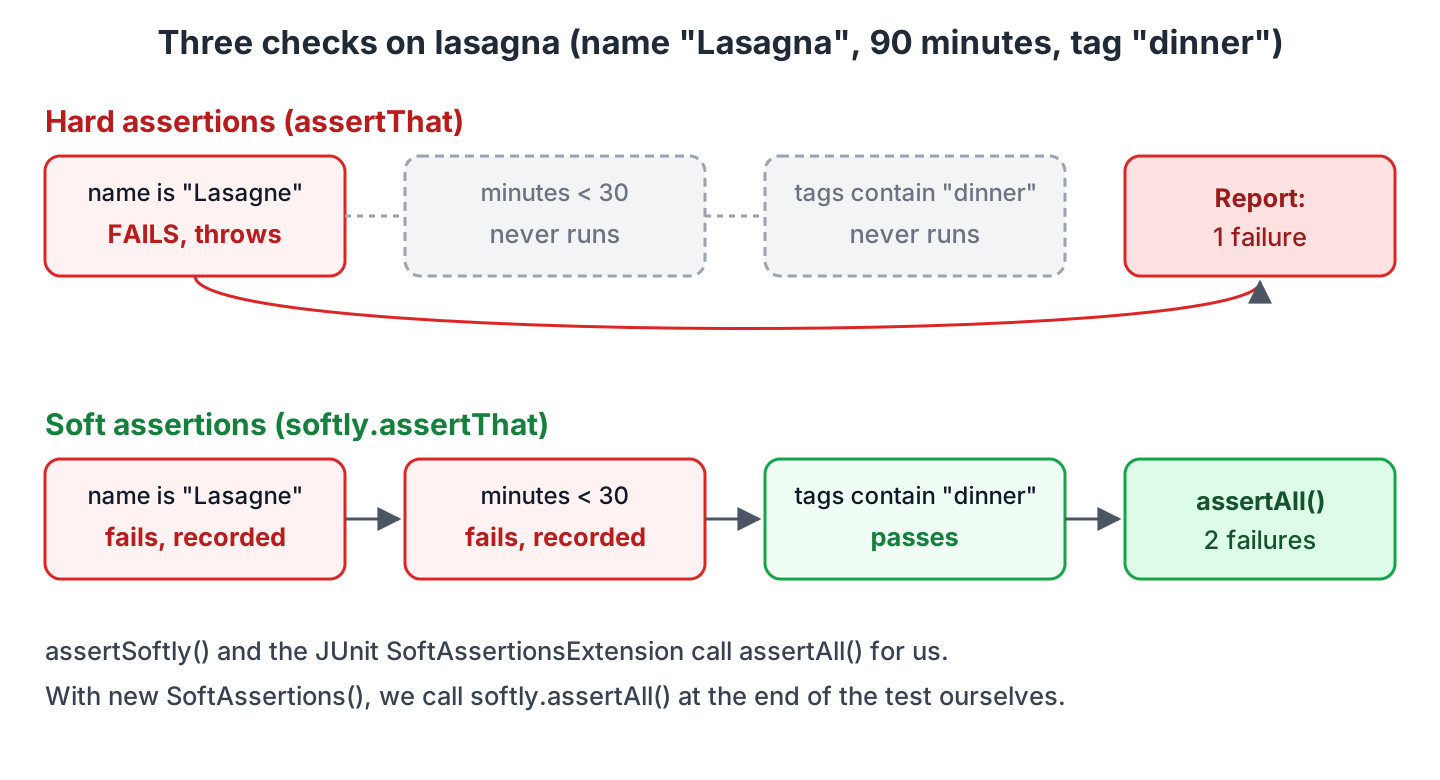
A normal assertion throws on the first failure, so the remaining checks in the test never run. When a test checks several fields of one object, we fix the first failure, run the test again, and find the next one. Soft assertions collect all failures and report them together at the end.
11.1. SoftAssertions.assertSoftly()
The assertSoftly() method gives us a SoftAssertions object, and every assertion called on softly records its failure instead of throwing. When the lambda ends, AssertJ calls assertAll(), which throws one error with all failures.
SoftAssertions.assertSoftly(softly -> {
  softly.assertThat(lasagna.name()).as("name").isEqualTo("Lasagne");
  softly.assertThat(lasagna.minutes()).as("minutes").isLessThan(30);
  softly.assertThat(lasagna.tags()).as("tags").contains("dinner");
});                                                         // AssertionError, 2 failures
Multiple Failures (2 failures)
-- failure 1 --
[name]
expected: "Lasagne"
but was: "Lasagna"
at SoftAssertionsTest.allFailuresReported(SoftAssertionsTest.java:24)
-- failure 2 --
[minutes]
Expecting actual:
90
to be less than:
30
at SoftAssertionsTest.allFailuresReported(SoftAssertionsTest.java:24)We can also create new SoftAssertions() and call softly.assertAll() at the end of the test. If we forget assertAll(), the recorded failures are never reported and the test passes. The assertSoftly() method and the JUnit extension in the next section avoid that mistake.
11.2. @InjectSoftAssertions With the JUnit Extension
The SoftAssertionsExtension is a JUnit Jupiter extension, and it works with JUnit 6 without changes. The extension injects a fresh SoftAssertions into a field annotated with @InjectSoftAssertions before each test method, and calls assertAll() after each test.
@ExtendWith(SoftAssertionsExtension.class)
class SoftAssertionsExtensionTest {

  @InjectSoftAssertions
  SoftAssertions softly;

  @Test
  void omelette() {
    softly.assertThat(omelette.name()).isEqualTo("Omelette");
    softly.assertThat(omelette.minutes()).isLessThanOrEqualTo(10);
    softly.assertThat(omelette.tags()).containsExactly("breakfast", "eggs");
  }                                                         // assertAll() runs after the method
}
The field must not be static or final. A test method can also declare a SoftAssertions parameter instead of the field, and the extension resolves it.
12. Custom Assertions and Conditions
When the same domain check appears in many tests, such as “this recipe is quick”, we can give it a name. A Condition is a named predicate that we pass to is() or areExactly(), whereas a custom assertion class adds new methods to the chain, such as isQuick().
12.1. Conditions
A Condition wraps a predicate and a description. The description appears in the failure message, so the reader of the test report knows which rule failed.
Condition<Recipe> quick     = new Condition<>(r -> r.minutes() <= 20, "quick (at most 20 minutes)");
Condition<Recipe> breakfast = new Condition<>(r -> r.tags().contains("breakfast"), "breakfast");

assertThat(pancakes).is(quick);                        // passes
assertThat(lasagna).isNot(quick);                      // passes
assertThat(pancakes).has(allOf(quick, breakfast));     // passes
assertThat(recipes).areExactly(2, quick);              // passes
assertThat(recipes).haveAtLeastOne(not(breakfast));    // passes
assertThat(recipes).filteredOn(quick).hasSize(2);      // passes

assertThat(lasagna).is(quick);                         // AssertionError
Expecting actual:
Recipe[name=Lasagna, minutes=90, tags=[dinner, baked], added=2026-03-04]
to be quick (at most 20 minutes)For a one-off check, matches() takes a predicate and a description, and satisfies() takes a lambda with assertions, for example assertThat(pancakes).matches(r -> r.minutes() < 30, “takes less than 30 minutes”).
12.2. A Custom Assertion Class
A custom assertion class extends AbstractAssert and adds methods that call failWithMessage() when the check fails. Each method returns this, so the new methods chain with each other and with the inherited ones, such as isNotNull(). A static assertThat() factory method makes the class read like the built-in assertions.
public class RecipeAssert extends AbstractAssert<RecipeAssert, Recipe> {

  private RecipeAssert(Recipe actual) {
    super(actual, RecipeAssert.class);
  }

  public static RecipeAssert assertThat(Recipe actual) {
    return new RecipeAssert(actual);
  }

  public RecipeAssert isQuick() {
    isNotNull();
    if (actual.minutes() > 20) {
      failWithMessage("Expected recipe <%s> to take at most 20 minutes but it takes <%d>",
          actual.name(), actual.minutes());
    }
    return this;
  }

  public RecipeAssert hasTag(String tag) {
    isNotNull();
    if (!actual.tags().contains(tag)) {
      failWithMessage("Expected recipe <%s> to have tag <%s> but tags were <%s>",
          actual.name(), tag, actual.tags());
    }
    return this;
  }
}
RecipeAssert.assertThat(pancakes).isQuick().hasTag("sweet"); // passes
RecipeAssert.assertThat(lasagna).isQuick(); // AssertionError
// Expected recipe <Lasagna> to take at most 20 minutes but it takes <90>We call the class by name because the test also imports Assertions.assertThat(). A custom class is more work than a Condition, so we write one only for checks that many tests share.
13. Using AssertJ in Spring Boot Tests
Spring Boot projects already have AssertJ, because spring-boot-starter-test brings assertj-core together with JUnit Jupiter, Mockito, Hamcrest and JSONassert, and Spring Boot 4.1.1 manages AssertJ 3.27.7. We don’t declare a version, and every @SpringBootTest or @WebMvcTest class can call assertThat() on the results.
The same starter brings XMLUnit, and its XmlAssert class offers AssertJ-style assertions for XML documents. Spring Boot 4.1.1 manages JUnit 6.0.3, so the example project sets the junit-jupiter.version property to 6.1.3, as described in JUnit with Spring Boot.
Since Spring Framework 6.2, the Spring MVC test support also has an AssertJ API named MockMvcTester, and Spring Framework 7 keeps it. We pass a request to assertThat() and chain checks on the status and the JSON body, instead of the static status() and jsonPath() matchers of the classic MockMvc API. Spring Boot auto-configures MockMvcTester in a @WebMvcTest when AssertJ is on the classpath.
The RecipeControllerTest class uses MockMvcTester with a @MockitoBean for the RecipeBook service. In Spring Boot 4, @WebMvcTest comes from the spring-boot-starter-webmvc-test starter, in the package org.springframework.boot.webmvc.test.autoconfigure.
@WebMvcTest(RecipeController.class)
class RecipeControllerTest {

  @Autowired
  MockMvcTester mvc;

  @MockitoBean
  RecipeBook recipeBook;

  @Test
  void returnsRecipe() {
    given(recipeBook.findByName("pancakes")).willReturn(Optional.of(pancakes));

    assertThat(mvc.get().uri("/recipes/{name}", "pancakes"))
        .hasStatusOk()
        .hasContentType(MediaType.APPLICATION_JSON)
        .bodyJson()
        .extractingPath("$.minutes").isEqualTo(15);

    assertThat(mvc.get().uri("/recipes/{name}", "pancakes"))
        .bodyJson()
        .convertTo(Recipe.class)
        .satisfies(r -> assertThat(r.tags()).containsExactly("breakfast", "sweet"));
  }

  @Test
  void returns404() {
    given(recipeBook.findByName("kiwi")).willReturn(Optional.empty());

    assertThat(mvc.get().uri("/recipes/{name}", "kiwi"))
        .hasStatus(HttpStatus.NOT_FOUND);
  }
}
The controller returns {“name”:”Pancakes”,”minutes”:15,”tags”:[“breakfast”,”sweet”],”added”:”2026-09-12″}. The extractingPath() method reads one value with a JSON path, and convertTo() maps the whole body to a Recipe, so the usual AssertJ object and collection assertions apply. For a body comparison, bodyJson().isLenientlyEqualTo(“{ \”name\”: \”Pancakes\”, \”minutes\”: 15 }”) ignores fields that the expected JSON does not list.
Service and repository tests need no Spring support for AssertJ, for example usingRecursiveComparison().ignoringFields(“id”) on an entity saved in a @DataJpaTest.
14. Common AssertJ Mistakes
AssertJ is flexible, and a few mistakes produce tests that pass when they should fail. The first one is an assertThat() call without an assertion method after it.
assertThat(fruits.contains("kiwi"));                     // passes, checks nothing
assertThat(fruits).doesNotContain("kiwi");               // passes, checks the list

assertThat(90).isLessThan(30).as("Lasagna cooking time");   // description is ignored
assertThat(90).as("Lasagna cooking time").isLessThan(30);   // [Lasagna cooking time] in the message

assertThat(fruits.size()).isEqualTo(4);                  // message: expected: 4 but was: 3
assertThat(fruits).hasSize(4);                           // message: Expected size: 4 but was: 3 in: ["apple", "banana", "cherry"]
In each pair, the first line is the mistake and the second line is the fix.
- The as() description must come before the assertion method, because a failing assertion throws and the rest of the chain never runs.
- Asserting on list.size() or optional.isPresent() loses the context. The type-specific methods hasSize() and isPresent() print the content of the list or the Optional in the message.
- Mixing up the static imports of AssertJ and Hamcrest compiles in some cases, because both libraries have a method named assertThat(). Import org.assertj.core.api.Assertions.assertThat for the fluent style.
- A new SoftAssertions() without assertAll() never reports its failures, as we saw in section 11.1.
AssertJ marks its assertThat() methods with a @CheckReturnValue annotation, so static analysis tools that honor it, such as Error Prone, report an assertThat() call whose result is not used.
15. AssertJ Cheat Sheet
The table lists the AssertJ assertions that cover most tests, grouped by the type of the actual value. Every method is chainable, so we can combine several checks on one value in one statement.
| Type | Assertion | Passes when |
|---|---|---|
| Any object | isEqualTo(x), isNotEqualTo(x) | equals() returns true or false |
| Any object | isNull(), isNotNull() | The value is or is not null |
| Any object | isSameAs(x) | Both are the same reference |
| Any object | isInstanceOf(Recipe.class) | The value is of the type |
| Any object | usingRecursiveComparison().isEqualTo(x) | All fields are equal |
| Any object | extracting(Recipe::name).isEqualTo(“Pancakes”) | The extracted value matches |
| Any object | satisfies(r -> …), matches(predicate) | The lambda passes or the predicate is true |
| String | startsWith(), endsWith(), contains() | The text matches |
| String | isEqualToIgnoringCase(), matches(regex) | The text matches |
| String | isBlank(), isNotBlank(), hasSize(n) | The text is blank, not blank or has n characters |
| Numbers | isGreaterThan(), isBetween(a, b), isPositive() | The comparison is true |
| double | isCloseTo(0.3, within(0.0001)) | Difference <= offset |
| BigDecimal | isEqualByComparingTo(“2.5”) | compareTo() returns 0 |
| List | hasSize(n), isEmpty() | The size matches |
| List | contains(a, b) | a and b are in the list |
| List | containsExactly(a, b) | The list is a, b in this order |
| List | containsExactlyInAnyOrder(a, b) | The list is a and b in any order |
| List | doesNotContain(x), doesNotHaveDuplicates() | The element or a duplicate is absent |
| List | extracting(f1, f2).contains(tuple(…)) | The extracted tuples match |
| List | filteredOn(predicate), allSatisfy(lambda) | Narrows the list, checks every element |
| Map | containsEntry(k, v), containsKey(k) | The entry or key is in the map |
| Optional | isPresent(), isEmpty(), hasValue(x) | The value is present, absent or equal to x |
| Exception | assertThatThrownBy(…).isInstanceOf(T.class) | The lambda throws T |
| Exception | hasMessage(), hasMessageContaining(), hasCauseInstanceOf() | The message or cause matches |
| Exception | assertThatNoException().isThrownBy(…) | The lambda does not throw |
| LocalDate | isBefore(), isAfter(), isBetween(), isInThePast() | The date comparison is true |
| Instant | isCloseTo(x, within(1, ChronoUnit.SECONDS)) | Difference <= 1 second |
| Several | SoftAssertions.assertSoftly(softly -> …) | All checks pass, all failures reported |
The full list of assertions per type is in the AssertJ Core Javadoc, and the IDE shows it after assertThat(value). as well.
16. AssertJ FAQs
16.1. Is AssertJ Better Than Hamcrest?
For new Java code, yes in most teams. Hamcrest uses nested matchers such as assertThat(fruits, hasItem(“apple”)), and the IDE cannot suggest a matcher from the type of the actual value. AssertJ chains methods on the actual value, so completion lists only the checks for that type, and the failure messages are more detailed. Hamcrest is still useful where an API expects a Matcher, such as the classic MockMvc jsonPath() checks or Awaitility conditions.
16.2. Does AssertJ Work With JUnit 4, JUnit 5 and TestNG?
Yes. AssertJ throws a standard AssertionError (or its opentest4j subclass when available), and every test framework reports that as a failed test. Only the soft assertions extension is specific to JUnit Jupiter, which covers JUnit 5 and JUnit 6. For JUnit 4, AssertJ has a JUnitSoftAssertions rule.
17. Conclusion
AssertJ replaces the JUnit assertEquals() and assertTrue() calls with chains that start at assertThat(actual). The type of the actual value decides which assertions are available, and each failure message names the exact difference, such as the list index or the record field.
For collections, the choice between contains(), containsExactlyInAnyOrder() and containsExactly() decides how strict the test is, and extracting() with tuple() avoids building complete expected objects. For exceptions, assertThatThrownBy() checks the type and the message in one statement, and fails when nothing is thrown.
Use usingRecursiveComparison() for entities and DTOs without equals(), and soft assertions when a test checks many fields of one result. In Spring Boot tests, AssertJ is already on the classpath, and MockMvcTester brings the same style to controller tests.
18. References
- AssertJ Core documentation
- AssertJ Core Javadoc
- AssertJ releases on GitHub
- AssertJ soft assertions with JUnit Jupiter
- Spring Framework MockMvcTester reference
- JUnit User Guide
Happy Learning !!
