

An API gateway is a single entry point in front of backend services. Spring Cloud Gateway is the Spring project for building an API gateway that matches each incoming HTTP request to a route and forwards it to the right backend service. On the way, the gateway runs filters that can change the request before the call and the response after it.
We use Spring Cloud Gateway when clients should call one host instead of many microservices, and when tasks such as path rewriting, rate limiting, retries, circuit breaking and CORS belong in one place instead of in every service.
The following example is one route in the application.yml of a Spring Boot app with the spring-cloud-starter-gateway-server-webflux starter. The gateway listens on port 8080 and forwards every request under /api/recipes/** to a recipe service on port 8081.
spring:
  cloud:
    gateway:
      server:
        webflux:
          routes:
            - id: recipes
              uri: http://localhost:8081
              predicates:
                - Path=/api/recipes/**
              filters:
                - RewritePath=/api/recipes/?(?<segment>.*), /recipes/$\{segment}
                - AddRequestHeader=X-Request-Source, recipe-gateway

# Client calls:      GET http://localhost:8080/api/recipes/pancakes
# Gateway forwards:  GET http://localhost:8081/recipes/pancakes  (X-Request-Source: recipe-gateway)
# Client receives:   {"requestSource":"recipe-gateway","minutes":20,"name":"pancakes"}
Notice that the client never sees port 8081 or the /recipes path of the backend, so we can move or split the recipe service later without changing any client.
Next, we build a complete gateway around this route, with Java routes, Redis rate limiting, retries, a Resilience4j circuit breaker, CORS, WireMock tests and the actuator endpoints, and we compare the WebFlux and Web MVC flavors.
1. What Is an API Gateway?
An API gateway is a server between the clients and the services of a microservices system. Clients send all requests to the gateway, and the gateway decides which service gets each request. Without it, every client must know every service address, and every service repeats the same checks for rate limits, CORS and authentication.
Say a recipe app has a web frontend and a mobile app, and the backend has a recipe service, a shopping list service and a user service. With a gateway, both apps call one host, and the gateway routes /api/recipes/** to the recipe service and /api/lists/** to the shopping list service. A per-user request limit is configured once in the gateway, not in each service.
Each typical gateway task has a matching Spring Cloud Gateway feature.
| Gateway task | Spring Cloud Gateway feature |
|---|---|
| Send each request to the right service | Routes with predicates such as Path, Method, Header, Host |
| Hide internal paths and add metadata | Filters such as RewritePath, StripPrefix, AddRequestHeader |
| Protect services from too many requests | RequestRateLimiter filter with Redis |
| Survive failing or slow services | Retry and CircuitBreaker filters (Resilience4j) |
| Allow browser calls from other origins | Global or per-route CORS configuration |
| See what the gateway is doing | Actuator endpoint /actuator/gateway |
Spring Cloud Gateway replaced Netflix Zuul as the gateway of Spring Cloud. Teams that still run Zuul can find that older approach in the Zuul gateway tutorial.
1.1. Routes, Predicates and Filters
Spring Cloud Gateway has three building blocks, and every configuration we write uses all three.
- A route has an ID, a destination URI, a list of predicates and a list of filters.
- A predicate is a condition on the request, such as the path, the HTTP method, a header or the host name. A route matches only when all its predicates are true.
- A filter changes the request before the gateway calls the service, or the response after the service answers.
For each request, the gateway picks the first route whose predicates all match. It runs the “pre” part of the filters, sends the request to the route’s URI, and runs the “post” part on the response. If no route matches, the gateway returns 404 Not Found.
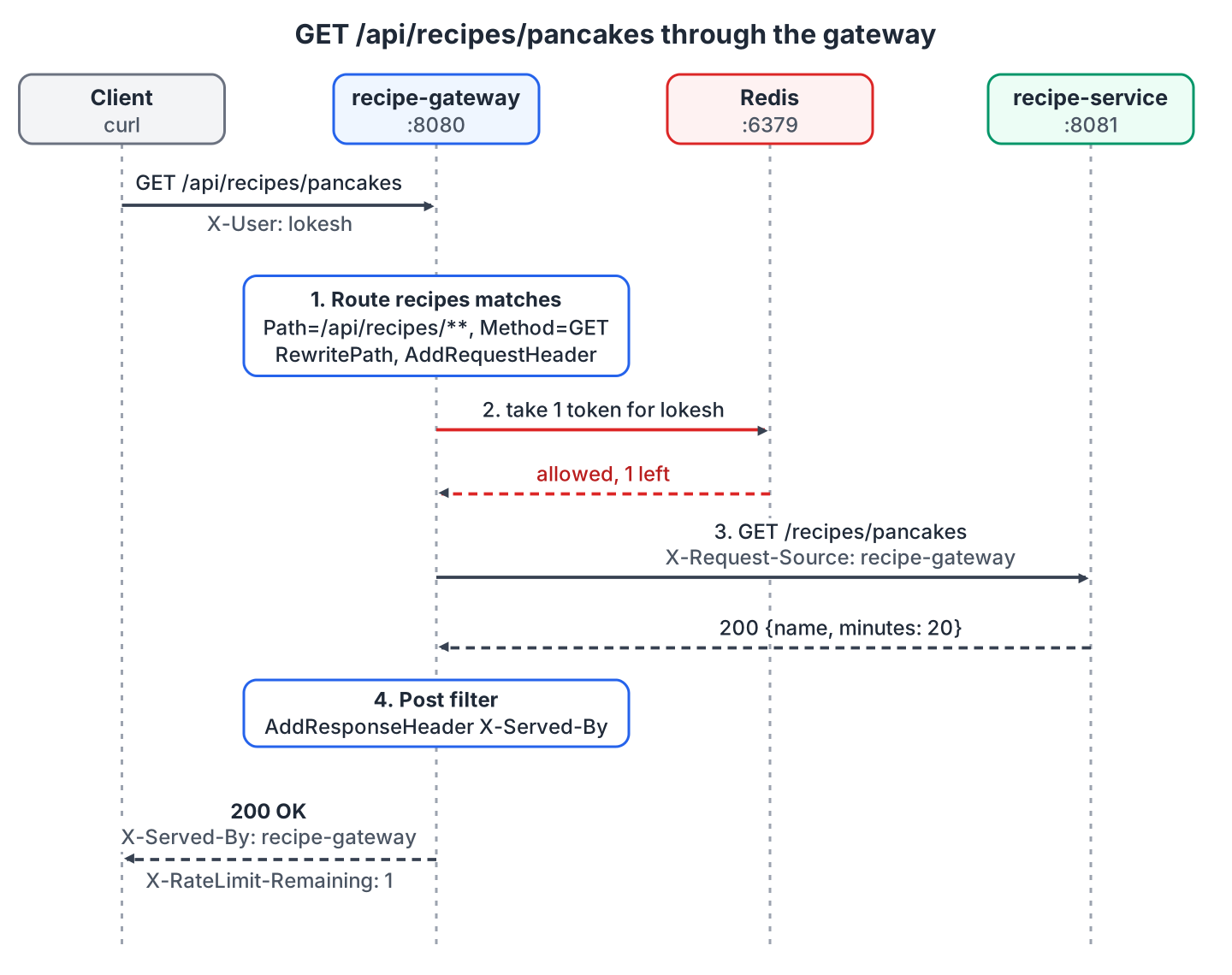
The most used predicates and filters, in the shortcut form of application.yml, are these.
| Kind | Example | Effect |
|---|---|---|
| Predicate | Path=/api/recipes/** | Matches the request path |
| Predicate | Method=GET | Matches the HTTP method |
| Predicate | Header=X-Version, 2 | Matches a header value (regex) |
| Predicate | Host=**.example.com | Matches the Host header |
| Filter | StripPrefix=1 | Removes the first path segment |
| Filter | RewritePath=regex, replacement | Rewrites the path with a Java regex |
| Filter | AddRequestHeader=name, value | Adds a header to the forwarded request |
| Filter | AddResponseHeader=name, value | Adds a header to the response |
1.2. Server WebFlux vs Server Web MVC
Spring Cloud Gateway comes in two flavors. Server WebFlux, the original gateway, runs on Spring WebFlux and Netty, and it does not work in a Servlet container or as a WAR. Server Web MVC runs on Spring MVC and the Servlet API, so it fits teams that already run Spring MVC services, for example with virtual threads.
In Spring Cloud 2025.1, the starters are spring-cloud-starter-gateway-server-webflux and spring-cloud-starter-gateway-server-webmvc. The older names spring-cloud-starter-gateway and spring-cloud-starter-gateway-mvc stop at version 4.3.5 on Maven Central, so a Spring Boot 4 project cannot use them.
| Server WebFlux | Server Web MVC | |
|---|---|---|
| Starter | spring-cloud-starter-gateway-server-webflux | spring-cloud-starter-gateway-server-webmvc |
| Runtime | Netty, reactive | Servlet container (Tomcat), blocking or virtual threads |
| Property prefix | spring.cloud.gateway.server.webflux | spring.cloud.gateway.server.webmvc |
| Java API | RouteLocatorBuilder returning a RouteLocator | GatewayRouterFunctions returning a RouterFunction |
| Rate limiting | RequestRateLimiter with Redis or Bucket4j | RateLimiter filter with Bucket4j |
| Good fit | High concurrency, reactive stack, Redis rate limiting | Teams on Spring MVC, Servlet filters, Spring Security for MVC |
We use Server WebFlux for most of the example because it has the Redis rate limiter. Section 9 shows the same route with Server Web MVC.
Since Spring Cloud Gateway 4.3, routes are configured under spring.cloud.gateway.server.webflux.routes. The old key spring.cloud.gateway.routes is deprecated, and in Spring Cloud Gateway 5.0.3 a route defined with it is ignored without an error. After an upgrade, check /actuator/gateway/routes to see that all routes are loaded.
2. Spring Cloud Gateway Example
The following example is a gateway for a small recipe service, built with Spring Boot 4.1.1, Spring Cloud 2025.1.3 (Spring Cloud Gateway 5.0.3 and Spring Cloud CircuitBreaker 5.0.3 with Resilience4j 2.3.0), Java 25 and Redis 8.10.2. The 2025.1.x release train supports Spring Boot 4.0.x and 4.1.x starting with 2025.1.2. The complete Maven project is on GitHub.
The project has three modules, and the recipe service contains no gateway code.
| Module | Port | Role |
|---|---|---|
| recipe-service | 8081 | Backend with /recipes/{name}, /flaky/recipes (fails 2 of 3 calls) and /slow/recipes (answers after 3 seconds) |
| gateway-webflux | 8080 | Spring Cloud Gateway Server WebFlux |
| gateway-webmvc | 8090 | Spring Cloud Gateway Server Web MVC |
The project imports the Spring Cloud BOM, and the WebFlux gateway adds the gateway starter plus three starters that the later sections need.
<dependencyManagement>
  <dependencies>
    <dependency>
      <groupId>org.springframework.cloud</groupId>
      <artifactId>spring-cloud-dependencies</artifactId>
      <version>2025.1.3</version>
      <type>pom</type>
      <scope>import</scope>
    </dependency>
  </dependencies>
</dependencyManagement>

<dependencies>
  <dependency>
    <groupId>org.springframework.cloud</groupId>
    <artifactId>spring-cloud-starter-gateway-server-webflux</artifactId>
  </dependency>
  <dependency>
    <groupId>org.springframework.cloud</groupId>
    <artifactId>spring-cloud-starter-circuitbreaker-reactor-resilience4j</artifactId>
  </dependency>
  <dependency>
    <groupId>org.springframework.boot</groupId>
    <artifactId>spring-boot-starter-data-redis-reactive</artifactId>
  </dependency>
  <dependency>
    <groupId>org.springframework.boot</groupId>
    <artifactId>spring-boot-starter-actuator</artifactId>
  </dependency>
</dependencies>
The gateway starter brings Spring WebFlux and Netty. We don’t add spring-boot-starter-webmvc to this module, because Server WebFlux needs the reactive web stack.
We build the project once and start the recipe service and the gateway in two terminals. Redis must run for the rate limiter, as shown in section 4.
mvn -DskipTests package
java -jar recipe-service/target/recipe-service-1.0.0.jar
java -jar gateway-webflux/target/gateway-webflux-1.0.0.jar
2.1. Defining Routes in application.yml
YAML routes are the shortest way to configure the gateway when routes and URIs are known at deployment time. The full recipes route adds a Method predicate, a response header and a rate limiter to the route from the intro.
server:
  port: 8080

spring:
  cloud:
    gateway:
      server:
        webflux:
          routes:
            - id: recipes
              uri: http://localhost:8081
              predicates:
                - Path=/api/recipes/**
                - Method=GET
              filters:
                - RewritePath=/api/recipes/?(?<segment>.*), /recipes/$\{segment}
                - AddRequestHeader=X-Request-Source, recipe-gateway
                - AddResponseHeader=X-Served-By, recipe-gateway
                - name: RequestRateLimiter
                  args:
                    redis-rate-limiter.replenishRate: 1
                    redis-rate-limiter.burstCapacity: 2
                    key-resolver: "#{@userKeyResolver}"
Called without the gateway, the recipe service gets no X-Request-Source header.
curl -s http://localhost:8081/recipes/pancakes

{"requestSource":"none","minutes":20,"name":"pancakes"}
Through the gateway, the request gets the extra header, and the response gets X-Served-By. The X-RateLimit-* headers come from the RequestRateLimiter filter in section 4.
curl -i http://localhost:8080/api/recipes/pancakes -H "X-User: lokesh"

HTTP/1.1 200 OK
X-RateLimit-Remaining: 1
X-RateLimit-Requested-Tokens: 1
X-RateLimit-Burst-Capacity: 2
X-RateLimit-Replenish-Rate: 1
Content-Type: application/json
X-Served-By: recipe-gateway

{"requestSource":"recipe-gateway","minutes":20,"name":"pancakes"}
When no route matches, for example /api/unknown, the gateway answers with its own 404 Not Found JSON error and never calls a backend.
2.2. Defining Routes in Java with RouteLocator
Java routes fit better when a route needs a typed configuration object or a filter that is easier to set up in code, such as a retry with backoff. We define a RouteLocator bean with the fluent RouteLocatorBuilder API, and it works together with the YAML routes. Our bean adds two routes, flaky-recipes with a retry and slow-recipes with a circuit breaker.
@Bean
public RouteLocator javaRoutes(RouteLocatorBuilder builder, RecipeServiceProperties recipeService) {
  return builder.routes()
      .route("flaky-recipes", r -> r.path("/api/flaky/**")
          .filters(f -> f
              .stripPrefix(1)                                  // /api/flaky/recipes -> /flaky/recipes
              .retry(retry -> retry
                  .setRetries(3)
                  .setStatuses(HttpStatus.SERVICE_UNAVAILABLE)
                  .setMethods(HttpMethod.GET)
                  .setBackoff(Duration.ofMillis(50), Duration.ofMillis(500), 2, false)))
          .uri(recipeService.uri()))
      .route("slow-recipes", r -> r.path("/api/slow/**")
          .filters(f -> f
              .stripPrefix(1)                                  // /api/slow/recipes -> /slow/recipes
              .circuitBreaker(cb -> cb
                  .setName("slowRecipes")
                  .setFallbackUri("forward:/fallback/recipes")))
          .uri(recipeService.uri()))
      .build();
}
The backend URI comes from a constructor-bound @ConfigurationProperties record, so it is not hardcoded in Java and each environment can set its own value.
@ConfigurationProperties("recipe-service")
public record RecipeServiceProperties(URI uri) {
}
recipe-service:
uri: http://localhost:8081The main class carries @ConfigurationPropertiesScan, so Spring Boot finds and binds the record. With service discovery, the URI becomes lb://recipe-service, and Spring Cloud LoadBalancer picks one of the instances registered in Eureka.
3. Rewriting Paths and Adding Headers
Public paths and internal paths often differ, as with /api/recipes/pancakes at the gateway and /recipes/pancakes at the service. Four filters change the path, and the right one depends on how different the two paths are.
| Filter | Configuration | Incoming path | Forwarded path |
|---|---|---|---|
| StripPrefix | StripPrefix=1 | /api/flaky/recipes | /flaky/recipes |
| PrefixPath | PrefixPath=/v2 | /recipes/pancakes | /v2/recipes/pancakes |
| RewritePath | RewritePath=/api/recipes/?(?<segment>.*), /recipes/$\{segment} | /api/recipes/pancakes | /recipes/pancakes |
| SetPath | SetPath=/recipes/{name} with Path=/api/r/{name} | /api/r/pancakes | /recipes/pancakes |
The RewritePath filter takes a Java regex and a replacement. The named group segment captures everything after /api/recipes/, and the replacement puts it after /recipes/. In YAML, the group reference needs a backslash after the dollar sign, as in $\{segment}, and the gateway removes the backslash before it applies the replacement. The StripPrefix filter is simpler when the internal path is the public path without its first segments.
Header filters work the same way on both sides of the call.
- AddRequestHeader, SetRequestHeader and RemoveRequestHeader change the forwarded request. We added X-Request-Source so the recipe service can tell gateway traffic from direct calls.
- AddResponseHeader, SetResponseHeader and RemoveResponseHeader change the response to the client. We added X-Served-By.
The recipe service log shows the rewritten path and the extra header.
c.h.recipes.RecipeController : GET /recipes/pancakes (X-Request-Source=recipe-gateway)4. Rate Limiting with Redis
The RequestRateLimiter filter decides for every request whether the caller still has quota. With the Redis rate limiter, the quota is stored in Redis as a token bucket per key. Each request takes one token, and Redis adds replenishRate tokens per second up to burstCapacity. When the bucket is empty, the gateway returns 429 Too Many Requests and does not call the service.
Because the buckets are stored in Redis, all gateway instances share them, so a client can’t multiply its quota by hitting several instances. We start Redis in Docker and point the gateway at it.
docker run -d --name recipe-redis -p 6379:6379 redis:8.10.2spring:
data:
redis:
host: localhost
port: 6379
timeout: 500ms # fail fast when Redis is downThe route from section 2.1 sets replenishRate to 1 and burstCapacity to 2, so each user may send two requests at once and one more per second after that. The key-resolver argument is a SpEL reference to a KeyResolver bean, which decides whose bucket a request uses. Our resolver uses the X-User header and falls back to the client IP address.
@Bean
public KeyResolver userKeyResolver() {
  return exchange -> {
    String user = exchange.getRequest().getHeaders().getFirst("X-User");
    if (user != null && !user.isBlank()) {
      return Mono.just(user.strip());                          // one bucket per user
    }
    InetSocketAddress remote = exchange.getRequest().getRemoteAddress();
    return Mono.just(remote != null ? remote.getHostString() : "anonymous");
  };
}
By default, the gateway uses PrincipalNameKeyResolver, which needs an authenticated user, and it denies requests with an empty key. In production, the user ID comes from a verified token, not from a header that the client can set freely as in this demo.
Four quick requests from one user empty the bucket, while a different user still gets through.
for i in 1 2 3 4; do
  curl -s -o /dev/null -w "%{http_code} remaining=%header{x-ratelimit-remaining}\n" \
       http://localhost:8080/api/recipes/pancakes -H "X-User: alex"
done
curl -s -o /dev/null -w "%{http_code} remaining=%header{x-ratelimit-remaining}\n" \
     http://localhost:8080/api/recipes/pancakes -H "X-User: maria"

200 remaining=1
200 remaining=0
429 remaining=0
429 remaining=0
200 remaining=1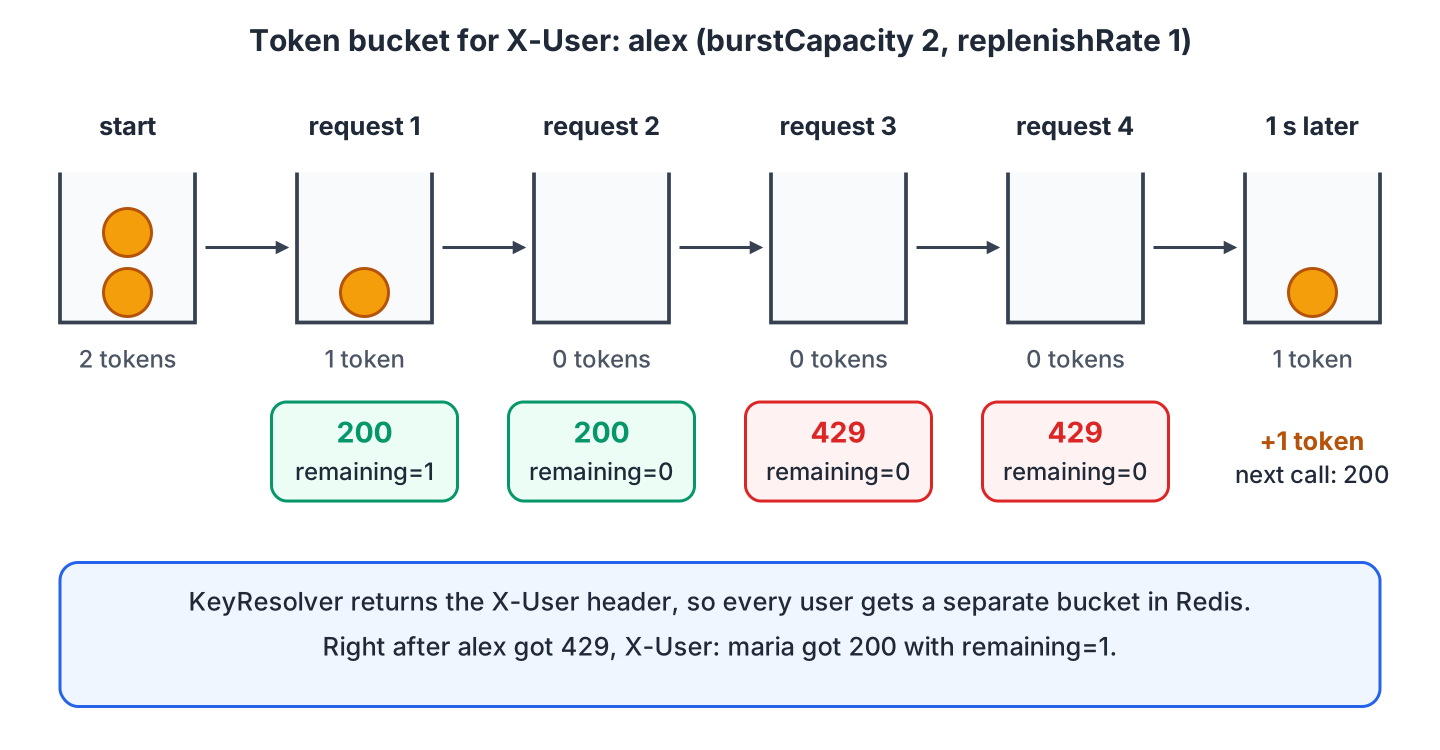
When Redis is not reachable, the Redis rate limiter logs the error and lets every request through. These responses carry X-RateLimit-Remaining: -1. With the Redis container stopped and the 500 ms timeout from above, each request returns 200 in about 30 ms. Without the spring.data.redis.timeout setting, the requests wait until Lettuce, the Redis client of Spring Boot, reconnects, so we always set a short timeout for the gateway’s Redis connection. The Lettuce and Jedis tutorial covers the other Redis client settings.
For limits inside a single service, Resilience4j has the annotation-based @RateLimiter instead.
5. Retry and Circuit Breaker with Resilience4j
The gateway is the first place that sees a failing or slow service. The Retry filter repeats a failed call, which helps with short glitches such as a restarting instance. The CircuitBreaker filter stops calling a service that keeps failing and returns a fallback response, which protects the client and the failing service.
5.1. Retrying Failed Calls
The Retry filter repeats the call when the response status or the exception matches. By default, it retries three times on 5xx responses, IOException and TimeoutException, for GET only and without backoff. The flaky-recipes route from section 2.2 retries only 503 and waits 50 ms before the first retry, doubling up to 500 ms. The backend fails two of every three calls, and the client still gets 200.
curl -s http://localhost:8080/api/flaky/recipes

{"name":"pancakes","call":3}
00:17:09.851 GET /flaky/recipes call 1 -> 503
00:17:09.916 GET /flaky/recipes call 2 -> 503
00:17:10.025 GET /flaky/recipes call 3 -> 200The timestamps show the backoff, about 50 ms before the first retry and 100 ms before the second.
Retry only idempotent requests, which are requests that are safe to repeat. That is why the default is GET only. Retrying a POST that creates an order can create the order twice when the first attempt reached the service but the response got lost.
5.2. Adding a Circuit Breaker with a Fallback
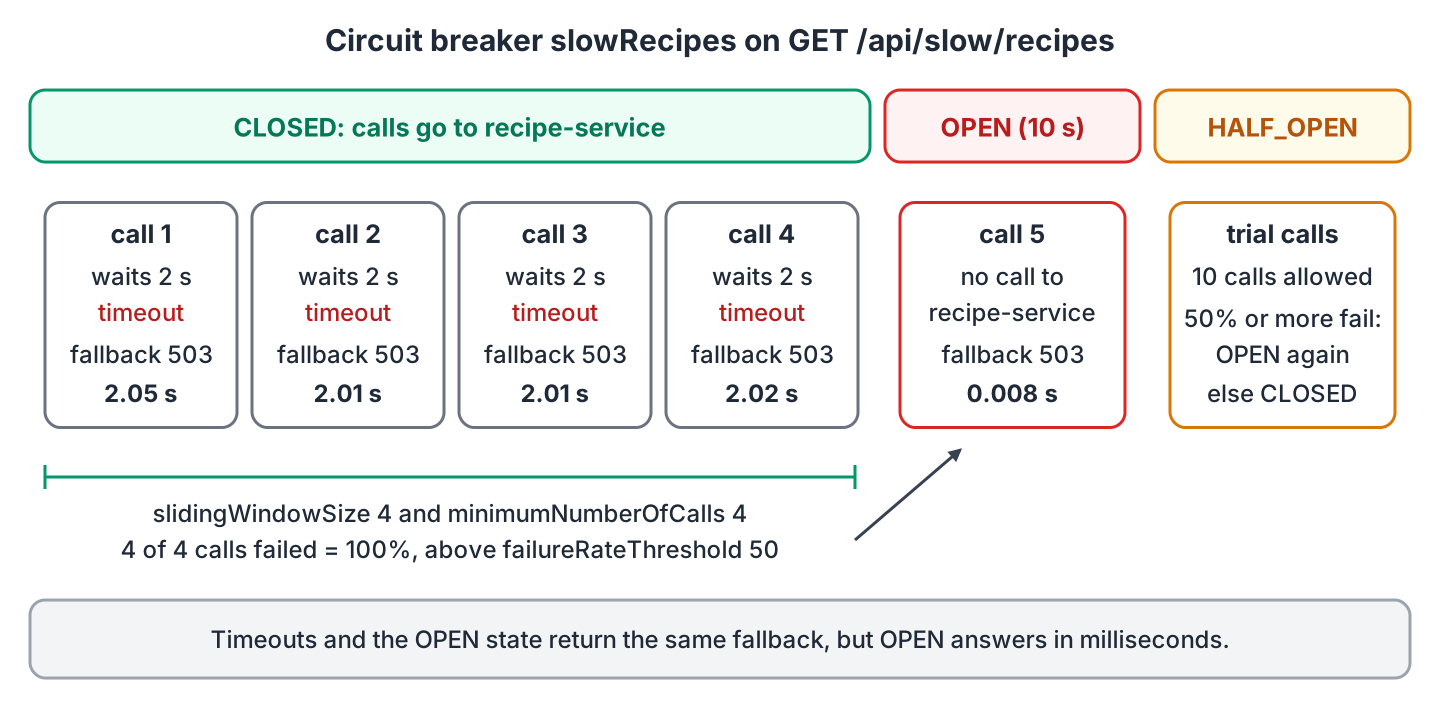
The CircuitBreaker filter wraps the route in a Spring Cloud CircuitBreaker backed by Resilience4j, from the spring-cloud-starter-circuitbreaker-reactor-resilience4j starter. A circuit breaker is always in one of three states.
- In the CLOSED state, calls go to the service, and the breaker counts the failures.
- When the failure rate reaches the threshold, the breaker switches to OPEN. It stops calling the service and returns the fallback right away.
- After the wait time, the breaker switches to HALF_OPEN and lets a few trial calls through. If enough of them succeed, the breaker closes again, otherwise it opens again.
By default, Resilience4j gives a call 1 second and needs 100 calls in its sliding window before it opens. We configure the slowRecipes breaker, named in the route, with a 2-second limit and a window of 4 calls.
@Bean
public Customizer<ReactiveResilience4JCircuitBreakerFactory> slowRecipesCustomizer() {
  return factory -> factory.configure(builder -> builder
      .timeLimiterConfig(TimeLimiterConfig.custom()
          .timeoutDuration(Duration.ofSeconds(2))              // give up after 2 s
          .build())
      .circuitBreakerConfig(CircuitBreakerConfig.custom()
          .slidingWindowSize(4)                                // look at the last 4 calls
          .minimumNumberOfCalls(4)
          .failureRateThreshold(50)                            // open at 50% failures
          .waitDurationInOpenState(Duration.ofSeconds(10))
          .build()), "slowRecipes");
}
The route’s fallbackUri is forward:/fallback/recipes, so the gateway forwards failed calls to a controller inside the gateway. The fallback returns 503 with a message, so the client knows that the data is missing.
@GetMapping("/fallback/recipes")
public Mono<ResponseEntity<Map<String, String>>> recipesFallback() {
  return Mono.just(ResponseEntity.status(HttpStatus.SERVICE_UNAVAILABLE)
      .body(Map.of("message", "Recipe service is slow, try again later")));
}
The /slow/recipes endpoint needs 3 seconds, which is more than the limit. We call it five times and print the time of each call.
for i in 1 2 3 4 5; do
  curl -s -w "  -> %{http_code} in %{time_total}s\n" http://localhost:8080/api/slow/recipes
done

{"message":"Recipe service is slow, try again later"}  -> 503 in 2.049243s
{"message":"Recipe service is slow, try again later"}  -> 503 in 2.009556s
{"message":"Recipe service is slow, try again later"}  -> 503 in 2.013234s
{"message":"Recipe service is slow, try again later"}  -> 503 in 2.020194s
{"message":"Recipe service is slow, try again later"}  -> 503 in 0.008346s
The first four calls time out after 2 seconds. With four failures out of four calls, the breaker opens, and the fifth call gets the fallback in 8 ms without reaching the recipe service.
When we combine both filters on one route, the time limit must cover all retry attempts, otherwise the breaker times out while the retries still run.
6. CORS Configuration in the Gateway
Browsers block JavaScript calls to another origin unless the server sends the right CORS headers, for example when a React app on http://localhost:3000 calls the gateway on port 8080. The gateway is the right place for these headers, because it is the only server the browser calls. In a single Spring MVC app, we would use the Spring Boot CORS configuration instead.
The global configuration maps a URL pattern to the properties of Spring’s CorsConfiguration.
spring:
  cloud:
    gateway:
      server:
        webflux:
          globalcors:
            add-to-simple-url-handler-mapping: true
            cors-configurations:
              '[/api/**]':
                allowedOrigins: "http://localhost:3000"
                allowedMethods:
                  - GET
                allowedHeaders: "*"
                maxAge: 3600
The browser sends the preflight request with the OPTIONS method, and our recipes route has the predicate Method=GET, so no route matches the preflight. With add-to-simple-url-handler-mapping set to true, the gateway answers the preflight from the CORS configuration anyway.
curl -i -X OPTIONS http://localhost:8080/api/recipes/pancakes \
     -H "Origin: http://localhost:3000" -H "Access-Control-Request-Method: GET"

HTTP/1.1 200 OK
Access-Control-Allow-Origin: http://localhost:3000
Access-Control-Allow-Methods: GET
Access-Control-Max-Age: 3600

curl -i -X OPTIONS http://localhost:8080/api/recipes/pancakes \
     -H "Origin: http://evil.example" -H "Access-Control-Request-Method: GET"

HTTP/1.1 403 Forbidden
A route can also carry its own CORS settings as metadata with the key cors. When the backend services also send CORS headers, the browser sees each header twice and rejects the response, so we remove CORS from the services or add the DedupeResponseHeader filter.
7. Testing the Gateway with WireMock
A gateway test starts the real gateway and checks what the backend receives. WireMock acts as the recipe service with stubbed responses, and Testcontainers starts Redis in a temporary Docker container for the rate limiter. The test needs four dependencies with test scope.
<dependency>
  <groupId>org.springframework.boot</groupId>
  <artifactId>spring-boot-starter-webflux-test</artifactId>
  <scope>test</scope>
</dependency>
<dependency>
  <groupId>org.springframework.boot</groupId>
  <artifactId>spring-boot-testcontainers</artifactId>
  <scope>test</scope>
</dependency>
<dependency>
  <groupId>org.testcontainers</groupId>
  <artifactId>testcontainers-junit-jupiter</artifactId>
  <scope>test</scope>
</dependency>
<dependency>
  <groupId>org.wiremock</groupId>
  <artifactId>wiremock-standalone</artifactId>
  <version>3.13.2</version>
  <scope>test</scope>
</dependency>
The test class is annotated with @Testcontainers, @SpringBootTest(webEnvironment = RANDOM_PORT) and @AutoConfigureWebTestClient. With @ServiceConnection, Spring Boot points the gateway at the Redis container’s random port. WireMock listens on port 8081, the port of the YAML route, so we stop the recipe service before running the tests.
@Container
@ServiceConnection(name = "redis")
static final GenericContainer<?> redis = new GenericContainer<>("redis:8.10.2").withExposedPorts(6379);

static final WireMockServer recipeService = new WireMockServer(wireMockConfig().port(8081));

static {
  recipeService.start();
}

@Autowired
WebTestClient client;
WireMock records every request, so the first test can verify the forwarded path and the request header after the call.
@Test
void rewritesPathAndAddsHeaders() {
  recipeService.stubFor(get("/recipes/pancakes")
      .willReturn(okJson("{\"name\":\"pancakes\",\"minutes\":20}")));

  client.get().uri("/api/recipes/pancakes")
      .header("X-User", "headers-test")
      .exchange()
      .expectStatus().isOk()
      .expectHeader().valueEquals("X-Served-By", "recipe-gateway")
      .expectBody().jsonPath("$.minutes").isEqualTo(20);

  recipeService.verify(getRequestedFor(urlEqualTo("/recipes/pancakes"))
      .withHeader("X-Request-Source", equalTo("recipe-gateway")));
}
For the retry, a WireMock scenario returns 503 twice and 200 on the third call. The test expects 200 and three requests at the backend.
@Test
void retriesOn503UntilTheServiceAnswers() {
  recipeService.stubFor(get("/flaky/recipes").inScenario("flaky")
      .whenScenarioStateIs(STARTED).willReturn(aResponse().withStatus(503))
      .willSetStateTo("second"));
  recipeService.stubFor(get("/flaky/recipes").inScenario("flaky")
      .whenScenarioStateIs("second").willReturn(aResponse().withStatus(503))
      .willSetStateTo("third"));
  recipeService.stubFor(get("/flaky/recipes").inScenario("flaky")
      .whenScenarioStateIs("third").willReturn(okJson("{\"name\":\"pancakes\"}")));

  client.get().uri("/api/flaky/recipes")
      .exchange()
      .expectStatus().isOk();

  recipeService.verify(3, getRequestedFor(urlEqualTo("/flaky/recipes")));
}
The project has six gateway tests, covering the path rewrite, the rate limit, the retry, the circuit breaker fallback (a stub with withFixedDelay(3000)), the CORS preflight and the actuator routes, plus one Web MVC test.
[INFO] Tests run: 6, Failures: 0, Errors: 0, Skipped: 0, Time elapsed: 16.94 s -- in com.howtodoinjava.gateway.GatewayRoutesTest
[INFO] Tests run: 1, Failures: 0, Errors: 0, Skipped: 0, Time elapsed: 10.97 s -- in com.howtodoinjava.gatewaymvc.GatewayMvcTest
[INFO] BUILD SUCCESS
The rate limit test sends five requests and asserts that the first two pass and at least one gets 429. Redis refills the buckets per full second, so a test that expects a fixed sequence fails when the requests cross a second boundary.
8. Actuator Gateway Endpoints
The /actuator/gateway endpoint shows the routes and filters that the gateway has loaded, which is the quickest check after a configuration change. It is not accessible by default, so we give it read-only access and expose it over HTTP.
management:
  endpoints:
    web:
      exposure:
        include: health,gateway
  endpoint:
    gateway:
      access: read-only
With read-only access, only the GET operations work, so a POST to /actuator/gateway/refresh returns 404 and a DELETE of a route returns 405. We set unrestricted only when we need to create or delete routes at runtime, and secure the endpoint in that case.
| Endpoint | Method | Returns |
|---|---|---|
| /actuator/gateway/routes | GET | All routes with predicates, filters and URI |
| /actuator/gateway/routes/{id} | GET | One route |
| /actuator/gateway/routes/{id}/combinedfilters | GET | The route filters plus the default filters |
| /actuator/gateway/globalfilters | GET | Global filters with their order |
| /actuator/gateway/routefilters | GET | Available GatewayFilter factories |
| /actuator/gateway/routepredicates | GET | Available predicate factories |
| /actuator/gateway/refresh | POST | Reloads the routes (needs unrestricted) |
The route list confirms that the YAML route and both Java routes are loaded.
curl -s http://localhost:8080/actuator/gateway/routes | jq -r '.[].route_id'

flaky-recipes
slow-recipes
recipes
A single route shows its predicate and each filter with its configuration.
curl -s http://localhost:8080/actuator/gateway/routes/slow-recipes

{
  "predicate": "Paths: [/api/slow/**], match trailing slash: true",
  "route_id": "slow-recipes",
  "filters": [
    "[[StripPrefix parts = 1], order = 0]",
    "[[SpringCloudCircuitBreakerResilience4JFilterFactory name = 'slowRecipes', fallback = forward:/fallback/recipes], order = 0]"
  ],
  "uri": "http://localhost:8081",
  "order": 0
}
9. Spring Cloud Gateway Server Web MVC Example
In the Web MVC flavor, routes are Spring MVC RouterFunction beans, and filters are functions that run before or after the call. The gateway-webmvc module depends only on spring-cloud-starter-gateway-server-webmvc, which brings Spring MVC and Tomcat.
<dependency>
  <groupId>org.springframework.cloud</groupId>
  <artifactId>spring-cloud-starter-gateway-server-webmvc</artifactId>
</dependency>
The recipes-mvc route forwards /api/recipes/** to the recipe service, removes the /api prefix and adds both headers. The static imports come from GatewayRouterFunctions, HandlerFunctions, BeforeFilterFunctions and AfterFilterFunctions.
@Bean
public RouterFunction<ServerResponse> recipeRoutes(RecipeServiceProperties recipeService) {
  return route("recipes-mvc")
      .GET("/api/recipes/**", http())
      .before(uri(recipeService.uri()))
      .before(stripPrefix(1))                                  // /api/recipes/x -> /recipes/x
      .before(addRequestHeader("X-Request-Source", "recipe-gateway-mvc"))
      .after(addResponseHeader("X-Served-By", "recipe-gateway-mvc"))
      .build();
}
We call http() without an argument and set the target with the uri() filter. The variants HandlerFunctions.http(String) and http(URI) were deprecated in 4.x and are removed in Spring Cloud Gateway 5.0, so older examples that pass the URI to http() no longer compile.
curl -i http://localhost:8090/api/recipes/omelette

HTTP/1.1 200
X-Served-By: recipe-gateway-mvc
Content-Type: application/json

{"requestSource":"recipe-gateway-mvc","minutes":10,"name":"omelette"}
The Web MVC flavor also reads YAML routes from spring.cloud.gateway.server.webmvc.routes, and it has its own filter functions for retries, circuit breakers and Bucket4j rate limits.
10. Conclusion
Spring Cloud Gateway gives our services one entry point. Each route has predicates that select requests and filters that change them, and we can write routes in YAML or as a Java RouteLocator bean. In Spring Cloud 2025.1, we pick between the spring-cloud-starter-gateway-server-webflux and spring-cloud-starter-gateway-server-webmvc starters, and the routes go under the matching spring.cloud.gateway.server.* prefix.
On top of routing, the gateway handles tasks that every service would otherwise repeat. RewritePath and StripPrefix keep internal paths private, and the header filters add metadata. The Redis RequestRateLimiter returns 429 when a user’s bucket is empty, and it lets traffic through when Redis is down. Retry repeats idempotent calls with backoff, and the Resilience4j CircuitBreaker answers from a fallback in milliseconds once a service keeps failing.
We test the real gateway with WireMock as the backend and Testcontainers for Redis, and we check /actuator/gateway/routes after every configuration change. Services behind the gateway can call each other with OpenFeign.
11. References
- Spring Cloud Gateway reference
- Including Spring Cloud Gateway Server WebFlux
- Spring Cloud Gateway Server Web MVC starter
- RequestRateLimiter GatewayFilter factory
- Actuator API of Spring Cloud Gateway
- Spring Cloud release trains and Spring Boot compatibility
- Resilience4j CircuitBreaker
- Resilience4j TimeLimiter
- WireMock documentation
- Redis Docker image
Happy Learning !!
