
A stream in Java is a sequence of elements from a source, such as a collection, an array or a file, that we process with a pipeline of operations like filter(), map() and collect() to produce a result without changing the source. This Java streams tutorial page groups every Stream article on HowToDoInJava by the task we want to solve, so we can go from “I need to filter a map” to the right article in one click.
Streams appeared in Java 8 and have gained new methods in almost every release since, up to the gatherers of Java 24. We use them daily to filter query results, convert lists to maps, group records for reports, sum numbers and read files.
The following example shows the three parts of every stream pipeline, with links to the tutorials for each step further down.
List<String> orders = List.of("tea", "coffee", "juice", "tea", "water");

List<String> drinks = orders.stream()              // 1. source
        .distinct()                                // 2. intermediate operations
        .filter(d -> d.length() > 3)
        .map(String::toUpperCase)
        .sorted()
        .toList();                                 // 3. terminal operation
String result = drinks.toString();                 // "[COFFEE, JUICE, WATER]"
Map<String, Long> counts = orders.stream()
        .collect(Collectors.groupingBy(d -> d, TreeMap::new, Collectors.counting()));
String grouped = counts.toString();                // "{coffee=1, juice=1, tea=2, water=1}"
Notice that the intermediate operations only describe the work, and nothing runs until toList() or collect() asks for the result. The sections start with the basics and follow the order in which a pipeline is built, from creating a stream to collecting, sorting and debugging it.
1. Stream Pipeline in Short
Every stream tutorial on this page builds on one model. A source provides elements, intermediate operations such as filter() and map() return new streams and run lazily, and one terminal operation such as toList(), count() or forEach() pulls the elements through and consumes the stream. The java.util.stream package defines the Stream interface and its primitive versions.
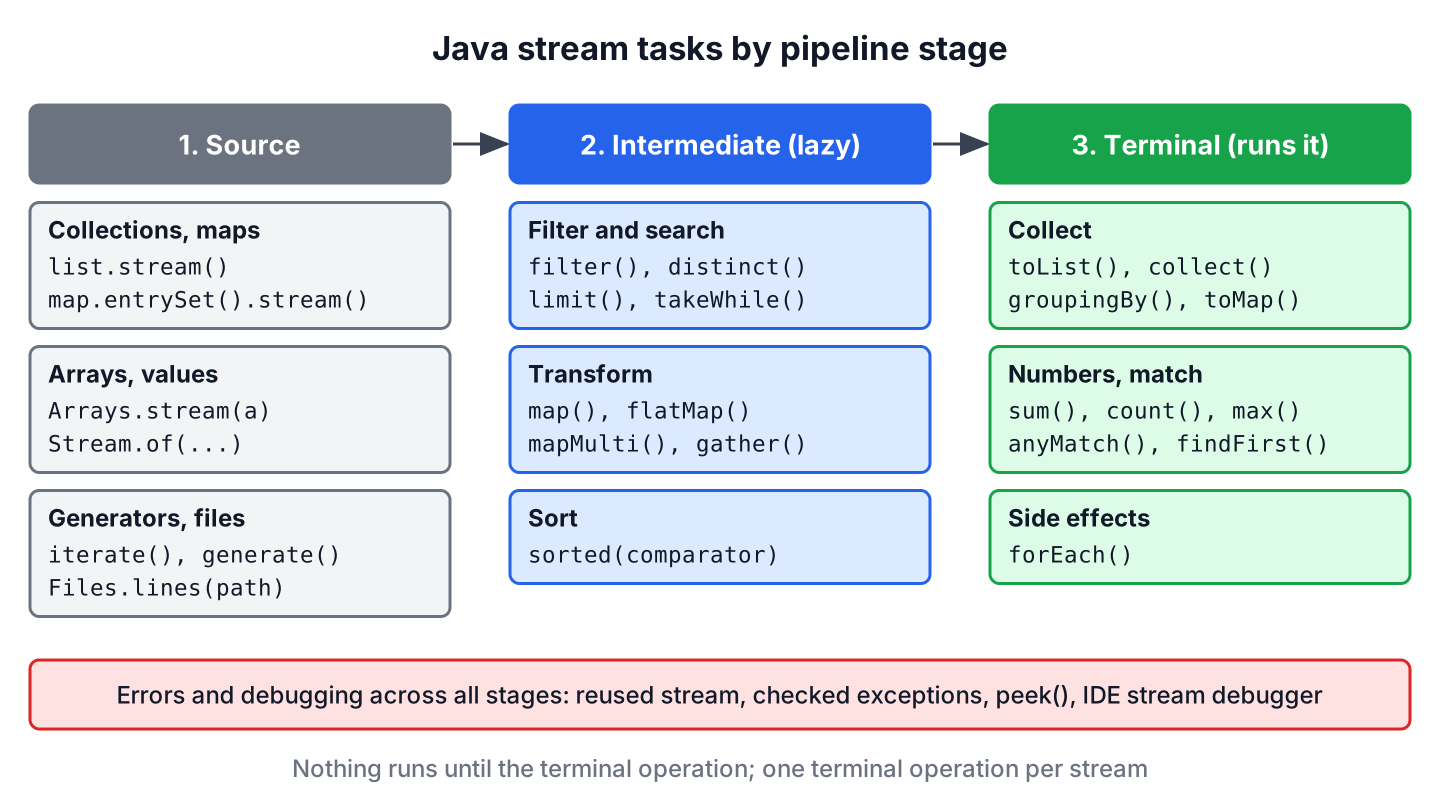
Take an online shop that shows customers their last ten orders above 50 dollars, newest first. The service streams the order list, filters by amount, sorts by date, limits to ten and collects a list for the response, and each of those steps has its own tutorial below. For a single article that walks through the whole API with examples, start with the Java Stream API examples guide.
The API has kept growing after Java 8. Java 9 added takeWhile() and dropWhile(), Java 16 added toList() and mapMulti(), and Java 24 made gatherers final, so a tutorial written for Java 8 often misses a shorter solution.
2. Getting Started With Streams
Streams take lambdas and method references as arguments, so these articles are the foundation. Read them first if the arrow syntax or names like Predicate and Function still look unfamiliar.
- Lambda expressions explains the syntax that every stream operation takes as its argument.
- Method references shows the shorter String::toUpperCase form and its four kinds.
- Functional interfaces covers Supplier, Consumer, Predicate and Function, plus writing generic ones.
- Predicate focuses on the interface that filter() and the match methods take.
- Internal vs external iteration explains why a stream loops for us instead of a for loop.
- Java 9 Stream API improvements adds takeWhile(), dropWhile(), ofNullable() and the new iterate().
3. Creating Streams From Different Sources
A stream can start from a collection, an array, a generator, a date range or a file. The source decides whether the stream is finite and whether it must be closed, as with streams that read files.
- Infinite streams builds endless streams with iterate() and generate() and stops them safely.
- Random number streams generates random values within a range for tests and simulations.
- Streams of dates uses LocalDate.datesUntil() to walk a calendar range.
- Iterable or Iterator to Stream wraps older APIs that return an Iterator.
- Reading a file line by line streams lines with Files.lines() inside try-with-resources.
- Listing all files in a directory streams directory entries with Files.list() and Files.walk().
- String to a stream of lines splits text with String.lines() from Java 11.
- Appending or prepending items adds elements at either end of an existing stream.
- Stream.concat() merges two streams into one.
4. Filtering, Matching and Searching
Filtering is the most common stream task. These tutorials cover single and combined conditions, nested data, maps, and the short-circuiting methods that stop at the first match.
- Stream filter() keeps the elements that match a condition.
- Multiple filter conditions compares chained filter() calls with one combined predicate.
- Chaining predicates joins conditions with and(), or() and negate().
- Negating a predicate uses Predicate.not() with method references.
- Regex as a predicate filters strings with Pattern.asPredicate().
- Filtering nested collections filters a list of objects by a condition on their inner lists.
- Filtering a Map by keys and values keeps the entries whose key, value or both match.
- Filtering a Map by a list of keys keeps only the entries for a given set of keys.
- contains, containsAny and containsAll checks whether a stream holds one or several values.
- anyMatch(), allMatch() and noneMatch() answer yes-or-no questions about the elements.
- findFirst() vs findAny() explains the difference in sequential and parallel streams, with the single-method articles on findFirst() and findAny().
- if-else logic in streams handles two outcomes in one pipeline.
- Stream distinct() removes duplicates, and distinct by multiple fields does it by selected properties.
- Finding and removing duplicates counts, lists or drops repeated elements.
- Getting the last element reads the final element of a stream.
- Stream skip() and Stream limit() cut a stream for paging.
5. Transforming Elements
Mapping changes each element into something else, such as a field, a DTO or several values. Choose map() for one-to-one conversions and flatMap() or mapMulti() for one-to-many.
- Stream map() converts each element with a function.
- Stream flatMap() flattens nested lists and optional values into one stream.
- map() vs flatMap() compares the two with diagrams.
- Reusing a stream explains why a stream works only once and how a Supplier helps.
- Stream mapMulti() pushes zero or more results per element without creating inner streams (Java 16).
- Removing and updating list elements shows removeIf(), replaceAll() and stream alternatives.
- Iterating a stream with indices gets the position of each element with IntStream.range().
6. Sorting and Finding Min or Max
Sorting in a stream takes a Comparator, and the same comparators drive min() and max(). The Java sorting guide covers sorting outside streams as well.
- Sorting streams covers natural order, reverse order and custom comparators.
- Stream sorted() explains the method and its stability for ordered streams.
- Sorting by multiple fields chains comparators with thenComparing().
- Sorting with null values places null first or last with nullsFirst() and nullsLast().
- Sorting numbers, strings, objects and maps collects the common sorting tasks in one place.
- Comparator with lambdas builds comparators in one line.
- Stream max(), Stream min() and finding max and min in a list return the largest and smallest elements.
- Stream max() with a Comparator finds the largest element and handles empty streams.
- Object with the latest date finds the newest record in a list.
7. Collecting Results
Most pipelines end with a collection, a map, a string or a count. These tutorials explain which collector to pick and how to deal with duplicates, nulls and unmodifiable results.
- Collecting to a List compares toList() with Collectors.toList().
- Collecting to a Map uses Collectors.toMap() and handles duplicate keys.
- Collecting into an immutable collection returns results that callers cannot change.
- Collectors.groupingBy() groups elements by a key and counts, sums or lists them per group.
- Collectors.teeing() runs two collectors over one pass and merges their results.
- Joining strings builds a delimited string with Collectors.joining(), and joining strings into CSV compares it with String.join().
- Stream toArray() and converting between stream and array turn streams into typed arrays and back.
- Stream count() counts the elements that match a filter.
8. Working With Numbers
Numeric work goes faster and reads shorter with the primitive streams, which add sum(), average() and statistics.
- Primitive type streams introduces IntStream, LongStream and DoubleStream and the overflow trap of sum().
- IntStream examples covers ranges, iteration and conversions.
- Boxed streams converts primitive streams to Stream<Integer> for collecting.
- Primitive streams to a collection or array collects primitive values without errors.
- IntPredicate filters an IntStream without boxing the values.
9. Looping and Side Effects
A terminal forEach() is the place for side effects such as printing or sending messages. Use it sparingly, because collecting a result is safer than adding elements to an outside list.
- Stream forEach() runs an action for each element.
- Stream forEachOrdered() keeps the encounter order in parallel streams.
- Iterable forEach() loops over collections and maps without a stream.
10. Handling Errors and Debugging
Stream code fails in a few typical ways, such as a reused stream, a checked exception in a lambda or a long pipeline that returns the wrong result. These articles cover the fixes.
- Stream has already been operated upon or closed explains the IllegalStateException and the Supplier fix.
- Reusing a stream shows how to run several terminal operations on the same data.
- Handling exceptions in streams wraps checked exceptions thrown inside lambdas.
- Debugging streams uses the IntelliJ IDEA stream debugger and logging to inspect each step.
- Stream peek() logs elements between operations and explains when the JDK skips it.
- Optional handles the empty results of findFirst(), min() and max(), and orElse() vs orElseGet() shows which fallback to choose.
11. Java Streams Tutorial FAQs
Developers new to streams tend to ask the same few questions before they pick a tutorial.
11.1. Which Java Version Introduced Streams?
Java 8, released in March 2014, introduced the Stream API together with lambda expressions. Later releases added methods, including takeWhile() in Java 9, toList() in Java 16 and gather() in Java 24.
11.2. Are Streams Better Than Loops?
Streams are better for filtering, mapping, grouping and collecting, because the code states the result instead of the steps. A plain loop stays the better choice for code that needs break, checked exceptions or changes to several local variables.
11.3. In What Order Should We Learn the Stream API?
We start with lambdas and functional interfaces, move on to filter(), map() and toList(), and after that collectors such as groupingBy(). Primitive streams, parallel streams and gatherers come last, once the basic pipeline feels natural.
11.4. Is a Java Stream the Same as an InputStream?
No. The java.util.stream.Stream interface processes elements in memory, whereas java.io.InputStream reads bytes from a file, socket or other source. The names are similar, but the two APIs are unrelated.
12. Conclusion
Every stream task fits into the same three-part pipeline of a source, intermediate operations and one terminal operation. We pick the section that matches the step at hand, and each linked tutorial gives runnable examples for current Java versions.
New readers get the most from the basics in section 2 and the full API walkthrough first. After that, the collecting and error-handling sections answer most questions that come up in real projects.
13. References
- java.util.stream package summary (Java 25)
- Stream Javadoc
- JEP 485: Stream Gatherers
- The Stream API on dev.java
Happy Learning !!
