
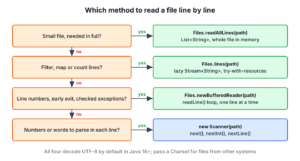
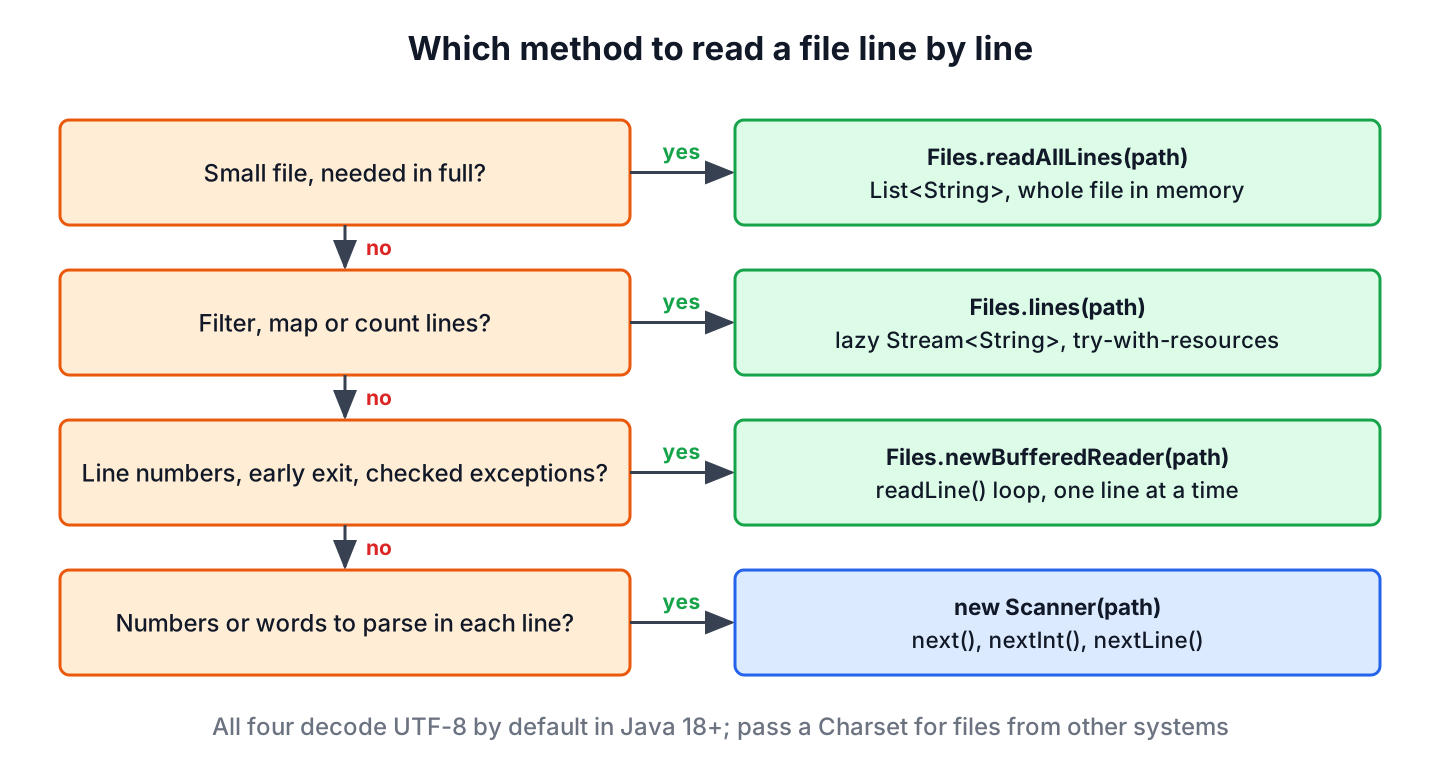
To read a file line by line in Java, we use Files.lines(path), which returns the lines as a lazy Stream<String> that we close with try-with-resources, or a readLine() loop on the BufferedReader from Files.newBufferedReader(path). For small files, Files.readAllLines(path) returns all lines at once as a List<String>.
We read files line by line to parse log files, import CSV data, load word lists or process any text format where one line is one record. Reading one line at a time keeps memory use flat, so the same code works for a 1 KB config file and a 5 GB access log.
The following example reads a small log file in three ways. The helper method createLog(), shown in section 1, writes five log lines into a temp file.
Path log = createLog();

try (Stream<String> lines = Files.lines(log)) {
    List<String> errors = lines.filter(line -> line.startsWith("ERROR")).toList();   // [ERROR db timeout, ERROR mail failed]
}

int warnings = 0;
try (BufferedReader reader = Files.newBufferedReader(log)) {
    String line;
    while ((line = reader.readLine()) != null) {
        if (line.startsWith("WARN")) {
            warnings++;
        }
    }
}
int warnCount = warnings;                      // 1

List<String> allLines = Files.readAllLines(log);   // [INFO app started, WARN disk almost full, ERROR db timeout, INFO order saved, ERROR mail failed]
Notice that each line comes without its line terminator, and that all three methods decode the bytes as UTF-8 unless we pass another Charset. The stream and the reader read the file piece by piece, whereas readAllLines() loads the whole file into memory. After the three main methods, we cover Scanner, character encodings, large files and the Guava and Commons IO helpers, and finish with a table for picking a method.
1. Reading Lines as a Stream With Files.lines()
The method Files.lines(Path) (Java 8) returns a Stream<String> whose elements are the lines of the file. The stream is lazy, so it reads the next line only when the pipeline asks for it, and it holds the file open until we close it. That makes it a good fit for filtering, mapping and counting lines with the Stream API.
The helper method createLog() writes five log lines into a temp file and returns its path, and every snippet starts by calling it.
static Path createLog() throws IOException {
    String text = """
            INFO app started
            WARN disk almost full
            ERROR db timeout
            INFO order saved
            ERROR mail failed
            """;
    return Files.writeString(Files.createTempFile("app", ".log"), text);
}
The following example counts the error lines and finds the first one. The method findFirst() stops the stream at the first match, so for a large file the rest of the file is never read.
Path log = createLog();

try (Stream<String> lines = Files.lines(log)) {
    long errorCount = lines.filter(line -> line.startsWith("ERROR")).count();   // 2
}

try (Stream<String> lines = Files.lines(log)) {
    Optional<String> firstError = lines.filter(line -> line.startsWith("ERROR")).findFirst();   // Optional[ERROR db timeout]
}

try (Stream<String> lines = Files.lines(log)) {
    List<String> messages = lines.skip(1).limit(2).map(line -> line.substring(line.indexOf(' ') + 1)).toList();   // [disk almost full, db timeout]
}
We always call Files.lines() in a try-with-resources statement, because the stream keeps the file open until it is closed. A terminal operation such as toList() does not close the stream. On Windows, an open handle also blocks other code from deleting or renaming the file.
The method Files.lines() declares only the IOException for opening the file. Errors that happen while reading, such as bytes that are not valid UTF-8, reach us as an UncheckedIOException from the terminal operation, as we see in section 5.
2. Reading Line by Line With BufferedReader
A BufferedReader reads characters into an internal buffer of 8192 chars and returns one line per call to readLine(), or null at the end of the file. We create one with Files.newBufferedReader(path), which decodes UTF-8 by default. A plain while loop gives us full control, so it suits code that counts line numbers, stops early or calls methods that throw checked exceptions.
Say an on-call engineer needs the first error in a log file, with its line number, to open the file at the right place. The following example stops reading as soon as it finds that line.
Path log = createLog();
String firstError = "none";
int lineNumber = 0;

try (BufferedReader reader = Files.newBufferedReader(log)) {
    String line;
    while ((line = reader.readLine()) != null) {
        lineNumber++;
        if (line.startsWith("ERROR")) {
            firstError = lineNumber + ": " + line;
            break;
        }
    }
}
String found = firstError;   // "3: ERROR db timeout"
The method readLine() accepts \n, \r and \r\n as line terminators, so files written on Windows, Linux and old macOS give the same lines. A LineNumberReader counts the lines for us if we prefer not to keep our own counter.
Since Java 8, BufferedReader.lines() returns the remaining lines as a stream. It is handy when another API hands us a Reader or an InputStream instead of a Path, such as a file in the classpath or an HTTP response body.
Path log = createLog();

try (BufferedReader reader = Files.newBufferedReader(log)) {
    List<String> infoLines = reader.lines().filter(line -> line.startsWith("INFO")).toList();   // [INFO app started, INFO order saved]
}
Older code builds the reader with new BufferedReader(new FileReader(file)). That still works, but before Java 18 a FileReader without a charset used the default charset of the operating system, so the same code could read a file differently on Windows and Linux. If we keep FileReader, we pass the charset explicitly with the constructor FileReader(File, Charset), which exists since Java 11. The BufferedReader guide covers the class in more detail.
3. Reading All Lines Into a List
The method Files.readAllLines(Path) (Java 7) reads the whole file, closes it and returns a List<String>. No try-with-resources is needed, because nothing stays open. We use it for small files that we need in full, such as a list of allowed email domains or a short config file, where random access by index is useful.
Path log = createLog();

List<String> lines = Files.readAllLines(log);
int count = lines.size();                  // 5
String third = lines.get(2);               // "ERROR db timeout"
String last = lines.getLast();             // "ERROR mail failed"

List<String> fromString = Files.readString(log).lines().toList();   // [INFO app started, WARN disk almost full, ERROR db timeout, INFO order saved, ERROR mail failed]
The final line terminator does not create an empty last element, so the list has 5 elements for 5 lines. The second variant combines Files.readString() (Java 11) with String.lines() (Java 11), which is useful when we need the full text and the lines. Whether the list from readAllLines() is modifiable is not specified, so we copy it into a new ArrayList<>(lines) before changing it, and the list from toList() is always unmodifiable. For other target types, the article on reading a file into an ArrayList shows more variants.
4. Reading Lines With Scanner
A Scanner reads lines with hasNextLine() and nextLine(), and it can also parse numbers and words from the same input with nextInt() or next(). That is its real strength, for example when a line contains a level and a message that we want as separate tokens.
Path log = createLog();
List<String> levels = new ArrayList<>();

try (Scanner scanner = new Scanner(log)) {
    while (scanner.hasNextLine()) {
        String level = scanner.next();
        scanner.nextLine();   // skip the rest of the line
        levels.add(level);
    }
}
List<String> result = levels;   // [INFO, WARN, ERROR, INFO, ERROR]
For plain line reading, a Scanner has two drawbacks compared with a BufferedReader. It is slower, because it runs regular expressions to find tokens and line ends. It also hides problems, because it replaces bytes it cannot decode with the character U+FFFD and never throws, so a file with the wrong encoding goes through without an error. The post on reading typed input with Scanner covers token parsing.
5. Character Encoding and MalformedInputException
A file contains bytes, and each line-reading method turns them into characters with a Charset. If the file was written in another encoding, such as ISO-8859-1 from an old Windows system, the UTF-8 decoder finds byte sequences it cannot decode. The methods in Files report that as an error instead of guessing.
The following example writes the French word for coffee in ISO-8859-1, where its last letter (\u00e9) is the single byte 0xE9. That byte is not valid UTF-8 on its own, so reading the file as UTF-8 fails, and reading it with the right charset works.
Path latin1 = Files.write(Files.createTempFile("menu", ".txt"), "caf\u00e9\n".getBytes(StandardCharsets.ISO_8859_1));

List<String> strict = Files.readAllLines(latin1);   // MalformedInputException: Input length = 1
Stream<String> lazy = Files.lines(latin1);
List<String> lazyLines = lazy.toList();             // UncheckedIOException: java.nio.charset.MalformedInputException: Input length = 1

try (Stream<String> lines = Files.lines(latin1, StandardCharsets.ISO_8859_1)) {
    boolean decoded = lines.findFirst().orElseThrow().equals("caf\u00e9");   // true
}
Each method handles the same broken byte differently. Since Java 18, the default charset of the JVM is UTF-8 on every platform (JEP 400), so the APIs that use the default charset behave the same on Windows and Linux.
| API | Charset if we pass none | Bytes that are not valid in that charset |
|---|---|---|
| Files.lines() | UTF-8 | UncheckedIOException wrapping MalformedInputException, thrown by the terminal operation |
| Files.readAllLines(), Files.readString(), Files.newBufferedReader() | UTF-8 | MalformedInputException |
| FileReader, new Scanner(path) | Default charset, UTF-8 since Java 18 | Replaced with U+FFFD, no exception |
A file saved by some Windows editors starts with a byte order mark (BOM). Java does not remove it, so the first line starts with the invisible character \uFEFF, and a check such as line.startsWith(“id”) fails on the header of a CSV file. We strip it from the first line with line.replace(“\uFEFF”, “”). The article on reading and writing UTF-8 files has more on encodings.
6. Reading Large Files Line by Line
A nightly job that counts failed requests in a 4 GB access log shows the difference between the methods. The List from readAllLines() must hold every line as a String at the same time, which needs more heap than the file size, so the job fails with an OutOfMemoryError on a normal heap. A Stream from Files.lines() or a BufferedReader loop holds only the current line and the buffer, so memory use stays the same for any file size.
Path log = createLog();

try (Stream<String> lines = Files.lines(log)) {
    Map<String, Long> perLevel = lines.collect(Collectors.groupingBy(line -> line.substring(0, line.indexOf(' ')), TreeMap::new, Collectors.counting()));   // {ERROR=2, INFO=2, WARN=1}
}
For files that can grow without limit, such as logs and exports, we read them with Files.lines() or a BufferedReader and keep only aggregated results, never a List of all lines. When we need only one line by its number, skip(n).findFirst() on the stream avoids keeping the earlier lines, as shown in the post on reading a given line from a file. The article on reading large files efficiently compares these methods with channels and memory-mapped files, and counting the lines of a file shows how to get only the line count.
7. Guava and Commons IO
Projects that already depend on Guava or Apache Commons IO can use their helpers, which work on a java.io.File and need an explicit charset. Neither library offers anything for plain line reading that the JDK lacks, so we do not add them only for this purpose.
File logFile = createLog().toFile();

List<String> guavaLines = com.google.common.io.Files.asCharSource(logFile, StandardCharsets.UTF_8).readLines();
int guavaCount = guavaLines.size();   // 5

try (LineIterator iterator = FileUtils.lineIterator(logFile, "UTF-8")) {
    String firstLine = iterator.next();   // "INFO app started"
}
The Guava method loads all lines like readAllLines(), whereas the Commons IO LineIterator reads one line at a time and must be closed. We write the Guava class with its full name, because its simple name Files clashes with java.nio.file.Files.
8. Which Method Should We Use?
All the methods return the same lines for a valid UTF-8 file, so the choice depends on the file size and on what the code does with each line. For new code, Files.lines() and Files.newBufferedReader() cover almost every case.
| Method | Memory | Closing | Best for |
|---|---|---|---|
| Files.lines(path) | One line at a time | try-with-resources | Filtering, mapping and counting lines in a pipeline |
| Files.newBufferedReader(path) + readLine() | One line at a time | try-with-resources | Loops with line numbers, early exit or checked exceptions |
| Files.readAllLines(path) | Whole file | Not needed | Small files that we need in full or by index |
| Files.readString(path).lines() | Whole file | Not needed | Small files that we also need as one string |
| Scanner | Buffer only | try-with-resources | Lines with numbers or words to parse |
| FileReader + BufferedReader | One line at a time | try-with-resources | Legacy code; pass the charset |
9. Reading Files Line by Line FAQs
CSV headers, memory use, speed, resource files and a strange first character are what developers ask about once the first loop works.
9.1. Does Files.lines() Load the Whole File Into Memory?
No. The stream reads the file through a buffer and creates each line when the pipeline asks for it. Only terminal operations that keep all elements, such as toList() or sorted(), hold every line in memory, so on a large file we prefer count(), anyMatch() or a grouping collector.
9.2. How Do I Skip the Header Line of a CSV File?
We call skip(1) on the stream before we parse the remaining lines. With a BufferedReader, we call readLine() once before the loop.
Path csv = Files.writeString(Files.createTempFile("prices", ".csv"), "item,price\napple,5\nbanana,3\n");

try (Stream<String> lines = Files.lines(csv)) {
    List<String> items = lines.skip(1).map(line -> line.split(",")[0]).toList();   // [apple, banana]
}
Real CSV files can contain commas inside quoted values, which split() does not handle. The article on parsing CSV files covers libraries for that case.
9.3. Is BufferedReader Faster Than Files.lines()?
For plain reading, both use the same buffered decoding, and the difference is small compared with the time to read from disk. The Scanner class is the slow one, because it matches regular expressions. We pick between Files.lines() and BufferedReader by code style, and measure with a benchmark tool such as JMH before we optimize.
9.4. How Do I Read a File From the Resources Folder Line by Line?
A file inside a JAR has no Path on the default file system, so we open it as a stream and wrap it in a BufferedReader. We call getResourceAsStream(“/data.txt”) on a class, wrap the result in new InputStreamReader(in, StandardCharsets.UTF_8) and a BufferedReader, and read with lines() or readLine(). The article on reading a file from the resources folder shows the full code.
9.5. Why Does the First Line Start With a Strange Character?
The file starts with a UTF-8 byte order mark, which Java returns as the character \uFEFF. We remove it from the first line before parsing, as shown in section 5.
10. Conclusion
For most code, reading a file line by line in Java means Files.lines() in a try-with-resources block for stream pipelines, or a BufferedReader from Files.newBufferedReader() for loops that need line numbers or an early exit. Both read one line at a time, so they handle files of any size.
Files.readAllLines() is the shortest option when a small file fits in memory, and Scanner is worth it only when the lines contain tokens to parse. The Files methods read UTF-8 by default and throw on bytes they cannot decode, so when a file comes from another system, we pass its charset explicitly.
11. References
- Files.lines() Javadoc
- Files.readAllLines() Javadoc
- Files.newBufferedReader() Javadoc
- BufferedReader Javadoc
- Scanner Javadoc
- JEP 400: UTF-8 by Default
Happy Learning !!

Hi ,
I want read certain word like ” Result ” . I need to print all line after result line.
please share me code.
Thanks in advance
Hi,
Have assigned with a task to create a Data Collector using NIO and TFTP.
From the Network Elements i have to get large files using TFTP and Java NIO.
Could you please help me to do this.
You must try yourself first, if struck anywhere then let me know.
Awesome Lokesh…really nice article.
Hi,
I am student of MTech.I have to do thesis work,where I have to read text and find the maximum probability of a particular Indian languages with Java.Suggest me how would I do that….
hi i’m a vivid follower of