
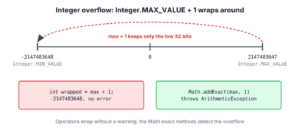
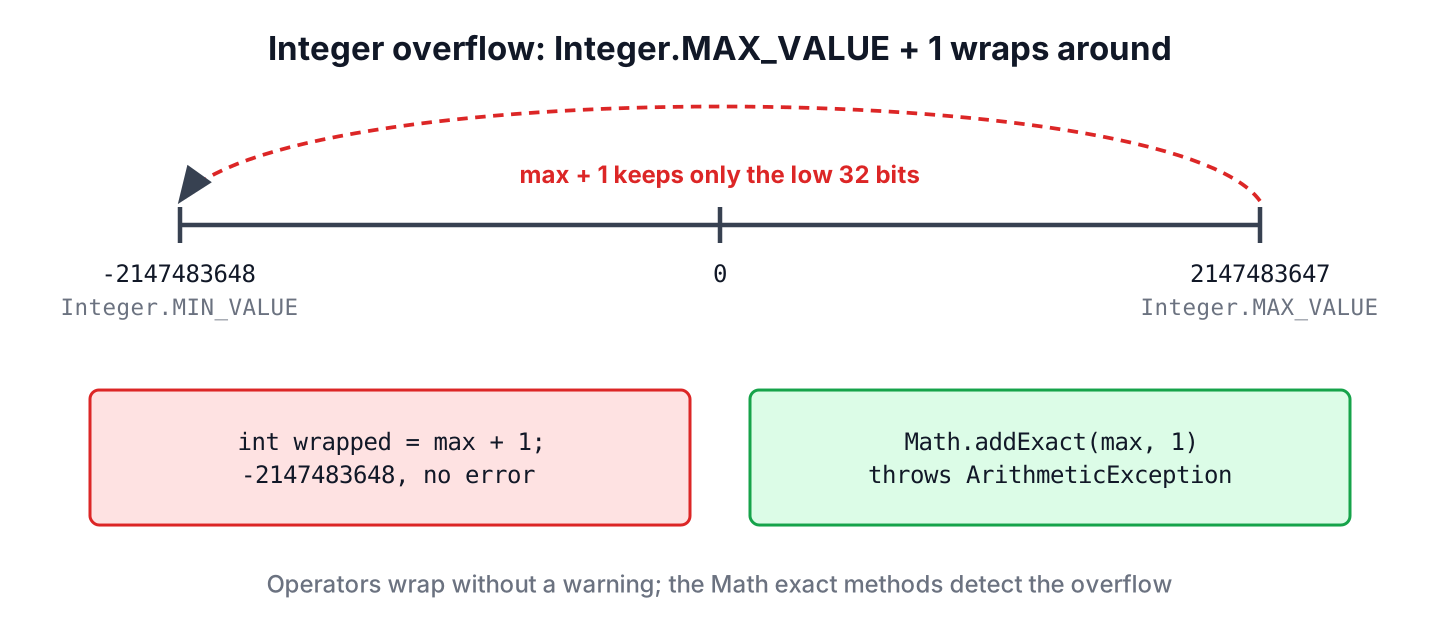
Integer overflow in Java happens when the result of an int or long calculation is larger than the type can hold, and Java wraps the value around to the other end of the range without any error. To detect it, we use the exact methods of java.lang.Math, such as Math.addExact() and Math.multiplyExact(), which throw an ArithmeticException instead of returning a wrong number.
Overflow checks matter wherever numbers come from users or grow over time, such as order totals in cents, quantities, file sizes, timeouts in milliseconds and counters. A wrapped value does not crash the app, so the wrong total or the negative timeout stays in the data until someone notices it in a report.
The following example adds 1 to the largest int in three ways.
int max = Integer.MAX_VALUE;                // 2147483647
int wrapped = max + 1;                      // -2147483648, no error
long widened = (long) max + 1;              // 2147483648
int checked = Math.addExact(max, 1);        // ArithmeticException: integer overflow
Notice that the plain + operator returns the smallest int and carries on, while Math.addExact() stops with an exception. We look at why Java wraps, every exact method and the Java version that added it, overflow in casts and compound assignments, the division and abs() edge cases, checks without exceptions, and BigInteger for values that never fit.
1. Why Integer Overflow Goes Unnoticed in Java
Java stores int and long values in two’s complement, with a fixed number of bits. When a result needs more bits, Java keeps only the low-order bits, so the value jumps from the largest number to the most negative one, like a counter that rolls over. The integer operators never report overflow, and only division by zero throws an exception.
Each integer type has its own range, and the data types with fewer bits overflow sooner.
| Type | Bits | Minimum | Maximum |
|---|---|---|---|
| byte | 8 | -128 | 127 |
| short | 16 | -32,768 | 32,767 |
| char | 16 | 0 | 65,535 |
| int | 32 | -2,147,483,648 | 2,147,483,647 |
| long | 64 | -9,223,372,036,854,775,808 | 9,223,372,036,854,775,807 |
A wrapped result looks like any other number, which is what makes overflow dangerous. For example, a shop that stores prices in cents multiplies the price by the quantity. A bulk order of 50,000 items at 499.99 has a correct total of 2,499,950,000 cents, which does not fit in an int.
int priceCents = 49_999;
int quantity = 50_000;
int total = priceCents * quantity;          // -1795017296, a negative order total
2. Detecting Overflow with Math Exact Methods
The exact methods do the same arithmetic as the operators, but they check the result. When the result fits, they return it, and when it overflows, they throw ArithmeticException with the message integer overflow or long overflow. Each method has an int and a long version.
| Method | Replaces | Since |
|---|---|---|
| addExact(a, b) | a + b | Java 8 |
| subtractExact(a, b) | a – b | Java 8 |
| multiplyExact(a, b) | a * b | Java 8 (Java 9 adds multiplyExact(long, int)) |
| incrementExact(a), decrementExact(a) | a++, a– | Java 8 |
| negateExact(a) | -a | Java 8 |
| toIntExact(longValue) | (int) longValue | Java 8 |
| absExact(a) | Math.abs(a) | Java 15 |
| divideExact(a, b), floorDivExact(a, b), ceilDivExact(a, b) | a / b, Math.floorDiv(a, b), Math.ceilDiv(a, b) | Java 18 |
int sum = Math.addExact(2_100_000_000, 100_000_000);         // ArithmeticException: integer overflow
long longSum = Math.addExact(2_100_000_000L, 100_000_000L);  // 2200000000
int below = Math.subtractExact(Integer.MIN_VALUE, 1);        // ArithmeticException: integer overflow
int square = Math.multiplyExact(46_341, 46_341);             // ArithmeticException: integer overflow
int next = Math.incrementExact(Integer.MAX_VALUE);           // ArithmeticException: integer overflow
int flipped = Math.negateExact(Integer.MIN_VALUE);           // ArithmeticException: integer overflow
long bytes = Math.multiplyExact(3_000_000_000L, 4);          // 12000000000
long huge = Math.multiplyExact(Long.MAX_VALUE, 2L);          // ArithmeticException: long overflow
The type of the arguments decides the range. Passing int values checks against the int range, so Math.addExact(2_100_000_000, 100_000_000) fails even if we assign the result to a long. To get a long result, at least one argument has to be a long.
2.1. Handling the ArithmeticException
ArithmeticException is an unchecked exception, so the compiler does not force us to catch it. We catch it where we can give a meaningful answer, for example by rejecting an order with a 400 response instead of storing a negative total.
For the shop from section 1, the cart total uses long cents and exact methods for every step. A cart line multiplies the price by the quantity in long, and the running total adds each line with addExact().
record CartLine(int priceCents, int quantity) {}static long cartTotalCents(List<CartLine> lines) {
long total = 0;
for (CartLine line : lines) {
long lineTotal = Math.multiplyExact((long) line.priceCents(), line.quantity());
total = Math.addExact(total, lineTotal);
}
return total;
}static String checkout(List<CartLine> lines) {
try {
return "Total: " + cartTotalCents(lines) + " cents";
} catch (ArithmeticException e) {
return "Rejected: order total is too large";
}
}String bulk = checkout(List.of(new CartLine(49_999, 50_000))); // "Total: 2499950000 cents"
String absurd = checkout(List.of(new CartLine(Integer.MAX_VALUE, Integer.MAX_VALUE),
new CartLine(Integer.MAX_VALUE, Integer.MAX_VALUE),
new CartLine(Integer.MAX_VALUE, Integer.MAX_VALUE)));The first order fits in a long and gets its correct total. The second order adds three lines of about 4.6 x 10¹⁸ cents each, the sum passes Long.MAX_VALUE, and checkout() returns “Rejected: order total is too large” instead of a wrapped negative number.
3. Overflow in Casts and Compound Assignments
Arithmetic is not the only place where values wrap. A narrowing cast from long to int keeps the low 32 bits, and a compound assignment such as += contains a hidden cast, so both lose data without a compiler error.
long fileSize = 3_000_000_000L;
int truncated = (int) fileSize;                         // -1294967296
int exact = Math.toIntExact(fileSize);                  // ArithmeticException: integer overflow
int clamped = Math.clamp(fileSize, 0, Integer.MAX_VALUE);  // 2147483647
The Math.toIntExact() method throws when the long value does not fit, which is the right choice for IDs and sizes that must stay correct. The Math.clamp() method, added in Java 21, returns the nearest value inside the range instead, which suits values such as a page size or a progress percentage, where the maximum is an acceptable answer.
The compound assignment trap is harder to spot. Java defines total += value as total = (int) (total + value), so adding a long to an int variable compiles and truncates.
int total = 0;
total += 3_000_000_000L;                                // compiles, adds a long to an int
int afterAdd = total;                                   // -1294967296

byte level = 127;
level++;                                                // wraps, like level = (byte) (level + 1)
byte afterIncrement = level;                            // -128
Every (int) cast and every += on a smaller type is a place where a value can wrap. In a code review, we replace such casts with Math.toIntExact() and declare running totals as long.
4. Division, Negation and Absolute Value Edge Cases
The int range has one more negative number than positive numbers, so Integer.MIN_VALUE has no positive counterpart. Dividing it by -1, negating it or taking its absolute value all overflow and return Integer.MIN_VALUE again, still without an exception.
int quotient = Integer.MIN_VALUE / -1;                  // -2147483648
int absolute = Math.abs(Integer.MIN_VALUE);             // -2147483648
int safeQuotient = Math.divideExact(Integer.MIN_VALUE, -1);  // ArithmeticException: integer overflow
int safeAbsolute = Math.absExact(Integer.MIN_VALUE);    // ArithmeticException: Overflow to represent absolute value of Integer.MIN_VALUE
The abs() case causes a real bug in hand-written hash partitioning. Code such as Math.abs(key.hashCode()) % partitions returns a negative index for the rare key whose hash code is Integer.MIN_VALUE, and the array access throws ArrayIndexOutOfBoundsException in production only. The Math.floorMod() method always returns a non-negative result for a positive divisor.
int hash = "polygenelubricants".hashCode();            // -2147483648
int brokenIndex = Math.abs(hash) % 10;                  // -8
int safeIndex = Math.floorMod(hash, 10);                // 2
We cover the two Java 15 and Java 18 methods in more detail in Math.abs() vs absExact() and Math.divideExact().
5. Checking for Overflow Without Exceptions
Sometimes we want a boolean answer instead of an exception, for example in a validation step that collects all errors of a form. Two techniques work without any exception, a wider type and a precondition test.
For int values, we do the calculation in long and check whether the result still fits. A long holds the product of any two int values, so the wide result is always correct.
static boolean multiplyFitsInInt(int a, int b) {
    long wide = (long) a * b;
    return wide == (int) wide;
}
For long values, no wider primitive exists, so we test the operands before the operation. For an addition, a positive b overflows when a is greater than Long.MAX_VALUE – b, and a negative b when a is less than Long.MIN_VALUE – b.
static boolean addFitsInLong(long a, long b) {
    return b > 0 ? a <= Long.MAX_VALUE - b : a >= Long.MIN_VALUE - b;
}
boolean fits = multiplyFitsInInt(46_340, 46_340); // true
boolean tooBig = multiplyFitsInInt(46_341, 46_341); // false
boolean longFits = addFitsInLong(Long.MAX_VALUE - 5, 5); // true
boolean longTooBig = addFitsInLong(Long.MAX_VALUE - 5, 6); // falseA well-known case where a precondition rewrite fixes overflow is the midpoint of a binary search. The expression (low + high) / 2 overflows for large indexes, and the JDK itself had this bug in Arrays.binarySearch() until Java 6.
int low = 1_500_000_000;
int high = 2_000_000_000;
int brokenMid = (low + high) / 2;                       // -397483648
int safeMid = low + (high - low) / 2;                   // 1750000000
int shiftMid = (low + high) >>> 1;                      // 1750000000
The >>> operator shifts in a zero bit, so it treats the wrapped sum as an unsigned number and divides it by two correctly, as long as both indexes are non-negative.
6. Avoiding Overflow with long and BigInteger
The best fix is often a type that is wide enough from the start. Time is a typical example, because a few weeks in milliseconds already exceeds the int range.
Say an app stores a session timeout in days and converts it to milliseconds for a scheduler. The constant expression looks harmless, but every operand is an int, so the multiplication overflows for 25 days or more.
int days = 25;
int brokenMillis = days * 24 * 60 * 60 * 1000;          // -2134967296
long millis = days * 24L * 60 * 60 * 1000;              // 2160000000
long fromDuration = Duration.ofDays(days).toMillis();   // 2160000000
A single L suffix early in the expression makes the rest of the calculation run in long. The java.time.Duration class does the conversion for us and throws ArithmeticException itself when the result does not fit in a long.
When even long is too small, as for factorials, cryptography or exact financial sums across many accounts, we use BigInteger. It grows as needed and never overflows, and its intValueExact() and longValueExact() methods throw ArithmeticException when we convert a value back that does not fit.
BigInteger factorial = BigInteger.ONE;
for (int i = 2; i <= 25; i++) {
    factorial = factorial.multiply(BigInteger.valueOf(i));
}
String value = factorial.toString();                    // "15511210043330985984000000"
long asLong = factorial.longValueExact();               // ArithmeticException: BigInteger out of long range
BigInteger objects are immutable and much slower than primitives, so we use them for values that can grow without limit and keep int and long with exact methods for everything else. For money with fractions, BigDecimal follows the same rules.
7. Floating-Point Overflow
The types float and double do not wrap around. A result that is too large becomes Infinity or -Infinity, and a result too close to zero becomes 0.0, which is called underflow. No exception is thrown, and Math has no exact methods for floating-point types.
double tooLarge = Double.MAX_VALUE * 2;                 // Infinity
boolean finite = Double.isFinite(tooLarge);             // false
double tooSmall = Double.MIN_VALUE / 2;                 // 0.0
double growth = Math.exp(1000);                         // Infinity
We check results with Double.isFinite() before storing or sending them, because Infinity cannot be stored in most database numeric columns and is not valid JSON.
8. Integer Overflow FAQs
Interview questions about overflow mostly test the rules behind wrapping and the exceptions Java does or does not throw.
8.1. Does Java Throw an Exception on Integer Overflow?
No. The +, –, *, / and ++ operators on int and long wrap around without an exception. Only the Math exact methods throw ArithmeticException on overflow. The ArithmeticException: / by zero that some developers remember comes from integer division by zero, which is a different error.
8.2. What Happens When a long Overflows?
A long wraps around the same way as an int, from 9,223,372,036,854,775,807 to -9,223,372,036,854,775,808. Because no wider primitive type exists, we detect it with the long versions of the exact methods, a precondition test as in section 5, or BigInteger.
8.3. How Do I Check for Overflow When Multiplying Two Numbers?
For two int values, we call Math.multiplyExact(a, b), or multiply as long and check whether the result fits in an int. For two long values, Math.multiplyExact(a, b) is the simplest check, and Math.multiplyHigh(a, b) (Java 9) returns the upper 64 bits of the full 128-bit product when we need the complete result.
8.4. Are the Math Exact Methods Slow?
No. The JDK marks methods such as addExact() and multiplyExact() as intrinsic candidates, so the HotSpot JIT compiler replaces the call with the CPU instruction and an overflow-flag check. We use them in business code by default and keep plain operators for code where wrapping is intended, such as hash calculations.
8.5. Can byte, short and char Overflow?
Yes, but only on assignment. Java promotes byte, short and char to int before any arithmetic, so byte b = 100; b = b + 100; does not compile without a cast. The compound forms b += 100 and b++ contain the cast, so they compile and wrap, as the byte example in section 3 shows.
8.6. What Is the Difference between Overflow and Underflow?
For integers, overflow means a result above the maximum and underflow is often used for a result below the minimum, such as Integer.MIN_VALUE – 1; Java wraps both. For float and double, underflow means a result too close to zero, which Java rounds to 0.0 or a tiny subnormal value.
9. Conclusion
Java never reports integer overflow from its arithmetic operators, so a value that passes Integer.MAX_VALUE or Long.MAX_VALUE wraps around to a wrong number. The Math exact methods, from addExact() in Java 8 to divideExact() in Java 18, throw ArithmeticException instead, and Math.toIntExact() and Math.clamp() handle narrowing from long to int.
For values that grow, we pick a wide enough type from the start, such as long cents or Duration, and switch to BigInteger when no primitive is large enough. Casts, compound assignments, Math.abs() and midpoint calculations deserve a second look in every code review.
10. References
- Math Javadoc (Java 25)
- JLS 4.2.2 Integer Operations
- JLS 15.26.2 Compound Assignment Operators
- BigInteger Javadoc (Java 25)
- Nearly All Binary Searches and Mergesorts are Broken (Google Research)
Happy Learning !!

So in both multiplyExact and addExact as you have shown, it’s giving RuntimeException i.e. java.lang.ArithmeticException: integer overflow. So how to use these methods properly without getting exceptions, that is not shown here.
Thanks.
Great article. At no place on complete internet or in any blogs I read it. This is really needed feature to handle those silent bugs. Thanks for writing.