
Base64 encoding turns binary data into text made of 64 printable characters, and in Java we encode and decode it with the java.util.Base64 class. The class gives us an encoder and a decoder for three variants, the basic one, a URL-safe one and a MIME one for email, all defined in RFC 4648 and RFC 2045.
We use Base64 wherever bytes have to pass through a channel that only accepts text, such as an HTTP header, a JSON field, a URL, an email attachment or an XML document. Typical examples are the HTTP Basic authentication header, the parts of a JSON Web Token and images embedded as data URIs.
The following example encodes and decodes the word Cat and shows the other variants.
byte[] data = "Cat".getBytes(StandardCharsets.UTF_8);

String encoded = Base64.getEncoder().encodeToString(data);                         // "Q2F0"
String decoded = new String(Base64.getDecoder().decode(encoded), StandardCharsets.UTF_8);  // "Cat"
String urlSafe = Base64.getUrlEncoder().encodeToString(new byte[] {-5, -1});       // "-_8="
String standard = Base64.getEncoder().encodeToString(new byte[] {-5, -1});         // "+/8="
String unpadded = Base64.getEncoder().withoutPadding().encodeToString(new byte[] {-5, -1});  // "+/8"
Notice that we always pass a charset when we turn text into bytes and back, and that the same two bytes encode to different characters in the basic and URL-safe variants. We cover how Base64 works, the three encoder types, padding, URL-safe and MIME encoding, streams and files, and the decoding errors that show up most often.
1. What Is Base64?
Base64 is a binary-to-text encoding. It takes the input bytes three at a time, which is 24 bits, splits them into four groups of 6 bits, and maps each group to one character from a 64-character alphabet. So every 3 bytes become 4 characters, and the encoded text is about 33% larger than the input.
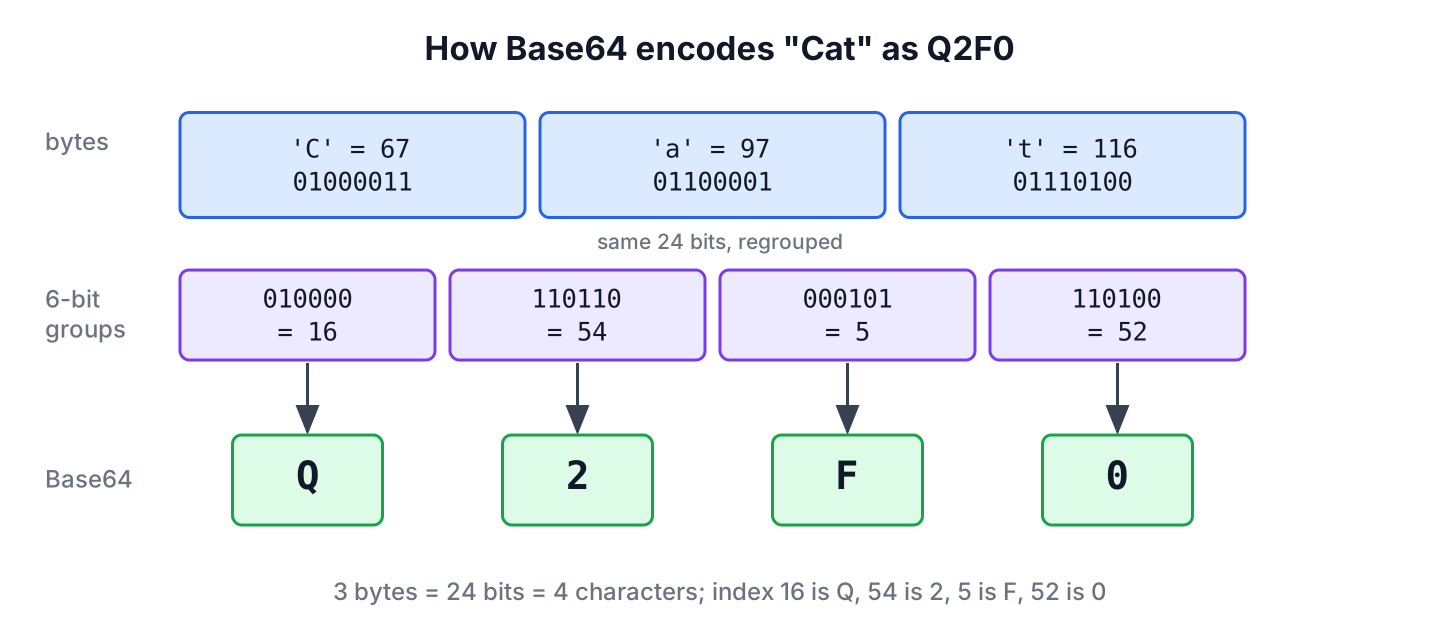
The basic alphabet has the uppercase letters A to Z, the lowercase letters a to z, the digits 0 to 9, and the two symbols + and /. When the input length is not a multiple of 3, the encoder fills the last group with zero bits and adds one or two = characters, so the output length is always a multiple of 4.
String oneByte = Base64.getEncoder().encodeToString("C".getBytes(StandardCharsets.UTF_8));     // "Qw=="
String twoBytes = Base64.getEncoder().encodeToString("Ca".getBytes(StandardCharsets.UTF_8));   // "Q2E="
String threeBytes = Base64.getEncoder().encodeToString("Cat".getBytes(StandardCharsets.UTF_8)); // "Q2F0"
Base64 is an encoding, not encryption, so anyone who sees the text can decode it. A password in a Basic authentication header is protected only by HTTPS, never by Base64.
2. Encoders and Decoders in java.util.Base64
The Base64 class has no public constructor. Its static factory methods return a Base64.Encoder or a Base64.Decoder for one variant, and both objects are immutable and thread-safe, so we can keep them in a constant.
| Variant | Factory methods | Alphabet | Line breaks | Decoder on unknown characters |
|---|---|---|---|---|
| Basic | getEncoder(), getDecoder() | A-Z a-z 0-9 + / | None | Throws IllegalArgumentException |
| URL and filename safe | getUrlEncoder(), getUrlDecoder() | A-Z a-z 0-9 – _ | None | Throws IllegalArgumentException |
| MIME | getMimeEncoder(), getMimeDecoder() | A-Z a-z 0-9 + / | CRLF after every 76 characters | Ignores them |
The Base64.Encoder class provides the encoding methods. Each one reads all the bytes we pass and returns a new array, buffer or string.
| Method | Purpose |
|---|---|
| byte[] encode(byte[] src) | Encodes all bytes from the specified byte array into a newly-allocated byte array |
| ByteBuffer encode(ByteBuffer buffer) | Encodes all remaining bytes from the specified byte buffer into a newly-allocated ByteBuffer |
| String encodeToString(byte[] src) | Encodes the specified byte array into a String |
| OutputStream wrap(OutputStream os) | Wraps an output stream for encoding byte data |
| Encoder withoutPadding() | Returns an encoder that leaves out the trailing = characters |
The Base64.Decoder class mirrors these methods for the way back. Its decode(String) method takes the encoded text as a String, with no conversion to bytes first.
| Method | Purpose |
|---|---|
| byte[] decode(byte[] src) | Decodes all bytes from the specified byte array into a newly-allocated byte array |
| ByteBuffer decode(ByteBuffer buffer) | Decodes all bytes from the specified byte buffer into a newly-allocated ByteBuffer |
| byte[] decode(String src) | Decodes the specified String into a new byte array |
| InputStream wrap(InputStream is) | Wraps an input stream for decoding byte data |
3. Encoding and Decoding a String
Base64 works on bytes, so a string first needs a charset. We pass StandardCharsets.UTF_8 to getBytes() and to the String constructor, so the result does not depend on the platform default, which was not UTF-8 everywhere before Java 18.
A common real-world case is the HTTP Basic authentication header. The client joins the user name and password with a colon, encodes the bytes, and sends Authorization: Basic followed by the encoded text, as defined in RFC 7617.
String credentials = "username:password";

String encoded = Base64.getEncoder()
        .encodeToString(credentials.getBytes(StandardCharsets.UTF_8));
String header = "Basic " + encoded;                     // "Basic dXNlcm5hbWU6cGFzc3dvcmQ="
The server reverses the steps. It removes the prefix, decodes the text into bytes, and builds a string with the same charset.
String received = "dXNlcm5hbWU6cGFzc3dvcmQ=";

byte[] bytes = Base64.getDecoder().decode(received);
String credentials = new String(bytes, StandardCharsets.UTF_8);  // "username:password"
In a Spring application, HTTP Basic authentication does this decoding for us, but the same two lines are useful in tests and in HTTP clients that build the header by hand.
4. Base64 without Padding
The trailing = characters carry no data, and some formats leave them out, for example JSON Web Tokens. The withoutPadding() method returns an encoder that skips them.
byte[] note = "Hi".getBytes(StandardCharsets.UTF_8);

String padded = Base64.getEncoder().encodeToString(note);                      // "SGk="
String unpadded = Base64.getEncoder().withoutPadding().encodeToString(note);   // "SGk"
String back = new String(Base64.getDecoder().decode(unpadded), StandardCharsets.UTF_8);  // "Hi"
The decoders accept input with or without padding, so we do not need to add the = characters back before decoding. If padding is present, it must be correct, and a single = where two are needed throws IllegalArgumentException.
5. URL-Safe Base64
The basic alphabet contains + and /, which have a special meaning in URLs and file names. The URL-safe variant from RFC 4648 replaces them with – and _, so the text fits into a query parameter or a path without percent-encoding.
JSON Web Tokens use URL-safe Base64 without padding for all three parts. For example, to read the claims of a token in a log or a test, we split it at the dots and decode the middle part with getUrlDecoder().
String jwt = "eyJhbGciOiJIUzI1NiJ9.eyJzdWIiOiJsb2tlc2giLCJyb2xlIjoiZWRpdG9yIn0.c2lnbmF0dXJl";

String payload = jwt.split("\\.")[1];
String claims = new String(Base64.getUrlDecoder().decode(payload), StandardCharsets.UTF_8);  // "{"sub":"lokesh","role":"editor"}"
Decoding the payload only reads it and does not check the signature, so a server must verify the token with a JWT library before trusting the claims. The article on JSON Web Tokens covers the verification. Base64 is also different from URL encoding, which replaces unsafe characters with % codes and is done by URLEncoder.
6. MIME Base64 for Email
Email attachments use the MIME variant from RFC 2045. It uses the basic alphabet but breaks the output into lines of at most 76 characters, separated by CRLF, because mail servers limit the line length.
byte[] attachment = new byte[100];

String mime = Base64.getMimeEncoder().encodeToString(attachment);
int firstLineLength = mime.indexOf("\r\n");                   // 76
int restoredLength = Base64.getMimeDecoder().decode(mime).length;  // 100
The getMimeEncoder(lineLength, lineSeparator) overload sets a different line length, which the encoder rounds down to a multiple of 4. A PEM file, such as a certificate, uses 64-character lines and a plain line feed.
byte[] certificate = new byte[60];

String pem = Base64.getMimeEncoder(64, "\n".getBytes(StandardCharsets.US_ASCII))
        .encodeToString(certificate);
int pemLineLength = pem.indexOf('\n');                         // 64
The MIME decoder ignores line breaks and every other character outside the alphabet. That makes it forgiving for multi-line input, but it also accepts garbage without complaint, so we use the basic decoder when the input must be valid.
7. Encoding Files and Streams
For large files, we do not load all bytes into memory. The wrap() method of an encoder returns an OutputStream that encodes everything we write to it, and the wrap() method of a decoder returns an InputStream that decodes while we read.
static void encodeFile(Path source, Path target) throws IOException {
    try (OutputStream out = Base64.getEncoder().wrap(Files.newOutputStream(target))) {
        Files.copy(source, out);
    }
}
static String decodeFile(Path encoded) throws IOException {
try (InputStream in = Base64.getDecoder().wrap(Files.newInputStream(encoded))) {
return new String(in.readAllBytes(), StandardCharsets.UTF_8);
}
}The encoder writes the final padding when the stream is closed, so the try-with-resources block is required for a complete result. The following example writes a short recipe note to a temporary file, encodes it into a second file and decodes it again.
Path recipe = Files.createTempFile("recipe", ".txt");
Files.writeString(recipe, "Mix flour and water.");
Path encodedRecipe = Files.createTempFile("recipe", ".b64");

encodeFile(recipe, encodedRecipe);
String fileContent = Files.readString(encodedRecipe);     // "TWl4IGZsb3VyIGFuZCB3YXRlci4="
String restored = decodeFile(encodedRecipe);              // "Mix flour and water."
For small files, such as an avatar image that goes into a JSON response or a data URI, we read the bytes in one call. The article on Base64 file encoding has more file examples, including images and PDFs.
Path avatar = Files.createTempFile("avatar", ".png");
Files.write(avatar, new byte[] {-119, 80, 78, 71});

String dataUri = "data:image/png;base64," + Base64.getEncoder().encodeToString(Files.readAllBytes(avatar));  // "data:image/png;base64,iVBORw=="
8. Common Base64 Decoding Errors
The basic and URL-safe decoders throw IllegalArgumentException for any character outside their alphabet, and the message names the character in hexadecimal. Reading that code is the fastest way to find the cause.
String fromQuery = "Q2F0 w==";                                          // a "+" became a space in a URL
byte[] spaced = Base64.getDecoder().decode(fromQuery);                  // IllegalArgumentException: Illegal base64 character 20
byte[] wrongDecoder = Base64.getDecoder().decode("-_8=");               // IllegalArgumentException: Illegal base64 character 2d
String rightDecoder = Arrays.toString(Base64.getUrlDecoder().decode("-_8="));   // [-5, -1]
byte[] newline = Base64.getDecoder().decode("Q2F0\n");                 // IllegalArgumentException: Illegal base64 character a
String stripped = new String(Base64.getDecoder().decode("Q2F0\n".strip()), StandardCharsets.UTF_8); // "Cat"- Character 20 is a space. Basic Base64 sent in a query string loses its + characters to form decoding, so we send URL-safe Base64 in URLs instead.
- Character 2d is – and character 5f is _. The input is URL-safe Base64, so we decode it with getUrlDecoder().
- Character a is a line feed and character d is a carriage return. The text came from a file or a terminal, so we call strip() first, or use getMimeDecoder() for multi-line input.
A decode that succeeds but prints strange characters is a charset problem, not a Base64 problem. The bytes were encoded from one charset and turned back into a string with another, so both sides must use the same charset, such as UTF-8.
9. Base64 Before Java 8
Before java.util.Base64 arrived in Java 8, projects used internal JDK classes or libraries. Old code still contains them, and some of them no longer compile on Java 25.
| Old API | Status on Java 25 | Replacement |
|---|---|---|
| sun.misc.BASE64Encoder, sun.misc.BASE64Decoder | Internal classes, removed in Java 9 | Base64.getEncoder(), Base64.getMimeDecoder() |
| javax.xml.bind.DatatypeConverter | Removed with the java.xml.bind module in Java 11 (JEP 320) | Base64.getEncoder(), Base64.getDecoder() |
| Apache Commons Codec Base64 | Still maintained, needs a dependency | java.util.Base64 unless the project already uses Commons Codec |
The old sun.misc.BASE64Encoder inserted a line break after every 76 characters, so its output matches the MIME encoder, not the basic one. When we migrate code that reads such data, we decode it with getMimeDecoder().
10. Java Base64 FAQs
Base64 confuses newcomers mostly with its security and with the trailing = signs.
10.1. Is Base64 Encryption?
No. Base64 uses a public alphabet and no key, so anyone can decode it in one line. We use encryption, such as AES, to keep data secret, and Base64 only to move the encrypted bytes through a text channel.
10.2. Why Does a Base64 String End with = or ==?
The = characters are padding. One = means the last group held two input bytes, and two mean it held one byte, so the encoded length stays a multiple of 4. The withoutPadding() encoder leaves them out, as in section 4.
10.3. How Much Larger Is Base64 Output?
The basic and URL-safe encoders produce 4 characters for every 3 bytes, rounded up, so the output is 4 * ceil(n / 3) characters long, about 33% larger than the input. The MIME encoder adds 2 more characters for every 76-character line.
10.4. How Do I Check Whether a String Is Valid Base64?
We try to decode it and catch IllegalArgumentException. A regular expression can check the characters, but the decoder also checks the padding and the length, so it is the more reliable test.
static boolean isBase64(String text) {
    try {
        Base64.getDecoder().decode(text);
        return true;
    } catch (IllegalArgumentException e) {
        return false;
    }
}
boolean valid = isBase64("Q2F0"); // true
boolean invalid = isBase64("Q2F0!"); // false10.5. How Does getUrlEncoder() Differ From getEncoder()?
The two encoders differ in two characters only. The getEncoder() method uses + and /, and getUrlEncoder() uses – and _, so its output is safe in URLs and file names. Data must be decoded with the matching decoder, because each one rejects the other’s two characters.
11. Conclusion
The java.util.Base64 class encodes bytes into text and back with three variants. The basic encoder fits headers and JSON, the URL-safe encoder fits URLs, file names and JSON Web Tokens, and the MIME encoder fits email and PEM files with their line limits.
We always convert strings with an explicit charset such as UTF-8, use wrap() with try-with-resources for large files, and read the character code in an IllegalArgumentException to find whether the input has spaces, line breaks or the other alphabet. Base64 hides nothing, so secrets still need encryption and HTTPS.
12. References
- Base64 Javadoc (Java 25)
- RFC 4648 The Base16, Base32, and Base64 Data Encodings
- RFC 2045 Section 6.8 Base64 Content-Transfer-Encoding
- RFC 7617 The Basic HTTP Authentication Scheme
Happy Learning !!

How to encode image to base64 in java 8?
warning: sun.misc.BASE64Decoder is Sun proprietary API and may be removed in a future release
byte[] dec = new sun.misc.BASE64Decoder().decodeBuffer(str);
How to solve this warning in java 6
You get the error because
sun.misc.BASE64Encoderis an internal API of the JDK. It’s not part of the official public Java API, so you are not supposed to be using it. There’s no guarantee that in a future Java update this class will still exist, and in other Java implementations (for example IBM’s JVM) this class doesn’t exist. Use this implementation.Hi Lokesh,
I am attaching my method please check…
public String getEncryotedCC(String plainText) throws InvalidKeyException, UnsupportedEncodingException, NoSuchAlgorithmException, InvalidKeySpecException, NoSuchPaddingException, IllegalBlockSizeException, BadPaddingException
{
DESKeySpec keySpec = new DESKeySpec(“Your secret Key phrase”.getBytes(“UTF8”));
SecretKeyFactory keyFactory = SecretKeyFactory.getInstance(“DES”);
SecretKey key = keyFactory.generateSecret(keySpec);
BASE64Encoder base64encoder = new BASE64Encoder();
    byte[] cleartext = plainText.getBytes("UTF8");

    Cipher cipher = Cipher.getInstance("DES");

    cipher.init(Cipher.ENCRYPT_MODE, key);

    String encrypedString = base64encoder.encode(cipher.doFinal(cleartext));

    System.out.println("encrypedPwd : " + encrypedString);

    return encrypedString;

}