

The Builder pattern separates an object’s construction from the object itself, allowing the caller to supply its configuration through a sequence of named methods. It is a creational design pattern commonly used when a class has several optional constructor arguments. The method names make each choice visible, and a final construction method returns the configured object.
1. How the Builder Pattern Works
A constructor works well when a class needs a few required values. As optional values accumulate, a constructor call becomes harder to interpret. Several arguments might have the same type, and callers may need to pass null or default values for options they do not use. Overloaded constructors can handle some combinations, but each combination adds another constructor to maintain.
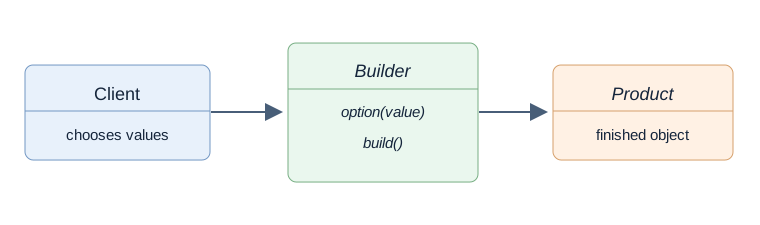
A builder gives those choices names. The calling code, or client, supplies values to the builder and asks it to create the product. In a typical Java implementation, that final method is named build(). The builder holds the values or construction steps until that method runs. The builder configures construction; the product is the completed object the application uses.
2. Builder Pattern in Action
Consider a sales application that lets a user download a report. Every report request needs a start date and an end date. The user can also choose a file format, filter by region, and request detailed rows. When no options are selected, the application uses CSV, includes all regions, and omits detailed rows.
These options can be combined independently. A request may change only the format, while another changes the format and region. A builder makes those choices explicit:
ReportRequest request = new ReportRequest.Builder(
        LocalDate.of(2026, 10, 1), LocalDate.of(2026, 10, 31))
        .format(ReportRequest.Format.PDF)
        .region("EU")
        .build();
This call creates an October report request in PDF format for the EU region. Detailed rows remain disabled because the caller did not enable them. The request contains the configuration a reporting service needs; generating the file is a separate operation.
Here, ReportRequest is the product, its nested Builder collects the configuration, and BuilderVariantsDemo is the client that creates requests. A request must reject an end date before its start date and a blank region. The implementations below enforce those rules while using different construction mechanisms.
3. Builder Pattern Implementations
The three implementations offer different ways to write and maintain the construction code. Choose based on the product’s API and whether the project uses code generation:
| Implementation | Choose it when | Main consideration |
|---|---|---|
| Classic nested builder | You want direct control over required values, defaults and validation without another dependency. | You write and maintain a builder for each product. |
| Generic builder | Existing mutable classes already expose suitable constructors and setters. | The reusable builder applies setters; the completed product can still change. |
| Lombok builder | You want a generated builder API and accept Lombok in the build. | Annotation processing must be configured, and application validation still needs code. |
The usage examples below share these dates, so the construction calls differ only in how they supply the same report settings:
LocalDate start = LocalDate.of(2026, 10, 1);
LocalDate end = LocalDate.of(2026, 10, 31);
3.1. Classic Builder Pattern
The classic Java form places a static nested Builder inside the product class. Because it is static, the caller can create a builder without an existing product instance. The builder has its own fields for construction values. Its methods return the same builder so calls can be chained, and build() invokes the product’s private constructor.
Our ReportRequest requires two LocalDate values. Its nested builder supplies defaults for the remaining fields:
package com.howtodoinjava.patterns.creational.builder;

import java.time.LocalDate;
import java.util.Objects;

public final class ReportRequest {
    public enum Format { CSV, PDF }

    private final LocalDate startDate;
    private final LocalDate endDate;
    private final Format format;
    private final String region;
    private final boolean includeDetails;

    private ReportRequest(Builder builder) {
        startDate = builder.startDate;
        endDate = builder.endDate;
        format = builder.format;
        region = builder.region;
        includeDetails = builder.includeDetails;
    }

    public LocalDate getStartDate() { return startDate; }
    public LocalDate getEndDate() { return endDate; }
    public Format getFormat() { return format; }
    public String getRegion() { return region; }
    public boolean isIncludeDetails() { return includeDetails; }

    @Override
    public String toString() {
        return startDate + " to " + endDate + " format=" + format
                + " region=" + region + " details=" + includeDetails;
    }

    public static final class Builder {
        private final LocalDate startDate;
        private final LocalDate endDate;
        private Format format = Format.CSV;
        private String region = "ALL";
        private boolean includeDetails;

        public Builder(LocalDate startDate, LocalDate endDate) {
            this.startDate = Objects.requireNonNull(startDate, "start date");
            this.endDate = Objects.requireNonNull(endDate, "end date");
        }

        public Builder format(Format format) {
            this.format = Objects.requireNonNull(format, "format");
            return this;
        }

        public Builder region(String region) {
            Objects.requireNonNull(region, "region");
            if (region.isBlank()) {
                throw new IllegalArgumentException("Region cannot be blank");
            }
            this.region = region;
            return this;
        }

        public Builder includeDetails(boolean includeDetails) {
            this.includeDetails = includeDetails;
            return this;
        }

        public ReportRequest build() {
            if (endDate.isBefore(startDate)) {
                throw new IllegalArgumentException("End date precedes start date");
            }
            return new ReportRequest(this);
        }
    }
}
The builder constructor checks that both dates are present. Calling format(), region() or includeDetails() changes a field in the builder and returns this. The product does not exist yet. When build() runs, it checks the date range and passes the builder to the private ReportRequest constructor. That constructor copies the selected values into the product’s final fields.
For a detailed PDF report, the client supplies all three options:
ReportRequest detailed = new ReportRequest.Builder(start, end)
        .format(ReportRequest.Format.PDF)
        .region("EU")
        .includeDetails(true)
        .build();
System.out.println(detailed.getRegion());
The printed region is EU. The same builder receives each configuration call, and build() returns a new ReportRequest. The product exposes getters and has no setters, so a reporting service can read the configuration without changing it. This approach keeps construction rules close to the product, but each additional option requires a builder field and method.
3.2. Generic Builder Pattern
If several classes already have setters, a reusable builder can record those setter calls instead of declaring a dedicated builder field for every property. We can pass those operations using functional interfaces, whose single abstract method can be implemented by a lambda expression or method reference.
Java’s Supplier is a functional interface that supplies a result. Here, it creates the product. A BiConsumer accepts two arguments and returns no value; here, those arguments are the product and the value passed to a setter.
GenericBuilder stores the creation operation and a list of configuration steps. Its type parameter T represents the product type. Each step is a Consumer: an operation that accepts one product and returns no value. The with() method uses a second type parameter, V, for the value accepted by a particular setter:
package com.howtodoinjava.patterns.creational.builder;

import java.util.ArrayList;
import java.util.List;
import java.util.function.BiConsumer;
import java.util.function.Consumer;
import java.util.function.Supplier;

public final class GenericBuilder<T> {
    private final Supplier<T> factory;
    private final List<Consumer<T>> steps = new ArrayList<>();

    private GenericBuilder(Supplier<T> factory) {
        this.factory = factory;
    }

    public static <T> GenericBuilder<T> of(Supplier<T> factory) {
        return new GenericBuilder<>(factory);
    }

    public <V> GenericBuilder<T> with(BiConsumer<T, V> setter, V value) {
        steps.add(target -> setter.accept(target, value));
        return this;
    }

    public T build() {
        T target = factory.get();
        for (Consumer<T> step : steps) {
            step.accept(target);
        }
        return target;
    }
}
Calling of() stores the supplied creation operation. Each with() call records a setter and its value inside a lambda expression. For example, passing a region setter and “EU” records an operation that will set EU on the product it receives. Neither method creates the product. During build(), factory.get() creates it, and the loop applies the recorded operations in order before returning it.
The immutable ReportRequest has no setters. For this implementation, we use MutableReportRequest, which keeps the required dates in its constructor and allows its optional settings to change. It shares the ReportRequest.Format enumeration:
package com.howtodoinjava.patterns.creational.builder;

import java.time.LocalDate;
import java.util.Objects;
import com.howtodoinjava.patterns.creational.builder.ReportRequest.Format;

public final class MutableReportRequest {
    private final LocalDate startDate;
    private final LocalDate endDate;
    private Format format = Format.CSV;
    private String region = "ALL";
    private boolean includeDetails;

    public MutableReportRequest(LocalDate startDate, LocalDate endDate) {
        this.startDate = Objects.requireNonNull(startDate, "start date");
        this.endDate = Objects.requireNonNull(endDate, "end date");
        if (endDate.isBefore(startDate)) {
            throw new IllegalArgumentException("End date precedes start date");
        }
    }

    public void setFormat(Format format) {
        this.format = Objects.requireNonNull(format, "format");
    }

    public void setRegion(String region) {
        Objects.requireNonNull(region, "region");
        if (region.isBlank()) {
            throw new IllegalArgumentException("Region cannot be blank");
        }
        this.region = region;
    }

    public void setIncludeDetails(boolean includeDetails) {
        this.includeDetails = includeDetails;
    }

    public LocalDate getStartDate() { return startDate; }
    public LocalDate getEndDate() { return endDate; }
    public Format getFormat() { return format; }
    public String getRegion() { return region; }
    public boolean isIncludeDetails() { return includeDetails; }

    @Override
    public String toString() {
        return startDate + " to " + endDate + " format=" + format
                + " region=" + region + " details=" + includeDetails;
    }
}
The client provides a lambda expression that creates a request with its required dates. Method references identify the setters to run:
MutableReportRequest generic = GenericBuilder
        .of(() -> new MutableReportRequest(start, end))
        .with(MutableReportRequest::setFormat, ReportRequest.Format.PDF)
        .with(MutableReportRequest::setRegion, "EU")
        .with(MutableReportRequest::setIncludeDetails, true)
        .build();
System.out.println(generic.getRegion());
This prints EU after build() has applied all three setters. The lambda supplied to of() provides the constructor arguments, so this generic builder does not require a no-argument constructor.
The resulting request remains mutable. Its setters are still available after construction:
generic.setRegion("APAC");
System.out.println(generic.getRegion()); // APAC
The same request now targets a different region. The reusable builder reduces product-specific builder code, but the completed request can change after a service receives it. Use this form when mutation is already part of the product’s intended API.
3.3. Lombok Builder
Lombok can generate the builder class and its fluent methods during compilation. Its @Builder annotation can be applied to a constructor, allowing us to keep validation in that constructor while Lombok generates the calls that reach it.
Add Lombok as a compile-time dependency. This example uses version 1.18.42:
<dependency>
    <groupId>org.projectlombok</groupId>
    <artifactId>lombok</artifactId>
    <version>1.18.42</version>
    <scope>provided</scope>
</dependency>
Lombok must also be configured as an annotation processor. An annotation processor runs during compilation; Lombok uses it to generate the builder methods. Add the following plugin under the Maven build/plugins element, alongside the dependency above:
<plugin>
    <groupId>org.apache.maven.plugins</groupId>
    <artifactId>maven-compiler-plugin</artifactId>
    <version>3.14.1</version>
    <configuration>
        <release>17</release>
        <annotationProcessorPaths>
            <path>
                <groupId>org.projectlombok</groupId>
                <artifactId>lombok</artifactId>
                <version>1.18.42</version>
            </path>
        </annotationProcessorPaths>
    </configuration>
</plugin>
The official Maven setup requires explicit processor configuration from JDK 23. The example project’s complete Maven file already contains both settings, so it can be compiled directly.
We annotate the constructor that validates the request. @Getter generates the read methods for the fields:
package com.howtodoinjava.patterns.creational.builder;

import java.time.LocalDate;
import java.util.Objects;
import lombok.Builder;
import lombok.Getter;
import com.howtodoinjava.patterns.creational.builder.ReportRequest.Format;

@Getter
public final class LombokReportRequest {
    private final LocalDate startDate;
    private final LocalDate endDate;
    private final Format format;
    private final String region;
    private final boolean includeDetails;

    @Builder
    private LombokReportRequest(LocalDate startDate, LocalDate endDate,
            Format format, String region, boolean includeDetails) {
        this.startDate = Objects.requireNonNull(startDate, "start date");
        this.endDate = Objects.requireNonNull(endDate, "end date");
        if (endDate.isBefore(startDate)) {
            throw new IllegalArgumentException("End date precedes start date");
        }
        if (region != null && region.isBlank()) {
            throw new IllegalArgumentException("Region cannot be blank");
        }
        this.format = format == null ? Format.CSV : format;
        this.region = region == null ? "ALL" : region;
        this.includeDetails = includeDetails;
    }

    @Override
    public String toString() {
        return startDate + " to " + endDate + " format=" + format
                + " region=" + region + " details=" + includeDetails;
    }
}
Lombok generates builder(), methods corresponding to the constructor parameters, and build(). The generated build() calls this constructor, so the date and region checks run before a product is returned.
The creation call supplies required dates through generated methods:
LombokReportRequest generated = LombokReportRequest.builder()
        .startDate(start)
        .endDate(end)
        .format(ReportRequest.Format.PDF)
        .region("EU")
        .includeDetails(true)
        .build();
System.out.println(generated.getRegion());
The printed region is EU, and the returned request exposes no setters. Unlike the handwritten builder constructor, builder() does not require dates as arguments. Omitting a date therefore compiles but fails with a NullPointerException when build() invokes our constructor.
The constructor also supplies defaults for a null format or region. Consequently, omitting either option and explicitly passing null have the same effect in this implementation. The classic and generic implementations reject explicitly supplied null options. Generated builder methods do not define application validation rules; the constructor above does.
4. Running and Comparing the Examples
The source directory contains a standalone Maven project for all three implementations. It targets Java 17 and includes the Lombok annotation processor. From that directory, run:
mvn -q clean compile
java -cp target/classes com.howtodoinjava.patterns.creational.builder.BuilderVariantsDemo
The demo uses 1 October through 31 October 2026 for all three implementations. With PDF, EU and detailed rows selected, it prints:
Classic: 2026-10-01 to 2026-10-31 format=PDF region=EU details=true
Generic: 2026-10-01 to 2026-10-31 format=PDF region=EU details=true
Lombok: 2026-10-01 to 2026-10-31 format=PDF region=EU details=true
The matching values show that each implementation constructs the requested configuration. To observe the defaults, the demo supplies only the dates:
System.out.println("Classic defaults: " + new ReportRequest.Builder(start, end).build());
System.out.println("Generic defaults: " + GenericBuilder
        .of(() -> new MutableReportRequest(start, end)).build());
System.out.println("Lombok defaults: " + LombokReportRequest.builder()
        .startDate(start).endDate(end).build());
All three use CSV, all regions and no details:
Classic defaults: 2026-10-01 to 2026-10-31 format=CSV region=ALL details=false
Generic defaults: 2026-10-01 to 2026-10-31 format=CSV region=ALL details=false
Lombok defaults: 2026-10-01 to 2026-10-31 format=CSV region=ALL details=false
Next, the demo reverses the dates. All three calls reject the range:
Classic dates: End date precedes start date
Generic dates: End date precedes start date
Lombok dates: End date precedes start date
The classic builder checks the range directly in build(). The generic builder calls its factory, which reaches the validating MutableReportRequest constructor. Lombok’s generated method reaches the validating LombokReportRequest constructor. Each fails before returning a completed request.
A blank region reveals a difference in validation timing. The classic builder rejects it as soon as region(” “) runs. The generic builder records the setter call and does not reject the value until build() executes it:
GenericBuilder<MutableReportRequest> pending = GenericBuilder
        .of(() -> new MutableReportRequest(start, end))
        .with(MutableReportRequest::setRegion, " ");
System.out.println("Generic steps recorded");
pending.build();
The message is printed before setRegion() throws an IllegalArgumentException. Lombok also accepts the blank value into its builder and rejects it when the constructor runs. The demo catches those exceptions and continues, finishing by changing the generic request’s region to APAC. The classic and Lombok products have no corresponding setter.
5. Frequently Asked Questions
A director, builder reuse and product immutability are separate design choices. Using a builder does not require a director or make its product immutable.
5.1. Does a Builder Need a Director?
A director is a separate class that calls a builder’s construction steps in a prescribed order. It is useful when the application reuses that sequence or different builders produce different representations from it. A nested Java builder does not require a director: the client can call its configuration methods directly, as our report examples do. The term classic builder in Java tutorials often refers to this nested form.
5.2. Can Builder Reuse Change an Existing Product?
Changing our classic builder does not change a request it already created, because the product constructor copied the field values. The builder retains its options after build(), so another call creates a new request with those options unless the client changes them first. The generic builder likewise retains its recorded steps, and its factory must supply a fresh product if separate results are required. Create a new builder for independent requests when carrying previous choices forward would be surprising.
Immutability is a separate concern. The classic and Lombok products contain only final references to immutable values and expose no setters. Adding a mutable collection would require defensive copying as well. A builder alone does not protect that collection from later changes.
5.3. When Is a Constructor or Factory Enough?
A constructor is usually sufficient for a small set of required values. Builder becomes useful when optional values make calls difficult to read or construction needs several steps. A Factory can encapsulate the choice of which product to create, while an Abstract Factory supplies related products as a family. Choose according to the creation problem rather than the number of patterns available.
6. Conclusion
Use a classic nested builder for explicit construction rules, a generic builder for suitable mutable products, or Lombok when generated builder code fits the project. Keep defaults and validation deliberate in every form. The choice of builder does not by itself make the resulting product immutable.
Happy Learning!

Hey buddy, I never find best example of builder pattern then your’s example. You explained in very easy way, while many tutorial make it complex & hard to understand. and ur way is superb. Keep going.
Greate article.
Have a question of this block:
public UserBuilder(String firstName, String lastName) {
this.firstName = firstName;
this.lastName = lastName;
}
Should we return this as well? like other funcs
Never mind, I figured it out. it’s constructor of UserBuilder, and we don’t need to return.
I like the idea of a Destroyer pattern, but it sounds like an impossible task.
I have a class User (same as your User). When I try to inherit the User class, it gives compilation error that “no default constructor available”.
public class Electronic extends User{ public enum ElecList{ TV, MOBILE, REFRIGERATOR } }Yes because the constructor for User class is private and classes with private constructors cannot be inherited.
its a immutable class, they are not meant to be extended.
Use final keyword to make cannot be extended
Great article!
You have provided a great insight here about builder design pattern in java. Designer pattern allows to develop complicated object phase by phase and also makes sure a way to develop an object as a finished object. It is very helpful for all java debvelopers to know about builder pattern in java, i have enjoyed this article, thanks a lot for sharing!
I’m not aligned on jdk example of Builder Pattern of StringBuilder#append and StringBuffer#append because these two are not immutable and also Builder pattern is best suitable for the classes that has large number of instance fields where as for StringBuilder#append and StringBuffer#append only single value is required. Please correct me if i’m missing anything in my understanding.
I will suggest you to look at the pattern from steps to create the full object.. rather number of fields. That will make things more clear.
Thank you, it resolves my doubt.
Very nicely explained.
I have a query in this pattern that as User class might have some fields as mandatory and some as optional so even if object is built using builder pattern that has only few optional fields set and others will be null then how does it make difference to create object using constructor in the same class that will have required and applicable fields set with some value and not applicable fields as null. Please help me understand this.
Thanks.
Very good reasoning. You are correct that with mentioned optionality, there seems no difference. In last, it all boils down to readability and ability to create immutable objects, which is not possible using constructors.
That is the good point, thank you.
Actually there is a clear difference. As stated before, once there is an optional object in the constructor, the developer is forced to initiate with a nullin cases where the value is not known. In the builder factory pattern, the optional fields are simply skipped and the code looks neater. The developer doesn’t have to instantiate them.
Hi Lokesh!
First of all, sincere thanks for your clear explanation! Can you please clarify my query below?
With the example code that you provided, the immutable User instance is created for no doubt. But if the User wants to update some detail, let’s say the phone number, please explain clearly how the behaviour would be. Will it be again creating a new instance or update the existing instance.
Thank you
Regards
Datt
In such cases, I would not like to change the existing user object. Rather, I will define a method
fromUser(User u)in userbuilder which will take an existing user instance and populate create a new User object with same data and a chance to update desired fields before constructing the object.Something like this:
User changedUser = new User.UserBuilder().fromUser(existingUser) .age(40) .phone("5655") .build();Thanks for your reply Lokesh!
If we follow the above approach,
1. How about the first user object that was created before modification?
2. Also, if the new object is created with modified data as mentioned, there could be chance for two identical objects to exist with first name and last name as common in both of them and other details in different way. If this point is correct, Won’t it be a memory loss? Please correct if am going wrong in understanding.
If possible please put this code patch in main program for better reference.
Thanks
In that case, you can provide methods for firstName and lastName fields also. Don’t make them final and treat as other fields.
I am studying for my Java professional Exam and I really can’t see the huge advantage of this pattern.
For example let’s say I have an Animal class and an AnimalBuilder class:
Animal needs a new mandatory parameter. Not only do I have to change it in the Animal class, but in the AnimalBuilder class, plus all the classes using AnimalBuilder.
To be honest all I can see in terms of advantages is more readable code, but even then it is a stretch.
Please tell me I am wrong and show me the light :)
Adding a new mandatory parameter is a big design change. To accommodate this change, you may follow below steps:
1) Add attribute to Animal class, assign some default value to it, AND one more constructor which sets its value from parameter.
2) Modify AnimalBuilder. Add new builder method to use this new constructor.
Till now, no change is needed in any other class. Now, you may use new builder method in new classes OR may use in older classes where its absolutely necessary.
The GOF book actually says “Separate the construction of a complex object from its representation so that
the same construction process can create different representations.”. Please correct your post.
Hi Anijith, I clearly mentioned that this definition is slightly different from what is mentioned in GangOfFour.
Your post says “The book says:
The builder pattern is a design pattern that allows for the step-by-step creation of complex objects using the correct sequence of actions. The construction is controlled by a director object that only needs to know the type of object it is to create.”
But, I don’t see the above description in the GOF book.
Instead the book says”
“Separate the construction of a complex object from its representation so that
the same construction process can create different representations.”
Brilliant! Thank you for sharing. Been Inspired, so I ventured to borrow your example and do another with the same goal but slightly different idea.
public interface User { //User now been declared as an interface, thus is immutable //All getters need to be implemented public String getFirstName(); public String getLastName(); public int getAge(); public String getPhone(); public String getAddress(); public static class UserBuilder { private final String firstName; private final String lastName; private int age; private String phone; private String address; public UserBuilder(String firstName, String lastName) { this.firstName = firstName; this.lastName = lastName; } public UserBuilder age(int age) { this.age = age; return this; } public UserBuilder phone(String phone) { this.phone = phone; return this; } public UserBuilder address(String address) { this.address = address; return this; } //Return the finally consrcuted User object public User build() { User user = newUser(); validateUserObject(user); return user; } private void validateUserObject(User user) { //Do some basic validations to check //if user object does not break any assumption of system } //Way to construct private User newUser() { //Introduce anonymous class return new User() { //All final attributes private String firstName; // required private String lastName; // required private int age; // optional private String phone; // optional private String address; // optional private User basedON(UserBuilder builder) { this.firstName = builder.firstName; this.lastName = builder.lastName; this.age = builder.age; this.phone = builder.phone; this.address = builder.address; return this; } public String getFirstName() { return firstName; } public String getLastName() { return lastName; } public int getAge() { return age; } public String getPhone() { return phone; } public String getAddress() { return address; } @Override public String toString() { return "User: "+this.firstName+", "+this.lastName+", "+this.age+", "+this.phone+", "+this.address; } }.basedON(this); } } }Thanks for sharing this.
awesome!! really I have gone through many sites but couldnt understand the builder pattern this much clearly… Thanks :)
I am trying to implement a similar problem,except that it has some nested builders.I have the builders created separately. Now,the problem is how do I write the client code . Also,I have seen implementations using Interfaces,when are they used? is it like interfaces give us the ability to have a control over the sequence in which we want to call out the methods?
I have a user class:
with similar fields as to what you have,
Then I have an Address class with usual fields such as city,state,zip etc.
How do I call the builder in Address inside the builder for User?
And while creating the user I want to give the option of creating the address or not. Can this be done? DO you need the builder code here? its pretty big,hence did not add.But,assuming its on the similar lines of yours how would go ahead and do it? What I have tried is this..
public HomeAddressBuilder havingHomeAddressAs() {
//HomeAddress is the other class,and it contains the static class for the builder inside it.
return new HomeAddress.HomeAddressBuilder();
}
is that the correct way?
so if I had the user builder will it look like this:
User user1 = new User.UserBuilder("Lokesh", "Gupta") .age(30) .phone("1234567") .havingHomeAddressAs() //the above method .createMyUserHomeAddress() //the method inside my address builder. .withCity("ccc") .withState("sss") .createAndReturnMyAddress() //this marks the end of address builder .build();//this marks the end of the user builderIf I will be in your place, I will not build address using userbuilder reference. Address is another example of complex data having lot’s of possible fields with multiple permutations and combinations internationally. So I will create a separate builder object for address as well.
//Build the address using addressbuilder
//Build the user using userbuilder AND set homeaddress obtained in above step.
This approach is good for two reasons:
1) Your code remain clean and easy to extend and modify. Always prefer simplicity in you code. Never make it unnecessarily complex.
2) There is no dependency between user class and address class builders. So any change in one class will not affect other class. Single Responsibility Principle.
Hi Lokesh,
Thank you very much for the reply.I got around that problem.I actually had created 2 separate classes for the purposes you mentined,sorry for mentioning the nested word.I also had 1 more problem. My test team wants to create a user even though no field has been set,so my approach was,when I am telling my builder to return the user object back,before that check if any fields have been set to null or are empty strings.If they are ,then recreate the user object with default-values.And then return the user.Is this approach correct?
Also,another problem I see with this approach is,I will be getting the same method name appearing twice,meaning,if set the name of the user for the first time,and I want to set some other properties, i will still be able to select the setName method and set the name again,i.e. i am not able to restrict the fields/reduce the fields that will now be set,I have an approach of creating the interfaces and making return type of the next field,i.e. make each field mandatory.Is that a good approach?
Thank you very much for the response.
I will suggest to create a constructor with all mandatory fields as arguments. This way you can force the coder to pass all mandatory fields even before getting the builder object. This will also remove unnecessary checks for mandatory fields inside build() method. You can remove the setter methods for these mandatory fields to avoid overriding them wrongly.
Note: Keep the number of mandatory fields to minimum.
“java.lang.Appendable are in fact good example of use of Builder pattern” ???
:(
“All implementations of java.lang.Appendable are infact good example”.. Can you please tell me, why you disagree?
public class RegistrationDoaHelper {

    Registration register = null;

    public RegistrationDoaHelper(Context context) {
        register = new Registration(context);
    }

    public long insertData(String username, String password, String email) {

        SQLiteDatabase db = register.getWritableDatabase();
        ContentValues contentValues = new ContentValues();
        contentValues.put("username", username);
        contentValues.put("password", password);
        contentValues.put("email", email);
        long id = db.insert(Registration.TABLE_NAME, null, contentValues);
        return id;
    }

    public Cursor getAllForListView() {

        SQLiteDatabase db = register.getWritableDatabase();
        String columns[] = { Registration.UID, Registration.USERNAME, Registration.PASSWORD, Registration.EMAIL };
        Cursor cursor = db.query(Registration.TABLE_NAME, columns, null, null,
                null, null, null);

        if(cursor!=null) {
            cursor.moveToNext();
        }
        return cursor;
    }

    public String getAllData() {

        //Map<String,String> mapData = new HashMap<String, String>();

        SQLiteDatabase db = register.getWritableDatabase();
        String columns[] = { Registration.UID, Registration.USERNAME,
                Registration.PASSWORD, Registration.EMAIL };
        Cursor cursor = db.query(Registration.TABLE_NAME, columns, null, null,
                null, null, null);

        StringBuffer buffer = new StringBuffer();
        while (cursor.moveToNext()) {

            int uid = cursor.getInt(0);
            String username = cursor.getString(1);
            String password = cursor.getString(2);
            String email = cursor.getString(3);

            /*mapData.put("username", username);
            mapData.put("password", password);
            mapData.put("email", email);*/

            buffer.append(uid + " " + username + " " + password + " " + email
                    + "\n");
        }
        //return mapData;
        return buffer.toString();
    }

    public static class Registration extends SQLiteOpenHelper {

        private static final String TAG = "DATABASE";

        private static final String DATABASE_NAME = "demo";
        private static final String TABLE_NAME = "REGISTER";
        private static final int DATABASE_VERSION = 1;

        private static final String UID = "_id";
        private static final String USERNAME = "username";
        private static final String PASSWORD = "password";
        private static final String EMAIL = "email";

        private static final String CREATE_TABLE = "CREATE TABLE " + TABLE_NAME
                + "(" + UID + " INTEGER PRIMARY KEY AUTOINCREMENT, " + USERNAME
                + " VARCHAR(255), " + PASSWORD + " VARCHAR(255), " + EMAIL
                + " VARCHAR(255))";

        private static final String DROP_TABLE = "DROP TABLE " + TABLE_NAME
                + " IF EXISTS";

        private Context context;

        public Registration(Context context) {
            super(context, DATABASE_NAME, null, DATABASE_VERSION);
            this.context = context;
            Log.d(TAG, "Constructor called");

            ToastMessage.toastMessage(context, "Constructor Called");
        }

        @Override
        public void onCreate(SQLiteDatabase db) {

            try {

                db.execSQL(CREATE_TABLE);
                Log.d("onCreate", "onCreate called");

                ToastMessage.toastMessage(context, "On Create Called");

            } catch (SQLException e) {

                e.printStackTrace();
            }

        }

        @Override
        public void onUpgrade(SQLiteDatabase db, int oldVersion, int newVersion) {

            try {

                db.execSQL("DROP TABLE IF EXISTS" + TABLE_NAME);
                Log.d(TAG, "onUpdate called");

                ToastMessage.toastMessage(context, "DATABASE DROPED");

                onCreate(db);
                Log.d(TAG, "onCreate called inside onUpdate");

                ToastMessage.toastMessage(context,
                        "onCreate called after onUpdate");

            } catch (SQLException e) {
                e.printStackTrace();
            }
        }
    }
Is above code is example of builder pattern?
I am not able find any reason to say any piece of above code as builder pattern. Perhaps I am missing something you want to say. Can you please highlight, what and why in above code you see a possibility of builder pattern.
I am just new to learn design pattern and I want to learn design pattern when in real world scenario I cannot think how to solve real world problem using design patterns.
Please do not mind on my stupid question. I post above question because of I have Registration inner class and RegistrationDalHelper outer class. In registration class I have not create any getter and setter. I access these value inside the RegistrationDaoHelper class because of that I have create the Outer class and make inner registration class.I can create the getter for the registation private members varialbe to accesss these outside the class.
I just post question because I have found that Inner and outer class inside the code.
Sorry again for stupid questions.
Please tell me why you have not find any reason for above code to be a builder patter.Please make just bullet points
Thanks
Hi Sohaib, no need to say sorry ever. And there are no stupid questions in discussions.
Further, Builder pattern is used to build an object using simple steps; which otherwise will take a very complex logic to build. Breaking building process in steps keep it simpler and easy to use. An example I have already covered into the tutorial.
Your example can be more related to Proxy pattern where a class functioning as an interface to something else.
Thanks
Really Awesome Article …… Getting lot of knowledge from your article Lokesh.
Hi Lokesh,
After your super duper blogs it made me to read more artcle ..after chetan bhagat ..I felt to read is only your blogs :) …
I liked your StringBuilder with any data type append method implemented using builder pattern , but in your case
I am using inner class for object creation and it divert me instead of building my own class using some inner class…is not possible like StringBuilder.
public class Pizza {
private final int size;
private final boolean cheese;
private final boolean corn;
public Pizza(int size){
//check the state
if(0==size){
throw new IllegalStateException(“oop! size zero pizza not exist in world :)”);
}
this.size = size;
}
public Pizza cheese(final boolean cheese){
this.cheese = cheese;
return this;
}
public Pizza corn(final boolean corn){
this.corn = corn;
return this;
}
}
May I wrong in this case?
Thanks
Vinod
Vinod, thanks for the kind words.
Next, your question about Pizza example. I strongly believe that design patterns are just concepts, and they do not enforce any particular implementation (literally any). So, if you are making the pizza building process easy by breaking the whole process into multiple small steps such that you can call PizzaBuilder().createBase().addStuff1().addStuff2()… or any such pattern, then you have implemented builder pattern.
Whether you have used inner classes or not, doesn’t make any difference. It’s only a design solution, not implementation guideline.
Hi Lokesh,
Nicely explained. But I have one question. You stated the following line before explaining builder pattern:
“Now what if only firstName and lastName are mandatory and rest 3 fields are optional.”
How is this problem solved using Builder as I still need to include all fields and their values while object creation in the line:
new User.UserBuilder(“Lokesh”, “Gupta”).age(30).phone(“1234567”).address(“Fake address 1234”).build();
Also, if additional fields are added, they also need to be included.
Ujjawal, If you write new User.UserBuilder(“Lokesh”, “Gupta”).build(); then also you will get a User object with only first name and lastname set. That means other fields are optional. If want to set age then call “.age(24)” OR if you don’t want to set it, simply leave it. So essentially they are optional.