Iterator Design Pattern in Java with a Custom Iterable

The iterator design pattern lets callers walk through a collection without knowing how it stores its elements. We build a custom Iterable in Java 25 with two traversal orders and a fail-fast Iterator.

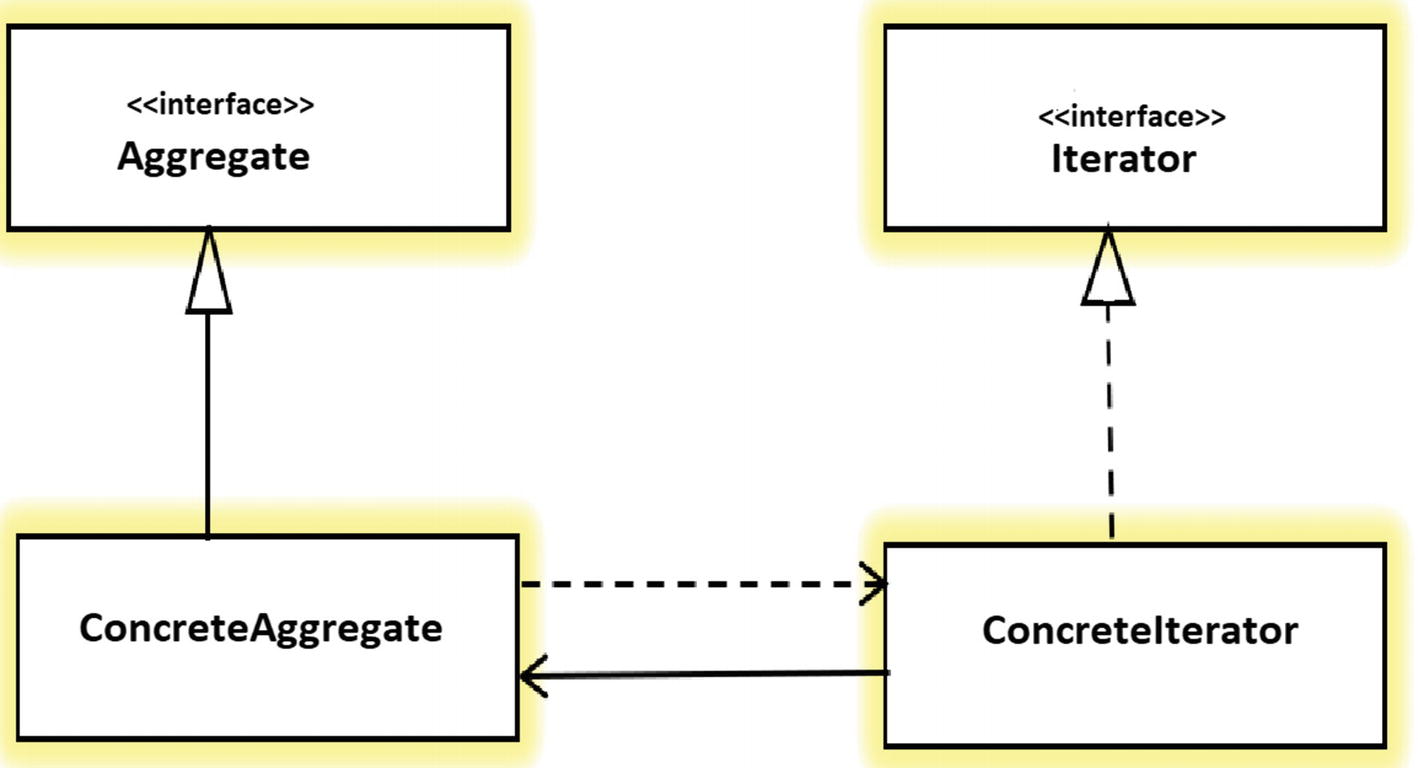
Iterator Pattern Class Diagram

The iterator design pattern gives us a way to go through the elements of a collection one at a time without knowing how the collection stores them. In Java, the pattern is part of the language. The interface java.util.Iterator is the iterator, and java.lang.Iterable is the collection that creates iterators, so every class that implements Iterable works in a for-each loop.

We write our own iterator when a class keeps its elements in a structure that callers should not see, such as an array with a moving start index or a tree. Callers loop over the elements, and the class keeps the freedom to change its storage later.

The following example adds four products to a “recently viewed” list that keeps only the last three, and reads them newest first through an iterator.

RecentlyViewed recent = new RecentlyViewed(3);
recent.add("apple");
recent.add("banana");
recent.add("cherry");
recent.add("mango");                                   // "apple" drops out (capacity 3)

Iterator<String> it = recent.iterator();
String newest = it.next();                             // "mango"
String second = it.next();                             // "cherry"
boolean more = it.hasNext();                           // true

for (String item : recent) {
  System.out.println(item);                            // mango, cherry, banana
}

The caller never touches an index or the array inside RecentlyViewed. It only calls hasNext() and next(), or lets the for-each loop call them.

We start with the roles of the pattern and the Java interfaces that play them, and build RecentlyViewed step by step. After that, we add a second traversal order and go through the rules that every Iterator must follow, including fail-fast behavior.

1. How the Iterator Pattern Works

The Gang of Four book describes the iterator pattern as a way to access the elements of an aggregate object sequentially without exposing its underlying representation. An aggregate is any object that holds a group of other objects. The pattern moves the job of walking through the elements out of the aggregate and into a separate iterator object, which remembers the current position.

For example, an online shop shows the last three products a user looked at. The shop stores them in a fixed-size array and overwrites the oldest slot when a new product comes in. The product page and the email service both need the products newest first, but neither should know which slot holds the newest product. An iterator gives both callers the same simple loop, and the array logic stays inside one class.

1.1. Participants and Their Java Types

The pattern has four roles. In Java, two of them are standard interfaces, so we write only the concrete classes.

RoleResponsibilityJava type in our example
IteratorDeclares the traversal methodsjava.util.Iterator (hasNext(), next())
Concrete iteratorKeeps the current position and returns the elementsNewestFirstIterator, an inner class of RecentlyViewed
AggregateDeclares a method that creates an iteratorjava.lang.Iterable (iterator())
Concrete aggregateStores the elements and returns a new iterator on each callRecentlyViewed
Class diagram of the iterator pattern in Java. RecentlyViewed implements the interface java.lang.Iterable with the method iterator(). NewestFirstIterator implements the interface java.util.Iterator with hasNext() and next(). RecentlyViewed creates NewestFirstIterator, and NewestFirstIterator reads the items array of RecentlyViewed. The client code uses only the two interfaces.
The client uses only Iterable and Iterator, so RecentlyViewed can change its storage without breaking callers.

1.2. Why Not Return the Internal Array?

The simplest alternative is a getter that returns the array or a List. That couples every caller to the storage format. With the ring buffer in our example, the caller would also need to know the start index and the wrap-around rule, and a caller could change the array and break the collection. An iterator hides the storage and gives read access in a defined order, so the class can switch to another structure later without any caller noticing.

2. Building a Custom Iterator in Java

The example stores the recently viewed products in a ring buffer, which is an array where the write position wraps around to index 0 when it reaches the end. The code needs only JDK 25, and all classes with a runnable Main are in the designpatterns repository.

2.1. The Collection (Concrete Aggregate)

The class RecentlyViewed keeps an array, the index of the next free slot, and the number of stored items. When the array is full, add() overwrites the oldest item.

public class RecentlyViewed implements Iterable<String> {

  private final String[] items;
  private int next;       // slot for the next add()
  private int size;
  private int modCount;   // changes on every add(), used for fail-fast iterators

  public RecentlyViewed(int capacity) {
    if (capacity < 1) {
      throw new IllegalArgumentException("capacity must be at least 1");
    }
    this.items = new String[capacity];
  }

  public void add(String item) {
    items[next] = item;
    next = (next + 1) % items.length;
    if (size < items.length) {
      size++;
    }
    modCount++;
  }

  @Override
  public Iterator<String> iterator() {
    return new NewestFirstIterator();
  }
}

The method iterator() returns a new iterator object on every call. Each iterator has its own position, so two loops over the same collection do not affect each other.

After the four add() calls from the intro, the array holds mango in slot 0, because mango overwrote apple. The newest item is always one slot before next, so the iterator starts there and walks backward, wrapping from slot 0 to the last slot.

An array of three slots after adding apple, banana, cherry and mango with capacity 3. Slot 0 holds mango, which overwrote apple, slot 1 holds banana and slot 2 holds cherry. The next pointer is at slot 1. Arrows show the newest-first order: slot 0 mango, then slot 2 cherry, then slot 1 banana.
The newest-first iterator starts one slot before next and walks backward, wrapping from slot 0 to slot 2.

2.2. The Iterator (Concrete Iterator)

The iterator is a private inner class, so it can read the array of the enclosing RecentlyViewed object, while no other class can create it. It counts the items it has returned and computes the array index from that count.

private class NewestFirstIterator implements Iterator<String> {

  private int returned;                          // items returned so far
  private final int expectedModCount = modCount;

  @Override
  public boolean hasNext() {
    return returned < size;
  }

  @Override
  public String next() {
    checkForChanges(expectedModCount);
    if (!hasNext()) {
      throw new NoSuchElementException();
    }
    int index = Math.floorMod(next - 1 - returned, items.length);
    returned++;
    return items[index];
  }
}

private void checkForChanges(int expectedModCount) {
  if (modCount != expectedModCount) {
    throw new ConcurrentModificationException();
  }
}

We use Math.floorMod() instead of the % operator, because % returns a negative number for a negative left side, e.g. -1 % 3 is -1, whereas Math.floorMod(-1, 3) is 2. That is the wrap-around from slot 0 to the last slot. The fields modCount and expectedModCount make the iterator fail-fast, which we cover in section 4.

2.3. Using the Iterator With for-each

Because RecentlyViewed implements Iterable, the enhanced for-each loop accepts it. The compiler turns the loop into a call to iterator() followed by hasNext() and next() calls. Iterable also brings the default method forEach(), which takes a lambda or a method reference.

Iterator<String> it = recent.iterator();
while (it.hasNext()) {
  String item = it.next();                             // mango, cherry, banana
}

for (String item : recent) {
  System.out.println(item);                            // mango, cherry, banana
}

List<String> items = new ArrayList<>();
recent.forEach(items::add);                            // [mango, cherry, banana]

We use the explicit while loop only when we need the iterator object itself, for example to call remove() or to stop early and keep the position for later. In all other cases, the for-each loop is shorter and cannot call next() twice by mistake.

3. Several Traversal Orders for One Collection

One benefit of the pattern is that one collection can offer several iterators. The collection stays the same, and each traversal order is a separate iterator class. For example, the product page shows the recently viewed items newest first, whereas an analytics job wants them oldest first, in the order the user saw them.

We add a second inner class OldestFirstIterator and a method that returns an Iterable for it. Because Iterable has a single abstract method, a constructor reference OldestFirstIterator::new is enough.

public Iterable<String> oldestFirst() {
  return OldestFirstIterator::new;
}

private class OldestFirstIterator implements Iterator<String> {

  private int returned;
  private final int expectedModCount = modCount;

  @Override
  public boolean hasNext() {
    return returned < size;
  }

  @Override
  public String next() {
    checkForChanges(expectedModCount);
    if (!hasNext()) {
      throw new NoSuchElementException();
    }
    int index = Math.floorMod(next - size + returned, items.length);
    returned++;
    return items[index];
  }
}

The caller picks the order by picking the Iterable. Two iterators over the same collection also keep separate positions, as the last line shows.

for (String item : recent.oldestFirst()) {
  System.out.println(item);                            // banana, cherry, mango
}

Iterator<String> first = recent.iterator();
Iterator<String> other = recent.iterator();
String a = first.next();                               // "mango"
String b = first.next();                               // "cherry"
String c = other.next();                               // "mango" (own position)

4. Rules Every Iterator Must Follow

The Iterator interface has a contract in its Javadoc, and callers such as for-each loops and the Collections API rely on it. A custom iterator that breaks the contract causes bugs far away from the iterator code.

SituationRequired behaviorOur iterators
next() after the last elementThrow NoSuchElementExceptionyes
remove() not supportedThrow UnsupportedOperationExceptioninherited from the default method
Collection changed during iterationShould throw ConcurrentModificationException (fail-fast, best effort)yes, through modCount
hasNext() called many timesReturns the same answer and does not move the positionyes

4.1. next() and remove()

When there are no more elements, next() must throw NoSuchElementException, never return null, because null can be a valid element. The default remove() method in Iterator throws UnsupportedOperationException with the message remove, so a read-only iterator needs no code for it.

Iterator<String> it = recent.iterator();
it.next();
it.next();
it.next();
boolean hasMore = it.hasNext();                        // false
String none = it.next();                               // NoSuchElementException

Iterator<String> readOnly = recent.iterator();
readOnly.next();
readOnly.remove();                                     // UnsupportedOperationException: remove

The safe way to read is to call hasNext() before every next(), which is what the for-each loop does for us.

4.2. Fail-Fast Iterators

A fail-fast iterator throws ConcurrentModificationException as soon as it notices that the collection changed after the iterator was created. Without that check, the iterator would return a mix of old and new elements, or skip some, and nobody would notice. Our collection increases modCount on every add(), and each iterator compares the value with the copy it took at creation.

For example, a loop adds a product to recent while it is still reading recent.

for (String item : recent) {
  if (item.equals("cherry")) {
    recent.add("kiwi");                                // the next next() throws ConcurrentModificationException
  }
}

The fix is to change the collection only after the loop, or to loop over a copy. Here we copy the items into a list first, so the loop reads the copy and add() changes only the original.

List<String> snapshot = new ArrayList<>();
recent.forEach(snapshot::add);

for (String item : snapshot) {
  if (item.equals("cherry")) {
    recent.add("lime");                                // no exception
  }
}

5. Getting a Stream From an Iterable

An Iterable has no stream() method, unlike Collection. The default method spliterator() of Iterable and the class StreamSupport turn any Iterable into a stream, so our custom collection works with map(), filter() and collectors.

// recent holds lime, kiwi, mango after section 4.2
String joined = StreamSupport.stream(recent.spliterator(), false)
    .map(String::toUpperCase)
    .collect(Collectors.joining(", "));                // "LIME, KIWI, MANGO"

The second argument false creates a sequential stream. The default spliterator does not know the size and splits poorly, so we keep such streams sequential. The Iterable or Iterator to Stream guide shows more conversions.

6. Iterators in the JDK

We use the iterator pattern every day through the JDK. Every Collection implements Iterable, and several other APIs return iterators as well.

JDK typeRoleNote
IteratorIteratorForward only, with optional remove()
ListIteratorIteratorForward and backward over a List, plus set() and add()
SpliteratorIteratorCan split the elements for parallel streams
ScannerIteratorImplements Iterator<String> and returns tokens from text input
DirectoryStream<Path>AggregateLists the files of a folder; allows only one iterator
EnumerationIteratorLegacy interface from Java 1.0; asIterator() converts it

ArrayList is a good model for a custom collection. Its iterator is an inner class, it checks a modCount field, and it supports remove().

7. Iterator FAQs

7.1. What Is the Difference Between Iterator and Iterable?

An Iterable is a collection that can create iterators, and an Iterator is one pass over that collection. An Iterable has the method iterator(), which returns a new Iterator on each call, whereas an Iterator has hasNext() and next() and is used up after one pass. The for-each loop accepts an Iterable or an array, but not an Iterator.

7.2. How Do I Remove Elements From a List While Iterating?

We call remove() on the iterator, or removeIf() on the list. Calling list.remove() inside a for-each loop changes the list behind the iterator’s back, so the next next() call throws ConcurrentModificationException.

List<String> cart = new ArrayList<>(List.of("apple", "banana", "cherry"));
for (String item : cart) {
  if (item.startsWith("a")) {
    cart.remove(item);                                 // ConcurrentModificationException on the next loop step
  }
}

List<String> safe = new ArrayList<>(List.of("apple", "banana", "cherry"));
Iterator<String> it = safe.iterator();
while (it.hasNext()) {
  if (it.next().startsWith("b")) {
    it.remove();                                       // safe: [apple, cherry]
  }
}

List<String> simpler = new ArrayList<>(List.of("apple", "banana", "cherry"));
boolean removed = simpler.removeIf(item -> item.startsWith("b"));   // true, [apple, cherry]

The fail-fast check is best effort, not a guarantee. If we remove the second-to-last element inside the for-each loop, hasNext() returns false right away, so the loop ends without an exception and never looks at the last element. The same rule applies whenever we remove elements from an ArrayList inside a loop.

7.3. What Is the Difference Between Iterator and Enumeration?

Enumeration is the older interface from Java 1.0, used by Vector and Hashtable. Iterator replaced it in Java 1.2 with shorter method names and an optional remove() method, and the iterators of the standard collections are fail-fast. New code uses Iterator, and Enumeration.asIterator() (Java 9) converts old Enumeration objects.

7.4. Should I Use an Iterator or an Index-Based for Loop?

We use the for-each loop, which uses the iterator, unless we need the index. An index loop is fast on ArrayList, but LinkedList.get(i) walks the list from one end on every call, so an index loop over a LinkedList gets slower as the list grows. The iterator works at the same speed for every collection type, which is the point of the pattern.

8. Conclusion

The iterator pattern separates the way a collection stores its elements from the way callers walk through them. In Java, we implement Iterable on the collection and return an Iterator from iterator(), and the for-each loop and StreamSupport work with our class without extra code.

A custom iterator is worth writing when the storage is not a plain list, as with the ring buffer in RecentlyViewed. One collection can offer several orders through separate iterator classes, and every iterator keeps its own position.

Each iterator must follow the contract. It throws NoSuchElementException at the end, leaves remove() to the default method when removal is not supported, and fails fast when the collection changes during a loop.

9. References

Happy Learning !!

Source Code on Github

Leave a Comment

  1. Iterator pattern de-couple the algorithm logic from the data structure. Suppose there is a method which calculates the sum of all numbers provided by an iterator object. It doesn’t matter whether numbers are stored in linked list or binary tree as long as Iterator objects provides a way to traverse all numbers, the method can calculate the sum.

Comments are closed.

About Us

HowToDoInJava provides tutorials and how-to guides on Java and related technologies.

It also shares the best practices, algorithms & solutions and frequently asked interview questions.