
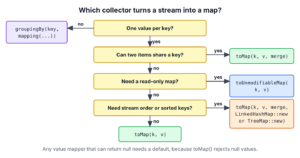
To convert a Java Stream to a Map, we call collect() with Collectors.toMap() and pass two functions, one that returns the key and one that returns the value for each stream item. The collector puts every item into a Map and returns that map. If two items produce the same key, toMap() throws an IllegalStateException, unless we also pass a merge function that decides which value to keep.
We use Collectors.toMap() whenever a list of objects has to be looked up by one of its fields, for example a list of items by their id or a list of users by their email.
The following example collects a Stream of Item(id, name) records into a Map in four ways.
List<Item> items = List.of(new Item(1, "Item1"), new Item(2, "Item2"), new Item(3, "Item3"));
List<Item> withDuplicates = List.of(new Item(1, "Item1"), new Item(3, "Item3-1"), new Item(3, "Item3-2"));
Map<Long, String> names = items.stream().collect(Collectors.toMap(Item::id, Item::name));                                       // {1=Item1, 2=Item2, 3=Item3}
Map<Long, Item> byId = items.stream().collect(Collectors.toMap(Item::id, Function.identity()));                                 // {1=Item[id=1, name=Item1], 2=Item[id=2, name=Item2], 3=Item[id=3, name=Item3]}
Map<Long, String> lastWins = withDuplicates.stream().collect(Collectors.toMap(Item::id, Item::name, (oldValue, newValue) -> newValue));   // {1=Item1, 3=Item3-2}
TreeMap<Long, String> sorted = items.reversed().stream().collect(Collectors.toMap(Item::id, Item::name, (o, n) -> n, TreeMap::new));     // {1=Item1, 2=Item2, 3=Item3}
Notice that the first two calls work only because every id in items is unique. The third call accepts the duplicate id 3 because it passes a merge function, and the fourth call also picks the map class. We look at each toMap() overload in turn, at the two exceptions it throws, at the map types we can ask for, and at when groupingBy() is the better choice.
1. The Three toMap() Overloads
The Collectors.toMap() method has three overloads, and each one adds one more argument to the previous one. All three start with the same two arguments, a key mapper and a value mapper.
| Overload | Extra argument | What it changes |
|---|---|---|
| toMap(keyMapper, valueMapper) | None | Throws IllegalStateException on a duplicate key. |
| toMap(keyMapper, valueMapper, mergeFunction) | A BinaryOperator that gets the old and the new value for the same key | Keeps the value the merge function returns. |
| toMap(keyMapper, valueMapper, mergeFunction, mapFactory) | A Supplier that creates the map, such as LinkedHashMap::new | Puts the entries into the map type we choose. |
The key mapper and the value mapper are plain Function objects, so we can pass a lambda or a method reference such as Item::id. When the value should be the stream item itself, we pass Function.identity(), which returns its argument unchanged.
The two-argument overload returns a HashMap in the current JDK, but toMap() gives no guarantee on the type or the mutability of the returned map. When the code needs a specific map type, we pass the map factory, as shown in section 5.
2. Collecting a Stream to Map with Unique Keys
Say an online shop loads its products once from the database and looks each one up by id many times per request. A Map<Long, Product> finds a product by id in one step, whereas a List has to be scanned from the start.
The following example is a stream of three Item records, where Item is a small record with an id and a name. Each id appears once, so the two-argument toMap() is enough.
record Item(long id, String name) {}The map key is the item id in both calls. The map value is either the item name or the whole Item, depending on the value mapper.
List<Item> items = List.of(new Item(1, "Item1"), new Item(2, "Item2"), new Item(3, "Item3"));
Map<Long, String> names = items.stream().collect(Collectors.toMap(Item::id, Item::name));             // {1=Item1, 2=Item2, 3=Item3}
Map<Long, Item> byId = items.stream().collect(Collectors.toMap(Item::id, Function.identity()));       // {1=Item[id=1, name=Item1], 2=Item[id=2, name=Item2], 3=Item[id=3, name=Item3]}
Map<String, Long> idsByName = items.stream().collect(Collectors.toMap(Item::name, Item::id));         // {Item1=1, Item2=2, Item3=3}
String second = byId.get(2L).name();                                                                  // "Item2"
We can see that Function.identity() saves us from writing item -> item and makes the intent clear. Notice the 2L in the last line. The key type is Long, so byId.get(2) would look up an Integer and return null.
3. Duplicate Keys and the IllegalStateException
Before we pick an overload, we need to know whether the key field is unique in the data. If two items map to the same key and we use the two-argument toMap(), the collector throws an IllegalStateException that names the key and both values.
The following example is a stream of five items where three items have the duplicate key 3.
List<Item> itemsWithDuplicates = List.of(new Item(1, "Item1"), new Item(2, "Item2"), new Item(3, "Item3-1"), new Item(3, "Item3-2"), new Item(3, "Item3-3"));
Map<Long, String> fails = itemsWithDuplicates.stream().collect(Collectors.toMap(Item::id, Item::name));   // IllegalStateException: Duplicate key 3 (attempted merging values Item3-1 and Item3-2)
Exception in thread "main" java.lang.IllegalStateException: Duplicate key 3 (attempted merging values Item3-1 and Item3-2)
at java.base/java.util.stream.Collectors.duplicateKeyException(Collectors.java:135)
at java.base/java.util.stream.Collectors.lambda$uniqKeysMapAccumulator$0(Collectors.java:182)The collector throws at the first repeated key, so the message names Item3-1 and Item3-2 and never gets to Item3-3. The fix is the third argument, the merge function. It gets the value already in the map and the new value for the same key, and it returns the value that stays in the map.
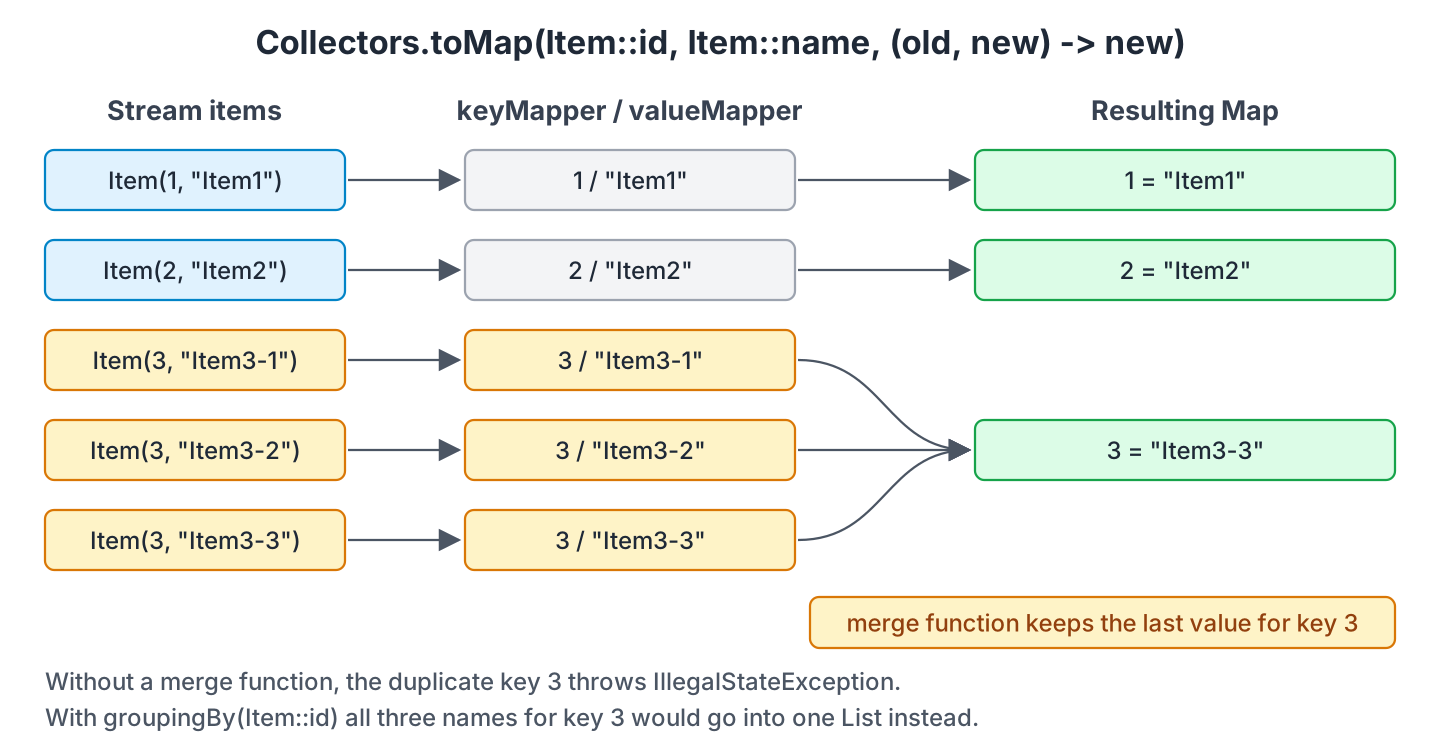
The following example shows four merge functions on the same stream. The first two pick one of the values, and the other two join or count the values.
List<Item> itemsWithDuplicates = List.of(new Item(1, "Item1"), new Item(2, "Item2"), new Item(3, "Item3-1"), new Item(3, "Item3-2"), new Item(3, "Item3-3"));
Map<Long, String> lastWins = itemsWithDuplicates.stream().collect(Collectors.toMap(Item::id, Item::name, (oldValue, newValue) -> newValue));   // {1=Item1, 2=Item2, 3=Item3-3}
Map<Long, String> firstWins = itemsWithDuplicates.stream().collect(Collectors.toMap(Item::id, Item::name, (oldValue, newValue) -> oldValue));  // {1=Item1, 2=Item2, 3=Item3-1}
Map<Long, String> joined = itemsWithDuplicates.stream().collect(Collectors.toMap(Item::id, Item::name, (a, b) -> a + ", " + b));               // {1=Item1, 2=Item2, 3=Item3-1, Item3-2, Item3-3}
Map<Long, Integer> counts = itemsWithDuplicates.stream().collect(Collectors.toMap(Item::id, item -> 1, Integer::sum));                          // {1=1, 2=1, 3=3}
Notice that the merge function runs only when a key repeats, so the entries for keys 1 and 2 are never touched. In the counts example, the value mapper turns every item into 1 and Integer::sum adds the ones up, which gives a count per key without groupingBy().
4. Null Values Throw NullPointerException
A null value is the second reason a toMap() call fails. Before the collector stores an entry, it checks the value with Objects.requireNonNull(). So as soon as the value mapper returns null, toMap() throws a NullPointerException. A null key does not throw, because the HashMap behind toMap() allows one null key.
The following example is a stream where the second item has no name.
List<Item> itemsWithNull = Arrays.asList(new Item(1, "Item1"), new Item(2, null), new Item(3, "Item3"));
Map<Long, String> fails = itemsWithNull.stream().collect(Collectors.toMap(Item::id, Item::name));   // NullPointerException
We have two ways out. The first is to replace the null in the value mapper, for example with an empty string. The second is to skip Collectors.toMap() and use the three-argument Stream.collect(), which puts the entries into a HashMap that we create ourselves. The put() method of HashMap accepts a null value.
List<Item> itemsWithNull = Arrays.asList(new Item(1, "Item1"), new Item(2, null), new Item(3, "Item3"));
Map<Long, String> withDefault = itemsWithNull.stream().collect(Collectors.toMap(Item::id, item -> Objects.requireNonNullElse(item.name(), "")));   // {1=Item1, 2=, 3=Item3}
Map<Long, String> withNulls = itemsWithNull.stream().collect(HashMap::new, (map, item) -> map.put(item.id(), item.name()), Map::putAll);          // {1=Item1, 2=null, 3=Item3}
The three-argument collect() takes the three pieces that make up a collector, one argument each.
- The supplier, HashMap::new, creates the map.
- The accumulator, (map, item) -> map.put(…), adds one item to the map.
- The combiner, Map::putAll, joins two maps when the stream runs in parallel.
The put() call overwrites an earlier value for the same key, so the last item wins and no exception is thrown for duplicates either. That is convenient, but a duplicate id in the data goes unnoticed.
5. Choosing the Map Type with the Map Supplier
The map we get back from the two-argument and three-argument toMap() is a HashMap, which stores its entries by hash code and not in the order of the stream. When the order matters, the fourth argument, the map supplier, lets us choose the map class.
| We want | Map supplier | Entry order |
|---|---|---|
| The order of the stream | LinkedHashMap::new | Insertion order |
| Keys in sorted order | TreeMap::new | Natural order of the keys, or a Comparator |
| Safe updates from several threads | ConcurrentHashMap::new | Not defined |
The following example collects three items whose ids are not in order, into the default map, into a LinkedHashMap and into a TreeMap. The four-argument overload needs a merge function, so we pass (o, n) -> n even though the keys are unique.
List<Item> unsortedItems = List.of(new Item(30, "Item30"), new Item(10, "Item10"), new Item(20, "Item20"));
Map<Long, String> hashOrder = unsortedItems.stream().collect(Collectors.toMap(Item::id, Item::name));                                         // {20=Item20, 10=Item10, 30=Item30}
LinkedHashMap<Long, String> insertionOrder = unsortedItems.stream().collect(Collectors.toMap(Item::id, Item::name, (o, n) -> n, LinkedHashMap::new));   // {30=Item30, 10=Item10, 20=Item20}
TreeMap<Long, String> sortedKeys = unsortedItems.stream().collect(Collectors.toMap(Item::id, Item::name, (o, n) -> n, TreeMap::new));                   // {10=Item10, 20=Item20, 30=Item30}
The LinkedHashMap keeps the entries in the order the stream produced them, so a sorted stream stays sorted in the map. The TreeMap sorts by key on its own, so we do not have to sort the stream first. When a parallel stream collects into one shared map, Collectors.toConcurrentMap() is the better choice. It has the same three overloads and returns a ConcurrentMap.
6. Collecting into an Unmodifiable Map
Since Java 10, Collectors.toUnmodifiableMap() returns an unmodifiable Map, the same kind that Map.of() returns. Any call that changes the map, such as put() or remove(), throws an UnsupportedOperationException.
List<Item> items = List.of(new Item(1, "Item1"), new Item(2, "Item2"), new Item(3, "Item3"));
Map<Long, String> unmodifiable = items.stream().collect(Collectors.toUnmodifiableMap(Item::id, Item::name));   // {1=Item1, 2=Item2, 3=Item3} in any order
String added = unmodifiable.put(4L, "Item4");                                                                // UnsupportedOperationException
The method has a two-argument and a three-argument overload, but no map supplier, because the map type is fixed. It rejects null keys as well as null values with a NullPointerException. The order of its entries is not defined and can change from one JVM run to the next. We use it for lookup tables that are built once and shared, which is the same use case as the immutable maps created with Map.of().
7. Choosing Between toMap() and groupingBy()
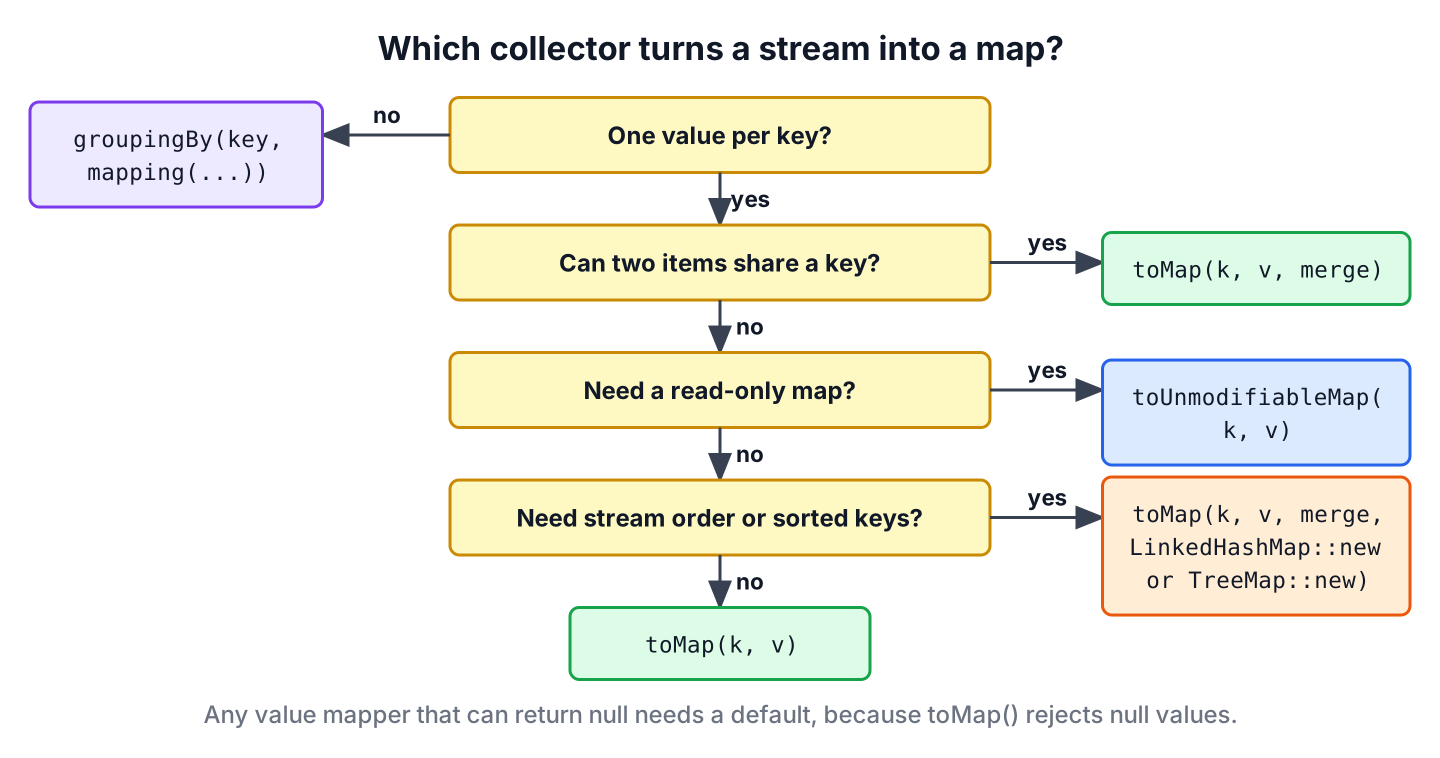
Both collectors build a Map from a stream, and both take a key function. The difference is what they store under one key. The toMap() collector stores one value per key, so duplicates need a merge function. The Collectors.groupingBy() collector stores all values for a key in a List, so duplicates are the normal case and never throw.
List<Item> itemsWithDuplicates = List.of(new Item(1, "Item1"), new Item(2, "Item2"), new Item(3, "Item3-1"), new Item(3, "Item3-2"), new Item(3, "Item3-3"));
Map<Long, List<String>> grouped = itemsWithDuplicates.stream().collect(Collectors.groupingBy(Item::id, Collectors.mapping(Item::name, Collectors.toList())));   // {1=[Item1], 2=[Item2], 3=[Item3-1, Item3-2, Item3-3]}
When each key should point to one value, such as an id to its item, we use toMap(). When each key should point to all the items that share it, such as a category to its items, we use groupingBy().
8. Building a Product Lookup Cache With toMap()
A checkout service receives a cart with product ids and quantities. For each line it needs the product price, and the product table can contain an id twice when an import job ran twice. The service loads the products once per request and builds a lookup map, so pricing a 20-line cart costs 20 map lookups instead of 20 list scans.
record Product(long id, String name, BigDecimal price) {}The merge function keeps the first product and leaves a trace in the log, so a duplicate import does not crash the checkout, but someone still sees it. The cart total is computed with BigDecimal, because prices are money.
System.Logger log = System.getLogger("checkout");
List<Product> fromDb = List.of(new Product(1, "pen", new BigDecimal("1.50")), new Product(2, "ink", new BigDecimal("4.00")), new Product(2, "ink", new BigDecimal("4.00")));
Map<Long, Product> catalog = fromDb.stream().collect(Collectors.toMap(Product::id, Function.identity(), (first, duplicate) -> {
    log.log(System.Logger.Level.WARNING, "duplicate product id {0}", first.id());
    return first;
}));
Map<Long, Integer> cart = Map.of(1L, 3, 2L, 1);
BigDecimal total = cart.entrySet().stream().map(line -> catalog.get(line.getKey()).price().multiply(BigDecimal.valueOf(line.getValue()))).reduce(BigDecimal.ZERO, BigDecimal::add);   // 8.50
int catalogSize = catalog.size();   // 2
A product id that is missing from the catalog would make catalog.get() return null. A real service checks the cart ids against catalog.keySet() first and rejects the cart with a clear error.
9. Collectors.toMap() FAQs
Keys, null values and the type of the returned map cause most of the surprises with toMap().
9.1. How Do We Convert a List to a Map in Java 8 and Later?
We call list.stream().collect(Collectors.toMap(keyMapper, valueMapper)). The code is the same from Java 8 to Java 25. Java 10 added toUnmodifiableMap(), and Java 16 added records, which make good stream items and good keys.
9.2. Why Does toMap() Throw an IllegalStateException for a Duplicate Key?
Because two stream items produced the same key and no merge function was given. Since Java 9, the message names the key and both values, as in Duplicate key 3 (attempted merging values Item3-1 and Item3-2). We either pass a merge function or switch to groupingBy().
9.3. Can toMap() Collect null Values?
No. A null value throws NullPointerException, even when the map type allows null. We replace the null in the value mapper or use collect(HashMap::new, …, Map::putAll), as section 4 shows.
9.4. Does Collectors.toMap() Keep the Order of the Stream?
No. The default map is a HashMap, which orders entries by hash code. We pass LinkedHashMap::new as the fourth argument to keep the stream order, or TreeMap::new to sort by key.
9.5. How Do We Convert a Map Back to a Stream and Into Another Map?
We stream map.entrySet() and collect with Map.Entry::getKey and Map.Entry::getValue. For example, swapping keys and values needs a merge function when two keys share a value.
Map<String, Integer> stock = Map.of("pen", 5, "ink", 5, "pad", 2);
Map<Integer, String> byCount = stock.entrySet().stream().collect(Collectors.toMap(Map.Entry::getValue, Map.Entry::getKey, (a, b) -> a.compareTo(b) < 0 ? a : b, TreeMap::new));   // {2=pad, 5=ink}
10. Conclusion
The Collectors.toMap() method collects stream items into a Map with a key mapper and a value mapper, and Function.identity() keeps the item itself as the key or the value. A duplicate key throws IllegalStateException unless we pass a merge function, and a null value throws NullPointerException unless we replace it or collect with HashMap::new and put().
The fourth argument picks the map type, so LinkedHashMap::new keeps the stream order and TreeMap::new sorts the keys. For a read-only result we use toUnmodifiableMap(), and for one key with many values we switch to groupingBy().
11. References
- Collectors Javadoc (JDK 25)
- Stream.collect(Supplier, BiConsumer, BiConsumer) Javadoc
- Unmodifiable Maps
- Function.identity() Javadoc
Happy Learning !!

If you wish to create map from list by id, but list contains duplicates you can use Collectors.toMap with BinnaryOperator:
public static void main (String[] args) {
  List<Employee> employeeList = Arrays.asList(
                new Employee(1, "A", 100),
                new Employee(1, "A", 100),
                new Employee(2, "A", 200),
                new Employee(3, "B", 300),
                new Employee(4, "B", 400),
                new Employee(5, "C", 500),
                new Employee(5, "C", 500),
                new Employee(6, "C", 600));


        Map<Long, Employee> employeesMap = employeeList.stream()
                .collect(Collectors.toMap(Employee::getId,
                        Function.identity(), (first, second) -> first));

        employeesMap.entrySet().forEach(System.out::println);
}
The console output will be:
Thanks for sharing.