
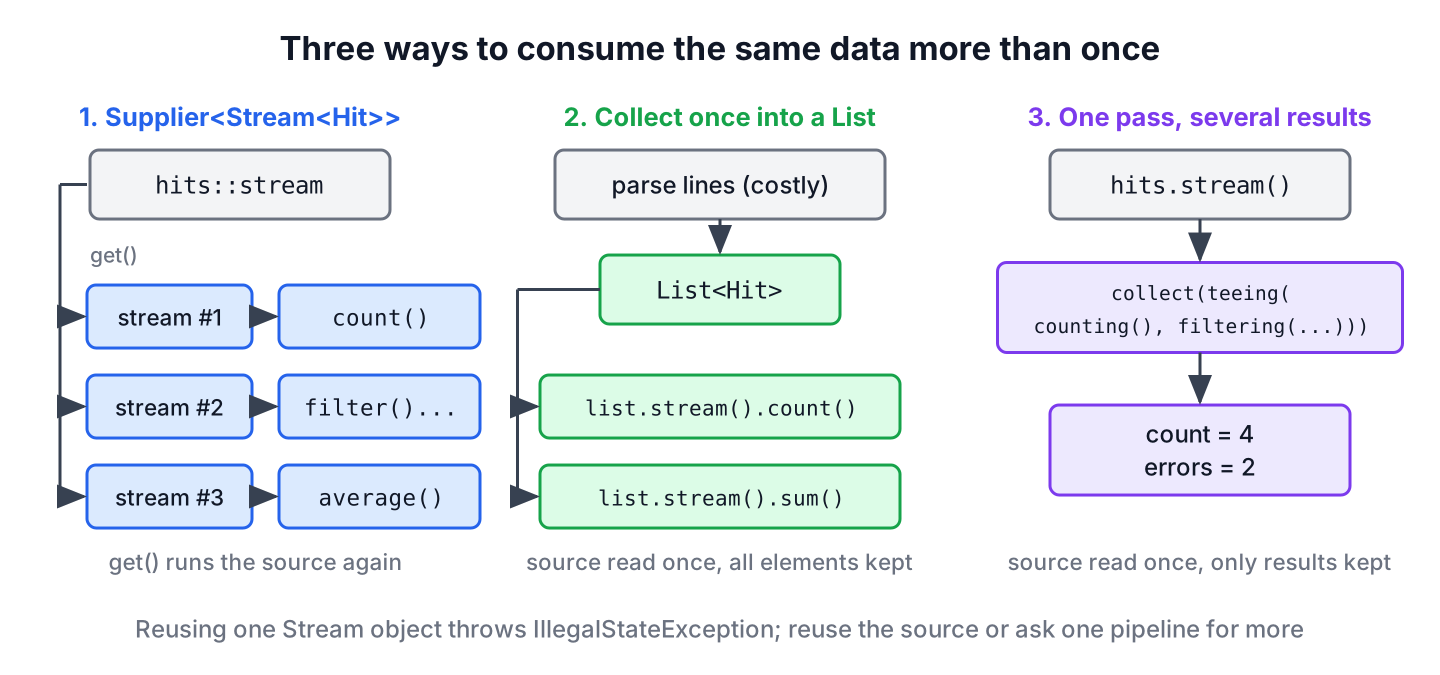
Java stream reuse is not possible, because every Stream object supports only one pipeline, so to consume the same data several times we reuse the source instead of the stream. We either build a new stream for each pass with a Supplier<Stream<T>>, collect the data once into a list, or compute all results in a single pass.
We need stream reuse whenever one data set feeds several numbers, such as the request count, the error rate and the slowest page of a web server log.
The following example triggers the failure once and works around it in three ways.
List<Hit> hits = List.of(new Hit("/home", 200, 40), new Hit("/cart", 500, 900), new Hit("/home", 200, 60), new Hit("/login", 404, 15));
Stream<Hit> once = hits.stream();
long first = once.count();                                                     // 4
long second = once.count();                                                    // IllegalStateException: stream has already been operated upon or closed
Supplier<Stream<Hit>> source = hits::stream;
long errors = source.get().filter(h -> h.status() >= 400).count();             // 2
List<Integer> times = hits.stream().map(Hit::millis).toList();
int slowest = times.stream().max(Integer::compare).orElse(0);                  // 900
double errorRate = hits.stream().collect(Collectors.teeing(Collectors.counting(), Collectors.filtering(h -> h.status() >= 400, Collectors.counting()), (all, bad) -> 100.0 * bad / all));   // 50.0
Notice that the list hits can create any number of streams, whereas the variable once fails on its second use. We start with the reason, look at each workaround with its cost, reuse the parts of a pipeline that are reusable, and handle sources that can be read only once.
1. Why a Stream Object Works Only Once
A stream is a pipeline description over a source, not a container of elements. The Stream contract allows one operation chain per object and lets the JDK throw IllegalStateException when code starts a second one. The JDK marks a stream as linked or consumed on the first intermediate or terminal call, so the second call fails before any element is read.
The examples use a web server access log, where each entry has a request path, an HTTP status and a response time in milliseconds.
record Hit(String path, int status, int millis) {
    static Hit parse(String line) {
        String[] parts = line.strip().split("\\s+");
        return new Hit(parts[0], Integer.parseInt(parts[1]), Integer.parseInt(parts[2]));
    }
}
The exception itself, with its stack trace and the code that triggers it, has its own article, stream has already been operated upon or closed.
2. A Supplier That Builds the Stream on Demand
A Supplier holds the code that creates the stream, not the stream itself. Each call to get() runs that code and returns a new Stream object, so every consumer gets its own pipeline. The method reference hits::stream is the shortest way to write it.
List<Hit> hits = List.of(new Hit("/home", 200, 40), new Hit("/cart", 500, 900), new Hit("/home", 200, 60), new Hit("/login", 404, 15));
Supplier<Stream<Hit>> hitStream = hits::stream;
long requests = hitStream.get().count();                                       // 4
OptionalDouble avgMillis = hitStream.get().mapToInt(Hit::millis).average();    // OptionalDouble[253.75]
Supplier<IntStream> millis = () -> hits.stream().mapToInt(Hit::millis);
int fastest = millis.get().min().orElse(0);                                    // 15
When each pass needs a slightly different stream, a Function that takes a parameter does the same job. For example, a status page counts the hits for one HTTP status at a time.
List<Hit> hits = List.of(new Hit("/home", 200, 40), new Hit("/cart", 500, 900), new Hit("/home", 200, 60), new Hit("/login", 404, 15));
Function<Integer, Stream<Hit>> withStatus = status -> hits.stream().filter(h -> h.status() == status);
long ok = withStatus.apply(200).count();                                       // 2
long notFound = withStatus.apply(404).count();                                 // 1
A supplier helps only when its lambda creates the stream. When the lambda only returns a stream that was created earlier and kept in a variable, every get() call hands back that one consumed object, and the second terminal operation fails again.
List<Hit> hits = List.of(new Hit("/home", 200, 40), new Hit("/cart", 500, 900), new Hit("/home", 200, 60), new Hit("/login", 404, 15));
Stream<Hit> stored = hits.stream();
Supplier<Stream<Hit>> broken = () -> stored;
long firstCall = broken.get().count();                                         // 4
long secondCall = broken.get().count();                                        // IllegalStateException
Each get() call runs the source code again from the start. For a list in memory that costs little, but a supplier around Files.lines() reads the file again for every get(), and each of those streams must be closed with try-with-resources.
3. Caching the Parsed Elements in a List
When creating the elements is expensive, such as parsing text, calling a remote service or mapping database rows, we run that part of the pipeline once and keep the result in a list. A list can create a new stream on every stream() call.
List<String> raw = List.of("/home 200 40", "/cart 500 900", "/home 200 60", "/login 404 15");
List<Hit> parsed = raw.stream().map(Hit::parse).toList();
long pages = parsed.stream().map(Hit::path).distinct().count();                // 3
long slow = parsed.stream().filter(h -> h.millis() > 100).count();             // 1
int totalMillis = parsed.stream().mapToInt(Hit::millis).sum();                 // 1015
None of the three streams parses the text again, because the parsing ran once inside toList(). The list from toList() is unmodifiable, so no later code can change the cached data by accident. The cost is memory for every element, which matters for logs with millions of lines, where the one-pass approach in section 5 keeps only the results.
4. Reusing the Pipeline Steps Instead of the Stream
The stream object is single-use, but the pieces we pass to it are not. A Predicate, a Comparator, a Function and even a Collector are plain objects that describe work, so we define them once and pass them to as many streams as we like.
A monitoring screen shows slow errors in several places. The filter steps live in one UnaryOperator, and the counting rule lives in one Collector, so every screen applies the same rules.
List<Hit> hits = List.of(new Hit("/home", 200, 40), new Hit("/cart", 500, 900), new Hit("/home", 200, 60), new Hit("/login", 404, 15));
Predicate<Hit> isError = h -> h.status() >= 400;
UnaryOperator<Stream<Hit>> slowErrors = s -> s.filter(isError).filter(h -> h.millis() > 100);
Collector<Hit, ?, Map<Integer, Long>> perStatus = Collectors.groupingBy(Hit::status, TreeMap::new, Collectors.counting());
long slowErrorCount = slowErrors.apply(hits.stream()).count();                 // 1
Map<Integer, Long> statusCounts = hits.stream().collect(perStatus);            // {200=2, 404=1, 500=1}
Map<Integer, Long> errorCounts = hits.stream().filter(isError).collect(perStatus);   // {404=1, 500=1}
The collector perStatus works twice without problems, because each collect() call creates a new result container from it. Reusing steps this way removes copied lambdas, and it pairs well with the supplier from section 2.
5. Answering Several Questions With One Collector
Many pipelines run twice over the same data only to produce two numbers. A collector that returns several results reads the source once and keeps only the results, so it also works for a source we cannot read twice. The JDK has three tools for this case, two of them in the Collectors class.
- The method summaryStatistics() on a primitive stream returns the count, sum, minimum, average and maximum together.
- The collector partitioningBy() splits the elements into a true group and a false group, with a downstream collector for each group.
- The collector Collectors.teeing() (Java 12) sends every element to two collectors and merges their results with a function.
List<Hit> hits = List.of(new Hit("/home", 200, 40), new Hit("/cart", 500, 900), new Hit("/home", 200, 60), new Hit("/login", 404, 15));
IntSummaryStatistics stats = hits.stream().mapToInt(Hit::millis).summaryStatistics();   // IntSummaryStatistics{count=4, sum=1015, min=15, average=253.750000, max=900}
Map<Boolean, Long> errorSplit = hits.stream().collect(Collectors.partitioningBy(h -> h.status() >= 400, Collectors.counting()));   // {false=2, true=2}
Map<String, Long> perPath = hits.stream().collect(Collectors.groupingBy(Hit::path, TreeMap::new, Collectors.counting()));       // {/cart=1, /home=2, /login=1}
String range = hits.stream().collect(Collectors.teeing(Collectors.minBy(Comparator.comparingInt(Hit::millis)), Collectors.maxBy(Comparator.comparingInt(Hit::millis)), (min, max) -> min.orElseThrow().path() + " to " + max.orElseThrow().path()));   // "/login to /cart"
For three or more unrelated results, nested teeing() calls get hard to read. A plain for loop over the elements, or a list collected once as in section 3, is clearer in that case.
6. Which Approach Fits Which Source
All approaches avoid the exception. The right one for a given source depends on two costs, the number of times the source is read and the data kept in memory.
| Approach | Source read | Extra memory | Fits when |
|---|---|---|---|
| New stream() call on a collection | Once per pass | None | The data is already in a collection |
| Supplier<Stream<T>> | Once per get() | None | Creating the stream is cheap and repeatable |
| Collect once into a List | Once | All elements | Creating the elements is expensive or the source is one-shot |
| One pass with a collector | Once | Only the results | Two or three results from a large or one-shot source |
7. Real-World Example of a One-Shot Log Upload
An admin page lets users upload a log file and shows a report with the request count, the error rate and the slowest path. The upload arrives as an InputStream, wrapped in a BufferedReader, and that reader can be read only once. A supplier around reader.lines() looks like a fix, but it fails without an exception.
BufferedReader upload = new BufferedReader(new StringReader("/home 200 40\n/cart 500 900\n/home 200 60\n/login 404 15"));
Supplier<Stream<String>> lines = upload::lines;
long firstCount = lines.get().count();                                         // 4
long secondCount = lines.get().count();                                        // 0
The second stream is new, but the reader behind it is already at its end, so the count is 0 instead of 4. A supplier repeats the source only when the source itself can be repeated. For a one-shot source, we parse the lines once into a list and build the report from that list.
record Report(long requests, double errorRate, String slowestPath) {}static Report report(BufferedReader reader) {
List<Hit> hits = reader.lines().filter(line -> !line.isBlank()).map(Hit::parse).toList();
long errors = hits.stream().filter(h -> h.status() >= 400).count();
String slowest = hits.stream().max(Comparator.comparingInt(Hit::millis)).map(Hit::path).orElse("none");
double rate = hits.isEmpty() ? 0 : 100.0 * errors / hits.size();
return new Report(hits.size(), rate, slowest);
}Report daily = report(new BufferedReader(new StringReader("/home 200 40\n/cart 500 900\n/home 200 60\n/login 404 15"))); // Report[requests=4, errorRate=50.0, slowestPath=/cart]
Report empty = report(new BufferedReader(new StringReader(""))); // Report[requests=0, errorRate=0.0, slowestPath=none]The method reads the upload once, skips blank lines, and handles an empty file without dividing by zero. The same rule applies to an Iterator turned into a stream, a database cursor or a network response, because none of them can start over.
8. Java Stream Reuse FAQs
Stream reuse is often confused with reading I/O streams, builders and iterators twice, so the answers keep those apart from the Stream API.
8.1. Can We Read an InputStream Twice?
Not as it is. An InputStream is an I/O stream, unrelated to the Stream API, and reading moves its position forward. We either read all bytes once with readAllBytes() and create a new ByteArrayInputStream for each pass, or use mark() and reset() on a stream that supports them, such as BufferedInputStream. The guide to converting an InputStream to a String starts with readAllBytes() as well.
byte[] data = new ByteArrayInputStream("log".getBytes(StandardCharsets.UTF_8)).readAllBytes();
int firstPass = new ByteArrayInputStream(data).readAllBytes().length;        // 3
int secondPass = new ByteArrayInputStream(data).readAllBytes().length;       // 3
8.2. Is a Stream.Builder Reusable?
No. A Stream.Builder builds one stream only. After build(), any further add() or build() call throws IllegalStateException, and the built stream is single-use like every other stream.
Stream.Builder<String> builder = Stream.<String>builder().add("/home").add("/cart");
long built = builder.build().count();                                         // 2
Stream<String> again = builder.build();                                       // IllegalStateException
8.3. Does an Iterable Give a New Stream Each Time?
Yes, when we create the stream from the Iterable and not from an Iterator. Each spliterator() call on an Iterable starts from the first element, so StreamSupport.stream(iterable.spliterator(), false) works any number of times. An Iterator moves forward only, so its second stream is empty.
Iterable<String> paths = List.of("/home", "/cart");
long firstRun = StreamSupport.stream(paths.spliterator(), false).count();    // 2
long secondRun = StreamSupport.stream(paths.spliterator(), false).count();   // 2
8.4. Can We Copy a Stream Into Two Streams?
No, the Stream API has no copy or fork method, because two consumers would read the elements at different speeds. To feed two computations from one stream, we use Collectors.teeing() as in section 5, or collect the elements into a list first.
9. Conclusion
A stream object runs one pipeline, so stream reuse always means reusing something else. A Supplier<Stream<T>> repeats a cheap and repeatable source, a list collected once caches expensive or one-shot data, and a collector such as teeing() or partitioningBy() returns several results from one pass.
Predicates, comparators and collectors stay reusable, so we define them once and apply them to every new stream. For one-shot sources like readers and iterators, a supplier returns empty streams without any error, which makes collect-once or one-pass the safe choices. The Java Streams guide links the other stream tutorials.
10. References
- Stream Javadoc (Java 25)
- Collectors Javadoc (Java 25)
- Stream.Builder Javadoc (Java 25)
- InputStream Javadoc (Java 25)
Happy Learning !!
