
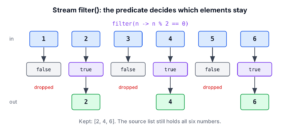
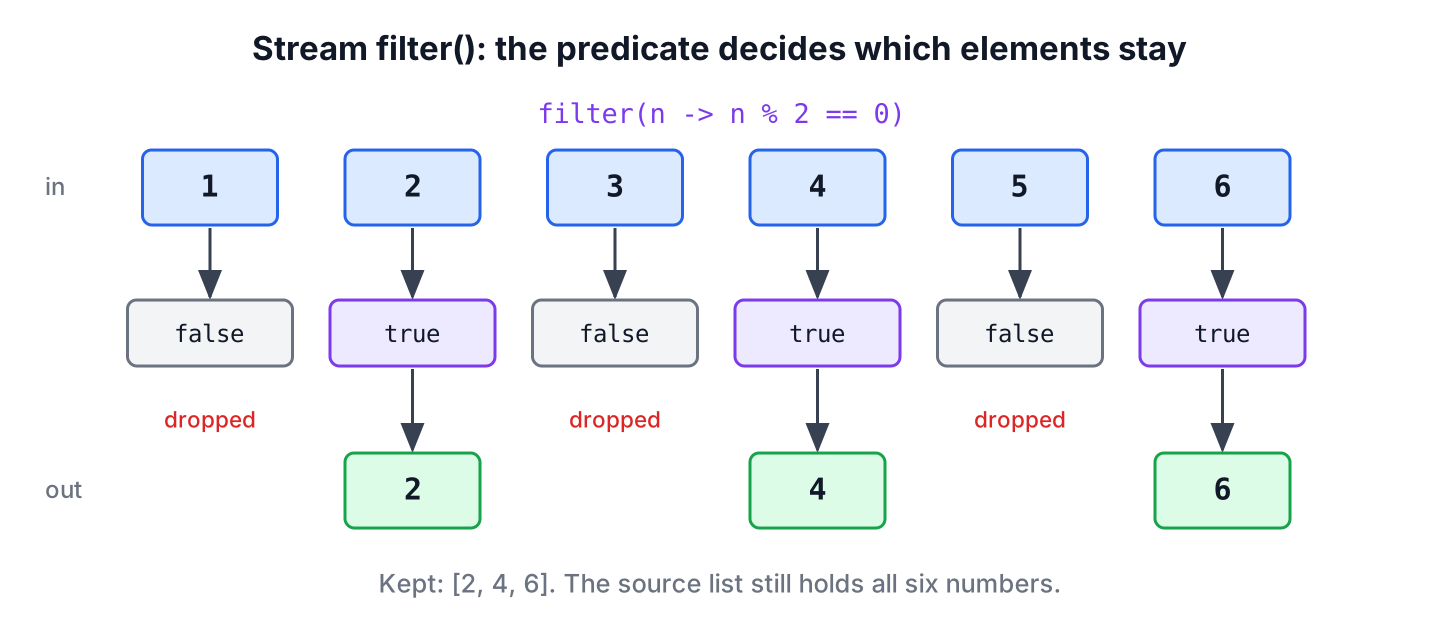
The Java Stream.filter() method is an intermediate operation that keeps the elements of a stream that match a given Predicate and drops all other elements. The predicate is a function that takes one element and returns true to keep it or false to remove it from the result.
We use filter() to select open tasks from a to-do list, to skip invalid or null input, to find the entries of a map that meet a condition and to narrow down search results before we sort or count them. The following example shows filter() with the terminal operations it is most often combined with.
List<Integer> numbers = List.of(1, 2, 3, 4, 5, 6);

List<Integer> evens = numbers.stream().filter(n -> n % 2 == 0).toList();                     // [2, 4, 6]
long bigOnes = numbers.stream().filter(n -> n > 4).count();                                  // 2
Optional<Integer> firstOver3 = numbers.stream().filter(n -> n > 3).findFirst();               // Optional[4]
List<String> words = Stream.of("tea", "", "jam").filter(Predicate.not(String::isEmpty)).toList();   // [tea, jam]
Notice that the source list numbers is the same after every line, because filter() builds a new stream instead of removing anything from the list. We go through the syntax, the order in which a pipeline runs, filtering objects, nulls and maps, the difference to removeIf() and takeWhile(), checked exceptions and a to-do app example.
1. Syntax of filter() and the Predicate Argument
The filter() method is declared in the Stream<T> interface of the Java Stream API. It accepts a Predicate, a functional interface whose test() method returns a boolean, and it returns a new stream of the same element type.
// does not compile: declaration in the Stream<T> interface
Stream<T> filter(Predicate<? super T> predicate)
We can pass the predicate in four common forms. The first two lines use the same condition, and the last two show a method reference and its negation.
Predicate<String> isLong = s -> s.length() > 3;
List<String> fruits = List.of("fig", "apple", "", "banana");

List<String> withLambda = fruits.stream().filter(s -> s.length() > 3).toList();          // [apple, banana]
List<String> withVariable = fruits.stream().filter(isLong).toList();                     // [apple, banana]
List<String> withReference = fruits.stream().filter(String::isEmpty).toList();           // []
List<String> withNot = fruits.stream().filter(Predicate.not(String::isEmpty)).toList();  // [fig, apple, banana]
A lambda expression is the shortest form for a one-off condition. A named Predicate variable helps when the same condition is used in several places, and a method reference reads best when a method already answers the question. The static Predicate.not(), added in Java 11, negates a method reference, which the expression !String::isEmpty cannot do.
2. In Which Order Does a Stream Run filter()?
A stream does not filter the whole list first and map it afterwards. Each element travels through all the steps of the pipeline before the next element starts, and nothing runs until a terminal operation asks for elements. That is why filter() followed by findFirst() stops at the first match.
The following example records every predicate and mapper call in a list. We use a side effect here only to make the order visible; real predicates should never change shared state.
List<String> trace = new ArrayList<>();
Optional<Integer> first = Stream.of(1, 2, 3, 4)
        .filter(n -> {
            trace.add("filter " + n);
            return n % 2 == 0;
        })
        .map(n -> {
            trace.add("map " + n);
            return n * 10;
        })
        .findFirst();
Optional<Integer> result = first;              // Optional[20]
String steps = String.join(", ", trace);       // "filter 1, filter 2, map 2"
The predicate ran for 1 and 2 only, and the mapper ran once. Putting filter() before map() also means the mapper runs only for the elements we keep.
3. Filtering a List of Objects
In application code, we filter objects by one or more of their fields. The following example is a to-do app with a Task record. A method such as isUrgent() on the record gives the condition a name and lets us use it as a method reference.
record Task(String title, boolean done, int priority) {
    boolean isUrgent() {
        return !done && priority >= 3;
    }
}
List<Task> tasks = List.of(
new Task("Pay rent", false, 3),
new Task("Buy milk", true, 1),
new Task("Call mom", false, 2),
new Task("Fix bike", false, 3));
List<String> open = tasks.stream().filter(t -> !t.done()).map(Task::title).toList(); // [Pay rent, Call mom, Fix bike]
List<String> urgent = tasks.stream().filter(Task::isUrgent).map(Task::title).toList(); // [Pay rent, Fix bike]
long doneCount = tasks.stream().filter(Task::done).count(); // 13.1. Filtering on Two Conditions
When the condition has two parts, we either join them with && in one lambda or chain two filter() calls. Both forms give the same elements, and the choice is about readability.
List<Task> tasks = List.of(new Task("Pay rent", false, 3), new Task("Buy milk", true, 3), new Task("Call mom", false, 2));

List<String> oneFilter = tasks.stream().filter(t -> !t.done() && t.priority() == 3).map(Task::title).toList();        // [Pay rent]
List<String> twoFilters = tasks.stream().filter(t -> !t.done()).filter(t -> t.priority() == 3).map(Task::title).toList();   // [Pay rent]
Combining predicates with and(), or() and negate(), building filters from optional search fields and choosing the order of the conditions are covered in filtering a stream on multiple conditions.
4. Collecting, Counting and Finding Filtered Elements
The filter() method only describes which elements stay, so every pipeline ends with a terminal operation that produces the result we need. The terminal operation decides whether we get a list, a number, a single element or a boolean.
List<Integer> scores = List.of(72, 95, 38, 88, 95);

List<Integer> passed = scores.stream().filter(s -> s >= 50).toList();                   // [72, 95, 88, 95]
Set<Integer> distinctTop = scores.stream().filter(s -> s > 90).collect(Collectors.toSet());   // [95]
int passedTotal = scores.stream().filter(s -> s >= 50).mapToInt(Integer::intValue).sum();     // 350
boolean anyFailed = scores.stream().anyMatch(s -> s < 50);                              // true
The toList() method, available since Java 16, returns an unmodifiable list, and the differences to Collectors.toList() are in converting a stream to a list. When we only need a yes or no answer, anyMatch() replaces filter() plus count() > 0 and stops at the first match.
5. Removing null Values and Blank Strings
Data from forms, CSV files and external APIs often contains null elements or blank strings. The method reference Objects::nonNull drops the nulls, and Predicate.not(String::isBlank) drops empty strings and strings made only of spaces.
List<String> emails = Arrays.asList("ana@mail.com", null, "  ", "raj@mail.com", "");

List<String> clean = emails.stream()
        .filter(Objects::nonNull)
        .filter(Predicate.not(String::isBlank))
        .map(String::strip)
        .toList();                              // [ana@mail.com, raj@mail.com]
The order of the two filters matters. Calling isBlank() on a null element throws a NullPointerException, so the null check comes first. We use Arrays.asList() here because List.of() does not accept null elements.
6. Filtering a Map by Key or Value
A Map has no stream() method, so we stream its entrySet(), filter the entries and collect them back into a map. A TreeMap keeps the keys sorted, which makes the printed result predictable.
Map<String, Integer> stock = new TreeMap<>(Map.of("apple", 5, "banana", 0, "kiwi", 12));

Map<String, Integer> available = stock.entrySet().stream()
        .filter(e -> e.getValue() > 0)
        .collect(Collectors.toMap(Map.Entry::getKey, Map.Entry::getValue, (a, b) -> a, TreeMap::new));   // {apple=5, kiwi=12}
Filtering by keys, by a list of keys and by both keys and values are covered in filtering a map by keys and values.
7. filter() vs removeIf() vs takeWhile()
Three methods select elements by a predicate, and they differ in what they touch and when they stop. The filter() method builds a new stream and leaves the source alone. The Collection.removeIf() method removes the matching elements from a modifiable collection in place, and Stream.takeWhile(), added in Java 9, keeps elements only until the predicate first returns false.
List<Integer> readings = new ArrayList<>(List.of(1, 2, 7, 3, 9));

List<Integer> small = readings.stream().filter(n -> n < 5).toList();         // [1, 2, 3]
List<Integer> prefix = readings.stream().takeWhile(n -> n < 5).toList();     // [1, 2]
boolean changed = readings.removeIf(n -> n >= 5);                             // true
List<Integer> afterRemove = readings; // [1, 2, 3]| Method | Changes the source? | Stops early? | Use it when |
|---|---|---|---|
| filter() | No | No, tests every element | We need a new result and the source must stay unchanged |
| removeIf() | Yes, in place | No | We want to clean up a modifiable list, such as an ArrayList |
| takeWhile() | No | Yes, at the first non-match | The data is sorted and we need the leading run, such as log lines before a timestamp |
Calling removeIf() on a list from List.of() or toList() throws an UnsupportedOperationException, because those lists are unmodifiable. More ways to change a list with streams are in removing and updating stream elements.
8. Checked Exceptions Inside filter()
The test() method of Predicate declares no checked exceptions, so a lambda that calls a method throwing IOException does not compile. We catch the exception inside the predicate and either decide what the element means, for example “skip it”, or rethrow it as an unchecked exception such as UncheckedIOException.
The following example keeps only the non-empty files of a temporary directory. The helper method wraps Files.size(), which throws IOException, and the predicate calls it like any other method.
static boolean hasContent(Path file) {
    try {
        return Files.size(file) > 0;
    } catch (IOException e) {
        throw new UncheckedIOException(e);
    }
}
Path dir = Files.createTempDirectory("uploads");
Path empty = Files.createFile(dir.resolve("empty.txt"));
Path notes = Files.writeString(dir.resolve("notes.txt"), "milk");
List<String> nonEmpty = Stream.of(empty, notes).filter(p -> hasContent(p)).map(p -> p.getFileName().toString()).toList(); // [notes.txt]Wrappers that work for any throwing lambda and the trade-offs of each approach are in handling exceptions in streams.
9. A Today Screen for a To-Do App
A to-do app has a “Today” screen that lists the open tasks that are due today or overdue, with the most important ones first. The same list of tasks feeds other screens, so the code must not remove anything from it.
The following example is a Todo record with a due date. The service method takes the date as a parameter instead of calling LocalDate.now(), so a unit test can pass a fixed date.
record Todo(String title, LocalDate due, boolean done, int priority) {}static List<String> today(List<Todo> todos, LocalDate date) {
return todos.stream()
.filter(t -> !t.done())
.filter(t -> !t.due().isAfter(date))
.sorted(Comparator.comparingInt(Todo::priority).reversed())
.map(Todo::title)
.toList();
}LocalDate day = LocalDate.of(2026, 10, 10);
List<Todo> todos = List.of(
new Todo("Pay rent", LocalDate.of(2026, 10, 1), false, 3),
new Todo("Buy milk", day, true, 1),
new Todo("Call mom", day, false, 2),
new Todo("Book flight", LocalDate.of(2026, 10, 20), false, 3));
List<String> screen = today(todos, day); // [Pay rent, Call mom]The first filter removes finished tasks and the second one removes tasks due in the future, so Buy milk and Book flight drop out. The sorted() step runs only on the two remaining tasks, and Comparator.comparingInt() with reversed() puts priority 3 before priority 2.
10. Java Stream filter() FAQs
The filter() questions that matter in practice concern the source list, changing elements and filtering by other data.
10.1. Does filter() modify the original list?
No. The filter() method returns a new stream, and the terminal operation builds a new collection. To remove elements from the list itself, we call removeIf() on a modifiable list, as shown in section 7.
10.2. Can filter() change the elements?
No, it only decides which elements stay. To change elements, we add a map() step after filter(), as in filter(t -> !t.done()).map(Task::title).
10.3. Should filter() come before or after map()?
Before, whenever the condition can be checked on the original element. The mapper runs only for the elements we keep, as the trace in section 2 shows. We filter after map() only when the condition needs the mapped value.
10.4. How do I filter a list by the elements of another list?
Put the other list into a HashSet and call its contains() method in the predicate. A HashSet lookup takes constant time on average, while List.contains() scans the whole list for every element.
Set<String> blocked = new HashSet<>(List.of("spam@mail.com"));
List<String> allowed = Stream.of("ana@mail.com", "spam@mail.com").filter(e -> !blocked.contains(e)).toList();   // [ana@mail.com]
11. Conclusion
The Stream.filter() method keeps the elements that match a Predicate and returns them as a new stream, without changing the source. It runs lazily, element by element, so filter() before map() saves work, and a short-circuiting terminal operation such as findFirst() stops at the first match.
We write the predicate as a lambda, a named variable or a method reference, use Predicate.not() for negation, and clean input with Objects::nonNull and String::isBlank. For in-place removal we switch to removeIf(), and for a sorted prefix to takeWhile().
12. References
- Stream.filter() Javadoc
- Predicate.not() Javadoc
- Collection.removeIf() Javadoc
- Stream.takeWhile() Javadoc
Happy Learning !!
