
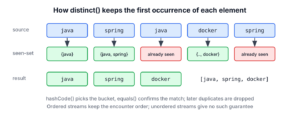
The Java Stream distinct() method returns a new stream without duplicate elements, where two elements count as duplicates when equals() returns true for them. For ordered streams, it keeps the first occurrence of each element and the original order, so it is the shortest way to collect unique values from a list.
We use distinct() to remove repeated tags, IDs, email addresses or log keys before we count, display or store them. The following example shows the main uses in a few lines.
List<String> tags = List.of("java", "spring", "java", "docker", "spring");
List<String> unique = tags.stream().distinct().toList();                         //
long uniqueCount = tags.stream().distinct().count();                             // 3
List<Integer> numbers = IntStream.of(3, 1, 3, 2, 1).distinct().boxed().toList();  // [3, 1, 2]
Notice that the results keep the order in which each value first appeared. We cover how distinct() decides equality, why custom classes need both equals() and hashCode(), how to find distinct elements by a field, and when a Set or a parallel stream is the better choice.
1. Stream.distinct() Method
The distinct() method is a stateful intermediate operation. It remembers every element it has already passed on, and it drops a new element when an equal one is already in that memory.
Stream<String> codes = Stream.of("IN", "US", "IN");
List<String> distinctCodes = codes.distinct().toList();   // [IN, US]
Four rules of Stream.distinct() apply to every stream type.
- Equality comes from equals() and hashCode(). The JDK keeps the seen elements in a hash-based set, so hashCode() decides which elements get compared, and equals() decides whether they are the same.
- For ordered streams, such as streams from a List, an array or Stream.of(), the element appearing first in the encounter order is kept and the order stays the same.
- For unordered streams, such as a stream from a HashSet, no stability guarantees are made about which of the equal elements survives.
- The source collection is not changed. The method returns a new Stream, and the work starts only when a terminal operation such as toList() runs.
2. Find Distinct Elements in a Stream of Strings or Primitives
Finding distinct items in a list of String values or wrapper classes is simple, because these classes already implement equals() and hashCode() by value. In the following example, we have a List of strings and collect the distinct ones into a new list with Stream.toList(), which returns an unmodifiable list since Java 16.
List<String> letters = List.of("A", "B", "C", "D", "A", "B", "C");
List<String> distinctLetters = letters.stream().distinct().toList();   // [A, B, C, D]
The primitive streams IntStream, LongStream and DoubleStream have their own distinct(). String comparison is case-sensitive, so “Java” and “java” are two different elements unless we normalize the case first.
int[] ports = IntStream.of(8080, 443, 8080, 80).distinct().toArray();                 // [8080, 443, 80]
List<String> mixedCase = Stream.of("Java", "java", "JAVA").distinct().toList();         // [Java, java, JAVA]
List<String> lowerCase = Stream.of("Java", "java", "JAVA").map(s -> s.toLowerCase(Locale.ROOT)).distinct().toList();   //
3. Distinct Custom Objects With equals() and hashCode()
In real applications, streams carry our own types, such as members, orders or products. Every class inherits equals() from Object, which compares references, so two objects with the same data are still different elements for distinct() unless the class defines equality.
A record gives us equals() and hashCode() over all its components, which is the right equality for most data carriers.
record Subscriber(String email, String plan) {}List<Subscriber> signups = List.of(new Subscriber("ana@mail.com", "free"), new Subscriber("raj@mail.com", "pro"), new Subscriber("ana@mail.com", "free"), new Subscriber("ana@mail.com", "pro"));
int distinctSignups = signups.stream().distinct().toList().size(); // 3The two free sign-ups of ana@mail.com are equal, but the pro one differs in a component, so it stays.
3.1. Override equals() and hashCode() to Define Object Equality
Sometimes two objects are the same entity when one field matches, such as an id. In that case, we override both equals() and hashCode() and use only that field in both methods. The following Member record treats members with the same id as equal.
record Member(int id, String name) {
    @Override
    public boolean equals(Object o) {
        return o instanceof Member other && id == other.id;
    }

    @Override
    public int hashCode() {
        return Integer.hashCode(id);
    }
}
Overriding equals() without hashCode() breaks distinct(). The record would keep its generated hashCode() over all components, so two members with the same id and different names land in different hash buckets and are never compared with equals().
3.2. Distinct Members Demo
We add a few members whose id repeats with a different spelling of the name, and use distinct() to keep one member per id.
List<Member> members = List.of(new Member(3, "Alex"), new Member(2, "Brian"), new Member(2, "Brian K."), new Member(1, "Lokesh"), new Member(1, "Lokesh G."));
List<String> distinctNames = members.stream().distinct().map(Member::name).toList();   // [Alex, Brian, Lokesh]
We can see that the output follows the source order, Alex first, and that the first spelling of each name wins, because distinct() keeps the first occurrence in an ordered stream.
4. Find Distinct Items by Complex Keys or Multiple Fields
We cannot always change equals(), and one screen may need a different rule than the rest of the app. For example, a mailing job must send one email per address, even though Subscriber equality includes the plan. Java has no distinctBy() method on Stream, so we write a small predicate and pass it to filter().
4.1. Create distinctByKey() Method
The distinctByKey() function keeps a thread-safe set of the keys it has seen. The Set.add() call returns true only for a key that was not in the set yet, so the predicate lets the first element with each key pass. The key comes from a lambda expression or a method reference.
static <T> Predicate<T> distinctByKey(Function<? super T, ?> keyExtractor) {
    Set<Object> seen = ConcurrentHashMap.newKeySet();
    return t -> seen.add(keyExtractor.apply(t));
}
Two details matter in practice. The key must not be null, because ConcurrentHashMap rejects null keys with a NullPointerException. Each predicate also keeps its own set, so we create a new one for every stream instead of storing it in a field.
4.2. Using distinctByKey() in filter()
The pipeline filter(distinctByKey(Subscriber::email)) keeps the first subscriber for each email address, whatever the plan.
List<Subscriber> signups = List.of(new Subscriber("ana@mail.com", "free"), new Subscriber("raj@mail.com", "pro"), new Subscriber("ana@mail.com", "pro"));
List<String> oneMailEach = signups.stream().filter(distinctByKey(Subscriber::email)).map(Subscriber::plan).toList();   // [free, pro]
List<String> emails = signups.stream().map(Subscriber::email).distinct().toList();   // [ana@mail.com, raj@mail.com]
The second line is the simpler choice when we need only the distinct key values, not the objects. For a key made of several fields, we pass a composite key such as s -> List.of(s.email(), s.plan()). The article on stream distinct by multiple fields covers composite keys, keeping the last occurrence, parallel streams and the Java 24 gatherer version.
5. distinct() vs Collectors.toSet() and Other Options
Collecting into a Set also removes duplicates, so the choice depends on the order and the result type we need. A HashSet loses the encounter order, and no Set can use a key other than equals().
| Code | Result | Keeps encounter order | Custom key |
|---|---|---|---|
| stream.distinct().toList() | List | Yes | No, uses equals() |
| stream.collect(Collectors.toSet()) | Set (a HashSet today) | No | No |
| stream.collect(Collectors.toCollection(LinkedHashSet::new)) | LinkedHashSet | Yes | No |
| stream.filter(distinctByKey(f)) | Any collector | Yes, in sequential streams | Yes |
| Collectors.toMap(f, v -> v, (first, _) -> first, LinkedHashMap::new) | Map by key | Yes | Yes, and can keep the last or best match |
We pick distinct() when the result is a list or when more stream steps follow. A LinkedHashSet fits when the result must stay a set, and toMap() fits when we also want to choose which duplicate survives. The last row uses an unnamed variable _ for the unused second value, which is standard since Java 22.
List<Integer> source = List.of(5, 3, 5, 1, 3);
List<Integer> asList = source.stream().distinct().toList();                                        // [5, 3, 1]
Set<Integer> asLinkedSet = source.stream().collect(Collectors.toCollection(LinkedHashSet::new));   // [5, 3, 1]
6. distinct() in Parallel Streams
A parallel stream returns the same distinct elements in the same order, but keeping the encounter order costs time and memory. An ordered distinct() in a parallel pipeline must act as a full barrier that buffers elements, so we call unordered() first when the order does not matter.
List<Integer> readings = IntStream.range(0, 1_000).map(i -> i % 10).boxed().toList();
List<Integer> ordered = readings.parallelStream().distinct().toList();       // [0, 1, 2, 3, 4, 5, 6, 7, 8, 9]
long anyOrderCount = readings.parallelStream().unordered().distinct().count();   // 10
For small lists, a sequential stream is faster than either version, because splitting the work costs more than it saves. The distinctByKey() predicate is thread-safe, but in a parallel stream it may keep a different element per key than the sequential run.
7. Real-World Example of Removing Duplicates With distinct()
A newsletter merges the email addresses from two sign-up forms before sending. The same person may sign up on both forms, once with uppercase letters and once with a trailing space. Plain distinct() treats those strings as different, so we normalize each address first and remove duplicates after that.
List<String> formA = List.of("Ana@Mail.com", "raj@mail.com ");
List<String> formB = List.of("ana@mail.com", "lee@mail.com");
List<String> mailingList = Stream.concat(formA.stream(), formB.stream()).map(e -> e.strip().toLowerCase(Locale.ROOT)).distinct().toList();   // [ana@mail.com, raj@mail.com, lee@mail.com]
The map() step before distinct() defines what “the same” means for this job, without touching the equals() of any class. The Stream.concat() call joins the two sources into one stream.
8. Java Stream distinct() FAQs
Counting, letter case, infinite sources and cost are the follow-ups that bring readers back to distinct().
8.1. How Do We Count Distinct Elements in a Stream?
We call count() after distinct(). To count how often each value appears instead, we group with Collectors.groupingBy() and Collectors.counting(), as the article on finding and counting duplicates in a stream shows.
long distinctCities = Stream.of("Pune", "Delhi", "Pune").distinct().count(); // 28.2. Is distinct() Case-Sensitive for Strings?
Yes, because String.equals() is case-sensitive. We map every element to one case before distinct(), as in section 7, or use distinctByKey(s -> s.toLowerCase(Locale.ROOT)) to keep the original spelling of the first occurrence.
8.3. Does distinct() Work on Infinite Streams?
Yes, as long as a short-circuiting operation such as limit() follows it and enough distinct values exist. The distinct() step passes each new value on at once, so Stream.iterate(0, n -> (n + 3) % 5).distinct().limit(5) finishes. Asking for six distinct values from that stream never finishes, because only five exist.
8.4. What Is the Cost of distinct()?
The cost is one hash lookup per element, so the time grows linearly with the stream size, plus memory for every distinct element seen. Slow hashCode() implementations or keys with many collisions make it slower. For a stream the JDK knows to be sorted, such as one after sorted() or from a TreeSet, the sequential version skips the hash set and compares each element with the previous one.
9. Conclusion
The purpose of Stream.distinct() is to remove duplicate elements from a stream, so that only distinct elements remain in the result. It uses the equals() and hashCode() methods of the elements, which is why records work without extra code and why a class that overrides only equals() keeps its duplicates.
For ordered streams, distinct() keeps the first occurrence and the original order. When the rule is a single field or a normalized value, we filter with distinctByKey() or map before distinct(). The Java Stream tutorials list the other intermediate operations.
10. References
- Stream.distinct() Javadoc (Java 25)
- Object.hashCode() contract
- Record Javadoc
- ConcurrentHashMap.newKeySet()
Happy Learning !!

Hi Tutor,
Examples are good. I have one question here. You have used following method
distinctByKey(p -> p.getFname() + ” “ + p.getLname())
I am unable to find it in Collectors and Stream classes. Requesting you please let me know where should find this method
Section 4.1.
Hi Lokesh, I encountered an issue when overriding the equals() method of the objects we are comparing for distinct(), but it was not working in my case. I solved the issue by overriding the hashCode() method also and it seems to have fixed my issue. Maybe it would be a good idea to update the post to include this also.
distinct seems to also use the hashCode method at some stage during its comparison.
Thanks, Adam.
Thanks for the feedback. The Stream.distinct() API does not use the hashCode() at any time, it only uses the equals() method.
The custom solution distinctByKey() uses a ConcurrentHashMap instance, so it is quite possible what you have faced. I am updating the post.
Still, if you can share the issue in detail, it will be really helpful for all.
thanks for the article, but is is any way for distinct by all fields of an on object/model/pojo.
Let say my method should work very generic, have person, employee model classes and each model class has 20 fields and need to find the distinct values of all fields.
How to filter based on distinct fname and lname from the above example?
Hi Lokesh,
Can you please explain this line
return t -> map.putIfAbsent(keyExtractor.apply(t), Boolean.TRUE) == null;
from
public static Predicate distinctByKey(Function keyExtractor)
{
Map map = new ConcurrentHashMap();
return t -> map.putIfAbsent(keyExtractor.apply(t), Boolean.TRUE) == null;
}
Does this mean that the above static method will return an object of Predicate and the prdicate.test will have the body as
return t -> map.putIfAbsent(keyExtractor.apply(t), Boolean.TRUE) == null;
If yes , how we can pass the map object here, might be i am not getting it , please explain , how the process will work and how many times the predicate will get a hit.