
In Java, the Stream.concat(a, b) method creates a lazily concatenated stream that returns all elements of stream a followed by all elements of stream b. It is a static method on the Stream interface, and the primitive streams IntStream, LongStream and DoubleStream have their own concat() versions.
We use concat() to process data from two sources in one pipeline, such as cached and fresh results, and to append or prepend single items to a stream, because a stream has no add() method.
The following example merges two streams and adds items at the end and at the start of a stream.
List<String> merged = Stream.concat(Stream.of("a", "b"), Stream.of("c", "d")).toList();   // [a, b, c, d]
List<String> appended = Stream.concat(Stream.of("a", "b"), Stream.of("z")).toList();      // [a, b, z]
List<String> prepended = Stream.concat(Stream.of("start"), Stream.of("a", "b")).toList(); // [start, a, b]
Notice that the argument order decides the element order, so the stream passed first is read first. We look at the rules concat() follows, merging more than two streams, appending and prepending items, removing duplicates, primitive streams and the alternatives to concat().
1. Stream.concat() Syntax and Behavior
The full signature is public static <T> Stream<T> concat(Stream<? extends T> a, Stream<? extends T> b). The method takes two streams of the same type, or of subtypes of a common type, and returns a new stream. Nothing is read when we call it, because the new stream pulls elements from the first input until it is exhausted and switches to the second only when a terminal operation such as toList() runs.
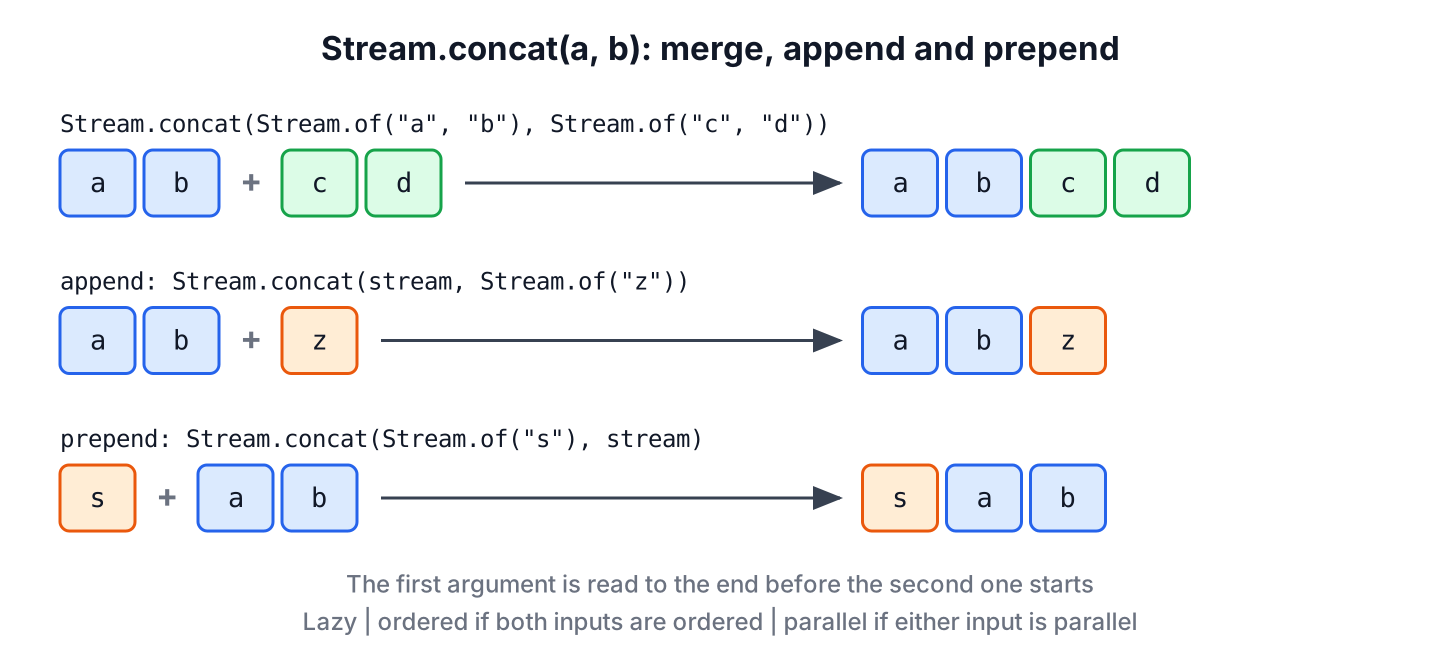
The resulting stream follows four rules, and each one has a visible effect in code.
| Rule | What we see |
|---|---|
| The result is lazy | No element is read until a terminal operation runs |
| The result is ordered if both inputs are ordered | Elements of a come before elements of b, in their original order |
| The result is parallel if either input is parallel | A sequential stream merged with a parallel one runs in parallel |
| Closing the result closes both inputs | The onClose() handlers of a and b both run |
A few lines of code show the parallel rule and the close rule. The close rule matters for streams that hold resources, such as two Files.lines() streams merged into one.
boolean parallel = Stream.concat(Stream.of(1).parallel(), Stream.of(2)).isParallel();   // true

List<String> closed = new ArrayList<>();
Stream<String> first = Stream.of("a").onClose(() -> closed.add("first closed"));
Stream<String> second = Stream.of("b").onClose(() -> closed.add("second closed"));
try (Stream<String> both = Stream.concat(first, second)) {
    both.forEach(s -> {});
}
List<String> handlers = closed;                     // [first closed, second closed]
Both input streams count as consumed once concat() has been called on them. Calling another operation on either input throws the stream has already been operated upon or closed error.
Stream<String> left = Stream.of("a");
Stream<String> combined = Stream.concat(left, Stream.of("b"));
long reused = left.count();                         // IllegalStateException: stream has already been operated upon or closed
2. Merging Three or More Streams
The concat() method takes two streams and no more, so merging more of them means nesting the calls. A static import of Stream.concat keeps the nesting readable for three or four streams.
Stream<Integer> first = Stream.of(1, 2);
Stream<Integer> second = Stream.of(3, 4);
Stream<Integer> third = Stream.of(5, 6);

List<Integer> nested = Stream.concat(first, Stream.concat(second, third)).toList();   // [1, 2, 3, 4, 5, 6]
Do not build long chains of concat() in a loop, because each call adds one level of nesting and a deep chain throws StackOverflowError when the stream is read. The problem appears only with repeated concatenation of many streams, not with two or three nested calls. For a variable number of streams, flatMap() merges them all at the same level.
List<Stream<Integer>> pages = List.of(Stream.of(1, 2), Stream.of(3, 4), Stream.of(5, 6));
List<Integer> flat = pages.stream().flatMap(Function.identity()).toList();     // [1, 2, 3, 4, 5, 6]

List<Integer> fromLists = Stream.of(List.of(1, 2), List.of(3), List.of(4, 5)).flatMap(List::stream).toList();   // [1, 2, 3, 4, 5]
Use nested concat() for a fixed, small number of streams, and flatMap() when the streams come from a list or a loop.
3. Appending and Prepending Items to a Stream
A stream is not a collection, so it has no add() method. To add items, we wrap them in a new stream with Stream.of() and concatenate the two streams. To append at the end, the new stream is the second argument. To prepend at the start, it is the first argument.
Stream<Integer> numbers = Stream.of(1, 2, 3);
List<Integer> withTail = Stream.concat(numbers, Stream.of(4, 5)).toList();      // [1, 2, 3, 4, 5]

Stream<Integer> more = Stream.of(1, 2, 3);
List<Integer> withHead = Stream.concat(Stream.of(0), more).toList();            // [0, 1, 2, 3]
An export job writes a report of orders to a CSV file, and the file must start with a header line and end with a total line. The order lines come from a stream, so we prepend the header and append the footer around it. The Stream.ofNullable() method, added in Java 9, adds an optional item only when it is not null.
List<String> rows = List.of("apple,5", "banana,3");
String header = "item,qty";
String footer = null;                               // no total line for this export

List<String> lines = Stream.concat(
        Stream.concat(Stream.of(header), rows.stream()),
        Stream.ofNullable(footer)).toList();
List<String> csv = lines;                           // [item,qty, apple,5, banana,3]
For pipelines that append and prepend often, the StreamEx library adds append() and prepend() as instance methods, which read in the same order as the result.
List<String> page = StreamEx.of("a", "b").prepend("header").append("footer").toList(); // [header, a, b, footer]When the data is already in a list, adding to a copy of the list is simpler than building streams. For example, we copy it with new ArrayList<>(rows) and call addFirst() or addLast(), which every List has since the sequenced collections of Java 21.
4. Removing Duplicates From Merged Streams
The concat() method keeps every element of both streams, including values that appear in both. Adding distinct() after concat() removes the duplicates based on equals() and keeps the first occurrence.
Stream<Integer> mondayIds = Stream.of(1, 2, 3, 4);
Stream<Integer> tuesdayIds = Stream.of(3, 4, 5);
List<Integer> unique = Stream.concat(mondayIds, tuesdayIds).distinct().toList();   // [1, 2, 3, 4, 5]
For records or other objects, distinct() uses the equals() method of the class. A record compares all its components, so two records that differ only in one field stay in the result. To keep one element per key, such as one product per name, we collect into a map keyed by that field, as described in distinct by multiple fields.
record Product(String name, int price) {}Stream<Product> cache = Stream.of(new Product("apple", 5), new Product("kiwi", 2));
Stream<Product> fresh = Stream.of(new Product("apple", 6), new Product("fig", 4));
Map<String, Product> byName = Stream.concat(fresh, cache)
.collect(Collectors.toMap(Product::name, p -> p, (newer, older) -> newer, LinkedHashMap::new));
List<Product> latest = List.copyOf(byName.values()); // [Product[name=apple, price=6], Product[name=fig, price=4], Product[name=kiwi, price=2]]Notice that the fresh stream goes first, so the merge function keeps the newer apple price. A product page that shows cached prices and overrides them with fresh ones from the database uses this exact pattern.
5. Concatenating IntStream, LongStream and DoubleStream
The primitive streams have their own static concat(), which takes two streams of the same primitive type and avoids boxing. An IntStream cannot be passed to Stream.concat(), because it is not a Stream.
int[] ids = IntStream.concat(IntStream.range(1, 4), IntStream.of(10, 20)).toArray();   // [1, 2, 3, 10, 20]
long total = LongStream.concat(LongStream.of(5), LongStream.of(7)).sum();             // 12
Streams of different object types can be merged when they share a supertype. The compiler infers that common type from the target, so a Stream<Integer> and a Stream<Double> merge into a Stream<Number>.
Stream<Number> mixed = Stream.concat(Stream.of(1, 2), Stream.of(2.5));
List<Number> values = mixed.toList();               // [1, 2, 2.5]
6. Stream.concat() vs flatMap() vs Merging Lists
All three approaches give the same elements in the same order, so the choice depends on what we start with and how many sources we have.
| Approach | Input | Use it when |
|---|---|---|
| Stream.concat(a, b) | Two streams | Two sources, or appending and prepending items |
| Stream.of(a, b, c).flatMap(…) | Any number of streams or collections | Three or more sources, or a list of sources |
| List.addAll() or merging ArrayLists | Lists | The data stays in memory as a list anyway |
| System.arraycopy() or concatenating arrays | Arrays | The result must be an array |
When the next step is a stream pipeline with filter() or map(), concat() and flatMap() avoid an intermediate list. When we only need the merged list, addAll() on a new ArrayList is shorter and does the same work.
7. Stream concat FAQs
After a first concat() call, developers check how it treats duplicates, laziness, single elements and primitive streams.
7.1. Does Stream.concat() remove duplicates?
No. It keeps every element of both streams. Add distinct() after it, as in section 4.
7.2. Can we add one element to a stream?
Yes, by concatenating the stream with Stream.of(element). Pass the new stream second to append and first to prepend.
List<String> added = Stream.concat(Stream.of("a", "b"), Stream.of("c")).toList(); // [a, b, c]7.3. Is Stream.concat() lazy?
Yes. It reads no elements when called. The elements are pulled from the first stream and afterwards from the second stream only when a terminal operation runs.
7.4. Why does a long chain of concat() calls fail?
Each concat() wraps the previous stream in one more level, and reading the result walks through every level recursively. Thousands of levels exceed the thread stack and throw StackOverflowError, so use flatMap() for many streams.
7.5. Can we concat a Stream and an IntStream?
Not in one call. Convert the IntStream with boxed() first, or convert the Stream<Integer> with mapToInt(Integer::intValue) and use IntStream.concat().
8. Conclusion
The Stream.concat() method merges two streams lazily, keeps their order, runs in parallel if either input is parallel, and closes both inputs when the result is closed. Both inputs are consumed by the call and cannot be reused.
To add items, we wrap them in Stream.of() and pass that stream second to append or first to prepend. For more than a few streams, flatMap() avoids the deep nesting that can end in StackOverflowError, and for in-memory lists, addAll() is often the shorter answer.
9. References
Happy Learning !!

Hi actually the merging is a concatenating here.
What I am interested in is how to merge streams like figuratively a zipper.
having stream A with numbers (1, 3, 5, 7…) and stream B with even ones (2, 4 ,6 ,8 …)
and a merge result of exactly like this:
(1,2,3,4,5,6,7,8, …)
Stream a = Stream.of(1,3,5,7);
Stream b = Stream.of(2,4,6,8);
Stream c = Stream.concat(a,b).sorted();