
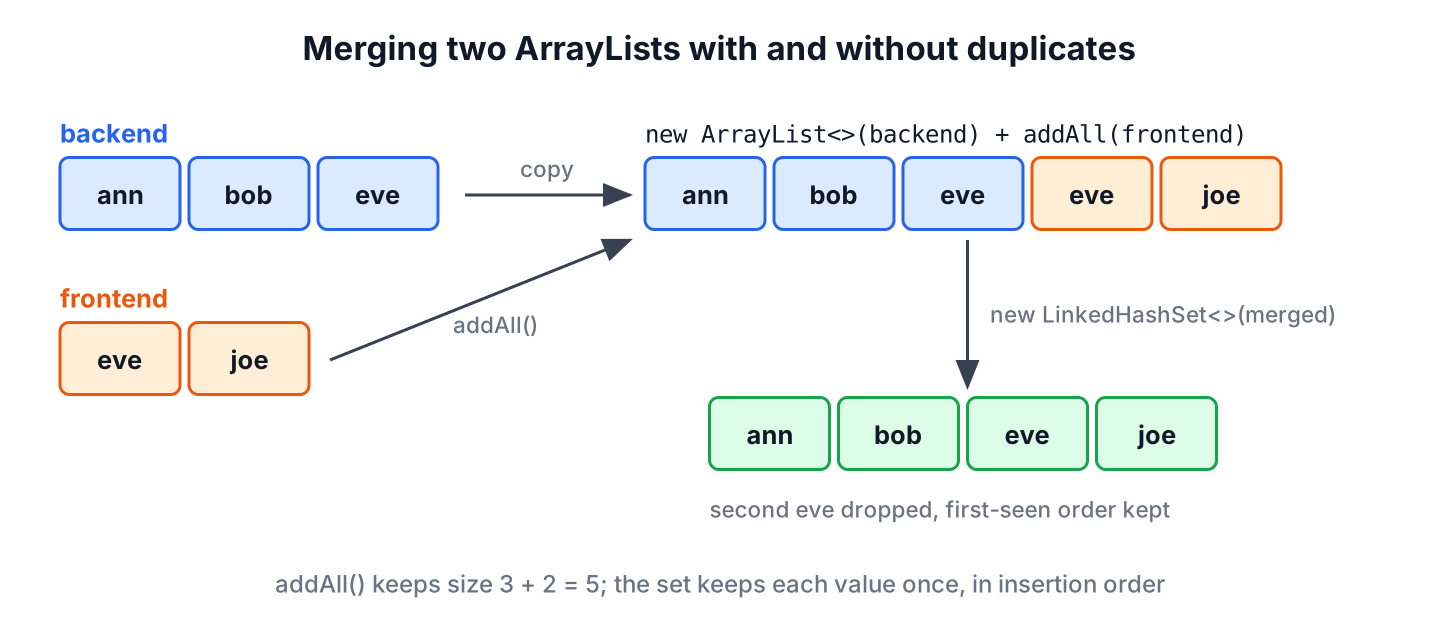
The usual way to merge two ArrayList objects is to copy the first list into a new ArrayList and call addAll() with the second, which appends every element of the second list and keeps the duplicates. For a merged list without duplicates, we pass the merged elements through a LinkedHashSet, which drops repeated values and keeps the first-seen order.
Merging lists comes up when an app combines search results from two sources, loads two pages of data or joins the members of two teams into one mailing list. The questions that decide the code are whether the original lists may change and whether duplicates should stay.
The following example merges the members of a backend team and a frontend team, with and without duplicates.
List<String> backend = List.of("ann", "bob", "eve");
List<String> frontend = List.of("eve", "joe");

List<String> everyone = new ArrayList<>(backend);
boolean changed = everyone.addAll(frontend);                   // true
List<String> merged = everyone;                                // [ann, bob, eve, eve, joe]
List<String> viaStream = Stream.concat(backend.stream(), frontend.stream()).toList();   // [ann, bob, eve, eve, joe]
List<String> unique = new ArrayList<>(new LinkedHashSet<>(merged));   // [ann, bob, eve, joe]
Notice that eve appears twice in the first two results and once in the last one. We look at merging with and without duplicates, merging many lists and sorted lists, and merging lists of objects that share a key.
1. Merging Two ArrayLists Retaining All Elements
A merge that keeps all elements returns a list whose size is the sum of both sizes. The elements of the first list come first, in their order, followed by the elements of the second list.
1.1. Using List.addAll()
The addAll() method appends all elements of the given collection to the end of the list and returns true if the list changed. Calling it on the first list changes that list in place, which is fine when we own the list and nobody else reads it.
List<String> backend = new ArrayList<>(List.of("ann", "bob"));
List<String> frontend = List.of("joe", "kim");
backend.addAll(frontend);
List<String> grown = backend;                                  // [ann, bob, joe, kim]
int unchanged = frontend.size();                               // 2
When the first list must stay unchanged, we merge into a new ArrayList instead of calling addAll() on the first list. Creating the new list with the combined size means neither addAll() call has to grow the backing array. The shorter form new ArrayList<>(backend) followed by addAll(frontend) gives the same result and grows the array once.
List<String> backend = List.of("ann", "bob");
List<String> frontend = List.of("joe");
List<String> merged = new ArrayList<>(backend.size() + frontend.size());
merged.addAll(backend);
merged.addAll(frontend);
List<String> result = merged;                                  // [ann, bob, joe]
List<String> original = backend;                               // [ann, bob]
The method addAll(int index, Collection) inserts the elements at a position instead of at the end. With index 0, the second list goes in front of the first, which is how we prepend a page of newer results. The guide to adding multiple elements covers both forms of addAll().
List<String> feed = new ArrayList<>(List.of("post3", "post4"));
feed.addAll(0, List.of("post1", "post2"));
List<String> newestFirst = feed;                               // [post1, post2, post3, post4]
1.2. Using Stream.concat() and flatMap()
The Stream.concat() method joins two streams into one, so Stream.concat(a.stream(), b.stream()).toList() builds the merged list in one expression without touching either input. The toList() method (Java 16) returns an unmodifiable list, so we collect into an ArrayList when the result must change later.
List<String> backend = List.of("ann", "bob");
List<String> frontend = List.of("joe");
List<String> fixed = Stream.concat(backend.stream(), frontend.stream()).toList();
fixed.add("kim");                                              // UnsupportedOperationException
List<String> editable = Stream.concat(backend.stream(), frontend.stream())
        .collect(Collectors.toCollection(ArrayList::new));
editable.add("kim");
List<String> result = editable;                                // [ann, bob, joe, kim]
A stream merge is useful when we filter or map the elements on the way. For a plain merge, the ArrayList constructor with addAll() is shorter and does less work, because it copies arrays instead of passing each element through a stream.
1.3. Merging More Than Two Lists
For three or more lists, Stream.of(…) with flatMap() turns a group of lists into one stream of elements. The same code works for a List<List<String>> whose size we do not know in advance, which the article on flattening nested lists covers in depth.
List<String> backend = List.of("ann", "bob");
List<String> frontend = List.of("joe");
List<String> design = List.of("liz", "ann");
List<String> all = Stream.of(backend, frontend, design)
        .flatMap(List::stream)
        .toList();                                             // [ann, bob, joe, liz, ann]
int total = all.size();                                        // 5
2. Merging Two ArrayLists Excluding Duplicate Elements
A merge without duplicates keeps each value once. The result depends on which occurrence we keep, and the three ways that follow all keep the first one, so the order follows the first list, followed by the new values of the second list.
2.1. Using LinkedHashSet
A LinkedHashSet stores each value once and remembers the insertion order, so adding both lists to it removes the duplicates without shuffling the elements. A plain HashSet would also remove them, but its iteration order is not defined.
List<String> backend = List.of("ann", "bob", "eve");
List<String> frontend = List.of("eve", "joe", "ann");
Set<String> members = new LinkedHashSet<>(backend);
members.addAll(frontend);
List<String> unique = new ArrayList<>(members);                // [ann, bob, eve, joe]
2.2. Using Stream distinct()
The distinct() operation keeps the first occurrence of each element in an ordered stream, so it gives the same result as the LinkedHashSet in one expression. It also removes duplicates that exist inside a single list, which removeAll() in the next section does not.
List<String> backend = List.of("ann", "bob", "bob");
List<String> frontend = List.of("eve", "ann");
List<String> unique = Stream.concat(backend.stream(), frontend.stream())
        .distinct()
        .toList();                                             // [ann, bob, eve]
2.3. Using removeAll() and addAll()
The two-step approach removes from a copy of the second list every value the first list already has, and appends the rest to a copy of the first list. It keeps duplicates that exist within the first list, which is useful when the first list is a trusted source and only the second list may repeat its values.
List<String> backend = List.of("ann", "bob", "eve");
List<String> frontend = List.of("eve", "joe");
List<String> newcomers = new ArrayList<>(frontend);
newcomers.removeAll(backend);
List<String> merged = new ArrayList<>(backend);
merged.addAll(newcomers);
List<String> result = merged;                                  // [ann, bob, eve, joe]
The method removeAll() calls contains() on its argument for every element. For large lists, we pass new HashSet<>(backend) as the argument, so each lookup takes constant time instead of a scan of the list.
3. Merging Two Sorted Lists
When both lists are already sorted, a merge can keep the result sorted without sorting it again. We walk both lists with one index each and always take the smaller of the two current elements, which is the merge step of merge sort and runs in linear time.
static <T extends Comparable<? super T>> List<T> mergeSorted(List<T> first, List<T> second) {
    List<T> result = new ArrayList<>(first.size() + second.size());
    int i = 0;
    int j = 0;
    while (i < first.size() && j < second.size()) {
        if (first.get(i).compareTo(second.get(j)) <= 0) {
            result.add(first.get(i++));
        } else {
            result.add(second.get(j++));
        }
    }
    result.addAll(first.subList(i, first.size()));
    result.addAll(second.subList(j, second.size()));
    return result;
}
List<Integer> morning = List.of(8, 10, 12);
List<Integer> evening = List.of(9, 12, 18, 20);
List<Integer> slots = mergeSorted(morning, evening); // [8, 9, 10, 12, 12, 18, 20]
List<Integer> sortedAgain = Stream.concat(morning.stream(), evening.stream()).sorted().toList(); // [8, 9, 10, 12, 12, 18, 20]The last line gives the same result with a full sort, which costs more for long lists but is shorter to write. For a few hundred elements, the shorter version is the better choice, and sorting an ArrayList shows the sort options.
4. Merging Two Team Rosters by Name
Say an HR system and a project tool both export a list of team members with their roles. The HR list has everyone, the project tool has fewer people but newer roles, and we need one roster where each person appears once with the newest role. A plain merge would list a person twice, and a set would keep only the first role.
record Member(String name, String role) {}List<Member> hr = List.of(new Member("ann", "dev"), new Member("bob", "dev"), new Member("joe", "qa"));
List<Member> project = List.of(new Member("ann", "lead"), new Member("kim", "dev"));
Map<String, Member> byName = Stream.concat(hr.stream(), project.stream())
.collect(Collectors.toMap(Member::name, Function.identity(),
(older, newer) -> newer, LinkedHashMap::new));
List<String> roster = byName.values().stream()
.map(m -> m.name() + "=" + m.role())
.toList(); // [ann=lead, bob=dev, joe=qa, kim=dev]The third argument of Collectors.toMap() decides which member wins when a name repeats, and here the later list wins. The LinkedHashMap keeps the order in which each name first appeared, so the roster still starts with the HR order.
5. Merging With Commons Collections and Guava
Projects that already use a collection library have a one-line helper for the merge. The Commons Collections method ListUtils.union() returns a new ArrayList with both lists, and Guava’s Iterables.concat() returns a view that reads both lists without copying them.
import org.apache.commons.collections4.ListUtils;
import com.google.common.collect.Iterables;
import com.google.common.collect.Lists;
List<String> backend = List.of("ann", "bob");
List<String> frontend = List.of("joe");
List<String> union = ListUtils.union(backend, frontend); // [ann, bob, joe]
List<String> copied = Lists.newArrayList(Iterables.concat(backend, frontend)); // [ann, bob, joe]A view from Iterables.concat() reflects later changes to the source lists, so we copy it into a list when we need a stable result. Adding a new dependency only for the merge is not needed, because the plain addAll() version is as short.
6. Merging ArrayLists FAQs
Merging lists raises a few follow-up questions about side effects, element types and null values.
6.1. Does addAll() modify the original list?
Yes, it changes the list we call it on and leaves the argument unchanged. To keep both inputs as they are, we copy the first list first, as in section 1.1.
6.2. How do we merge lists of different element types?
We use a common supertype for the result, because addAll() accepts a Collection<? extends E>.
List<Integer> whole = List.of(1, 2);
List<Double> halves = List.of(0.5);
List<Number> numbers = new ArrayList<>(whole);
numbers.addAll(halves);
List<Number> mixed = numbers;                                  // [1, 2, 0.5]
6.3. What happens if one of the lists is null?
The addAll() call and the ArrayList constructor throw NullPointerException for a null argument. We replace a possible null with an empty list first, for example with Objects.requireNonNullElse(list, List.of()).
6.4. How do we merge two lists by alternating their elements?
We loop over the longer length and take one element from each list while it has one left. A stream with IntStream.range() does the same in one expression.
List<String> home = List.of("h1", "h2", "h3");
List<String> away = List.of("a1", "a2");
List<String> schedule = IntStream.range(0, Math.max(home.size(), away.size()))
        .boxed()
        .flatMap(i -> Stream.of(i < home.size() ? home.get(i) : null, i < away.size() ? away.get(i) : null))
        .filter(Objects::nonNull)
        .toList();                                             // [h1, a1, h2, a2, h3]
7. Conclusion
To merge two ArrayList objects and keep every element, we copy the first list and call addAll() with the second, or use Stream.concat() when we also filter or map. For three or more lists, flatMap() builds one stream from all of them.
To merge without duplicates, a LinkedHashSet or distinct() keeps the first occurrence of each value in order. Sorted inputs can be merged in linear time, and lists of objects that share a key merge cleanly through Collectors.toMap() with a merge function. The ArrayList guide lists the other list operations.
8. References
- ArrayList.addAll() Javadoc
- Stream.concat() Javadoc
- LinkedHashSet Javadoc
- Apache Commons Collections ListUtils
Happy Learning !!
