
The Java Stream.flatMap() method replaces every element of a stream with the elements of a new stream returned by a mapper function, and merges all those streams into one flat stream. A Stream<List<String>> becomes a Stream<String>, and each input element can produce zero, one or many output elements.
We use flatMap() to flatten a list of lists, to split lines of text into words, to collect the items held inside other objects and to drop empty Optional values. The following example shows these four cases.
List<List<String>> baskets = List.of(List.of("apple", "kiwi"), List.of("banana"), List.of());

List<String> fruits = baskets.stream().flatMap(List::stream).toList();                              // [apple, kiwi, banana]
List<String> words = Stream.of("green tea", "black tea").flatMap(s -> Arrays.stream(s.split(" "))).toList();   // [green, tea, black, tea]
List<String> found = Stream.of(Optional.of("jam"), Optional.<String>empty()).flatMap(Optional::stream).toList(); // [jam]
int total = Stream.of(new int[] {1, 2}, new int[] {3}).flatMapToInt(Arrays::stream).sum();           // 6
Notice that the empty basket adds nothing to the result, so the output stream can be shorter or longer than the input. We start with what flattening means, look at the signature and its rules, work through the common examples and finish with a shopping list built from a weekly meal plan.
1. What Is Flattening?
Flattening means turning a structure with two levels, such as a list of lists, into one level that holds all the inner elements in order. The flatMap() method does it in two steps for every element. It first calls our mapper, which returns a stream, and after that it pushes the elements of that stream into the result stream.
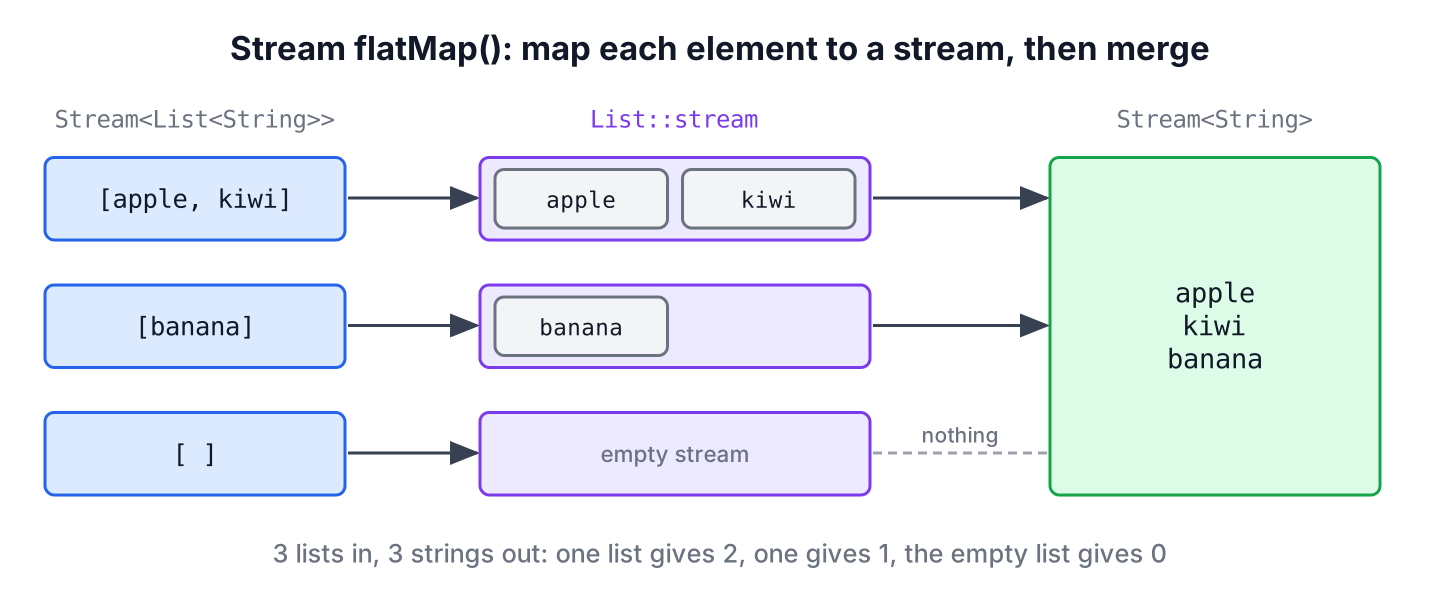
The text form of the same idea shows the nested input and the flat output.
Before flattening : [[apple, kiwi], [banana], []]
After flattening  : [apple, kiwi, banana]
With map() and the same mapper, we would get a Stream<Stream<String>> with three elements, which is rarely what we want. The detailed comparison of both methods is in map() vs flatMap().
2. Stream flatMap() Method
The flatMap() method is an intermediate operation of the Java Stream API. It was added in Java 8 together with streams and has not changed since.
2.1. Signature of flatMap()
The mapper takes one element of type T and returns a stream of R elements, or a stream of a subtype of R. The method returns a Stream<R>.
// does not compile: declaration in the Stream<T> interface
<R> Stream<R> flatMap(Function<? super T, ? extends Stream<? extends R>> mapper)
The mapper has to return a Stream, not a List. That is why we write List::stream for a list of lists and Arrays::stream for an array of arrays.
2.2. How flatMap() Behaves
A few rules of flatMap() matter once it runs in production code.
- The flatMap() method is lazy, so the mapper runs only when a terminal operation pulls elements.
- The output keeps the order of the outer elements and, inside each group, the order of the inner stream.
- Each stream returned by the mapper is closed after its elements have been passed on, so a mapper can return a stream backed by a file or another resource.
- If the mapper returns null, flatMap() treats it as an empty stream. Returning Stream.empty() says the same thing more clearly.
- Since Java 10, short-circuiting operations such as findFirst() and limit() stop pulling from the inner stream once they have enough elements (JDK-8075939).
We can check the last two rules with a counter and a mapper that returns null for one element.
AtomicInteger pulled = new AtomicInteger();
Optional<Integer> first = Stream.of(1, 2)
        .flatMap(n -> IntStream.range(0, 1000).peek(i -> pulled.incrementAndGet()).boxed())
        .findFirst();
int seen = pulled.get();                        // 1
List<String> rest = Stream.of("a", "b").flatMap(s -> s.equals("a") ? null : Stream.of(s)).toList();   // [b]
Only one of the 1,000 inner elements was generated, because findFirst() needed only one. On Java 8 and 9, the same pipeline generated the whole inner stream first.
3. Stream flatMap() Examples
The following examples cover the shapes of nested data that we meet in everyday code, from plain nested lists to objects that hold collections.
3.1. Converting Nested Lists into a Single List
A List<List<Integer>> often comes from batching, for example when an API returns results page by page. The method reference List::stream turns each inner list into a stream, and toList() collects the merged elements.
List<List<Integer>> pages = List.of(List.of(1, 2, 3), List.of(4, 5), List.of(6, 7, 8));
List<Integer> all = pages.stream().flatMap(List::stream).toList();       // [1, 2, 3, 4, 5, 6, 7, 8]
3.2. Collecting Nested Arrays into a Single List
For a two-dimensional array, the outer Arrays.stream() gives a stream of rows, and Arrays::stream in flatMap() turns each row into a stream of cells.
String[][] grid = {{"a", "b"}, {"c", "d"}, {"e"}};
List<String> cells = Arrays.stream(grid).flatMap(Arrays::stream).toList();   // [a, b, c, d, e]
3.3. Splitting Lines Into Words
Text is a classic one-to-many case, because one line holds several words. We strip each line before splitting, since a line with leading spaces would otherwise give an empty first word, and we drop the empty result of a blank line.
String text = "salt and pepper\n\n  olive oil";
List<String> words = text.lines()
        .flatMap(line -> Arrays.stream(line.strip().split("\\s+")))
        .filter(w -> !w.isEmpty())
        .toList();                              // [salt, and, pepper, olive, oil]
The same pipeline works on a file. The Files.lines() method keeps the file open until the stream is closed, so we always call it in a try-with-resources block, as described in reading a file line by line.
Path file = Files.createTempFile("notes", ".txt");
Files.writeString(file, "salt and pepper\n\n  olive oil\n");
long wordCount;
try (Stream<String> lines = Files.lines(file)) {
    wordCount = lines.flatMap(line -> Arrays.stream(line.strip().split("\\s+")))
            .filter(w -> !w.isEmpty())
            .count();
}
long countedWords = wordCount;                  // 5
boolean deleted = Files.deleteIfExists(file);   // true
3.4. Flattening a Collection Inside Each Object
Most nested data in business code is a list inside an object. In the following example, a Recipe record holds its ingredients, and we want every ingredient used by the recipes in alphabetical order without duplicates.
record Recipe(String name, List<String> ingredients) {}List<Recipe> recipes = List.of(
new Recipe("Pancakes", List.of("flour", "milk", "eggs")),
new Recipe("Omelette", List.of("eggs", "cheese")));
List<String> ingredients = recipes.stream()
.flatMap(r -> r.ingredients().stream())
.distinct()
.sorted()
.toList(); // [cheese, eggs, flour, milk]When we also need the parent next to each child, for example the recipe name next to each ingredient, the inner stream maps each child to a combined value, such as r.ingredients().stream().map(i -> r.name() + “: ” + i). More patterns for nested data are in filtering nested collections.
3.5. Removing Empty Optional Values
Since Java 9, Optional.stream() returns a stream with one element for a present value and an empty stream otherwise. Passing it to flatMap() keeps the present values and drops the empty ones, without calling isPresent() and get().
Map<String, Integer> prices = Map.of("apple", 5, "banana", 3);
List<Integer> known = Stream.of("apple", "kiwi", "banana")
        .map(name -> Optional.ofNullable(prices.get(name)))
        .flatMap(Optional::stream)
        .toList();                              // [5, 3]
The Optional guide covers the other Optional methods, including Optional.flatMap(), which removes nested Optional layers in the same way.
3.6. Building Every Combination of Two Lists
A nested flatMap() with a map() inside produces every pair of two lists, which is called a Cartesian product. A meeting room booking page uses it to list all free rooms for all time slots.
List<String> rooms = List.of("A", "B");
List<String> slots = List.of("9:00", "10:00");
List<String> options = rooms.stream()
        .flatMap(room -> slots.stream().map(slot -> room + " " + slot))
        .toList();                              // [A 9:00, A 10:00, B 9:00, B 10:00]
4. Flattening with IntStream, LongStream and DoubleStream
The Stream interface has three primitive variants. The methods flatMapToInt(), flatMapToLong() and flatMapToDouble() expect the mapper to return an IntStream, LongStream or DoubleStream, and the result is a primitive stream with sum(), average() and the other numeric methods.
// does not compile: declarations in the Stream<T> interface
IntStream flatMapToInt(Function<? super T, ? extends IntStream> mapper)
LongStream flatMapToLong(Function<? super T, ? extends LongStream> mapper)
DoubleStream flatMapToDouble(Function<? super T, ? extends DoubleStream> mapper)
In the following example, we sum all numbers of a list of lists without boxing the result, and count the characters of several words with String::chars, which returns an IntStream.
List<List<Integer>> groups = List.of(List.of(1, 2, 3), List.of(4, 5), List.of(6, 7, 8));
int sum = groups.stream().flatMapToInt(g -> g.stream().mapToInt(Integer::intValue)).sum();   // 36
long letters = Stream.of("tea", "jam").flatMapToInt(String::chars).count();                 // 6
The primitive type streams article explains these streams in more detail.
5. flatMap() Compared With map() and mapMulti()
Use flatMap() when each element turns into a group of elements that already exists as a collection or a stream, and map() when each element turns into one value. Java 16 added mapMulti() for the same one-to-many job, with a consumer instead of a returned stream.
| Need | Best method | Reason |
|---|---|---|
| One result per element | map() | No inner stream to create |
| Elements of a list or array inside each element | flatMap() | List::stream or Arrays::stream is the whole mapper |
| Zero or a few results chosen with if statements | mapMulti() | No stream object per element |
| Short-circuiting over large inner groups | flatMap() | Stops pulling inner elements early |
6. Building a Shopping List From a Weekly Meal Plan
A meal planning app shows a weekly plan, where each day has a few recipes and each recipe has its ingredients. On Saturday the user taps “Shopping list” and expects every ingredient once, with the number of recipes that need it, so the app has to flatten two levels of nesting.
The following example is a Day record that holds a list of the Recipe records from section 3.4. Two flatMap() calls go from days to recipes and from recipes to ingredients, and a groupingBy() collector counts each ingredient in a sorted TreeMap.
record Day(String name, List<Recipe> meals) {}Recipe pancakes = new Recipe("Pancakes", List.of("flour", "milk", "eggs"));
Recipe omelette = new Recipe("Omelette", List.of("eggs", "cheese"));
List<Day> week = List.of(new Day("Mon", List.of(pancakes)), new Day("Tue", List.of(omelette, pancakes)));
Map<String, Long> shoppingList = week.stream()
.flatMap(day -> day.meals().stream())
.flatMap(recipe -> recipe.ingredients().stream())
.collect(Collectors.groupingBy(Function.identity(), TreeMap::new, Collectors.counting())); // {cheese=1, eggs=3, flour=2, milk=2}Each extra level of nesting needs one more flatMap() call. The pipeline never builds an intermediate list of recipes, because each recipe flows straight from the first flatMap() into the second one.
7. Java Stream flatMap() FAQs
Flattening deeper structures, laziness and collectors come up as soon as the first flatMap() call works.
7.1. How do I flatten a list of lists in Java?
Call flatMap(List::stream) on a stream of the outer list and collect with toList(), as in section 3.1. Without streams, we create a new ArrayList and call addAll() for each inner list in a loop, which gives the same result.
7.2. How do I flatten more than two levels?
Chain one flatMap() call per level. A List<List<List<Integer>>> needs two calls.
List<List<List<Integer>>> cube = List.of(List.of(List.of(1, 2), List.of(3)), List.of(List.of(4)));
List<Integer> flat = cube.stream().flatMap(List::stream).flatMap(List::stream).toList();   // [1, 2, 3, 4]
7.3. Is flatMap() lazy?
Yes. Since Java 10 it is also lazy inside each inner stream, so findFirst(), anyMatch() or limit() stop as soon as they have their answer, as the counter in section 2.2 shows. On Java 8 and 9, each inner stream was consumed fully.
7.4. Can we flatten inside a collector?
Yes, with Collectors.flatMapping(), added in Java 9. It flattens the values of each group inside groupingBy(), for example all ingredients per recipe size, where a flatMap() before the collector would lose the recipe that holds each ingredient.
List<Recipe> menu = List.of(new Recipe("Tea", List.of("water", "tea")), new Recipe("Toast", List.of("bread")));
Map<Integer, List<String>> bySize = menu.stream().collect(Collectors.groupingBy(r -> r.ingredients().size(), TreeMap::new, Collectors.flatMapping(r -> r.ingredients().stream(), Collectors.toList())));   // {1=[bread], 2=[water, tea]}
8. Conclusion
The Stream.flatMap() method maps each element to a stream and merges all those streams into one, so nested lists, arrays, lines of text and Optional values become one flat stream. The mapper must return a stream, empty groups disappear, and since Java 10 the operation stays lazy inside each inner stream.
We use flatMap(List::stream) for nested collections, flatMap(Optional::stream) to drop empty values, the primitive variants for numeric work, and one more flatMap() per extra level of nesting. For one-to-one conversions, map() stays the right tool.
9. References
- Stream.flatMap() Javadoc
- Stream.flatMapToInt() Javadoc
- Optional.stream() Javadoc
- Collectors.flatMapping() Javadoc
- JDK-8075939, Stream.flatMap() causes breaking of short-circuiting of terminal operations
Happy Learning !!
