
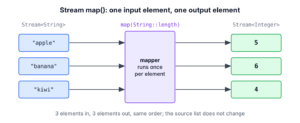
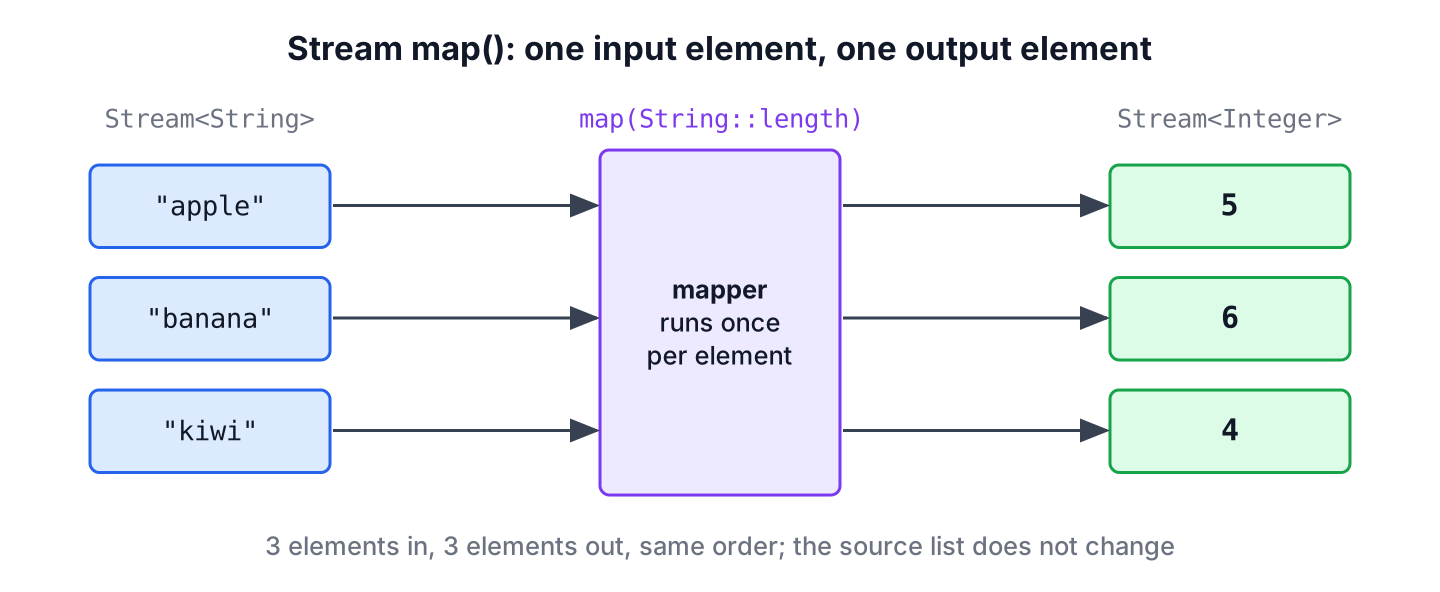
The Java Stream.map() method is an intermediate operation that applies a function to every element of a stream and returns a new stream with the results, one output element for each input element. The function can keep the element type, such as String to String, or change it, such as String to Integer.
We use map() to convert values from one type to another, to pick one field out of each object, to clean up text before processing it and to turn database entities into the objects an API returns. The following example shows the common forms of map() on a small list of fruits.
List<String> fruits = List.of("apple", "banana", "kiwi");

List<String> upper = fruits.stream().map(String::toUpperCase).toList();     // [APPLE, BANANA, KIWI]
List<Integer> lengths = fruits.stream().map(String::length).toList();      // [5, 6, 4]
List<String> labels = fruits.stream().map(f -> f + " x2").toList();        // [apple x2, banana x2, kiwi x2]
int letters = fruits.stream().mapToInt(String::length).sum();              // 15
Notice that three fruits always give three results, and that the source list stays unchanged. We look at the cases where map() fits, the method signature and its rules, typical conversions, the primitive variants and a real-world example of mapping entities to API responses.
1. When Do We Use Stream map()?
We use map() whenever every element of a collection must become one new value. The Java Stream API applies our function to the elements one by one and passes each result to the next step of the pipeline, so we describe the conversion once and never write the loop.
Four situations call for map() in almost every business app.
- A CSV import reads every line as a String, and each value must become an int, a LocalDate or a BigDecimal.
- A service loads Song entities from the database, and the controller returns one SongView DTO per entity, as in section 6.
- A sign-up form sends email addresses with spaces and capital letters, and we store them trimmed and in lowercase.
- A report needs only one field of each object, such as the artist of every song, often followed by distinct().
2. Stream map() Method
The map() method is declared in the Stream<T> interface. It accepts a Function, which is a functional interface with one method that takes a value and returns a value.
2.1. Signature of map()
The type parameter T is the element type of the current stream, and R is the element type of the stream that map() returns. The compiler infers R from the return type of our lambda expression or method reference.
// does not compile: declaration in the Stream<T> interface
<R> Stream<R> map(Function<? super T, ? extends R> mapper)
For example, String::length returns an int, which is boxed to Integer, so Stream<String> becomes Stream<Integer>. A mapper that returns a List gives a stream of lists, which is the point where flatMap() becomes the better choice.
2.2. How map() Behaves
The mapper must be non-interfering (it does not modify the source) and stateless (its result does not depend on anything that changes during the run). In practice, that gives us a few rules.
- The map() method is an intermediate operation, so it returns a new Stream and does nothing until a terminal operation such as toList() or forEach() runs.
- The mapper runs once per element and returns one value. It never removes or adds elements.
- On an ordered source, such as a List, the results keep the order of the source elements.
- The mapper must not modify the source collection and should not change shared state, because the result would depend on timing in parallel streams.
We can see the laziness with a counter. Creating the pipeline calls the mapper zero times, and only toList() pulls the three elements through it.
AtomicInteger calls = new AtomicInteger();
Stream<String> pending = Stream.of("a", "b", "c").map(s -> {
    calls.incrementAndGet();
    return s.toUpperCase();
});
int before = calls.get();                      // 0
List<String> done = pending.toList();          // [A, B, C]
int after = calls.get();                       // 3
We use a counter like this only for demonstration. In application code, the mapper returns a value and changes nothing else.
3. Stream map() Examples
The following examples cover the conversions that come up most often in application code. Each one uses Stream.toList(), available since Java 16, which returns an unmodifiable list. The difference to Collectors.toList() is covered in collecting a stream to a list.
3.1. Converting a Stream of Strings to Integers
The method reference Integer::valueOf takes one String and returns an Integer, so it fits map() as the mapper. A value that is not a number makes the parse throw a NumberFormatException, which stops the whole pipeline.
List<String> input = List.of("1", "2", "3");
List<Integer> numbers = input.stream().map(Integer::valueOf).toList();               // [1, 2, 3]
List<Integer> broken = Stream.of("1", "two").map(Integer::valueOf).toList();         // NumberFormatException: For input string: "two"
When the input comes from a user or a file, we strip the spaces and keep only valid numbers before mapping. Other options, such as wrapping the parse in a method that returns an Optional, are in handling exceptions in streams.
List<String> raw = List.of(" 10", "abc", "25 ", "");
List<Integer> valid = raw.stream()
        .map(String::strip)
        .filter(s -> s.matches("-?\\d{1,9}"))
        .map(Integer::valueOf)
        .toList();                              // [10, 25]
3.2. Extracting a Field From Objects
A record accessor such as Song::artist is the most common mapper in business code. In the following example, a playlist holds songs, and we list the artists without duplicates by chaining distinct() after map().
record Song(String title, String artist, int seconds) {}List<Song> playlist = List.of(
new Song("Intro", "Ana", 95),
new Song("Rain", "Raj", 241),
new Song("Sunset", "Ana", 188));
List<String> artists = playlist.stream().map(Song::artist).distinct().toList(); // [Ana, Raj]
List<Integer> minutes = playlist.stream().map(s -> s.seconds() / 60).toList(); // [1, 4, 3]3.3. Combining map() With filter() and sorted()
Real pipelines rarely use map() alone. The following example reuses the same three songs. We filter first, so the mapper runs only for the elements we keep, and sort either before or after the mapping, depending on which value we sort by.
List<Song> songs = List.of(new Song("Intro", "Ana", 95), new Song("Rain", "Raj", 241), new Song("Sunset", "Ana", 188));

List<String> longTitles = songs.stream()
        .filter(s -> s.seconds() > 120)
        .map(Song::title)
        .sorted()
        .toList();                              // [Rain, Sunset]
The filter() call removes Intro before map() runs, and sorted() sorts the titles alphabetically.
3.4. Mapping Map Entries
A Map has no stream() method, so we stream its entrySet() and map each entry to the value we need. A TreeMap keeps the keys sorted, which makes the result order predictable.
Map<String, Integer> stock = new TreeMap<>(Map.of("apple", 5, "banana", 3));
List<String> lines = stock.entrySet().stream().map(e -> e.getKey() + ": " + e.getValue()).toList();   // [apple: 5, banana: 3]
4. Stream of Integers, Longs or Doubles
The Stream interface has three more mapping methods for numbers. The methods mapToInt(), mapToLong() and mapToDouble() return an IntStream, LongStream or DoubleStream, which store primitive values instead of boxed objects.
// does not compile: declarations in the Stream<T> interface
IntStream mapToInt(ToIntFunction<? super T> mapper)
LongStream mapToLong(ToLongFunction<? super T> mapper)
DoubleStream mapToDouble(ToDoubleFunction<? super T> mapper)
The primitive streams add sum(), average(), min(), max() and summaryStatistics(), and they avoid creating an Integer object per element. In the following example, exam scores arrive as strings and we compute the average.
List<String> scores = List.of("85", "92", "78", "90", "88");
double average = scores.stream().mapToInt(Integer::parseInt).average().orElse(0.0);   // 86.6
List<String> squares = IntStream.rangeClosed(1, 3).mapToObj(n -> n + "^2=" + n * n).toList();   // [1^2=1, 2^2=4, 3^2=9]
The average() method returns an OptionalDouble, because an empty stream has no average, so we supply 0.0 with orElse(). To go back from a primitive stream to objects, we call mapToObj() or boxed(). The primitive type streams article covers these streams in depth.
5. map() vs flatMap() vs mapMulti()
Use map() when every element turns into one value, and switch to flatMap() or mapMulti() when an element turns into zero or more values. A mapper that returns a list from map() gives a Stream<List<T>>, and flatMap() fixes that by merging the inner streams into one.
| Method | Mapper returns | Elements out per element in | Typical use |
|---|---|---|---|
| map() | One value | Always 1 | Convert types, extract a field |
| flatMap() | A Stream | 0 to n | Flatten nested lists, split lines into words |
| mapMulti() (Java 16) | Nothing, calls a consumer | 0 to n | Filter and expand in one step with a loop |
| mapToInt() and siblings | A primitive | Always 1 | Sums, averages, statistics |
The full side-by-side comparison with diagrams and Optional examples is in map() vs flatMap().
6. Mapping Song Entities to API Responses
A music streaming app has a /playlists/{id} endpoint. The repository returns Song entities with the length in seconds, but the mobile app wants each song as a small JSON object with the length already formatted as m:ss. Converting the entities into DTOs in one place keeps the formatting out of the controller and out of the entity.
The following example is a SongView record with a static factory method that does the conversion for one song. The service method maps the whole list with a method reference to that factory.
record SongView(String title, String length) {
    static SongView from(Song song) {
        String length = song.seconds() / 60 + ":" + String.format("%02d", song.seconds() % 60);
        return new SongView(song.title(), length);
    }
}
List<Song> songs = List.of(new Song("Intro", "Ana", 95), new Song("Rain", "Raj", 241), new Song("Sunset", "Ana", 188));
List<SongView> response = songs.stream().map(SongView::from).toList();
SongView first = response.getFirst(); // SongView[title=Intro, length=1:35]
int count = response.size(); // 3The factory method can be unit tested on its own, and the pipeline needs only one line to map every song to its view. In a Spring Boot application, Jackson serializes the list of records to JSON. The getFirst() call comes from the sequenced collections added to List in Java 21.
7. Java Stream map() FAQs
Four points about map() confuse new stream users more than the rest.
7.1. Does map() change the original list?
No. The map() method writes its results into a new stream, and the terminal operation builds a new collection from it. The source list keeps its elements, as long as the mapper does not modify them, which it should never do.
7.2. Can the mapper in map() return null?
Yes. A null result becomes a null element in the new stream, and both toList() and Collectors.toList() accept it. The next step that calls a method on the element throws a NullPointerException, so we remove nulls with filter(Objects::nonNull) right after map().
Map<String, String> codes = Map.of("apple", "A1");
List<String> found = Stream.of("apple", "kiwi").map(codes::get).filter(Objects::nonNull).toList();   // [A1]
7.3. What is the difference between map() and forEach()?
The map() method is an intermediate operation that returns a new stream of results, while forEach() is a terminal operation that returns void and runs an action for its side effect, such as printing. We transform with map() and consume the results with forEach() or a collector.
7.4. Does map() keep the order of elements?
Yes, for ordered sources such as a List, an array or Stream.of(). Even a parallel stream returns the results in encounter order when we collect them with toList(). The mapper itself runs in any order on a parallel stream, so only side effects such as printing inside map() or forEach() show the elements out of order.
8. Conclusion
The Stream.map() method converts each element of a stream into one new value and returns a new stream, so the number of elements and their order stay the same. It is lazy, and the mapper should be a pure function that does not modify the source or shared state.
We use map() for type conversions, for extracting fields and for building DTOs, mapToInt() and its siblings for numbers, and flatMap() when one element must become several. Combined with filter() and toList(), these few methods cover most of the data transformations in a typical Java application.
9. References
- Stream.map() Javadoc
- Stream.mapToInt() Javadoc
- Stream.toList() Javadoc
- java.util.stream package summary
Happy Learning !!

Hi @Praveen try this also
empList.stream().map(employee -> {
    employee.setSalary(employee.getSalary()+1000);
    return  employee;
}).collect(Collectors.toList())
Hi praveen please check it out.
List employeesList = Arrays.asList(
new Employee(1, “Alex”, 100),
new Employee(2, “Brian”, 100),
new Employee(3, “Charles”, 200),
new Employee(4, “David”, 200),
new Employee(5, “Edward”, 300),
new Employee(6, “Frank”, 300)
);
List distinctSalaries = employeesList.stream()
.map( e -> e.getSalary() )
.distinct()
.collect(Collectors.toList());
System.out.println(distinctSalaries);
Hi Sir, I’m Praveen I have one small doubt in above example we are getting only employee salary data using map, so if i want to get whole employee data with increase 10000 salary to every employee. is it possible using map in java8
You should check out flatMap.