
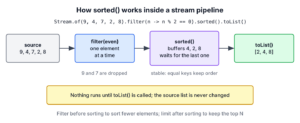
The Stream.sorted() method returns a new stream with the elements sorted in their natural order, and sorted(Comparator) sorts them in the order that the given Comparator defines. We use it to order search results, build leaderboards, print reports by date or pick the top N items before a terminal operation collects them.
The following example sorts the same data in ascending, descending and custom order.
List<Integer> scores = List.of(42, 7, 19, 3);
List<Integer> ascending = scores.stream().sorted().toList();                             // [3, 7, 19, 42]
List<Integer> descending = scores.stream().sorted(Comparator.reverseOrder()).toList();   // [42, 19, 7, 3]
List<String> fruits = List.of("kiwi", "fig", "banana");
List<String> byLength = fruits.stream().sorted(Comparator.comparing(String::length)).toList();   // [fig, kiwi, banana]
List<Integer> original = scores;                                                         // [42, 7, 19, 3]
Notice that the source list keeps its order, because sorted() never changes the source. We start with the two overloads and how they run inside a pipeline, sort numbers, strings and records, handle null values, and compare sorted() with List.sort().
1. Stream sorted() and sorted(Comparator)
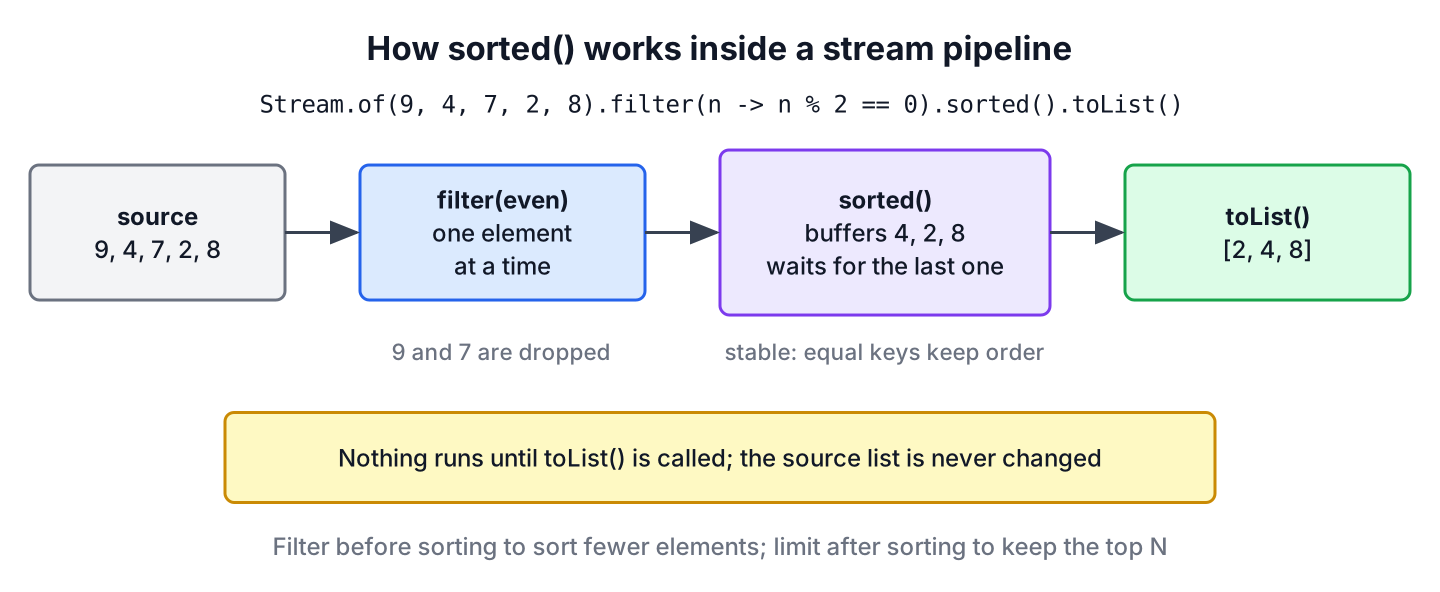
The Stream interface has two sorting methods. Both are stateful intermediate operations, which means they return a new Stream and need to see every element before they can pass the first one on. Sorting starts only when a terminal operation such as toList(), forEach() or findFirst() runs.
The two methods, Stream<T> sorted() and Stream<T> sorted(Comparator<? super T> comparator), differ only in where the order comes from.
- The sorted() method uses the natural order of the elements, so the element type must implement Comparable. Otherwise the terminal operation throws a ClassCastException.
- The sorted(Comparator) method uses the Comparator we pass, so it works for any type, including classes that have no natural order.
- For ordered streams, such as streams from a List or Stream.of(), both sorts are stable. Equal elements keep their original relative order.
The sort is part of the Java Stream pipeline, so the elements reach sorted() only after the earlier steps. For example, putting filter() before sorted() means fewer elements to sort, which is cheaper than sorting first and filtering afterwards.
List<Integer> evens = Stream.of(9, 4, 7, 2, 8).filter(n -> n % 2 == 0).sorted().toList(); // [2, 4, 8]2. Sorting Numbers and Strings
Wrapper types such as Integer, Long and Double, and also String and the java.time classes, implement Comparable. For these types, sorted() without arguments gives ascending order, and Comparator.reverseOrder() gives descending order.
2.1. Ascending and Descending Order
Numbers sort by value. The descending version passes Comparator.reverseOrder(), which reverses the natural order of any Comparable type.
List<Integer> asc = Stream.of(5, 1, 4, 2, 3).sorted().toList();                              // [1, 2, 3, 4, 5]
List<Integer> desc = Stream.of(5, 1, 4, 2, 3).sorted(Comparator.reverseOrder()).toList();    // [5, 4, 3, 2, 1]
List<LocalDate> dates = Stream.of(LocalDate.of(2026, 3, 1), LocalDate.of(2025, 12, 24)).sorted().toList();   // [2025-12-24, 2026-03-01]
2.2. Strings and Case-Insensitive Order
The natural order of String compares character codes, so every uppercase letter comes before every lowercase letter. For a list that users see, we pass String.CASE_INSENSITIVE_ORDER, or a Comparator built with Comparator.comparing() when we sort by length or another key.
List<String> tags = List.of("java", "Spring", "api", "Docker");
List<String> natural = tags.stream().sorted().toList();                                  // [Docker, Spring, api, java]
List<String> ignoreCase = tags.stream().sorted(String.CASE_INSENSITIVE_ORDER).toList();  // [api, Docker, java, Spring]
List<String> reversed = tags.stream().sorted(Comparator.reverseOrder()).toList();        // [java, api, Spring, Docker]
List<String> shortFirst = tags.stream().sorted(Comparator.comparingInt(String::length)).toList();   // [api, java, Spring, Docker]
The last line also shows stability. The words Spring and Docker both have six letters, and they keep the order they had in the source list.
2.3. Primitive Streams
The primitive streams IntStream, LongStream and DoubleStream have only the no-argument sorted(), because a Comparator works with objects. For descending order, we box the values first, or sort ascending and read the result from the end.
int[] asc = IntStream.of(8, 3, 5).sorted().toArray();                                  // [3, 5, 8]
List<Integer> desc = IntStream.of(8, 3, 5).boxed().sorted(Comparator.reverseOrder()).toList();   // [8, 5, 3]
3. Sorting a Stream of Objects
Most real streams carry objects, such as orders, products or log entries. We have two choices for them. Either the class implements Comparable and sorted() uses that natural order, or we pass a Comparator that reads one or more fields. The examples use a recipe catalog.
record Recipe(String name, int minutes, double rating) {}3.1. Sorting by a Field With Comparator.comparing()
The factory method Comparator.comparing() takes a key extractor, most often a method reference to a record accessor or getter, and compares the extracted keys. For int, long and double keys, comparingInt(), comparingLong() and comparingDouble() avoid boxing.
List<Recipe> recipes = List.of(new Recipe("lasagna", 90, 4.8), new Recipe("omelette", 10, 4.2), new Recipe("pancakes", 25, 4.5));
List<String> byName = recipes.stream().sorted(Comparator.comparing(Recipe::name)).map(Recipe::name).toList();   // [lasagna, omelette, pancakes]
List<String> quickest = recipes.stream().sorted(Comparator.comparingInt(Recipe::minutes)).map(Recipe::name).toList();   // [omelette, pancakes, lasagna]
A common mistake from older code is to pass the key extractor itself, as in sorted(Recipe::name). That line does not compile, because sorted() expects a Comparator, which compares two elements, and not a function that reads one field.
// does not compile: Recipe::name is a key extractor, not a Comparator
List<Recipe> wrong = recipes.stream().sorted(Recipe::name).toList();
3.2. Descending Order by a Field
For descending order on a field, call reversed() on the Comparator, or pass Comparator.reverseOrder() as the key comparator. Both lines give the best-rated recipe first.
List<Recipe> recipes = List.of(new Recipe("lasagna", 90, 4.8), new Recipe("omelette", 10, 4.2), new Recipe("pancakes", 25, 4.5));
List<String> bestFirst = recipes.stream().sorted(Comparator.comparingDouble(Recipe::rating).reversed()).map(Recipe::name).toList();   // [lasagna, pancakes, omelette]
List<String> bestFirst2 = recipes.stream().sorted(Comparator.comparing(Recipe::rating, Comparator.reverseOrder())).map(Recipe::name).toList();   // [lasagna, pancakes, omelette]
When we chain a second field with thenComparing(), a reversed() at the end reverses every field of the chain, not only the last one. The article on sorting a stream by multiple fields shows how to give each field its own direction.
3.3. Natural Order With Comparable
When a class has one obvious order, it can implement Comparable and sorted() uses that order without arguments. A Comparator passed to sorted(Comparator) still wins whenever a screen needs a different order.
record Dish(String name, int calories) implements Comparable<Dish> {
    @Override
    public int compareTo(Dish other) {
        return Integer.compare(calories, other.calories);
    }
}
List<Dish> dishes = List.of(new Dish("soup", 180), new Dish("salad", 120), new Dish("curry", 450));
List<String> lightFirst = dishes.stream().sorted().map(Dish::name).toList(); // [salad, soup, curry]If the class does not implement Comparable, the code compiles, but the terminal operation fails, because the natural-order comparator casts each element to Comparable.
List<Recipe> recipes = List.of(new Recipe("lasagna", 90, 4.8), new Recipe("omelette", 10, 4.2));
List<Recipe> broken = recipes.stream().sorted().toList();   // ClassCastException: Recipe cannot be cast to Comparable
The fix is either to pass a Comparator, as in section 3.1, or to implement Comparable when the order is part of what the class means.
4. Sorting When Values Can Be null
Natural-order comparators throw a NullPointerException as soon as they meet a null element or a null key. The wrappers Comparator.nullsFirst() and Comparator.nullsLast() place the nulls at one end and use the wrapped comparator for the rest.
List<String> cities = Arrays.asList("Pune", null, "Delhi");
List<String> crash = cities.stream().sorted().toList();                                         // NullPointerException
List<String> nullsLast = cities.stream().sorted(Comparator.nullsLast(Comparator.naturalOrder())).toList();   // [Delhi, Pune, null]
For null fields inside objects, we wrap the key comparator in the same way, for example Comparator.comparing(Recipe::name, Comparator.nullsLast(Comparator.naturalOrder())). The guide to sorting a stream with null values covers both cases in detail.
5. Stream sorted() vs List.sort() vs Collections.sort()
All three sort objects with a stable sort, so the choice depends on whether we want a new collection or want to change the existing one. The sorted() method fits inside a pipeline that also filters or maps, whereas List.sort() reorders a mutable list in place.
| Method | Changes the source | Returns | Typical use |
|---|---|---|---|
| stream().sorted(c).toList() | No | A new unmodifiable List | Sort as one step of a pipeline |
| list.sort(c) | Yes | void | Reorder an ArrayList we own |
| Collections.sort(list, c) | Yes | void | Older code; calls list.sort(c) |
| new TreeSet<>(c) | Not applicable | A sorted Set | Keep elements sorted while adding, drops duplicates |
List<Integer> numbers = new ArrayList<>(List.of(3, 1, 2));
List<Integer> copy = numbers.stream().sorted().toList();   // [1, 2, 3]
List<Integer> before = numbers;                            // [3, 1, 2]
numbers.sort(null);
List<Integer> after = numbers;                             // [1, 2, 3]
Passing null to List.sort() means natural order. The articles on sorting an ArrayList and Collections.sort() cover the in-place options.
6. Real-World Example of Stream Sorting
A recipe app shows a “Quick dinners” box with the three best-rated recipes that take at most 30 minutes. Recipes with the same rating should appear with the shortest one first. The pipeline filters first, sorts with two keys and keeps three elements with limit().
static List<String> quickDinners(List<Recipe> recipes) {
    return recipes.stream()
        .filter(r -> r.minutes() <= 30)
        .sorted(Comparator.comparingDouble(Recipe::rating).reversed()
            .thenComparingInt(Recipe::minutes))
        .limit(3)
        .map(Recipe::name)
        .toList();
}
List<Recipe> menu = List.of(new Recipe("lasagna", 90, 4.8), new Recipe("omelette", 10, 4.5), new Recipe("pancakes", 25, 4.5), new Recipe("salad", 15, 4.7), new Recipe("toast", 5, 3.9));
List<String> box = quickDinners(menu); // [salad, omelette, pancakes]The order of the steps matters. The filter runs before the sort, so the slow lasagna never reaches sorted(). Moving limit(3) before sorted() would pick the first three recipes of the source list and sort only those, which is a different and wrong result.
The same rule applies to infinite streams. A pipeline such as Stream.iterate(1, n -> n + 1).sorted().limit(5) never finishes, because sorted() waits for an end that never comes. Calling limit() before sorted() makes the stream finite.
7. Java Stream sorted() FAQs
Stability, parallel streams, maps sorted by value and the ClassCastException are where stream sorting surprises people most often.
7.1. Does sorted() Modify the Original List?
No. The sorted() method reads the source and produces a new stream, and toList() creates a new list. The source list keeps its order, as the intro example shows. To sort a list in place, call list.sort(comparator).
7.2. Is Stream.sorted() Stable?
Yes, for ordered streams. The Stream.sorted() Javadoc guarantees that equal elements keep their encounter order. For unordered streams, such as a stream from a HashSet, there is no order to keep, so no stability is guaranteed.
7.3. Does sorted() Work With Parallel Streams?
Yes. A parallel stream sorts in chunks and merges the results, and toList() or forEachOrdered() returns the elements in sorted order. Plain forEach() on a parallel stream ignores the order, so the printed elements look unsorted even though the sort worked.
7.4. How Do We Sort a Map by Value With a Stream?
We stream the entry set and pass Map.Entry.comparingByValue() to sorted(), collecting into a LinkedHashMap to keep the order. The article on sorting a Map by values shows the full collector.
Map<String, Integer> stock = Map.of("apple", 5, "banana", 2, "cherry", 9);
List<String> lowStockFirst = stock.entrySet().stream().sorted(Map.Entry.comparingByValue()).map(Map.Entry::getKey).toList();   // [banana, apple, cherry]
7.5. Why Does sorted() Throw ClassCastException?
The element type does not implement Comparable, so sorted() without arguments has no natural order to use. Pass a Comparator to sorted(Comparator), or implement Comparable in the class, as section 3 shows.
8. Conclusion
The sorted() method gives natural order, and sorted(Comparator) gives any order we can describe with Comparator.comparing(), reversed(), reverseOrder() or nullsLast(). Both return a new stream and leave the source untouched.
Because sorted() buffers every element, we filter before sorting and limit after sorting. For in-place sorting of a list we own, List.sort() is the simpler call.
9. References
Happy Learning !!

Hi,i have a requirement of id,name and age …i want to sort only age….kindly provide me the answer