
Java Stream count() returns the number of elements in a stream as a long and ends the stream, because it is a terminal operation. Combined with filter(), it counts only the elements that match a condition, which is the most common way to count records in a list.
We use count() for dashboard numbers, validation rules such as “at most three active sessions”, and checks in tests. The following example counts all elements, the matching elements and the distinct elements.
List<String> statuses = List.of("open", "closed", "open", "pending", "open");
long total = statuses.stream().count();                                     // 5
long open = statuses.stream().filter("open"::equals).count();               // 3
long kinds = statuses.stream().distinct().count();                          // 3
long evens = IntStream.rangeClosed(1, 10).filter(n -> n % 2 == 0).count();  // 5
Notice that every line starts a new stream, because count() consumes the stream it runs on. We cover counting with conditions, primitive streams, the case where count() skips the pipeline, and how count() differs from Collectors.counting() and size().
1. The Java Stream count() Method
The method is declared as long count() in the Stream interface. It is an abstract method, not a default method, and every stream type has its own version, including IntStream, LongStream and DoubleStream.
A call to count() is a special case of a reduction and gives the same result as mapToLong(e -> 1L).sum(). Being a terminal operation, count() runs the pipeline and closes the stream, so a second terminal operation on the same stream object throws an IllegalStateException.
Stream<String> names = Stream.of("ana", "raj");
long first = names.count();    // 2
long second = names.count();   // IllegalStateException: stream has already been operated upon or closed
The fix is to create a new stream from the source for each count, as the intro example does. The article on the stream has already been operated upon or closed error shows the other ways around it.
2. Counting Elements That Match a Condition
To count matching elements, we put a filter() before count(). The filter keeps the elements for which the predicate returns true, and count() counts what is left. The examples use support tickets with a status and a priority, where 1 is the most urgent.
record Ticket(int id, String status, int priority) {}List<Ticket> tickets = List.of(new Ticket(1, "open", 1), new Ticket(2, "closed", 2), new Ticket(3, "open", 3), new Ticket(4, "pending", 1), new Ticket(5, "open", 1));
long openTickets = tickets.stream().filter(t -> t.status().equals("open")).count(); // 3
long urgentOpen = tickets.stream().filter(t -> t.status().equals("open") && t.priority() == 1).count(); // 2
long notClosed = tickets.stream().map(Ticket::status).filter(Predicate.not("closed"::equals)).count(); // 4For several conditions, one filter() with && reads well, and multiple filters in a row give the same count. The Predicate.not() method, added in Java 11, negates a method reference without a lambda.
When we only need to know whether any element matches, anyMatch() is faster than count() > 0, because it stops at the first match. The same goes for allMatch() and noneMatch().
3. Counting in Primitive Streams and Other Sources
The primitive streams return a long from count() as well. Strings, arrays and maps all turn into streams, so the same filter-and-count pattern works for characters, array items and map entries.
long vowels = "stream count".chars().filter(c -> "aeiou".indexOf(c) >= 0).count();          // 4
long bigOrders = Arrays.stream(new int[] {120, 45, 300, 80}).filter(v -> v >= 100).count();   // 2
Map<String, Integer> stock = Map.of("apple", 0, "banana", 7, "cherry", 0);
long soldOut = stock.values().stream().filter(qty -> qty == 0).count();                        // 2
The primitive streams avoid boxing each value, so IntStream.count() after a filter is cheaper than the same pipeline on a Stream<Integer>.
4. When count() Skips the Pipeline
Since Java 9, count() may return the size of the source without running the pipeline at all. This happens when the source knows its size, such as a List or an array, and no step in between can add or remove elements. Steps such as map(), peek() and sorted() keep the size, so they are skipped, whereas filter() and flatMap() change it, so the pipeline runs.
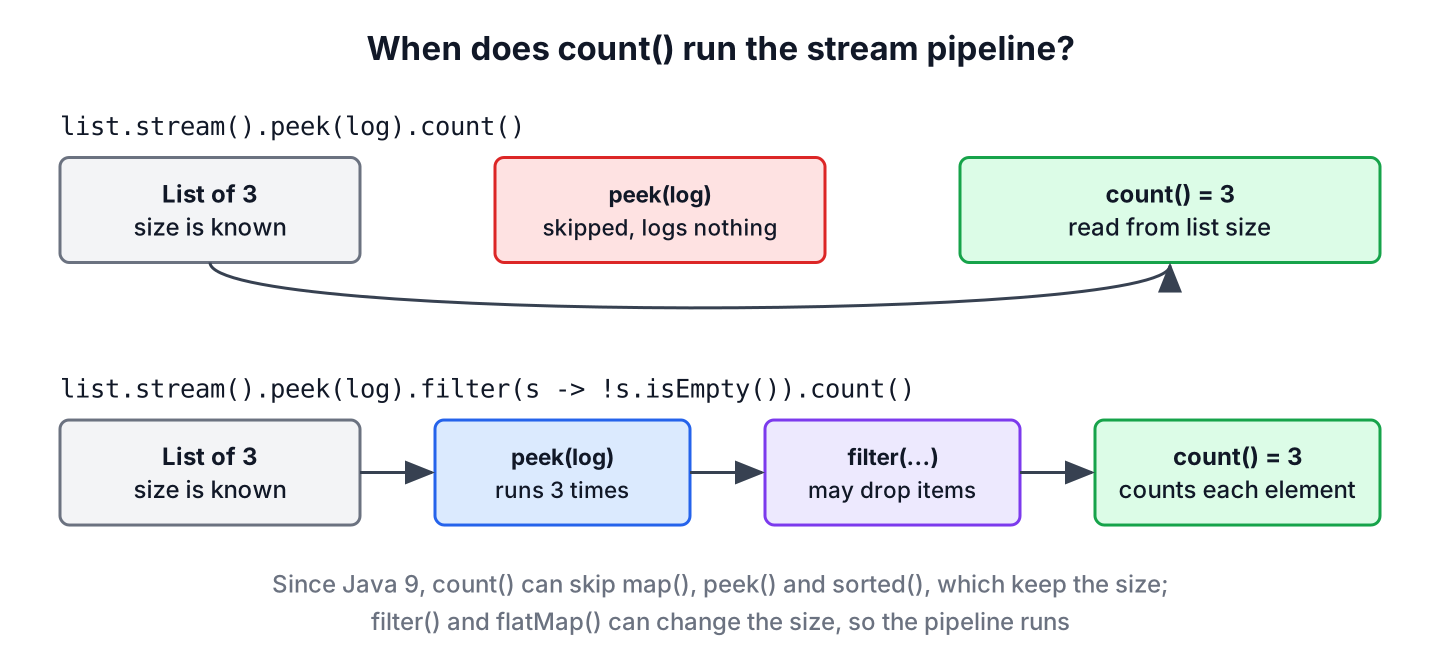
List<String> seenByPeek = new ArrayList<>();
long sized = List.of("a", "b", "c").stream().peek(seenByPeek::add).count();                     // 3
int peeked = seenByPeek.size();                                                                // 0
List<String> seenWithFilter = new ArrayList<>();
long filtered = List.of("a", "b", "c").stream().peek(seenWithFilter::add).filter(s -> !s.isEmpty()).count();   // 3
int peekedWithFilter = seenWithFilter.size();                                                  // 3
Never put work that must happen, such as logging, saving or sending, in map() or peek() of a pipeline that ends with count(). When count() takes the size from the source, such side effects may not run at all. A loop or forEach() is the right place for that work, and debugging with peek() works only when the pipeline runs.
5. count() vs Collectors.counting() vs size()
All three give a number of elements, but they fit different places. The count() method ends a stream, Collectors.counting() is a collector meant for use inside groupingBy() or partitioningBy(), and size() belongs to collections and needs no stream.
| Code | Returns | Best use |
|---|---|---|
| stream.count() | long | Count the elements of a stream, often after filter() |
| stream.collect(Collectors.counting()) | Long (boxed) | As a downstream collector, such as counts per group |
| list.size() | int | Size of a collection we already have, read in constant time |
Calling collect(Collectors.counting()) on its own works, but it only adds boxing compared with count(). Its real job is counting per key, as the next example shows with Collectors.groupingBy().
List<Ticket> tickets = List.of(new Ticket(1, "open", 1), new Ticket(2, "closed", 2), new Ticket(3, "open", 3), new Ticket(4, "pending", 1), new Ticket(5, "open", 1));
Map<String, Long> perStatus = tickets.stream().collect(Collectors.groupingBy(Ticket::status, TreeMap::new, Collectors.counting()));   // {closed=1, open=3, pending=1}
int listSize = tickets.size();   // 5
6. Real-World Example With a Ticket Dashboard
A help desk dashboard shows two numbers at the top, the open tickets and the urgent open tickets, and a breakdown of open tickets by priority. All three come from the same list, so a method that takes the list and returns the counts keeps the controller small.
record DashboardCounts(long open, long urgentOpen, Map<Integer, Long> openByPriority) {}static DashboardCounts dashboard(List<Ticket> tickets) {
List<Ticket> open = tickets.stream()
.filter(t -> t.status().equals("open"))
.toList();
long urgent = open.stream().filter(t -> t.priority() == 1).count();
Map<Integer, Long> byPriority = open.stream()
.collect(Collectors.groupingBy(Ticket::priority, TreeMap::new, Collectors.counting()));
return new DashboardCounts(open.size(), urgent, byPriority);
}List<Ticket> tickets = List.of(new Ticket(1, "open", 1), new Ticket(2, "closed", 2), new Ticket(3, "open", 3), new Ticket(4, "pending", 1), new Ticket(5, "open", 1));
DashboardCounts counts = dashboard(tickets);
long openCount = counts.open(); // 3
long urgentCount = counts.urgentOpen(); // 2
Map<Integer, Long> breakdown = counts.openByPriority(); // {1=2, 3=1}We filter the open tickets once and reuse the list, so the status check does not run three times. The open count comes from size(), because the open tickets are already in a list. For thousands of tickets in a database, a COUNT(*) query with GROUP BY is faster than loading every row to count it in Java.
7. Java Stream count() FAQs
The long return type, speed compared with size(), infinite streams and per-element counts are the usual follow-ups once filter().count() works.
7.1. Why Does count() Return long and Not int?
A stream is not limited to the size of a collection, for example a stream of file lines or a generated range, so its count can exceed Integer.MAX_VALUE. When an int is needed, Math.toIntExact() converts the value and throws an ArithmeticException on overflow instead of returning a wrong number.
long matches = Stream.of("a", "bb", "ccc").filter(s -> s.length() > 1).count();
int asInt = Math.toIntExact(matches);   // 2
7.2. Is list.stream().count() Slower Than list.size()?
Yes, slightly, and never faster. The size() method reads a stored field, while count() creates a stream first. On a plain list, Java 9 and later return the size without visiting the elements, so the difference is small, but size() is the clearer code when there is no filter.
7.3. Does count() Work on Infinite Streams?
No. A stream from Stream.generate() or Stream.iterate() without a limit never ends, so count() never returns. We add limit() or the three-argument Stream.iterate(seed, hasNext, next) to make the stream finite before counting.
7.4. How Do We Count Occurrences of Each Element?
We group the elements by themselves with groupingBy(Function.identity(), Collectors.counting()). The article on finding and counting duplicates in a stream builds on that map to list the repeated elements.
8. Conclusion
The count() method returns the number of elements as a long and ends the stream. Put a filter() in front of it to count matches, and use Collectors.counting() inside groupingBy() when we need a count per key.
Since Java 9, count() may skip map() and peek() when the source size is known, so the pipeline must not depend on their side effects. The Java Stream tutorials cover the other terminal operations.
9. References
- Stream.count() Javadoc (Java 25)
- Collectors.counting() Javadoc
- JDK-8067969 Optimize Stream.count for SIZED Streams
Happy Learning !!
