
To convert an Iterable or an Iterator to a Stream in Java, we wrap it in a Spliterator and pass that to StreamSupport.stream(), because neither interface has a stream() method. For an Iterable, iterable.spliterator() gives the Spliterator, and for an Iterator, Spliterators.spliteratorUnknownSize() creates one.
We need the conversion when a library hands us an Iterable or an Iterator instead of a Collection, such as a DirectoryStream, a JSON node or a paged result from a client SDK, and we want to filter, map or collect it with the Stream API.
The following example converts both types into a list of upper-case names.
Iterable<String> iterable = List.of("apple", "banana");
List<String> fromIterable = StreamSupport.stream(iterable.spliterator(), false).map(String::toUpperCase).toList();   // [APPLE, BANANA]

Iterator<String> iterator = List.of("kiwi", "fig").iterator();
Spliterator<String> split = Spliterators.spliteratorUnknownSize(iterator, Spliterator.ORDERED);
List<String> fromIterator = StreamSupport.stream(split, false).map(String::toUpperCase).toList();          // [KIWI, FIG]
In both calls, the second argument of StreamSupport.stream() is false, which asks for a sequential stream. We cover each conversion, the shortcut for collections, a reusable helper method, Guava, JDK classes that already return streams, and the pitfalls of single-use iterators.
1. Why Iterable Has No stream() Method
The Collection interface has a stream() method, but its parent Iterable does not. An Iterable only promises that we can get an Iterator from it, without a size or other details that a stream needs to split the work. The JDK designers left stream() out so that each type can decide how to provide a good Spliterator, which is the object a stream uses to read and split its source.
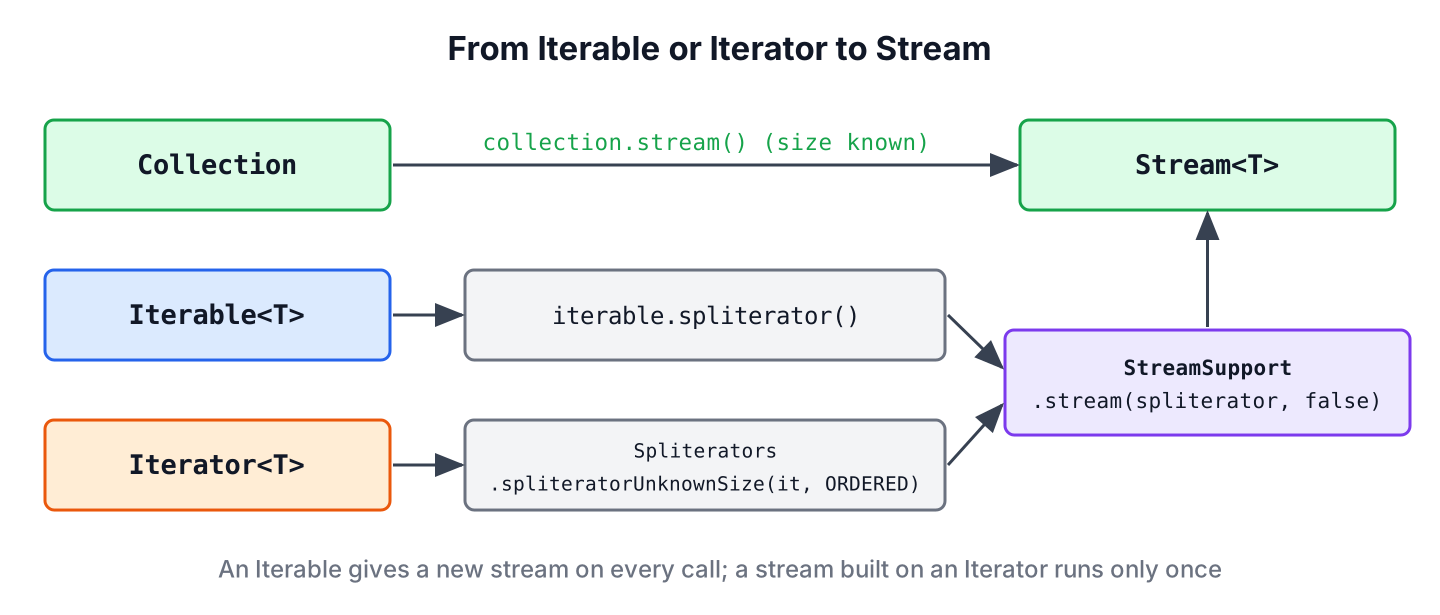
Since Java 8, Iterable has a default spliterator() method, and StreamSupport turns any Spliterator into a Stream. Only a Collection tells the stream its size up front.
| Source | How to get a Stream | Size known |
|---|---|---|
| Collection (List, Set) | collection.stream() | Yes |
| Iterable | StreamSupport.stream(iterable.spliterator(), false) | No, by default |
| Iterator | StreamSupport.stream(Spliterators.spliteratorUnknownSize(it, ORDERED), false) | No |
2. Converting an Iterable to a Stream
Any class that implements Iterable inherits spliterator(), so the conversion is one line. Because Iterable has a single abstract method, a lambda that returns an Iterator is a valid Iterable, which keeps the example short.
Iterable<Integer> scores = () -> List.of(7, 3, 9, 4).iterator();

List<Integer> high = StreamSupport.stream(scores.spliterator(), false)
        .filter(s -> s > 5)
        .sorted()
        .toList();                                  // [7, 9]
The stream does not read any element when we create it. It reads the elements from the Iterator only when a terminal operation such as toList() runs, as with any stream pipeline.
The default Iterable.spliterator() reports no characteristics, not even ORDERED. A sequential stream still returns the elements in iteration order, but a parallel stream may ignore that order in operations such as findFirst() or limit(). When order matters for a parallel stream, we build the Spliterator ourselves with the ORDERED flag.
Iterable<String> names = () -> List.of("a", "b", "c").iterator();

boolean defaultOrdered = names.spliterator().hasCharacteristics(Spliterator.ORDERED);   // false
Spliterator<String> ordered = Spliterators.spliteratorUnknownSize(names.iterator(), Spliterator.ORDERED);
String first = StreamSupport.stream(ordered, true).findFirst().orElseThrow();             // "a"
3. Streaming the Elements of an Iterator
An Iterator has no spliterator() method, so we create the Spliterator with Spliterators.spliteratorUnknownSize(). The second argument holds the characteristics, and Spliterator.ORDERED is the right value for iterators that return elements in a fixed order.
Iterator<String> words = List.of("one", "two", "three").iterator();

Spliterator<String> spliterator = Spliterators.spliteratorUnknownSize(words, Spliterator.ORDERED);
Map<Integer, List<String>> byLength = StreamSupport.stream(spliterator, false)
        .collect(Collectors.groupingBy(String::length));
Map<Integer, List<String>> grouped = byLength;      // {3=[one, two], 5=[three]}
An Iterator can be traversed only once, so the stream built on it is single-use, and the Iterator is empty after the stream has run. An Iterable is different, because each call to spliterator() gets a new Iterator, so we can create as many streams from it as we need.
Iterator<Integer> once = List.of(1, 2).iterator();
long firstCount = StreamSupport.stream(Spliterators.spliteratorUnknownSize(once, 0), false).count();    // 2
long secondCount = StreamSupport.stream(Spliterators.spliteratorUnknownSize(once, 0), false).count();   // 0
Older tutorials suggest Stream.generate() with takeWhile(x -> it.hasNext()) and map(x -> it.next()) as a Java 9 shortcut. It gives the right result on a sequential stream, but it depends on side effects inside the lambdas, and it breaks on a parallel stream. The spliteratorUnknownSize() version is the safer choice.
4. A Reusable Helper and Guava Streams.stream()
Code that converts iterables in several places is easier to read with a small helper. The helper checks for a Collection first, because Collection.stream() knows the size and splits better for parallel work.
static <T> Stream<T> streamOf(Iterable<T> iterable) {
    if (iterable instanceof Collection<T> collection) {
        return collection.stream();
    }
    return StreamSupport.stream(iterable.spliterator(), false);
}
static <T> Stream<T> streamOf(Iterator<T> iterator) {
return StreamSupport.stream(Spliterators.spliteratorUnknownSize(iterator, Spliterator.ORDERED), false);
}Iterable<String> plain = () -> List.of("x", "y").iterator();
List<String> viaHelper = streamOf(plain).toList(); // [x, y]
List<String> viaIterator = streamOf(List.of("p", "q").iterator()).toList(); // [p, q]Projects that already use Guava can call Streams.stream(), which has overloads for Iterable, Iterator and Optional and applies the same Collection check. Adding Guava only for this one method is not worth the extra dependency.
Iterable<String> letters = () -> List.of("x", "y").iterator();
List<String> guavaIterable = Streams.stream(letters).toList();                 // [x, y]
List<String> guavaIterator = Streams.stream(List.of("m", "n").iterator()).toList();   // [m, n]
5. Streaming the Files of a DirectoryStream
A cleanup job lists the log files in a folder and deletes those older than a week. The NIO DirectoryStream returns the matching paths as an Iterable<Path>, and it must be closed, so we create the stream inside try-with-resources and sort the names, because the directory order is not defined.
Path dir = Files.createTempDirectory("logs");
Files.createFile(dir.resolve("app.log"));
Files.createFile(dir.resolve("error.log"));
Files.createFile(dir.resolve("notes.txt"));

List<String> logFiles;
try (DirectoryStream<Path> entries = Files.newDirectoryStream(dir, "*.log")) {
    logFiles = StreamSupport.stream(entries.spliterator(), false)
            .map(path -> path.getFileName().toString())
            .sorted()
            .toList();
}
List<String> found = logFiles;                      // [app.log, error.log]
For plain listing, Files.list() already returns a Stream<Path>. The DirectoryStream route is useful when we want its glob filter, such as *.log, or when a library hands us the DirectoryStream.
6. JDK Classes That Already Return a Stream
Before converting an Iterator by hand, check whether the class has a stream method of its own. Several JDK classes that used to return iterators or enumerations gained one in Java 8, 9 or 11.
| Class | Old style | Stream method |
|---|---|---|
| Scanner | hasNext() / next() | tokens() (Java 9) |
| BufferedReader | readLine() loop | lines() (Java 8) |
| String | split(“\\R”) | lines() (Java 11) |
| Matcher | find() loop | results() (Java 9) |
| Enumeration | hasMoreElements() | asIterator() (Java 9) plus spliteratorUnknownSize() |
List<String> tokens = new Scanner("red green blue").tokens().toList();     // [red, green, blue]
List<String> lines = "first\nsecond".lines().toList();                    // [first, second]
For an Enumeration, such as the one returned by ClassLoader.getResources(), Collections.list(enumeration).stream() is the shortest form when the elements fit in memory.
7. Iterable and Iterator to Stream FAQs
Four related questions concern parallel streams, the way back to an Iterator, copying and lists.
7.1. How do we get a parallel stream from an Iterable?
Pass true as the second argument of StreamSupport.stream(). The source has no size information, so it splits poorly, and a parallel stream from a plain Iterable is rarely faster. Copying it into an ArrayList first often splits better.
7.2. Can we convert a Stream back to an Iterator?
Yes. Every stream has an iterator() method, which is a terminal operation.
Iterator<String> back = Stream.of("a", "b").iterator();
String next = back.next();                          // "a"
7.3. Does converting an Iterable to a Stream copy the elements?
No. The stream reads the elements from the Iterator one at a time when a terminal operation runs, so no copy is made.
7.4. How do we convert an Iterable to a List?
Collect the stream with toList(), or use a loop with forEach() and add(). Both ways are shown in Java Iterator and Iterator vs Spliterator.
8. Conclusion
An Iterable becomes a stream with StreamSupport.stream(iterable.spliterator(), false), and an Iterator needs Spliterators.spliteratorUnknownSize() first. When the Iterable is a Collection, its own stream() method is the better choice.
A stream on an Iterator can run only once, while an Iterable gives a fresh stream on every call. Add Spliterator.ORDERED when order matters for parallel streams, and check for JDK methods such as Scanner.tokens() or BufferedReader.lines() before writing the conversion by hand.
9. References
- StreamSupport.stream() Javadoc
- Spliterators.spliteratorUnknownSize() Javadoc
- Iterable.spliterator() Javadoc
- Guava Streams Javadoc
Happy Learning !!
