
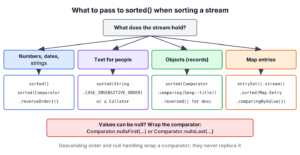
To sort a stream in Java, we call sorted() for the natural order of the elements, or sorted(comparator) for any other order, and collect the result with a terminal operation such as toList(). The source collection keeps its order, because the stream produces a new sorted sequence.
We sort streams whenever data has to appear in a fixed order, such as prices from low to high, names in alphabetical order, the most played songs first or map entries by their values.
The following example shows the most common sorting tasks, one per line, with the result as a comment.
List<Integer> prices = List.of(30, 5, 12);
List<Integer> lowFirst = prices.stream().sorted().toList();                              // [5, 12, 30]
List<Integer> highFirst = prices.stream().sorted(Comparator.reverseOrder()).toList();    // [30, 12, 5]
List<String> names = List.of("bob", "Alice", "carol");
List<String> az = names.stream().sorted(String.CASE_INSENSITIVE_ORDER).toList();         // [Alice, bob, carol]
List<Song> songs = List.of(new Song("Yellow", "Coldplay", 900), new Song("Halo", "Beyonce", 1200), new Song("Clocks", "Coldplay", 1200), new Song("Hello", "Adele", 700));
List<String> mostPlayed = songs.stream().sorted(Comparator.comparingInt(Song::plays).reversed()).map(Song::title).toList();   // [Halo, Clocks, Yellow, Hello]
List<String> withNulls = Stream.of("b", null, "a").sorted(Comparator.nullsLast(Comparator.naturalOrder())).toList();       // [a, b, null]
Notice that every line differs only in the argument of sorted(). Choosing the right Comparator is the whole task, so we go through it by data type (numbers, strings, objects, null values and map entries) and finish with the ways to collect the sorted result.
1. How to Sort a Stream in Java by Data Type
A stream has two sorting methods. The no-argument sorted() uses the natural order of the element type, which exists only when the type implements Comparable, as Integer, String and LocalDate do. The sorted(Comparator) overload accepts any order we describe with a Comparator, so it also works for our own records.
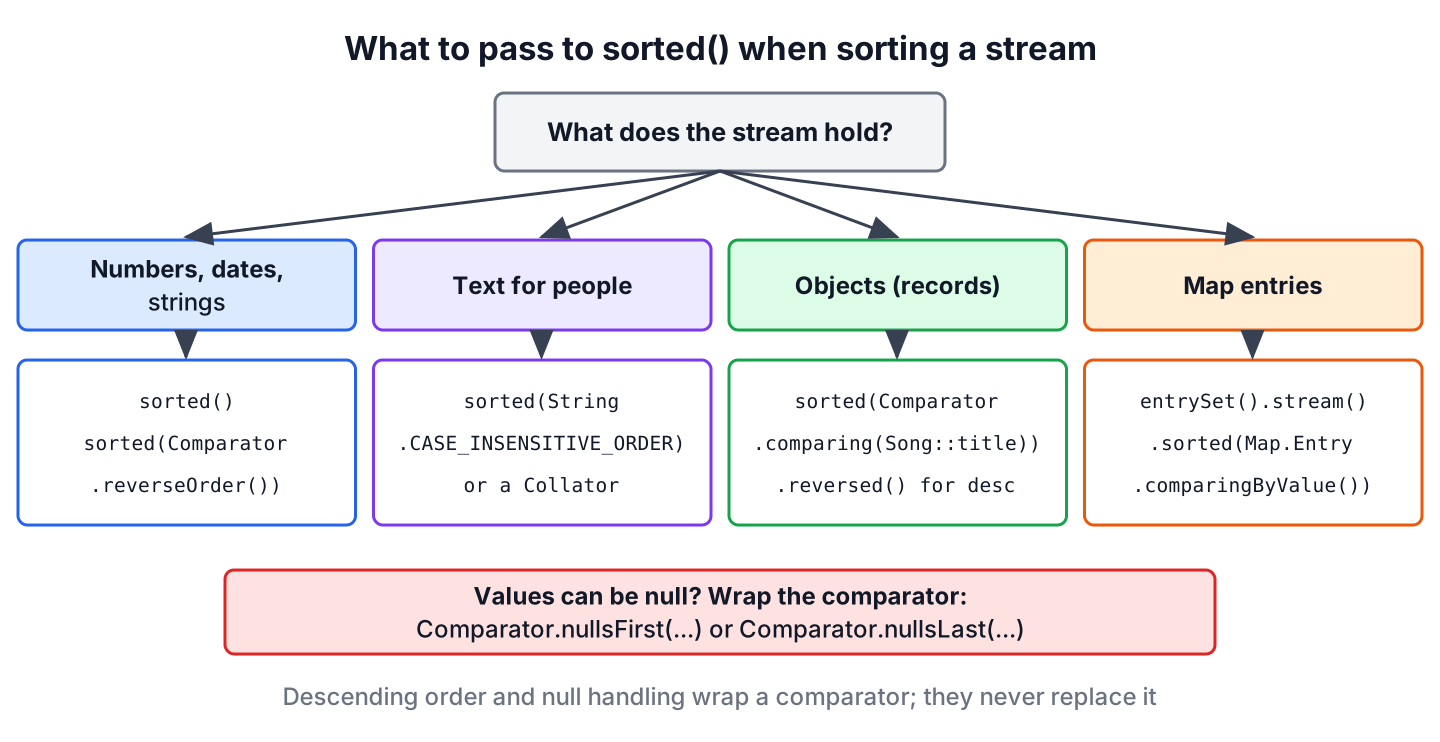
Most sorting tasks map to one factory method of the Comparator interface, and each row of the table links to the section with the examples for that task.
| Task | Argument for sorted() | Section |
|---|---|---|
| Numbers, dates or strings in ascending order | none | section 2 |
| Same, in descending order | Comparator.reverseOrder() | section 2 |
| Strings ignoring case | String.CASE_INSENSITIVE_ORDER | section 3 |
| Strings with accents in a given language | Collator.getInstance(locale) | section 3 |
| Objects by one field | Comparator.comparing(Song::title) | section 4 |
| Objects by a field, largest first | comparingInt(Song::plays).reversed() | section 5 |
| Elements or fields that can be null | Comparator.nullsFirst(…) or nullsLast(…) | section 6 |
| Map entries by value | Map.Entry.comparingByValue() | section 7 |
For the full reference of the method itself, with stability, laziness and parallel streams, see the article on the Stream sorted() method. Here we stay with the tasks.
2. Sorting a Stream of Numbers
The wrapper classes Integer, Long, Double and BigDecimal compare by numeric value. The call sorted() gives ascending order, and sorted(Comparator.reverseOrder()) gives descending order.
List<Integer> prices = List.of(30, 5, 12, 5);
List<Integer> asc = prices.stream().sorted().toList();                              // [5, 5, 12, 30]
List<Integer> desc = prices.stream().sorted(Comparator.reverseOrder()).toList();    // [30, 12, 5, 5]
List<Double> ratings = Stream.of(4.5, 3.9, 4.8).sorted().toList();                  // [3.9, 4.5, 4.8]
List<Integer> topTwo = prices.stream().sorted(Comparator.reverseOrder()).limit(2).toList();   // [30, 12]
A primitive stream such as IntStream, LongStream or DoubleStream offers sorted() without parameters only, since a Comparator works on objects and not on int or double values. To get the largest value first, we call boxed() to turn the values into wrapper objects and pass Comparator.reverseOrder() after that.
int[] asc = IntStream.of(8, 3, 5).sorted().toArray();                                            // [3, 5, 8]
List<Integer> desc = IntStream.of(8, 3, 5).boxed().sorted(Comparator.reverseOrder()).toList();    // [8, 5, 3]
Some answers online negate each value, sort ascending and negate again to avoid boxing. Negating fails for Integer.MIN_VALUE, since -Integer.MIN_VALUE is again Integer.MIN_VALUE in int arithmetic. The smallest number ends up first, ahead of the larger ones.
int[] looksFine = IntStream.of(5, 1, 9).map(i -> -i).sorted().map(i -> -i).toArray();                    // [9, 5, 1]
int[] wrong = IntStream.of(5, Integer.MIN_VALUE, 9).map(i -> -i).sorted().map(i -> -i).toArray();       // [-2147483648, 9, 5]
3. Sorting a Stream of Strings
The natural order of String compares the UTF-16 code of each character. Every uppercase letter has a smaller code than every lowercase letter, so “Zoe” sorts before “adam”. For text that people read, we pass String.CASE_INSENSITIVE_ORDER.
List<String> names = List.of("adam", "Zoe", "bella", "Carl");
List<String> byCode = names.stream().sorted().toList();                                 // [Carl, Zoe, adam, bella]
List<String> alphabetical = names.stream().sorted(String.CASE_INSENSITIVE_ORDER).toList();   // [adam, bella, Carl, Zoe]
List<String> zToA = names.stream().sorted(String.CASE_INSENSITIVE_ORDER.reversed()).toList();   // [Zoe, Carl, bella, adam]
List<String> shortFirst = names.stream().sorted(Comparator.comparingInt(String::length).thenComparing(String.CASE_INSENSITIVE_ORDER)).toList();   // [Zoe, adam, Carl, bella]
Case-insensitive order still fails for accented letters, because an accented capital E (Unicode U+00C9) has a larger code than z. A Collator knows the alphabet rules of a given language, and it implements Comparator<Object>, so we pass it to sorted() as it is.
List<String> cities = List.of("zurich", "\u00c9vian", "amsterdam");
List<String> byCodes = cities.stream().sorted().toList();                                // [amsterdam, zurich, \u00c9vian]
List<String> byLanguage = cities.stream().sorted(Collator.getInstance(Locale.FRENCH)).toList();   // [amsterdam, \u00c9vian, zurich]
The escape \u00c9 is the letter E with an acute accent, so the second list reads amsterdam, Evian, zurich. Strings that contain numbers have a similar problem. The natural order compares “track10” and “track2” character by character, and ‘1’ is smaller than ‘2’. Sorting by the number inside the string fixes the order.
List<String> files = List.of("track10", "track2", "track1");
List<String> textOrder = files.stream().sorted().toList();                                                    // [track1, track10, track2]
List<String> numberOrder = files.stream().sorted(Comparator.comparingInt(f -> Integer.parseInt(f.substring(5)))).toList();   // [track1, track2, track10]
4. Sorting Objects by a Field
A record or class without a natural order needs a Comparator that reads one field. The factory Comparator.comparing() takes a key extractor, such as the method reference Song::title, and orders the elements by the values that the extractor returns. Numeric fields have their own factories, comparingInt(), comparingLong() and comparingDouble(), which skip the boxing step.
The remaining examples use a music library where each song has a title, an artist and a play count.
record Song(String title, String artist, int plays) {}List<Song> songs = List.of(new Song("Yellow", "Coldplay", 900), new Song("Halo", "Beyonce", 1200), new Song("Clocks", "Coldplay", 1200), new Song("Hello", "Adele", 700));
List<String> byTitle = songs.stream().sorted(Comparator.comparing(Song::title)).map(Song::title).toList(); // [Clocks, Halo, Hello, Yellow]
List<String> leastPlayed = songs.stream().sorted(Comparator.comparingInt(Song::plays)).map(Song::title).toList(); // [Hello, Yellow, Halo, Clocks]
List<String> byArtist = songs.stream().sorted(Comparator.comparing(Song::artist).thenComparing(Song::title)).map(Song::title).toList(); // [Hello, Halo, Clocks, Yellow]The method thenComparing() runs only when the first key is equal, so the two Coldplay songs are ordered by title. In the second line, Halo and Clocks both have 1,200 plays and keep their source order, because the stream sort is stable. For three or more keys, the guide on sorting a stream by multiple fields builds longer chains.
A lambda in place of the method reference causes a surprising compile error once we chain a method such as reversed(). The compiler infers the lambda parameter before it knows the target type, so s becomes Object, which has no plays() method.
// does not compile: s is inferred as Object, so s.plays() is not found
Comparator<Song> byPlays = Comparator.comparing(s -> s.plays()).reversed();
The fix is a method reference, or an explicit parameter type in the lambda.
Comparator<Song> byPlays = Comparator.comparing(Song::plays).reversed();
Comparator<Song> byPlaysTyped = Comparator.comparing((Song s) -> s.plays()).reversed();
5. Descending Order and Where reversed() Goes
Descending order is a reversed comparator. Java offers three ways to get one, and they differ in what they reverse.
- The comparator Comparator.reverseOrder() reverses the natural order, so it fits numbers, strings and dates.
- The method reversed() reverses an existing comparator, including the whole chain built before the call.
- The overload comparing(keyExtractor, Comparator.reverseOrder()) reverses one key only, so it is the safe choice inside a chain.
The position of reversed() matters in a chain. In the second line, it reverses both the artist and the play count, so the list starts with Coldplay instead of Adele.
List<Song> songs = List.of(new Song("Yellow", "Coldplay", 900), new Song("Halo", "Beyonce", 1200), new Song("Clocks", "Coldplay", 1200), new Song("Hello", "Adele", 700));
List<String> artistAscPlaysDesc = songs.stream().sorted(Comparator.comparing(Song::artist).thenComparing(Song::plays, Comparator.reverseOrder())).map(Song::title).toList();   // [Hello, Halo, Clocks, Yellow]
List<String> bothReversed = songs.stream().sorted(Comparator.comparing(Song::artist).thenComparingInt(Song::plays).reversed()).map(Song::title).toList();                   // [Clocks, Yellow, Halo, Hello]
List<String> playsDescTitleAsc = songs.stream().sorted(Comparator.comparingInt(Song::plays).reversed().thenComparing(Song::title)).map(Song::title).toList();              // [Clocks, Halo, Yellow, Hello]
The last line calls reversed() before thenComparing(), so only the play count is reversed and the titles stay in A to Z order. Passing Comparator.reverseOrder() as the key comparator avoids this question entirely.
6. Sorting a Stream With null Values
Sorting by natural order calls compareTo() on the elements, so a single null element or null key ends the sort with a NullPointerException. The fix is a wrapper around the comparator. Comparator.nullsFirst() or Comparator.nullsLast() moves every null to the chosen end and lets the inner comparator order the remaining values.
List<String> titles = Arrays.asList("Halo", null, "Clocks");
List<String> crash = titles.stream().sorted().toList();                                                  // NullPointerException
List<String> nullsLast = titles.stream().sorted(Comparator.nullsLast(Comparator.naturalOrder())).toList();   // [Clocks, Halo, null]
List<String> nullsFirst = titles.stream().sorted(Comparator.nullsFirst(Comparator.reverseOrder())).toList(); // [null, Halo, Clocks]
A null field inside an object needs the wrapper around the key comparator, passed as the second argument of comparing(). A song imported without artist data is a typical case.
List<Song> library = List.of(new Song("Halo", "Beyonce", 1200), new Song("Intro", null, 50), new Song("Hello", "Adele", 700));
List<String> unknownLast = library.stream().sorted(Comparator.comparing(Song::artist, Comparator.nullsLast(Comparator.naturalOrder()))).map(Song::title).toList();   // [Hello, Halo, Intro]
More combinations, such as null objects that also have null fields, are in the tutorial on sorting a stream with null values.
7. Sorting Map Entries by Key or Value
A Map has no sorted() method, but its entry set can be streamed. The comparators Map.Entry.comparingByKey() and comparingByValue() sort the entries, and a LinkedHashMap keeps the sorted order when we collect them back into a map.
Map<String, Integer> plays = Map.of("Halo", 1200, "Yellow", 900, "Hello", 700);
Map<String, Integer> topFirst = plays.entrySet().stream().sorted(Map.Entry.comparingByValue(Comparator.reverseOrder())).collect(Collectors.toMap(Map.Entry::getKey, Map.Entry::getValue, (a, b) -> a, LinkedHashMap::new));   // {Halo=1200, Yellow=900, Hello=700}
List<String> keysByValue = plays.entrySet().stream().sorted(Map.Entry.comparingByValue()).map(Map.Entry::getKey).toList();   // [Hello, Yellow, Halo]
Map<String, Integer> byKey = new TreeMap<>(plays);                                                                          // {Halo=1200, Hello=700, Yellow=900}
Plain Collectors.toMap() gives no order guarantee, and the current JDK returns a HashMap, which drops the order we sorted. For keys only, a TreeMap is shorter than a stream. The dedicated guides show how to sort a Map by values and how to sort a Map by keys with more options.
8. Collecting the Sorted Result
The terminal operation decides what kind of container holds the sorted elements. The choice matters when later code adds elements, removes duplicates or needs an array.
| Terminal operation | Result | Note |
|---|---|---|
| toList() | Unmodifiable List | Calling add() throws UnsupportedOperationException |
| collect(Collectors.toCollection(ArrayList::new)) | Mutable ArrayList | Use when the caller adds or removes elements |
| collect(Collectors.toCollection(LinkedHashSet::new)) | Sorted Set without duplicates | Keeps the sorted order |
| toArray(String[]::new) | Typed array | For APIs that take arrays |
| collect(Collectors.joining(“, “)) | One String | For log messages and CSV output |
| forEachOrdered(…) | No result | Keeps the order on parallel streams, unlike forEach() |
List<Integer> sorted = Stream.of(3, 1, 2).sorted().toList();
boolean added = sorted.add(4);                                                                       // UnsupportedOperationException
List<Integer> mutable = Stream.of(3, 1, 2).sorted().collect(Collectors.toCollection(ArrayList::new));   // [1, 2, 3]
Set<Integer> unique = Stream.of(3, 1, 3, 2).sorted().collect(Collectors.toCollection(LinkedHashSet::new));   // [1, 2, 3]
String[] array = Stream.of("c", "a", "b").sorted().toArray(String[]::new);                           // [a, b, c]
String line = Stream.of("c", "a", "b").sorted().collect(Collectors.joining(", "));                   // "a, b, c"
A TreeSet also keeps elements sorted, but it treats two elements as duplicates whenever the comparator returns 0. Sorting songs into a TreeSet by play count keeps only one of the two songs with 1,200 plays.
List<Song> songs = List.of(new Song("Yellow", "Coldplay", 900), new Song("Halo", "Beyonce", 1200), new Song("Clocks", "Coldplay", 1200), new Song("Hello", "Adele", 700));
int kept = songs.stream().collect(Collectors.toCollection(() -> new TreeSet<>(Comparator.comparingInt(Song::plays)))).size();   // 3
The article on converting a stream to a list compares toList() and Collectors.toList() in more depth.
9. Real-World Example of a Weekly Top Songs Chart
A music streaming app shows a weekly chart with the three most played songs. Songs with the same play count must appear in a fixed order, otherwise the chart changes between page loads, so the title decides ties. The method sorts, keeps the first entries with limit() and formats each line.
static List<String> weeklyChart(List<Song> songs, int size) {
    return songs.stream()
        .sorted(Comparator.comparingInt(Song::plays).reversed()
            .thenComparing(Song::title))
        .limit(size)
        .map(s -> s.title() + " (" + s.plays() + ")")
        .toList();
}
List<Song> week = List.of(new Song("Yellow", "Coldplay", 900), new Song("Halo", "Beyonce", 1200), new Song("Clocks", "Coldplay", 1200), new Song("Hello", "Adele", 700));
List<String> chart = weeklyChart(week, 3); // [Clocks (1200), Halo (1200), Yellow (900)]The order of the steps matters. The call limit(3) comes after sorted(), so it keeps the top three songs. With limit(3) in front of sorted(), the stream would take the first three songs of the source list and sort only those three. The method also returns an unmodifiable list, which suits data that the web layer only displays.
10. Stream Sorting FAQs
Readers who sort streams also ask how to sort dates, characters and sets, and whether a stream is the right tool at all.
10.1. How Do We Sort a Stream of Dates?
We call sorted(), because LocalDate, LocalDateTime and Instant implement Comparable with the earliest value first. For the latest date first, we pass Comparator.reverseOrder(), and for objects with a date field, Comparator.comparing() with the date accessor.
List<LocalDate> latestFirst = Stream.of(LocalDate.of(2025, 11, 3), LocalDate.of(2026, 5, 1)).sorted(Comparator.reverseOrder()).toList(); // [2026-05-01, 2025-11-03]10.2. Should We Use stream().sorted() or List.sort()?
The choice depends on whether we need a new list or may reorder the existing one. The stream version leaves the source untouched and fits a pipeline that also filters or maps. The method List.sort() reorders a mutable list in place and needs no stream at all.
List<Integer> numbers = new ArrayList<>(List.of(3, 1, 2));
List<Integer> copy = numbers.stream().sorted().toList();   // [1, 2, 3]
numbers.sort(Comparator.reverseOrder());
List<Integer> inPlace = numbers;                            // [3, 2, 1]
10.3. How Do We Sort the Characters of a String With a Stream?
We stream the characters with chars(), sort the IntStream and collect the codes back into a StringBuilder. The article on sorting the characters of a string also shows the array-based version.
String sortedChars = "stream".chars().sorted().collect(StringBuilder::new, StringBuilder::appendCodePoint, StringBuilder::append).toString(); // "aemrst"10.4. Does sorted() Work on a Stream From a HashSet?
Yes. A HashSet has no defined order, but sorted() imposes one, so toList() returns the elements in sorted order. The set itself stays unordered.
Set<String> tags = new HashSet<>(List.of("rock", "jazz", "pop"));
List<String> sortedTags = tags.stream().sorted().toList();   // [jazz, pop, rock]
11. Conclusion
Sorting a stream comes down to one decision, the argument of sorted(). Numbers, dates and strings use their natural order or Comparator.reverseOrder(), text for people uses String.CASE_INSENSITIVE_ORDER or a Collator, and objects use Comparator.comparing() with a field accessor.
Descending order and null handling wrap a comparator, and the position of reversed() in a chain decides how many keys it reverses. Map entries sort through their entry set into a LinkedHashMap, and the terminal operation decides whether the result is unmodifiable, mutable, a set or an array. More stream tasks are collected in the Java Streams guide.
12. References
- Stream.sorted() Javadoc (Java 25)
- Comparator Javadoc (Java 25)
- Map.Entry Javadoc (Java 25)
- Collator Javadoc (Java 25)
Happy Learning !!
