

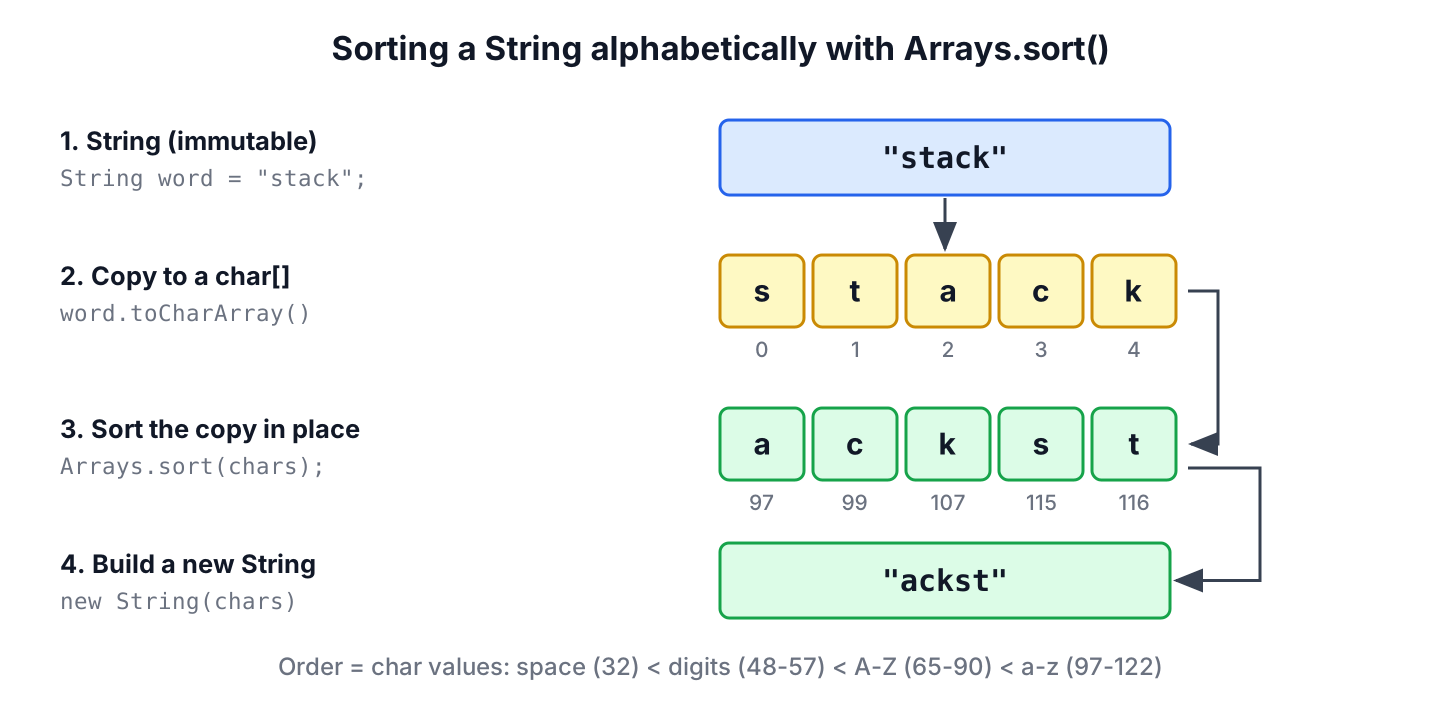
Java has no sort() method for strings, so to sort a String alphabetically, we convert it to a char array with toCharArray(), sort the array with Arrays.sort() and create a new String from the sorted array. Strings are immutable, so every approach builds a new string and leaves the original unchanged.
Sorting the characters of a word is the standard way to check whether two words are anagrams, and it also gives a word game or a search index one lookup key for all words with the same letters.
The following example sorts the word “stack” in three ways and shows the effect of uppercase letters on the result.
String word = "stack";
char[] chars = word.toCharArray();
Arrays.sort(chars);
String sorted = new String(chars);                                                     // "ackst"
String withStream = word.chars().sorted().mapToObj(Character::toString).collect(Collectors.joining());   // "ackst"
String descending = new StringBuilder(sorted).reverse().toString();                   // "tskca"

char[] mixed = "Banana".toCharArray();
Arrays.sort(mixed);
String caseSensitive = new String(mixed);                                             // "Baaann"
Notice the last result. The uppercase B comes before the lowercase letters, because Arrays.sort() compares the numeric char values, not letters of the alphabet. Next, we look at how the char values decide the order, sort while ignoring case, handle emoji and accented letters, write the sort without sort() for interviews, and use the sorted string to find anagrams.
1. Sorting the Characters With Arrays.sort()
A String stores its text as a sequence of UTF-16 char values. The method toCharArray() copies these values into a new char[], and Arrays.sort(char[]) sorts the copy in ascending numeric order. The constructor new String(char[]) or the method String.valueOf(char[]) turns the sorted array back into a string.
String code = "dcab";
char[] letters = code.toCharArray();
Arrays.sort(letters);
String sortedCode = String.valueOf(letters);   // "abcd"
String original = code;                        // "dcab"
For a char[], the JDK uses a Dual-Pivot Quicksort, which runs in O(n log n) time and sorts the array in place. Sorting a primitive array needs no boxing into Character objects, so Arrays.sort() is the fastest of the approaches in this post and the one we use by default.
2. Why Uppercase Letters Sort First
The order of Arrays.sort() is the order of the char values in the Unicode table. All uppercase ASCII letters have smaller values than the lowercase letters, and digits and the space character come even earlier. That is why “alphabetical” in Java means “by char value” unless we say otherwise.
| Characters | Char values | Position after sorting |
|---|---|---|
| Space | 32 | Before everything else in this table |
| 0 to 9 | 48 to 57 | Before all letters |
| A to Z | 65 to 90 | Before all lowercase letters |
| a to z | 97 to 122 | After the uppercase letters |
A product name with a space shows the effect. The space moves to the front, and D and J come before every lowercase letter. When the space carries no meaning, we remove it before sorting.
char[] name = "Java Dev".toCharArray();
Arrays.sort(name);
String withSpace = new String(name);                                                            // " DJaaevv"
String lettersOnly = "Java Dev".chars().filter(Character::isLetter).sorted().mapToObj(Character::toString).collect(Collectors.joining());   // "DJaaevv"
2.1. Sorting While Ignoring Case
To sort the letters as a person reads them, we compare the lowercase form of each character but keep the original character in the result. The stream of code points gives us an Integer per character, so we sort it with Comparator.comparingInt(Character::toLowerCase).
static String sortIgnoringCase(String text) {
    return text.codePoints()
            .boxed()
            .sorted(Comparator.comparingInt(Character::toLowerCase))
            .map(Character::toString)
            .collect(Collectors.joining());
}
String ignoreCase = sortIgnoringCase("Banana"); // "aaaBnn"
String names = sortIgnoringCase("bAcB"); // "AbBc"The sort is stable, so letters that differ only in case, such as b and B in “bAcB”, keep their original order. If we want every letter in lowercase anyway, we call toLowerCase(Locale.ROOT) before sorting, which is shorter but changes the letters in the result.
3. Sorting a String With the Stream API
The method chars() returns an IntStream of the char values, and codePoints() returns an IntStream of the Unicode code points. Both streams sort primitive int values, and mapToObj(Character::toString) turns each value back into a one-character string for Collectors.joining().
String word = "stack";
String byChars = word.chars().sorted().mapToObj(Character::toString).collect(Collectors.joining());        // "ackst"
String byCodePoints = word.codePoints().sorted().mapToObj(Character::toString).collect(Collectors.joining());   // "ackst"
String unique = "banana".chars().distinct().sorted().mapToObj(Character::toString).collect(Collectors.joining());   // "abn"
The stream version is longer than Arrays.sort(), but it fits into a pipeline that also filters, removes duplicates with distinct() or changes the characters. The Java Streams guide covers the other stream operations.
3.1. Emoji and Other Characters Outside the BMP
Characters outside the Basic Multilingual Plane (BMP), such as most emoji, take two char values in a Java string, called a surrogate pair. Arrays.sort() and chars() sort the two halves separately, so they can split a pair and break the character. The method codePoints() treats the pair as one value and keeps it intact.
For example, a chat app sorts the reaction emoji of a message to build a stable key. The pizza emoji (U+1F355) and the grinning face (U+1F600) are written with Unicode escapes in the snippet.
String emoji = "\uD83D\uDE00\uD83C\uDF55";
char[] halves = emoji.toCharArray();
Arrays.sort(halves);
String broken = new String(halves);
boolean pairsIntact = broken.codePoints().allMatch(cp -> Character.isSupplementaryCodePoint(cp));   // false
String safe = emoji.codePoints().sorted().mapToObj(Character::toString).collect(Collectors.joining());
boolean safeIntact = safe.codePoints().allMatch(cp -> Character.isSupplementaryCodePoint(cp));       // true
int firstCodePoint = safe.codePointAt(0);                                                            // 127829
When the text can contain emoji or other non-BMP characters, we sort codePoints(), not chars() or the char[]. For plain ASCII text such as product codes, both give the same result.
4. Sorting in Descending Order
A descending sort is the ascending result read backwards. The method StringBuilder.reverse() keeps surrogate pairs together, so it is safe for any text. Alternatively, we sort the code points with Comparator.reverseOrder() in one pipeline.
char[] chars = "stack".toCharArray();
Arrays.sort(chars);
String reversed = new StringBuilder(new String(chars)).reverse().toString();   // "tskca"
String inPipeline = "stack".codePoints().boxed().sorted(Comparator.reverseOrder()).map(Character::toString).collect(Collectors.joining());   // "tskca"
5. Sorting Accented Letters With a Collator
Char values put accented letters such as e with an acute accent (U+00E9) after z, which is wrong for French, German or Spanish readers. A java.text.Collator compares strings by the rules of a language, so it places the accented letter next to e.
String letters = "fe\u00e9a";
char[] chars = letters.toCharArray();
Arrays.sort(chars);
String byCharValue = new String(chars);                                                                   // "aef\u00e9"
Collator french = Collator.getInstance(Locale.FRENCH);
String byCollator = letters.codePoints().mapToObj(Character::toString).sorted(french).collect(Collectors.joining());   // "ae\u00e9f"
A Collator implements Comparator<Object>, so sorted() accepts it for a stream of one-character strings. It is slower than comparing char values, so we use it for text that users read, such as a sorted list of names, and keep Arrays.sort() for codes and keys. Locale values such as Locale.FRENCH pick the language rules.
6. Sorting a String Without the sort() Method
Interviewers often ask for a character sort without Arrays.sort(). An insertion sort is short and correct, so it is a good answer. It takes each character and shifts the larger characters before it one position to the right until the gap is in the right place.
static String insertionSort(String text) {
    char[] chars = text.toCharArray();
    for (int i = 1; i < chars.length; i++) {
        char current = chars[i];
        int j = i - 1;
        while (j >= 0 && chars[j] > current) {
            chars[j + 1] = chars[j];
            j--;
        }
        chars[j + 1] = current;
    }
    return new String(chars);
}
String manual = insertionSort("stack"); // "ackst"
String empty = insertionSort(""); // ""Insertion sort runs in O(n^2) time, which is fine for words and short codes but slower than Arrays.sort() for long text. The insertion sort and bubble sort posts explain the algorithms step by step.
7. Real-World Example: Finding Anagrams
Two words are anagrams when they contain the same letters, such as “listen” and “silent”. A word game checks player input this way, and a search feature groups the words of a dictionary by their sorted letters. The sorted string works as the key in both cases, because all anagrams produce the same key.
The following example normalizes a word before sorting it. It keeps only letters, converts them to lowercase with Locale.ROOT so the result does not depend on the server locale, and sorts the letters.
static String anagramKey(String word) {
    char[] letters = word.toLowerCase(Locale.ROOT).replaceAll("[^a-z]", "").toCharArray();
    Arrays.sort(letters);
    return new String(letters);
}
boolean anagram = anagramKey("Listen").equals(anagramKey("Silent")); // true
boolean notAnagram = anagramKey("stack").equals(anagramKey("stick")); // false
Map<String, List<String>> groups = Stream.of("listen", "stack", "silent", "tacks", "enlist").collect(Collectors.groupingBy(w -> anagramKey(w), TreeMap::new, Collectors.toList())); // {ackst=[stack, tacks], eilnst=[listen, silent, enlist]}The Collectors.groupingBy() call puts every word into the list of its key, and the TreeMap keeps the keys in sorted order. The regular expression [^a-z] drops spaces and punctuation, so “Dormitory” and “dirty room” also match.
8. Which Method to Pick
All approaches return a new string. They differ in speed, in how they treat case and Unicode, and in how well they fit into other code.
| Approach | Order | Best for |
|---|---|---|
| toCharArray() + Arrays.sort() | Char value, case-sensitive | Default choice, ASCII codes and keys |
| chars().sorted() | Char value, case-sensitive | Pipelines that also filter or remove duplicates |
| codePoints().sorted() | Code point | Text with emoji or other non-BMP characters |
| comparingInt(Character::toLowerCase) | Case-insensitive, original letters kept | Display text where case must not split letters |
| Collator | Language rules | Accented letters in user-facing text |
| Insertion sort | Char value | Interviews and exercises |
To sort the words of a sentence instead of its characters, we split the string into a String[] and sort the array, as the post on sorting a String array alphabetically shows. Arrays, lists and maps have their own posts in the Java sorting guide.
9. Sort String Alphabetically FAQs
Immutability and speed come up again and again once the basic sort works.
9.1. Does Sorting Change the Original String?
No. A String is immutable, and toCharArray() returns a copy of its characters. We sort the copy and create a new String, so the original variable keeps its value until we assign the new string to it.
9.2. How Do I Sort a String and Remove Duplicate Letters?
We add distinct() to the stream before sorted(). The call keeps the first occurrence of each char value.
String unique = "mississippi".chars().distinct().sorted().mapToObj(Character::toString).collect(Collectors.joining()); // "imps"9.3. Which Is Faster, Arrays.sort() or a Stream?
Arrays.sort() on a char[] does less work, because it sorts the primitive array in place, whereas the stream also creates a one-character string per character and joins them. For words and short text, the difference is too small to notice, so we pick the one that reads better in the surrounding code.
9.4. How Do I Sort Only the Letters and Keep Digits in Place?
We sort the letters separately and write them back into the positions that held letters. The digits and other characters stay where they were.
static String sortLettersOnly(String text) {
    char[] chars = text.toCharArray();
    char[] letters = text.chars().filter(Character::isLetter).sorted().mapToObj(c -> String.valueOf((char) c)).collect(Collectors.joining()).toCharArray();
    int next = 0;
    for (int i = 0; i < chars.length; i++) {
        if (Character.isLetter(chars[i])) {
            chars[i] = letters[next++];
        }
    }
    return new String(chars);
}
String mixedCode = sortLettersOnly("d3c1b"); // "b3c1d"9.5. What Is the Time Complexity of Sorting a String?
Sorting with Arrays.sort() or sorted() takes O(n log n) time for a string of n characters, plus O(n) extra memory for the copied array or the stream. The insertion sort from section 6 takes O(n^2) time.
10. Conclusion
Java has no sort() method for strings, so we sort a copy of the characters and build a new string. The combination of toCharArray(), Arrays.sort() and new String() is the fastest and shortest way for most text.
The default order follows char values, which puts uppercase letters, digits and spaces before lowercase letters. A comparator on Character::toLowerCase ignores case, codePoints() keeps emoji intact, and a Collator sorts accented letters the way readers expect.
11. References
- Arrays Javadoc (Java 25)
- String Javadoc (Java 25)
- CharSequence.codePoints() Javadoc (Java 25)
- Collator Javadoc (Java 25)
Happy Learning !!

How do I sort The characters in one string in ascending order of their ASCII values??
How about comparing 2 strings that have been already ordered?
Didn’t get the question.