

To sort by multiple fields in Java, we build a Comparator for the first field and add every further field with thenComparing(), which is consulted only when all earlier fields are equal. Passing the result to List.sort() sorts the list in place, the same way ORDER BY country, minutes sorts rows in SQL.
We need it for result tables, staff lists, invoices and any list where many elements share the same first value. The following example sorts marathon runners by country and, within one country, by finishing time.
record Runner(String name, String country, int minutes) {}List<Runner> runners = new ArrayList<>(List.of(
new Runner("Ivo", "NO", 171), new Runner("Ana", "KE", 128),
new Runner("Lea", "NO", 150), new Runner("Tom", "KE", 128), new Runner("Bo", "KE", 140)));
runners.sort(Comparator.comparing(Runner::country).thenComparingInt(Runner::minutes));
List<String> twoKeys = runners.stream().map(Runner::name).toList(); // [Ana, Tom, Bo, Lea, Ivo]
runners.sort(Comparator.comparing(Runner::country).thenComparingInt(Runner::minutes).thenComparing(Runner::name, Comparator.reverseOrder()));
List<String> threeKeys = runners.stream().map(Runner::name).toList(); // [Tom, Ana, Bo, Lea, Ivo]Notice the two Kenyans with 128 minutes. With two keys, they keep their original order, because List.sort() is stable, and the third key decides between them once we add it. We look at how thenComparing() is built, walk through its six overloads, sort with locale-aware names, assemble a chain from a list, sort map entries and array rows, and compare chaining with sorting twice.
1. How thenComparing() Combines Two Comparators
The compare(a, b) method of a Comparator answers with a sign, where zero means the two elements tie. The default method thenComparing(other) returns a new comparator that runs the current comparator first and asks other only when the first result is zero. The JDK implementation is a short lambda, and writing the same logic by hand shows that nothing else happens.
Comparator<Runner> byCountry = Comparator.comparing(Runner::country);
Comparator<Runner> byTime = Comparator.comparingInt(Runner::minutes);
Comparator<Runner> handMade = (a, b) -> {
    int res = byCountry.compare(a, b);
    return res != 0 ? res : byTime.compare(a, b);
};
Comparator<Runner> chained = byCountry.thenComparing(byTime);
Runner lea = new Runner("Lea", "NO", 150);
Runner ivo = new Runner("Ivo", "NO", 171);
int byHand = handMade.compare(lea, ivo);           // -1
int byChain = chained.compare(lea, ivo);           // -1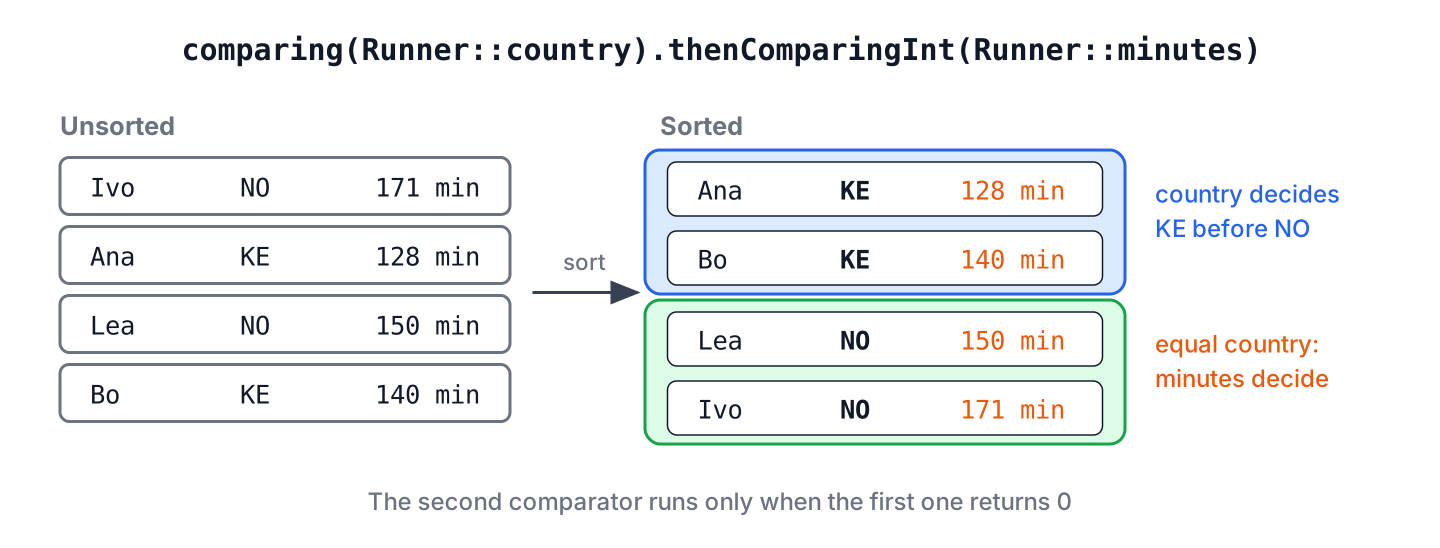
Each call returns a new comparator and leaves the original unchanged, so byCountry can still be used alone. The cost of a chain is one extra comparison per tie, and the sort itself stays a single O(n log n) pass, no matter how many keys we add.
2. The Six thenComparing() Overloads
The Comparator interface has six thenComparing methods. They differ in what we pass, a ready comparator or a key extractor, and in whether the key is an object or a primitive.
| Overload | What we pass | Example |
|---|---|---|
| thenComparing(Comparator other) | A complete comparator | thenComparing(byTime) |
| thenComparing(Function key) | A key whose type is Comparable | thenComparing(Runner::name) |
| thenComparing(Function key, Comparator keyCmp) | A key plus an order for that key | thenComparing(Runner::name, String.CASE_INSENSITIVE_ORDER) |
| thenComparingInt(ToIntFunction key) | An int key, compared without boxing | thenComparingInt(Runner::minutes) |
| thenComparingLong(ToLongFunction key) | A long key | thenComparingLong(Lap::millis) |
| thenComparingDouble(ToDoubleFunction key) | A double key | thenComparingDouble(Lap::pace) |
The following example uses a record with all three primitive types, so every overload has a field to work on.
record Lap(String name, int bib, long millis, double pace) {}List<Lap> splits = new ArrayList<>(List.of(
new Lap("eva", 3, 900L, 4.5), new Lap("Ben", 1, 900L, 4.5),
new Lap("ada", 2, 500L, 4.1), new Lap("ben", 4, 900L, 4.5)));
splits.sort(Comparator.comparingDouble(Lap::pace).thenComparingLong(Lap::millis).thenComparing(Lap::name, String.CASE_INSENSITIVE_ORDER).thenComparingInt(Lap::bib));
List<Integer> bibs = splits.stream().map(Lap::bib).toList(); // [2, 1, 4, 3]We can see each key at work. Ada has the lowest pace, the others tie on pace and milliseconds, the case-insensitive name puts both Bens before Eva, and the bib number orders the two Bens. A thenComparing(Lap::bib) call would give the same order, but it would box every int into an Integer on each comparison, so the primitive versions are the better habit for numeric fields.
3. Sort by Multiple Fields in Place
Both List.sort(comparator) and Collections.sort(list, comparator) change the list we pass and return nothing. The two are equivalent, because Collections.sort() calls List.sort(), and both are stable, which means equal elements keep their original relative order. The Collections.sort() article explains the algorithm and the stability guarantee.
List<Runner> board = new ArrayList<>(List.of(new Runner("Ivo", "NO", 171), new Runner("Ana", "KE", 128), new Runner("Lea", "NO", 150)));
Comparator<Runner> order = Comparator.comparing(Runner::country).thenComparingInt(Runner::minutes);
Collections.sort(board, order);
String first = board.get(0).name();                                  // "Ana"
List<Runner> fixed = Arrays.asList(new Runner("Ivo", "NO", 171), new Runner("Lea", "NO", 150));
fixed.sort(order);
String fixedFirst = fixed.get(0).name();                             // "Lea"
List<Runner> frozen = List.of(new Runner("Ivo", "NO", 171), new Runner("Lea", "NO", 150));
frozen.sort(order);                                                  // UnsupportedOperationException
A list from Arrays.asList() can be sorted because sorting only replaces elements and never changes the size. A list from List.of() or Stream.toList() rejects every change. For such lists, we either copy into a new ArrayList<>(list) or sort a stream, which sorting a stream by multiple fields covers with mixed ascending and descending keys.
4. Comparing Names in Language Order With a Collator
A String sorts by the numeric UTF-16 value of each char, so an accented capital such as É sorts after Z. For names shown to people, the key comparator should be a Collator, which compares text by the rules of a language and also implements Comparator.
List<Runner> field = new ArrayList<>(List.of(
        new Runner("Zoe", "FR", 140), new Runner("\u00c9mile", "FR", 140), new Runner("Eva", "FR", 140)));
field.sort(Comparator.comparingInt(Runner::minutes).thenComparing(Runner::name));
List<String> byCharValue = field.stream().map(Runner::name).toList();     // [Eva, Zoe, \u00c9mile]
Collator french = Collator.getInstance(Locale.FRENCH);
field.sort(Comparator.comparingInt(Runner::minutes).thenComparing(Runner::name, french));
List<String> byLanguage = field.stream().map(Runner::name).toList();      // [\u00c9mile, Eva, Zoe]
The code writes Émile with the escape \u00c9 so the source file stays plain ASCII. The thenComparing(key, keyComparator) overload is the natural place for a collator, because the earlier keys stay numeric and only the name uses the language rules.
5. Building the Chain From a List of Comparators
Sometimes the keys are known only at runtime, for example from a saved table layout. When we already hold the comparators in a list, reduce(Comparator::thenComparing) folds them into one chain in list order, and an empty list falls back to a comparator that treats all elements as equal.
static <T> Comparator<T> chainOf(List<Comparator<T>> keys) {
    return keys.stream().reduce(Comparator::thenComparing).orElse((a, b) -> 0);
}
List<Comparator<Runner>> layout = List.of(Comparator.comparing(Runner::country), Comparator.comparingInt(Runner::minutes).reversed());
List<Runner> table = new ArrayList<>(List.of(new Runner("Ivo", "NO", 171), new Runner("Ana", "KE", 128), new Runner("Lea", "NO", 150), new Runner("Bo", "KE", 140)));
table.sort(chainOf(layout));
List<String> slowestFirst = table.stream().map(Runner::name).toList(); // [Bo, Ana, Ivo, Lea]Notice that reversed() sits on the minutes comparator before it enters the list, so it flips only that key. A reversed() call on the finished chain would flip the countries as well.
6. Sorting Map Entries and Array Rows by Two Keys
The same chain works on types we do not own. Word counts are a common case, sorted by count from high to low and alphabetically for equal counts. The static helpers Map.Entry.comparingByValue() and comparingByKey() build the two comparators, and the explicit type arguments tell the compiler the entry type.
Map<String, Integer> counts = Map.of("run", 4, "pace", 2, "lap", 4, "bib", 1);
Comparator<Map.Entry<String, Integer>> byCountDesc = Map.Entry.<String, Integer>comparingByValue().reversed();
List<String> ranked = counts.entrySet().stream().sorted(byCountDesc.thenComparing(Map.Entry.comparingByKey())).map(Map.Entry::getKey).toList();   // [lap, run, pace, bib]
In Java, a two-dimensional int array holds rows, and every row is an int[] of its own. A comparator on int[] sorts the rows by the first column and the second column, for example lap times stored as minutes and seconds.
int[][] laps = {{5, 40}, {4, 55}, {5, 12}, {4, 55}};
Arrays.sort(laps, Comparator.<int[]>comparingInt(r -> r[0]).thenComparingInt(r -> r[1]));
int[][] sortedLaps = laps;                                   // [[4, 55], [4, 55], [5, 12], [5, 40]]
More on map sorting is in sorting a Map by values, which also shows how to keep the result in a LinkedHashMap.
7. Sorting Twice Instead of Chaining
Because the sort is stable, two sorts in a row also give a multi-field order. We sort by the least important key first and by the most important key last, and the last sort keeps the earlier order inside each group of equal elements.
List<Runner> twice = new ArrayList<>(List.of(new Runner("Ivo", "NO", 171), new Runner("Ana", "KE", 128), new Runner("Lea", "NO", 150), new Runner("Bo", "KE", 140)));
twice.sort(Comparator.comparingInt(Runner::minutes));
twice.sort(Comparator.comparing(Runner::country));
List<String> viaTwoSorts = twice.stream().map(Runner::name).toList();    // [Ana, Bo, Lea, Ivo]
The result matches a comparing(Runner::country).thenComparingInt(Runner::minutes) chain, but the list is sorted twice and the reversed order of the calls is a common source of review mistakes. We use the trick only when the second sort comes from a different part of the code, such as a table that is already sorted by time when the user clicks the country column.
8. Ranking Results on a Race Board
Say a running club publishes results for each race. Runners who did not finish go to the bottom, and finishers are ordered by time. Equal times are ordered by name, so the page never changes between refreshes. The record gets a finished flag, and Boolean sorts false before true, so we sort by the opposite flag.
record Result(String name, boolean finished, int minutes) {
    boolean dnf() {
        return !finished;
    }
}
class RaceBoard {
static final Comparator<Result> ORDER = Comparator.comparing(Result::dnf)
.thenComparingInt(Result::minutes)
.thenComparing(Result::name);
}List<Result> results = new ArrayList<>(List.of(
new Result("Ivo", false, 0), new Result("Tom", true, 128),
new Result("Ana", true, 128), new Result("Lea", true, 150)));
results.sort(RaceBoard.ORDER);
List<String> page = new ArrayList<>();
for (int i = 0; i < results.size(); i++) {
Result r = results.get(i);
page.add(r.finished() ? (i + 1) + ". " + r.name() : "DNF " + r.name());
}
List<String> lines = page; // [1. Ana, 2. Tom, 3. Lea, DNF Ivo]Keeping the chain in a static final field builds it once and gives the order a name that tests can reuse. For the wider picture of the Comparator interface, including nullsFirst() and comparators for TreeMap, see the Java Comparator guide.
9. thenComparing() FAQs
Moving from one sort key to several raises questions about boxing, descending keys, type inference and null values.
9.1. What is the difference between thenComparing() and thenComparingInt()?
Both add an int key to the chain and give the same order. The thenComparingInt() version reads the key as a primitive, whereas thenComparing(Runner::minutes) boxes it into an Integer for each comparison, which creates garbage in large sorts.
9.2. How do we sort only one of the fields in descending order?
We give that one field a reversed key comparator, as in thenComparing(Runner::name, Comparator.reverseOrder()), or reverse a single-key comparator before chaining it, as in section 5. A reversed() call at the end of the chain flips every field.
9.3. Why does thenComparing() not compile after a lambda key?
In Comparator.comparing(r -> r.country()).thenComparing(…), the compiler cannot infer the type of r from the chained call, so r becomes Object. A method reference, a typed lambda or explicit type arguments fix it.
// does not compile: r is inferred as Object
Comparator<Runner> broken = Comparator.comparing(r -> r.country()).thenComparingInt(Runner::minutes);
Comparator<Runner> typed = Comparator.comparing((Runner r) -> r.country()).thenComparingInt(Runner::minutes);
Comparator<Runner> witness = Comparator.<Runner, String>comparing(r -> r.country()).thenComparingInt(Runner::minutes);
int sameResult = Integer.signum(typed.compare(new Runner("Ana", "KE", 128), new Runner("Lea", "NO", 150))); // -19.4. What happens when a field in the chain is null?
The comparator built by thenComparing(key) throws NullPointerException when it compares a null key. We protect the key with a null-aware comparator, as in thenComparing(Runner::country, Comparator.nullsLast(Comparator.naturalOrder())), so null keys sort to the end.
10. Conclusion
A multi-field sort is one comparator. The first factory call names the field that matters most, each thenComparing() call adds a tie-breaker, and the finished chain goes to List.sort() or Collections.sort(), which sort in place and keep equal elements in order.
The primitive overloads avoid boxing, the key-plus-comparator overload takes a Collator or reverseOrder() for one field, and reduce(Comparator::thenComparing) builds a chain from a list. The same chains sort map entries and array rows. More sorting topics are collected in the Java sorting guide.
11. References
- Comparator (Java SE 25 API)
- List.sort() (Java SE 25 API)
- Collator (Java SE 25 API)
- Map.Entry (Java SE 25 API)
Happy Learning !!

how can you write above example using lambda experession.
i.e how to write these method reference into lambda expression ?
.comparing(Employee::getFirstName) .thenComparing(Employee::getLastName);Why you want to write? Is it not already sufficiently easy-to-read? What is the use case?
thanks Lokesh for your reply.
Actually, Lambda exp. and Method Reference are inter changeable. We use method reference where we can use Lambda exp. and its good way to do java programming but I’m not very comfortable in Method Ref so i always use Lambda first and then convert in method reference for my self understanding. thats the only reason.
I asked chatGPT and it gave me this:
Thanks! its working
We have a data structure where some of the field values are null, so we are getting NullPointer exception, how to handle that?
You need to write custom
compare()logic which handles thenullvalues as well. Write something like NameSorter.java (Section 1.1.) in this link and check for values before comparing the field values.Or, you can see if this solution fits in your usecase.
Can we sort ignoring cases sensitivity in case of using Lambda expressions
Player class constructor :
public Player (	String playerName,
		Integer matchesPlayed,
		Integer runs,
		Integer highestScore,
		Country country)
{
	super();
	this.playerName = playerName;
	this.matchesPlayed = matchesPlayed;
	this.runs = runs;
	this.highestScore = highestScore;
	this.country = country;
}

public static List players = Arrays.asList(
	new Player("Virat", 52, 5200, 100, new Country(1, "India")),
	new Player("Williamson", 4200, 550, 90, new Country(2, "New Zealand")),
	new Player("Smith", 262, 6500, 35, new Country(3, "Australia")),
	new Player("Chris", 321, 7000, 150, new Country(4, "West Indies")),
	new Player("Gayle", 250, 3200, 45, new Country(4, "West Indies")),
	new Player("MS Dhoni", 102, 5020, 109, new Country(5, "India"))
);
Suppose I have a above list. Player and country has a relationship.
How can I sort the list by country name and then by matches Played in reversed order.
Suppose I have.
public Country (Integer id, String countryName)
Comparator compareByCountryAndPlayer = Comparator .comparing(p -> p.getCountry().getCountryName()) .thenComparing(Player::getMatchesPlayed, Comparator.reverseOrder());Nice tutorial but I am stuck with another problem.How to sort a list of object based on two field where we have to sort one field in ascending order and one field in descending order?