
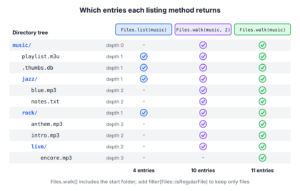
The method Files.list(dir) lists all files in a directory in Java once we keep only the entries that pass Files::isRegularFile, and Files.walk(dir) does the same for the directory and all its subfolders. Both methods return a lazy Stream<Path> that holds an open directory handle, so we always call them in a try-with-resources statement.
We list files to import uploaded CSV files, to scan a music library for songs, to clean up old log files or to find every .java file in a project. When we need the attributes of each file, such as its size, Files.find() filters on them while it walks.
The following example builds a small music folder in a temp directory and lists it in three ways. The helper method createMusicFolder() is shown in section 1.
Path music = createMusicFolder();

try (Stream<Path> entries = Files.list(music)) {
    List<String> topFiles = entries.filter(Files::isRegularFile).map(p -> p.getFileName().toString()).sorted().toList();   // [.thumbs.db, playlist.m3u]
}

try (Stream<Path> tree = Files.walk(music)) {
    List<String> allFiles = tree.filter(Files::isRegularFile).map(p -> music.relativize(p).toString()).sorted().toList();   // [.thumbs.db, jazz/blue.mp3, jazz/notes.txt, playlist.m3u, rock/anthem.mp3, rock/intro.mp3, rock/live/encore.mp3]
}

try (Stream<Path> found = Files.find(music, 2, (p, attrs) -> attrs.isRegularFile() && p.toString().endsWith(".mp3"))) {
    List<String> songs = found.map(p -> p.getFileName().toString()).sorted().toList();   // [anthem.mp3, blue.mp3, intro.mp3]
}
Notice that Files.list() stops at the first level, while Files.walk() goes down to rock/live. The call to Files.find() with a depth of 2 skips encore.mp3, which sits three levels below the start folder. We also sort every result, because none of these methods returns the entries in a guaranteed order. After the two basic cases, we filter by extension and hidden state, handle unreadable folders and pick the right method for the job.
1. Listing Files Only in a Given Directory
A non-recursive listing returns the files and subfolders of one directory and ignores everything below them. A typical case is an upload folder, where a nightly job picks up the new CSV files and moves them to an archive subfolder that it never reads again.
All snippets work on the same small tree, which the helper method createMusicFolder() creates in a temp directory. Each file contains its own relative path as text, so the files have different sizes.
static Path createMusicFolder() throws IOException {
    Path music = Files.createTempDirectory("music");
    Files.createDirectories(music.resolve("rock/live"));
    Files.createDirectories(music.resolve("jazz"));
    for (String file : List.of("playlist.m3u", ".thumbs.db", "rock/intro.mp3", "rock/anthem.mp3",
            "rock/live/encore.mp3", "jazz/blue.mp3", "jazz/notes.txt")) {
        Files.writeString(music.resolve(file), file);
    }
    return music;
}
1.1. Stream of Files with Files.list()
The method Files.list(Path), added in Java 8, returns a lazily populated Stream<Path> of the entries in the directory. The listing is not recursive, and it contains both files and subfolders, so we filter with Files::isRegularFile to keep only the files. Since Java 16, Stream.toList() collects the result into an unmodifiable list.
Path music = createMusicFolder();

try (Stream<Path> entries = Files.list(music)) {
    List<Path> files = entries.filter(Files::isRegularFile).sorted().toList();
    int count = files.size();                                    // 2
    String first = files.getFirst().getFileName().toString();   // ".thumbs.db"
}

try (Stream<Path> entries = Files.list(music)) {
    List<String> folders = entries.filter(Files::isDirectory).map(p -> p.getFileName().toString()).sorted().toList();   // [jazz, rock]
}
The stream returned by Files.list() keeps the directory open until we close it, so a call without try-with-resources leaks one file handle per call. A scheduled job that lists a folder every minute without closing the stream eventually fails with a FileSystemException for too many open files. The try-with-resources statement closes the stream even when the pipeline throws.
1.2. DirectoryStream to Loop through Files
The interface DirectoryStream (Java 7) is an Iterable over the entries of one directory, so we can loop over it with a for-each loop instead of a stream pipeline. A for-each loop is handy when the loop body throws checked exceptions, such as a call to Files.move(), because a lambda cannot throw them.
Path music = createMusicFolder();
List<String> names = new ArrayList<>();

try (DirectoryStream<Path> stream = Files.newDirectoryStream(music)) {
    for (Path path : stream) {
        if (Files.isRegularFile(path)) {
            names.add(path.getFileName().toString());
        }
    }
}
Collections.sort(names);
List<String> topFiles = names;   // [.thumbs.db, playlist.m3u]
The overload newDirectoryStream(dir, glob) filters the entries by a glob pattern before we see them. For example, *.{mp3,m3u} accepts names that end in .mp3 or .m3u. A third overload takes a DirectoryStream.Filter for conditions a glob cannot express.
Path music = createMusicFolder();
List<String> playlists = new ArrayList<>();

try (DirectoryStream<Path> stream = Files.newDirectoryStream(music, "*.{mp3,m3u}")) {
    stream.forEach(p -> playlists.add(p.getFileName().toString()));
}
List<String> matched = playlists;   // [playlist.m3u]
2. Listing All Files in Given Directory and Sub-directories
A recursive listing visits the directory, its subfolders, their subfolders and so on. Say a music player scans the library folder of a user at startup. The songs sit in artist and album folders of different depths, so the scanner must go through the whole tree and collect every audio file it finds.
2.1. Files.walk() for Stream of Paths
The method Files.walk(Path) returns a Stream<Path> that walks the file tree depth-first, starting at the given path. The first element is the start directory itself, which surprises many developers who count the results. We keep only the files with Files::isRegularFile, or only the folders with Files::isDirectory.
Path music = createMusicFolder();

try (Stream<Path> tree = Files.walk(music)) {
    List<Path> all = tree.toList();
    int entries = all.size();                                    // 11
    boolean startIncluded = all.getFirst().equals(music);        // true
}

try (Stream<Path> tree = Files.walk(music)) {
    List<String> folders = tree.filter(Files::isDirectory).map(p -> music.relativize(p).toString()).sorted().toList();   // [, jazz, rock, rock/live]
}
The 11 entries are 7 files, 3 subfolders and the start folder, which relativize() turns into an empty string.
The overload Files.walk(start, maxDepth) limits how deep the walk goes. A depth of 0 returns only the start path, and a depth of 1 returns the same entries as Files.list() plus the start folder.
Path music = createMusicFolder();

try (Stream<Path> tree = Files.walk(music, 2)) {
    List<String> twoLevels = tree.filter(Files::isRegularFile).map(p -> music.relativize(p).toString()).sorted().toList();   // [.thumbs.db, jazz/blue.mp3, jazz/notes.txt, playlist.m3u, rock/anthem.mp3, rock/intro.mp3]
}
By default, Files.walk() does not follow symbolic links, so a link to a folder shows up as one entry and the walk does not enter it. With FileVisitOption.FOLLOW_LINKS, the walk enters linked folders, and if a link points back to one of its parent folders, the stream throws an UncheckedIOException that wraps a FileSystemLoopException. The post on symbolic links covers links in more detail.
2.2. Files.find() to Filter on File Attributes
The method Files.find() walks the tree like Files.walk(), but it passes each path together with its BasicFileAttributes to a BiPredicate. The walk has already read these attributes, so checks on the size, the type or the last modified time do not read the file system a second time.
Path music = createMusicFolder();

try (Stream<Path> found = Files.find(music, Integer.MAX_VALUE, (p, attrs) -> attrs.isRegularFile() && attrs.size() > 14)) {
    List<String> large = found.map(p -> music.relativize(p).toString()).sorted().toList();   // [rock/anthem.mp3, rock/live/encore.mp3]
}
The second argument is the maximum depth, and Integer.MAX_VALUE means all levels. In a real app the size limit would be something like 10 MB, for example to warn about large files before an upload.
2.3. Simple Recursion
We can also write the walk ourselves with recursion. It gives more control than a stream, for example to skip folders such as .git or node_modules without entering them, or to stop at the first match. The method collectFiles() lists the regular files of one folder and calls itself for each subfolder.
static void collectFiles(Path dir, List<Path> result) throws IOException {
    try (DirectoryStream<Path> stream = Files.newDirectoryStream(dir)) {
        for (Path path : stream) {
            if (Files.isDirectory(path, LinkOption.NOFOLLOW_LINKS)) {
                collectFiles(path, result);
            } else if (Files.isRegularFile(path)) {
                result.add(path);
            }
        }
    }
}
Path music = createMusicFolder();
List<Path> collected = new ArrayList<>();
collectFiles(music, collected);
int fileCount = collected.size(); // 7Older code does the same with File.listFiles(). That method returns null, not an empty array, when the path is not a directory or when an I/O error occurs, such as missing read permission. A recursive loop over that result throws a NullPointerException, so legacy code needs a null check before the loop. The NIO version throws an IOException that names the problem, such as AccessDeniedException.
File notADirectory = Files.createTempFile("song", ".mp3").toFile();
File[] children = notADirectory.listFiles();   // null
3. Listing All Files of a Certain Extension
To get only the files of one type, we combine Files::isRegularFile with a check on the file name. The check runs on getFileName().toString(), because Path.endsWith() compares whole name elements, not the end of a string, so path.endsWith(“.mp3”) is always false for a file named blue.mp3.
Path music = createMusicFolder();

try (Stream<Path> tree = Files.walk(music)) {
    List<String> mp3Files = tree.filter(Files::isRegularFile)
            .filter(p -> p.getFileName().toString().endsWith(".mp3"))
            .map(p -> p.getFileName().toString())
            .sorted()
            .toList();   // [anthem.mp3, blue.mp3, encore.mp3, intro.mp3]
}

Path blue = music.resolve("jazz/blue.mp3");
boolean pathEndsWith = blue.endsWith(".mp3");                         // false
boolean nameEndsWith = blue.getFileName().toString().endsWith(".mp3");   // true
For several extensions, or for patterns such as **/live/*.mp3, a PathMatcher with glob syntax reads better than a chain of endsWith() calls. The pattern ** matches across folder boundaries, whereas * matches inside one name only. We match the relative path, because the glob is written relative to the music folder.
Path music = createMusicFolder();
PathMatcher audio = FileSystems.getDefault().getPathMatcher("glob:**.{mp3,m3u}");

try (Stream<Path> tree = Files.walk(music)) {
    List<String> audioFiles = tree.filter(Files::isRegularFile)
            .filter(p -> audio.matches(music.relativize(p)))
            .map(p -> music.relativize(p).toString())
            .sorted()
            .toList();   // [jazz/blue.mp3, playlist.m3u, rock/anthem.mp3, rock/intro.mp3, rock/live/encore.mp3]
}
Extension checks are case-sensitive, so a file named SONG.MP3 needs toLowerCase() on the name first. The older FilenameFilter and FileFilter interfaces do the same job for File.listFiles().
4. Listing All Hidden Files
Operating systems and tools leave hidden files in user folders, such as .DS_Store on macOS, Thumbs.db on Windows or .thumbs.db in our example. A music scanner skips them, while a backup tool may need them. On Linux and macOS, a file is hidden when its name starts with a dot. On Windows, a file is hidden when its DOS hidden attribute is set.
The method Files.isHidden(Path) applies the rule of the current platform, but it throws the checked IOException, so it does not fit into a filter() lambda. Inside a stream, we use File.isHidden(), which applies the same platform rule and returns a plain boolean. These results are from Linux, and on Windows the same file counts as hidden only when its attribute is set.
Path music = createMusicFolder();

try (Stream<Path> entries = Files.list(music)) {
    List<String> hidden = entries.filter(p -> p.toFile().isHidden()).map(p -> p.getFileName().toString()).toList();   // [.thumbs.db]
}

try (Stream<Path> tree = Files.walk(music)) {
    long visibleFiles = tree.filter(Files::isRegularFile).filter(p -> !p.toFile().isHidden()).count();   // 6
}
5. Errors While Listing Directories
Two kinds of errors can happen. Opening the start directory fails with a checked exception, such as NoSuchFileException when the path does not exist, or NotDirectoryException when Files.list() gets a file. Errors deeper in the tree, such as a subfolder without read permission, happen while the stream runs, so the stream wraps them in an UncheckedIOException that the terminal operation throws.
Path missing = Path.of("no-such-folder");
Stream<Path> broken = Files.list(missing);   // NoSuchFileException: no-such-folder
A single unreadable subfolder stops the whole Files.walk() stream, and the files collected before the error are lost. When a walk must continue past folders it cannot read, as a backup tool or a disk usage report must, we use Files.walkFileTree() with a FileVisitor and handle the error in visitFileFailed().
static List<Path> listReadableFiles(Path start) throws IOException {
    List<Path> files = new ArrayList<>();
    Files.walkFileTree(start, new SimpleFileVisitor<>() {
        @Override
        public FileVisitResult visitFile(Path file, BasicFileAttributes attrs) {
            if (attrs.isRegularFile()) {
                files.add(file);
            }
            return FileVisitResult.CONTINUE;
        }

        @Override
        public FileVisitResult visitFileFailed(Path file, IOException e) {
            System.err.println("Skipped " + file + ": " + e);
            return FileVisitResult.CONTINUE;
        }
    });
    return files;
}
Path music = createMusicFolder();
List<Path> readable = listReadableFiles(music);
int readableCount = readable.size(); // 7The visitor also has preVisitDirectory(), which can return FileVisitResult.SKIP_SUBTREE to skip a folder without entering it. The same visitor pattern powers tasks such as deleting a directory recursively and calculating a directory size.
6. Choosing a Method to List Files
All the methods return the same files, so the choice depends on the depth we need and on what the loop does with each file. As a rule, we start with Files.list() or Files.walk() and move to the other methods when a requirement calls for them.
| Method | Recursive | Returns | Use it when |
|---|---|---|---|
| Files.list(dir) | No | Stream<Path> | We need the direct entries of one folder in a stream pipeline. |
| Files.newDirectoryStream(dir, glob) | No | DirectoryStream<Path> | The loop body throws checked exceptions, or a glob filter is enough. |
| Files.walk(dir, depth) | Yes, up to depth | Stream<Path> | We need every file in the tree, and any error may stop the listing. |
| Files.find(dir, depth, matcher) | Yes, up to depth | Stream<Path> | The filter uses size, type or timestamps. |
| Files.walkFileTree(dir, visitor) | Yes | Nothing, calls the visitor | We must skip folders or continue after errors. |
| File.listFiles() | No | File[] or null | Only in legacy code that already uses java.io.File. |
If the goal is to find one file by name rather than list them all, the article on finding a file in a directory shows how to stop the walk at the first match.
7. Listing Files in Java FAQs
Questions about listing files tend to come from code that misses files, leaks handles or behaves differently on another operating system.
7.1. Why Does Files.walk() Return the Directory Itself?
Because the walk starts at the given path and reports every path it visits, including the first one. The stream always has at least one element, the start path itself, and the walk visits it first. We remove it with a Files::isRegularFile filter, or with .skip(1) when we want folders but not the start folder.
7.2. In What Order Does Files.list() Return Files?
In no guaranteed order. The order comes from the file system, so it can differ between Linux, Windows and macOS, and between two runs. When the order matters, for example for a numbered file list in the UI, we add .sorted(), which sorts the paths by name, or .sorted(Comparator.comparing(…)) for another key.
7.3. Is Files.walk() Faster Than File.listFiles() Recursion?
For most folders the difference is small, because both read the same directory entries from the operating system. The real differences are elsewhere. Files.walk() reads the tree lazily and gives clear exceptions, whereas File.listFiles() builds a full array per folder and returns null on errors. We pick Files.walk() for those reasons and measure before we optimize a slow listing.
7.4. Why Do I Get AccessDeniedException When Listing a Folder?
The process has no read permission for the folder or one of its subfolders. On Windows, this often happens with system folders such as C:\System Volume Information when we walk a whole drive. We either list a narrower folder, or we use Files.walkFileTree() and return CONTINUE from visitFileFailed(), as shown in section 5.
8. Conclusion
For one folder, Files.list() returns its entries as a stream, and a DirectoryStream does the same for a for-each loop with an optional glob filter. For a whole tree, Files.walk() visits every level or stops at a maxDepth, and Files.find() adds a filter on file attributes.
Every one of these streams holds an open directory handle, so it belongs in a try-with-resources block. None of them guarantees an order, so we sort when the order matters. When a walk must survive unreadable folders, Files.walkFileTree() with visitFileFailed() keeps it going, and the Java Stream guide covers the stream operations we used to filter and map the paths.
9. References
- Files.list() Javadoc
- Files.walk() Javadoc
- Files.find() Javadoc
- DirectoryStream Javadoc
- FileSystem.getPathMatcher() and glob syntax
- Walking the File Tree (Java Tutorials)
Happy Learning !!

List files = Files.list(Paths.get(directory))
.map(Path::toFile)
.filter(File::isFile)
.collect(Collectors.toList());
I have the suspicion that the stream is not closed after this use and handlers get stuck in the system.
Is that correct?
Hi,
how to apply filter to get the list of files created between two dates.
Could you please suggest on this.
Files.newDirectoryStream(Paths.get(directory),
path -> path.toFile().lastModified() > sd.getTime() && path.toFile().lastModified() < ed.getTime());
Alex B, that code does not demonstrate what list the filenames go to. Where is the list variable ?
Here is the code for reading filename and store them in list.
List fileNamesList = new ArrayList(); Files.newDirectoryStream(Paths.get(dir), path -> path.toString().endsWith(".java")).forEach(filePath -> fileNamesList.add(filePath.toString()));I appreciate the post.
But the code in “Find all hidden files in directory” section gives syntax error.
And, its sad that you didn’t tell how to capture the file names in a list or something else (will be helpful for the people who are learning java 8). In real world, we don’t need to read the file names just to sysout.
Here is the code for reading file names and store them in list.
You’re actually better off doing something like this:
            Files.list(Paths.get(dir))
                    .map(Path::toFile)
                    .map(File::getAbsolutePath)
                    .collect(Collectors.toList())
Which allows you to use the streams api to transform/filter the list before you collect it.
Files.list(Paths.get(dir)) .map(Path::toAbsolutePath) .collect(Collectors.toList())nice code