
The Java for-each loop, also called the enhanced for loop, visits every element of an array or an Iterable collection in order, without an index variable. Java added it in Java 5 as a shorter and safer way to read all elements of a collection.
We use the for-each loop whenever we need each element but not its position, such as summing values, printing items, searching a list, or converting one collection into another.
The following example adds up the song durations of a playlist.
int[] durations = {210, 185, 245};      // seconds
int total = 0;
for (int seconds : durations) {
    total += seconds;
}
String length = total / 60 + " min " + total % 60 + " s";   // "10 min 40 s"
The loop has no counter, no length check and no durations[i], so an off-by-one error is not possible. We start with the translation the compiler makes, move on to loops over lists, sets and maps, the limits of the loop variable, safe removal, and how to make our own classes work with for-each.
1. for-each Syntax and What the Compiler Generates
The header for (Type item : source) reads as “for each item in source”. The source must be an array or an object that implements Iterable, and the variable type must accept the element type. We can also write var or add final.
The for-each loop is syntax sugar. The JLS defines it as a translation into one of two ordinary loops, and the compiler produces the same bytecode as if we had written that loop ourselves.
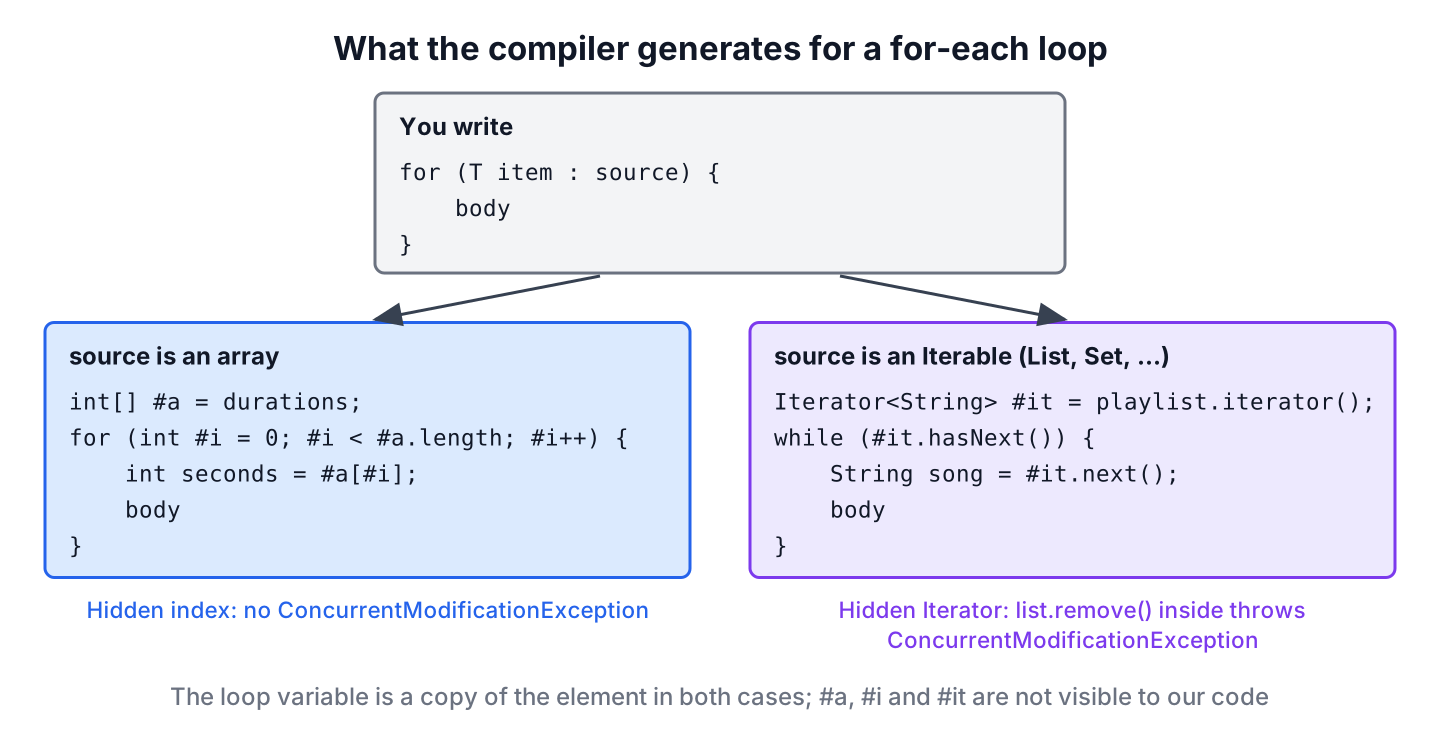
That translation explains the behavior in the rest of the article. Arrays use a hidden index, so they never throw ConcurrentModificationException. Collections use an Iterator, so changing the collection during the loop breaks the iterator. A source that is not an array or an Iterable, such as a Stream, does not compile.
// does not compile: for-each not applicable to expression type, required: array or java.lang.Iterable
Stream<String> songs = Stream.of("Intro", "Echoes");
for (String song : songs) {
    System.out.println(song);
}
2. Looping Over Lists, Sets and Maps
Every Collection is an Iterable, so the loop works the same way for a List, a Set or a Queue. The order follows the collection. A List keeps insertion order, a TreeSet sorts, and a HashSet gives no guaranteed order.
List<String> playlist = List.of("Intro", "Echoes", "Outro");
StringBuilder shortSongs = new StringBuilder();
for (String song : playlist) {
    if (song.length() == 5) {
        shortSongs.append(song).append(' ');
    }
}
String fiveLetters = shortSongs.toString().strip();   // "Intro Outro"
A Map is not an Iterable, so we loop over one of its three views. The entrySet() view gives the key and the value together, which avoids a second lookup with get() for every key.
Map<String, Integer> plays = new TreeMap<>(Map.of("Echoes", 12, "Intro", 40, "Outro", 7));
StringBuilder report = new StringBuilder();
for (Map.Entry<String, Integer> entry : plays.entrySet()) {
    report.append(entry.getKey()).append('=').append(entry.getValue()).append(' ');
}
String played = report.toString().strip();           // "Echoes=12 Intro=40 Outro=7"
int totalPlays = 0;
for (int count : plays.values()) {
    totalPlays += count;
}
int allPlays = totalPlays;                             // 59
We loop over keySet() when we need only the keys, and over values() when we need only the values, as the second loop does.
3. The Loop Variable Is a Copy
The loop variable holds a copy of the current element, not a reference to the array slot. Assigning a new value to it changes only the local variable, and the array or list stays the same.
int[] volumes = {3, 5, 7};
for (int v : volumes) {
    v = v * 2;                        // changes only the local copy
}
String unchanged = Arrays.toString(volumes);        // "[3, 5, 7]"
for (int i = 0; i < volumes.length; i++) {
    volumes[i] = volumes[i] * 2;
}
String doubled = Arrays.toString(volumes);          // "[6, 10, 14]"
For objects, the copy is a reference to the same object. Calling a method that changes the object, such as StringBuilder.append() or a setter, does change the element. To replace the elements of a list, we use List.replaceAll() or an index-based for loop.
List<String> titles = new ArrayList<>(List.of("intro", "outro"));
titles.replaceAll(String::toUpperCase);
List<String> upper = titles;                        // [INTRO, OUTRO]
4. Removing Elements Safely
Never add or remove elements of a collection inside a for-each loop over that collection. The hidden Iterator notices the change on its next call and throws ConcurrentModificationException, which is a fail-fast check of collections such as ArrayList and HashMap.
static List<String> removeSkipped(List<String> songs, String skipped) {
    for (String song : songs) {
        if (song.equals(skipped)) {
            songs.remove(song);            // modifies the list behind the iterator
        }
    }
    return songs;
}
List<String> queue = new ArrayList<>(List.of("Intro", "Echoes", "Outro", "Bonus"));
List<String> broken = removeSkipped(queue, "Intro"); // ConcurrentModificationExceptionSince Java 8, removeIf() is the shortest safe way to remove by a condition. When the loop does more work than a condition, we use an explicit Iterator and call its own remove() method, which keeps the iterator in sync with the list.
List<String> tracks = new ArrayList<>(List.of("Intro", "Echoes", "Outro", "Bonus"));
boolean removed = tracks.removeIf(t -> t.equals("Intro"));   // true
List<String> rest = tracks;                                  // [Echoes, Outro, Bonus]
Iterator<String> it = tracks.iterator();
while (it.hasNext()) {
    if (it.next().startsWith("B")) {
        it.remove();
    }
}
List<String> noBonus = tracks;                               // [Echoes, Outro]
5. Making a Custom Class Work with for-each
Any class that implements Iterable works in a for-each loop. The interface has one abstract method, iterator(), so we often return the iterator of an existing collection or stream.
Say a hotel booking app stores a stay as a check-in and a check-out date, and the billing code charges each night. A Stay record that implements Iterable<LocalDate> lets that code loop over the nights with a plain for-each loop.
record Stay(LocalDate checkIn, LocalDate checkOut) implements Iterable<LocalDate> {
    public Iterator<LocalDate> iterator() {
        return checkIn.datesUntil(checkOut).iterator();
    }
}
Stay stay = new Stay(LocalDate.of(2026, 12, 30), LocalDate.of(2027, 1, 2));
int price = 0;
for (LocalDate night : stay) {
price += night.getMonthValue() == 12 ? 150 : 100; // December rate
}
int bill = price; // 400, two December nights and one January nightThe method datesUntil() excludes the end date, which matches the hotel rule that the check-out day is not charged.
6. null Sources, Reverse Order and Other Limits
A for-each loop over a null array or collection throws NullPointerException before the first iteration. Methods that return collections should return an empty one instead of null, and for values we do not control, Objects.requireNonNullElse() supplies the empty default.
List<String> favorites = null;                       // user has no favorites yet
int count = 0;
for (String song : Objects.requireNonNullElse(favorites, List.<String>of())) {
    count++;
}
int favoriteCount = count;                           // 0, no exception
The loop always moves forward. For reverse order, Java 21 added reversed() to List, Deque and the other sequenced collections, which returns a reversed view without copying.
List<String> album = List.of("Intro", "Echoes", "Outro");
StringBuilder backwards = new StringBuilder();
for (String song : album.reversed()) {
    backwards.append(song.charAt(0));
}
String initials = backwards.toString();              // "OEI"
The loop also hides the index, and it cannot walk two collections in step. In both cases, we use a classic for loop with an index. When the element itself is not needed, the unnamed variable from Java 22 makes that clear, as in for (String _ : album).
7. for-each vs for Loop vs forEach()
Java offers a third style for collections, the forEach() method from Java 8. It takes a lambda, which cannot change local variables, cannot use break, and must catch checked exceptions inside the lambda.
List<String> album = List.of("Intro", "Echoes", "Outro");
List<String> lines = new ArrayList<>();
album.forEach(song -> lines.add("Now playing " + song));
String first = lines.get(0);                          // "Now playing Intro"
int[] bpm = {90, 120};
int sumBpm = Arrays.stream(bpm).sum(); // 210, arrays have no forEach() method| Need | for-each | for loop | forEach() |
|---|---|---|---|
| Read every element | Yes, the shortest form | Yes | Yes |
| Index or position | No | Yes | No |
| Stop early with break | Yes | Yes | No |
| Change local variables | Yes | Yes | No, only effectively final |
| Remove or replace elements | No | Yes, for lists by index | No, use removeIf() or replaceAll() |
For an ArrayList or an array, all three styles have about the same speed after JIT compilation. For a LinkedList, the for-each loop is much faster than a for loop with get(i), because each get(i) has to step through the nodes up to index i.
8. for-each Loop FAQs
Developers who switch to the enhanced for loop often search for these answers.
8.1. How do we get the index in a for-each loop?
The loop has no index. We either keep a counter variable and increase it at the end of the body, or switch to a classic for loop. For lists, IntStream.range(0, list.size()) also gives the index in a stream.
8.2. Can we use for-each with a Stream?
No, because Stream does not implement Iterable. We either call stream.forEach(), or collect the stream into a list with toList() and loop over the list.
8.3. Which is faster, the for loop or the for-each loop?
For arrays and ArrayList, neither one. Both compile to similar code, and the JIT removes the difference. The for-each loop is faster for LinkedList, where indexed access is O(n) per call.
8.4. When was the for-each loop added to Java?
In Java 5, released in 2004, together with generics, autoboxing and enums. The Oracle guide from that release still describes its design.
9. Conclusion
The for-each loop reads every element of an array or an Iterable without an index, and the compiler turns it into an index loop for arrays or an Iterator loop for collections. Maps work through entrySet(), keySet() and values(), and any class that implements Iterable works as a source.
The loop variable is a copy, so assigning to it changes nothing, and removing elements inside the loop throws ConcurrentModificationException. For removal we call removeIf() or Iterator.remove(), for reverse order reversed(), and for an index we switch to a classic for loop.
10. References
- JLS 25, The enhanced for Statement
- Iterable (Java SE 25 API)
- ConcurrentModificationException (Java SE 25 API)
- SequencedCollection (Java SE 25 API)
- Oracle, The For-Each Loop
Happy Learning !!
