
A labeled break or continue in Java names an enclosing statement with a label, such as search:, so that break search; ends that statement and continue search; starts the next pass of that loop, even from inside a nested loop. Without a label, both statements act only on the innermost loop.
We use labeled break and continue mainly with nested loops, for example to stop a search in a grid at the first match, or to skip the rest of an outer element as soon as an inner check fails.
The following example finds the first free seat in a cinema hall and stops both loops when it finds one.
boolean[][] booked = {
    {true, true, false},
    {false, false, true}
};
int row = -1;
int seat = -1;
search:
for (int r = 0; r < booked.length; r++) {
    for (int s = 0; s < booked[r].length; s++) {
        if (!booked[r][s]) {
            row = r;
            seat = s;
            break search;               // ends both loops
        }
    }
}
int freeRow = row;                      // 0
int freeSeat = seat;                    // 2
Notice that the label sits on the outer loop, and the break inside the inner loop names it. We cover the label syntax and scope, labeled break and continue with nested loops, labels on blocks, the rules the compiler checks, and the alternatives that often read better.
1. Label Syntax and Scope
A label is an identifier followed by a colon, written in front of a statement. The Java Language Specification allows a label on any statement, but only break and continue can refer to it, and only from inside the labeled statement. That region is the scope of the label.
Common label names are short lowercase words that say what the loop does, such as search, rows or orderLoop. Labels have their own namespace, so a label and a local variable may share a name without a conflict, although different names are easier to read.
The two labeled forms differ in where the program continues.
- The statement break label; ends the labeled statement, and the program continues with the first statement after it.
- The statement continue label; ends the current pass of every loop inside the labeled loop and starts the next pass of the labeled loop, which runs its update and condition check first.
- Neither form jumps back to the label line. A labeled break does not restart the loop, as people sometimes expect from the name.
2. Breaking Out of Nested Loops With a Label
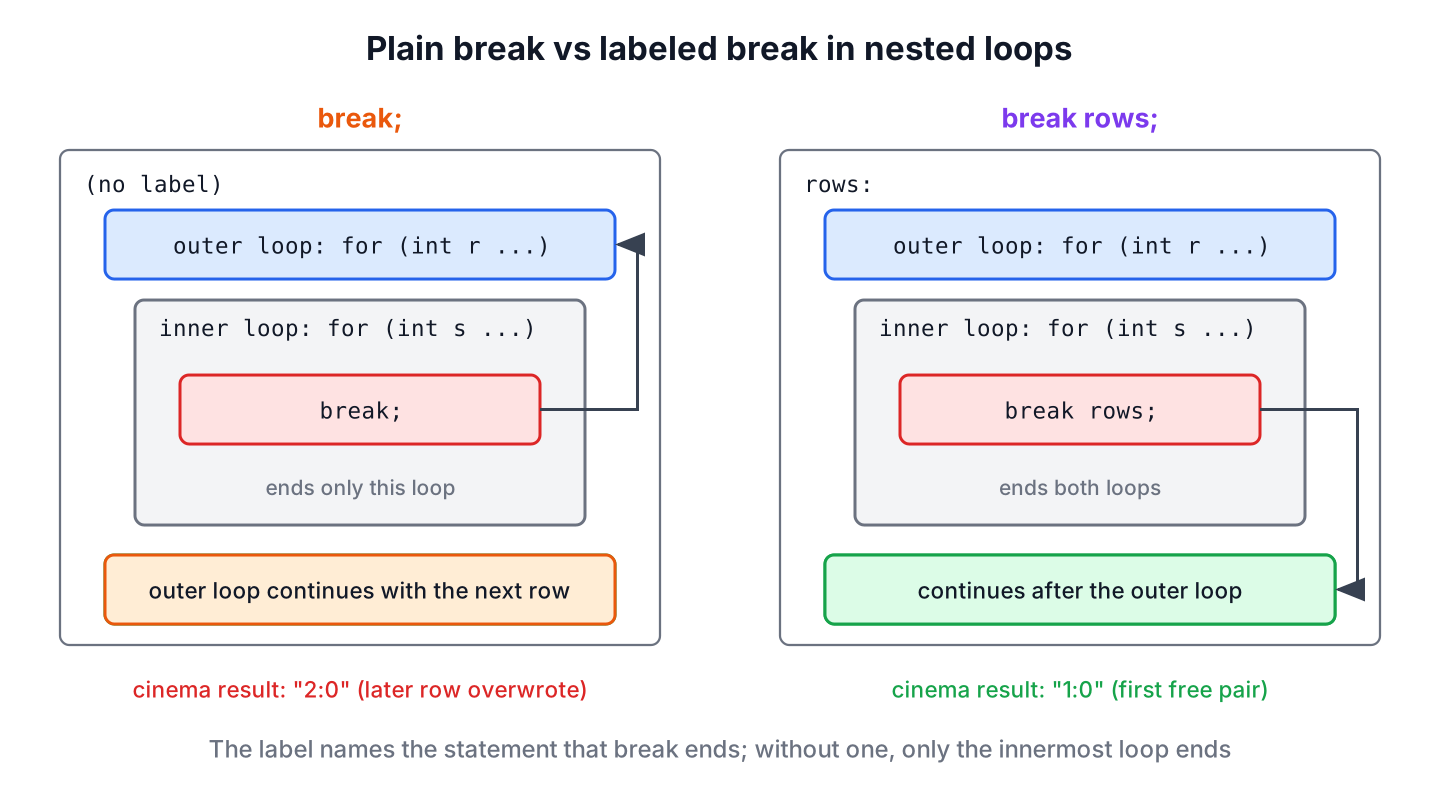
Without a label, break ends only the innermost loop around it. Say the cinema app must find two free seats next to each other and offer the first such pair. With a plain break, the outer loop keeps going after the first match, and a later row overwrites the result.
boolean[][] booked = {
    {true, false, true, false},
    {false, false, true, true},
    {false, false, false, true}
};
String pair = "none";
for (int r = 0; r < booked.length; r++) {
    for (int s = 0; s + 1 < booked[r].length; s++) {
        if (!booked[r][s] && !booked[r][s + 1]) {
            pair = r + ":" + s;
            break;                      // ends only the seat loop
        }
    }
}
String chosen = pair;                   // "2:0", row 2 overwrote "1:0"
When a nested loop must stop completely at the first match, put a label on the outer loop and break out of it by name. The labeled version returns the first pair and does not look at row 2 at all.
boolean[][] booked = {
    {true, false, true, false},
    {false, false, true, true},
    {false, false, false, true}
};
String pair = "none";
rows:
for (int r = 0; r < booked.length; r++) {
    for (int s = 0; s + 1 < booked[r].length; s++) {
        if (!booked[r][s] && !booked[r][s + 1]) {
            pair = r + ":" + s;
            break rows;                 // ends the row loop too
        }
    }
}
String chosen = pair;                   // "1:0"
A label works the same way on a while loop, a do-while loop or a for-each loop. It is also the way to end a loop from inside a switch, where a plain break ends only the switch statement.
3. Skipping to the Next Outer Pass With a Labeled continue
A plain continue skips the rest of the inner pass only. A labeled continue abandons the inner loop and moves the outer loop to its next element, which is what we need when one bad inner element makes the whole outer element invalid.
Say an online store ships an order only when every item in it is in stock. The outer loop goes over the orders and the inner loop checks the items, and the first missing item sends the outer loop on to the next order.
Map<String, Integer> stock = Map.of("pen", 5, "ink", 0, "pad", 2);
List<List<String>> orders = List.of(
        List.of("pen", "pad"),
        List.of("pen", "ink"),
        List.of("pad"));
List<Integer> shippable = new ArrayList<>();
orderLoop:
for (int o = 0; o < orders.size(); o++) {
    for (String item : orders.get(o)) {
        if (stock.getOrDefault(item, 0) == 0) {
            continue orderLoop;         // skip this order
        }
    }
    shippable.add(o);                   // runs only if no item was missing
}
String ready = shippable.toString();    // "[0, 2]"
The statement after the inner loop, shippable.add(o), runs only for orders whose items all passed the check. With a plain continue, the inner loop would skip only the missing item, and order 1 would be shipped without ink.
4. Labels on Blocks and if Statements
A labeled break also works on a block or an if statement, which are not loops. The break ends the block, and the program continues after it. Labeled blocks are rare in application code, but they appear in validation code that checks several conditions in order and stops at the first failure.
String email = "ann@example.com";
String result = "unchecked";
validation:
{
    if (email.isBlank()) {
        result = "empty";
        break validation;
    }
    if (!email.contains("@")) {
        result = "missing @";
        break validation;
    }
    result = "ok";
}
String status = result;                 // "ok"
A labeled continue needs a loop, because it starts the next pass. Naming a block or an if in a continue fails to compile.
// does not compile: not a loop label: validation
validation:
{
    for (int i = 0; i < 3; i++) {
        continue validation;
    }
}
In most cases, the same validation reads better as a separate method that returns early, which we compare in section 6.
5. Label Rules the Compiler Checks
Labels are restricted on purpose. Unlike C and C++, Java has no goto statement, and labeled jumps can only leave or restart a statement that encloses them. The compiler enforces that with a few rules.
- The label must be on a statement that encloses the break or continue. A label on an earlier, finished loop gives undefined label.
- A nested statement cannot reuse the label of a statement around it, which gives label outer already in use.
- Two separate statements one after the other may use the same label, and a label that no statement refers to is allowed.
- A jump cannot leave a lambda body, a method, or a switch expression, so break outer inside a forEach() lambda gives undefined label.
// does not compile: undefined label: first
first:
for (int i = 0; i < 3; i++) {
}
for (int j = 0; j < 3; j++) {
    break first;
}
// does not compile: label outer already in use
outer:
for (int i = 0; i < 3; i++) {
outer:
for (int j = 0; j < 3; j++) {
}
}int visits = 0;
scan:
for (int i = 0; i < 3; i++) {
visits++;
if (i == 1) {
break scan;
}
}
scan:
for (int j = 0; j < 2; j++) {
visits++; // this label is never used
}
int total = visits; // 4The word goto is still a reserved keyword in Java 25, together with const. Neither one does anything, and both exist only so that nobody can use them as names.
6. Alternatives to Labeled Jumps
Labeled jumps are correct Java, but many teams use them rarely, because a reader has to find the label to know where the program goes. For each case, we can pick a label or one of these options.
- Move the nested loop into a method and use return, which ends every loop at once and gives the result a name.
- Add a boolean flag that the outer condition checks.
- Use a stream method that stops on its own, such as anyMatch() or findFirst().
The following method does the same as the labeled continue in section 3. The inner check moves into a method, and the outer loop becomes a plain loop with an if.
static boolean allInStock(List<String> items, Map<String, Integer> stock) {
    for (String item : items) {
        if (stock.getOrDefault(item, 0) == 0) {
            return false;
        }
    }
    return true;
}
Map<String, Integer> stock = Map.of("pen", 5, "ink", 0, "pad", 2);
boolean firstOk = allInStock(List.of("pen", "pad"), stock); // true
boolean secondOk = allInStock(List.of("pen", "ink"), stock); // false
boolean viaStream = List.of("pen", "ink").stream().allMatch(i -> stock.getOrDefault(i, 0) > 0); // false| Approach | Leaves both loops | Best fit |
|---|---|---|
| break label / continue label | Yes | Short nested loops that keep working after the search in the same method |
| Method with return | Yes | Searches and checks that have a clear name and a result |
| boolean flag | At the next outer check | Older code, or when the outer loop must finish its current pass |
| Stream with anyMatch(), allMatch() or findFirst() | Yes, stops early | Checks over collections without index math |
7. Labeled break and continue FAQs
Most questions about labels in Java come from developers who know goto from C or who need to exit nested loops.
7.1. Does Java have a goto statement?
No. The word goto is reserved, so it cannot be used as a name, but the language has no goto statement. Labeled break and continue cover the main structured uses, namely leaving nested loops and restarting an outer loop.
7.2. Is using labeled break bad practice?
No, but use it sparingly. A labeled break in a short nested loop is clear, and the JDK source uses labels too, for example continue outer in ConcurrentHashMap. In long methods, a method with return is easier to follow, because the method name explains what the loops search for.
7.3. Can we label any statement in Java?
Yes. Any statement, including a block, an if statement or an expression statement, can carry a label. The label only matters to break and continue, and continue accepts only labels on loops.
7.4. Can a labeled break exit a method or a lambda?
No. The label must be on a statement inside the same method, and a jump cannot cross a lambda body. To leave a method, we use return, and inside a lambda, return ends the current call.
7.5. Does break label restart the labeled loop?
No. It ends the labeled loop, and the program continues after it. To start the next pass of the labeled loop, we use continue label.
8. Conclusion
A label is an identifier with a colon in front of a statement. A labeled break ends that statement, which can be an outer loop, a block or an if, and a labeled continue starts the next pass of an outer loop.
The compiler allows labeled jumps only out of enclosing statements in the same method, so Java has no goto-style jumps. For searches in nested loops, a method with return or a stream method is often clearer, and labels remain a good tool for short loops that do more work after the search.
9. References
- JLS 25, Labeled Statements
- JLS 25, The break Statement
- JLS 25, The continue Statement
- JLS 25, Keywords
- Branching Statements (Oracle Java Tutorials)
Happy Learning !!
