
The Stream.peek() method is an intermediate operation that returns a stream with the same elements and runs a Consumer action on each element when the next operation pulls it. The elements pass through unchanged, so peek() lets us look at a stream pipeline between two steps without changing its result.
We use peek() mainly to see which elements reach a certain point of a stream while debugging, and sometimes to write DEBUG log lines in a pipeline. The method exists mainly to support debugging, and its behavior explains why it is a poor place for business logic.
The following example records the words that pass the filter before they are converted to uppercase.
List<String> seen = new ArrayList<>();
List<String> loud = Stream.of("hum", "beep", "buzz", "hi").filter(w -> w.length() > 3).peek(seen::add).map(String::toUpperCase).toList();   // [BEEP, BUZZ]
List<String> passedFilter = seen;                                  // [beep, buzz]
List<String> counted = new ArrayList<>();
long total = Stream.of("hum", "beep").peek(counted::add).count();  // 2
List<String> peekedBeforeCount = counted;                          // [], count() skipped the pipeline
Notice the last line. The first pipeline ran the peek() action for every word that passed the filter, while the second one never ran it at all. We look at the order in which peek() sees elements, the cases where the action is skipped, how peek() compares with map() and forEach(), parallel streams and a logging example from a sensor data import.
1. How peek() Sees Each Element
The signature is Stream<T> peek(Consumer<? super T> action). Like every intermediate operation, peek() is lazy, so calling it only adds a step to the pipeline. Nothing runs until a terminal operation such as toList() or forEach() starts pulling elements.
A sequential stream processes one element through all steps before it starts the next element. The action of peek() therefore interleaves with the other steps instead of running for the whole list first.
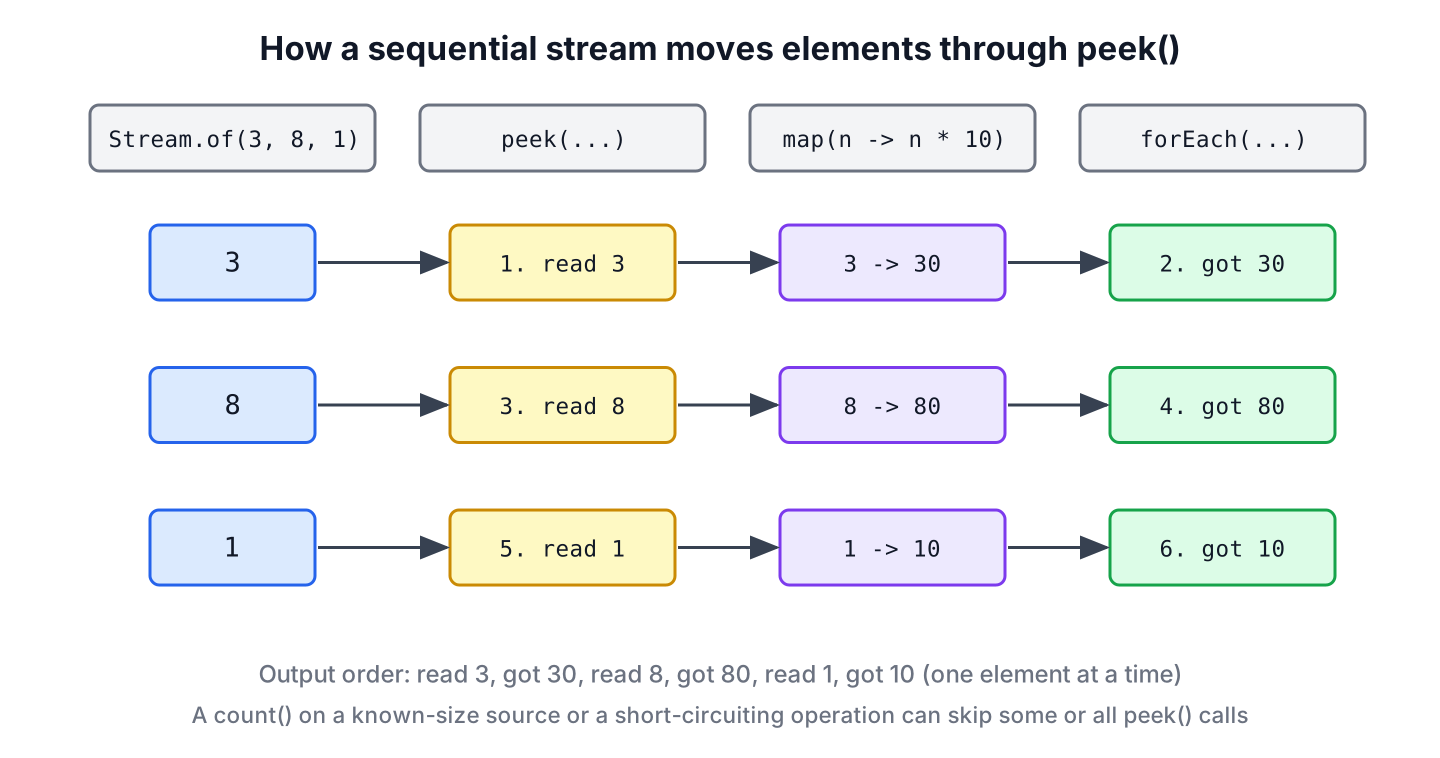
Stream.of(3, 8, 1).peek(n -> System.out.println("read " + n)).map(n -> n * 10).forEach(n -> System.out.println("got " + n));read 3
got 30
read 8
got 80
read 1
got 10The interleaved output is what makes peek() useful for debugging, because each line shows the state of one element at one point. We cover breakpoints, IntelliJ stream tracing and other debugging tools in debugging Java streams.
2. When the peek() Action Does Not Run
A stream may skip the peek() action for some elements or for all of them, because a Stream implementation is allowed to leave out steps that do not change the result. Code that relies on peek() running for every element can therefore break without any error.
| Situation | What happens to the peek() action |
|---|---|
| No terminal operation | Never runs, because the pipeline never starts |
| count() on a source of known size (Java 9+) | Skipped when the size can be computed without the elements |
| Short-circuiting terminal operation, such as findFirst() or anyMatch() | Runs only for the elements pulled before the answer is known |
| limit(n) later in the pipeline | Runs only for the elements that limit() lets through |
| sorted() later in the pipeline | Runs for all elements before the first sorted element moves on |
2.1. count() on a Stream of Known Size
Since Java 9, count() returns the size of a list or an array without walking the pipeline if no step can change the number of elements. A map() keeps the size, so the stream still skips the work, whereas a filter() can change the size, so the stream has to run every step.
List<Integer> mapped = new ArrayList<>();
long size = List.of(5, 6, 7).stream().peek(mapped::add).map(n -> n * 2).count();       // 3
List<Integer> afterMap = mapped;                                                       // []
List<Integer> filtered = new ArrayList<>();
long bigOnes = List.of(5, 6, 7).stream().peek(filtered::add).filter(n -> n > 5).count();   // 2
List<Integer> afterFilter = filtered;                                                  // [5, 6, 7]
2.2. Short-Circuiting and limit()
Operations that can stop early pull only the elements they need. The peek() action therefore shows how far the stream went, which is useful for checking that an infinite stream or a costly source stops in time.
List<Integer> pulled = new ArrayList<>();
Optional<Integer> firstEven = Stream.of(3, 5, 6, 8, 9).peek(pulled::add).filter(n -> n % 2 == 0).findFirst();   // Optional[6]
List<Integer> visited = pulled;                                                                                 // [3, 5, 6]
List<Integer> generated = new ArrayList<>();
List<Integer> firstTwo = Stream.iterate(1, n -> n + 1).peek(generated::add).limit(2).toList();                  // [1, 2]
List<Integer> created = generated;                                                                              // [1, 2]
2.3. peek() Before sorted()
The sorted() operation must see every element before it can return the smallest one. A peek() before it runs for the whole stream first, and a peek() after it sees the elements in sorted order.
List<String> events = new ArrayList<>();
List<Integer> sortedNumbers = Stream.of(3, 1, 2).peek(n -> events.add("in " + n)).sorted().peek(n -> events.add("out " + n)).toList();   // [1, 2, 3]
List<String> order = events;                                                                                                             // [in 3, in 1, in 2, out 1, out 2, out 3]
3. peek() vs map() vs forEach()
The three methods all take a lambda per element, which is why they get mixed up. The difference is what they return and whether the action is guaranteed to run.
| Method | Kind | Returns | Action guaranteed to run | Use it to |
|---|---|---|---|---|
| peek(Consumer) | Intermediate | The same elements | No | Look at elements while debugging |
| map(Function) | Intermediate | New elements | For every element the result needs | Transform elements |
| forEach(Consumer) | Terminal | Nothing | Yes, for every element | Run a side effect at the end |
Changing elements inside peek() compiles when the elements are mutable, but the change depends on the action running. In the following example, count() skips the pipeline, so the names are never capitalized.
List<StringBuilder> names = List.of(new StringBuilder("ann"), new StringBuilder("bob"));
long changed = names.stream().peek(sb -> sb.setCharAt(0, 'A')).count();       // 2
String firstName = names.getFirst().toString();                                // "ann", peek() never ran
The reliable version transforms with map() and returns new values, which also works with immutable types such as String and records.
List<String> capitalized = Stream.of("ann", "bob").map(s -> Character.toUpperCase(s.charAt(0)) + s.substring(1)).toList(); // [Ann, Bob]4. peek() in Parallel Streams
In a parallel stream, the action may run at any time and in any thread that has the element. The order of the peek() calls changes from run to run, even though toList() keeps the result in encounter order, and an action that writes to shared state needs a thread-safe target.
Queue<Integer> seenInParallel = new ConcurrentLinkedQueue<>();
List<Integer> doubled = IntStream.rangeClosed(1, 6).boxed().parallel().peek(seenInParallel::add).map(n -> n * 2).toList();   // [2, 4, 6, 8, 10, 12]
int seenCount = seenInParallel.size();                                                                                       // 6, in an order that varies
With a plain ArrayList instead of ConcurrentLinkedQueue, the same code can lose elements or throw ArrayIndexOutOfBoundsException, because several threads call add() at once.
5. Logging a Sensor Data Import With peek()
A weather station uploads lines such as s1,21.5, one per sensor. The import service skips malformed lines and turns the rest into readings, and while we investigate a bug we want DEBUG log lines that show which lines passed validation, without changing the import result.
record Reading(String sensor, double celsius) {}System.Logger log = System.getLogger("sensor-import");
Predicate<String> wellFormed = Pattern.compile("\\w+,-?\\d+(\\.\\d+)?").asMatchPredicate();
List<String> upload = List.of("s1,21.5", "s2,abc", "s3,-4.0");
List<Reading> readings = upload.stream()
.filter(wellFormed)
.peek(line -> log.log(System.Logger.Level.DEBUG, "valid line {0}", line))
.map(line -> line.split(","))
.map(parts -> new Reading(parts[0], Double.parseDouble(parts[1])))
.toList();
List<Reading> imported = readings; // [Reading[sensor=s1, celsius=21.5], Reading[sensor=s3, celsius=-4.0]]The DEBUG lines appear only when the logger for sensor-import is set to DEBUG, so the peek() call can stay in the code without filling the production logs. We read the number of rejected lines from the data with upload.size() – readings.size(), not from a counter inside peek(), because a counter would give a wrong number as soon as someone replaces toList() with count().
6. Stream peek() FAQs
Code reviews and search results keep returning to the same peek() questions.
6.1. Should peek() Be Used in Production Code?
Only for logging or metrics that may be skipped without harm. The stream may elide the action, as section 2 shows, so peek() must never change data, call a service or count something that the program depends on.
6.2. Why Is peek() Skipped Before count()?
Since Java 9, count() computes the size from the source when the source size is known and no step can change it, such as a list followed only by peek() and map(). A filter() or flatMap() in the pipeline makes the stream run every step, because the size is no longer known.
6.3. What Is the Difference Between peek() and map()?
The peek() method returns the same elements and only looks at them, whereas map() returns the result of its function for each element. When we want different elements, we use map(), even if the new element is a changed copy of the old one.
6.4. Does peek() Change the Order of Elements?
No. The elements leave peek() in the order they arrive. In a parallel stream the action itself runs in an unpredictable order, but the stream still keeps its encounter order for operations such as toList() and forEachOrdered().
6.5. What Is the Difference Between peek() and forEach()?
The forEach() method is a terminal operation that ends the stream and runs the action for every element, whereas peek() is an intermediate operation that returns a stream and needs a later terminal operation. A pipeline that ends with peek() does nothing at all.
7. Conclusion
The peek() method passes each element on unchanged and runs an action as the element moves through the pipeline. In a sequential stream the action interleaves with the other steps, which makes it a good tool to see what a filter or a map did to the data.
The action can be skipped by count(), short-circuiting operations and limit(), and it runs in any order in parallel streams. We keep it for debugging and DEBUG logging, and we use map() to change elements and forEach() for side effects that must happen.
8. References
- Stream.peek() Javadoc (Java 25)
- Stream.count() Javadoc
- java.util.stream package, Side-effects
- System.Logger Javadoc
Happy Learning !!
