

In JUnit 5, the @BeforeEach annotation marks a method that JUnit runs before every test method in the class. We use it to create the objects that each test changes, so every test starts from the same clean state. For example, in a music app one test adds a song to a playlist and another test removes one, and neither test should see what the other one did.
The following example is PlaylistTest, where the createPlaylist() method builds a new Playlist with one song before each test.
Playlist playlist;

@BeforeEach
void createPlaylist() {
  playlist = new Playlist("road trip");
  playlist.add("Intro");
  System.out.println("@BeforeEach: new playlist, size " + playlist.size());
}

@Test
void addSong() {
  playlist.add("Outro");
  System.out.println("@Test addSong: size " + playlist.size());        // 2
}

@Test
void removeSong() {
  playlist.remove("Intro");
  System.out.println("@Test removeSong: size " + playlist.size());     // 0
}
@BeforeEach: new playlist, size 1
@Test addSong: size 2
@BeforeEach: new playlist, size 1
@Test removeSong: size 0Notice that both tests start with a playlist of size 1, so the song added in addSong() is gone again when removeSong() runs.
Next, we compare @BeforeEach with @BeforeAll, @AfterEach and @AfterAll and print their real execution order. After that, we cover the test instance lifecycle (and why @BeforeAll must be static), parameter injection, inheritance, and what happens when a @BeforeEach method throws an exception.
1. What Is the @BeforeEach Annotation?
@BeforeEach is one of the four JUnit lifecycle annotations. JUnit runs the annotated method before each @Test, @RepeatedTest, @ParameterizedTest, @TestFactory and @TestTemplate method in the current class. @BeforeEach is typically used to set up a test fixture (the objects and data that a test needs), such as a fresh list or a temporary file.
A @BeforeEach method has a few rules, and JUnit checks them when it discovers the test class.
- The method returns void and must not be static. A static @BeforeEach method is an error, and JUnit runs no test in that class.
- The method can declare parameters, such as TestInfo or a @TempDir Path, and JUnit resolves them for each test.
- A private method still runs in JUnit 6.1.3, but JUnit logs a warning because private lifecycle methods will be disallowed in a future release.
- The method name is free, so setUp() works as well as createPlaylist(). We pick a name that says what the method prepares.
The annotation and its rules are the same in JUnit 5 and JUnit 6. JUnit 4 used @Before from the org.junit package for the same purpose, and the other lifecycle annotations also got new names in JUnit 5.
1.1. @BeforeEach vs @BeforeAll vs @AfterEach vs @AfterAll
The four lifecycle annotations differ in how often JUnit calls the method. The @BeforeEach and @AfterEach methods run once per test, whereas the @BeforeAll and @AfterAll methods run once per test class. The All methods are static by default, because JUnit calls them before it creates any test instance, as we will see in section 3.
| JUnit 5 / 6 | JUnit 4 | Runs | Static? | Typical use |
|---|---|---|---|---|
| @BeforeEach | @Before | Before every test method | Must not be static | Create a fresh object for the test |
| @AfterEach | @After | After every test method, even when the test fails | Must not be static | Delete files, reset a mock, close a resource |
| @BeforeAll | @BeforeClass | Once, before the first test of the class | Static, unless @TestInstance(PER_CLASS) | Start a database or server shared by all tests |
| @AfterAll | @AfterClass | Once, after the last test of the class | Static, unless @TestInstance(PER_CLASS) | Stop what @BeforeAll started |
So we use @BeforeEach for cheap objects that a test changes, and @BeforeAll for expensive resources that the tests only read. For example, a test class for a music library starts an embedded database once in @BeforeAll and creates a fresh Playlist in @BeforeEach. The @AfterEach method is the place for cleanup that must happen after every test.
2. Execution Order of @BeforeEach and Other Lifecycle Methods
The following example project uses Java 25 and JUnit 6.1.3. The only dependency we need is junit-jupiter, and the JUnit BOM (bill of materials, a POM that sets matching versions for all JUnit modules) picks its version. Running the tests with Maven also needs a recent Surefire plugin setup.
<dependencyManagement>
  <dependencies>
    <dependency>
      <groupId>org.junit</groupId>
      <artifactId>junit-bom</artifactId>
      <version>6.1.3</version>
      <type>pom</type>
      <scope>import</scope>
    </dependency>
  </dependencies>
</dependencyManagement>

<dependencies>
  <dependency>
    <groupId>org.junit.jupiter</groupId>
    <artifactId>junit-jupiter</artifactId>
    <scope>test</scope>
  </dependency>
</dependencies>
The class LifecycleOrderTest has all four lifecycle methods and two tests. Its constructor counts the test instances, which shows us when JUnit creates a new object of the test class.
static int instances = 0;

LifecycleOrderTest() {
  instances++;
  System.out.println("constructor: test instance #" + instances);
}

@BeforeAll
static void beforeAll() { System.out.println("@BeforeAll"); }

@BeforeEach
void beforeEach() {
  playlist = new Playlist("focus");
  System.out.println("  @BeforeEach");
}

@Test
void addSong() { ... }          // adds "Rain", expects size 1

@Test
void emptyPlaylist() { ... }    // expects size 0

@AfterEach
void afterEach() { System.out.println("  @AfterEach"); }

@AfterAll
static void afterAll() { System.out.println("@AfterAll"); }
@BeforeAll
constructor: test instance #1
@BeforeEach
@Test addSong
@AfterEach
constructor: test instance #2
@BeforeEach
@Test emptyPlaylist
@AfterEach
@AfterAllWe can see that @BeforeAll runs before the first constructor call, and @AfterAll runs after the last test. Each test gets its own sequence of constructor, @BeforeEach, test and @AfterEach, so emptyPlaylist() never sees the song that addSong() added. The order of the two test methods is deterministic but not obvious. To control the order, we use @TestMethodOrder.
2.1. @BeforeEach With @RepeatedTest
@BeforeEach also runs before every repetition of a @RepeatedTest and before every invocation of a @ParameterizedTest, because JUnit treats each repetition and each invocation as a separate test. The @BeforeEach method can declare a RepetitionInfo parameter to read the current repetition number.
@BeforeEach
void createPlaylist(RepetitionInfo repetitionInfo) {
  playlist = new Playlist("repeat");
  System.out.println("@BeforeEach for repetition " + repetitionInfo.getCurrentRepetition()
      + " of " + repetitionInfo.getTotalRepetitions());
}

@RepeatedTest(3)
void addSong() {
  playlist.add("Loop");
  assertEquals(1, playlist.size());       // passes 3 times, the playlist is new each time
}
@BeforeEach for repetition 1 of 3
@BeforeEach for repetition 2 of 3
@BeforeEach for repetition 3 of 3JUnit can resolve RepetitionInfo only for a @RepeatedTest. If the same class also has a plain @Test method, that test fails with ParameterResolutionException, because the @BeforeEach method asks for a parameter that does not exist for the plain test.
org.junit.jupiter.api.extension.ParameterResolutionException: No ParameterResolver registered for parameter [org.junit.jupiter.api.RepetitionInfo arg0] in method [void com.howtodoinjava.beforeeach.demo.RepetitionInfoMixDemo.setUp(org.junit.jupiter.api.RepetitionInfo)].3. Test Instance Lifecycle and Why @BeforeAll Is Static
By default, JUnit creates a new instance of the test class for every test method. JUnit calls this default the per-method test instance lifecycle (Lifecycle.PER_METHOD). Separate instances keep the tests isolated, because a field that one test changes belongs to an object that the next test never sees.
The per-method lifecycle is also the reason why @BeforeAll is static. JUnit calls @BeforeAll once, before the first test instance exists, so no object is available to call an instance method on. When we forget static on a @BeforeAll method, JUnit reports a discovery error and runs no test in the class.
@BeforeAll
void connect() {                 // missing static
  System.out.println("@BeforeAll connect()");
}
[ERROR] TestEngine with ID 'junit-jupiter' encountered a critical issue during test discovery:
(1) [ERROR] @BeforeAll method 'void com.howtodoinjava.beforeeach.demo.NonStaticBeforeAllDemo.connect()' must be static unless the test class is annotated with @TestInstance(Lifecycle.PER_CLASS).
...
[INFO] Tests run: 0, Failures: 0, Errors: 0, Skipped: 0
[INFO] BUILD FAILURE3.1. One Test Instance With @TestInstance(PER_CLASS)
When we annotate the class with @TestInstance(TestInstance.Lifecycle.PER_CLASS), JUnit creates one test instance and runs all test methods on it. In that case, @BeforeAll and @AfterAll can be instance methods. For example, a test class that opens one database connection for all its tests can keep the connection in an instance field and close it in a non-static @AfterAll method. Fields also keep their values from one test to the next. With PER_CLASS, we reset every mutable field in @BeforeEach.
@TestInstance(TestInstance.Lifecycle.PER_CLASS)
class PerClassLifecycleTest {

  Playlist playlist;
  int testsRun = 0;

  @BeforeAll
  void beforeAll() {                       // non-static is allowed with PER_CLASS
    System.out.println("@BeforeAll (non-static)");
  }

  @BeforeEach
  void beforeEach() {
    playlist = new Playlist("focus");      // reset, the instance is shared
    testsRun++;
    System.out.println("  @BeforeEach, testsRun = " + testsRun);
  }
  ...
}
constructor: test instance #1
@BeforeAll (non-static)
@BeforeEach, testsRun = 1
@BeforeEach, testsRun = 2
@AfterAll (non-static), testsRun = 2The constructor ran once, and testsRun reached 2 because both tests used the same object. With the default lifecycle, testsRun would be 1 in every test. The diagram puts both lifecycles side by side.
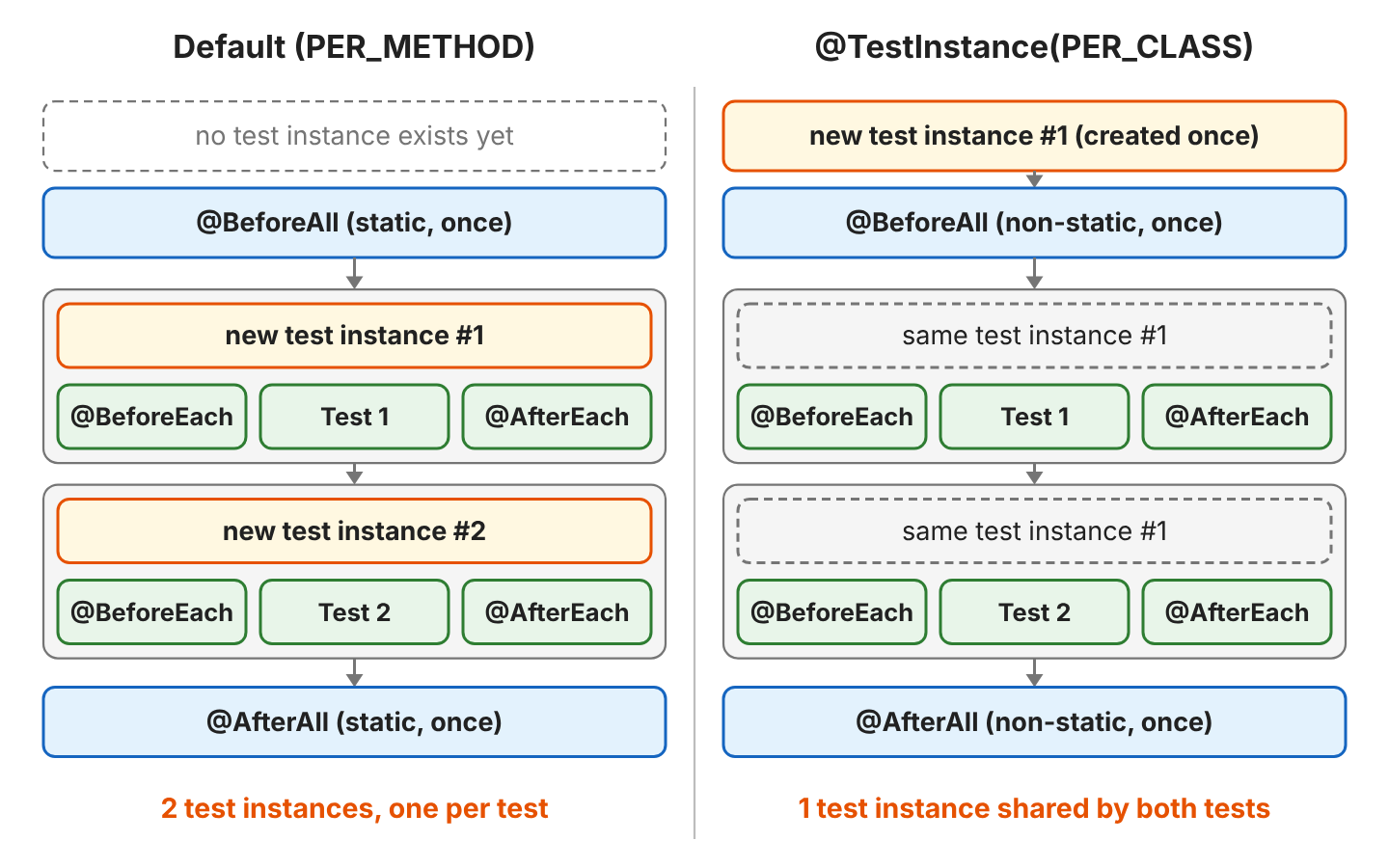
To make PER_CLASS the default for a whole project, we set junit.jupiter.testinstance.lifecycle.default = per_class in src/test/resources/junit-platform.properties. With per_class as the default, every test class in the project can use non-static @BeforeAll and @AfterAll methods.
4. Injecting TestInfo and @TempDir Into @BeforeEach
A @BeforeEach method can declare parameters, and JUnit resolves them through its ParameterResolver extensions (classes that create the value for a parameter). JUnit has built-in resolvers for these parameter types.
- TestInfo gives details of the current test, such as its display name and tags.
- TestReporter publishes extra entries for the current test to the test report.
- RepetitionInfo gives the current and the total repetition number of a @RepeatedTest.
- A Path parameter annotated with @TempDir gets a new temporary directory that JUnit deletes after the test.
The following example writes a playlist file into the temporary directory and logs the display name of the test that the setup prepares.
Path playlistFile;

@BeforeEach
void writePlaylistFile(TestInfo testInfo, @TempDir Path tempDir) throws IOException {
  playlistFile = tempDir.resolve("playlist.txt");
  Files.write(playlistFile, List.of("Intro", "Outro"));
  System.out.println("Setting up '" + testInfo.getDisplayName() + "' in " + tempDir.getFileName());
}

@Test
@DisplayName("reads two songs")
void readsSongs() throws IOException {
  assertEquals(List.of("Intro", "Outro"), Files.readAllLines(playlistFile));   // passes
}
Setting up 'appends a song' in junit-1205771305770451532
Setting up 'reads two songs' in junit-15448790660950508017Each test got a different directory, so appendsSong() can change its file without breaking readsSongs(). The call testInfo.getDisplayName() returns the @DisplayName text, which helps when we log which test a setup step belongs to.
5. @BeforeEach Methods in a Superclass
@BeforeEach methods are inherited from superclasses and interface default methods, as long as the subclass does not override them. JUnit runs the superclass @BeforeEach method before the @BeforeEach methods of the subclass, so the subclass setup can use what the superclass created. For @AfterEach, the order is reversed. For example, a music app with many playlist test classes keeps the shared setup in one abstract base class. In the following example, BasePlaylistTest creates the playlist, and RockPlaylistTest adds a song to it.
abstract class BasePlaylistTest {
  protected Playlist playlist;

  @BeforeEach
  void createPlaylist() {
    playlist = new Playlist("base");
    System.out.println("1. BasePlaylistTest.createPlaylist()");
  }

  @AfterEach
  void printSongs() { System.out.println("5. BasePlaylistTest.printSongs(): " + playlist.songs()); }
}

class RockPlaylistTest extends BasePlaylistTest {

  @BeforeEach
  void addRockSongs() {
    playlist.add("Thunder");                   // playlist is not null here
    System.out.println("2. RockPlaylistTest.addRockSongs()");
  }

  @Test
  void hasRockSong() { ... }                   // expects ["Thunder"]

  @AfterEach
  void afterRock() { System.out.println("4. RockPlaylistTest.afterRock()"); }
}
1. BasePlaylistTest.createPlaylist()
2. RockPlaylistTest.addRockSongs()
3. @Test hasRockSong
4. RockPlaylistTest.afterRock()
5. BasePlaylistTest.printSongs(): [Thunder]The superclass methods wrap the subclass methods, so the parent setup runs first and the parent cleanup runs last. Within a single class, JUnit gives no order guarantee for several @BeforeEach methods.
6. What Happens When @BeforeEach Throws an Exception?
When a @BeforeEach method throws an exception, JUnit skips the test method and reports the test as failed with that exception. The @AfterEach methods still run, so cleanup code must handle fields that the setup never assigned. In FailingSetupDemo, the method loadPlaylist() throws before playlist is assigned.
@BeforeEach
void loadPlaylist() {
  System.out.println("@BeforeEach loadPlaylist()");
  throw new IllegalStateException("Playlist file not found: road-trip.txt");
}

@Test
void addSong() {
  System.out.println("@Test addSong");      // never printed
  ...
}

@AfterEach
void cleanUp() {
  System.out.println("@AfterEach cleanUp(), playlist = " + playlist);
}
@BeforeEach loadPlaylist()
@AfterEach cleanUp(), playlist = null
[ERROR] Tests run: 1, Failures: 0, Errors: 1, Skipped: 0, Time elapsed: 1.164 s <<< FAILURE! -- in com.howtodoinjava.beforeeach.demo.FailingSetupDemo
[ERROR] com.howtodoinjava.beforeeach.demo.FailingSetupDemo.addSong -- Time elapsed: 0.795 s <<< ERROR!
java.lang.IllegalStateException: Playlist file not found: road-trip.txt
at com.howtodoinjava.beforeeach.demo.FailingSetupDemo.loadPlaylist(FailingSetupDemo.java:21)Maven Surefire reports the test under its own name, addSong, as an error rather than a failure, because the exception is not an AssertionError. The exception affects only the current test, since JUnit calls @BeforeEach again for the next one. When a setup step should skip the test instead of failing it, for example when a database is not available, we use an assumption such as assumeTrue() in the @BeforeEach method.
7. JUnit @BeforeEach FAQs
7.1. Can a @BeforeEach Method Be Static?
No. A @BeforeEach method runs on the test instance, so JUnit reports a static one as a discovery error and runs no test in the class.
(1) [ERROR] @BeforeEach method 'static void com.howtodoinjava.beforeeach.demo.StaticBeforeEachDemo.createPlaylist()' must not be static.7.2. Can a @BeforeEach Method Be Private?
Yes, in JUnit 6.1.3, but JUnit logs a warning for it. The @BeforeEach Javadoc says that private lifecycle methods are strongly discouraged and will be disallowed in a future release, so we use package-private (no modifier) instead.
(1) [WARNING] @BeforeEach method 'private void com.howtodoinjava.beforeeach.demo.PrivateBeforeEachDemo.createPlaylist()' should not be private. This will be disallowed in a future release.7.3. In Which Order Do Multiple @BeforeEach Methods Run?
JUnit does not guarantee the order of several @BeforeEach methods declared in the same class. The methods are sorted by an algorithm that is deterministic but intentionally non-obvious, so the order can look alphabetical and still change after a rename. The JUnit team recommends at most one @BeforeEach method per class when the setup steps depend on each other. When we need a fixed order, we call the steps from one @BeforeEach method, or move the first step to a superclass.
7.4. What Happens When a Subclass Overrides the @BeforeEach Method?
Only the subclass version runs. In OverridingSetupTest, createPlaylist() overrides the method of BasePlaylistTest, and the test sees a playlist named override. The @AfterEach method of the superclass still runs, because the subclass did not override it.
1. OverridingSetupTest.createPlaylist()
5. BasePlaylistTest.printSongs(): []
7.5. Should We Use @BeforeEach or a Field Initializer?
With the default per-method lifecycle, both work, because JUnit creates a new test instance for every test, so Playlist playlist = new Playlist(“x”); also gives each test a fresh object. We use @BeforeEach when the setup needs a parameter such as TestInfo or @TempDir, or when it can throw a checked exception. With PER_CLASS, a field initializer runs only once, so we create the fresh object in @BeforeEach instead. @BeforeEach also runs after extension callbacks such as MockitoExtension, so @Mock fields are already set when the setup method uses them.
8. Conclusion
@BeforeEach runs before every test method, including each repetition of a @RepeatedTest and each invocation of a @ParameterizedTest, so each test starts with fresh objects. The method must not be static and should not be private. It can take parameters such as TestInfo and @TempDir Path. Superclass @BeforeEach methods run first, and an exception in @BeforeEach fails the test while @AfterEach still runs. For expensive setup that the tests share, we use @BeforeAll, which is static unless the class uses @TestInstance(PER_CLASS).
9. References
- @BeforeEach Javadoc (JUnit 6.1.3)
- JUnit User Guide: Test Instance Lifecycle
- JUnit User Guide: Dependency Injection for Constructors and Methods
- JUnit User Guide: Relative Execution Order of User Code and Extensions
Happy Learning !!
