

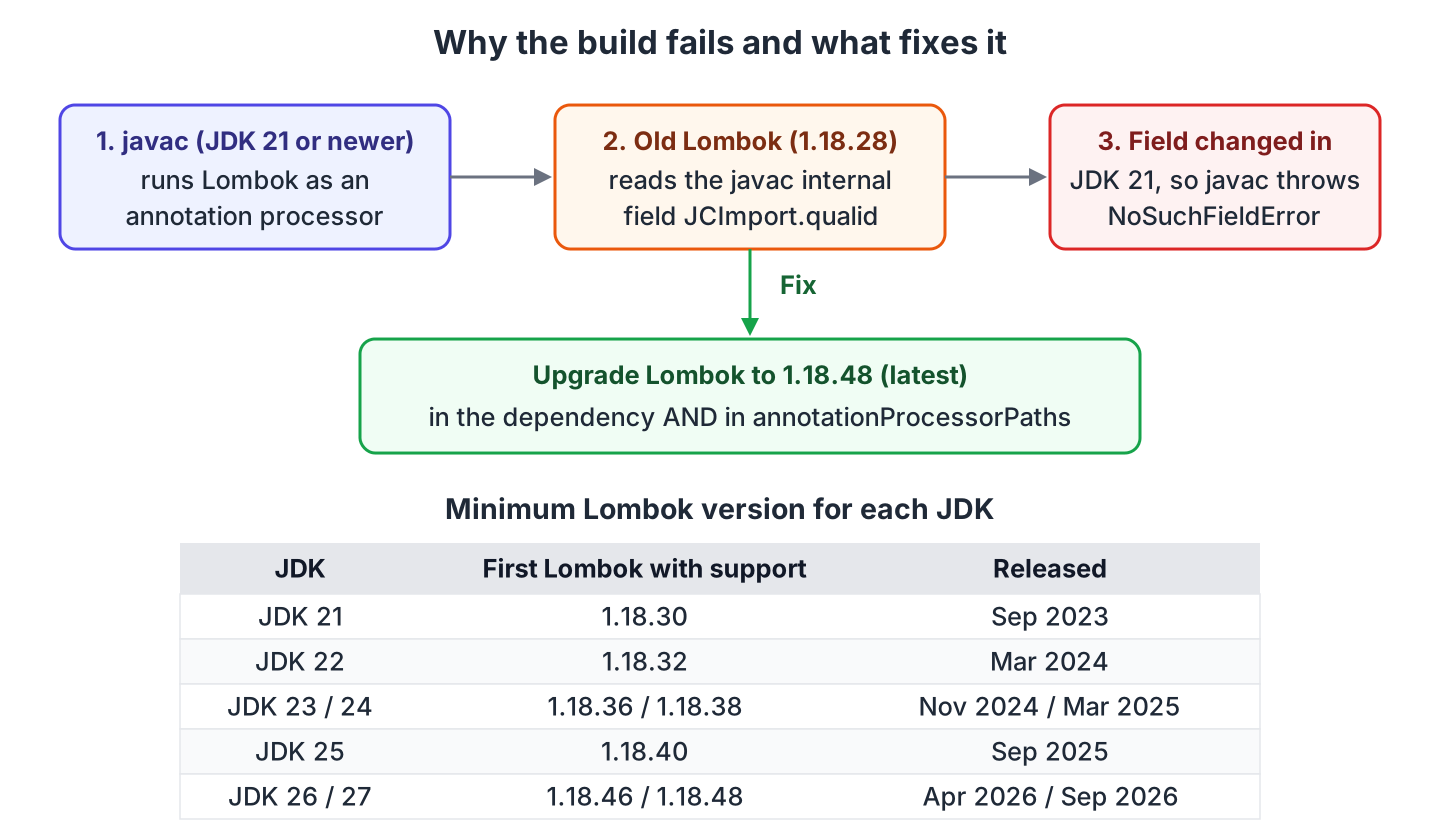
The build error NoSuchFieldError: Class com.sun.tools.javac.tree.JCTree$JCImport does not have member field ‘com.sun.tools.javac.tree.JCTree qualid’ means that an old Lombok version (1.18.28 or older) is compiling our code on JDK 21 or newer. The fix is to upgrade Lombok to the latest version, 1.18.48 today. Lombok reads an internal part of the Java compiler that changed in JDK 21, so every older Lombok fails on the first class it compiles.
We see the error right after moving a Java or Spring Boot project to a newer JDK. Maven prints it as “Fatal error compiling”, Gradle fails the compileJava task, and IntelliJ IDEA shows a red “java:” line in the Build window.
The following example is the Maven fix. If the compiler plugin also lists Lombok under annotationProcessorPaths, we change that version too, as section 2 shows.
<dependency>
  <groupId>org.projectlombok</groupId>
  <artifactId>lombok</artifactId>
  <version>1.18.48</version>
  <scope>provided</scope>
</dependency>
Notice that we use 1.18.48 and not 1.18.30, the first version with JDK 21 support, because each new JDK needs a newer Lombok again. Next we look at the cause, the Gradle and IDE fixes, how to check which version a build uses, and which Lombok each JDK needs.
1. What Causes the NoSuchFieldError JCTree$JCImport Error
Lombok is not a normal library. It runs inside javac while our code compiles, and it adds the getters, setters and constructors for the fields we annotate. To do that, Lombok reads internal javac classes such as com.sun.tools.javac.tree.JCTree. These classes are not a public API, so the JDK team can change them in any release.
In JDK 21, the type of the qualid field in JCTree$JCImport changed. Lombok 1.18.28 and older still look for the old field, so javac throws NoSuchFieldError and the build stops with a message like the following.
[ERROR] Failed to execute goal org.apache.maven.plugins:maven-compiler-plugin:3.16.0:compile
  (default-compile) on project lombok-nosuchfielderror: Fatal error compiling:
  java.lang.NoSuchFieldError: Class com.sun.tools.javac.tree.JCTree$JCImport
  does not have member field 'com.sun.tools.javac.tree.JCTree qualid' -> [Help 1]
Lombok 1.18.30, released in September 2023, added JDK 21 support and fixed this message. Every later JDK changed other internals again, so the same old Lombok prints a different message on JDK 23 and newer. The cause and the fix stay the same. For example, Lombok 1.18.28 on JDK 25 fails with ExceptionInInitializerError and the text com.sun.tools.javac.code.TypeTag :: UNKNOWN.
2. Fix the Error in Maven
A pom.xml can name Lombok in two places, and both must get the new version. The first is the normal dependency with provided scope. The second is the annotationProcessorPaths list of the maven-compiler-plugin, which the Lombok Maven setup requires from JDK 23 on. When that list is present, javac loads Lombok from it and ignores the dependency, so an old version there fails the build even when the dependency is new.
<plugin>
  <groupId>org.apache.maven.plugins</groupId>
  <artifactId>maven-compiler-plugin</artifactId>
  <version>3.16.0</version>
  <configuration>
    <annotationProcessorPaths>
      <path>
        <groupId>org.projectlombok</groupId>
        <artifactId>lombok</artifactId>
        <version>1.18.48</version>
      </path>
    </annotationProcessorPaths>
  </configuration>
</plugin>
In a Spring Boot project, the parent POM picks the Lombok version, so our dependency has no version element. Spring Boot 3.5.16 and 4.1.1 both pick Lombok 1.18.46, which works on JDK 25 and 26. When we need a newer one, for example for JDK 27, we set one property.
<properties>
  <java.version>25</java.version>
  <lombok.version>1.18.48</lombok.version>
</properties>
Spring Boot 3.1.3 and older pick Lombok 1.18.28 or older, so a project on those versions fails on JDK 21 until we set the property or upgrade Spring Boot. After the change, we run mvn clean compile so that no class files from the old Lombok stay in target/.
[INFO] Running com.howtodoinjava.lombok.RecipeTest
[INFO] Tests run: 1, Failures: 0, Errors: 0, Skipped: 0
[INFO] BUILD SUCCESS
The lombok-maven-plugin (the delombok plugin) is a separate case. Its last release, 1.18.20.0, ships with Lombok 1.18.20 inside and fails on JDK 21 and newer with the same messages. We keep the plugin and give it a newer Lombok in its own dependencies block.
<plugin>
  <groupId>org.projectlombok</groupId>
  <artifactId>lombok-maven-plugin</artifactId>
  <version>1.18.20.0</version>
  <dependencies>
    <dependency>
      <groupId>org.projectlombok</groupId>
      <artifactId>lombok</artifactId>
      <version>1.18.48</version>
    </dependency>
  </dependencies>
</plugin>
3. Fix the Error in Gradle
Gradle has the same two places, the compile classpath and the annotation processor classpath, so both lines get the new version. The Lombok Gradle setup also lists the two test lines, which matter when test classes use Lombok annotations.
dependencies {
  compileOnly 'org.projectlombok:lombok:1.18.48'
  annotationProcessor 'org.projectlombok:lombok:1.18.48'
  testCompileOnly 'org.projectlombok:lombok:1.18.48'
  testAnnotationProcessor 'org.projectlombok:lombok:1.18.48'
}
A Spring Boot Gradle project takes the Lombok version from the Spring Boot dependency management plugin. We override it with the same property name as in Maven, in gradle.properties or as an ext property in the build file.
lombok.version=1.18.48After the change we run gradle clean build. Gradle reuses compiled classes when it thinks nothing changed, so a plain build can keep classes from before the upgrade.
4. Fix the Error in IntelliJ IDEA and Eclipse
The IDE does not bring its own Lombok. IntelliJ IDEA’s Lombok plugin only adds code completion for the generated methods. The compile step runs javac with the Lombok jar from the project dependencies. So the fix is still the pom.xml or build.gradle change, followed by a project reload (the Maven or Gradle tool window, then Reload All Projects) and Build > Rebuild Project. If the error stays, File > Invalidate Caches removes the old Lombok classes that IntelliJ keeps in its own cache.
Two IntelliJ settings can hold an old version on their own. We check both when the build file already has the new version.
| Setting | Where | What to check |
|---|---|---|
| Annotation processors | Settings > Build, Execution, Deployment > Compiler > Annotation Processors | Use “Obtain processors from project classpath”; remove any processor path that points to an old lombok.jar. |
| Project JDK | File > Project Structure > SDK | The build uses the JDK we upgraded to. With an older project SDK, the build passes on our machine while the CI build on the new JDK fails. |
Eclipse works the other way around. It compiles with its own compiler (ECJ) and loads Lombok from the -javaagent:lombok.jar line in eclipse.ini. So we download the latest lombok.jar from projectlombok.org, run java -jar lombok.jar, and let the installer update eclipse.ini. A Maven build started from Eclipse still uses the Lombok version in pom.xml.
5. Find the Lombok Version a Build Uses
When several POMs or a parent decide the version, the first check is the dependency tree. The dependency:tree goal prints the version Maven picked after all dependency management rules.
mvn dependency:tree -Dincludes=org.projectlombok[INFO] com.howtodoinjava:lombok-nosuchfielderror:jar:1.0.0
[INFO] \- org.projectlombok:lombok:jar:1.18.48:providedThe tree does not show the annotation processor path, so we also search the POM and its parents for annotationProcessorPaths. In Gradle, gradle dependencies –configuration annotationProcessor prints the processor classpath. For a Spring Boot project, the managed version is listed in the Spring Boot reference under org.projectlombok.
6. Which Lombok Version Works With Which JDK
Lombok adds support for a new JDK in the first release after that JDK ships. So a project that moves to a new JDK every year needs a Lombok upgrade too. The Lombok changelog lists each of these releases as a “PLATFORM” entry.
| JDK | First Lombok with support | Released |
|---|---|---|
| 21 | 1.18.30 | September 2023 |
| 22 | 1.18.32 | March 2024 |
| 23 | 1.18.36 | November 2024 |
| 24 | 1.18.38 | March 2025 |
| 25 | 1.18.40 | September 2025 |
| 26 | 1.18.46 | April 2026 |
| 27 | 1.18.48 | September 2026 |
A newer Lombok still builds on older JDKs, so there is no reason to pick the minimum version from the table. Use the latest Lombok from Maven Central on every JDK, and upgrade it in the same commit as the JDK.
7. Conclusion
The NoSuchFieldError on JCTree$JCImport is not a bug in our code. It comes from Lombok 1.18.28 or older reading a javac internal that JDK 21 changed. On JDK 23 and newer, the same old Lombok fails with a different message.
The fix is one version number in every place that names Lombok. In Maven that is the dependency and the annotationProcessorPaths, in Gradle the compileOnly and annotationProcessor lines, and in a Spring Boot project the lombok.version property. After the change, a clean build and a project reload in the IDE pick up the new jar.
8. References
- Lombok changelog
- Lombok with Maven
- Lombok with Gradle
- Lombok with IntelliJ IDEA
- Spring Boot managed dependency versions
Happy Learning !!

good explanation.
wow on the dot explanation and solution for the issue i was facing….