
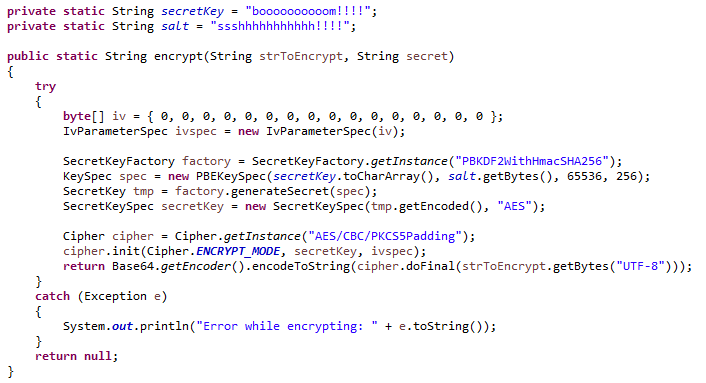
Java supports many secure encryption algorithms but some of them are too weak to be used in security-intensive applications. For example, the Data Encryption Standard (DES) encryption algorithm is considered highly insecure; messages encrypted using DES have been decrypted by brute force within a single day by machines such as the Electronic Frontier Foundation’s (EFF) Deep Crack.
A more secure encryption algorithm is AES – Advanced Encryption Standard. AES was established as a standard by the U.S. National Institute of Standards and Technology (NIST) in 2001. It was chosen through a competition to replace the older Data Encryption Standard (DES). Today, AES encryption is used by the U.S.A. for securing sensitive but unclassified material, so we can say it is enough secure.
Learn to use Java AES-256-bit encryption to create secure passwords and decryption for password validation.
1. What is AES (Advanced Encryption Standard)?
AES is a widely used symmetric encryption algorithm for securing data through encryption and decryption. AES is a symmetric-key algorithm, which means the same key is used for both encrypting and decrypting data. This key is known as the secret key.
Because it uses the same key for encryption and decryption processes, the sender and the receiver, both must know — and use — the same secret key.
AES operates on fixed-size blocks of data. The data is divided into blocks, and each block is encrypted separately. It is capable of handling 128-bit blocks, using keys sized at 128, 192, and 256 bits. Remember that the larger the key size, the stronger the encryption.
AES can be used with different modes of operation, such as Electronic Codebook (ECB), Cipher Block Chaining (CBC), Galois/Counter Mode (GCM), and others, to address various encryption requirements.
- ECB (Default): In this mode, each block of data is encrypted independently with the same encryption key. This means that identical plaintext blocks will result in identical ciphertext blocks. ECB is not suitable for encrypting large amounts of data or for data with patterns, as it does not provide confidentiality beyond individual blocks.
- CBC: CBC mode addresses the issue of identical plaintext blocks in ECB. It introduces an Initialization Vector (IV) to the first block and XORs the previous ciphertext block with the current plaintext block before encryption. CBC mode provides a higher level of security than ECB and is widely used in secure communication protocols, such as SSL/TLS, IPsec, and VPNs.
AES was intended to be easy to implement in hardware and software, as well as in restricted environments, and offer good defenses against various attack techniques.
2. AES-256 Encryption Example
Java program to encrypt a password (or any information) using AES 256 bits.
- The encrypt() method takes three parameters: the string to encrypt, a secret key, and a salt.
- A random Initialization Vector (IV) is generated for each encryption.
- The provided secret key and salt are used to derive an encryption key using PBKDF2 with SHA-256.
- The secret key is created and used for AES encryption.
- The method returns the encrypted string in Base64 encoding.
In given encryption and decryption example, I have used base64 encoding in UTF-8 charset. It is done for displaying the output of program.
In your application, you can store and validate the data in byte array format as well.
import javax.crypto.Cipher;
import javax.crypto.SecretKey;
import javax.crypto.SecretKeyFactory;
import javax.crypto.spec.IvParameterSpec;
import javax.crypto.spec.PBEKeySpec;
import javax.crypto.spec.SecretKeySpec;
import java.security.SecureRandom;
import java.security.spec.KeySpec;
import java.util.Base64;
import java.io.UnsupportedEncodingException;

public class AES256 {

  private static final int KEY_LENGTH = 256;
  private static final int ITERATION_COUNT = 65536;

  public static String encrypt(String strToEncrypt, String secretKey, String salt) {

    try {

        SecureRandom secureRandom = new SecureRandom();
        byte[] iv = new byte[16];
        secureRandom.nextBytes(iv);
        IvParameterSpec ivspec = new IvParameterSpec(iv);

        SecretKeyFactory factory = SecretKeyFactory.getInstance("PBKDF2WithHmacSHA256");
        KeySpec spec = new PBEKeySpec(secretKey.toCharArray(), salt.getBytes(), ITERATION_COUNT, KEY_LENGTH);
        SecretKey tmp = factory.generateSecret(spec);
        SecretKeySpec secretKeySpec = new SecretKeySpec(tmp.getEncoded(), "AES");

        Cipher cipher = Cipher.getInstance("AES/CBC/PKCS5Padding");
        cipher.init(Cipher.ENCRYPT_MODE, secretKeySpec, ivspec);

        byte[] cipherText = cipher.doFinal(strToEncrypt.getBytes("UTF-8"));
        byte[] encryptedData = new byte[iv.length + cipherText.length];
        System.arraycopy(iv, 0, encryptedData, 0, iv.length);
        System.arraycopy(cipherText, 0, encryptedData, iv.length, cipherText.length);

        return Base64.getEncoder().encodeToString(encryptedData);
    } catch (Exception e) {
        // Handle the exception properly
        e.printStackTrace();
        return null;
    }
  }

}
Do not forget to use the same secret key and salt in encryption and decryption.
3. AES-256 Decryption Example
Java program to decrypt a password (or any information) using AES 256 bits.
- The decrypt() method takes three parameters: the encrypted string, the secret key, and the salt.
- The IV is extracted from the encrypted data.
- The secret key is derived from the provided secret key and salt using PBKDF2 with SHA-256.
- The secret key is then used for AES decryption.
- The method returns the decrypted string.
import javax.crypto.Cipher;
import javax.crypto.SecretKey;
import javax.crypto.SecretKeyFactory;
import javax.crypto.spec.IvParameterSpec;
import javax.crypto.spec.PBEKeySpec;
import javax.crypto.spec.SecretKeySpec;
import java.security.SecureRandom;
import java.security.spec.KeySpec;
import java.util.Base64;
import java.io.UnsupportedEncodingException;

public class AES256 {

  private static final int KEY_LENGTH = 256;
  private static final int ITERATION_COUNT = 65536;

  public static String decrypt(String strToDecrypt, String secretKey, String salt) {

    try {

        byte[] encryptedData = Base64.getDecoder().decode(strToDecrypt);
        byte[] iv = new byte[16];
        System.arraycopy(encryptedData, 0, iv, 0, iv.length);
        IvParameterSpec ivspec = new IvParameterSpec(iv);

        SecretKeyFactory factory = SecretKeyFactory.getInstance("PBKDF2WithHmacSHA256");
        KeySpec spec = new PBEKeySpec(secretKey.toCharArray(), salt.getBytes(), ITERATION_COUNT, KEY_LENGTH);
        SecretKey tmp = factory.generateSecret(spec);
        SecretKeySpec secretKeySpec = new SecretKeySpec(tmp.getEncoded(), "AES");

        Cipher cipher = Cipher.getInstance("AES/CBC/PKCS5Padding");
        cipher.init(Cipher.DECRYPT_MODE, secretKeySpec, ivspec);

        byte[] cipherText = new byte[encryptedData.length - 16];
        System.arraycopy(encryptedData, 16, cipherText, 0, cipherText.length);

        byte[] decryptedText = cipher.doFinal(cipherText);
        return new String(decryptedText, "UTF-8");
    } catch (Exception e) {
        // Handle the exception properly
        e.printStackTrace();
        return null;
    }
  }
}
4. Demo
Let’s test our AES256 encryption and decryption methods with a simple string.
public class AESEncryptDecryptTest {

  public static void main(String[] args) {

    // Define your secret key and salt (keep these secure and don't hardcode in production)
    String secretKey = "MySecretKey";
    String salt = "MySalt";

    // String to be encrypted
    String originalString = "Hello, this is a secret message.";

    // Encrypt the string
    String encryptedString = AES256.encrypt(originalString, secretKey, salt);
    if (encryptedString != null) {
        System.out.println("Encrypted: " + encryptedString);
    } else {
        System.err.println("Encryption failed.");
        return;
    }

    // Decrypt the string
    String decryptedString = AES256.decrypt(encryptedString, secretKey, salt);
    if (decryptedString != null) {
        System.out.println("Decrypted: " + decryptedString);
    } else {
        System.err.println("Decryption failed.");
    }
  }
}
Program output.
Encrypted: 6wbHslctOZuMj8LWSGJAaWrCFidrMfH...  // A new string genearted everytime
Decrypted: Hello, this is a secret message.
We are able to use AES256 encryption to encrypt a string, and decryption to get back the original string from the encrypted string.
5. Conclusion
In this article, we learned to perform string-based AES-256 encryption and decryption. Feel free to customize it according to your needs.
This program should be a starting point for understanding AES-256 encryption. In a production environment, you should consider additional security measures, such as managing secret keys and salts securely and addressing any specific requirements of your application.
Happy Learning !!

if (decryptedString != null) {
should be replaced by
if (!decryptedString.equals(encryptedString)) {
This is merely for testing/verification. You can choose to write whatever you want.
Great job Lokesh.. Wonderful article. I have modified the code to use a file with live data. But the encryption algorithm takes time. For 110 lines it took about a minute to encrypt.
For large data files try using multi-threading with 4 threads (or as many as your system supports) and see if it improves the performance.
Hi Jagan, I am not sure what you are proposing. We use multithreading when we can break a large task into multiple small tasks, and each task runs in a different thread. Here, you have a file and I am assuming that you want to encrypt the whole file as a single input. How multi-threading will help here?
If you plan to somehow break the file content into parts (such as lines), and then encrypt each line independently, store it and later use it; then you can use Callable as discussed in these files in git.
Hi Team,
Thanks for the awesome tutorial.
Do you have an alternative of the same encryptions methods in swift?
Thanks in advance,
Ram
i got error in main method at secreteKey
Rename the secretKey of SecretKeySpec to something else. That should help.
Thanks for the contribution, but you should warn readers about the use of hardcoded salt and IV. I know some people that used your exemple “as is” in a project, hardcoding a fixed salt and a fixed IV for all their encryptions and decryptions!
Error while encrypting: java.security.NoSuchAlgorithmException: PBKDF2WithHmacSHA256 SecretKeyFactory not available
Please see if this helps.
AES 256 encrypt and decrypt method is take too much of time during retrieve multiple rows query , how quickly decrypt multiple rows retrieve using java
You didn’t mention the import statements in the code sample. I am getting conflicts for that when i am trying to use this.Can u provide the import statements too so that we can use that code with out conflicts as it is having some conflicts in importing the some other packages.
import java.security.spec.KeySpec;
import java.util.Base64;
import javax.crypto.Cipher;
import javax.crypto.SecretKey;
import javax.crypto.SecretKeyFactory;
import javax.crypto.spec.IvParameterSpec;
import javax.crypto.spec.PBEKeySpec;
import javax.crypto.spec.SecretKeySpec;
Did you just list “secure passwords” as an example for encryption and decryption? Did you consider using hashing instead of encryption for that?
Password is just an usecase. It can be anything.
what i have to put in string salt=????????
How are people using this code example? You attempt to use secretKey to init spec, before secretKey is even defined. I tried rearranging the order of declarations, but they all depend on something else in a way such that it is impossible to use as written. If I declare secretKey before the KeySpec declaration – that won’t work because secretKey declaration requires tmp which needs spec and spec can’t be defined until secret key exists.
Quoted code snippet (from encrypt):
SecretKeyFactory factory = SecretKeyFactory.getInstance(“PBKDF2WithHmacSHA256”);
KeySpec spec = new PBEKeySpec(secretKey.toCharArray(), salt.getBytes(), 65536, 256);
SecretKey tmp = factory.generateSecret(spec);
SecretKeySpec secretKey = new SecretKeySpec(tmp.getEncoded(), “AES”);
Nevermind I got it. The variable names overlap, but the toCharArray() is in reference to the string value.
Hi Lokesh,
I want to use your encryption and decryption methods. But I m getting this error ;
“java.security.NoSuchAlgorithmException: PBKDF2WithHmacSHA256 SecretKeyFactory not available”.
I cant solve this problem.
I use Java 1.6 version.
How can I fix it.
Thank you,
hi Lokesh,
I have used your example to do AES encrypt/decrypt. Here is problem, if i run it standalone it works, however when i copy the encrypted string to a properties file and read it in groovy/grails webapplication ( which uses your code to decrypt), i am getting error like :
I am getting java.lang.IllegalArgumentException: Illegal base64 character 5c.
so i changed the decode code to the following :
return new String(cipher.doFinal(Base64.getMimeDecoder().decode(strToDecrypt)));
Now its giving me a different error :
Error while decrypting: java.lang.IllegalArgumentException: Last unit does not have enough valid bits
btw the input string i have which is encrypted by your example is of length 15 characters.
and the encrypted string is of length 24 characters
this is the encrypted string :
vHsfqebYndXnWc78jk/qsQ==
I have been trying to make this work for the last two days with little success, as always in a time crunch, any help is truly appreciated.
Thanks
Chandra
That’s weird. I know you may probably have already crosschecked it, but be sure you are not copying any extra whitespaces.
AES uses the same secret key is used for the both encryption and decryption. Unlike AES 128 bit encryption and decryption, if we need a stronger AES 256 bit key, we need to have Java cryptography extension (JCE) unlimited strength jurisdiction policy files.
If we have not installed the JCE we will be getting the error like “java.security.InvalidKeyException: Illegal key size” or “org.apache.xml.security.encryption.XMLEncryptionException: Illegal key size or default parameters”
If i pass key as 256 bit(string length as 32) the algorithm gives the error as invalid key , Is this implementation for 256bit key or just 128 bit key( string length 16 )?