
The body of an HttpServletRequest is a stream that the servlet container gives us only once, so to read the HttpServletRequest body multiple times we copy its bytes into an HttpServletRequestWrapper that returns a new stream on every call. The filter and the servlet both read the same bytes, and neither of them sees an empty body.
We need this when a filter must look at the raw body before the servlet or a Spring controller parses it, for example to verify the signature of a webhook, to log a JSON payload or to check a hash. The following example is the doFilter() method of such a filter, written for Jakarta Servlet 6.1 on Tomcat 11.
protected void doFilter(HttpServletRequest request, HttpServletResponse response, FilterChain chain) throws IOException, ServletException {
    CachedBodyRequest cached = new CachedBodyRequest(request, 64 * 1024);                       // reads the stream once, at most 64 KB
    byte[] body = cached.getBody();                                                             // 1st read, for the filter
    String json = new String(cached.getInputStream().readAllBytes(), StandardCharsets.UTF_8);   // 2nd read, a fresh stream
    chain.doFilter(cached, response);                                                           // the servlet reads it a 3rd time
}
Notice that the filter passes cached, not the original request, to the chain. We start with why the second read returns nothing, build the CachedBodyRequest wrapper, use it to verify a payment webhook, test it, and look at form posts and the Spring alternative.
1. Why the Request Body Can Be Read Only Once
The container does not keep the body of a request in memory. The ServletInputStream returned by getInputStream() reads the bytes from the network connection, and every byte we read is gone from the stream. A second call to getInputStream() returns the same stream object, which is already at its end.
A second rule applies as well. A ServletRequest gives us either the byte stream or the character reader, never both, so getReader() throws IllegalStateException after getInputStream() was called, and the other way round.
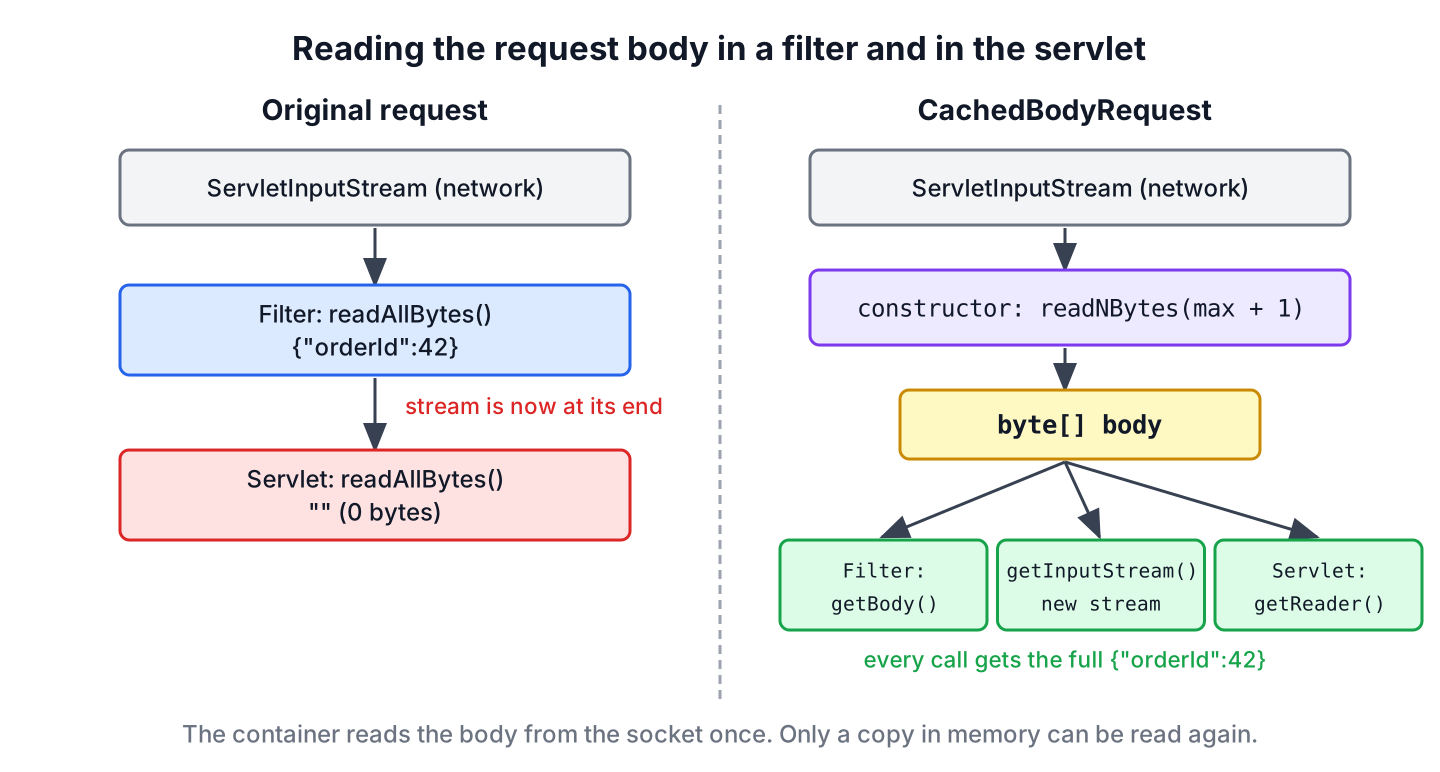
The following example is a filter that logs the body and passes the original request on, which is the mistake we want to avoid.
@WebFilter("/naive/*")
public class BodyLogFilter extends HttpFilter {

    @Override
    protected void doFilter(HttpServletRequest request, HttpServletResponse response, FilterChain chain) throws IOException, ServletException {
        String body = new String(request.getInputStream().readAllBytes(), StandardCharsets.UTF_8);
        getServletContext().log("filter read: " + body);
        chain.doFilter(request, response);                     // the stream is already at its end
    }
}
A servlet mapped to /naive/echo reads the body again and prints what it got. On Tomcat 11 the filter logs the JSON, and the servlet reads zero bytes.
curl -X POST -H "Content-Type: application/json" -d '{"orderId":42,"status":"PAID"}' http://localhost:8080/naive/echoINFO: filter read: {"orderId":42,"status":"PAID"}
servlet read: []The servlet does not get an exception, only an empty body. With a JSON parser in the servlet, the error appears later as a parse failure such as “No content to map” or, in Spring MVC, as “Required request body is missing”, which makes the cause hard to find.
2. A Wrapper to Read the HttpServletRequest Body Multiple Times
The HttpServletRequestWrapper class implements every method of HttpServletRequest by calling the wrapped request. We extend it, read the body once in the constructor, and override only getInputStream() and getReader(), so headers, parameters and attributes still come from the original request.
The constructor reads at most maxBytes + 1 bytes with readNBytes(). A body that is larger throws BodyTooLargeException, so a client cannot fill the heap with a huge upload.
public class CachedBodyRequest extends HttpServletRequestWrapper {

    private final byte[] body;

    public CachedBodyRequest(HttpServletRequest request, int maxBytes) throws IOException {
        super(request);
        byte[] bytes = request.getInputStream().readNBytes(maxBytes + 1);
        if (bytes.length > maxBytes) {
            throw new BodyTooLargeException(maxBytes);
        }
        this.body = bytes;
    }

    @Override
    public ServletInputStream getInputStream() {
        return new CachedBodyInputStream(body);              // a new stream on every call
    }

    @Override
    public BufferedReader getReader() {
        String encoding = getCharacterEncoding();
        Charset charset = encoding != null ? Charset.forName(encoding) : StandardCharsets.UTF_8;
        return new BufferedReader(new InputStreamReader(getInputStream(), charset));
    }

    public byte[] getBody() {
        return body.clone();
    }
}
public class BodyTooLargeException extends IOException {
public BodyTooLargeException(int maxBytes) {
super("Request body is larger than " + maxBytes + " bytes");
}
}The getReader() method uses the charset from the Content-Type header and falls back to UTF-8, which is the encoding JSON requires. A plain new InputStreamReader(stream) would use the JVM default charset, which is UTF-8 since Java 18 but ignores a charset that the client declared, such as ISO-8859-1.
2.1. The ServletInputStream Over the Cached Bytes
A ServletInputStream subclass must implement read() and the three non-blocking methods isFinished(), isReady() and setReadListener(), which Servlet 3.1 added for async I/O. The bytes are already in memory, so isReady() is always true and the listener can be told at once that all data is there.
public class CachedBodyInputStream extends ServletInputStream {

    private final ByteArrayInputStream in;

    public CachedBodyInputStream(byte[] body) {
        this.in = new ByteArrayInputStream(body);
    }

    @Override
    public int read() {
        return in.read();
    }

    @Override
    public int read(byte[] buffer, int offset, int length) {
        return in.read(buffer, offset, length);              // bulk reads without one call per byte
    }

    @Override
    public boolean isFinished() {
        return in.available() == 0;
    }

    @Override
    public boolean isReady() {
        return true;
    }

    @Override
    public void setReadListener(ReadListener listener) {
        try {
            if (!isFinished()) {
                listener.onDataAvailable();
            }
            listener.onAllDataRead();
        } catch (IOException e) {
            listener.onError(e);
        }
    }
}
Overriding the bulk read(byte[], int, int) matters for speed. Without it, InputStream calls the single-byte read() once per byte, which JSON parsers and readAllBytes() would do thousands of times per request.
3. Verifying a Payment Webhook Signature
A payment provider calls our /webhooks/payment endpoint when an order is paid, and it signs the raw JSON body with HMAC-SHA256 and a shared secret. The signature arrives in the X-Signature header. We must compute the HMAC over the exact bytes that were sent, before any parser touches them, and the servlet still needs the same JSON to update the order.
The following filter wraps the request, rejects a body over 64 KB with status 413, compares the signatures with MessageDigest.isEqual(), and passes the wrapper to the chain. The constant-time comparison avoids leaking how many leading characters of a forged signature were correct.
@WebFilter("/webhooks/*")
public class WebhookSignatureFilter extends HttpFilter {

    private static final int MAX_BODY_BYTES = 64 * 1024;
    private byte[] secret;

    @Override
    public void init() {
        secret = Objects.requireNonNullElse(System.getenv("WEBHOOK_SECRET"), "change-me").getBytes(StandardCharsets.UTF_8);
    }

    @Override
    protected void doFilter(HttpServletRequest request, HttpServletResponse response, FilterChain chain) throws IOException, ServletException {
        CachedBodyRequest cached;
        try {
            cached = new CachedBodyRequest(request, MAX_BODY_BYTES);
        } catch (BodyTooLargeException e) {
            response.sendError(HttpServletResponse.SC_REQUEST_ENTITY_TOO_LARGE);
            return;
        }
        byte[] expected = hmacHex(cached.getBody()).getBytes(StandardCharsets.US_ASCII);
        byte[] received = Objects.requireNonNullElse(request.getHeader("X-Signature"), "").getBytes(StandardCharsets.US_ASCII);
        if (!MessageDigest.isEqual(expected, received)) {
            response.sendError(HttpServletResponse.SC_UNAUTHORIZED, "Bad signature");
            return;
        }
        chain.doFilter(cached, response);                        // the servlet reads the body again
    }

    private String hmacHex(byte[] body) throws ServletException {
        try {
            Mac mac = Mac.getInstance("HmacSHA256");
            mac.init(new SecretKeySpec(secret, "HmacSHA256"));
            return HexFormat.of().formatHex(mac.doFinal(body));
        } catch (GeneralSecurityException e) {
            throw new ServletException(e);
        }
    }
}
The servlet reads the body the normal way, as if no filter had read it before.
@WebServlet("/webhooks/payment")
public class PaymentWebhookServlet extends HttpServlet {

    @Override
    protected void doPost(HttpServletRequest request, HttpServletResponse response) throws IOException {
        String json = new String(request.getInputStream().readAllBytes(), StandardCharsets.UTF_8);
        log("payment event " + json);
        response.setContentType("text/plain");
        response.setCharacterEncoding(StandardCharsets.UTF_8);
        response.getWriter().println("received " + json.length() + " chars");
    }
}
We sign the body with openssl to play the provider and send three requests, one with the right signature, one with a wrong signature and one with a 70 KB body.
BODY='{"orderId":42,"status":"PAID"}'
SIG=$(printf '%s' "$BODY" | openssl dgst -sha256 -hmac change-me -hex | awk '{print $2}')
curl -X POST -H "Content-Type: application/json" -H "X-Signature: $SIG" -d "$BODY" http://localhost:8080/webhooks/payment
curl -s -o /dev/null -w "%{http_code}\n" -X POST -H "X-Signature: abc" -d "$BODY" http://localhost:8080/webhooks/payment
curl -s -o /dev/null -w "%{http_code}\n" -X POST --data-binary @big.json http://localhost:8080/webhooks/payment
received 30 chars
401
413The servlet received all 30 characters after the filter had read them for the HMAC. Annotations register the filter and the servlet in this example. In a web.xml with the Servlet 6.1 schema, the same filter needs a <filter> and a <filter-mapping> element, as the Java servlets tutorial shows.
4. Testing the Wrapper Without a Server
The spring-test module contains MockHttpServletRequest, a plain Jakarta Servlet request that works without Spring and without a container. It behaves like a real request here. The second read of the original stream returns nothing, and getReader() after getInputStream() throws.
MockHttpServletRequest raw = new MockHttpServletRequest("POST", "/webhooks/payment");
raw.setContent("{\"orderId\":42}".getBytes(StandardCharsets.UTF_8));
String firstRead = new String(raw.getInputStream().readAllBytes(), StandardCharsets.UTF_8);    // "{"orderId":42}"
String secondRead = new String(raw.getInputStream().readAllBytes(), StandardCharsets.UTF_8);   // ""
BufferedReader reader = raw.getReader();                                                       // IllegalStateException
The wrapper returns the full body on every call, through the stream as well as the reader.
MockHttpServletRequest request = new MockHttpServletRequest("POST", "/webhooks/payment");
request.setContent("{\"orderId\":42}".getBytes(StandardCharsets.UTF_8));
CachedBodyRequest cached = new CachedBodyRequest(request, 1024);
String viaStream = new String(cached.getInputStream().readAllBytes(), StandardCharsets.UTF_8);   // "{"orderId":42}"
String viaStreamAgain = new String(cached.getInputStream().readAllBytes(), StandardCharsets.UTF_8);   // "{"orderId":42}"
String viaReader = cached.getReader().readLine();                                               // "{"orderId":42}"
int cachedBytes = cached.getBody().length;                                                      // 14
MockHttpServletRequest tooBig = new MockHttpServletRequest("POST", "/webhooks/payment");
tooBig.setContent(new byte[2048]);
CachedBodyRequest rejected = new CachedBodyRequest(tooBig, 1024); // BodyTooLargeException: Request body is larger than 1024 bytes5. Form Posts and getParameter()
For a form post with the content type application/x-www-form-urlencoded, the container reads the parameters from the body the first time we call getParameter(). Our wrapper does not override getParameter(), so the call goes to the original request, whose stream the wrapper has already consumed.
On Tomcat 11, the logging filter from section 1 in front of a servlet that calls request.getParameter(“name”) shows the problem.
curl -X POST -d "name=pasta" http://localhost:8080/naive/formINFO: filter read: name=pasta
name = nullWe wrap only bodies that the app reads as a stream, such as JSON or XML, and never form posts or multipart uploads. For form posts the filter calls request.getParameterMap() instead, which reads the body once and keeps the parameters for the servlet. A check such as Objects.requireNonNullElse(request.getContentType(), “”).startsWith(“application/json”) in the filter skips the other requests.
6. ContentCachingRequestWrapper in Spring Applications
Spring Framework has its own wrapper, ContentCachingRequestWrapper. It works differently from CachedBodyRequest, because it copies the bytes while the app reads them. The cached copy is complete only after the controller has read the body, so it suits a Spring filter that logs the request after chain.doFilter(), but not a filter that needs the body before the controller.
| Need | CachedBodyRequest | ContentCachingRequestWrapper (Spring 7) |
|---|---|---|
| Read the body before the servlet or controller | Yes | No, the cache is empty until someone reads the stream |
| Read the stream several times | Yes, a new stream per call | No, the stream can still be read only once |
| Log the body after the request | Yes | Yes, with getContentAsByteArray() |
| Size limit | The maxBytes argument | The required cacheLimit constructor argument |
| Form parameters | Not supported | Supported, it rebuilds the cache from getParameterMap() |
In Spring Framework 7, the only constructor is ContentCachingRequestWrapper(HttpServletRequest, int cacheLimit), so every use states how many bytes it keeps. For the webhook check in section 3, a Spring Boot application still needs a wrapper like CachedBodyRequest, registered as a filter bean.
7. Reading the Request Body FAQs
The questions in this part come from Stack Overflow threads about reading a request body twice.
7.1. Why Does getInputStream() Return an Empty Body the Second Time?
Because the stream reads from the network connection and the container does not keep a copy. The second call returns the same stream object at its end, so readAllBytes() returns an empty array. We cache the bytes in a wrapper and return a new stream per call.
7.2. Can We Call getReader() After getInputStream()?
No. The method getReader() throws IllegalStateException if getInputStream() was already called on the request, and the reverse rule applies to getInputStream(). The CachedBodyRequest wrapper lifts this rule, because both methods read from the cached bytes.
7.3. Is It Safe to Cache Large Request Bodies?
Only with a limit. Every cached body stays on the heap until the request ends, so 200 parallel uploads of 50 MB need 10 GB. We set a limit such as 64 KB for webhooks and skip the wrapper for file uploads, which the container already streams to disk.
7.4. Does the Wrapper Work With Async Servlets?
Yes. The setReadListener() method of CachedBodyInputStream calls onDataAvailable() and onAllDataRead() at once, because all bytes are already in memory. The blocking read happens earlier, in the filter, when the wrapper is created.
7.5. Does the Wrapper Change getContentLength()?
No. The header values come from the original request, and the cached body has the same length as the bytes the client sent. A filter that changes the body, for example to remove a field, must also override getContentLength() and getContentLengthLong().
8. Conclusion
The request body is a one-time stream from the network, so a filter that reads it leaves nothing for the servlet. A HttpServletRequestWrapper that reads the bytes once with a size limit and returns a new ServletInputStream per call lets the filter and the servlet read the same body.
We pass the wrapper, not the original request, to chain.doFilter(), wrap only JSON or XML bodies, and use getParameterMap() for form posts. In Spring applications, ContentCachingRequestWrapper covers logging after the request, while reading before the controller still needs our own wrapper.
9. References
- HttpServletRequestWrapper Javadoc (Jakarta Servlet 6.1)
- ServletInputStream Javadoc
- Jakarta Servlet 6.1 specification
- ContentCachingRequestWrapper Javadoc
Happy Learning !!

Where does newly created BufferedReader in below method gets closed to have proper resource maintenance?
@Override
public BufferedReader getReader() throws IOException {
return new BufferedReader(new InputStreamReader(this.getInputStream()));
}
It is used by
HttpServletRequestWrapperand inside it is closed.did you find any solution for multipart requests. I am also facing same issue.
Hi,
I used similar code for creating RequestWraper for our application to implement Req encryption on client side and decryption on server side. But i facing the issue when i upload an image or zip files they are getting corrupted.
If i stop using RequestWrapper which is newly introduced, Upload and download files are working fine.
I feel we need to do something here when request is “multipart”, Please help me what is the fix for this issue.
Thanks in advance.
In my case, I’m working on legacy code and need to make a patch. The problem: an ancient application sends bad HTTP POST requests. I need to always read the http POST data and update it with the correct post and sent back to REST endpoint. If I read data once, then I am not able to read it again. Can you please guide me on this ?
I have an error in the request = new RequestWrapper (HttpServletRequest) request
error is RequestWrapper (org.apache.http.HttpRequest) in RequestWrapper can not be applied to javax.servlet.http.HttpServletRequest
knowing that for the RequestWrapper I used the following import: org.apache.http.impl.client.RequestWrapper
There’s quite a few drawbacks to this if used with Tomcat 8.
Once you get the InputStream from the original request, then you can’t use getParameter(), unless you parse them on your own.
If you first invoke getParameter to try and get them parsed, and then call getInputStream on the original request, you’ll get a stream that has already reached its end, and you can’t read it again.
I was hoping to use this to re-read bodies and send them as attachments when my error filter catches something. It will take a lot more code to get it to parse the bodies for parameters.
Thank you for ur solution. it works well!!
Hi I trying same code on Web Sphere application server but it is not working. Once the request is read it when I chain the request values goes null there.
Let me know if we can use this modification:
public RequestWrapper(HttpServletRequest request) throws IOException { super(request); try { body = IOUtils.toString(request.getInputStream()); } catch (IOException ex) { throw ex; } }I have 2 filters, and I used your code in one of them, eactly like you did in your example. The first time the filter is called, I read body without problem, but when call chain.doFilter the wrapper is called again, and this time (second time) the line “while …” throw an exception because the stream is closed. I have commented the line where bufferedreader is closed and everything works fine. So, I’d like to know why the wrapper was called twice? And how to close the bufferedreader without close inputstream who have been passed in constructor?