

A pointcut expression is a regex-like pattern that tells Spring AOP which method invocations get the extra code execution, such as a logging statement. We write the extra code once, in a method called an advice, and the pointcut picks the methods where the advice runs.
We use pointcut expressions to add logging, auditing or timing to many methods without touching those methods. The class that holds the advice and its pointcut is called an aspect.
The following example lists the most used expressions. Next to each one is the list of methods it matched in the hotel booking project of this post.
execution(* com.howtodoinjava.aop.service.*.*(..))     // every method of every class in the service package
execution(* com.howtodoinjava.aop..*.*(..))            // same, plus all sub-packages of aop
execution(* book*(..))                                 // BookingService.book: name starts with "book"
execution(* *(String))                                 // cancel(String), delete(String): exactly one String
within(com.howtodoinjava.aop.payment.PaymentService+)  // CardPaymentService.charge: PaymentService and subtypes
@annotation(com.howtodoinjava.aop.annotation.Audited)  // cancel, charge: methods annotated with @Audited
bean(*Repository)                                      // bookingRepository: bean name ends with "Repository"
args(String, int)                                      // book, rebook, charge, save: called with (String, int)

serviceLayer() && !audited()                           // && = AND, || = OR, ! = NOT
Notice that the last line combines two named pointcuts with the operators && and !. An aspect puts one of these expressions into an advice annotation, and in the next snippet, @Before runs the log method before each matched call.
@Aspect
@Component
public class LoggingAspect {

  @Before("execution(* com.howtodoinjava.aop.service.*.*(..))")
  public void logServiceCall(JoinPoint jp) {
    System.out.println("[log]    " + jp.getSignature().toShortString()
        + " args=" + Arrays.toString(jp.getArgs()));
  }
}

bookings.book("Lokesh", 3);      // [log]    BookingService.book(..) args=[Lokesh, 3]
Next, we break execution() into its parts and learn the wildcards * and ... After that, we cover the other kinds of expressions, the cases where Spring skips the advice without any error, and how @Order picks which aspect runs first.
1. What Is a Pointcut Expression?
Say a hotel booking app has 30 service methods, and the team wants to log how long each one takes. Copying the timing code into 30 methods is messy, and sooner or later someone forgets one. Spring AOP (aspect-oriented programming) lets us move that code into separate classes, the aspects. A pointcut expression tells Spring which methods an aspect applies to.
Each method call where an advice can run, such as one call of book(), is a join point. In Spring, a join point is always a method call on a Spring bean (an object that Spring creates and manages for us).
Spring does not change our class to add the advice. Spring creates a proxy, which is an extra object that Spring puts in front of our bean. For example, when our code calls bookings.book(), the call first reaches the proxy. The proxy runs the log advice and then calls the real book() method. Each AOP term in the table has a matching class or call in the hotel booking example.
| Term | Meaning | In the example |
|---|---|---|
| Aspect | A class with @Aspect that holds the advice methods | LoggingAspect, AuditAspect, TimingAspect |
| Advice | A method that runs before, after or around a matched method | @Before, @Around, @AfterReturning methods |
| Join point | A place where an advice can run. In Spring AOP, always a method call. | The call of BookingService.book() |
| Pointcut | The expression that picks the join points | execution(* com.howtodoinjava.aop.service.*.*(..)) |
| Proxy | An object in front of the bean. The proxy runs the advice, then calls the bean. | BookingService$$SpringCGLIB$$1 |
The pointcut language comes from AspectJ, an older and bigger AOP tool for Java, and Spring AOP supports only the parts that make sense for method calls on Spring beans. Each expression starts with a keyword, such as execution or within, which is called a designator.
| Designator | Matches methods | Example |
|---|---|---|
| execution | By signature: return type, class, name, parameters | execution(* *(String)) |
| within | Declared in a type or package | within(com.howtodoinjava.aop.service.*) |
| this | Where the proxy object is an instance of the type | this(CardPaymentService) |
| target | Where the real bean behind the proxy is an instance of the type | target(CardPaymentService) |
| args | Whose runtime arguments are instances of the types | args(String, int) |
| @annotation | That carry the annotation | @annotation(Audited) |
| @within | Declared in a class that carries the annotation | @within(org.springframework.stereotype.Repository) |
| @target | Where the class of the real bean carries the annotation | @target(org.springframework.stereotype.Service) |
| @args | Whose runtime arguments have classes with the annotation | @args(com.example.Sensitive) |
| bean | Of a Spring bean with the given name (Spring-only, not in AspectJ) | bean(*Repository) |
The table shortens some type names, but in real code every type outside java.lang needs its full package name.
Spring AOP has one more limit. It never intercepts field access, constructors or calls on objects created with new. For those, an app needs full AspectJ weaving, which means that AspectJ adds the advice code into our compiled classes at compile time or at load time.
1.1. Maven Dependency for Spring Boot 4
In Spring Boot 4, the AOP starter is spring-boot-starter-aspectj. The old spring-boot-starter-aop was renamed, and the last release under the old name on Maven Central is 4.0.0-M2, so a Spring Boot 4.1.1 project cannot use it.
<dependency>
  <groupId>org.springframework.boot</groupId>
  <artifactId>spring-boot-starter-aspectj</artifactId>
</dependency>
The starter brings spring-aop 7.0.9 and aspectjweaver 1.9.25.1. When aspectjweaver is on the classpath, Spring Boot turns on @EnableAspectJAutoProxy for us, so every @Aspect class that is also a @Component is active.
By default, Spring Boot uses CGLIB proxies. A CGLIB proxy is a subclass of our bean class that Spring generates at runtime. If we want JDK proxies, which implement the interfaces of the bean instead, we set spring.aop.proxy-target-class=false.
In a Spring application without Spring Boot, we add spring-aspects and put @EnableAspectJAutoProxy on a @Configuration class. A first aspect in a Spring Boot app needs only the starter and one @Aspect class.
1.2. The Hotel Booking Example
The following example is a small hotel booking app on Java 25 and Spring Boot 4.1.1. The complete project on GitHub runs with mvn spring-boot:run. Note the package names, because most expressions pick methods by package.
com.howtodoinjava.aop
  annotation/Audited             @Audited(action = "CANCEL") marks audited methods
  service/BookingService         book(String, int), cancel(String), rebook(String, int),
                                 rebookThroughProxy(String, int), final countBookings(), private price(int)
  payment/PaymentService         interface: charge(String, int)
  payment/CardPaymentService     implements PaymentService, charge() is @Audited
  repository/BookingRepository   save(String, int), delete(String), count()
  aspect/CommonPointcuts         named @Pointcut methods
  aspect/LoggingAspect           no @Order
  aspect/TimingAspect            @Order(1)
  aspect/AuditAspect             @Order(2)
BookingService is the main bean in the tests, and its cancel() method carries our own @Audited annotation.
@Service
public class BookingService {

  public String book(String guest, int nights) {
    return repository.save(guest, nights) + " (" + price(nights) + ")";
  }

  @Audited(action = "CANCEL")
  public void cancel(String guest) {
    repository.delete(guest);
  }

  public String rebook(String guest, int nights) {
    cancel(guest);                        // self-invocation, see section 7
    return book(guest, nights);
  }
}
2. Pointcut Expression Syntax for execution()
An execution() expression has up to six parts in a fixed format, and a part with a question mark is optional.
execution(modifiers-pattern? ret-type-pattern declaring-type-pattern?name-pattern(param-pattern) throws-pattern?)Only three parts are required, namely the return type, the method name and the parameter list. The image shows each part of a full expression and its wildcard forms.
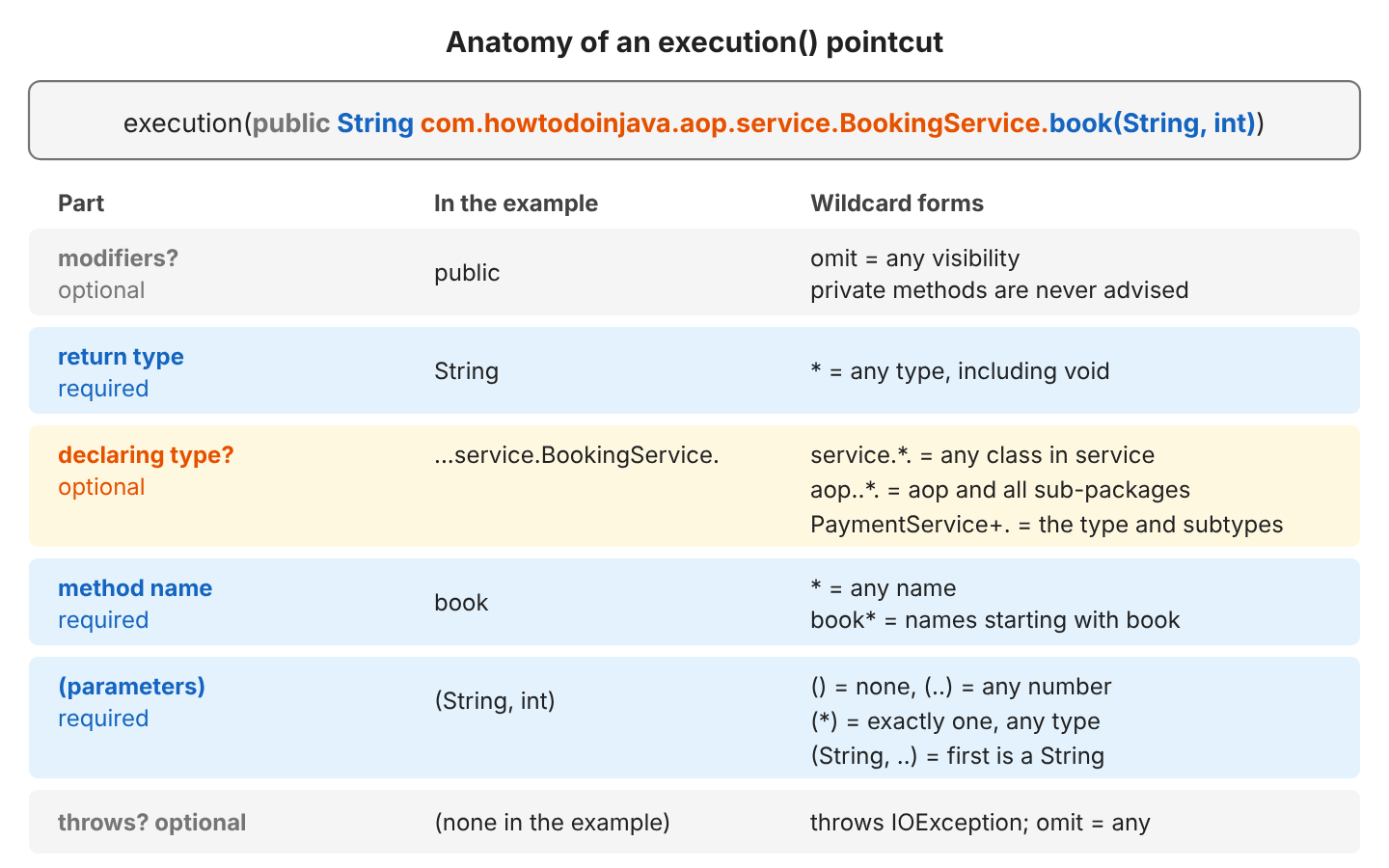
So the shortest valid expression is execution(* *(..)), which means any return type, any method name and any parameters. When we add the class, a dot separates the class from the method name, as in BookingService.book.
2.1. Wildcards * and ..
AspectJ has two wildcards, * and .., plus the + sign. Mixing up * and .. causes most wrong matches.
- The * wildcard matches any characters inside one name. The name can be one package part, one class name, part of a method name, or one type.
- The .. wildcard in a package matches that package and all its sub-packages. In a parameter list, the .. wildcard matches zero or more parameters of any type.
- + after a type matches the type and every subtype. For example, PaymentService+ matches all classes that implement PaymentService.
The class PointcutCheatSheet in the project tests each expression with Spring’s AspectJExpressionPointcut and prints the methods that each expression matches in BookingService, CardPaymentService and BookingRepository.
| Expression | Matched methods |
|---|---|
| execution(* com.howtodoinjava.aop.service.*.*(..)) | All six BookingService methods, including private price |
| execution(* com.howtodoinjava.aop..*.*(..)) | All ten methods in all three packages |
| execution(public String com.howtodoinjava.aop.service.BookingService.book(String, int)) | book |
| execution(* book*(..)) | book |
| execution(int *(..)) | countBookings, count |
| execution(* com.howtodoinjava.aop.service.*.*(..)) on RoomServiceImpl in aop.service.impl | Nothing, because service.* skips sub-packages |
| execution(* com.howtodoinjava.aop.service..*.*(..)) on RoomServiceImpl | findRoom |
The last two rows show a common mistake. RoomServiceImpl sits in service.impl, so service.* misses the class. A single * after a package picks classes in that package only. To include sub-packages, we write ..*.
2.2. Matching Method Parameters
The parameter pattern sets how many arguments a method takes, and their types. String and int need no package name, because Java finds java.lang types and primitive types without one.
| Parameter pattern | Meaning | Matched methods |
|---|---|---|
| () | No parameters | countBookings, count |
| (..) | Any number, including none | All methods |
| (*) | Exactly one parameter of any type | cancel(String), price(int), delete(String) |
| (String) | Exactly one String | cancel, delete |
| (String, ..) | First parameter is a String, any number after it | book, cancel, rebook, rebookThroughProxy, charge, delete, save |
Notice that the private method price(int) matches (*) too, because a pointcut expression matches private methods like any other method. But a match does not mean that the advice runs. As we will see in section 7.2, a Spring proxy never runs advice for a private method.
3. within(), bean() and args() Expressions
The execution() designator picks methods by their signature, whereas the other designators look at something else. For example, within() looks at the class or package, and bean() looks at the bean name. The args() designator looks at the values passed in the call.
3.1. within() for Classes and Packages
The within() designator takes a class or package pattern, with no return type and no parameter list. So it picks every method declared in a matching class.
within(com.howtodoinjava.aop.service.*)                 // all methods of classes in the service package
within(com.howtodoinjava.aop..*)                        // ... and all sub-packages
within(com.howtodoinjava.aop.service.BookingService)    // all methods of one class
within(com.howtodoinjava.aop.payment.PaymentService+)   // CardPaymentService.charge: all implementations
The expressions within(com.howtodoinjava.aop.service.*) and execution(* com.howtodoinjava.aop.service.*.*(..)) pick the same methods. We use within() when only the package or class matters, and execution() when the return type, name or parameters matter too. In section 9, the output line [within] CardPaymentService.charge(..) comes from the PaymentService+ pattern.
3.2. bean() for Spring Bean Names
The bean() designator exists only in Spring, not in AspectJ. It matches the bean name, and * is the only wildcard. BookingRepository gets the default name bookingRepository, so bean(*Repository) picks every method of that bean.
@AfterReturning(pointcut = "bean(*Repository)", returning = "result")
public void logRepositoryResult(JoinPoint jp, Object result) {
  System.out.println("[bean]   " + jp.getSignature().getName() + "() returned " + result);
}

bookings.book("Lokesh", 3);      // [bean]   save() returned Lokesh:3
The argument of bean() is always a bean name, never a package or an annotation. So bean(com.example.service.*) or bean(@MyAnnotation *) picks nothing useful. For a package we use within(), and for an annotated class we use @within(). We can combine two bean() expressions like any others, for example bean(*Service) || bean(*Repository).
3.3. args() and Binding the Arguments
The expression args(String, int) checks the types of the values passed at runtime, in any class. In the cheat sheet run, the expression matched book, rebook, rebookThroughProxy, charge and save, because all five methods take a String and an int. To limit the classes, we add a narrow execution() or within() next to args().
The args() designator can also pass the call’s arguments to the advice, which we call binding. We write parameter names instead of types inside args(), and Spring passes the values into the advice method parameters with the same names. The types come from the advice method.
@Before("CommonPointcuts.serviceLayer() && args(guest, nights)")
public void logBookingArgs(String guest, int nights) {
  System.out.println("[args]   guest=" + guest + ", nights=" + nights);
}

bookings.book("Lokesh", 3);      // [args]   guest=Lokesh, nights=3
bookings.cancel("Lokesh");       // no [args] line: cancel() has one parameter
With binding, we do not need to cast the entries of JoinPoint.getArgs(), and the advice runs only for methods with that argument list.
4. Reusing Named Pointcuts With @Pointcut
When ten advices share the same long expression, a change in the package name means ten edits. So we give the expression a name. We put @Pointcut on an empty method, and the method name becomes the name of the expression. Other expressions use that name like a method call.
public class CommonPointcuts {

  @Pointcut("execution(* com.howtodoinjava.aop.service.*.*(..))")
  public void serviceLayer() {}

  @Pointcut("within(com.howtodoinjava.aop.payment.PaymentService+)")
  public void payments() {}

  @Pointcut("bean(*Repository)")
  public void repositories() {}

  @Pointcut("@annotation(com.howtodoinjava.aop.annotation.Audited)")
  public void audited() {}

  @Pointcut("serviceLayer() && !audited()")
  public void unauditedService() {}
}
An advice in the same package writes CommonPointcuts.serviceLayer(), whereas an advice in another package writes the full name, com.howtodoinjava.aop.aspect.CommonPointcuts.serviceLayer(). Inside CommonPointcuts itself, the short form serviceLayer() works. The class with the @Pointcut methods needs no @Aspect and no @Component.
We can join expressions with three operators. The operators work on named pointcuts and on full expressions.
| Operator | Example | Matched methods |
|---|---|---|
| && | within(com.howtodoinjava.aop.service.*) && !@annotation(…Audited) | BookingService methods except cancel |
| || | execution(* *(String)) || execution(* *()) | cancel, countBookings, count, delete |
| ! | !audited() | Every method without @Audited |
In XML config, we write the operators as and, or and not, because && is hard to type inside an XML attribute.
5. Matching and Binding a Custom Annotation
An annotation pointcut picks methods by a marker, not by name. To give a new method the advice, we add the annotation to it. @Audited is our own custom annotation with an action attribute. The annotation needs @Retention(RetentionPolicy.RUNTIME). Without that setting, the annotation is gone when the program runs, so Spring cannot see it and the pointcut matches nothing.
@Target(ElementType.METHOD)
@Retention(RetentionPolicy.RUNTIME)
public @interface Audited {

  String action();
}
The expression @annotation(com.howtodoinjava.aop.annotation.Audited) matches cancel() and charge(). The advice also prints the action value, such as “CANCEL”, so the advice binds the annotation the way args() binds arguments. The expression has the parameter name audited in place of the type, and the advice method declares a parameter Audited audited.
@Aspect
@Order(2)
@Component
public class AuditAspect {

  @Around("@annotation(audited)")
  public Object audit(ProceedingJoinPoint pjp, Audited audited) throws Throwable {
    System.out.println("[audit]  " + audited.action() + " " + pjp.getArgs()[0]);
    return pjp.proceed();
  }
}

bookings.cancel("Lokesh");             // [audit]  CANCEL Lokesh
payments.charge("Lokesh", 300);        // [audit]  CHARGE Lokesh
An @Around advice wraps the real method, so it must call pjp.proceed(), or the real method never runs. The same binding form works for @within(name), @target(name) and @args(name). In the cheat sheet run, @within(org.springframework.stereotype.Repository) matched all three BookingRepository methods, because the @Repository annotation is on the class.
6. this() vs target() in Spring AOP
Every advised call involves two objects, the proxy and the real bean behind it. The this() designator checks the type of the proxy, whereas target() checks the type of the real bean. The type of the proxy depends on how Spring builds it.
- A JDK proxy implements the interfaces of the bean, for example PaymentService, but it is not a CardPaymentService.
- A CGLIB proxy is a subclass of the bean class, so it is also a CardPaymentService.
ThisVsTargetDemo wraps a CardPaymentService in both kinds of proxy using AspectJProxyFactory, and then records which of two advices runs.
@Before("this(com.howtodoinjava.aop.payment.CardPaymentService)")
public void thisAdvice() { fired.add("this"); }

@Before("target(com.howtodoinjava.aop.payment.CardPaymentService)")
public void targetAdvice() { fired.add("target"); }
JDK proxy: $Proxy29 -> advice fired: [target]
CGLIB proxy: CardPaymentService$$SpringCGLIB$$0 -> advice fired: [target, this]| Proxy type | this(CardPaymentService) | target(CardPaymentService) | this(PaymentService) |
|---|---|---|---|
| JDK proxy | No match | Match | Match |
| CGLIB proxy (Spring Boot default) | Match | Match | Match |
For class types, we prefer target() because it matches the same way with both kinds of proxy. An aspect built with this(SomeClass) stops working when somebody sets spring.aop.proxy-target-class=false.
7. Spring AOP Proxy Limitations
Every advice runs inside the proxy, so a call that does not go through the proxy gets no advice, and Spring raises no error for such a call. Four cases cause most of the reports of an aspect that does not run.
7.1. Self-Invocation
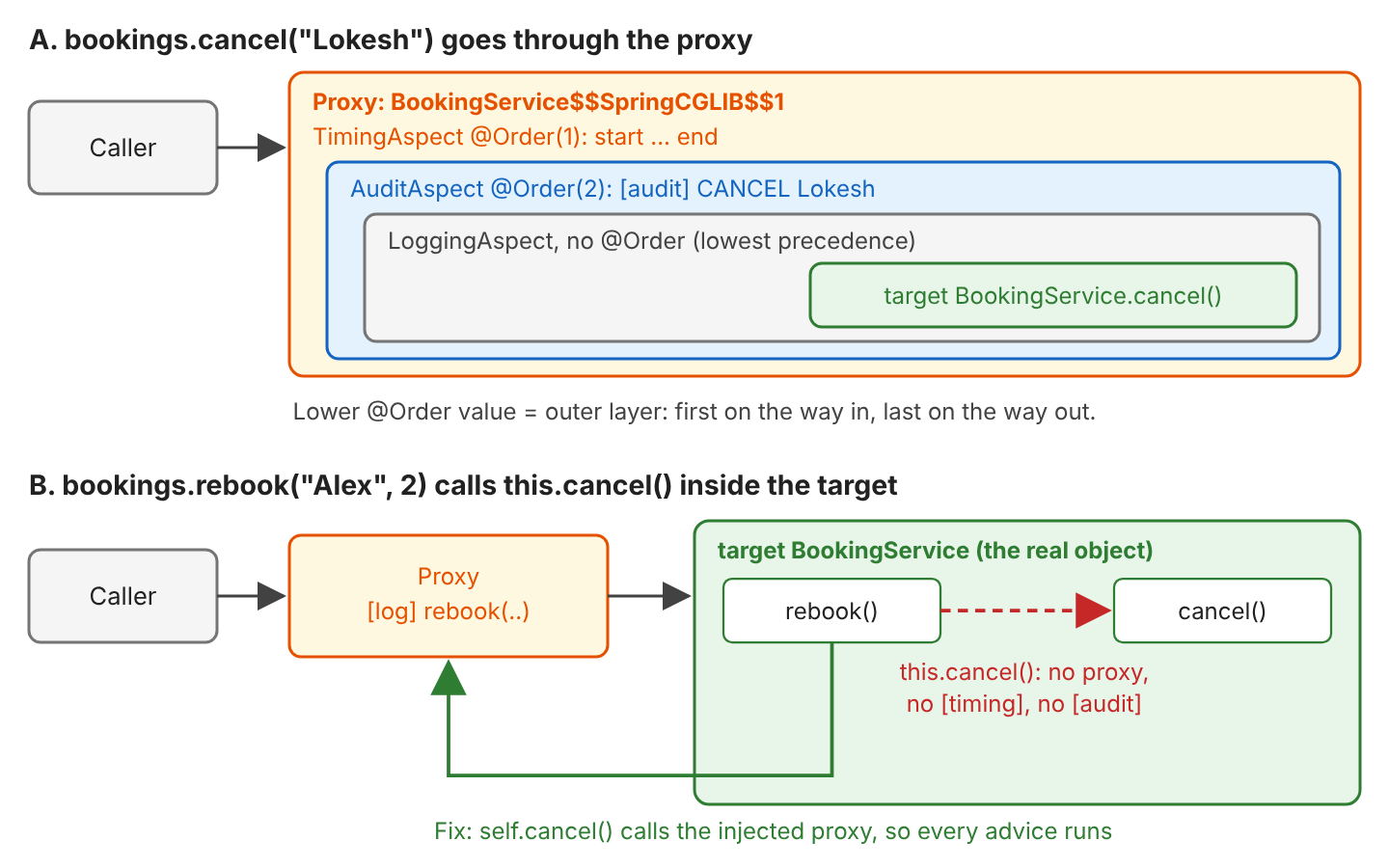
Self-invocation means that a method calls another method of the same object. The method rebook() calls cancel() and book() on this, and inside the bean, this is the real object, not the proxy. So those two inner calls skip every aspect.
[args]   guest=Alex, nights=2
[log]    BookingService.rebook(..) args=[Alex, 2]
[bean]   delete() returned null
[bean]   save() returned Alex:2
result: Alex:2 (200 USD)
The method cancel() did run, yet the output has no [timing], [audit] or [log] BookingService.cancel line. The [bean] lines still appear because BookingRepository is a different bean, and BookingService calls the repository through the repository’s own proxy.
The example fixes self-invocation with self-injection. The bean gets its own proxy in the constructor, as a field named self, and calls the inner methods on self instead of this.
We need the @Lazy annotation here. Without it, startup fails with “The dependencies of some of the beans in the application context form a cycle”, because Spring Boot does not allow circular references by default. With @Lazy, Spring injects a stand-in proxy that finds the real bean on the first call.
public BookingService(BookingRepository repository, @Lazy BookingService self) {
  this.repository = repository;
  this.self = self;
}

public String rebookThroughProxy(String guest, int nights) {
  self.cancel(guest);                 // goes through the proxy
  return self.book(guest, nights);
}
[args] guest=Alex, nights=4
[log] BookingService.rebookThroughProxy(..) args=[Alex, 4]
[timing] start cancel
[audit] CANCEL Alex
[log] BookingService.cancel(..) args=[Alex]
[bean] delete() returned null
[timing] end cancel
[args] guest=Alex, nights=4
[log] BookingService.book(..) args=[Alex, 4]
[bean] save() returned Alex:4
result: Alex:4 (400 USD)There are three fixes for self-invocation.
- Move the inner method to another bean. The Spring team recommends this change as the cleanest fix.
- Inject the bean into itself, as rebookThroughProxy() does.
- Set @EnableAspectJAutoProxy(exposeProxy = true) and call AopContext.currentProxy(). The downside is that AopContext ties the business code to Spring AOP.
The same limit applies to @Transactional and @Async, and to every other Spring feature built on the same proxies, such as @Cacheable.
7.2. Private Methods
LoggingAspect has an advice for execution(private * com.howtodoinjava.aop.service.BookingService.*(..)), and the expression matches price(int), as section 2.2 showed. Yet the line [private] never printed never appears in the output.
There are two reasons. A subclass can’t override a private method. Also, only code inside the class can call a private method, so every call is a self-invocation anyway.
Spring AOP advises a method only when a proxy can override it and the caller goes through the proxy. So public methods get the advice, and with CGLIB proxies, protected and package-private methods get it too.
7.3. Final Methods
A CGLIB proxy cannot override a final method, so a call to a final method runs the method body on the proxy object itself. The proxy is an empty subclass object whose fields Spring never sets. The method countBookings() is final and reads the repository field, which is null on the proxy.
public final int countBookings() {
  return repository.count();
}

int count = bookings.countBookings();     // NullPointerException
Spring warns at startup, and the call fails at runtime.
WARN  CglibAopProxy : Public final method [public final int com.howtodoinjava.aop.service.BookingService.countBookings()] cannot get proxied via CGLIB, consider removing the final marker or using interface-based JDK proxies.
...
NullPointerException: Cannot invoke "com.howtodoinjava.aop.repository.BookingRepository.count()" because "this.repository" is null
When we get a NullPointerException on an injected field of a proxied bean, we look for a final method first. Removing the final modifier fixes the problem. In Kotlin, classes and methods are final by default, which is why Spring Boot Kotlin projects use the kotlin-spring compiler plugin to open them.
7.4. Final Classes
CGLIB cannot create a subclass of a final class at all, so when a pointcut matches any method of a final bean class, the application fails to start. FinalClassProxyTest registers a final InvoiceService and an aspect that matches the class.
Error creating bean with name 'invoiceService' defined in com.howtodoinjava.aop.FinalClassProxyTest$Config:
Could not generate CGLIB subclass of class com.howtodoinjava.aop.FinalClassProxyTest$InvoiceService:
Common causes of this problem include using a final class or a non-visible class
Caused by: java.lang.IllegalArgumentException: Cannot subclass final class com.howtodoinjava.aop.FinalClassProxyTest$InvoiceService
A Java record is final too, so a CGLIB proxy cannot advise a record bean. We can remove final, or give the class an interface and use JDK proxies. Removing final fixes two of the four proxy limits, whereas the other two need a call through the proxy.
| Case | What happens | Fix |
|---|---|---|
| Self-invocation (this.method()) | The inner call runs without advice | Move the method to another bean, or call the method through the proxy |
| Private method | Never advised, no warning | Make the method public, or move the logic to another bean |
| Final method | Not advised. The body runs on the proxy with null fields. | Remove final |
| Final class | The application fails to start | Remove final, or use an interface with JDK proxies |
8. Ordering Aspects With @Order
When two aspects match the same method, @Order on the aspect class decides which aspect runs first. The aspect with the lower @Order value runs first before the method, and last after the method. Spring calls this a higher precedence. TimingAspect has @Order(1) and AuditAspect has @Order(2), and both aspects match the @Audited methods.
@Aspect
@Order(1)
@Component
public class TimingAspect {

  @Around("CommonPointcuts.audited()")
  public Object time(ProceedingJoinPoint pjp) throws Throwable {
    System.out.println("[timing] start " + pjp.getSignature().getName());
    try {
      return pjp.proceed();
    } finally {
      System.out.println("[timing] end   " + pjp.getSignature().getName());
    }
  }
}
[timing] start cancel
[audit] CANCEL Lokesh
[log] BookingService.cancel(..) args=[Lokesh]
[bean] delete() returned null
[timing] end cancelThe [timing] line prints first and last because TimingAspect wraps AuditAspect. LoggingAspect has no @Order, which means the lowest precedence, so the [log] line comes last before the method. Panel A of the image in section 7.1 shows the same nesting, where each aspect wraps the aspects with a higher @Order value. Two more advice ordering rules apply.
- Inside one aspect class, the advice type sets the order, from @Around and @Before to @After, @AfterReturning and @AfterThrowing.
- Two advices of the same type in one aspect run in an undefined order. In the example, [args] happened to print before [log]. When the order matters, we move one advice into a separate aspect with its own @Order.
An aspect can also implement the Ordered interface in place of the @Order annotation.
9. Running and Testing the Example
A CommandLineRunner runs at startup and calls each example method once.
cd spring-aop-pointcuts
mvn spring-boot:runProxy class: BookingService$$SpringCGLIB$$1
--- 1. book("Lokesh", 3) ---
[args] guest=Lokesh, nights=3
[log] BookingService.book(..) args=[Lokesh, 3]
[bean] save() returned Lokesh:3
result: Lokesh:3 (300 USD)
--- 2. cancel("Lokesh"), two ordered aspects ---
[timing] start cancel
[audit]  CANCEL Lokesh
[log]    BookingService.cancel(..) args=[Lokesh]
[bean]   delete() returned null
[timing] end   cancel
--- 3. charge("Lokesh", 300) ---
[timing] start charge
[audit] CHARGE Lokesh
[within] CardPaymentService.charge(..)
[timing] end charge
result: charged Lokesh 300 USDTwo kinds of tests check the pointcuts. The first kind is a plain unit test that checks one expression without starting Spring, so a wrong package or a missing .. shows up in milliseconds.
var pointcut = new AspectJExpressionPointcut();
pointcut.setExpression("execution(* com.howtodoinjava.aop.service.*.*(..))");

boolean matchesBook = pointcut.matches(BookingService.class.getMethod("book", String.class, int.class),
    BookingService.class);                                       // true
boolean matchesCharge = pointcut.matches(CardPaymentService.class.getMethod("charge", String.class, int.class),
    CardPaymentService.class);                                   // false
The second kind is a @SpringBootTest with Spring Boot’s OutputCaptureExtension. It calls the real beans through their proxies and checks the printed lines, so the test shows which advice ran, including the self-invocation and ordering cases.
@Test
void orderOneWrapsOrderTwo(CapturedOutput output) {
  bookings.cancel("Lokesh");
  assertThat(output.getOut()).containsSubsequence(
      "[timing] start cancel", "[audit]  CANCEL Lokesh", "[timing] end   cancel");
}
The project has 20 tests, and mvn test passes all of them.
10. Pointcut Expression FAQs
10.1. Why Is My Spring AOP Advice Not Called?
When an advice is not called, we check the usual causes in this order.
- The aspect class has @Aspect but no @Component, or the class sits outside the packages that Spring scans.
- The starter is missing. In Spring Boot 4, the dependency is spring-boot-starter-aspectj.
- The object was created with new, so Spring never wrapped the object in a proxy.
- The call is a self-invocation, or the method is private or final (section 7).
- The expression is wrong. For example, service.* misses a class in a sub-package, and a unit test with AspectJExpressionPointcut (section 9) shows the matches.
10.2. What Is the Difference Between execution() and within()?
The execution() designator matches a method signature (return type, class, name and parameters). The within() designator looks at the class or package alone, so it picks every method of the class. The expression within(com.howtodoinjava.aop.service.*) picks the same methods as execution(* com.howtodoinjava.aop.service.*.*(..)), and we need execution() as soon as the name or the parameters matter.
10.3. How Do I Match All Methods in a Package and Its Sub-Packages?
We put .. between the package and the class wildcard, as in execution(* com.howtodoinjava.aop..*.*(..)) and within(com.howtodoinjava.aop..*). A single dot, as in aop.*.*(..), matches the classes in aop and not in its sub-packages.
10.4. What Is the Difference Between @annotation() and @within()?
The designator @annotation(Audited) checks the annotation on the method, whereas @within(Audited) checks the annotation on the class that declares the method. So with @within(), one annotation on the class picks all methods of the class.
10.5. Does Spring AOP Need AspectJ?
Yes, but only two parts of aspectjweaver, namely the annotations (@Aspect, @Before) and the expression parser. Spring AOP does not use the AspectJ compiler or weaver, because Spring creates proxies at runtime instead. We need full AspectJ weaving only for join points that proxies cannot reach, which are constructors, field access, private methods, self-invocation and objects created with new.
11. Conclusion
A pointcut expression decides which method calls get an advice. The execution() designator matches the method signature, and it needs the return type, the name and the parameter list. The * wildcard matches one name or type, whereas .. matches sub-packages or any number of parameters.
The within() designator picks by package or class, and bean() picks by bean name. The args() designator picks by argument types. The @annotation() designator picks by a marker annotation, and the advice can receive that annotation as a parameter. Named @Pointcut methods keep long expressions in one place, and &&, || and ! combine them.
Spring AOP works through proxies, so self-invocation, private methods, final methods and final classes get no advice. @Order sets which aspect wraps which. The same expressions work with the other advice types, such as @Before and @AfterReturning advice, and the Spring AOP interview questions help us test what we learned.
12. References
- Spring Framework Reference: Declaring a Pointcut
- Spring Framework Reference: Declaring Advice
- Spring Framework Reference: Proxying Mechanisms
- Spring Boot Reference: Aspect-Oriented Programming
- AspectJ Programming Guide: Pointcuts
- AspectJExpressionPointcut Javadoc
Happy Learning !!

in my case this pointcut is not working. bean(com.example.service.*)
Can we use a generic expression like ResponseEntity<abc> in pointcut
@After(“execution(public ResponseEntity<abc> com.backend.data_access.controller.ControllerV1..*(..))”)
I thought Spring AOP can’t advise private methods? 1.1 states the opposite. Am I missing something?
Spring AspectJ based AOP supports it. Try it to verify.
Great post, thank you!
I have an interesting corner case when I am using the expression like:
“@Pointcut(“!within(org.springframework.data.repository.Repository+)”
because I want to exclude ALL methods in ALL classes implementing Repository Spring interface. When a Java project uses Repository (which is the case 99% of Java project) then everything worked fine, However, if a project does NOT use Repository then my Aspect break at init time and Spring gives me an error that it cannot initialize a bean because it could not locate the Repository type…
Look, I am using NOT (please, see exclamation point in my expression) in my expression thus I assumes that Spring should be smart enough to ignore the logic locating the type Repository if I said NOT…
Is there a way to fix this somehow?
Thank you!
Alex Gordon
Very useful. Thank you so much.
How can I include multiple packages in the pointcut expression ?
e.g Take the logger example in above mentioned comment. I want the logger around
all methods in packages inside the folder com.example.packages
For one package I can use “execution(* com.example.packages.Class1)”
will “execution(* com.example.packages.*)” also work ?
You need to use:
within(com.howtodoinjava..*). See section ‘Matching all methods defined in classes inside package com.howtodoinjava and classes inside all sub-packages as well’Hi Lokesh,
I am using @After advice in my Aspect. The problem I am facing is, all of my methods from the REST Controller are called except only one. I tried lot of things but that specific method is not called in Aspect.
I have used aspect advice as follows.
@After(“execution(* package.Class.methodName (..))”)
Could you please help me know where am I going wrong ?
Thanks in advance.
Hi Lokesh,
I am trying to use aspectJ for logging. There are two things I am trying to do
1. Log entry and exit of every method called Configured using
@Around("execution(public * package..*.*(..))")2. Log execution time for methods having LogTime annotation. Configured using
@Around("execution(public * package..*.*(..)) || @annotation(logTime)")I have created two around advises for this. Now these two advises itself are cross cutting.
I need to log entry and exit for methods having LogTime annotation also.
Only first advise is getting triggered in my case.
Could you please help me know if I am doing anything wrong?
Thanks in advance.
Try :
execution(@LogTime * *.*(..))Also, you may want to try changing the
||operator to&&operator.Thanks for such a helpful info for aop expressions.
Thanks, very nice examples.