
Learn to configure caching in Spring boot application using Ehcache 3.x (JSR-107). Learn to use annotation-based cache config and caching annotations as well as manually update the cache with CacheManager.
1. Maven
1.1. With Spring Boot 3
In Spring Boot 3, we can add the Ehcahce 3.10.x support with the following dependencies. It supports the Jakarta namespace that is needed since Spring Boot 3.
<dependency>
  <groupId>org.springframework.boot</groupId>
  <artifactId>spring-boot-starter-cache</artifactId>
</dependency>
<dependency>
  <groupId>org.ehcache</groupId>
  <artifactId>ehcache</artifactId>
  <classifier>jakarta</classifier>
</dependency>
1.2. With Spring Boot 2
To add ehcache in Spring Boot 2 applications with legacy JAXB namespaces, we can add the following dependencies:
<dependency>
    <groupId>org.springframework.boot</groupId>
    <artifactId>spring-boot-starter-cache</artifactId>
    <version>2.7.2</version></dependency>
<dependency>
    <groupId>javax.cache</groupId>
    <artifactId>cache-api</artifactId>
    <version>1.1.1</version>
</dependency>
<dependency>
    <groupId>org.ehcache</groupId>
    <artifactId>ehcache</artifactId>
    <version>3.8.1</version>
</dependency>
2. Spring Caching with Ehcache
2.1. @EnableCaching
The @EnableCaching annotation enables Spring’s annotation-driven cache management capability and enables support for proxy interceptors when @Cacheable annotated methods are invoked.
import org.springframework.cache.annotation.EnableCaching;
import org.springframework.context.annotation.Configuration;

@Configuration
@EnableCaching
public class CacheConfig {

}
2.2. Cache Configuration
Springs auto-configuration with spring-boot-starter-cache finds Ehcache in the classpath and configures it automatically, once we have added the ehcache.xml file in the classpath.
spring.cache.jcache.config=classpath:ehcache.xmlIn ehcache.xml file, configure the cache names and their attributes. Find the complete list of attributes in the ehcache documentation.
<config
  xmlns:xsi='http://www.w3.org/2001/XMLSchema-instance'
  xmlns='http://www.ehcache.org/v3'
  xmlns:jsr107='http://www.ehcache.org/v3/jsr107'>

  <service>
    <jsr107:defaults enable-statistics="true"/>
  </service>

  <cache alias="employeeCache">
    <key-type>java.lang.Long</key-type>
    <value-type>com.howtodoinjava.model.Employee</value-type>
    <expiry>
      <ttl unit="seconds">10000</ttl>
    </expiry>
    <listeners>
      <listener>
        <class>com.howtodoinjava.caching.CustomCacheEventLogger</class>
        <event-firing-mode>ASYNCHRONOUS</event-firing-mode>
        <event-ordering-mode>UNORDERED</event-ordering-mode>
        <events-to-fire-on>CREATED</events-to-fire-on>
        <events-to-fire-on>UPDATED</events-to-fire-on>
        <events-to-fire-on>EXPIRED</events-to-fire-on>
        <events-to-fire-on>REMOVED</events-to-fire-on>
        <events-to-fire-on>EVICTED</events-to-fire-on>
      </listener>
    </listeners>
    <resources>
      <offheap unit="MB">100</offheap>
    </resources>
  </cache>
</config>
3. CacheEventListener
It is a good idea to log the cache events in the log file for debugging purposes in case we have issues in production. We can use the following event listener which shall be logging the cache events when cache entries are created, removed or updated.
import org.ehcache.event.CacheEvent;
import org.ehcache.event.CacheEventListener;
import org.slf4j.Logger;
import org.slf4j.LoggerFactory;
import org.springframework.stereotype.Component;

@Component
public class CustomCacheEventLogger implements CacheEventListener<Object, Object> {

  private static final Logger LOG = LoggerFactory.getLogger(CustomCacheEventLogger.class);

  @Override
  public void onEvent(CacheEvent cacheEvent) {
    LOG.info("Cache event = {}, Key = {},  Old value = {}, New value = {}", cacheEvent.getType(),
        cacheEvent.getKey(), cacheEvent.getOldValue(), cacheEvent.getNewValue());
  }
}
4. Using @Cacheable Annotation
To cache data that is returned from a method call, we can use @Cacheable annotation on the method. Use its attributes cacheNames and key to refer to cache and key attribute of a cache entry.
@Service
@Log
public class EmployeeService {

  @Cacheable(cacheNames="employeeCache", key="#id")
  public Employee getEmployeeById(Long id) {

    log.info("Getting employee from DB");
    return repository.get(id);
  }
}
5. Spring CacheManager API
Sometimes we may want to use caching in cases where using annotations might not seem the perfect solution. In those cases, we can use org.springframework.cache.CacheManager and org.springframework.cache.Cache abstraction to access and utilize Ehcache for adding and accessing cache entries.
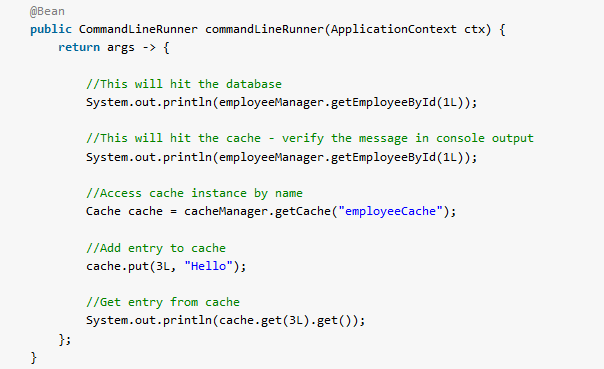
To use CacheManager, we must first autowire into a spring component and use its getCache(name) method to get the cache instance by its name. Once we have access to the cache, we can use it’s get() and put() methods to add and access cache entries.
//1

@Autowired
private CacheManager cacheManager;

//2

Cache cache = cacheManager.getCache("employeeCache");
cache.put(3L, "Hello");
String value = cache.get(3L).get();
6. Demo
We are creating a model class Employee whose instances will be cached.
@Data
@AllArgsConstructor
@NoArgsConstructor
public class Employee implements Serializable {

  private Long id;
  private String firstName;
  private String lastName;
}
Now in the demo application class, I am testing the annotation-based cache access using @Cacheable annotation and manual cache access using CacheManager.
@SpringBootApplication
public class App implements CommandLineRunner {

  public static void main(String[] args) {
    SpringApplication.run(App.class, args);
  }

  @Autowired
  private CacheManager cacheManager;

  @Autowired
  private EmployeeService employeeService;

  @Override
  public void run(String... args) throws Exception {

    //This will hit the database
    employeeService.getEmployeeById(1L);

    //This will hit the cache - verify the message in console output
    employeeService.getEmployeeById(1L);
  }
}
Program output.
...o.s.cache.interceptor.CacheInterceptor   : No cache entry for key '1' in cache(s) [employeeCache]
...c.howtodoinjava.service.EmployeeService  : Getting employee from DB
...c.h.caching.CustomCacheEventLogger       : Cache event = CREATED, Key = 1,  Old value = null, New value = Employee(id=1, firstName=Alex, lastName=Gussin)

...o.s.cache.interceptor.CacheInterceptor   : Cache entry for key '1' found in cache 'employeeCache'

...org.ehcache.core.EhcacheManager          : Cache 'employeeCache' removed from EhcacheManager.
Drop me your questions related to this Spring boot cache example using Ehcache 3 in the comments.
Happy Learning !!

Hi. What if we have several instances of this application?
It depends on what you want to do. If you want to associate each application instance with its own local cache, you can consider caffeine. If you want to setup a dedicated cache server accessed by all application instaces, then consider using redis or hazelcast.
For ehcache, you can use Terracotta server.
Thank you ! <3
It works better with the classifier !
spring boot3 A component required a bean named ‘cacheManager’ that could not be found.
Did you tried running the demo application (link at post end). Please verify your changes with it.
Hi,
1.How to configure ehcache3 to “LFU” in
ehcache.xmlfile?, and how to implementpublic boolean adviseAgainstEviction(Object o, Object o2)to have LFU eviction policy?2.It seems that the Spring application doesn’t refer to
ehcache.xml, even though the file is in the resources folder, andapplication.propertieshas –spring.cache.jcache.config=classpath:ehcache.xml.3.When getting into AbstractCacheResolver, I see the
cacheManageris theConcurrentMapCacheManagerand not theEhcacheManagerthat I get when running this code:URL myUrl = getClass().getResource("/ehcache.xml"); Configuration xmlConfig = new XmlConfiguration(myUrl); CacheManager cacheManager = CacheManagerBuilder.newCacheManager(xmlConfig); cacheManager.init(); distanceCache = cacheManager.getCache("distanceCache", LatLonDistance.class, Double.class);how to make sure I’m working with the
EhcacheManager?Hi,
Can I read ehcache3 configuration values from the Spring Boot properties?
For example:
java.lang.String
${wss.cache.library.ttl}
I get an error:
Caused by: org.xml.sax.SAXParseException: cvc-datatype-valid.1.2.1: ‘${wss.cache.library.ttl}’ is not a valid value for ‘integer’.
Hi May I know How we use CacheEvictionPolicy like “LRU” or “LFU” ? What is default eviction policy ?
In ehcache default policy is LRU
Hi,
Can you cache method returning List of Employees, Please give example and what should be value-type
Thanks,
Shashikanth
The value type must be List if you are returning a List and Employee must be serializable java.util.ArrayList
Hey so far this has been a great tutorial but, i have a cache of this kind, I want to retrieve all the key values in my cache.
Cache nonZeroCache= cacheManager.getCache("nonZeroCache");
nonZeroCache.put(M, offSetDateTime.now());
nonZeroCache.put(K, offSetDateTime.now());
now i want get all the keys form my cache, this is, would i be able to get all my keys and values? Would i be able to perform the below stuff.
Please reply ASAP