
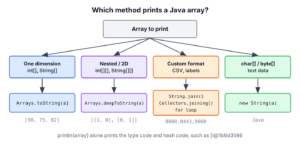
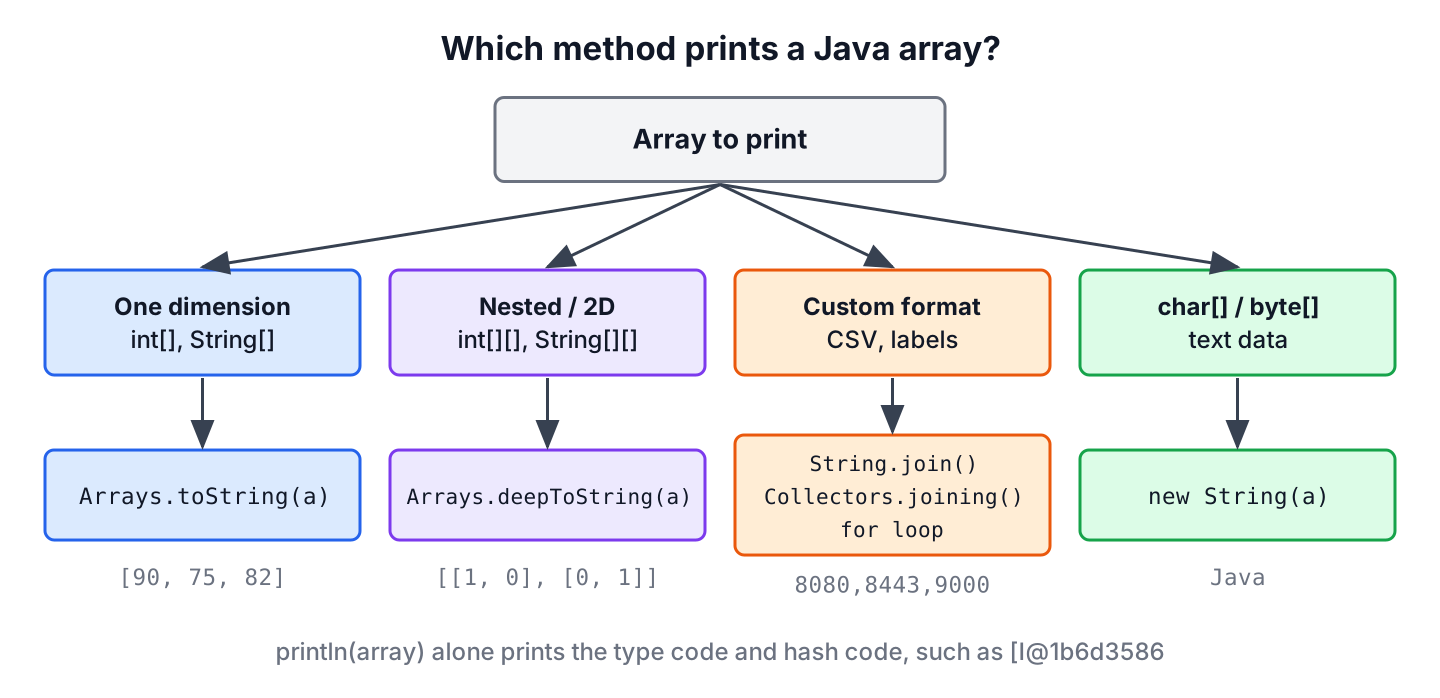
To print an array in Java, we pass it to Arrays.toString() for a one-dimensional array or to Arrays.deepToString() for a 2D or nested array, because printing the array variable itself shows only its type and hash code, such as [I@1b6d3586. Both methods return a String like [90, 75, 82] that we can print, log or put in an exception message.
We print arrays mostly while debugging, in log statements and in test failure messages, where we need to see the actual values. For screens and reports, we build our own format with a loop, a stream or String.join().
The following example compares printing the array variable with the two Arrays methods.
int[] scores = {90, 75, 82};
String raw = String.valueOf(scores);             // "[I@" followed by a hash code
String flat = Arrays.toString(scores);           // "[90, 75, 82]"
int[][] board = {{1, 0}, {0, 1}};
String nested = Arrays.deepToString(board);      // "[[1, 0], [0, 1]]"
We can see that only the Arrays methods show the values. The sections explain where the [I@ text comes from, cover 2D arrays and custom formats, and fix arrays inside records and char[] output.
1. Why Printing an Array Shows [I@1b6d3586
Arrays are objects, but they do not override toString(). They inherit Object.toString(), which returns the class name, an @ sign and the hash code in hex. The class name of an array is a short JVM code, so System.out.println(scores) prints something like [I@1b6d3586 instead of the numbers.
The text before the @ tells us the array type. One [ means one dimension, and the letter after it names the element type.
| Array type | Printed class name | Example output |
|---|---|---|
| int[] | [I | [I@1b6d3586 |
| double[] | [D | [D@4554617c |
| boolean[] | [Z | [Z@74a14482 |
| String[] | [Ljava.lang.String; | [Ljava.lang.String;@1540e19d |
| int[][] | [[I | [[I@677327b6 |
String intType = new int[0].getClass().getName();         // "[I"
String textType = new String[0].getClass().getName();     // "[Ljava.lang.String;"
String gridType = new int[0][0].getClass().getName();     // "[[I"
The hash code part changes on every run, so it tells us nothing about the contents. Whenever we see this pattern in a log, an array reached string conversion without Arrays.toString().
2. Printing a One-Dimensional Array With Arrays.toString()
The Arrays.toString() method has an overload for every primitive array type and one for Object[]. It puts the elements in square brackets, separated by a comma and a space, and it handles null and empty arrays without an exception.
double[] prices = {9.99, 4.5};
String p = Arrays.toString(prices);                // "[9.99, 4.5]"
boolean[] flags = {true, false};
String f = Arrays.toString(flags);                 // "[true, false]"
String[] fruits = {"apple", null, "kiwi"};
String s = Arrays.toString(fruits);                // "[apple, null, kiwi]"
int[] none = null;
String n = Arrays.toString(none);                  // "null"
String empty = Arrays.toString(new int[0]);        // "[]"
For object arrays, each element is printed with its own toString(). Records and most JDK classes such as LocalDate already have a readable toString(), so an array of them prints well.
record Item(String name, int qty) {}Item[] cart = {new Item("milk", 2), new Item("bread", 1)};
String items = Arrays.toString(cart); // "[Item[name=milk, qty=2], Item[name=bread, qty=1]]"In a shopping cart service, a log line such as log.debug(“Cart items {}”, Arrays.toString(cart)) shows every item in one line. Printing cart without the call would log only [LItem;@ and a hash code, which is useless when we investigate a wrong order total.
3. Printing a 2D Array With Arrays.deepToString()
A 2D array is an array of arrays, so Arrays.toString() prints the outer array and calls toString() on each row, which brings back the hash codes. Arrays.deepToString() goes into every nested array, at any depth.
int[][] seats = {{1, 0, 1}, {0, 0, 1}};
String shallow = Arrays.toString(seats);       // "[[I@..., [I@...]", row hash codes
String deep = Arrays.deepToString(seats);      // "[[1, 0, 1], [0, 0, 1]]"
String[][] menu = {{"tea", "coffee"}, {"cake"}};
String jagged = Arrays.deepToString(menu);     // "[[tea, coffee], [cake]]"
The deepToString() method accepts only an Object[], so it works for int[][] but not for a one-dimensional int[]. An int[][] is an array of int[] objects, which makes it an Object[], whereas an int[] holds primitives.
// does not compile: int[] cannot be converted to Object[]
int[] ids = {1, 2};
String text = Arrays.deepToString(ids);
For a grid shown on the console, one line per row reads better than the single-line format. We loop over the rows and print each row with Arrays.toString().
int[][] seats = {{1, 0, 1}, {0, 0, 1}};
for (int[] row : seats) {
    System.out.println(Arrays.toString(row));
}
[1, 0, 1]
[0, 0, 1]4. Printing Elements in a Custom Format
When the brackets and commas do not fit, for example in a CSV line, a report or a UI label, we format the elements ourselves. The right tool depends on the element type.
- A classic for loop gives us the index, which we need for output such as 1. apple.
- The enhanced for loop is shorter when we need only the values.
- String.join() joins a String[] with any separator, and the string array join guide covers it in detail.
- Arrays.stream() with mapToObj() and Collectors.joining() formats primitive arrays, which String.join() does not accept.
String[] tasks = {"build", "test", "deploy"};
for (int i = 0; i < tasks.length; i++) {
    System.out.println((i + 1) + ". " + tasks[i]);
}
1. build
2. test
3. deployString[] tasks = {"build", "test", "deploy"};
String pipeline = String.join(" -> ", tasks); // "build -> test -> deploy"
int[] ports = {8080, 8443, 9000};
String csv = Arrays.stream(ports).mapToObj(String::valueOf).collect(Collectors.joining(",")); // "8080,8443,9000"String[] steps = {"build", "test", "deploy"};
Arrays.stream(steps).forEach(System.out::println);build
test
deployPrinting one element per line with forEach() is fine for a quick check, but for logs we build one String and log it once, so the values stay together in one log entry.
5. Arrays Inside Records and Classes
The array problem comes back when an array is a field. A record generates toString() for us, but for an array component it prints the hash code, because the generated method calls the array’s own toString().
record Student(String name, int[] marks) {}Student s = new Student("Lokesh", new int[] {80, 92});
String text = s.toString(); // "Student[name=Lokesh, marks=[I@...]"We fix it by overriding toString() in the record and calling Arrays.toString() for the array field. The same applies to classes, and the ToStringBuilder from Apache Commons Lang also prints the contents of array fields.
record Report(String title, int[] totals) {
    @Override
    public String toString() {
        return "Report[title=" + title + ", totals=" + Arrays.toString(totals) + "]";
    }
}
Report r = new Report("Q1", new int[] {120, 95});
String line = r.toString(); // "Report[title=Q1, totals=[120, 95]]"6. Printing char[] and byte[] Arrays
Two array types behave differently. PrintStream has a println(char[]) overload that prints the characters as text, but string concatenation does not use it, so the same array prints as text in one line and as a hash code in the next.
char[] code = {'J', 'a', 'v', 'a'};
System.out.println(code);                     // prints Java
String joined = "Code: " + code;              // "Code: [C@" followed by a hash code
String asText = "Code: " + new String(code);  // "Code: Java"
String asList = Arrays.toString(code);        // "[J, a, v, a]"
A byte[] holds either encoded text or binary data such as a hash. For text, we decode it with a charset, and the article on converting a byte array to a String covers the details. For binary data, HexFormat (Java 17) prints the bytes in hex, which is how checksums are shown.
byte[] data = "Hi".getBytes(StandardCharsets.UTF_8);
String numbers = Arrays.toString(data);                       // "[72, 105]"
String text = new String(data, StandardCharsets.UTF_8);       // "Hi"
String hex = HexFormat.of().formatHex(data);                  // "4869"
7. Print an Array in Java, Method by Method
All the options return or print the same values, and they differ in the output format and in the array shapes they accept.
| Need | Use | Example output |
|---|---|---|
| Quick look at a 1D array | Arrays.toString(a) | [1, 2] |
| 2D or nested arrays | Arrays.deepToString(a) | [[1, 2], [3]] |
| Custom separator for String[] | String.join(“, “, a) | 1, 2 |
| Custom separator for int[] | Arrays.stream(a) with Collectors.joining() | 1|2 |
| Index or extra text per element | for loop | 1. … |
| Apache Commons Lang already in the project | ArrayUtils.toString(a) | {1,2} |
The last row prints braces and no spaces, which differs from the JDK format. We use it only when the project already depends on Commons Lang, because the JDK methods cover the same needs.
int[] pair = {1, 2};
String commons = ArrayUtils.toString(pair);          // "{1,2}"
8. Printing Arrays FAQs
Most questions about printing arrays start with output that does not look as expected, such as brackets we do not want or values in the wrong order.
8.1. How do we print an array without brackets and commas?
We join the elements with the separator we want. String.join(” “, words) works for a String[], and Arrays.stream(nums).mapToObj(String::valueOf).collect(Collectors.joining(” “)) works for an int[].
8.2. Why does a List print its values but an array does not?
Because ArrayList and the other collections override toString(), and arrays do not. Arrays.asList(stringArray) wraps an object array in a list, so printing the list also shows the values.
8.3. How do we print a 2D array as a matrix?
We loop over the rows and print each row on its own line with Arrays.toString(row), as in section 3. For aligned columns, we format each value with String.format(“%4d”, value).
8.4. How do we print an array in reverse order?
We loop from length – 1 down to 0, or we reverse a copy first and print it with Arrays.toString(). The article on how to reverse an array shows both ways.
9. Conclusion
Printing an array variable calls Object.toString(), so we get a type code such as [I and a hash code. Arrays.toString() prints a one-dimensional array of any type, and Arrays.deepToString() prints 2D and nested arrays.
For our own formats, loops, String.join() and Collectors.joining() give full control. Records and classes with array fields need a toString() that calls Arrays.toString(), and char[] and byte[] print best after we turn them into a String.
10. References
- Arrays (Java SE 25 API)
- Object.toString() (Java SE 25 API)
- Class.getName() (Java SE 25 API)
- HexFormat (Java SE 25 API)
Happy Learning !!
