
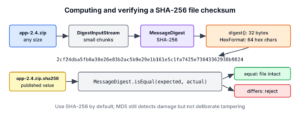
A file checksum is a short fixed-length value, such as a 64-character SHA-256 hex string, that we compute from every byte of a file, so that the same file always gives the same checksum and any change to the file gives a different one. To create a Java file checksum, we use MessageDigest with MD5, SHA-256 or SHA-512, stream the file through it and turn the bytes into hex with HexFormat (Java 17).
We use file checksums to verify downloads against the value the publisher lists, to find duplicate files, to detect changed files in a sync or backup job and to check that an upload arrived complete. The following example computes the MD5 and SHA-256 checksums of a small file with the checksum() helper from section 2.
Path file = Files.writeString(Files.createTempFile("greeting", ".txt"), "hello");

String md5 = checksum(file, "MD5");            // "5d41402abc4b2a76b9719d911017c592"
String sha256 = checksum(file, "SHA-256");     // "2cf24dba5fb0a30e26e83b2ac5b9e29e1b161e5c1fa7425e73043362938b9824"
int md5Length = md5.length();                  // 32
int sha256Length = sha256.length();            // 64
Notice that the values match what the command-line tools md5sum and sha256sum print for the same file, because the algorithms are standard. We look at why checksums are useful, write the streaming helper, compare it with Guava and Apache Commons Codec, and finish with verification, the leading-zero bug and the difference between a checksum and a signature.
1. Why Generate a File’s Checksum?
A checksum is a fingerprint of the file content. Two copies of a file have the same checksum only if every byte is the same, so comparing two short strings tells us whether two large files are identical without comparing them byte by byte.
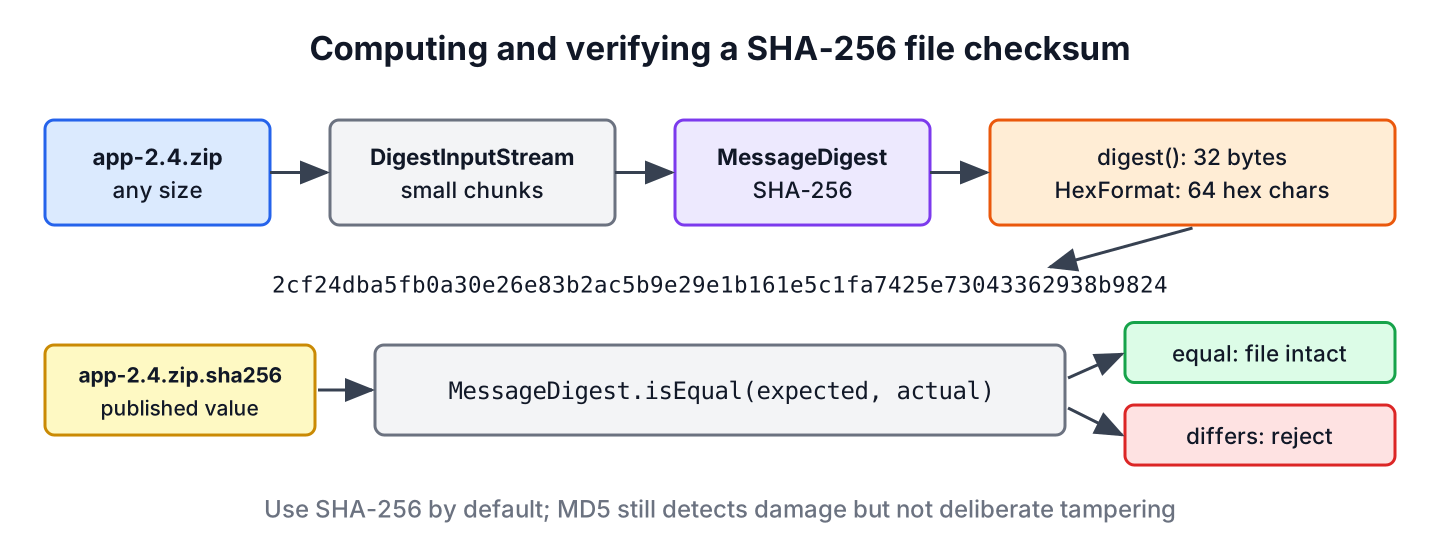
A build server publishes app-2.4.zip together with app-2.4.zip.sha256. The deploy script downloads both, computes the SHA-256 of the zip and stops if the value differs from the published one, because a broken proxy or a disk error damaged the file on its way. Other common uses follow the same pattern.
- A backup or sync tool stores the checksum of each file and copies only files whose checksum changed.
- A photo app finds duplicate images by grouping files with the same SHA-256.
- An upload API compares the checksum the client sends with the one the server computes, and rejects incomplete uploads.
- A cache uses the checksum of a file as its key, so a changed file gets a new cache entry.
The choice of algorithm decides how much the checksum can be trusted.
| Algorithm | Name in Java | Hex length | Use it for |
|---|---|---|---|
| MD5 | MD5 | 32 | Legacy checksums and duplicate detection, never security |
| SHA-1 | SHA-1 | 40 | Legacy only, collisions are practical |
| SHA-256 | SHA-256 | 64 | Default for downloads and integrity checks |
| SHA-512 | SHA-512 | 128 | Same as SHA-256, often faster on 64-bit CPUs |
| SHA3-256 | SHA3-256 | 64 | When a spec asks for SHA-3 |
| CRC32C | java.util.zip.CRC32C | 8 | Detecting accidental corruption at high speed |
MD5 still detects accidental damage, but anyone can build two different files with the same MD5 (RFC 6151), so we use SHA-256 whenever the file might come from an attacker. The post on password hashing explains why neither MD5 nor SHA-256 is suitable for passwords.
2. Generate a File Checksum With MessageDigest
The class MessageDigest computes a hash with the algorithm we pass to getInstance(), using one of the standard algorithm names. We feed it bytes with update() and get the result with digest(), which returns 16 bytes for MD5 and 32 bytes for SHA-256.
2.1. Small Files With Files.readAllBytes()
For a file that fits comfortably in memory, such as a configuration file or a thumbnail, we read all bytes and hash them in one call. HexFormat from Java 17 turns the digest into lowercase hex, two characters per byte.
Path config = Files.writeString(Files.createTempFile("app", ".properties"), "hello");

byte[] data = Files.readAllBytes(config);
byte[] hash = MessageDigest.getInstance("SHA-256").digest(data);
String hex = HexFormat.of().formatHex(hash);       // "2cf24dba5fb0a30e26e83b2ac5b9e29e1b161e5c1fa7425e73043362938b9824"
String upper = HexFormat.of().withUpperCase().formatHex(hash).substring(0, 8);   // "2CF24DBA"
The method readAllBytes() loads the whole file into one array, so a 3 GB video either needs 3 GB of heap or fails with an OutOfMemoryError, and arrays are limited to about 2 GB anyway. For files of unknown size we stream.
2.2. Large Files With DigestInputStream
A DigestInputStream passes every byte it reads to a MessageDigest. We read the stream to the end with transferTo() into a null output stream, which uses an internal buffer of a few kilobytes, so memory use stays the same for a 1 KB file and a 50 GB disk image.
static String checksum(Path file, String algorithm) throws IOException, NoSuchAlgorithmException {
    MessageDigest digest = MessageDigest.getInstance(algorithm);
    try (InputStream in = new DigestInputStream(Files.newInputStream(file), digest)) {
        in.transferTo(OutputStream.nullOutputStream());
    }
    return HexFormat.of().formatHex(digest.digest());
}
Path big = Files.createTempFile("disk", ".img");
try (OutputStream out = Files.newOutputStream(big)) {
byte[] block = new byte[1024 * 1024];
for (int i = 0; i < 50; i++) {
out.write(block);
}
}
long size = Files.size(big); // 52428800
String sha512 = checksum(big, "SHA-512").substring(0, 16); // "50173936f83822c2"The same helper accepts any algorithm name, so checksum(file, “SHA3-256”) works too. If the bytes are already flowing through our code, for example while we copy an upload to disk, we call digest.update(buffer, 0, count) inside the copy loop instead of reading the file twice.
3. Generate a File Checksum With Guava
Google Guava hashes a file through ByteSource.hash(), which streams the content and returns a HashCode whose toString() is the lowercase hex value. The project needs the dependency com.google.guava:guava:33.7.2-jre.
Path report = Files.writeString(Files.createTempFile("report", ".csv"), "hello");

ByteSource source = com.google.common.io.Files.asByteSource(report.toFile());
HashCode guavaSha = source.hash(Hashing.sha256());
String guavaHex = guavaSha.toString();          // "2cf24dba5fb0a30e26e83b2ac5b9e29e1b161e5c1fa7425e73043362938b9824"
Guava has its own Files class, so we write the full name com.google.common.io.Files next to java.nio.file.Files. The methods Hashing.md5() and Hashing.sha1() are deprecated in Guava because the algorithms are broken; they still work for legacy checksums, and Hashing.sha256() is the replacement.
4. Generate a File Checksum With Apache Commons Codec
Apache Commons Codec offers DigestUtils, which reads a stream or a file and returns the hex string in one call. The dependency is commons-codec:commons-codec:1.22.1.
Path invoice = Files.writeString(Files.createTempFile("invoice", ".pdf"), "hello");

String codecMd5;
try (InputStream in = Files.newInputStream(invoice)) {
    codecMd5 = DigestUtils.md5Hex(in);
}
String codecSha = new DigestUtils(MessageDigestAlgorithms.SHA_256).digestAsHex(invoice.toFile());   // "2cf24dba5fb0a30e26e83b2ac5b9e29e1b161e5c1fa7425e73043362938b9824"
boolean codecMatch = codecMd5.equals("5d41402abc4b2a76b9719d911017c592");                          // true
The three approaches give the same values. A project that already has Guava or Commons Codec can use it, while the DigestInputStream helper needs no dependency at all.
5. Verifying a Download Against a Published Checksum
Publishers list checksums in the format of sha256sum, which is the hex value, two spaces and the file name. We read the first token, decode it to bytes and fail loudly on a mismatch. We compare the decoded bytes with MessageDigest.isEqual() instead of the hex strings with equals(), because bytes have no letter case and isEqual() takes the same time for every input.
static boolean matchesPublished(Path file, Path checksumFile) throws IOException, NoSuchAlgorithmException {
    String published = Files.readString(checksumFile).strip().split("\\s+")[0];
    byte[] expected = HexFormat.of().parseHex(published.toLowerCase());
    byte[] actual = HexFormat.of().parseHex(checksum(file, "SHA-256"));
    return MessageDigest.isEqual(expected, actual);
}
Path zip = Files.writeString(Files.createTempFile("app-2.4", ".zip"), "hello");
Path sums = Files.writeString(Files.createTempFile("app-2.4", ".sha256"),
"2CF24DBA5FB0A30E26E83B2AC5B9E29E1B161E5C1FA7425E73043362938B9824 app-2.4.zip\n");
boolean intact = matchesPublished(zip, sums); // true
Files.writeString(zip, "hellO");
boolean damaged = matchesPublished(zip, sums); // falseChanging one letter changed the whole checksum, which is the property that makes the comparison reliable. The method parseHex() throws an IllegalArgumentException for a value with an odd length or a non-hex character, so a broken checksum file fails as well.
6. The BigInteger Leading-Zero Bug
Many older examples, including ones that rank well, turn the digest into hex with new BigInteger(1, hash).toString(16). A number has no leading zeros, so when the first hex digit of the hash is 0, the result is one character short and no longer matches the published value. About one file in sixteen hits it.
Path fruit = Files.writeString(Files.createTempFile("fruit", ".txt"), "grape");
byte[] grapeHash = MessageDigest.getInstance("SHA-256").digest(Files.readAllBytes(fruit));

String broken = new BigInteger(1, grapeHash).toString(16);
int brokenLength = broken.length();                          // 63
String correct = HexFormat.of().formatHex(grapeHash);
int correctLength = correct.length();                        // 64
String start = correct.substring(0, 8);                      // "0f78fcc4"
On Java 17 and later, HexFormat is the fix. On older versions, String.format(“%064x”, new BigInteger(1, hash)) pads to the full length, where the width is twice the digest length.
7. Checksum, HMAC or Signature?
A checksum proves that a file has not changed since someone computed the checksum, but it does not prove who computed it. An attacker who can replace a download on a mirror can often replace the checksum file next to it too. For tamper protection, the check needs a secret or a public key.
- A plain checksum (SHA-256) detects accidental damage and works when the checksum comes over a trusted channel, such as HTTPS from the vendor’s site.
- An HMAC (HMAC-SHA256 with a secret key) proves that someone with the key created the value, which suits files that our own services exchange, such as nightly exports.
- A digital signature (RSA, ECDSA or Ed25519 with a key pair) lets anyone verify the publisher with a public key, which is how JDK builds, Maven artifacts and OS packages are protected.
A billing service sends a nightly export file to a reporting service, and both services read the same secret key from their configuration. The billing service adds an HMAC-SHA256 tag to the file, and the reporting service recomputes the tag and rejects a file that someone edited on the way. An HMAC does not fit a file that we ship to customers, such as a license file, because the key would ship with the app, so a license file needs a digital signature. The class Mac works like MessageDigest with a key.
Path export = Files.writeString(Files.createTempFile("export", ".csv"), "rows=5");
SecretKeySpec exportKey = new SecretKeySpec("demo-key-from-config".getBytes(StandardCharsets.UTF_8), "HmacSHA256");

Mac mac = Mac.getInstance("HmacSHA256");
mac.init(exportKey);
String tag = HexFormat.of().formatHex(mac.doFinal(Files.readAllBytes(export)));
int tagLength = tag.length();                                // 64

Files.writeString(export, "rows=500");
String edited = HexFormat.of().formatHex(mac.doFinal(Files.readAllBytes(export)));
boolean exportValid = MessageDigest.isEqual(tag.getBytes(StandardCharsets.US_ASCII), edited.getBytes(StandardCharsets.US_ASCII));   // false
For pure corruption checks inside an app, such as verifying a cache block, the class CRC32C is much faster than SHA-256 and gives an 8-character value, but it offers no protection against deliberate changes.
8. Java File Checksum FAQs
After the first checksum works, the follow-up questions are about matching other tools, picking the algorithm and the speed on big files.
8.1. Why Does My Java Checksum Differ From sha256sum?
Three causes cover almost every case. The hex conversion dropped a leading zero (see section 6), the code hashed a String of the content with a different charset or line endings instead of the raw bytes, or the file was changed by a text-mode transfer that turned \r\n into \n.
8.2. Which Is Better for File Checksums, MD5 or SHA-256?
SHA-256. MD5 is faster and still catches random corruption, but an attacker can craft two files with the same MD5. SHA-256 has no known collisions, and on modern CPUs with SHA extensions it is fast enough for large files.
8.3. How Do I Get a Checksum of a Large File Without Running Out of Memory?
Stream it through a DigestInputStream or call update() in a read loop, as in section 2. Only Files.readAllBytes() loads the whole file; the streaming helper uses a small fixed buffer.
8.4. Is a MessageDigest Thread-Safe?
No. A MessageDigest keeps state between update() calls, so each thread needs its own instance. Creating one with getInstance() is cheap, which is why checksum() creates a new one per call.
8.5. How Do I Checksum a Whole Directory?
Walk the files in a fixed order, such as sorted relative paths, and feed each relative path and its file checksum into one outer MessageDigest. The sorted order matters, because Files.walk() does not promise any order and a different order gives a different result.
9. Conclusion
A file checksum in Java takes a MessageDigest, a DigestInputStream to stream the bytes and HexFormat to print the result, and the values match md5sum and sha256sum. Guava’s ByteSource.hash() and Commons Codec’s DigestUtils give the same result in one line when those libraries are already on the classpath.
We use SHA-256 as the default, compare digests with MessageDigest.isEqual() and avoid the BigInteger hex conversion. When the goal is protection against deliberate changes, an HMAC or a signature is needed on top of the checksum.
10. References
- MessageDigest Javadoc (Java 25)
- DigestInputStream Javadoc
- HexFormat Javadoc
- MessageDigest standard algorithm names
- Guava ByteSource Javadoc
- Commons Codec DigestUtils Javadoc
- RFC 6151 MD5 security considerations
Happy Learning !!

plz provide code for how to get file from hash
You can’t. The SHA-family and MD5 are one way functions. It is not possible to extract the input from the output. Actually that is the precise function of those algorithms – it is what we want them to do.
if you achieve that, consider yourself a nobel prize winner.
Really wounderful , thanks for your articles….looking more useful technical articles from you
I wonder it works ok with file 1 or 2GB?
It took almost 30 seconds for a file almost 3.00 GB
i did md5 hashing it works correctly, shows same value if i do this over same file at same location but if i change the location of file its hash changes i don’t know why this happens and i really need to fix this bug help me out kindly ……
I don’t think it should happen. Can you please post your code which is creating problem.
Could you please tell me the exact situation where we have to use this checksum ?
Read this hashing guide.
sir i use this concept to find 2 difeerent name same doc file but it returns two different value why/
Please elaborate.