

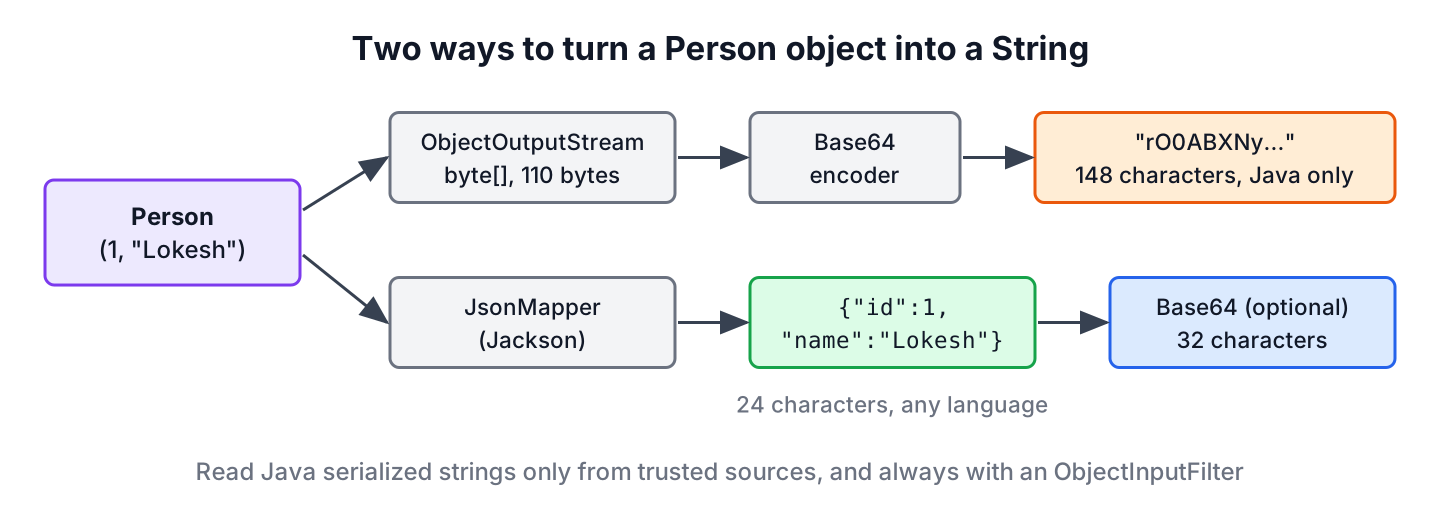
To serialize an object to a String in Java, we either write it with ObjectOutputStream and encode the bytes with Base64, or we convert it to JSON or XML text with a library such as Jackson. Both ways give a String that we can store or send and turn back into an equal object later.
We need object-to-String conversion when a value has to fit into a text-only place, such as a database VARCHAR column, a cookie, a message queue header, a cache entry or a JSON payload. Text strings are also easier to log and debug than byte arrays.
The following example converts the same Person record both ways. The helper class SerializationUtils is shown in section 1.
Person person = new Person(1, "Lokesh");
String base64 = SerializationUtils.objectToString(person);  // "rO0ABXNy...", 148 characters
String json = new JsonMapper().writeValueAsString(person);  // {"id":1,"name":"Lokesh"}
Notice the difference in size. The Base64 string carries the full class name and field types, whereas the JSON string carries only the data and is six times shorter.
| Mechanism | Requirements | Result for Person(1, “Lokesh”) |
|---|---|---|
| Java serialization with ObjectOutputStream, encoded with Base64 | The class implements Serializable. No external dependency. | 148 characters, readable only by Java |
| JSON (or XML) with Jackson or Gson | No Serializable needed. Needs the Jackson or Gson library. | 24 characters of JSON, readable by any language |
| JSON encoded with Base64 | Same as JSON. Base64 is optional. | 32 characters, safe for URLs and headers with the URL encoder |
We go through both ways with deserialization, add Base64 on top of JSON, and spend a full section on the security risk of turning an untrusted String back into an object.
1. Serialize Object to Base64 Encoded String
In the default serialization mechanism in Java, we can write an object to a byte[] if its class implements the Serializable interface. The classes ObjectOutputStream and ObjectInputStream do the work with their writeObject() and readObject() methods. A byte array is not valid text, so we encode it with java.util.Base64, which turns every 3 bytes into 4 printable characters.
The following example is a Person record and a utility class with one method for each direction. The reading method takes the expected class and installs an ObjectInputFilter, which we explain in section 3.
record Person(int id, String name) implements Serializable {}class SerializationUtils {
static String objectToString(Serializable obj) throws IOException {
ByteArrayOutputStream bytes = new ByteArrayOutputStream();
try (ObjectOutputStream out = new ObjectOutputStream(bytes)) {
out.writeObject(obj);
}
return Base64.getEncoder().encodeToString(bytes.toByteArray());
}
static <T> T stringToObject(String data, Class<T> type)
throws IOException, ClassNotFoundException {
byte[] bytes = Base64.getDecoder().decode(data);
try (ObjectInputStream in = new ObjectInputStream(new ByteArrayInputStream(bytes))) {
in.setObjectInputFilter(ObjectInputFilter.Config.createFilter(
"maxdepth=5;maxbytes=10000;" + type.getName() + ";java.lang.*;!*"));
return type.cast(in.readObject());
}
}
}We use the utility method objectToString() to convert the object to a Base64 encoded String, and stringToObject() to convert it back.
Person person = new Person(1, "Lokesh");
String encoded = SerializationUtils.objectToString(person);              // "rO0ABXNy..."
Person restored = SerializationUtils.stringToObject(encoded, Person.class); // Person[id=1, name=Lokesh]
boolean equal = restored.equals(person); // truerO0ABXNyACtjb20uaG93dG9kb2luamF2YS5jb3JlLnNlcmlhbGl6YXRpb24uUGVyc29uAAAAAAAAAAACAAJJAAJpZEwABG5hbWV0ABJMamF2YS9sYW5nL1N0cmluZzt4cAAAAAF0AAZMb2tlc2g=The encoded String is long because it contains metadata about the serialized object, such as the class name com.howtodoinjava.core.serialization.Person, the serialVersionUID and the type of every field. The prefix rO0AB is the Base64 form of the stream header bytes AC ED 00 05, so a String that starts with it is almost always serialized Java data.
Every class in the object graph must be Serializable, otherwise writeObject() throws NotSerializableException. Fields marked transient are skipped. If we need small strings, or other systems must read them, we serialize the object to JSON or XML instead.
2. Serialize Object to JSON or XML
Another good way to serialize an object to String is to convert it to JSON or XML. A big advantage of this approach is that the class does not need to implement Serializable. That is useful when the class comes from legacy code or a third-party library that we cannot modify. JSON is also readable by humans and by services written in other languages.
The following example uses Jackson 3.2.3, whose mapper classes are in the tools.jackson packages. Jackson 2 code looks the same with com.fasterxml.jackson.databind.ObjectMapper, except that its methods throw the checked JsonProcessingException, while Jackson 3 throws the unchecked JacksonException.
Person person = new Person(1, "Lokesh");
JsonMapper mapper = new JsonMapper();
String json = mapper.writeValueAsString(person);          // {"id":1,"name":"Lokesh"}
Person fromJson = mapper.readValue(json, Person.class);   // Person[id=1, name=Lokesh]
Jackson reads records through their canonical constructor, so Person needs no annotations or setters. For a regular class, Jackson uses a no-argument constructor with setters, or a constructor marked with @JsonCreator.
2.1. Serialize Object to XML
For the XML representation, we use XmlMapper from the jackson-dataformat-xml module instead of JsonMapper, as in our XML and JSON conversion guide. Everything else remains the same.
Person person = new Person(1, "Lokesh");
XmlMapper xmlMapper = new XmlMapper();
String xml = xmlMapper.writeValueAsString(person);        // <Person><id>1</id><name>Lokesh</name></Person>
Person fromXml = xmlMapper.readValue(xml, Person.class);  // Person[id=1, name=Lokesh]
2.2. Encode the JSON String With Base64
Irrespective of JSON or XML, we can still apply Base64 to the String when the target does not accept quotes, braces or angle brackets, such as an HTTP header, a cookie or a URL parameter. The encoded String stays much smaller than the serialized one because it contains no class metadata.
JsonMapper mapper = new JsonMapper();
String json = mapper.writeValueAsString(new Person(1, "Lokesh"));
byte[] utf8 = json.getBytes(StandardCharsets.UTF_8);
String encodedJson = Base64.getEncoder().encodeToString(utf8);            // "eyJpZCI6MSwibmFtZSI6Ikxva2VzaCJ9"
String urlSafe = Base64.getUrlEncoder().withoutPadding().encodeToString(utf8); // "eyJpZCI6MSwibmFtZSI6Ikxva2VzaCJ9"
String decodedJson = new String(Base64.getDecoder().decode(encodedJson), StandardCharsets.UTF_8);
Person decoded = mapper.readValue(decodedJson, Person.class);             // Person[id=1, name=Lokesh]
We always pass StandardCharsets.UTF_8 to getBytes() and to the String constructor, because the no-argument versions used the platform charset before Java 18. The URL encoder replaces + and / with – and _, which matters for longer data. Base64 is an encoding, not encryption, so anyone can decode the value, as explained in our Base64 encoding and decoding guide.
3. Deserializing an Object From an Untrusted String
Never pass a String from a user, a cookie, a request parameter or any other system we do not control to ObjectInputStream.readObject() without a filter. Java deserialization creates objects of any Serializable class on the classpath that the data names, and it runs code in those classes, such as their readObject() methods, before our code ever sees the result. Attackers combine such classes from common libraries into gadget chains, where one class calls a method on the next, until the last call runs a system command.
A typical case shows how this happens. A web app keeps the shopping cart in a cookie as a Base64 serialized object. An attacker replaces the cookie value with a crafted stream, and the server deserializes it on the next request before any login check runs. Several remote code execution vulnerabilities in widely used Java products came from this pattern of reading untrusted data with readObject().
The JDK offers ObjectInputFilter (Java 9, JEP 290) to limit what a stream may contain. The filter in stringToObject() allows only the expected class and java.lang classes, limits the depth of the object graph and the stream size, and rejects everything else with !*.
Map<String, Integer> other = new HashMap<>(Map.of("a", 1));
String foreign = SerializationUtils.objectToString((Serializable) other);
Person rejected = SerializationUtils.stringToObject(foreign, Person.class);  // InvalidClassException: filter status: REJECTED
The filter stops the HashMap before any of its code runs. For a whole application, the system property jdk.serialFilter sets a JVM-wide filter with the same pattern syntax, and Java 17 added a filter factory for per-stream rules (JEP 415). The OWASP deserialization cheat sheet gives the same advice and recommends data-only formats for anything that crosses a trust boundary.
JSON with a concrete target type, such as readValue(json, Person.class), is the safer choice, because Jackson only creates the classes that Person declares. That stays true as long as we do not enable polymorphic default typing, which lets the JSON name its own classes and brings back the same class of risk.
4. Choosing Between Serialization and JSON
For most apps, JSON is the better default. It is shorter, readable in logs and by other languages, and it does not break when we rename a private field, as long as the JSON property names stay the same. Java serialization still has a place when both sides are Java code that we control, for example when we deep copy an object graph or keep a session in a trusted, internal cache.
| Need | Java serialization + Base64 | JSON with Jackson |
|---|---|---|
| Other languages read the data | No | Yes |
| String size | Large, includes class metadata | Small, data only |
| Class changes | Needs a matching serialVersionUID | Tolerant if property names stay the same |
| Untrusted input | Dangerous without ObjectInputFilter | Safe with a concrete target type |
| Dependencies | None, part of the JDK | Jackson or Gson library |
| Object graphs with cycles | Supported | Needs extra annotations |
Java serialization handles shared references and cycles in an object graph, whereas JSON writes a tree and needs annotations such as @JsonIdentityInfo for the same result. For collections, the ArrayList serialization example shows the Java serialization side in more detail.
5. Object to String Serialization FAQs
Developers who move objects into text columns, caches and cookies ask the same practical questions.
5.1. Is calling toString() the same as serializing an object?
No. The toString() method returns a description for humans, such as Person[id=1, name=Lokesh], and Java has no standard way to parse it back into an object. Serialization produces a format that a matching reader turns back into an equal object.
5.2. Why is the Base64 serialized String so long?
Java serialization writes a stream header, the full class name, the serialVersionUID and the name and type of every field before the data itself. Base64 adds one third on top, so our two-field Person becomes 110 bytes and 148 characters, whereas the JSON form has 24 characters.
5.3. How do we store a serialized object in a database?
We store JSON in a text or JSON column, such as jsonb in PostgreSQL, so the database can index and query it. If we must keep Java serialized data, we store the raw bytes in a BLOB or bytea column instead of a Base64 String, which saves a third of the space.
5.4. Can we serialize an object that does not implement Serializable?
Not with ObjectOutputStream, which throws NotSerializableException. JSON and XML libraries such as Jackson and Gson do not need the interface, so we use them to convert third-party classes.
5.5. Is Base64 encoding a form of encryption?
No. Base64 only maps bytes to printable characters, and anyone can decode it. To protect the content, we encrypt the bytes before encoding them, for example with AES-GCM, or we sign them with an HMAC when we only need to detect tampering.
6. Conclusion
We can turn a Java object into a String in two ways. Java serialization plus Base64 needs no library and keeps the full object graph, but the String is long, readable only by Java and dangerous to read back from untrusted sources without an ObjectInputFilter. JSON or XML with Jackson gives a short, portable String, works with classes that are not Serializable, and can be Base64 encoded when the target accepts only plain characters.
For data that leaves our own JVMs, such as cookies, queues and APIs, JSON with a concrete target type is the safe default. We keep Java serialization for trusted, Java-only uses, and we always install a filter when reading it.
7. References
- ObjectOutputStream Javadoc
- ObjectInputFilter Javadoc
- Base64 Javadoc
- Java Object Serialization Specification
- JEP 290, Filter Incoming Serialization Data
- OWASP Deserialization Cheat Sheet
- Jackson Databind on GitHub
Happy Learning !!
