
The java.lang.IllegalStateException: stream has already been operated upon or closed error means that our code called a second operation on a Stream object that was already used, because a Java stream can be operated on only once. The fix is to create a new stream from the source for each pipeline, or to compute everything in a single pass.
We hit the error when a stream is stored in a variable, a field or a method result and our code uses it twice, for example once to find even numbers and once to find odd numbers. The source collection is not the problem, so streaming it again works.
The following example uses the same Stream object twice and fails on the second filter() call. The fixed version calls stream() on the list for each pipeline.
Stream<Integer> numbers = Stream.of(123, 234, 11, 57, 60, -4);
List<Integer> evens = numbers.filter(n -> n % 2 == 0).toList();   // [234, 60, -4]
List<Integer> odds = numbers.filter(n -> n % 2 != 0).toList();    // IllegalStateException: stream has already been operated upon or closed

List<Integer> source = List.of(123, 234, 11, 57, 60, -4);
List<Integer> evenNumbers = source.stream().filter(n -> n % 2 == 0).toList();   // [234, 60, -4]
List<Integer> oddNumbers = source.stream().filter(n -> n % 2 != 0).toList();    // [123, 11, 57]
The exception comes from filter(), an intermediate operation, and not only from terminal operations. We look at why streams are single-use, the code patterns that trigger the error, and three fixes with their costs.
1. Reason for the Exception
A Java stream is not a collection that holds data. It is a pipeline of operations over a source, such as a list, an array or the lines of a file. Every operation that we call, intermediate or terminal, links a new stage to the stream object and marks that object as used. The terminal operation, such as toList(), count() or max(), pulls the elements from the source once.
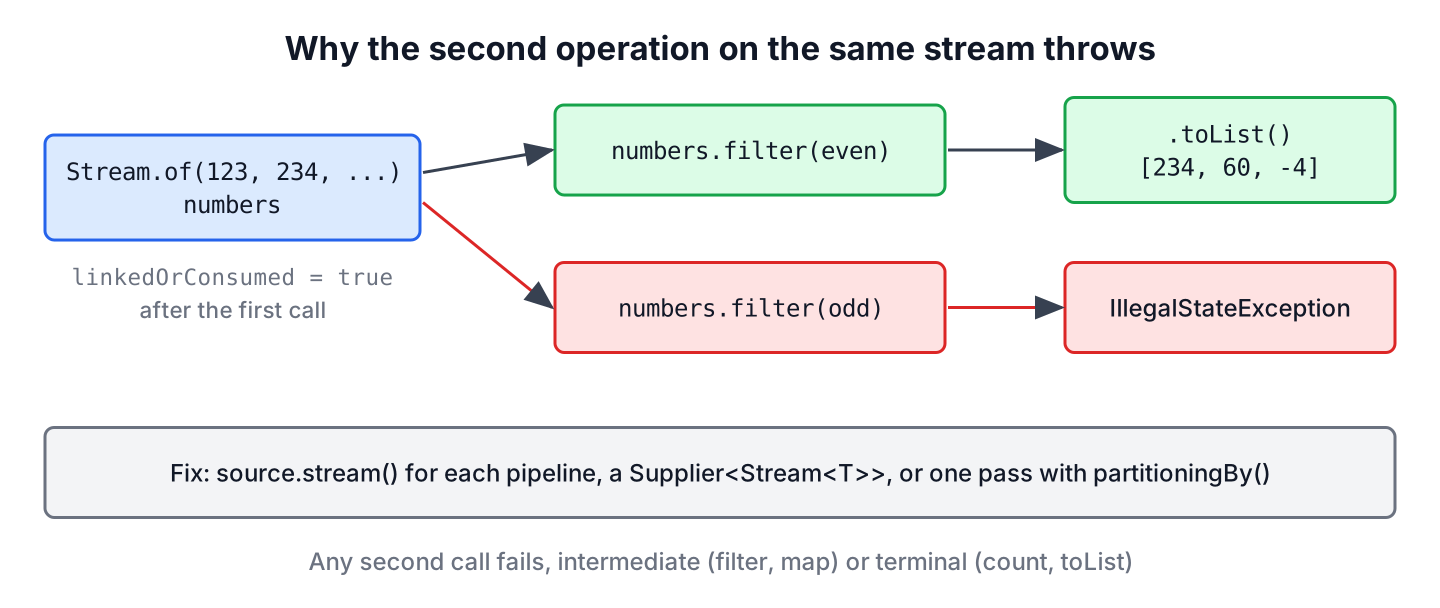
A stream should be operated on only once, by an intermediate or a terminal operation, and an implementation may throw IllegalStateException when it detects reuse. The JDK checks a flag on every call, so the second call fails at once, even before any element is processed.
Running the first three lines of the intro example in a main() method of a class ParityReport on Java 25 prints this stack trace.
Exception in thread "main" java.lang.IllegalStateException: stream has already been operated upon or closed
	at java.base/java.util.stream.AbstractPipeline.<init>(AbstractPipeline.java:201)
	at java.base/java.util.stream.ReferencePipeline.<init>(ReferencePipeline.java:101)
	at java.base/java.util.stream.ReferencePipeline$StatelessOp.<init>(ReferencePipeline.java:841)
	at java.base/java.util.stream.ReferencePipeline$2.<init>(ReferencePipeline.java:185)
	at java.base/java.util.stream.ReferencePipeline.filter(ReferencePipeline.java:184)
	at ParityReport.main(ParityReport.java:8)
The last frame of the stack trace points to our line that touched the stream the second time. The message says “operated upon or closed” because both states give the same error. A stream is closed when we call close() on it, which also runs the handlers registered with onClose(). A terminal operation does not close the stream, it only consumes it.
2. Code That Reuses a Stream
The two-filter() example is the obvious case. In real code, the reuse is often hidden behind a field, a method call or a try block, so these patterns are worth recognizing.
2.1. Branching One Stream Into Two Pipelines
A shared stream with a common first step looks like a good idea, because the first map() seems to run only once. The second branch fails, because the variable doubled was already linked to the first filter().
Stream<Integer> doubled = Stream.of(123, 234, 11, 57, 60, -4).map(n -> n * 2);
List<Integer> big = doubled.filter(n -> n > 100).toList();        // [246, 468, 114, 120]
List<Integer> small = doubled.filter(n -> n <= 100).toList();     // IllegalStateException
2.2. Returning a Stream From a Method or a Field
A method that returns a stream is fine, as long as each caller calls the method again. The error appears when the result is stored in a field or a local variable and used twice, such as a repository class that caches Stream<Integer> instead of List<Integer>.
static Stream<Integer> scores() {
    return Stream.of(123, 234, 11, 57, 60, -4);
}
long count = scores().count(); // 6
Stream<Integer> cached = scores();
long positives = cached.filter(n -> n > 0).count(); // 5
long negatives = cached.filter(n -> n < 0).count(); // IllegalStateException2.3. Calling iterator() or close() Before Another Operation
The methods iterator() and spliterator() are terminal operations too. Once we take an iterator from a stream, the stream itself cannot run count() or forEach(), and a closed stream rejects every operation.
Stream<Integer> iterated = Stream.of(123, 234);
Iterator<Integer> it = iterated.iterator();
long afterIterator = iterated.count();                           // IllegalStateException

Stream<Integer> closed = Stream.of(123, 234);
closed.close();
long afterClose = closed.count();                                // IllegalStateException
The close() case shows up with file streams. A method that opens Files.lines() in a try-with-resources block and returns the stream gives the caller a closed stream, so the caller gets the same exception on its first operation.
2.4. Evaluating the Stream in the Debugger
An IDE debugger can also consume a stream. If we evaluate readings.toList() in the Evaluate Expression window while the program is paused, the expression runs on the real object, and the next line of our code throws IllegalStateException. The stream debugging article shows how to inspect a pipeline step by step without adding a second operation to our code.
3. Solutions
Instead of reusing a stream object, we create a new one from the source or compute all results in one pass. Which fix fits depends on how expensive the source is to read and how many results we need.
3.1. Collect Once and Stream the List Again
When the stream comes from an expensive source or a long pipeline, we collect the result once into a list. A list can create any number of streams, and each stream() call starts from the stored elements.
List<Integer> source = List.of(123, 234, 11, 57, 60, -4);

List<Integer> positiveNumbers = source.stream().filter(n -> n > 0).toList();          // [123, 234, 11, 57, 60]
long evenCount = positiveNumbers.stream().filter(n -> n % 2 == 0).count();             // 2
int largest = positiveNumbers.stream().max(Integer::compare).orElseThrow();            // 234
The list from toList() is unmodifiable, which suits a cached result. The cost is memory for all elements, so for millions of rows from a database we prefer the next option or a single pass.
3.2. Use a Supplier to Create a New Stream Each Time
A Supplier<Stream<T>> stores the recipe for the stream instead of the stream itself. Each get() call runs the lambda and returns a new stream, so every pipeline has its own object.
Supplier<Stream<Integer>> streamSupplier = () -> Stream.of(123, 234, 11, 57, 60, -4);

List<Integer> evenOnes = streamSupplier.get().filter(n -> n % 2 == 0).toList();   // [234, 60, -4]
List<Integer> oddOnes = streamSupplier.get().filter(n -> n % 2 != 0).toList();    // [123, 11, 57]
The supplier repeats all work of the source for every call. That is cheap for Stream.of() or a list in memory, but with Files.lines() or a database query, each get() reads the file or runs the query again. The stream reuse article compares this approach with other variations.
3.3. Compute All Results in One Pass
Often we stream the data twice only because we need two results. A collector that produces both results reads the source only once, which matters for large or expensive sources.
List<Integer> source = List.of(123, 234, 11, 57, 60, -4);

Map<Boolean, List<Integer>> byParity = source.stream().collect(Collectors.partitioningBy(n -> n % 2 == 0));   // {false=[123, 11, 57], true=[234, 60, -4]}
IntSummaryStatistics stats = source.stream().mapToInt(Integer::intValue).summaryStatistics();               // IntSummaryStatistics{count=6, sum=481, min=-4, average=80.166667, max=234}
int range = source.stream().collect(Collectors.teeing(
        Collectors.minBy(Integer::compare),
        Collectors.maxBy(Integer::compare),
        (min, max) -> max.orElseThrow() - min.orElseThrow()));                                                // 238
The even and odd lists from the first example come out of one partitioningBy() call. For counts, sums, minimum, maximum and average, summaryStatistics() computes all five values together, and Collectors.teeing() (Java 12) combines any two collectors into one result.
3.4. Comparing the Fixes
All three fixes remove the exception, but they differ in how often the source is read and what stays in memory.
| Fix | Source read | Memory | Best for |
|---|---|---|---|
| Collect once into a List | Once | All elements | Results reused many times |
| Supplier<Stream<T>> | Once per get() | None extra | Cheap sources, such as in-memory data |
| One pass with a collector | Once | Only the results | Several results from large or slow sources |
4. Real-World Example of a CSV Report
A monthly sales report reads a CSV file and prints the number of rows, the total and the rows above a limit. A first version opens Files.lines() once, stores the stream in a variable and calls three terminal operations, so the second one throws. Wrapping Files.lines() in a supplier fixes the exception, but it reads the file three times.
The better version reads the file once inside a try-with-resources block, keeps the parsed amounts in a list and runs the three calculations on that list.
static List<Integer> readAmounts(Path csv) throws IOException {
    try (Stream<String> lines = Files.lines(csv)) {
        return lines.skip(1)
                .map(line -> line.split(",")[1].strip())
                .map(Integer::parseInt)
                .toList();
    }
}
List<Integer> amounts = List.of(120, 75, 300, 40);
long rows = amounts.size(); // 4
int total = amounts.stream().mapToInt(Integer::intValue).sum(); // 535
List<Integer> large = amounts.stream().filter(a -> a > 100).toList(); // [120, 300]The try-with-resources block closes the file after toList() finished, and the method returns a list instead of a stream. Returning the stream from inside the try block would hand the caller a closed stream, which is the case from section 2.3.
5. Stream Reuse FAQs
Reuse, closing, suppliers and the confusing word closed in the message are what most readers of this error ask about next.
5.1. Can a Java stream be reused?
No. Every Stream, IntStream, LongStream and DoubleStream object can run one pipeline. We reuse the source instead, by calling stream() on the collection again, by keeping a Supplier, or by collecting the results into a list.
5.2. Is a stream closed after a terminal operation?
No, it is consumed but not closed. Closing is a separate step that runs the onClose() handlers, and it matters only for streams that hold a resource, such as Files.lines() or Files.list(). Both states throw the same IllegalStateException when we touch the stream again.
5.3. Does Supplier.get() return a new stream every time?
Yes, as long as the lambda creates the stream, as in () -> list.stream(). A supplier that returns a stream stored in a variable, such as () -> numbers, returns the same used object and throws the exception again.
5.4. Can we check whether a stream was already used?
No, the Stream interface has no public method for that. We design the code so that a stream never leaves the method that consumes it, and we pass collections or suppliers between methods.
5.5. Why does the exception say closed when we never called close()?
The JDK uses one message for both cases, a stream that is already linked to an operation and a stream that was closed. In most code, the cause is the first case, so we look for the earlier operation on the same variable.
6. Conclusion
The IllegalStateException with the message “stream has already been operated upon or closed” appears when the same stream object gets a second operation, intermediate or terminal, or when it was closed. A stream is a one-time pipeline, not a container.
We fix it by streaming the source again, by collecting the results into a list when the source is expensive, by using a Supplier for cheap sources, or by computing all results in one pass with partitioningBy(), summaryStatistics() or teeing(). Keeping streams local to the method that consumes them prevents the error in the first place.
7. References
Happy Learning !!
