
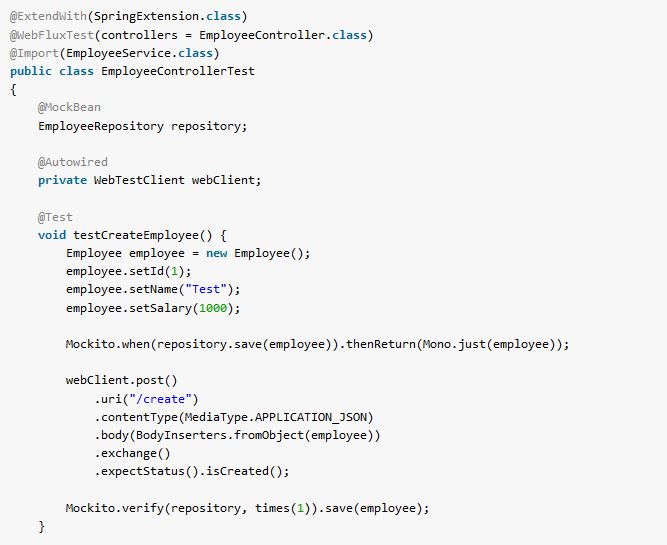
Use @WebFluxTest to test a Spring WebFlux controller’s HTTP behavior without starting an HTTP server. The annotation loads the selected controller and WebFlux infrastructure, and Spring Boot supplies a WebTestClient that sends requests through that test context. A mock service gives the controller predictable responses while the test checks the status code and JSON body.
This example uses Spring Boot 4.1.2 and @MockitoBean, the Spring Framework annotation that supplies a mock bean to the test context. The tests check an order that exists and an order that does not.
1. Set Up a WebFlux Controller Test
The application needs the WebFlux starter. The test starter adds Spring Boot’s WebFlux test support, JUnit, Mockito and WebTestClient. With Spring Boot’s dependency management, neither starter needs its own version in the project pom.xml.
<dependency>
  <groupId>org.springframework.boot</groupId>
  <artifactId>spring-boot-starter-webflux</artifactId>
</dependency>
<dependency>
  <groupId>org.springframework.boot</groupId>
  <artifactId>spring-boot-starter-webflux-test</artifactId>
  <scope>test</scope>
</dependency>
The following distinction determines what a passing test tells us. A slice test exercises HTTP mapping, WebFlux request handling, response serialization and the selected controller. It does not run the real service when that service is mocked.
| Test setup | Application context | HTTP server |
|---|---|---|
| @WebFluxTest(OrderStatusController.class) | Selected controller and WebFlux test infrastructure | No |
| @SpringBootTest(webEnvironment = RANDOM_PORT) | Full application | Yes |
The Spring Boot testing reference describes which components the WebFlux slice includes. Start with a slice when the question is whether a controller turns a service result into the correct HTTP response.
2. Define the Order Status Endpoint
An order application lets a customer request the current status of an order. The controller receives an order ID from /orders/{orderId}/status and asks OrderStatusService for an OrderStatus. The service returns a Mono, a reactive publisher that emits either one status or no status.
public record OrderStatus(String orderId, String state) {}

public interface OrderStatusService {
  Mono<OrderStatus> findStatus(String orderId);
}
The controller maps a returned status to HTTP 200 with JSON. When the publisher is empty, defaultIfEmpty() supplies HTTP 404. The response type is Mono<ResponseEntity
@RestController
public class OrderStatusController {
  private final OrderStatusService service;

  public OrderStatusController(OrderStatusService service) {
    this.service = service;
  }

  @GetMapping("/orders/{orderId}/status")
  public Mono<ResponseEntity<OrderStatus>> status(@PathVariable String orderId) {
    return service.findStatus(orderId)
        .map(ResponseEntity::ok)
        .defaultIfEmpty(ResponseEntity.notFound().build());
  }
}
The complete project has an InMemoryOrderStatusService for an ordinary application run. The controller tests intentionally replace that collaborator with a mock, so each test controls the service result without depending on the sample service’s data.
3. Test an Existing Order
@WebFluxTest(OrderStatusController.class) creates the controller and WebFlux test infrastructure. The slice leaves out the regular @Service bean. @MockitoBean supplies an OrderStatusService mock so Spring can construct the controller. Boot injects the configured WebTestClient into the test.
The test makes the mock return a status for order A-17, sends a GET request and checks the JSON fields. The final verify() call checks that the controller passed the requested ID to its service.
@WebFluxTest(OrderStatusController.class)
class OrderStatusControllerTest {
  @Autowired WebTestClient client;
  @MockitoBean OrderStatusService service;

  @Test
  void returnsOrderStatusAsJson() {
    when(service.findStatus("A-17"))
        .thenReturn(Mono.just(new OrderStatus("A-17", "SHIPPED")));

    client.get().uri("/orders/A-17/status").exchange()
        .expectStatus().isOk()
        .expectBody()
        .jsonPath("$.orderId").isEqualTo("A-17")
        .jsonPath("$.state").isEqualTo("SHIPPED");

    verify(service).findStatus("A-17");
  }
}
exchange() submits the request to the mock WebFlux server bound to the test context. The response is HTTP 200 and contains {"orderId":"A-17","state":"SHIPPED"}. The assertion also catches a controller that ignores the path variable or returns the wrong field names. It does not prove that the real service can find that order, because the mock supplies the status.
4. Test an Order That Does Not Exist
The missing-order case changes one input and one service result. This time the mock returns Mono.empty(). No OrderStatus reaches map(), so defaultIfEmpty() supplies a 404 response with no body.
@Test
void returnsNotFoundWhenServiceIsEmpty() {
  when(service.findStatus("missing")).thenReturn(Mono.empty());

  client.get().uri("/orders/missing/status").exchange()
      .expectStatus().isNotFound()
      .expectBody().isEmpty();

  verify(service).findStatus("missing");
}
This assertion checks the controller’s missing-result rule rather than treating every service response as HTTP 200. If the controller returned an empty Mono<ResponseEntity
5. Know When to Use a Full Application Test
A passing @WebFluxTest proves the selected controller’s behavior in a test slice; it does not prove the real service, repository or running server works. Use a separate full-context test when those interactions are the subject of the test. With RANDOM_PORT, @SpringBootTest starts a server. In Spring Boot 4, add @AutoConfigureWebTestClient to make the client available in this full-context test.
@SpringBootTest(webEnvironment = SpringBootTest.WebEnvironment.RANDOM_PORT)
@AutoConfigureWebTestClient
class OrderStatusHttpTest {
  @Autowired WebTestClient client;

  @Test
  void readsStatusThroughRunningServer() {
    client.get().uri("/orders/A-17/status").exchange()
        .expectStatus().isOk()
        .expectBody()
        .jsonPath("$.state").isEqualTo("SHIPPED");
  }
}
This broader test uses the sample InMemoryOrderStatusService, so it checks the real service-to-controller path as well as the HTTP response. It remains an in-memory example, not proof of database or external API integration. See the Spring Framework WebTestClient reference for mock binding and live-server options.
6. Frequently Asked Questions
6.1. Does @WebFluxTest Start Netty?
No. It binds WebTestClient to WebFlux test infrastructure without starting a listening HTTP server. Use a full test with a running web environment when you need to test the actual network boundary.
6.2. Why Is @MockitoBean Needed If the Application Has a Service?
The regular service is outside the selected WebFlux slice, but the controller still needs an OrderStatusService constructor argument. @MockitoBean adds a mock bean to the slice. The test can then stub the exact publisher the controller should receive.
6.3. Can WebTestClient Test Functional Routes?
Yes. WebTestClient can test functional endpoints as well as annotated controllers. A functional route needs a suitable test setup, such as binding to a router function or loading the relevant application context. The selected-controller form of @WebFluxTest shown here is for the annotated OrderStatusController.
7. Conclusion
Use @WebFluxTest for fast tests of a WebFlux controller’s route, HTTP status and response body. Stub the service publisher with @MockitoBean, then test both a value and an empty result. Add a full application test when the real service or running server is the behavior you need to verify.
Happy Learning!

I keep getting csrf token error.
(An expected CSRF token cannot be found
java.lang.AssertionError: Status expected:<201 CREATED> but was:<403 FORBIDDEN>
Expected :201 CREATED
Actual :403 FORBIDDEN)
But as per my security config I have disabled csrf as shown below:
@Configuration
@EnableWebFluxSecurity
public class SecurityConfig {
    @Autowired
    private UserRepository userRepository;
    @Bean
    public PasswordEncoder passwordEncoder() {
        return new BCryptPasswordEncoder();
    }

    @Bean
    public SecurityWebFilterChain securityWebFilterChain(ServerHttpSecurity http){
        return http
                .csrf(ServerHttpSecurity.CsrfSpec::disable)
                .authorizeExchange(authorizeExchangeSpec -> authorizeExchangeSpec
                        .anyExchange()
                        .permitAll())
                .build();
    }
Would you mind giving me suggestions?
Your configuration seems correct. Plz share debug logs at which point the check fails.
how to do the same testing if WebFlux RouterFunction is used instead of RestController. How to tell to the test that it is WebFlux test?