
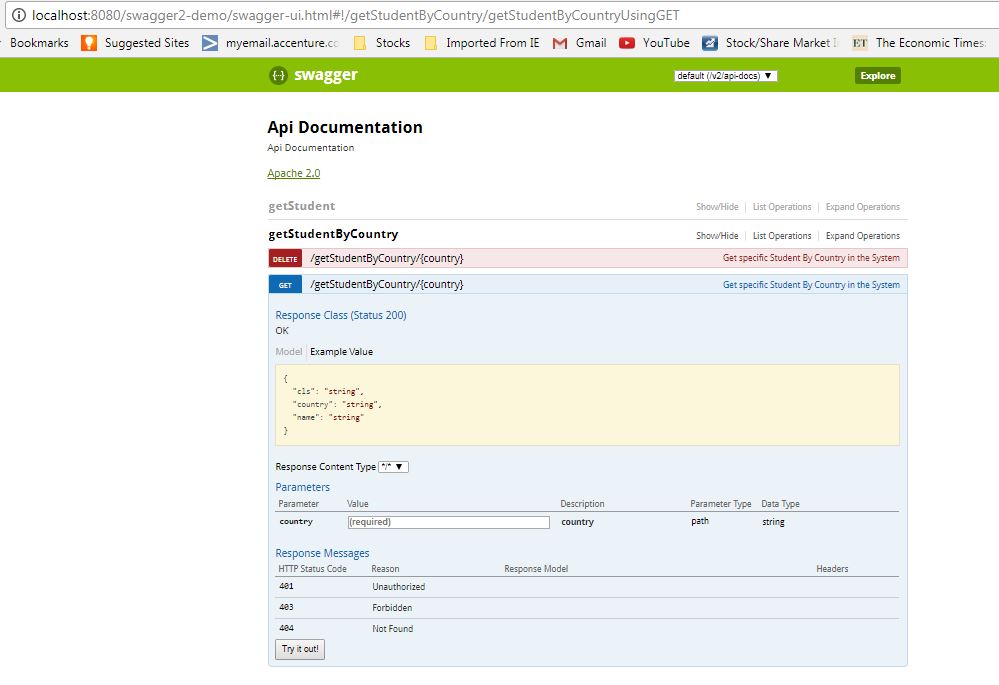
Swagger API documentation is a web page, called Swagger UI, that lists every endpoint of a REST API and lets us send test requests to the endpoints from the browser. Swagger UI builds the page from an OpenAPI document, which is a JSON or YAML file that describes the paths, parameters, request bodies and responses of the API. In a Spring Boot application, the springdoc-openapi library generates both from our controller code.
We use Swagger documentation to share the API contract with frontend developers and other teams, and to call an endpoint during development without writing a curl command first.
The following example adds Swagger documentation to a Spring Boot 4 app. We add one dependency, and the two URLs in the comments start working when the app runs.
<dependency>
  <groupId>org.springdoc</groupId>
  <artifactId>springdoc-openapi-starter-webmvc-ui</artifactId>
  <version>3.1.1</version>
</dependency>

<!-- Swagger UI:        http://localhost:8080/swagger-ui.html -->
<!-- OpenAPI document:  http://localhost:8080/v3/api-docs     -->
Notice that we write no configuration class and no annotation. The library finds our @RestController classes and documents their request mappings with the default settings.
Next, we see how Swagger and OpenAPI relate and build a small recipes API. After that, we describe the API with annotations such as @Operation and @Schema, change the default URLs, turn the docs off in production and migrate old Springfox code.
1. What Is Swagger and OpenAPI?
The OpenAPI Specification (formerly the Swagger Specification) is a standard format for describing REST APIs in JSON or YAML. Swagger is the name of a set of open-source tools built around the specification, such as Swagger UI and Swagger Editor. So when developers say “Swagger docs”, they mean an OpenAPI document that Swagger UI shows as a web page.
Four names show up in Swagger tutorials, and each one is a different thing.
| Name | What it is | In our example |
|---|---|---|
| OpenAPI Specification | The format. Version 2.0 is also called Swagger 2.0; the current versions are 3.0 and 3.1. | The document at /v3/api-docs, version 3.1.0 |
| Swagger UI | A web page that renders an OpenAPI document and sends test requests | /swagger-ui.html |
| springdoc-openapi | A Java library that generates the OpenAPI document from Spring MVC or Spring WebFlux code and bundles Swagger UI | The dependency in pom.xml |
| Springfox | An older library that generated Swagger 2.0 documents. Its last release is 3.0.0 from July 2020. | Not used |
For example, a mobile team builds the app for a recipes website, and our team writes the REST API behind it. A wiki page with the endpoints is out of date after the next release. Swagger UI is generated from the running code, so the mobile developers always see the endpoints of the deployed version.
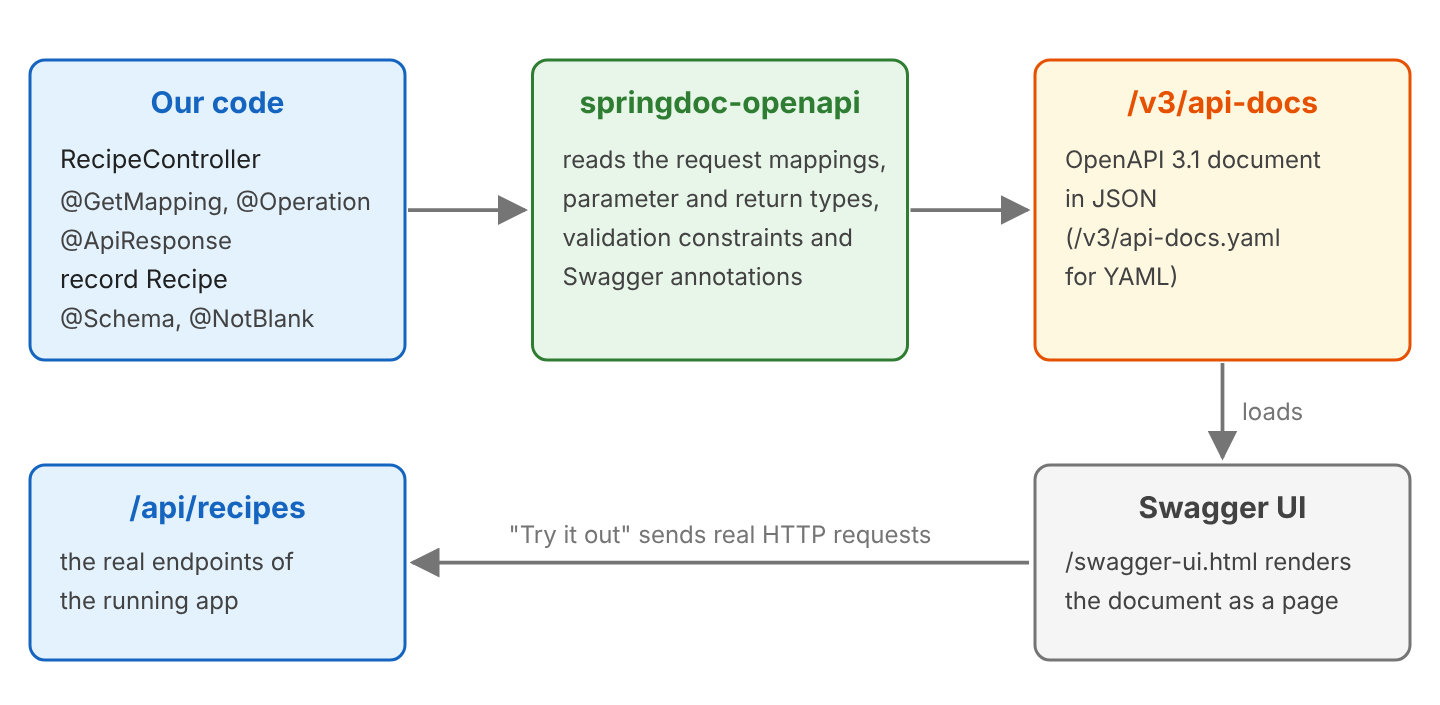
The diagram shows the flow from our code to Swagger UI. The springdoc-openapi library reads our request mappings and annotations when the first request for the docs arrives, and serves the result as an OpenAPI document. Swagger UI loads that document and renders it.
2. Swagger Documentation Example With Spring Boot
The following example is a small REST API for recipes. A Recipe has an id, a name and a cooking time in minutes. The RecipeController reads and creates recipes over HTTP. The app runs on Spring Boot 4.1.1 (Spring Framework 7.0.9) and Java 25, with springdoc-openapi 3.1.1, which bundles Swagger UI 5.32.14. The complete project is in the spring-webmvc repository on GitHub.
2.1. Adding the springdoc-openapi Dependency
For a Spring MVC app, we add the springdoc-openapi-starter-webmvc-ui dependency from the intro. It brings the OpenAPI generator and the Swagger annotations, and it includes the Swagger UI files. The library has other starters for other cases.
- The starter springdoc-openapi-starter-webflux-ui does the same for Spring WebFlux apps.
- The starter springdoc-openapi-starter-webmvc-api generates only the OpenAPI document, without Swagger UI.
The major version of springdoc-openapi must match the major version of Spring Boot, because springdoc-openapi releases a new major version together with each Spring Boot major release.
| Spring Boot | springdoc-openapi | Starter for Spring MVC |
|---|---|---|
| 4.x | 3.x | springdoc-openapi-starter-webmvc-ui |
| 3.x | 2.x | springdoc-openapi-starter-webmvc-ui |
| 2.x | 1.x | springdoc-openapi-ui |
With springdoc-openapi 2.x, a Spring Boot 4 app does not start, as we will see in section 7.1.
2.2. A REST Controller Without Swagger Annotations
We start with a controller that has no Swagger annotations at all. The Recipe class is a Java record, and the controller keeps the recipes in a ConcurrentHashMap. The @GetMapping and @PostMapping annotations map the HTTP requests.
public record Recipe(Long id, String name, int minutes) {
}

@RestController
@RequestMapping("/api/recipes")
public class RecipeController {

  private final Map<Long, Recipe> recipes = new ConcurrentHashMap<>();
  private final AtomicLong ids = new AtomicLong();

  @GetMapping
  public List<Recipe> findAll() {
    return List.copyOf(recipes.values());
  }

  @GetMapping("/{id}")
  public ResponseEntity<Recipe> findById(@PathVariable Long id) {
    Recipe recipe = recipes.get(id);
    return recipe == null ? ResponseEntity.notFound().build() : ResponseEntity.ok(recipe);
  }

  @PostMapping
  public ResponseEntity<Recipe> create(@RequestBody Recipe request) {
    long id = ids.incrementAndGet();
    Recipe saved = new Recipe(id, request.name(), request.minutes());
    recipes.put(id, saved);
    return ResponseEntity.created(URI.create("/api/recipes/" + id)).body(saved);
  }
}
When we open http://localhost:8080/v3/api-docs, springdoc-openapi returns the OpenAPI document for the three operations. The shortened output shows the POST operation and the Recipe schema.
{
  "openapi": "3.1.0",
  "info": {
    "title": "OpenAPI definition",
    "version": "v0"
  },
  "paths": {
    "/api/recipes": {
      "post": {
        "tags": ["recipe-controller"],
        "operationId": "create",
        "requestBody": {
          "content": {
            "application/json": {
              "schema": { "$ref": "#/components/schemas/Recipe" }
            }
          },
          "required": true
        },
        "responses": {
          "200": {
            "description": "OK",
            "content": {
              "*/*": {
                "schema": { "$ref": "#/components/schemas/Recipe" }
              }
            }
          }
        }
      }
    }
  },
  "components": {
    "schemas": {
      "Recipe": {
        "type": "object",
        "properties": {
          "id": { "type": "integer", "format": "int64" },
          "name": { "type": "string" },
          "minutes": { "type": "integer", "format": "int32" }
        }
      }
    }
  }
}
We can see that the paths, the request body and the field types are correct. But the document has gaps that confuse anyone who reads the docs.
- The title is “OpenAPI definition”, and the tag is the class name recipe-controller.
- The POST operation says it returns 200, but the method returns 201 Created.
- The 404 response of findById() is missing, because springdoc-openapi cannot see it in the method signature.
- The response media type is \/\**, because the mapping does not declare what it produces.
We fix these gaps with annotations in section 3.
2.3. Opening Swagger UI and the OpenAPI Document
By default, springdoc-openapi serves the docs at three URLs.
| URL | Content |
|---|---|
| /v3/api-docs | The OpenAPI document in JSON |
| /v3/api-docs.yaml | The same document in YAML |
| /swagger-ui.html | Swagger UI. The URL redirects (HTTP 302) to /swagger-ui/index.html. |
The app also logs two warnings at startup, because both endpoints are enabled by default. We turn them off for production in section 5.2.
WARN  o.s.core.events.SpringDocAppInitializer  : SpringDoc /v3/api-docs endpoint is enabled by default. To disable it in production, set the property 'springdoc.api-docs.enabled=false'
WARN  o.s.core.events.SpringDocAppInitializer  : SpringDoc /swagger-ui.html endpoint is enabled by default. To disable it in production, set the property 'springdoc.swagger-ui.enabled=false'
3. Describing the API With Swagger Annotations
The Swagger annotations add the information that springdoc-openapi cannot read from the code, such as a summary of each operation or the meaning of each status code. They come from the package io.swagger.v3.oas.annotations of the swagger-core library, which the starter already includes. The annotations change only the OpenAPI document, so the behavior of the endpoints stays the same.
3.1. Grouping and Summaries With @Tag and @Operation
The @Tag annotation on the controller class puts all its operations into one group in Swagger UI, with a readable name instead of recipe-controller. The @Operation annotation on a method sets a one-line summary, which Swagger UI shows next to the path, and a longer description, which shows when we open the operation.
@Tag(name = "Recipes", description = "Create and read recipes")
@RestController
@RequestMapping(path = "/api/recipes", produces = MediaType.APPLICATION_JSON_VALUE)
public class RecipeController {

  @Operation(summary = "List all recipes")
  @GetMapping
  public List<Recipe> findAll() {
    return List.copyOf(recipes.values());
  }
}
We also added produces = MediaType.APPLICATION_JSON_VALUE to the class-level @RequestMapping, so the OpenAPI document lists application/json as the response media type of every operation instead of \/\**.
3.2. Documenting Status Codes With @ApiResponse
The @ApiResponse annotation documents one status code of an operation. We repeat the annotation for each code, so we don’t need the @ApiResponses wrapper. When a method has at least one @ApiResponse, springdoc-openapi documents only the listed status codes, so we list the success code as well.
@Operation(summary = "Find a recipe by its id")
@ApiResponse(responseCode = "200", description = "Recipe found")
@ApiResponse(responseCode = "404", description = "No recipe with this id", content = @Content)
@GetMapping("/{id}")
public ResponseEntity<Recipe> findById(
    @Parameter(description = "Recipe id", example = "1") @PathVariable Long id) {
  Recipe recipe = recipes.get(id);
  return recipe == null ? ResponseEntity.notFound().build() : ResponseEntity.ok(recipe);
}

@Operation(summary = "Create a recipe", description = "The server generates the id.")
@ApiResponse(responseCode = "201", description = "Recipe created")
@ApiResponse(responseCode = "400", description = "Invalid recipe", content = @Content)
@PostMapping
public ResponseEntity<Recipe> create(@Valid @RequestBody Recipe request) {
  Recipe saved = save(request);
  return ResponseEntity.created(URI.create("/api/recipes/" + saved.id())).body(saved);
}
The empty @Content on the 404 and 400 responses tells springdoc-openapi that these responses have no Recipe body. Without it, springdoc-openapi adds the method’s return type to every response. The generated responses of findById() look like this.
"responses": {
  "200": {
    "description": "Recipe found",
    "content": {
      "application/json": {
        "schema": { "$ref": "#/components/schemas/Recipe" }
      }
    }
  },
  "404": {
    "description": "No recipe with this id"
  }
}
3.3. Describing Parameters With @Parameter
The @Parameter annotation in section 3.2 describes the path variable id. The example value fills the input field in Swagger UI, so a tester can press Execute without typing an id. The same annotation works for query parameters (@RequestParam) and headers (@RequestHeader).
"parameters": [
  {
    "name": "id",
    "in": "path",
    "description": "Recipe id",
    "required": true,
    "schema": { "type": "integer", "format": "int64" },
    "example": 1
  }
]
3.4. Describing the Model With @Schema and Bean Validation
The @Schema annotation describes a model class or one of its fields. We put it on the record and on each record component. The library also reads the Bean Validation constraints, so @NotBlank, @Min and @Max turn into the matching OpenAPI rules without extra annotations. The constraints need the spring-boot-starter-validation dependency.
@Schema(description = "A recipe with its cooking time")
public record Recipe(

    @Schema(description = "Generated by the server", example = "1", accessMode = Schema.AccessMode.READ_ONLY)
    Long id,

    @Schema(description = "Recipe name", example = "Pancakes")
    @NotBlank
    String name,

    @Schema(description = "Cooking time in minutes", example = "20")
    @Min(1) @Max(600)
    int minutes) {
}
The generated schema shows each mapping. The @NotBlank constraint becomes required plus minLength: 1, the @Min and @Max constraints become minimum and maximum, and READ_ONLY marks the id as a value that the server sets.
"Recipe": {
  "type": "object",
  "description": "A recipe with its cooking time",
  "properties": {
    "id": {
      "type": "integer",
      "format": "int64",
      "description": "Generated by the server",
      "example": 1,
      "readOnly": true
    },
    "name": {
      "type": "string",
      "description": "Recipe name",
      "example": "Pancakes",
      "minLength": 1
    },
    "minutes": {
      "type": "integer",
      "format": "int32",
      "description": "Cooking time in minutes",
      "example": 20,
      "maximum": 600,
      "minimum": 1
    }
  },
  "required": ["name"]
}
Swagger has its own @RequestBody annotation in the package io.swagger.v3.oas.annotations.parameters. In the controller, we keep the Spring annotation org.springframework.web.bind.annotation.RequestBody, because only the Spring one binds the JSON body to the parameter. If we need both in one class, we write the Swagger one with its full package name.
3.5. Setting the API Title and Version
The title and the version at the top of Swagger UI come from the info part of the OpenAPI document. We set them with a bean of type OpenAPI (from io.swagger.v3.oas.models), which springdoc-openapi uses as the starting point of the document.
@Configuration
public class OpenApiConfig {

  @Bean
  public OpenAPI recipesOpenApi() {
    return new OpenAPI()
        .info(new Info()
            .title("Recipes API")
            .version("1.0")
            .description("Create and read recipes"));
  }
}
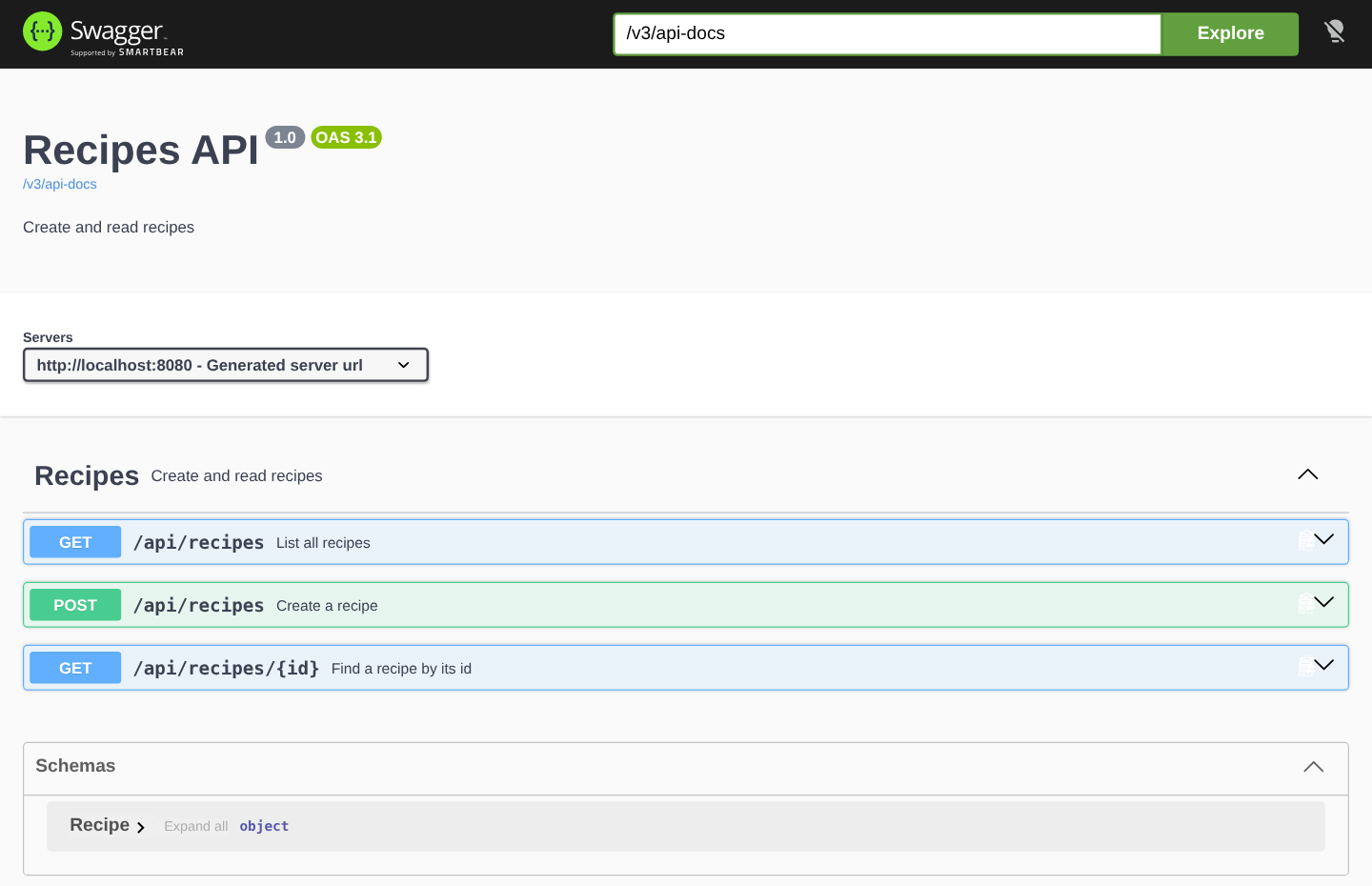
With all the annotations in place, Swagger UI shows the API title and one Recipes group with a summary for each operation.
4. Trying an Endpoint in Swagger UI
Each operation in Swagger UI has a “Try it out” button. We click it, fill in the parameters and press Execute, and Swagger UI sends a real HTTP request to the running app. The result shows the matching curl command and the full response, including the status code and the headers.
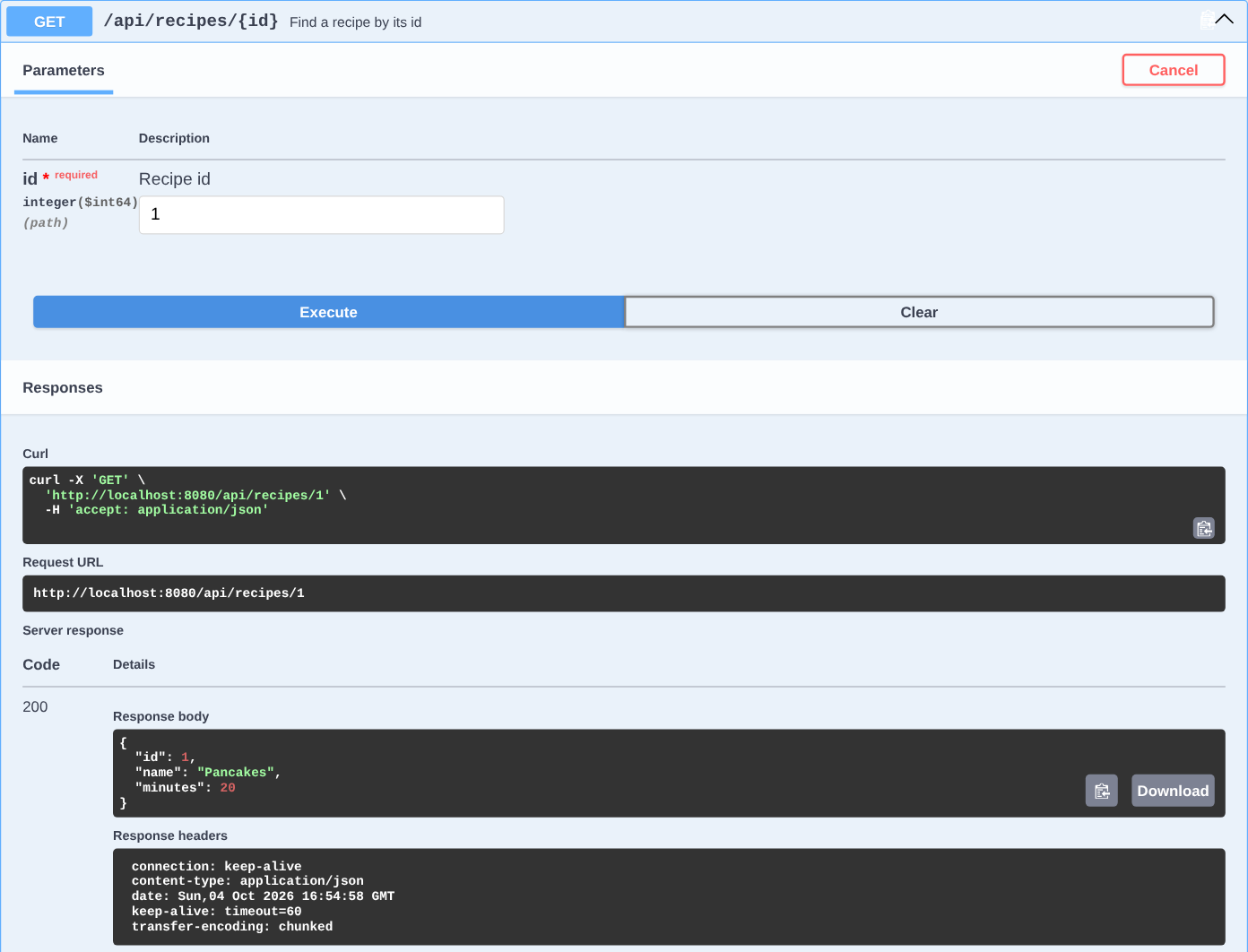
Because the requests are real, a POST in Swagger UI creates a real recipe, and a DELETE removes real data. So we use Swagger UI against a local or test environment, and in production we turn it off, as shown in section 5.2.
5. Configuring springdoc-openapi
The springdoc-openapi library reads its settings from application.properties with the prefix springdoc. Every property has a default, so we set only the ones we want to change.
| Property | Default | What it changes |
|---|---|---|
| springdoc.api-docs.path | /v3/api-docs | URL of the OpenAPI document |
| springdoc.swagger-ui.path | /swagger-ui.html | URL of Swagger UI |
| springdoc.api-docs.enabled | true | Set to false to remove the OpenAPI endpoints |
| springdoc.swagger-ui.enabled | true | Set to false to remove Swagger UI |
| springdoc.packagesToScan | all packages | Documents only the controllers in the listed packages |
| springdoc.pathsToMatch | all paths | Documents only the paths that match the listed patterns, such as /api/\\** |
5.1. Changing the Swagger UI and API Docs URLs
Some teams publish all API documentation under one URL, such as /docs. We set both paths in application.properties.
springdoc.swagger-ui.path=/docs
springdoc.api-docs.path=/api-docs
With these settings, /docs redirects to /swagger-ui/index.html, and the OpenAPI document moves to /api-docs. The old URLs /swagger-ui.html and /v3/api-docs return 404. The Swagger UI files themselves stay under /swagger-ui/.
5.2. Disabling Swagger UI in Production
The docs show every endpoint and every field of our API, and “Try it out” can change real data. For a public production API, we turn off both endpoints. We put the two properties into a profile-specific file, so the docs stay on for local development.
# No API docs and no Swagger UI in production
springdoc.api-docs.enabled=false
springdoc.swagger-ui.enabled=false
When we start the app with –spring.profiles.active=prod, the docs URLs return 404 and the API keeps working. The two startup warnings disappear as well. The Spring Boot profiles guide explains the other ways to activate a profile.
| Request | Default profile | prod profile |
|---|---|---|
| GET /v3/api-docs | 200 | 404 |
| GET /swagger-ui.html | 302 | 404 |
| GET /api/recipes | 200 | 200 |
6. Migrating From Springfox to springdoc-openapi
Many older Spring Boot projects still use Springfox with @EnableSwagger2 and a Docket bean. Springfox has had no release since 3.0.0 in July 2020 and it was built for the javax.servlet API, whereas Spring Boot 3 and 4 use the jakarta.servlet API. So a Spring Boot 3 or 4 project moves to springdoc-openapi.
The springdoc-openapi migration guide describes four steps.
- Remove the Springfox dependencies and add springdoc-openapi-starter-webmvc-ui.
- Replace the Swagger 2 annotations with the Swagger 3 annotations from the table.
- Remove the Docket bean. If it selected packages or paths, set springdoc.packagesToScan or springdoc.pathsToMatch instead. Several Docket beans become GroupedOpenApi beans.
- Move the API title and version from the ApiInfo object into an OpenAPI bean, as in section 3.5.
Most annotations have a direct replacement, but the attribute names change, for example code becomes responseCode in @ApiResponse.
| Springfox (Swagger 2) | springdoc-openapi (Swagger 3) |
|---|---|
| @Api | @Tag |
| @ApiOperation(value = “foo”, notes = “bar”) | @Operation(summary = “foo”, description = “bar”) |
| @ApiResponse(code = 404, message = “foo”) | @ApiResponse(responseCode = “404”, description = “foo”) |
| @ApiParam | @Parameter |
| @ApiImplicitParam | @Parameter |
| @ApiImplicitParams | @Parameters |
| @ApiModel | @Schema |
| @ApiModelProperty | @Schema |
| @ApiModelProperty(allowEmptyValue = true) | @Schema(nullable = true) |
| @ApiIgnore | @Hidden, @Operation(hidden = true) or @Parameter(hidden = true) |
The URLs change too. Springfox served the document at /v2/api-docs, and springdoc-openapi serves it at /v3/api-docs, so API gateways and client generators that read the old URL need the new one.
7. Swagger Documentation FAQs
7.1. Why Does the App Fail to Start After Upgrading to Spring Boot 4?
The springdoc-openapi version is too old. Version 2.x was compiled against Spring Boot 3, and Spring Boot 4 moved the class WebMvcProperties to a new package. With springdoc-openapi 2.8.17 on Spring Boot 4.1.1, the app stops at startup with this error.
ERROR o.s.boot.SpringApplication : Application run failed
Caused by: org.springframework.boot.autoconfigure.condition.OnBeanCondition$BeanTypeDeductionException: Failed to deduce bean type for org.springdoc.webmvc.ui.SwaggerConfig.swaggerWelcome
Caused by: java.lang.NoClassDefFoundError: org/springframework/boot/autoconfigure/web/servlet/WebMvcProperties
We fix it by upgrading to springdoc-openapi 3.x, as the version table in section 2.1 shows.
7.2. Why Does /swagger-ui.html Return 404?
Swagger UI is not served at the URL we call. We check these causes in order.
- The property springdoc.swagger-ui.enabled is false, for example in an active prod profile.
- The property springdoc.swagger-ui.path moves Swagger UI to another URL, so /swagger-ui.html no longer exists.
- The app sets a context path with server.servlet.context-path, such as /shop, so Swagger UI is at /shop/swagger-ui.html.
- The project has the springdoc-openapi-starter-webmvc-api starter, which has no Swagger UI.
7.3. How Do I Hide an Endpoint From Swagger Documentation?
We put @Hidden on the method, or on the controller class to hide all its endpoints. The @Operation(hidden = true) attribute does the same for one method. In our example, deleteAll() clears the test data, and it does not show up in the OpenAPI document.
@Hidden
@DeleteMapping
public ResponseEntity<Void> deleteAll() {
  recipes.clear();
  return ResponseEntity.noContent().build();
}
The @Hidden annotation removes the endpoint from the docs, not from the app. A DELETE /api/recipes request still returns 204 and clears the recipes, so an endpoint that must not be public needs security, not @Hidden.
7.4. Does Swagger UI Work With Spring Security?
Yes, but Spring Security protects the docs URLs like every other URL, so Swagger UI returns 401 until we permit them. We add the docs paths to permitAll() and keep the API itself protected.
@Bean
public SecurityFilterChain securityFilterChain(HttpSecurity http) throws Exception {
  http
      .authorizeHttpRequests(auth -> auth
          .requestMatchers("/v3/api-docs/**", "/v3/api-docs.yaml",
              "/swagger-ui.html", "/swagger-ui/**").permitAll()
          .anyRequest().authenticated())
      .httpBasic(Customizer.withDefaults());
  return http.build();
}
The pattern /v3/api-docs/\\** covers /v3/api-docs and /v3/api-docs/swagger-config, which Swagger UI loads first. It does not cover /v3/api-docs.yaml, so the YAML URL needs its own entry. With this configuration, the docs URLs return 200 or 302, and GET /api/recipes without credentials returns 401.
7.5. How Do I Download the OpenAPI Document as a File?
We download it from the running app. The JSON document is at /v3/api-docs, and the YAML document is at /v3/api-docs.yaml.
curl -o recipes-api.json http://localhost:8080/v3/api-docs
curl -o recipes-api.yaml http://localhost:8080/v3/api-docs.yaml
We can import the file into Postman or give it to a client code generator.
8. Conclusion
Swagger documentation is an OpenAPI document plus the Swagger UI page that renders it. In a Spring Boot application, the springdoc-openapi starter generates both from our controllers, and its major version must match the Spring Boot major version, which means 3.x for Spring Boot 4.
The generated document is correct for paths and types, but it cannot know status codes such as 201 and 404 or what a field means. We add that with @Tag, @Operation, @ApiResponse, @Parameter and @Schema, and the Bean Validation constraints show up in the schema without extra annotations.
Before going live, we decide where the docs may run. A prod profile with both enabled properties set to false removes them, and with Spring Security, we permit only the docs paths.
9. References
- springdoc-openapi documentation
- springdoc-openapi FAQ
- Migrating from Springfox
- OpenAPI Specification
- What Is OpenAPI (Swagger docs)
- Swagger UI
Happy Learning !!
