

To validate a date strictly with SimpleDateFormat, we call setLenient(false) before parse(), so the parser throws a ParseException when a field is out of range, such as month 13 or February 30. By default, SimpleDateFormat is lenient, which means it rolls an invalid value over into another date and returns it without any error.
We need strict parsing whenever a date comes from outside the code, such as a birth date in a sign-up form or a due date in a CSV import, and the code still uses java.util.Date. The same idea applies to Java date validation with LocalDate, where the strict mode is called ResolverStyle.STRICT.
The following example parses bad and good input with a lenient and a strict formatter, and with the java.time equivalent.
SimpleDateFormat lenient = new SimpleDateFormat("MM/dd/yyyy");
SimpleDateFormat strict = new SimpleDateFormat("MM/dd/yyyy");
strict.setLenient(false);

Date wrongOrder = lenient.parse("2012/12/17");     // Wed Aug 12 00:00:00 IST 184
Date rolledOver = lenient.parse("02/30/2026");     // Mon Mar 02 00:00:00 IST 2026
Date rejected = strict.parse("02/30/2026");        // ParseException: Unparseable date: "02/30/2026"
Date valid = strict.parse("12/17/2012");           // Mon Dec 17 00:00:00 IST 2012

DateTimeFormatter modern = DateTimeFormatter.ofPattern("MM/dd/uuuu").withResolverStyle(ResolverStyle.STRICT);
LocalDate checked = LocalDate.parse("02/30/2026", modern);   // DateTimeParseException: ... Invalid date 'FEBRUARY 30'
Notice that the lenient formatter turns both bad inputs into real dates, whereas the strict one throws. The method parse() throws the checked ParseException, so the calling method must catch or declare it. The printed zone IST comes from the default time zone of the JVM.
Next, we see why lenient parsing produces the year 184 and which inputs setLenient(false) rejects or still accepts. After that, we build a strict helper that returns an Optional. The last sections cover leniency in Calendar and strict parsing with java.time.
1. Java Date Validation with SimpleDateFormat.parse()
Many code bases validate a date by calling SimpleDateFormat.parse(). If the method returns a Date, the input counts as valid. With a default formatter, that check is wrong, because SimpleDateFormat is lenient unless we change it, and a lenient parser returns a Date for many invalid inputs.
private static final String DATE_PATTERN = "MM/dd/yyyy";
SimpleDateFormat sdf = new SimpleDateFormat(DATE_PATTERN);

//Lenient conversion result in unexpected output
Date d = sdf.parse("2012/12/17");
System.out.println(d);
Program output.
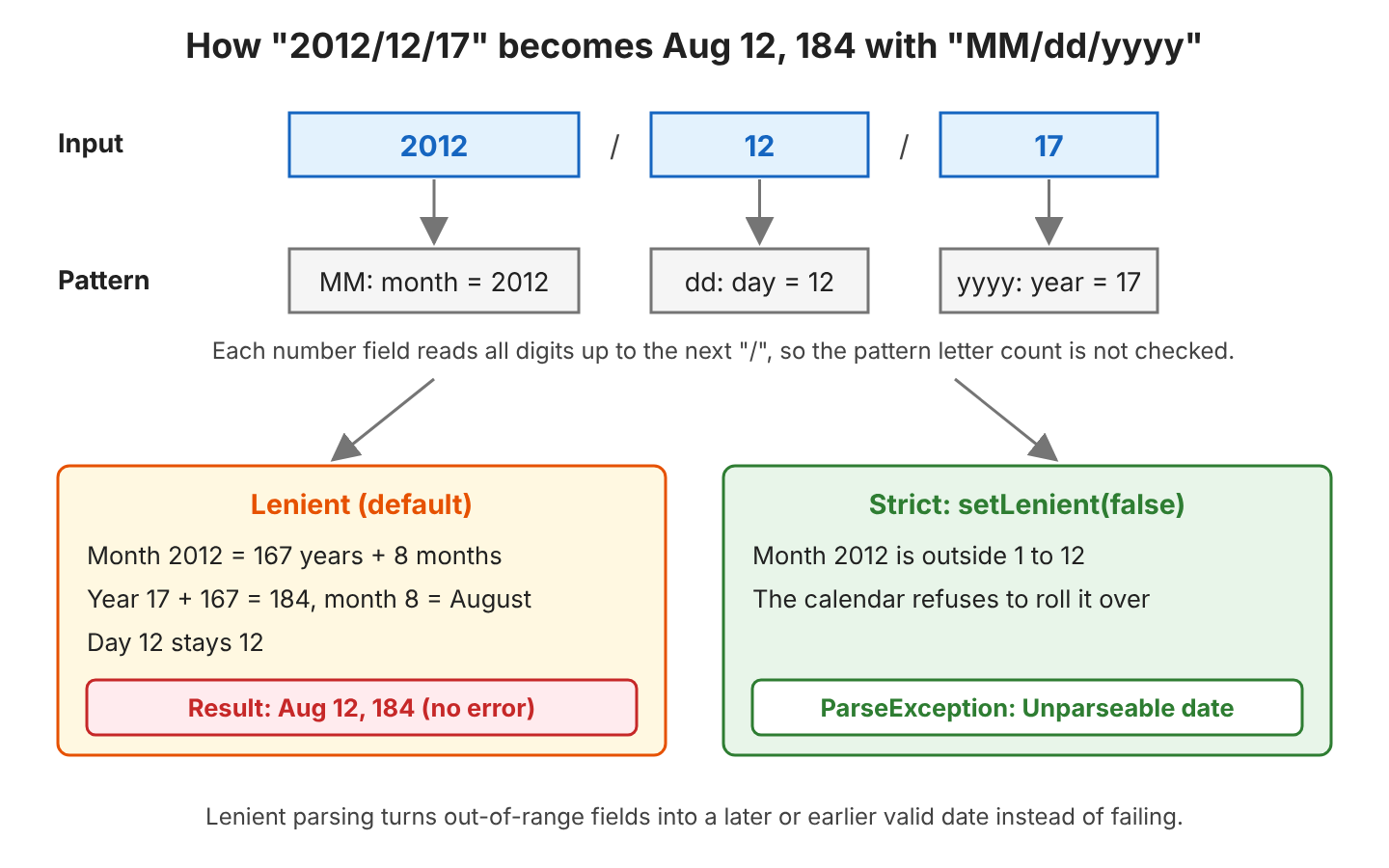
Wed Aug 12 00:00:00 IST 1841.1. What went wrong?
The above date validation is strange for two reasons. First, it should have flagged the validation error, and second, the date object obtained is completely useless. So, what went wrong here?
The parser reads the input from left to right and fills one field per pattern letter group. For numbers, SimpleDateFormat ignores the number of pattern letters during parsing, so MM reads every digit up to the next slash. That gives month 2012, day 12 and year 17. A lenient calendar accepts month 2012 and moves it into later years, which ends in August 12 of the year 184.
The same rollover happens for every field. In a sign-up form, a user types 02/30/2026 as a birth date, and the lenient parser stores March 2. Nobody sees an error, and the wrong date shows up months later in a report.
| Input | Lenient parse() result |
|---|---|
| “02/30/2026” | Mar 02, 2026 |
| “02/29/2026” | Mar 01, 2026 (2026 is not a leap year) |
| “13/01/2026” | Jan 01, 2027 |
| “00/10/2026” | Dec 10, 2025 |
| “12/17/-2012” | Dec 17, 2013 BC |
2. Correct way to validate a date with SimpleDateFormat.setLenient()
The method setLenient(false) switches the formatter to strict parsing), in which the input must match the format of the object. In practice, every field must be in its valid range for the given month and year, or parse() throws a ParseException.
private static final String DATE_PATTERN = "MM/dd/yyyy";
SimpleDateFormat sdf = new SimpleDateFormat(DATE_PATTERN);

sdf.setLenient(false);

//Strict parsing rejects the wrong field order
Date d = sdf.parse("2012/12/17");
System.out.println(d);
Program output.
java.text.ParseException: Unparseable date: "2012/12/17"
	at java.base/java.text.DateFormat.parse(DateFormat.java:427)
	at com.howtodoinjava.core.datetime.StrictDateValidation.strictExample(StrictDateValidation.java:58)
So setting setLenient(false) corrects the parsing behavior of SimpleDateFormat. We can verify the correct parsing by passing a valid date in the required pattern.
SimpleDateFormat sdf = new SimpleDateFormat("MM/dd/yyyy");
sdf.setLenient(false);

Date d = sdf.parse("12/17/2012");    // Mon Dec 17 00:00:00 IST 2012
All five inputs from the table in section 1.1 throw ParseException in strict mode, and 02/29/2028 still parses, because 2028 is a leap year. The method isLenient() returns the current mode, which is true for a new formatter.
3. What setLenient(false) Does Not Check
Strict mode checks the range of each field, not the shape of the text. For numbers, SimpleDateFormat ignores the number of pattern letters, and with yyyy, it reads the year literally, whatever the number of digits. Also, parse(String) stops at the end of the pattern and ignores the rest of the text.
| Input | Strict parse() result | Why it passes |
|---|---|---|
| “12/17/2012abc” | Dec 17, 2012 | the text after the year is ignored |
| “12/17/12” | Dec 17, 12 AD | yyyy reads 12 as the year 12 |
| “02/28/202” | Feb 28, 202 AD | a 3-digit year is read literally |
| “12/17/20126” | Dec 17, 20126 AD | a 5-digit year is read literally |
| “1/5/2026” | Jan 05, 2026 | MM accepts one digit |
| ” 12/17/2026″ | Dec 17, 2026 | leading spaces before a number are skipped |
The two-digit year is the dangerous case, because the result looks like a normal date. For example, a CSV import gets 12/17/12 from a spreadsheet export, and strict mode stores the year 12 instead of 2012, with no exception. So setLenient(false) alone is not a complete validation.
3.1. A Strict Validation Helper
The parseStrict() helper adds two checks after the strict parse. First, parse(String, ParsePosition) tells us where parsing stopped, so we reject the input when any text is left. Second, we format the Date again and compare the result with the input, which rejects every input from the table except the 5-digit year. The helper returns an Optional, so the caller handles bad input without a try-catch.
public static Optional<Date> parseStrict(String text, String pattern) {
  if (text == null) {
    return Optional.empty();
  }
  SimpleDateFormat format = new SimpleDateFormat(pattern, Locale.US);
  format.setLenient(false);
  ParsePosition position = new ParsePosition(0);
  Date date = format.parse(text, position);
  if (date == null || position.getIndex() != text.length() || !format.format(date).equals(text)) {
    return Optional.empty();
  }
  return Optional.of(date);
}
The helper creates a new SimpleDateFormat on every call, because the class is not thread-safe, as we see in section 6.1.
Optional<Date> valid = parseStrict("12/17/2012", "MM/dd/yyyy");        // Optional[Mon Dec 17 00:00:00 IST 2012]
Optional<Date> rolled = parseStrict("02/30/2026", "MM/dd/yyyy");       // Optional.empty
Optional<Date> trailing = parseStrict("12/17/2012abc", "MM/dd/yyyy");  // Optional.empty
Optional<Date> shortYear = parseStrict("12/17/12", "MM/dd/yyyy");      // Optional.empty
Optional<Date> oneDigit = parseStrict("1/5/2026", "MM/dd/yyyy");       // Optional.empty
Optional<Date> missing = parseStrict(null, "MM/dd/yyyy");              // Optional.empty
Optional<Date> farYear = parseStrict("12/17/20126", "MM/dd/yyyy");     // Optional[Tue Dec 17 00:00:00 IST 20126]
The last line shows the one gap left. A 5-digit year is a real year, so the round trip gives the same text. When the app expects years in a known range, such as 1900 to 2100 for a birth date, we check the year after parsing.
4. Default leniency behavior in Calendar class
The class SimpleDateFormat keeps its leniency in its Calendar, and setLenient() on the formatter is the same as getCalendar().setLenient(). So the Calendar rules decide what a lenient formatter does. A later call to setCalendar() replaces the calendar, together with its leniency value.
Calendar class has two modes for interpreting the calendar fields, lenient and non-lenient. When a calendar is in lenient mode, it accepts a wider range of calendar field values than it produces. When a calendar recomputes field values for return by get(), all of the calendar fields are normalized.
For example, a lenient GregorianCalendar interprets “MONTH = JANUARY and DAY_OF_MONTH = 32” as February 1, which is incorrect.
When a Calendar is in non-lenient mode, it throws an exception if there is any inconsistency in its calendar fields. For example, a GregorianCalendar always produces DAY_OF_MONTH values between 1 and the length of the month. A non-lenient GregorianCalendar throws an exception upon calculating its time or calendar field values if any out-of-range field value has been set.
Calendar lenientCalendar = Calendar.getInstance();
lenientCalendar.clear();
lenientCalendar.set(2026, Calendar.JANUARY, 32);
Date february = lenientCalendar.getTime();                  // Sun Feb 01 00:00:00 IST 2026

Calendar strictCalendar = Calendar.getInstance();
strictCalendar.clear();
strictCalendar.setLenient(false);
strictCalendar.set(2026, Calendar.JANUARY, 32);
Date rejected = strictCalendar.getTime();                   // IllegalArgumentException: DAY_OF_MONTH
Default is lenient mode.
Notice that the non-lenient calendar throws only in getTime(), not in set(), because the calendar checks the fields when it computes the time.
5. Strict Date Validation With java.time
In new code, we use LocalDate with a DateTimeFormatter, which is immutable and thread-safe. Its parser has three resolver styles, and the default, SMART, is not strict either. For a day-of-month greater than the length of the month, SMART picks the last valid day, so 02/30/2026 becomes February 28 without any error.
| Input | SMART (default) | STRICT with uuuu |
|---|---|---|
| “12/17/2012” | 2012-12-17 | 2012-12-17 |
| “02/30/2026” | 2026-02-28 | DateTimeParseException |
| “13/01/2026” | DateTimeParseException | DateTimeParseException |
| “12/17/2012abc” | DateTimeParseException | DateTimeParseException |
| “12/17/12” | DateTimeParseException | DateTimeParseException |
| “1/5/2026” | DateTimeParseException | DateTimeParseException |
Unlike SimpleDateFormat, the java.time parser checks the number of digits and rejects text after the date in both modes. For strict parsing, we combine ResolverStyle.STRICT with the year pattern uuuu, not yyyy. The letter y means year-of-era, and in strict mode a year-of-era without an era cannot be resolved, so every input fails, even 12/17/2012.
DateTimeFormatter strict = DateTimeFormatter.ofPattern("MM/dd/uuuu")
    .withResolverStyle(ResolverStyle.STRICT);

LocalDate valid = LocalDate.parse("12/17/2012", strict);    // 2012-12-17
LocalDate leap = LocalDate.parse("02/29/2028", strict);     // 2028-02-29
LocalDate invalid = LocalDate.parse("02/29/2026", strict);  // DateTimeParseException: ... Invalid date 'February 29' as '2026' is not a leap year

DateTimeFormatter wrongYear = DateTimeFormatter.ofPattern("MM/dd/yyyy")
    .withResolverStyle(ResolverStyle.STRICT);
LocalDate failed = LocalDate.parse("12/17/2012", wrongYear);   // DateTimeParseException: ... Unable to obtain LocalDate from TemporalAccessor
For user input, we wrap the call in a helper that catches DateTimeParseException and returns an Optional<LocalDate>, in the same way as parseStrict(). The helper also calls strip(), so a leading or trailing space in a form field does not fail the check.
private static final DateTimeFormatter STRICT_DATE = DateTimeFormatter.ofPattern("MM/dd/uuuu")
    .withResolverStyle(ResolverStyle.STRICT);

public static Optional<LocalDate> parseLocalDate(String text) {
  if (text == null) {
    return Optional.empty();
  }
  try {
    return Optional.of(LocalDate.parse(text.strip(), STRICT_DATE));
  } catch (DateTimeParseException e) {
    return Optional.empty();
  }
}

Optional<LocalDate> ok = parseLocalDate("12/17/2012");    // Optional[2012-12-17]
Optional<LocalDate> bad = parseLocalDate("02/30/2026");   // Optional.empty
The three resolver styles are compared in more detail in strict, smart and lenient date resolution. When a library still needs a Date, we parse with java.time and convert the result, as shown in LocalDate to Date.
6. SimpleDateFormat Validation FAQs
6.1. Is SimpleDateFormat Thread-Safe?
No. Date formats are not synchronized, and a shared SimpleDateFormat instance can return wrong dates or throw exceptions when two threads parse at the same time. So we never keep a lenient or strict SimpleDateFormat in a static field of a web app. We create one per call, as parseStrict() does, or use a DateTimeFormatter, which is safe to share.
6.2. What Is the Default Value of setLenient()?
The default is lenient, so isLenient() returns true for a new SimpleDateFormat and for a new Calendar. We call setLenient(false) on every formatter that validates input.
6.3. Does setLenient(false) Check the Number of Digits?
No. Strict mode checks the value of each field, not its length, so “1/5/2026” and “12/17/12” parse with the pattern MM/dd/yyyy. To reject them, we compare the formatted Date with the input, as in section 3.1, or parse with DateTimeFormatter.
6.4. Why Does parse() Accept Extra Text After the Date?
The method parse(String) reads only as much text as the pattern needs and ignores the rest, so “12/17/2012abc” parses to December 17, 2012. The overload parse(String, ParsePosition) returns the position where parsing stopped, and the input is complete only when that position equals the length of the text.
7. Conclusion
A default SimpleDateFormat is lenient, so parse() turns invalid input such as 02/30/2026 or 2012/12/17 into another date without any error. Calling setLenient(false) makes the parser check the range of every field and throw a ParseException for invalid dates.
Strict mode still accepts trailing text, leading spaces, one-digit months and years with two, three or five digits. A small helper with ParsePosition and a format round trip rejects those inputs and returns an Optional for the caller.
In new code, we validate with LocalDate and a DateTimeFormatter that uses ResolverStyle.STRICT and the year pattern uuuu. That formatter is strict about the digits, the range and the full text, and it is thread-safe.
8. References
- DateFormat JavaDoc (Java 25)
- SimpleDateFormat JavaDoc (Java 25)
- Calendar JavaDoc (Java 25)
- ResolverStyle JavaDoc (Java 25)
- DateTimeFormatter JavaDoc (Java 25)
Happy Learning !!
