

To convert a decimal number to hexadecimal, we divide it by 16 again and again and read the remainders from the last one to the first one, so 269 becomes 10D. In Java, Integer.toHexString(269) does the decimal to hexadecimal conversion for us and returns “10d”, and Integer.parseInt(“10d”, 16) converts the hex text back to 269.
We need hexadecimal (hex) numbers whenever a value is shown or stored in base 16, such as color codes like #FF8800, byte dumps, hash values and memory addresses in a thread dump.
The following example converts 269 to hex text in a few formats and back to decimal, with the result of each line as a comment.
String hex = Integer.toHexString(269);             // "10d"
String upper = String.format("%X", 269);           // "10D"
String padded = String.format("%04X", 269);        // "010D"
String hexDigits = HexFormat.of().toHexDigits(269); // "0000010d" (Java 17+)

int decimal = Integer.parseInt("10D", 16);         // 269
int fromPrefix = Integer.decode("0x10D");          // 269
int bad = Integer.parseInt("10G", 16);             // NumberFormatException: For input string: "10G" under radix 16
Notice that the methods return lowercase letters by default, and that String.format() gives us uppercase letters and padding with zeros. Bad hex text throws a NumberFormatException, which we handle in section 4.4.
First, we convert numbers by hand with worked examples, because the math explains what the Java methods print. Then we go through the Java APIs in both directions, including negative numbers, HexFormat and a custom method.
1. Difference between Decimal and Hexadecimal Numbers
1.1. Difference
A decimal number uses 10 symbols (base 10), from 0 to 9, to represent a number, while a hexadecimal number uses 16 symbols (base 16), from 0 to 9 and A to F.
The radix (or base) of a decimal number is 10, so every digit of a decimal number stands for a power of 10. The radix of a hexadecimal number is 16, so every digit of a hexadecimal number stands for a power of 16. The letters A to F stand for the values 10 to 15.

One hex digit holds 4 bits, so two hex digits describe one byte (8 bits). For example, the byte value 255 is FF. So programs print bytes and hash values in hex, because the text is short and every hex digit stands for a group of 4 bits.
1.2. Converting Decimal to Hexadecimal by Hand
As every hexadecimal digit stands for a power of 16, we can divide a given decimal number by 16 and consider the remainder to get the corresponding hexadecimal number. Let’s understand this by an example.
Let’s walk through step by step to convert 269 (a decimal number) to hexadecimal.
- Take 269 as the dividend and 16 as the divisor.
- Divide the dividend by the divisor and store the remainder.
- Divide the quotient from the previous step by 16 and store the remainder.
- Repeat the third step until the quotient becomes zero.
- The final hexadecimal number is the stored remainders in reverse order.
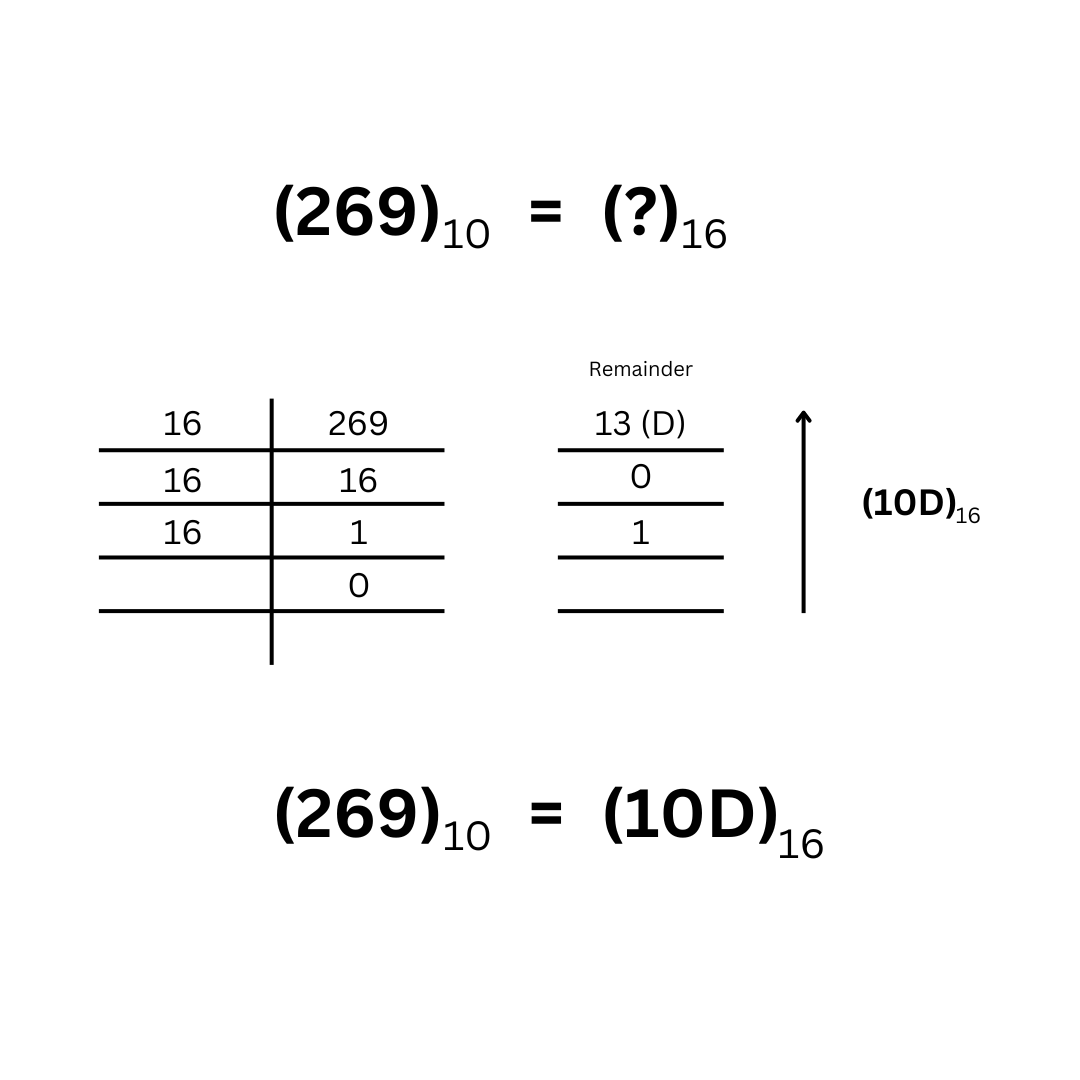
The same steps work for any whole number. In the table, every row is one worked example with its solution, and the remainders are listed in the order we get them.
| Decimal | Divisions by 16 (quotient, remainder) | Remainders read in reverse | Hexadecimal |
|---|---|---|---|
| 255 | 255 / 16 = 15 r 15 (F), 15 / 16 = 0 r 15 (F) | F F | FF |
| 269 | 269 / 16 = 16 r 13 (D), 16 / 16 = 1 r 0, 1 / 16 = 0 r 1 | 1 0 D | 10D |
| 1000 | 1000 / 16 = 62 r 8, 62 / 16 = 3 r 14 (E), 3 / 16 = 0 r 3 | 3 E 8 | 3E8 |
| 2026 | 2026 / 16 = 126 r 10 (A), 126 / 16 = 7 r 14 (E), 7 / 16 = 0 r 7 | 7 E A | 7EA |
| 4096 | 4096 / 16 = 256 r 0, 256 / 16 = 16 r 0, 16 / 16 = 1 r 0, 1 / 16 = 0 r 1 | 1 0 0 0 | 1000 |
1.3. Converting Hexadecimal to Decimal by Hand
The opposite direction uses the place values. We multiply every hex digit by the power of 16 for its position, counting from 0 on the right, and add the products.
| Hexadecimal | Calculation | Decimal |
|---|---|---|
| 10D | 1 x 256 + 0 x 16 + 13 x 1 | 269 |
| FF | 15 x 16 + 15 x 1 | 255 |
| 7EA | 7 x 256 + 14 x 16 + 10 x 1 | 2026 |
A shorter way to do the same math is to read the digits from left to right, and for each digit, multiply the running total by 16 and add the digit. For 10D, the total goes 1, then 1 x 16 + 0 = 16, then 16 x 16 + 13 = 269. The custom Java method in section 4.3 uses this order.
2. Representing Numbers of Different Bases in Java
In Java, an int or a long stores only a binary value, and printing it always shows the decimal form. A variable never holds a number “in hex”. Hex, octal and binary are only ways to write the value in source code or in text.
We can assign binary, octal, or hexadecimal values to an int or a long using predefined literal prefixes.
int hexNum = 0X10D;            // 269 ('0X' or '0x' prefix for hexadecimal)
int octNumber = 01560;         // 880 ('0' prefix for octal)
int binNumber = 0b100001101;   // 269 ('0b' or '0B' prefix for binary)
The compiler turns all three literals into the same kind of int value, and printing the variable hexNum prints 269. So when we need the hex form of a number, we create a String, and the hex number exists only as text.
3. Converting a Decimal Number to Hexadecimal
Java has four ways to turn a number into hex text. The number classes and String.format() cover most cases. The class HexFormat adds fixed-width output and byte arrays, and a custom method shows the algorithm from section 1.2.
For example, a theme settings page stores the brand color as three int values for red, green and blue. The page shows the color as #FF8800, so it needs every value as two uppercase hex digits.
String color = String.format("#%02X%02X%02X", 255, 136, 0); // "#FF8800"3.1. Using Number Classes
The wrapper classes Integer and Long, and the class BigInteger, have built-in methods for the conversion from decimal to an equivalent hex number.
- Integer.toHexString(num) and Long.toHexString(num) return the hex digits of the number.
- Integer.toString(num, 16) and Long.toString(num, 16) take the radix as the second argument.
- The method toString(16) of BigInteger converts a number of any size.
String hex = Integer.toHexString(269);                    // "10d"
String withRadix = Integer.toString(269, 16);             // "10d"
String longHex = Long.toHexString(3000000000L);           // "b2d05e00"
String bigHex = new BigInteger("123456789012345678901234567890").toString(16);   // "18ee90ff6c373e0ee4e3f0ad2"
For positive numbers, toHexString() and toString(num, 16) return the same text. They differ for negative numbers, as we see in section 3.5.
The classes Float and Double also have a toHexString() method, but it returns a different kind of text. The method Double.toHexString() writes the binary floating-point value as a hex fraction with a power-of-two exponent after the p, which is the format of a hex floating-point literal in Java.
String doubleHex = Double.toHexString(333.44d);   // "0x1.4d70a3d70a3d7p8"
String floatHex = Float.toHexString(333.44f);     // "0x1.4d70a4p8"
3.2. Using String.format()
The String class has a format() method that accepts a format specifier. The specifier for hexadecimal numbers is %x, and %X prints uppercase letters. A width with a leading zero, such as %04X, pads the text with zeros, and the # flag adds the 0x prefix.
String hex = String.format("%x", 269);            // "10d"
String upper = String.format("%X", 269);          // "10D"
String fourDigits = String.format("%04x", 269);   // "010d"
String eightDigits = String.format("%08X", 269);  // "0000010D"
String prefixed = String.format("%#x", 269);      // "0x10d"
String fromLong = String.format("%x", 3000000000L);   // "b2d05e00"
String formatted = "%X".formatted(269);           // "10D"
The %x specifier works for byte, short, int, long and BigInteger values. For a double value, it throws an IllegalFormatConversionException, so floating-point values go to Double.toHexString().
3.3. Using HexFormat (Java 17 and Later)
Java 17 added the class HexFormat, which converts between numbers or byte arrays and hex text. The method toHexDigits() always returns the full width of the type, so an int gives 8 digits, a short gives 4 and a byte gives 2.
HexFormat hexFormat = HexFormat.of();
String intDigits = hexFormat.toHexDigits(269);                         // "0000010d"
String shortDigits = hexFormat.toHexDigits((short) 269);               // "010d"
String byteDigits = hexFormat.toHexDigits((byte) 255);                 // "ff"
String upperDigits = HexFormat.of().withUpperCase().toHexDigits(269);  // "0000010D"

String bytes = HexFormat.of().formatHex(new byte[]{1, 13, (byte) 255});                          // "010dff"
String withColons = HexFormat.ofDelimiter(":").withUpperCase().formatHex(new byte[]{1, 13, (byte) 255});   // "01:0D:FF"
We use HexFormat when the output must have a fixed width, such as in a protocol or a log of byte values, and when we convert byte arrays. For one number with no padding, Integer.toHexString() is shorter.
3.4. Using a Custom Method
We can also write a custom method for the algorithm discussed in section 1.2. The method performs the long division of the decimal number in a loop.
- Take the remainder of the division by 16.
- Get the hexadecimal token for the remainder from the text “0123456789ABCDEF”.
- Prepend the token to the result.
- Divide the number by 16, and repeat these steps until the number is 0.
public static String convertToHex(int number) {

  if (number == 0) {
    return "0";
  }

  long value = Math.abs((long) number);   // long, so Integer.MIN_VALUE works too
  StringBuilder result = new StringBuilder();
  String tokens = "0123456789ABCDEF";

  while (value > 0) {
    int remainder = (int) (value % 16);
    result.insert(0, tokens.charAt(remainder));
    value = value / 16;
  }
  return number < 0 ? "-" + result : result.toString();
}
The method converts the number to a long before it removes the sign, because Math.abs(Integer.MIN_VALUE) overflows and stays negative for an int. For a negative number, the method adds a minus sign, the same way as Integer.toString(num, 16).
String hex = convertToHex(269);                  // "10D"
String zero = convertToHex(0);                   // "0"
String negative = convertToHex(-269);            // "-10D"
String min = convertToHex(Integer.MIN_VALUE);    // "-80000000"
3.5. Converting Negative Numbers
Java stores an int in 32 bits as a two’s complement value, so a negative number has its highest bit set. The method Integer.toHexString() prints these 32 bits as an unsigned value, whereas Integer.toString(num, 16) prints a minus sign and the hex digits of the absolute value.
String unsigned = Integer.toHexString(-269);      // "fffffef3" (32 bits, two's complement)
String signed = Integer.toString(-269, 16);       // "-10d"
String minusOne = Integer.toHexString(-1);        // "ffffffff"
String longMinusOne = Long.toHexString(-1L);      // "ffffffffffffffff"
String formatted = String.format("%x", -269);     // "fffffef3"
The two forms convert back with different methods. Text from toHexString() goes back through Integer.parseUnsignedInt(), because Integer.parseInt(“fffffef3”, 16) is above Integer.MAX_VALUE and throws an exception. Text with a minus sign goes back through Integer.parseInt().
int fromUnsigned = Integer.parseUnsignedInt("fffffef3", 16);   // -269
int fromSigned = Integer.parseInt("-10d", 16);                 // -269
int overflow = Integer.parseInt("fffffef3", 16);               // NumberFormatException: For input string: "fffffef3" under radix 16
4. Converting a Hexadecimal Number to Decimal
The conversion from hex text to a number is a parse, so it can fail. Every method in this section throws a NumberFormatException for text that is not valid hex, and section 4.4 shows how to handle bad input.
4.1. Using Number Classes
Converting from hexadecimal strings to the int and long types is direct, because the number classes accept a radix.
- Integer.parseInt(hex, 16) and Long.parseLong(hex, 16) return a primitive value.
- Integer.valueOf(hex, 16) and Long.valueOf(hex, 16) return an Integer or a Long object.
- Integer.decode(hex) and Long.decode(hex) read the radix from a 0x, 0X or # prefix.
- The constructor new BigInteger(hex, 16) converts a hex number of any size.
Upper and lower case letters both work. The methods differ in the result type, which is an int, an Integer, a long or a BigInteger.
int decimal = Integer.parseInt("10D", 16);           // 269
int lowerCase = Integer.parseInt("10d", 16);         // 269
Integer boxed = Integer.valueOf("10D", 16);          // 269
int fromPrefix = Integer.decode("0x10D");            // 269
int fromHash = Integer.decode("#10D");               // 269
long bigValue = Long.parseLong("b2d05e00", 16);      // 3000000000
BigInteger huge = new BigInteger("10d", 16);         // 269
The prefix decides which method fits. The method parseInt() rejects the 0x prefix, and decode() needs the prefix, because without it, decode() reads the text as a decimal number.
int withPrefix = Integer.parseInt("0x10D", 16);   // NumberFormatException: For input string: "0x10D" under radix 16
int noPrefix = Integer.decode("10D");             // NumberFormatException: For input string: "10D"
For more about parseInt(), valueOf() and decode(), read converting a String to int.
Converting a hexadecimal to floating-point numbers (float and double) depends on what the hex text contains. When the text holds the raw bits of a float, such as “BF800000”, we parse it with Integer.parseUnsignedInt() and pass the bits to Float.intBitsToFloat(). For a double, the methods are Long.parseUnsignedLong() and Double.longBitsToDouble().
int bits = Integer.parseUnsignedInt("BF800000", 16);              // -1082130432
float value = Float.intBitsToFloat(bits);                         // -1.0
String back = Integer.toHexString(Float.floatToIntBits(value));   // "bf800000"
When the text is a hex floating-point literal, such as the output of Double.toHexString(), the method Double.parseDouble() reads it.
double parsed = Double.parseDouble("0x1.4d70a3d70a3d7p8"); // 333.444.2. Using HexFormat.fromHexDigits()
The static method HexFormat.fromHexDigits() parses up to 8 hex digits into an int, and fromHexDigitsToLong() parses up to 16 digits into a long. Both methods accept upper and lower case letters, but no sign and no prefix.
int fromDigits = HexFormat.fromHexDigits("10d");                 // 269
int padded = HexFormat.fromHexDigits("0000010D");                // 269
long fromLong = HexFormat.fromHexDigitsToLong("b2d05e00");       // 3000000000
int tooLong = HexFormat.fromHexDigits("123456789");              // IllegalArgumentException: string length greater than 8: 9
int notHex = HexFormat.fromHexDigits("10g");                     // NumberFormatException: not a hexadecimal digit: "g" = 103
4.3. Using a Custom Method
To convert a hexadecimal string into a decimal integer using the raw method, we use the left-to-right algorithm from section 1.3.
- Find the decimal value of the current hex digit with Character.digit(c, 16), which returns -1 for a character that is not a hex digit.
- Multiply the result by 16 and add the digit value.
- Repeat these steps until the last digit of the hexadecimal string.
public static int convertHexToDecimal(String hex) {

  if (hex == null || hex.isBlank()) {
    throw new NumberFormatException("Empty hex string");
  }
  String digits = hex.strip();
  int result = 0;

  for (int i = 0; i < digits.length(); i++) {
    int n = Character.digit(digits.charAt(i), 16);   // -1 for a non-hex character
    if (n == -1) {
      throw new NumberFormatException("Not a hex digit: '" + digits.charAt(i) + "' in \"" + hex + "\"");
    }
    result = Math.addExact(Math.multiplyExact(result, 16), n);   // ArithmeticException on overflow
  }
  return result;
}
The method checks every character and uses Math.multiplyExact() and Math.addExact(), so a bad digit or a value above Integer.MAX_VALUE throws an exception instead of returning a wrong number.
int decimal = convertHexToDecimal("10D");        // 269
int lower = convertHexToDecimal("ff");           // 255
int bad = convertHexToDecimal("10G");            // NumberFormatException: Not a hex digit: 'G' in "10G"
int tooBig = convertHexToDecimal("80000000");    // ArithmeticException: integer overflow
4.4. Handling Invalid Hex Input
Hex text from a form field or a config file can contain spaces, a 0x or # prefix, or a typo. When bad input is expected, we put the parsing into a small helper that returns an OptionalInt instead of throwing the exception at every call.
public static OptionalInt tryParseHex(String text) {
  if (text == null) {
    return OptionalInt.empty();
  }
  String hex = text.strip();
  if (hex.startsWith("0x") || hex.startsWith("0X") || hex.startsWith("#")) {
    hex = hex.substring(hex.startsWith("#") ? 1 : 2);
  }
  try {
    return OptionalInt.of(Integer.parseInt(hex, 16));
  } catch (NumberFormatException e) {
    return OptionalInt.empty();
  }
}

OptionalInt spaced = tryParseHex(" 0x10D ");     // OptionalInt[269]
OptionalInt color = tryParseHex("#ff");          // OptionalInt[255]
OptionalInt invalid = tryParseHex("xyz");        // OptionalInt.empty
OptionalInt missing = tryParseHex(null);         // OptionalInt.empty
int orDefault = tryParseHex("xyz").orElse(-1);   // -1
5. Decimal and Hexadecimal FAQs
5.1. How Do We Convert a Decimal Fraction to Hexadecimal?
We convert the whole part by division, as in section 1.2, and the fraction by multiplication. We multiply the fraction by 16, take the whole part of the result as the next hex digit, and repeat with the remaining fraction until it is 0.
For example, 10.75 has the whole part 10, which is A. The fraction 0.75 x 16 = 12.0 gives the digit 12, which is C, and the remaining fraction is 0. So 10.75 in decimal is A.C in hex.
Java has no method that prints A.C. The method Double.toHexString(10.75) returns “0x1.58p3”, which is the same value written as 1.58 (hex) x 2 to the power 3.
5.2. How Do We Convert a Byte Array to a Hex String?
We call HexFormat.of().formatHex(bytes) on Java 17 and later, as we saw in section 3.3. The opposite method HexFormat.of().parseHex(text) turns the hex text back into a byte array. To convert text characters to hex and back, read converting hex to ASCII and ASCII to hex.
5.3. Why Does Integer.toHexString(-1) Return ffffffff?
The method toHexString() prints all 32 bits of the int, and -1 has every bit set in two’s complement, so all 8 hex digits are f. For a hex text with a minus sign, we use Integer.toString(-1, 16), which returns “-1”. We compared the two forms in section 3.5.
5.4. How Do We Convert Decimal to Binary or Octal?
We use the same methods with a different radix, or the methods Integer.toBinaryString() and Integer.toOctalString(). The article on binary, octal and hexadecimal conversions covers all three number systems.
6. Conclusion
To convert a decimal number to hexadecimal by hand, we divide it by 16 until the quotient is 0 and read the remainders in reverse order. To go back, we multiply each hex digit by its power of 16 and add the results.
In Java, Integer.toHexString() and String.format(“%X”) convert an int to hex text, and HexFormat gives fixed-width output and works with byte arrays. Negative numbers come out as 32-bit two’s complement text from toHexString(), or with a minus sign from Integer.toString(num, 16).
For the opposite direction, Integer.parseInt(hex, 16) parses plain hex digits, and Integer.decode() parses text with a 0x or # prefix. When the input comes from users, we strip it and parse it through a helper that returns an OptionalInt, so a typo never stops the program. For more on number types, read the Java data types tutorial.
7. References
- Integer JavaDoc (Java 25)
- HexFormat JavaDoc (Java 25)
- Formatter JavaDoc (Java 25)
- BigInteger JavaDoc (Java 25)
- Double JavaDoc (Java 25)
- Hexadecimal (Wikipedia)
Happy Learning !!
