
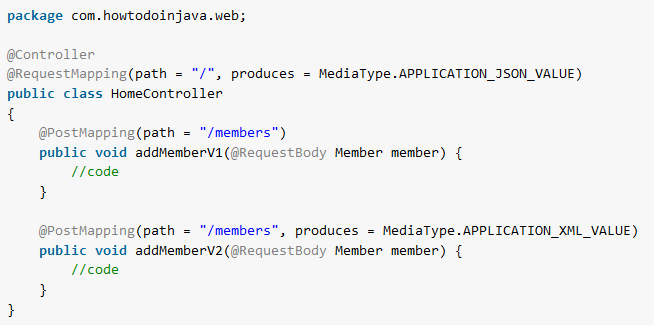
In Spring, @GetMapping maps HTTP GET requests and @PostMapping maps HTTP POST requests to controller methods. Both annotations are shortcuts for @RequestMapping with a fixed HTTP method, so @PostMapping(“/users”) means the same as @RequestMapping(value = “/users”, method = RequestMethod.POST). They work the same way in a Spring Boot application and in a Spring Web MVC application without Spring Boot.
We use @GetMapping on endpoints that read data, such as the list of users or one user by id. We use @PostMapping on endpoints that create data from the request body, such as a JSON payload sent by a form or another service.
The following example is a REST controller in a Spring Boot 4.1.1 app (Spring Framework 7.0.9, Java 25) with two GET endpoints and one POST endpoint.
@RestController
@RequestMapping("/users")
public class UserController {

  private final Map<Long, User> users = new ConcurrentHashMap<>();

  @GetMapping                                           // GET /users    -> 200 OK, all users
  public List<User> getAll() {
    return List.copyOf(users.values());
  }

  @GetMapping("/{id}")                                  // GET /users/1  -> 200 OK or 404 Not Found
  public ResponseEntity<User> getById(@PathVariable long id) {
    return ResponseEntity.of(Optional.ofNullable(users.get(id)));
  }

  @PostMapping                                          // POST /users   -> 201 Created
  public ResponseEntity<User> create(@RequestBody User user) {
    users.put(user.id(), user);
    return ResponseEntity.created(URI.create("/users/" + user.id())).body(user);
  }
}
Notice that the class-level @RequestMapping(“/users”) holds the common path, so each method annotation adds only its own part. The POST call answers with 201 Created and a Location header that points to the new user.
$ curl -i -X POST localhost:8080/users -H "Content-Type: application/json" -d '{"id":1,"name":"Lokesh"}'
HTTP/1.1 201
Location: /users/1
{"id":1,"name":"Lokesh"}

$ curl localhost:8080/users/1
{"id":1,"name":"Lokesh"}

$ curl -i localhost:8080/users/2
HTTP/1.1 404
Next, we compare both annotations with @RequestMapping, write a full @GetMapping and @PostMapping handler, and go through the attributes such as consumes, produces, headers and params that narrow a mapping.
1. Request Mapping Annotations
Before Spring 4.3, Spring had only @RequestMapping annotation for mapping all the incoming HTTP request URLs to the corresponding controller methods.
Spring 4.3 introduced 5 new and more specific annotations for each HTTP request type.
- @GetMapping
- @PostMapping
- @PutMapping
- @DeleteMapping
- @PatchMapping
For example, @GetMapping and @PostMapping replace the generic annotation on these three handler methods.
@GetMapping(value = "/users")
public Users getUsers() { ... }

@GetMapping(value = "/users/{id}")
public User getUser(@PathVariable("id") String id) { ... }

@PostMapping(value = "/users")
public User createUser(User user) { ... }
To compare the two styles, the next snippet maps the same HTTP requests with @RequestMapping. Notice that we specify the HTTP request type (GET or POST) in the annotation attribute method.
@RequestMapping(value = "/users", method = RequestMethod.GET)
public Users getUsers() { ... }

@RequestMapping(value = "/users/{id}", method = RequestMethod.GET)
public User getUser(@PathVariable("id") String id) { ... }

@RequestMapping(value = "/users", method = RequestMethod.POST)
public User createUser(User user) { ... }
2. Spring @GetMapping Example
The @GetMapping annotation is a composed version of the @RequestMapping annotation that acts as a shortcut for @RequestMapping(method = RequestMethod.GET). The @GetMapping annotated methods handle the HTTP GET requests matched with the given URI expression.
In the following example, we map two GET requests. The {id} part of the second URI is a template variable, and @PathVariable binds it to the method parameter.
- HTTP GET /users returns all the users in the system.
- HTTP GET /users/{id} returns a user by the specified id.
@RestController
public class UserController {

  private final UserService userService;

  @Autowired
  public UserController(UserService userService) {
    this.userService = userService;
  }

  @GetMapping("/users")
  public ResponseEntity<List<User>> getAll() {

    List<User> users = userService.getAll();
    return ResponseEntity.ok(users);
  }

  @GetMapping("/users/{id}")
  public ResponseEntity<User> getById(@PathVariable long id) {

    Optional<User> user = userService.getById(id);
    return user.map(ResponseEntity::ok)
      	.orElseThrow(() -> new RecordNotFoundException("User not found for ID " + id));
  }
}
3. Spring @PostMapping Example
The @PostMapping is a specialized version of @RequestMapping annotation that acts as a shortcut for @RequestMapping(method = RequestMethod.POST). The @PostMapping annotated methods handle the HTTP POST requests matched with the given URI expression.
As a best practice, always specify the media types (XML, JSON etc.) using the consumes and produces attributes. In the following example, we map one POST request.
- HTTP POST /users creates a new user in the system.
@PostMapping(path = "/users",
   consumes = MediaType.APPLICATION_JSON_VALUE,
   produces = MediaType.APPLICATION_JSON_VALUE)
public ResponseEntity<User> createUser(@RequestBody User newUser, HttpServletRequest request) {

	User user = userService.save(newUser);
	if (user != null) {
		URI location = ServletUriComponentsBuilder.fromRequestUri(request)
				.path("/{id}")
				.buildAndExpand(user.getId())
				.toUri();
		return ResponseEntity.created(location).body(user);
	} else {
		throw new ServerException("Error in creating the User resource. Try Again.");
	}
}
4. Annotation Attributes
All request mapping annotations support the following attributes, but we use each one only where it fits the request type.
- path or value specifies the mapping URI. A handler method that is not mapped to any path explicitly is effectively mapped to an empty path.
@PostMapping(value = "/members")

//or

@PostMapping("/members")
The short form @PostMapping(“/members”) works only when the path is the single attribute. As soon as we add a second attribute, Java needs the name value or path in front of the URI, otherwise the compiler reports “annotation values must be of the form ‘name=value'”.
- consumes lists one or more media types, and one of them must match the request Content-Type header. A request with any other content type gets 415 Unsupported Media Type.
@PostMapping(value = "/members", consumes = {"text/plain", "application/*"})- produces lists one or more media types, and Spring picks one of them through content negotiation against the acceptable media types, which come from the Accept header in most cases but may be derived from query parameters.
@PostMapping(value = "/members", produces = {"text/plain", "application/*"})- headers specifies the headers of the mapped request, narrowing the primary mapping, with a request only mapped if each such header is found to have the given value.
@PostMapping(value = "/members", headers = "content-type=text/json") - name assigns a name to the mapping.
@PostMapping(value = "/members", name = "AddNewMember") - params specifies the parameters of the mapped request, narrowing the primary mapping, with a request only mapped if each such parameter is found to have the given value. A request without the parameter gets 400 Bad Request.
@PostMapping(value = "/members", params = "x-country=USA") 5. Class-level Shared Attributes
The mapping annotations such as @RequestMapping, @GetMapping and @PostMapping inherit the annotation attribute values from the @RequestMapping annotation applied at the @RestController class.
In HomeController, the @RequestMapping annotation at the top sets the produces attribute to MediaType.APPLICATION_JSON_VALUE, so all the handler methods in this class, by default, will return the JSON response.
@RestController
@RequestMapping(path = "/", produces = MediaType.APPLICATION_JSON_VALUE)
public class HomeController
{
	@PostMapping(path = "/members")
	public void addMember(@RequestBody Member member) {
		//code
	}
}
Note that the method-level mapping annotation may override the attribute values by providing its own values. In the following example, the /members API overrides the produces attribute so it will return the XML response to the clients.
@RestController
@RequestMapping(path = "/", produces = MediaType.APPLICATION_JSON_VALUE)
public class HomeController
{
	@PostMapping(path = "/members", produces = MediaType.APPLICATION_XML_VALUE)
	public void addMember(@RequestBody Member member) {
		//code
	}
}
6. Difference between @PostMapping and @RequestMapping
As noted above, the @PostMapping annotation is one specialized version of the @RequestMapping annotation that handles only the HTTP POST requests.
@PostMapping = @RequestMapping(method = { RequestMethod.POST })
Both declarations in the next snippet map the same POST request to the /employees URI, and only the syntax differs.
@RequestMapping(value = "/employees", method = RequestMethod.POST)

@PostMapping("/employees")      //Similar to above declaration
In other words, @PostMapping acts as a shortcut for @RequestMapping(method = RequestMethod.POST). We can see the source code of the @PostMapping annotation which internally uses the @RequestMapping annotation.
@Target({ java.lang.annotation.ElementType.METHOD })
@Retention(RetentionPolicy.RUNTIME)
@Documented
@RequestMapping(method = { RequestMethod.POST })
public @interface PostMapping
{
    //code
}
7. Conclusion
Spring MVC keeps request handlers short. We add @GetMapping and @PostMapping to the handler methods, put the class where component scanning finds it, and Spring registers the mappings in the web application context.
Attributes declared on the class-level @RequestMapping apply to all handler methods by default, and a method overrides them when it needs different values.
We use the other request mapping annotations, @PutMapping, @DeleteMapping and @PatchMapping, the same way for the matching HTTP methods.
8. References
Happy Learning !!

I’m using @PostMapping like this:
@PostMapping(value = “/echo”)
public String postEcho(@RequestBody String entity) {
//TODO: process POST request
return entity;
}
and use a form to post data like this:
but it respond me Only one connection receive subscriber allowed.
why it run like this?
Please elaborate? – “but it respond me Only one connection receive subscriber allowed.”